一、业务场景
在企业级平台中,大文件、批量文件上传是高频场景。同步上传极易导致接口超时、前端阻塞、用户体验差等问题。
本文基于真实生产实践,实现一套通用、高可用、可直接复用的异步文件上传方案:
- 异步处理上传逻辑,接口快速响应
- 多业务线程池隔离,避免互相影响
- 上传失败自动指数退避重试
- 上传结果实时推送前端展示
二、核心设计思路
- 使用 SpringBoot
@Async实现异步上传,不阻塞主线程 - 拆分独立线程池:文件上传、消息推送,业务隔离
- 失败重试采用指数退避策略,防止频繁重试压垮服务
- 事务保证文件状态与上传结果一致
- 上传结果通过事件机制推送,前端实时感知
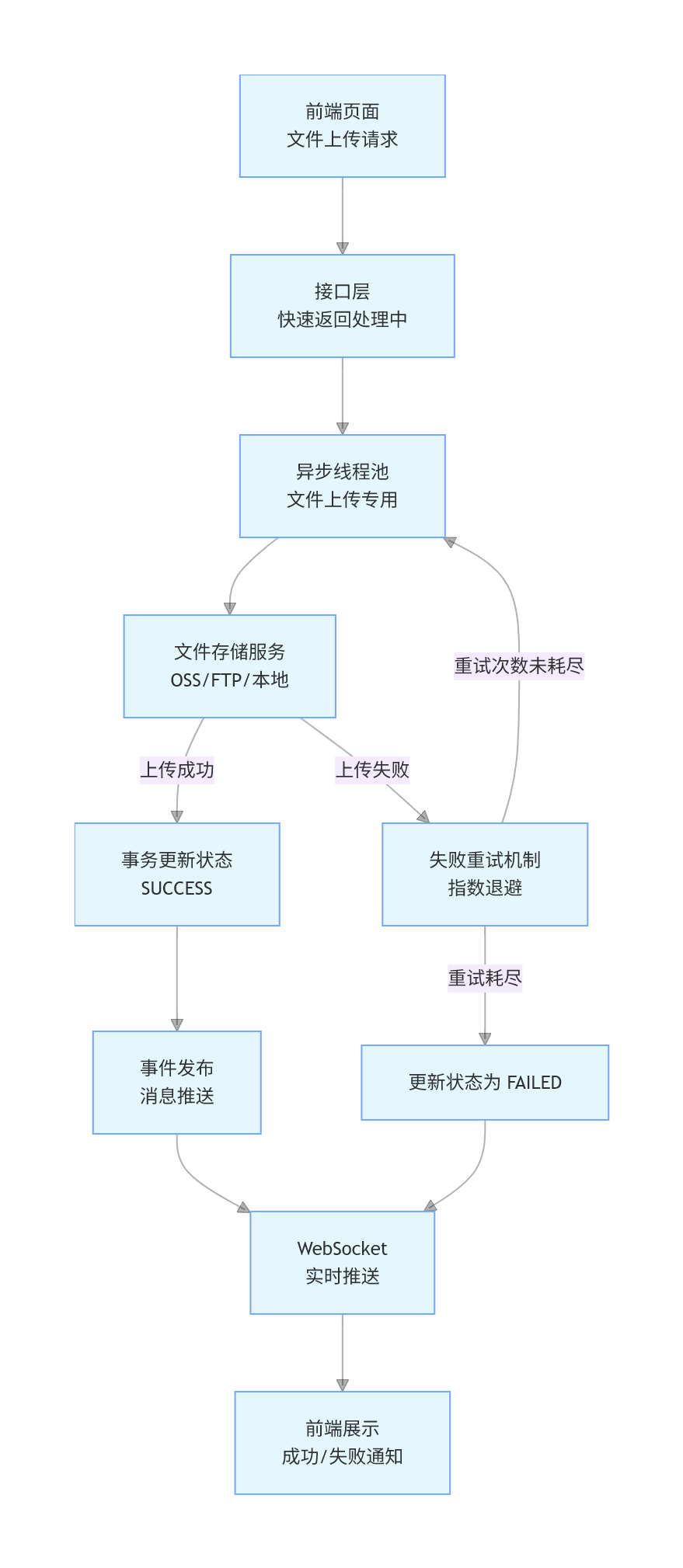
三、线程池配置(业务隔离)
java
运行
import org.springframework.context.annotation.Bean;
import org.springframework.context.annotation.Configuration;
import org.springframework.core.task.TaskExecutor;
import org.springframework.scheduling.annotation.EnableAsync;
import org.springframework.scheduling.concurrent.ThreadPoolTaskExecutor;

import java.util.concurrent.ThreadPoolExecutor;

@Configuration
@EnableAsync
public class AsyncConfig {

    /**
     * 文件上传专用线程池(IO 密集型)
     */
    @Bean("fileUploadExecutor")
    public TaskExecutor fileUploadExecutor() {
        ThreadPoolTaskExecutor executor = new ThreadPoolTaskExecutor();
        executor.setCorePoolSize(5);
        executor.setMaxPoolSize(10);
        executor.setQueueCapacity(100);
        executor.setThreadNamePrefix("FileUpload-");
        executor.setRejectedExecutionHandler(new ThreadPoolExecutor.CallerRunsPolicy());
        executor.setWaitForTasksCompleteOnShutdown(true);
        executor.setAwaitTerminationSeconds(60);
        executor.initialize();
        return executor;
    }

    /**
     * 消息推送专用线程池
     */
    @Bean("messagePushExecutor")
    public TaskExecutor messagePushExecutor() {
        ThreadPoolTaskExecutor executor = new ThreadPoolTaskExecutor();
        executor.setCorePoolSize(4);
        executor.setMaxPoolSize(8);
        executor.setQueueCapacity(500);
        executor.setThreadNamePrefix("MsgPush-");
        executor.setRejectedExecutionHandler(new ThreadPoolExecutor.DiscardOldestPolicy());
        executor.initialize();
        return executor;
    }
}
四、异步上传核心服务
java
运行
import lombok.extern.slf4j.Slf4j;
import org.springframework.beans.factory.annotation.Autowired;
import org.springframework.scheduling.annotation.Async;
import org.springframework.stereotype.Service;
import org.springframework.transaction.support.TransactionTemplate;

import java.io.File;
import java.time.LocalDateTime;

@Service
@Slf4j
public class AsyncUploadService {


    @Autowired
    private FileStorageService fileStorageService;

    @Autowired
    private TransactionTemplate transactionTemplate;

    @Autowired
    private EventPublisher eventPublisher;

    /**
     * 异步上传文件核心方法
     */
    @Async("fileUploadExecutor")
    public void asyncUpload(Long fileId) {
        FileResource file = fileResourceService.getById(fileId);
        if (file == null) {
            log.error("文件记录不存在,fileId:{}", fileId);
            return;
        }

        try {
            // 执行上传
            String remotePath = fileStorageService.upload(file.getTempFilePath());
            if ("FAILED".equals(remotePath)) {
                throw new RuntimeException("文件存储服务上传失败");
            }

            // 事务更新状态
            boolean updateSuccess = updateFileStatus(file, remotePath, "SUCCESS");
            if (updateSuccess) {
                // 删除临时文件
                deleteTempFile(file.getTempFilePath());
                log.info("文件上传成功,fileId:{}", fileId);
                // 推送成功消息
                pushStatusMessage(file, "SUCCESS");
            }

        } catch (Exception e) {
            log.error("文件上传异常,fileId:{}", fileId, e);
            handleUploadFailure(file, e);
        }
    }

    /**
     * 事务内更新文件状态
     */
    private boolean updateFileStatus(FileResource file, String remotePath, String status) {
        return transactionTemplate.execute(status -> {
            file.setFilePath(remotePath);
            file.setUploadStatus(status);
            file.setUpdateTime(LocalDateTime.now());
            return fileResourceService.updateById(file) > 0;
        });
    }

    /**
     * 删除临时文件
     */
    private void deleteTempFile(String tempPath) {
        try {
            File file = new File(tempPath);
            if (file.exists()) {
                file.delete();
            }
        } catch (Exception e) {
            log.warn("临时文件删除失败", e);
        }
    }
}
五、失败重试机制(指数退避)
java
运行
/**
 * 上传失败处理 + 重试
 */
private void handleUploadFailure(FileResource file, Exception e) {
    int currentRetry = file.getRetryCount() == null ? 0 : file.getRetryCount();
    int maxRetry = 3;

    if (currentRetry < maxRetry) {
        // 重试
        file.setRetryCount(currentRetry + 1);
        file.setLastRetryTime(LocalDateTime.now());
        file.setFailReason("上传失败,即将重试:" + e.getMessage());
        fileResourceService.updateById(file);

        scheduleRetry(file.getId());
        log.warn("文件上传失败,准备重试:{},次数:{}/{}",
                file.getId(), currentRetry + 1, maxRetry);
    } else {
        // 最终失败
        transactionTemplate.execute(status -> {
            file.setUploadStatus("FAILED");
            file.setFailReason("重试次数耗尽:" + e.getMessage());
            file.setUpdateTime(LocalDateTime.now());
            return fileResourceService.updateById(file) > 0;
        });

        pushStatusMessage(file, "FAILED");
        deleteTempFile(file.getTempFilePath());
    }
}

/**
 * 指数退避重试调度
 */
@Async("fileUploadExecutor")
public void scheduleRetry(Long fileId) {
    try {
        FileResource file = fileResourceService.getById(fileId);
        int delaySeconds = (int) Math.pow(2, file.getRetryCount());
        Thread.sleep(delaySeconds * 1000L);
        asyncUpload(fileId);
    } catch (InterruptedException ie) {
        Thread.currentThread().interrupt();
        log.error("重试任务被中断,fileId:{}", fileId);
    }
}
六、实时状态消息推送
java
运行
/**
 * 推送上传结果消息
 */
private void pushStatusMessage(FileResource file, String status) {
    // 过滤系统内部账号
    String username = file.getUsername();
    if ("system-service".equals(username)) {
        return;
    }

    // 构建消息
    Message message = new Message();
    message.setTitle("文件上传通知");
    message.setContent(file.getFileName() + ("SUCCESS".equals(status) ? " 上传成功" : " 上传失败"));
    message.setReceiver(username);
    message.setCreateTime(LocalDateTime.now());
    message.setStatus("UNREAD");

    // 发布事件,由 WebSocket 推送到前端
    Event event = new Event();
    event.setType("MESSAGE");
    event.setData(message);
    eventPublisher.publishEvent(username, event);
}
七、实战总结
- 线程池必须业务隔离,避免某一类任务耗尽线程影响核心功能
- 异步化是大文件上传标配,可大幅提升接口吞吐量与用户体验
- 指数退避重试能有效防止网络抖动引发的重试风暴
- 事务控制状态,保证文件记录与实际存储一致
- 实时消息推送让用户无需轮询,体验更流畅
- 整套方案通用、轻量、无业务侵入,可直接在 SpringBoot 项目中落地使用
📚 系列导航:
【技术底稿】01:37岁老码农,用4台机器搭了套个人DevOps平台
【产品底稿01】37 岁 Java 老码农,用 Java 搭了个 AI 写作助手,把自己 14 年技术文章全喂给了 AI!