本文会基于《红楼梦》小说文本构建一个 RAG 系统。使用到了 Langchain + Chroma + qwen-plus 。
Langchain 是一个模块化、可扩展的开源框架,专为简化大型语言模型(LLM)应用开发而设计,通过提供标准化组件和抽象层,帮助开发者高效构建智能对话系统、知识增强应用和 AI 智能体。
Chroma 是一款开源的 AI 原生向量数据库,专为高效存储和检索高维向量数据设计,特别适合语义相似性搜索场景,是构建 RAG(检索增强生成)系统最流行的工具之一。
qwen-plus 是阿里巴巴推出的大语言模型。
构建 RAG 系统的主要步骤:
-
初始化向量数据库
-
文本切分并写入向量数据库
-
检索向量数据库,结合 LLM 生成答案
初始化向量数据库
创建 Embedding 对象,供后续 Chroma 入库和检索使用:
ts
const embeddings = new OpenAIEmbeddings({
  apiKey: dashscopeApiKey,
  model: "text-embedding-v4",
  batchSize: 10,
  configuration: {
    baseURL: "https://dashscope.aliyuncs.com/compatible-mode/v1",
  },
});
初始化向量数据库:
ts
import { Chroma } from "@langchain/community/vectorstores/chroma";
import { OpenAIEmbeddings } from "@langchain/openai";

let vectorStore: Chroma;

async function main(): Promise<void> {
  // 初始化向量数据库
  vectorStore = await Chroma.fromExistingCollection(embeddings, {
    collectionName: "hongloumeng",
    url: "http://localhost:8000",
  });
}
fromExistingCollection 的作用是: 连接一个已经存在的 Chroma 集合,并返回可直接读写/检索的 vectorStore 实例 。
collectionName: "hongloumeng":指定要连接的集合名url: "http://localhost:8000":指定 Chroma 服务地址embeddings:绑定向量化模型,后续写入与检索都要用
文本切分并写入向量数据库
这里创建 npm run ingest 的 npm script 命令,用于完成《红楼梦》小说的文本切分,写入 Chroma 向量数据库,完成知识库"入库"步骤。
ts
async function ingestData() {
  console.log("📚 正在读取《红楼梦》文本...");
  const rawText = fs.readFileSync("./data/hong.txt", "utf-8");

  console.log("🔪 正在进行文本分割...");
  const textSplitter = new RecursiveCharacterTextSplitter({
    chunkSize: 1000, // 每个块的大小
    chunkOverlap: 200, // 块之间的重叠,保持上下文连贯性
    separators: ["\n\n", "\n", "。", "!", "?", ";", ",", " "], // 针对中文优化的分隔符
  });

  const docs = await textSplitter.createDocuments([rawText]);

  console.log(`📝 分割完成,共 ${docs.length} 个片段。正在存入向量数据库...`);

  // 将文档添加到现有的 Chroma 集合中
  await vectorStore.addDocuments(docs);

  console.log("✅ 数据入库完成!");
}-
读取《红楼梦》文本文件:
./data/hong.txt -
使用
RecursiveCharacterTextSplitter对文本进行切分,将文本切分为多个片段,每个片段大小为 1000 字节,重叠度为 200 字节。 -
生成文档数组:
createDocuments([rawText]) -
调
vectorStore.addDocuments(docs)写入向量库
并将 ingestData 封装成 npm script 命令,方便调用:
ts
async function main(): Promise<void> {
  const command = process.argv[2];
  if (command === "ingest") {
    await ingestData();
    return;
  }
}
process.argv[2] 的作用是: 读取命令行传给脚本的第一个"业务参数" 。
在 Node 里:
process.argv[0]:Node 可执行文件路径process.argv[1]:当前脚本路径process.argv[2]:你手动传入的第一个参数
比如执行:
pnpm ingest时,process.argv[2]就是ingest。
执行 pnpm ingest 命令,将《红楼梦》的文本切分并写入 Chroma 向量数据库。
注意在执行 pnpm ingest 命令前,需要先启动本地 Chroma 数据库服务:
bash
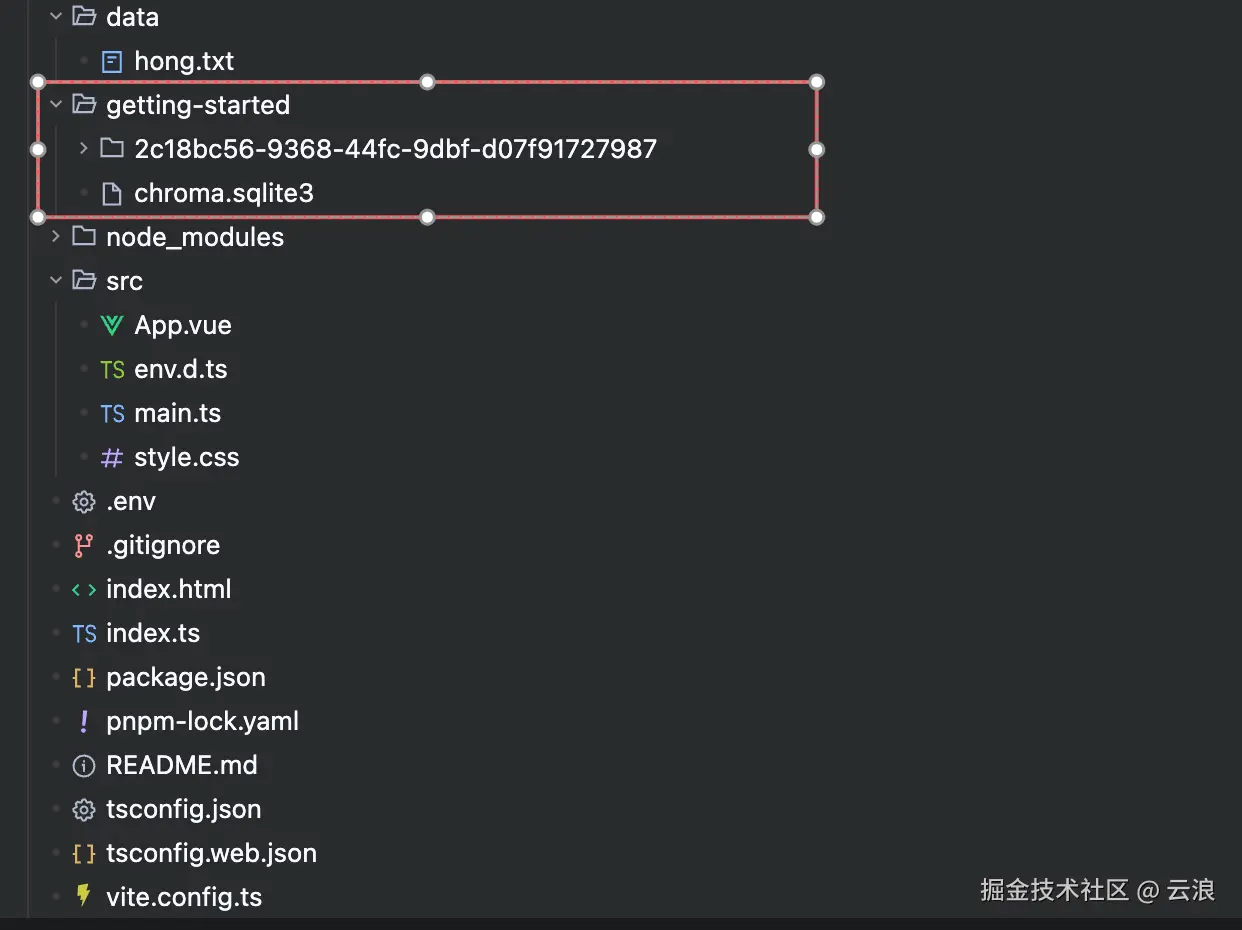
pnpm exec chroma run --path ./getting-started上面命令的作用:启动本地 Chroma 数据库服务,并把数据持久化到 ./getting-started 目录 。
检索向量数据库,结合 LLM 生成答案
基于 Chroma 检索到的《红楼梦》相关片段,调用大模型生成并返回答案。
-
设置检索器,获取最相关的 4 个片段
-
定义提示词模板
-
创建文档组合链
-
创建检索链
-
执行并返回
ts
async function chatWithHongLouMeng(query: string) {
  console.log(`\n🔍 正在检索关于 "${query}" 的内容...`);

  // 设置检索器,获取最相关的 4 个片段
  const retriever = vectorStore.asRetriever({
    searchType: "similarity",
    k: 4,
  });

  // 定义提示词模板
  const prompt = ChatPromptTemplate.fromTemplate(`
    你是一个精通《红楼梦》的文学助手。请根据以下检索到的上下文信息回答用户的问题。
    如果上下文中没有相关信息,请直接说明你不知道,不要编造内容。

    上下文信息:
    {context}

    用户问题:{input}
    回答:
  `);

  // 创建文档组合链
  const combineDocsChain = await createStuffDocumentsChain({
    llm: model,
    prompt,
    outputParser: new StringOutputParser(),
  });

  // 创建检索链
  const chain = await createRetrievalChain({
    retriever,
    combineDocsChain,
  });

  // 执行并返回
  const response = await chain.invoke({ input: query });
  return response.answer;
}
将 RAG 能力封装成 API
使用 express 将 RAG 系统封装成 API,供前端调用。
-
创建 express 服务器,监听 18000 端口
-
配置 json 解析中间件和 CORS 响应头
-
将 chatWithHongLouMeng 函数封装成 POST 请求,供前端调用
ts
const PORT = 18000;

const app = express();

// 初始化 Express 服务并配置基础中间件(JSON 解析 + CORS 响应头) 。
app.use(express.json());
app.use((_, res, next) => {
  res.header("Access-Control-Allow-Origin", "*");
  res.header("Access-Control-Allow-Methods", "POST,OPTIONS");
  res.header("Access-Control-Allow-Headers", "Content-Type");
  next();
});

app.post("/hongloumeng/chat", async (req, res) => {
  const questionParam = req.body?.question;
  const question =
    typeof questionParam === "string" ? questionParam.trim() : "";

  if (!question) {
    res.status(400).json({
      error: "Missing body parameter `question`",
    });
    return;
  }

  try {
    const answer = await chatWithHongLouMeng(question);
    res.json({ question, answer });
  } catch (error) {
    console.error("chat api failed:", error);
    res.status(500).json({
      error: "Failed to generate answer",
    });
  }
});

app.listen(PORT, () => {
  console.log(`API server running at http://localhost:${PORT}`);
  console.log(
    'Example: POST /hongloumeng/chat with body {"question":"贾宝玉的外貌如何?"}'
  );
});
RAG 系统前端部分开发
前端部分使用的技术栈为 Vue.js + Vite + Element Plus
由于 qwen-plus 大模型返回的是 markdown 格式的文本,要将 markdown 文本展示到 Web 上,则需要借助 marked 库,其作用是将 markdown 转换成 html 。
同时为防止 XSS 攻击,需要使用 dompurify 对 marked 解析出的 html 字符串进行消毒处理,过滤 html 中的恶意内容。
dompurify 通过白名单机制严格过滤 html ,只保留安全的标签和属性,移除所有潜在危险内容。
ts
import { marked } from "marked";
import DOMPurify from "dompurify";

function renderMarkdown(content: string): string {
  const html = marked.parse(content, { breaks: true });
  return DOMPurify.sanitize(typeof html === "string" ? html : "");
}
RAG 系统后端服务监听 18000 端口,为了让前端调试服务器能够访问后端接口,需要设置 Vite 的代理:
ts
import { defineConfig } from "vite";
import vue from "@vitejs/plugin-vue";

export default defineConfig({
  plugins: [vue()],
  server: {
    port: 5173,
    proxy: {
      "/hongloumeng": {
        target: "http://localhost:18000",
        changeOrigin: true,
      },
    },
  },
});
然后就能在前端正常调用 /hongloumeng/chat 接口:
ts
type Role = "user" | "assistant";

interface Message {
  role: Role;
  content: string;
}

const messages = ref<Message[]>([
  {
    role: "assistant",
    content: "你好,我是红楼梦问答助手。你想了解哪位人物?",
  },
]);

const response = await fetch("/hongloumeng/chat", {
  method: "POST",
  headers: {
    "Content-Type": "application/json",
  },
  body: JSON.stringify({ question: input }),
});
const data = (await response.json()) as { answer?: string; error?: string };

if (!response.ok) {
  throw new Error(data.error ?? "请求失败");
}

messages.value.push({
  role: "assistant",
  content: data.answer ?? "未返回答案",
});
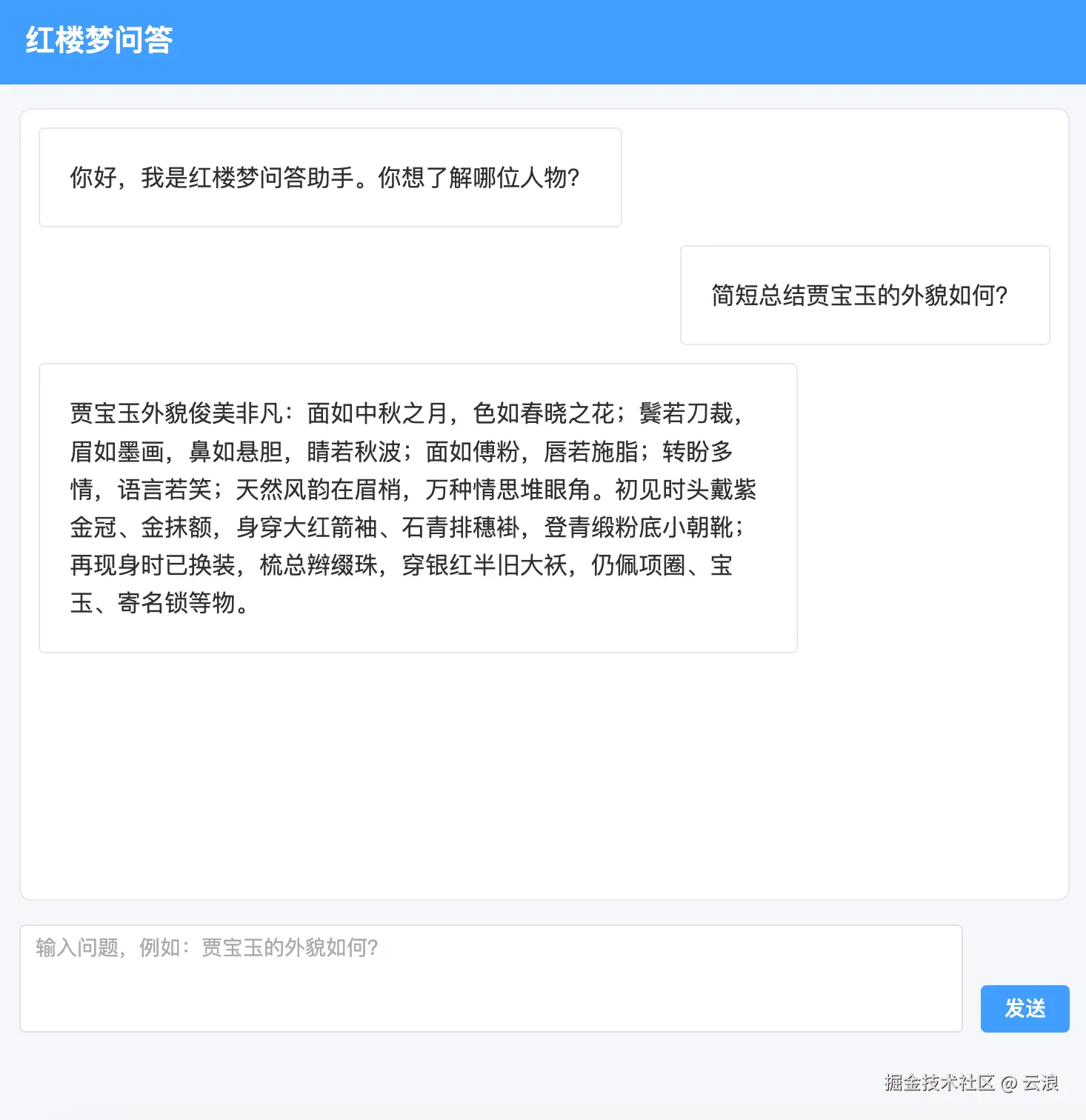
上面就是《红楼梦》问答助手前端部分核心代码,下面正式执行
最终《红楼梦》问答助手的效果如下:
总结
本文介绍了如何使用 Langchain + Chroma + qwen-plus 构建一个《红楼梦》RAG 问答系统的完整流程:
- 初始化向量数据库 - 配置文本嵌入模型和连接本地 Chroma
- 数据入库 - 切分《红楼梦》文本并写入向量数据库
- 检索生成 - 根据用户问题检索相关片段,调用 LLM 生成回答
- 后端 API - 用 Express 封装 RAG 能力为 HTTP 接口
- 前端展示 - Vue.js + Vite 实现聊天界面,使用 marked 和 dompurify 处理 markdown 并防 XSS
核心工作流程:文本入库 → 语义检索 → LLM 生成答案 → API 调用 → 前端展示