文章目录
- 一、效果
- 二、内容介绍
- 三、技术栈与核心依赖
- [四、PCD 点云渲染核心实现](#四、PCD 点云渲染核心实现)
-
- [4.1、页面结构设计(Vue 组件模板)](#4.1、页面结构设计(Vue 组件模板))
- [4.2、核心逻辑实现(Script 部分)](#4.2、核心逻辑实现(Script 部分))
- [4.3、样式美化(Scoped CSS)](#4.3、样式美化(Scoped CSS))
- 五、高斯泼溅效果核心优化解析
- 六、交互与性能优化
- 七、核心源码
一、效果
1.1、动态图片
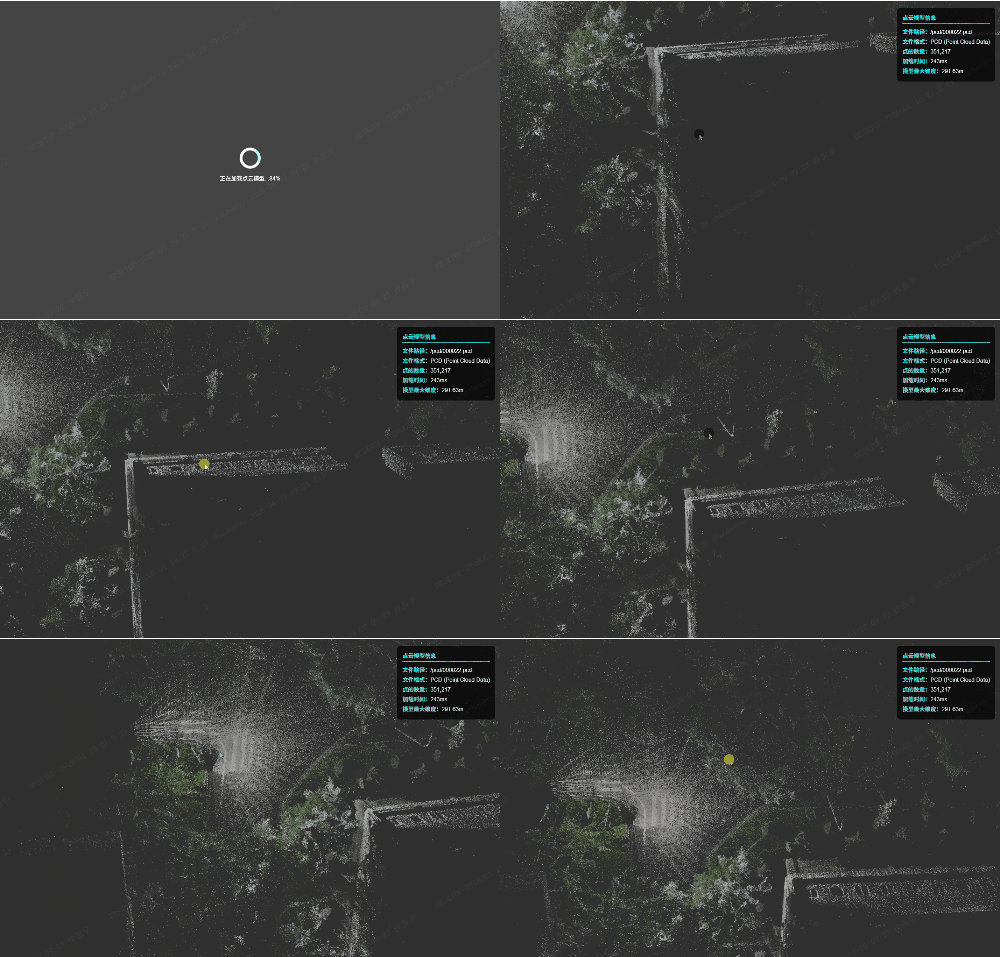
csdn文件大小限制,只能压缩成小图,剪辑上传
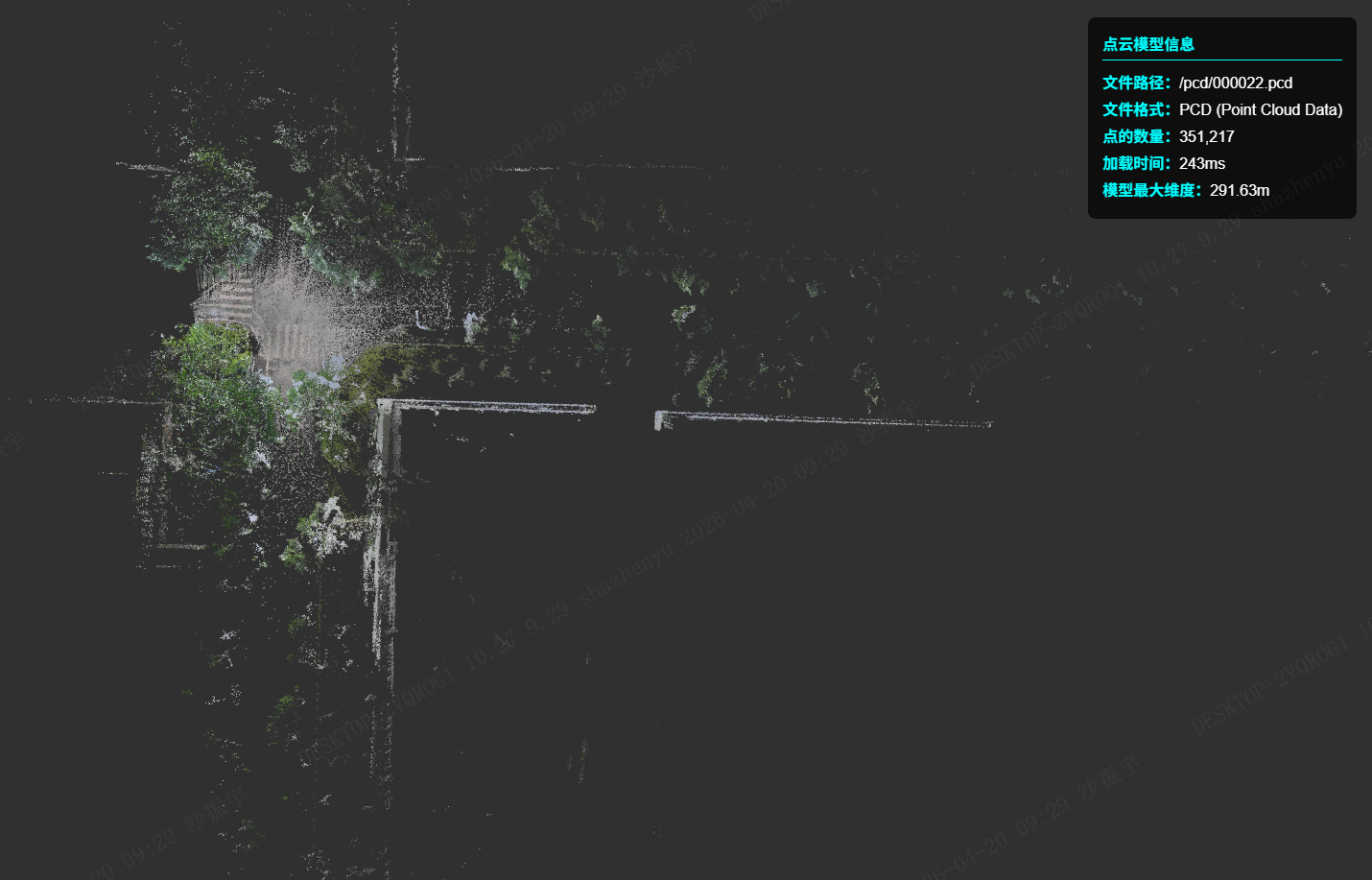
1.2、静图
二、内容介绍
2.1、前言
点云数据(PCD)是 3D 可视化领域中重要的数据格式,广泛应用于激光扫描、三维重建、自动驾驶等场景。相比于 PLY 格式,PCD 更专注于点云数据的存储与传输,本文将基于 Vue3 + Three.js 技术栈,实现 PCD 点云模型的加载、渲染,并结合高斯泼溅(Gaussian Splatting)核心思路优化点云的视觉呈现效果,让点云数据展示更具立体感和真实感。
2.2、简介
本文基于 Vue3 + Three.js 实现了 PCD 点云模型的完整渲染流程,并结合高斯泼溅的核心思路优化了点云的视觉呈现效果。相比于传统的点云渲染,高斯泼溅效果让点云数据更具立体感和真实感,可直接应用于激光扫描、自动驾驶可视化、三维重建等业务场景。
2.3、PCD与PLY区别
PCD 是专为点云设计的专用格式(PCL/ROS 生态),上一篇文章《【Web】使用Vue3+PlayCanvas开发3D游戏(十一)渲染3D高斯泼溅效果》用的3D 高斯泼溅(3DGS)常用它存点 + 颜色 / 强度;PLY 是斯坦福的通用 3D 格式,既能存点云,也能存三角网格,3DGS 现在主流用 PLY 存完整高斯参数(位置、旋转、缩放、颜色、球谐),兼容性更强。
| 维度 | PCD | PLY |
|---|---|---|
| 设计目标 | 纯点云专用,PCL/ROS 生态 | 通用 3D,点云 + 网格 + 自定义属性 |
| 3DGS 适配 | 仅存基础点 (x/y/z/rgb),不支持高斯专属参数 | 完整存 3DGS 全参数(旋转、缩放、球谐、透明度) |
| 字段 | 固定 / 半固定,适合点云算法 | 完全自定义,想加什么属性就加什么 |
| 兼容性 | 主要在 PCL/ROS/ 激光雷达工具 | 全 3D 软件 / 引擎 / 渲染器通用 |
| 典型用途 | 激光雷达点云、SLAM、PCL 算法 | 3D 扫描、3DGS 模型、网格交换、3D 打印 |
三、技术栈与核心依赖
3.1、核心技术选型
Vue3:前端组件化开发框架,负责页面结构与状态管理
Three.js:WebGL 3D 图形库,核心负责 3D 场景、相机、渲染器的构建
PCDLoader:Three.js 官方扩展的 PCD 文件加载器,解析 PCD 点云数据
OrbitControls:Three.js 轨道控制器,实现模型的交互控制(旋转、缩放、平移)
3.2、依赖安装
bash
npm install three@0.183.2
npm install three-orbit-controls
npm i --save three-css2drender
四、PCD 点云渲染核心实现
4.1、页面结构设计(Vue 组件模板)
核心分为加载状态区、3D 渲染容器、点云信息面板三部分:
html
<template>
  <div style="height: 100%; width: 100%; position: relative;">
    <!-- 加载中状态 -->
    <div v-if="loading" class="loader-container">
      <div class="loader"></div>
      <p class="loading-text">正在加载点云模型...{{ loadingProgress }}%</p>
    </div>
    <!-- Three.js渲染容器 -->
    <div id="three" style="height: 100%; width: 100%"></div>
    <!-- 点云信息面板 -->
    <div v-if="pcdInfo.visible" class="pcd-info-panel">
      <h4>点云模型信息</h4>
      <ul>
        <li><strong>文件路径:</strong>{{ pcdInfo.filePath }}</li>
        <li><strong>文件格式:</strong>{{ pcdInfo.fileFormat }}</li>
        <li><strong>点的数量:</strong>{{ pcdInfo.pointCount.toLocaleString() }}</li>
        <li><strong>加载时间:</strong>{{ pcdInfo.loadTime }}ms</li>
        <li><strong>模型最大维度:</strong>{{ pcdInfo.maxDimension.toFixed(2) }}m</li>
      </ul>
    </div>
  </div>
</template>
4.2、核心逻辑实现(Script 部分)
(1)初始化全局缓存与状态
js
<script>
import * as THREE from "three";
import { PCDLoader } from "three/examples/jsm/loaders/PCDLoader.js";
import { OrbitControls } from "three/examples/jsm/controls/OrbitControls.js";

// 缓存Three.js核心实例,避免重复创建
let threeCache = {
  scene: null,
  camera: null,
  renderer: null,
  loader: null,
  controls: null,
  animationId: null,
  elem: null,
};

// 帧率控制
const clock = new THREE.Clock();
const FPS = 30;
const renderT = 1 / FPS;
let timeS = 0;

export default {
  data() {
    return {
      loading: true,
      loadingProgress: 0,
      pcdInfo: {
        visible: false,
        filePath: "",
        fileFormat: "PCD (Point Cloud Data)",
        pointCount: 0,
        loadTime: 0,
        maxDimension: 0,
      },
    };
  },
  // 组件销毁前清理资源
  beforeDestroy() {
    this.destroyModel();
  },
  mounted() {
    const startTime = Date.now();
    // 加载指定PCD文件
    this.initModel(`/pcd/src_location_match_fusion_pcds_output (2).pcd`, "three", startTime);
  },
(2)初始化 3D 场景与 PCD 加载
js
  methods: {
    /**
     * 初始化3D场景并加载PCD模型
     * @param {string} pcdPath PCD文件路径
     * @param {string} domName 渲染容器DOMID
     * @param {number} startTime 加载开始时间戳
     */
    initModel(pcdPath, domName, startTime) {
      threeCache.elem = document.getElementById(domName);
      this.pcdInfo.filePath = pcdPath;

      // 1. 创建相机
      threeCache.camera = new THREE.PerspectiveCamera(
        30, // 视角
        threeCache.elem.clientWidth / threeCache.elem.clientHeight, // 宽高比
        0.1, // 近裁切面
        1000 // 远裁切面
      );

      // 2. 创建渲染器
      threeCache.renderer = new THREE.WebGLRenderer({
        antialias: true, // 抗锯齿
        alpha: true, // 透明背景
      });
      threeCache.renderer.setClearColor(new THREE.Color(0x303030)); // 背景色
      threeCache.renderer.setSize(threeCache.elem.clientWidth, threeCache.elem.clientHeight);
      threeCache.elem.appendChild(threeCache.renderer.domElement);

      // 3. 创建场景
      threeCache.scene = new THREE.Scene();
      threeCache.loader = new PCDLoader();

      // 4. 加载PCD文件
      threeCache.loader.load(
        pcdPath,
        // 加载成功回调
        (points) => {
          this.pcdInfo.loadTime = Date.now() - startTime;

          // 关键:启用PCD自带顶点颜色
          points.material.vertexColors = true;

          // ========== 高斯泼溅效果核心优化 ==========
          // 1. 替换点材质为粒子材质,模拟高斯泼溅的雾化效果
          const gaussianMaterial = new THREE.PointsMaterial({
            size: 0.05, // 粒子大小(根据点云尺度调整)
            vertexColors: true, // 保留原始顶点颜色
            transparent: true, // 开启透明
            opacity: 0.8, // 透明度
            blending: THREE.AdditiveBlending, // 加法混合,增强泼溅的叠加效果
            depthWrite: false, // 关闭深度写入,避免粒子遮挡问题
            sizeAttenuation: true, // 开启尺寸衰减(近大远小)
          });
          points.material = gaussianMaterial;

          threeCache.scene.add(points);

          // 计算点云包围盒,居中模型
          const boundingBox = new THREE.Box3().setFromObject(points);
          const middle = new THREE.Vector3();
          boundingBox.getCenter(middle);
          points.applyMatrix4(new THREE.Matrix4().makeTranslation(-middle.x, -middle.y, -middle.z));

          // 计算模型最大维度,调整相机位置
          const size = new THREE.Vector3();
          boundingBox.getSize(size);
          const maxDimension = Math.max(size.x, size.y, size.z);

          // 更新点云信息
          this.pcdInfo.pointCount = points.geometry.attributes.position.count;
          this.pcdInfo.maxDimension = maxDimension;
          this.pcdInfo.visible = true;

          // 调整相机位置,适配模型尺度
          threeCache.camera.position.y = maxDimension * 1;

          // 创建轨道控制器,实现交互
          threeCache.controls = new OrbitControls(threeCache.camera, threeCache.renderer.domElement);
          threeCache.controls.enableDamping = true; // 阻尼效果,交互更丝滑
          threeCache.controls.dampingFactor = 0.05;

          this.loading = false;
          this.animate(); // 启动渲染循环
        },
        // 加载进度回调
        (xhr) => {
          this.loadingProgress = Math.floor((xhr.loaded / xhr.total) * 100);
        },
        // 加载失败回调
        (error) => {
          this.loading = false;
          console.error("PCD加载失败:", error);
        }
      );
    },
(3)渲染循环与资源销毁
js
    /**
     * 渲染循环(帧率控制)
     */
    animate() {
      threeCache.animationId = requestAnimationFrame(() => this.animate());
      const T = clock.getDelta();
      timeS += T;
      // 固定FPS渲染,避免性能浪费
      if (timeS > renderT) {
        threeCache.renderer?.render(threeCache.scene, threeCache.camera);
        timeS = 0;
      }
      // 更新控制器
      if (threeCache.controls) threeCache.controls.update();
    },

    /**
     * 销毁3D资源,避免内存泄漏
     */
    destroyModel() {
      try {
        if (threeCache.controls) {
          threeCache.controls.dispose();
          threeCache.controls = null;
        }
        if (threeCache.scene) {
          threeCache.scene.clear();
          threeCache.scene = null;
        }
        if (threeCache.renderer) {
          threeCache.renderer.dispose();
          threeCache.renderer.forceContextLoss();
          const gl = threeCache.renderer.domElement.getContext("webgl");
          gl?.getExtension("WEBGL_lose_context")?.loseContext();
          threeCache.renderer.domElement.parentNode?.removeChild(threeCache.renderer.domElement);
          threeCache.renderer = null;
        }
        if (threeCache.animationId) {
          cancelAnimationFrame(threeCache.animationId);
          threeCache.animationId = null;
        }
        threeCache.camera = null;
        threeCache.loader = null;
        threeCache.elem = null;
        // 重置状态
        this.loading = true;
        this.loadingProgress = 0;
        this.pcdInfo = {
          visible: false,
          filePath: "",
          fileFormat: "PCD",
          pointCount: 0,
          loadTime: 0,
          maxDimension: 0
        };
      } catch (e) {
        console.error("资源销毁失败", e);
      }
    },
  },
};
</script>
4.3、样式美化(Scoped CSS)
css
<style scoped>
/* 加载动画样式 */
.loader-container {
  position: absolute;
  top: 0;
  left: 0;
  width: 100%;
  height: 100%;
  background: rgba(48, 48, 48, 0.9);
  display: flex;
  flex-direction: column;
  justify-content: center;
  align-items: center;
  z-index: 1000;
}
.loader {
  width: 60px;
  height: 60px;
  border: 8px solid #fff;
  border-top: 8px solid #00ffff;
  border-radius: 50%;
  animation: spin 1s linear infinite;
}
.loading-text {
  color: #fff;
  margin-top: 15px;
}
@keyframes spin {
  0% { transform: rotate(0); }
  100% { transform: rotate(360deg); }
}

/* 点云信息面板样式 */
.pcd-info-panel {
  position: absolute;
  top: 20px;
  right: 20px;
  background: rgba(0,0,0,0.7);
  color: #fff;
  padding: 15px;
  border-radius: 8px;
  z-index: 999;
}
.pcd-info-panel h4 {
  color: #00ffff;
  margin: 0 0 10px 0;
  border-bottom: 1px solid #00ffff;
  padding-bottom: 5px;
}
.pcd-info-panel ul {
  list-style: none;
  padding: 0;
  margin: 0;
}
.pcd-info-panel li {
  margin: 4px 0;
}
.pcd-info-panel strong {
  color: #00ffff;
}
</style>
五、高斯泼溅效果核心优化解析
高斯泼溅(Gaussian Splatting)的核心是通过「粒子雾化 + 颜色混合」模拟高斯分布的视觉效果,本文针对 PCD 点云的优化关键点:
5.1、材质替换
将默认的点材质替换为THREE.PointsMaterial,并开启以下关键配置:
- sizeAttenuation: true:实现粒子近大远小的透视效果,贴合真实物理规律;
- AdditiveBlending:加法混合模式,让相邻粒子的颜色叠加,形成类似高斯泼溅的雾化效果;
- transparent: true + opacity: 0.8:半透明效果,减少粒子的生硬感,增强层次感。
5.2、深度写入控制
设置depthWrite: false,避免粒子之间的深度遮挡问题,让密集点云区域的叠加效果更自然,符合高斯泼溅「模糊雾化」的视觉特征。
5.3、粒子尺寸适配
size: 0.05需根据点云的实际尺度调整:
- 若点云尺度较大(如自动驾驶点云,单位为米),可设置size: 0.1~0.5;
- 若为小尺度点云(如零件扫描),可设置size: 0.01~0.05。
六、交互与性能优化
- 轨道控制器优化
启用enableDamping: true和dampingFactor: 0.05,让模型旋转 / 平移时带有阻尼效果,交互更丝滑,避免生硬的瞬间移动。 - 帧率控制
通过clock.getDelta()计算帧间隔,固定 30FPS 渲染,避免高刷新率下的性能浪费,兼顾流畅度与性能。 - 资源销毁
组件销毁时彻底清理 Three.js 实例(场景、渲染器、控制器、动画帧),并释放 WebGL 上下文,避免内存泄漏。
七、核心源码
html
<template>
  <div style="height: 100%; width: 100%; position: relative;">
    <div v-if="loading" class="loader-container">
      <div class="loader"></div>
      <p class="loading-text">正在加载点云模型...{{ loadingProgress }}%</p>
    </div>
    <div id="three" style="height: 100%; width: 100%"></div>
    <div v-if="pcdInfo.visible" class="pcd-info-panel">
      <h4>点云模型信息</h4>
      <ul>
        <li><strong>文件路径:</strong>{{ pcdInfo.filePath }}</li>
        <li><strong>文件格式:</strong>{{ pcdInfo.fileFormat }}</li>
        <li><strong>点的数量:</strong>{{ pcdInfo.pointCount.toLocaleString() }}</li>
        <li><strong>加载时间:</strong>{{ pcdInfo.loadTime }}ms</li>
        <li><strong>模型最大维度:</strong>{{ pcdInfo.maxDimension.toFixed(2) }}m</li>
      </ul>
    </div>
  </div>
</template>

<script>
import * as THREE from "three";
import { PCDLoader } from "three/examples/jsm/loaders/PCDLoader.js";
import { OrbitControls } from "three/examples/jsm/controls/OrbitControls.js";

let threeCache = {
  scene: null,
  camera: null,
  renderer: null,
  loader: null,
  controls: null,
  animationId: null,
  elem: null,
};

const clock = new THREE.Clock();
const FPS = 30;
const renderT = 1 / FPS;
let timeS = 0;

export default {
  data() {
    return {
      loading: true,
      loadingProgress: 0,
      pcdInfo: {
        visible: false,
        filePath: "",
        fileFormat: "PCD (Point Cloud Data)",
        pointCount: 0,
        loadTime: 0,
        maxDimension: 0,
      },
    };
  },
  beforeDestroy() {
    this.destroyModel();
  },
  mounted() {
    const startTime = Date.now();
    // /pcd/map.pcd
    // /pcd/src_location_match_fusion_pcds_output (2).pcd
    // /pcd/src_location_match_fusion_pcds_output_global (2).pcd
    this.initModel(`/pcd/000022.pcd`, "three", startTime);
  },
  methods: {
    initModel(pcdPath, domName, startTime) {
      threeCache.elem = document.getElementById(domName);
      this.pcdInfo.filePath = pcdPath;

      threeCache.camera = new THREE.PerspectiveCamera(
        30,
        threeCache.elem.clientWidth / threeCache.elem.clientHeight,
        0.1,
        1000
      );

      threeCache.renderer = new THREE.WebGLRenderer({
        antialias: true,
        alpha: true,
      });
      threeCache.renderer.setClearColor(new THREE.Color(0x303030));
      threeCache.renderer.setSize(threeCache.elem.clientWidth, threeCache.elem.clientHeight);
      threeCache.elem.appendChild(threeCache.renderer.domElement);

      threeCache.scene = new THREE.Scene();
      threeCache.loader = new PCDLoader();

      threeCache.loader.load(
        pcdPath,
        (points) => {
          this.pcdInfo.loadTime = Date.now() - startTime;

          // ======================================
          // 关键:开启 PCD 自带颜色
          // ======================================
          points.material.vertexColors = true;

          threeCache.scene.add(points);

          const boundingBox = new THREE.Box3().setFromObject(points);
          const middle = new THREE.Vector3();
          boundingBox.getCenter(middle);
          points.applyMatrix4(new THREE.Matrix4().makeTranslation(-middle.x, -middle.y, -middle.z));

          const size = new THREE.Vector3();
          boundingBox.getSize(size);
          const maxDimension = Math.max(size.x, size.y, size.z);

          this.pcdInfo.pointCount = points.geometry.attributes.position.count;
          this.pcdInfo.maxDimension = maxDimension;
          this.pcdInfo.visible = true;

          threeCache.camera.position.y = maxDimension * 1;

          threeCache.controls = new OrbitControls(threeCache.camera, threeCache.renderer.domElement);
          threeCache.controls.enableDamping = true;
          threeCache.controls.dampingFactor = 0.05;

          this.loading = false;
          this.animate();
        },
        (xhr) => {
          this.loadingProgress = Math.floor((xhr.loaded / xhr.total) * 100);
        },
        (error) => {
          this.loading = false;
          console.error("加载失败:", error);
        }
      );
    },
    animate() {
      threeCache.animationId = requestAnimationFrame(() => this.animate());
      const T = clock.getDelta();
      timeS += T;
      if (timeS > renderT) {
        threeCache.renderer?.render(threeCache.scene, threeCache.camera);
        timeS = 0;
      }
      if (threeCache.controls) threeCache.controls.update();
    },
    destroyModel() {
      try {
        if (threeCache.controls) { threeCache.controls.dispose(); threeCache.controls = null; }
        if (threeCache.scene) { threeCache.scene.clear(); threeCache.scene = null; }
        if (threeCache.renderer) {
          threeCache.renderer.dispose();
          threeCache.renderer.forceContextLoss();
          const gl = threeCache.renderer.domElement.getContext("webgl");
          gl?.getExtension("WEBGL_lose_context")?.loseContext();
          threeCache.renderer.domElement.parentNode?.removeChild(threeCache.renderer.domElement);
          threeCache.renderer = null;
        }
        if (threeCache.animationId) { cancelAnimationFrame(threeCache.animationId); threeCache.animationId = null; }
        threeCache.camera = null;
        threeCache.loader = null;
        threeCache.elem = null;
        this.loading = true;
        this.loadingProgress = 0;
        this.pcdInfo = { visible: false, filePath: "", fileFormat: "PCD", pointCount: 0, loadTime: 0, maxDimension: 0 };
      } catch (e) { console.error("销毁失败", e); }
    },
  },
};
</script>

<style scoped>
.loader-container {
  position: absolute;
  top: 0;
  left: 0;
  width: 100%;
  height: 100%;
  background: rgba(48, 48, 48, 0.9);
  display: flex;
  flex-direction: column;
  justify-content: center;
  align-items: center;
  z-index: 1000;
}
.loader {
  width: 60px;
  height: 60px;
  border: 8px solid #fff;
  border-top: 8px solid #00ffff;
  border-radius: 50%;
  animation: spin 1s linear infinite;
}
.loading-text {
  color: #fff;
  margin-top: 15px;
}
@keyframes spin {
  0% { transform: rotate(0); }
  100% { transform: rotate(360deg); }
}
.pcd-info-panel {
  position: absolute;
  top: 20px;
  right: 20px;
  background: rgba(0,0,0,0.7);
  color: #fff;
  padding: 15px;
  border-radius: 8px;
  z-index: 999;
}
.pcd-info-panel h4 {
  color: #00ffff;
  margin: 0 0 10px 0;
  border-bottom: 1px solid #00ffff;
  padding-bottom: 5px;
}
.pcd-info-panel ul {
  list-style: none;
  padding: 0;
  margin: 0;
}
.pcd-info-panel li {
  margin: 4px 0;
}
.pcd-info-panel strong {
  color: #00ffff;
}
</style>