文章目录
cal指令
cal指令可以用来显示公历(阳历)日历;公历是现在国际通⽤的历法,⼜称格列历,通称阳历。"阳历"⼜名"太阳历",系以地球绕⾏太阳⼀周
cal:用于查看日历等时间信息,如果只有一个参数,则表示年份(1-9999),如果有两个参数,则表示月份和年份
cal 语法 :cal 参数 年份
常用选项:
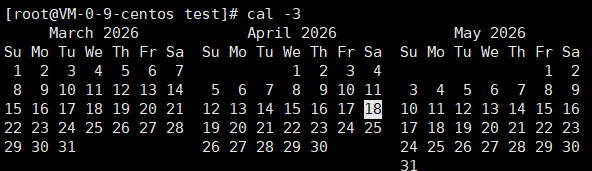
- -3 显示系统前一个月,当前月,下一个月的月历
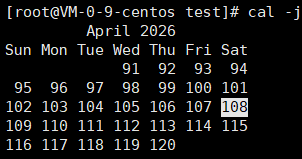
- -j 显示在当年中的第几天(一年日期按天算,从1月1号算起,默认显示当前月在一年中的天数)
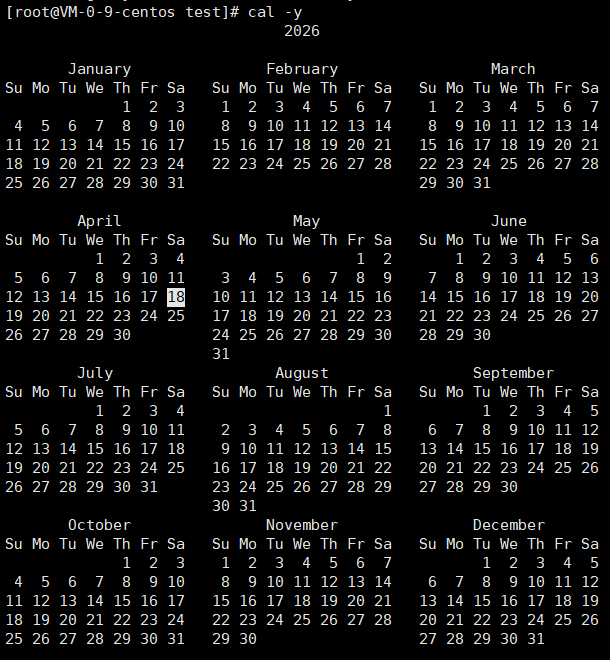
- -y 显示当前年份的日历
示例
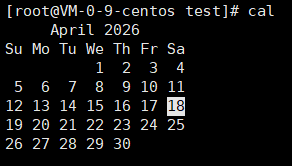
常规样例---显示今天的日期:cal
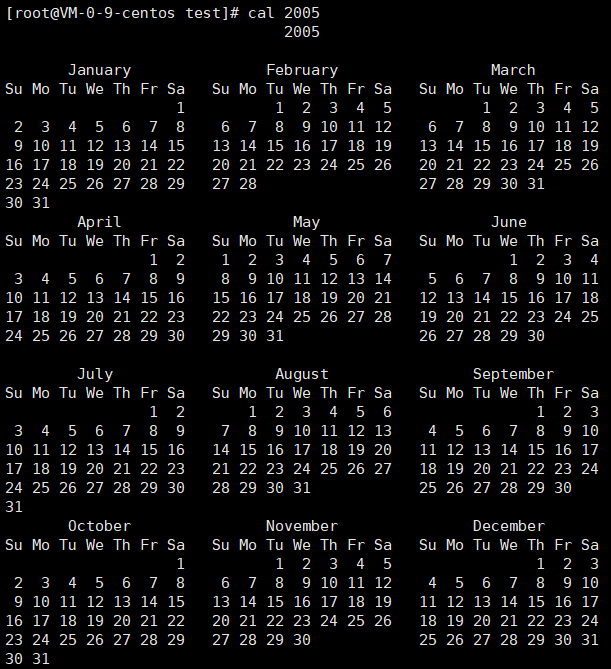
显示2005年一整年的日历:cal 2005
显示系统前一个月,当前月,下一个月的月历:cal -3
显示在当年中的第几天(一年日期按天算,从1月1号算起,默认显示当前月在一年中的天数):cal -j
显示当前年份的日历:cal -y
find指令
- Linux下find命令在⽬录结构中搜索⽂件,并执⾏指定的操作。
- Linux下find命令提供了相当多的查找条件,功能很强⼤。由于find具有强⼤的功能,所以它的选项也很多,其中⼤部分选项都值得我们花时间来了解⼀下。
- 即使系统中含有⽹络⽂件系统( NFS),find命令在该⽂件系统中同样有效,只你具有相应的权限。
- 在运⾏⼀个⾮常消耗资源的find命令时,很多⼈都倾向于把它放在后台执⾏,因为遍历⼀个⼤的⽂件系统可能会花费很⻓的时间(这⾥是指30G字节以上的⽂件系统)。
find:用于在文件树中查找文件,并作出相应的处理(可能访问磁盘)
find 语法 :find pathname -options
常用选项:
- -name 按照文件名查找文件
- 其他选项比较复杂,有需要再查
示例
c
//在跟目录(~)查找 a 文件
[root@VM-0-9-centos test]# find ~ -name a
/root/a
which指令
which:搜索系统指定的命令
示例
c
#查找 ls
[dyy@VM-0-9-centos ~]$ which ls
alias ls='ls --color=auto'
	/bin/ls

#查 pwd
[dyy@VM-0-9-centos ~]$ which pwd
/bin/pwd
whereis指令
whereis:用于找到程序的源、二进文件或手册
示例
c
[dyy@VM-0-9-centos ~]$ whereis ls
ls: /usr/bin/ls /usr/share/man/man1/ls.1.gz /usr/share/man/man1p/ls.1p.gz

[dyy@VM-0-9-centos ~]$ whereis libc.so
libc: /usr/lib64/libc.so /usr/share/man/man7/libc.7.gz
alias指令
- 设置:alias 别名='命令'(等号前后无空格)
- 查看:alias(列出所有别名)
- 删除:unalias 别名
- 删除所有别名:unalias -a
示例
c
#1.设置:将命令 ls -a -l -n   的别名设置为 hello

//设置别名
[dyy@VM-0-9-centos ~]$ alias hello='ls -a -l -n'

//检查别名:which hello
[dyy@VM-0-9-centos ~]$ which hello
alias hello='ls -a -l -n'
	/bin/ls

//用别名执行命令
[dyy@VM-0-9-centos ~]$ hello
total 44
drwx------  5 1002 1002 4096 Apr 18 14:20 .
drwxr-xr-x. 5    0    0 4096 Apr 18 12:44 ..
-rw-------  1 1002 1002 2655 Apr 19 11:47 .bash_history
-rw-r--r--  1 1002 1002   18 Apr  1  2020 .bash_logout
-rw-r--r--  1 1002 1002  193 Apr  1  2020 .bash_profile
-rw-r--r--  1 1002 1002  231 Apr  1  2020 .bashrc
drwxrwxr-x  3 1002 1002 4096 Apr 18 12:44 .cache
drwxrwxr-x  3 1002 1002 4096 Apr 18 12:44 .config
-rw-rw-r--  1 1002 1002  210 Apr 18 12:58 temp.txt
drwxrwxr-x  2 1002 1002 4096 Apr 18 14:26 test
-rw-------  1 1002 1002  827 Apr 18 13:03 .viminfo

#2.查看:查看所有的命令别名->alias
[dyy@VM-0-9-centos ~]$ alias
alias egrep='egrep --color=auto'
alias fgrep='fgrep --color=auto'
alias grep='grep --color=auto'
alias hello='ls -a -l -n'
alias l.='ls -d .* --color=auto'
alias ll='ls -l --color=auto'
alias ls='ls --color=auto'
alias vi='vim'
alias which='alias | /usr/bin/which --tty-only --read-alias --show-dot --show-tilde'

#3.删除别名:alias hello
[dyy@VM-0-9-centos ~]$ unalias hello
[dyy@VM-0-9-centos ~]$ hello
-bash: hello: command not found

#4.设置路径别名:alias 11='cd test'
[dyy@VM-0-9-centos ~]$ alias 11='cd test'
[dyy@VM-0-9-centos ~]$ 11
[dyy@VM-0-9-centos test]$
grep指令
grep:在文件中搜索字符,将找到的行打印出来
grep语法 :grep 选项 搜索字符串 目标文件
常用选项:
- -i:忽略大小写的不同,所以大小写是为相同
- -n:顺便输出行号
- -v:反向选择,亦即显示'搜寻字符串'内容的那一行
c
#基本查找
....
hello 1987
hello 1988
hello 1989
hello 1990
hello 1991
hello 1992
hello 1993
hello 1994
hello 1995
hello 1996
hello 1997
hello 1998
hello 1999
hello 2000
[dyy@VM-0-9-centos test]$ grep "hello 1988" temp.txt
hello 1988


#忽略大小写的不同,所以大小写视为相同
[dyy@VM-0-9-centos test]$ grep -i "HEllo 1999" temp.txt
hello 1999


#顺便输出行号
[dyy@VM-0-9-centos test]$ grep -n "hello 1999" temp.txt
2000:hello 1999

[dyy@VM-0-9-centos test]$ grep -in "HEllo 1999" temp.txt
2000:hello 1999


# 反向选择,即显⽰出没有 '搜寻字符串' 内容的那⼀(些)行
...
...
hello 1994
hello 1995
hello 1996
hello 1997
hello 1998			//没有1999
hello 2000
zip/unzip指令
zip : 将目录或文件压缩成zip格式
unzip: 解压
语法 : zip 压缩文件.zip 目录或文件
常用选项:
- -r: 递归处理,将指定目录下的所有文件和子目录一并处理
示例
将test1目录压缩: zip test1.zip test1/*
解压到tmp目录: unzip test1.zip -d /tmp
tar指令
tar : 将多个文件/目录打成一个包
语法:tar 生成的包名 要打包文件/目录
- -c :建立一个压缩文件的参数指令(create 的意思);
- -x :解开一个压缩文件的参数指令!\n-t :查看 tarfile 里面的文件!
- -z :是否同时具有 gzip 的属性?亦即是否需要用 gzip 压缩?
- -j :是否同时具有 bzip2 的属性?亦即是否需要用 bzip2 压缩?
- -v :压缩的过程中显示文件!这个常用,但不建议用在背景执行过程!
- -f :使用档名,请留意,在 f 之后要立即接档名喔!不要再加参数!
- -C: 解压到指定目录
bc指令
bc: 计算器
c
[dyy@VM-0-9-centos test]$ bc
bc 1.06.95
Copyright 1991-1994, 1997, 1998, 2000, 2004, 2006 Free Software Foundation, Inc.
This is free software with ABSOLUTELY NO WARRANTY.
For details type `warranty'. 	//这里是输完bc后呈现的样子,下面就能输入数值计算
3+3
6
3*3
9
2-1
1
2.6*2
5.2
20.1/4
5

#退出:	 1.Ctrl+D
		 2.输入quit再按回车
uname指令
uname :用来获取电脑和操作系统的相关信息
补充说明:uname可显示linux主机所用的操作系统的版本、硬件的名称等基本信息。
语法: uname 选项
常用选项:
- -a或--all :详细输出所有信息,依次为内核名称,主机名,内核版本号,内核版本,硬件名,处理器类型,硬件平台类型,操作系统名称