引言
流体模拟是计算机图形学中最具挑战性的领域之一。从海洋的波涛汹涌到杯中咖啡的涟漪,流体的行为遵循着复杂的物理规律。在游戏开发和实时渲染中,我们需要在物理准确性和计算效率之间找到平衡。
本文将深入探讨两种核心的流体模拟方法:Navier-Stokes 方程(NS方程) 用于描述完整的流体动力学,以及**浅水方程(Shallow Water Equations)**用于高效的表面流体模拟。我们将从数学原理出发,逐步深入到 Unity URP 中的实际实现。
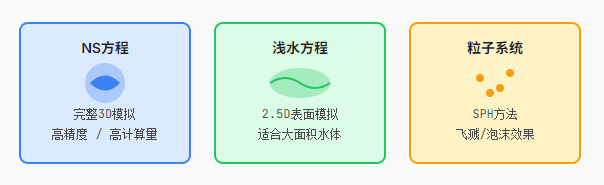
Navier-Stokes 方程
Navier-Stokes 方程是描述粘性流体运动的基本方程组,由法国工程师 Navier 和英国数学家 Stokes 在19世纪提出。这组方程基于质量守恒、动量守恒和能量守恒三大物理定律。
数学原理
NS方程包含两个核心方程:连续性方程(质量守恒)和动量方程。
连续性方程(不可压缩流体)
∇ · u = 0
表示流体微元的体积保持不变
动量方程
∂u/∂t + (u · ∇)u = -∇p/ρ + ν∇²u + f
描述流体速度随时间的变化
符号说明:
u = 速度场向量 (u, v, w)
p = 压力场
ρ = 流体密度
ν = 运动粘度系数
f = 外力项(如重力)
方程组成解析
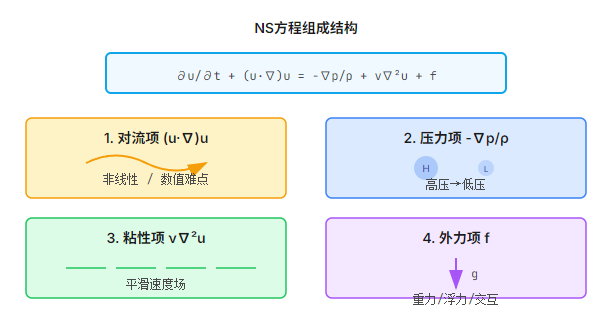
1. 对流项 (u · ∇)u
描述流体微元随流动而产生的速度变化。这是 NS 方程中非线性的来源,也是数值求解的主要难点。
2. 压力项 -∇p/ρ
压力梯度驱动流体从高压区流向低压区。在不可压缩流体中,压力起到拉格朗日乘子的作用,确保速度场无散度。
3. 粘性项 ν∇²u
描述流体内部的摩擦效应,使速度趋于平滑。粘度系数 ν 越大,流体越"粘稠"。
4. 外力项 f
通常包含重力、浮力、表面张力等外部作用力。在游戏开发中,也常用于添加交互效果。
数值求解方法
在实时渲染中,我们使用有限差分法在网格上离散化 NS 方程。以下是基于 Jos Stam 的 Stable Fluids 算法的简化实现:
cs
// 第1步:添加外力(如鼠标交互、重力)
AddForces(velocityField, dt);
// 第2步:对流(使用半拉格朗日方法)
Advect(velocityField, velocityField, dt);
// 第3步:粘性扩散
Diffuse(velocityField, viscosity, dt);
// 第4步:投影步骤(确保无散度)
Project(velocityField, pressureField);
// 第5步:密度/颜色平流
Advect(densityField, velocityField, dt);
浅水方程
浅水方程是 NS 方程在特定条件下的简化形式。当流体的水平尺度远大于垂直尺度时(如海洋、湖泊、河流),可以假设流体在垂直方向上的压力分布是静水压力,从而将三维问题简化为二维问题。
数学推导
连续性方程
∂h/∂t + ∇ · (hu) = 0
动量方程
∂(hu)/∂t + ∇ · (hu⊗u) = -gh∇h + νh∇²u + hf
浅水方程特有符号:
h = 水深(水面高度)
u = 水平速度场 (u, v)
g = 重力加速度
⊗ = 张量积
优势与应用场景
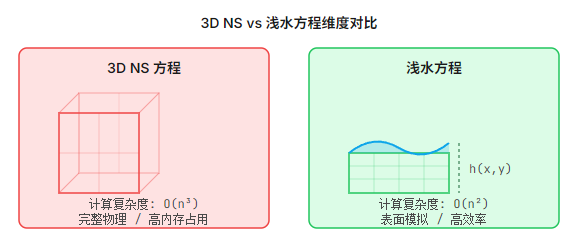
计算效率
- • 2D网格 vs 3D网格,内存占用大幅减少
- • 时间步长可以更大(受CFL条件限制更宽松)
- • 适合大规模水体(海洋、湖泊)
适用场景
- • 开放世界游戏中的海洋系统
- • 河流、瀑布等表面水体
- • 需要与地形交互的洪水模拟
局限性
- • 无法模拟垂直方向的运动(如漩涡、水花飞溅)
- • 不适用于深水区域或快速变化的流体
- • 需要配合粒子系统处理破碎波和泡沫
波动方程形式
在小振幅假设下,浅水方程可以进一步简化为经典的波动方程:
∂²h/∂t² = c²∇²h
其中 c = √(gh) 是波速
这种形式特别适合使用频谱方法(如FFT)求解,可以高效模拟大面积水面的波动效果。
Unity URP 实现
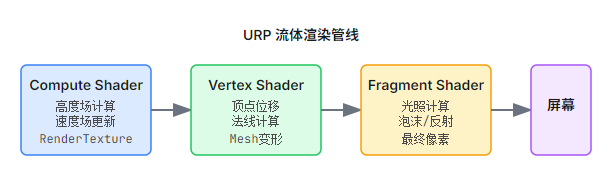
Unity 的 Universal Render Pipeline (URP) 提供了现代化的渲染架构,结合 Compute Shader 的强大计算能力,可以实现高效的流体模拟。
Compute Shader 实现
Compute Shader 允许我们在 GPU 上进行通用计算,非常适合流体模拟这类并行计算密集型任务。
FluidCompute.compute - 浅水方程求解
cs
#pragma kernel UpdateHeight
#pragma kernel UpdateVelocity
RWTexture2D<float> _HeightField;
RWTexture2D<float2> _VelocityField;
float _DeltaTime;
float _GridSize;
float _Gravity;
[numthreads(8, 8, 1)]
void UpdateHeight(uint3 id : SV_DispatchThreadID)
{
    uint2 pos = id.xy;
    uint2 size;
    _HeightField.GetDimensions(size.x, size.y);

    // 边界检查
    if (pos.x >= size.x || pos.y >= size.y) return;

    // 获取当前格子的速度
    float2 vel = _VelocityField[pos];

    // 计算高度梯度(连续性方程)
    float hL = _HeightField[clamp(pos - int2(1, 0), 0, size - 1)];
    float hR = _HeightField[clamp(pos + int2(1, 0), 0, size - 1)];
    float hB = _HeightField[clamp(pos - int2(0, 1), 0, size - 1)];
    float hT = _HeightField[clamp(pos + int2(0, 1), 0, size - 1)];

    // 更新高度
    float divergence = ((hR - hL) * vel.x + (hT - hB) * vel.y) / (2.0 * _GridSize);
    float newHeight = _HeightField[pos] - _DeltaTime * divergence;

    _HeightField[pos] = max(newHeight, 0.0);
}
FluidCompute.compute - 速度更新
cs
[numthreads(8, 8, 1)]
void UpdateVelocity(uint3 id : SV_DispatchThreadID)
{
    uint2 pos = id.xy;
    uint2 size;
    _VelocityField.GetDimensions(size.x, size.y);

    if (pos.x >= size.x || pos.y >= size.y) return;

    float h = _HeightField[pos];
    if (h < 0.01) return; // 避免除零

    float2 vel = _VelocityField[pos];

    // 计算压力梯度(重力驱动)
    float hL = _HeightField[clamp(pos - int2(1, 0), 0, size - 1)];
    float hR = _HeightField[clamp(pos + int2(1, 0), 0, size - 1)];
    float hB = _HeightField[clamp(pos - int2(0, 1), 0, size - 1)];
    float hT = _HeightField[clamp(pos + int2(0, 1), 0, size - 1)];

    float2 pressureGrad;
    pressureGrad.x = -(hR - hL) * _Gravity / (2.0 * _GridSize);
    pressureGrad.y = -(hT - hB) * _Gravity / (2.0 * _GridSize);

    // 更新速度(简化欧拉积分)
    float2 newVel = vel + _DeltaTime * pressureGrad;

    // 阻尼
    newVel *= 0.995;

    _VelocityField[pos] = newVel;
}
可视化渲染
模拟完成后,我们需要将高度场和速度场转换为可视化的水面。URP 提供了灵活的 Shader Graph 和 HLSL Shader 选项。
WaterSurface.shader - URP Shader
cs
Shader "Custom/WaterSurface"
{
    Properties
    {
        _HeightMap ("Height Map", 2D) = "black" {}
        _NormalStrength ("Normal Strength", Float) = 1.0
        _BaseColor ("Base Color", Color) = (0.0, 0.3, 0.5, 1.0)
        _FoamColor ("Foam Color", Color) = (1.0, 1.0, 1.0, 1.0)
        _FoamThreshold ("Foam Threshold", Float) = 0.8
    }

    SubShader
    {
        Tags { "RenderType"="Transparent" "Queue"="Transparent" }

        Pass
        {
            Name "ForwardLit"
            Tags { "LightMode"="UniversalForward" }

            HLSLPROGRAM
            #pragma vertex vert
            #pragma fragment frag
            #include "Packages/com.unity.render-pipelines.universal/ShaderLibrary/Core.hlsl"

            struct Attributes
            {
                float4 positionOS : POSITION;
                float2 uv : TEXCOORD0;
            };

            struct Varyings
            {
                float4 positionHCS : SV_POSITION;
                float3 positionWS : TEXCOORD0;
                float2 uv : TEXCOORD1;
                float3 normalWS : TEXCOORD2;
            };

            TEXTURE2D(_HeightMap);
            SAMPLER(sampler_HeightMap);
            float4 _HeightMap_TexelSize;
            float _NormalStrength;
            float4 _BaseColor;
            float4 _FoamColor;
            float _FoamThreshold;

            Varyings vert(Attributes input)
            {
                Varyings output;

                float2 uv = input.uv;
                float height = SAMPLE_TEXTURE2D_LOD(_HeightMap, sampler_HeightMap, uv, 0).r;

                float3 positionOS = input.positionOS.xyz;
                positionOS.y += height;

                output.positionHCS = TransformObjectToHClip(positionOS);
                output.positionWS = TransformObjectToWorld(positionOS);
                output.uv = uv;

                // 计算法线
                float hL = SAMPLE_TEXTURE2D_LOD(_HeightMap, sampler_HeightMap, uv - float2(_HeightMap_TexelSize.x, 0), 0).r;
                float hR = SAMPLE_TEXTURE2D_LOD(_HeightMap, sampler_HeightMap, uv + float2(_HeightMap_TexelSize.x, 0), 0).r;
                float hB = SAMPLE_TEXTURE2D_LOD(_HeightMap, sampler_HeightMap, uv - float2(0, _HeightMap_TexelSize.y), 0).r;
                float hT = SAMPLE_TEXTURE2D_LOD(_HeightMap, sampler_HeightMap, uv + float2(0, _HeightMap_TexelSize.y), 0).r;

                float3 normal;
                normal.x = (hL - hR) * _NormalStrength;
                normal.y = 2.0 * _HeightMap_TexelSize.x;
                normal.z = (hB - hT) * _NormalStrength;
                normal = normalize(normal);

                output.normalWS = TransformObjectToWorldNormal(normal);

                return output;
            }

            float4 frag(Varyings input) : SV_Target
            {
                float height = SAMPLE_TEXTURE2D(_HeightMap, sampler_HeightMap, input.uv).r;

                // 基础颜色
                float4 color = _BaseColor;

                // 简单的光照计算
                float3 normal = normalize(input.normalWS);
                float3 lightDir = normalize(_MainLightPosition.xyz);
                float NdotL = saturate(dot(normal, lightDir));

                color.rgb *= (0.3 + 0.7 * NdotL);

                // 泡沫效果(波峰处)
                float foam = saturate((height - _FoamThreshold) / 0.2);
                color = lerp(color, _FoamColor, foam);

                return color;
            }
            ENDHLSL
        }
    }
}
C# 驱动脚本
FluidSimulator.cs - CPU端控制
cs
using UnityEngine;
using UnityEngine.Rendering;
public class FluidSimulator : MonoBehaviour
{
    [Header("Simulation Settings")]
    [SerializeField] private int gridSize = 256;
    [SerializeField] private float gridSpacing = 0.1f;
    [SerializeField] private float timeStep = 0.016f;
    [SerializeField] private float gravity = 9.81f;
    [SerializeField] private float damping = 0.995f;

    [Header("Compute Shader")]
    [SerializeField] private ComputeShader fluidCompute;

    [Header("Interaction")]
    [SerializeField] private float brushRadius = 5f;
    [SerializeField] private float brushStrength = 1f;

    // 渲染纹理
    private RenderTexture heightField;
    private RenderTexture heightFieldTemp;
    private RenderTexture velocityField;
    private RenderTexture velocityFieldTemp;

    // Compute Shader 内核索引
    private int updateHeightKernel;
    private int updateVelocityKernel;
    private int addDisturbanceKernel;

    void Start()
    {
        InitializeTextures();
        InitializeComputeShader();
    }

    void InitializeTextures()
    {
        // 创建双缓冲渲染纹理
        RenderTextureDescriptor desc = new RenderTextureDescriptor(
            gridSize, gridSize,
            RenderTextureFormat.RFloat, 0
        );
        desc.enableRandomWrite = true;

        heightField = new RenderTexture(desc);
        heightField.Create();
        heightFieldTemp = new RenderTexture(desc);
        heightFieldTemp.Create();

        // 速度场使用 RGFloat 格式(存储 x, y 分量)
        RenderTextureDescriptor velocityDesc = new RenderTextureDescriptor(
            gridSize, gridSize,
            RenderTextureFormat.RGFloat, 0
        );
        velocityDesc.enableRandomWrite = true;

        velocityField = new RenderTexture(velocityDesc);
        velocityField.Create();
        velocityFieldTemp = new RenderTexture(velocityDesc);
        velocityFieldTemp.Create();
    }

    void InitializeComputeShader()
    {
        updateHeightKernel = fluidCompute.FindKernel("UpdateHeight");
        updateVelocityKernel = fluidCompute.FindKernel("UpdateVelocity");
        addDisturbanceKernel = fluidCompute.FindKernel("AddDisturbance");
    }

    void Update()
    {
        HandleInput();

        // 执行模拟步骤
        DispatchComputeShaders();

        // 交换缓冲区
        SwapBuffers();
    }

    void DispatchComputeShaders()
    {
        int threadGroups = Mathf.CeilToInt(gridSize / 8f);

        // 设置共享参数
        fluidCompute.SetFloat("_DeltaTime", timeStep);
        fluidCompute.SetFloat("_GridSize", gridSpacing);
        fluidCompute.SetFloat("_Gravity", gravity);
        fluidCompute.SetFloat("_Damping", damping);

        // 更新速度
        fluidCompute.SetTexture(updateVelocityKernel, "_HeightField", heightField);
        fluidCompute.SetTexture(updateVelocityKernel, "_VelocityField", velocityField);
        fluidCompute.SetTexture(updateVelocityKernel, "_VelocityFieldOut", velocityFieldTemp);
        fluidCompute.Dispatch(updateVelocityKernel, threadGroups, threadGroups, 1);

        // 更新高度
        fluidCompute.SetTexture(updateHeightKernel, "_HeightField", heightField);
        fluidCompute.SetTexture(updateHeightKernel, "_VelocityField", velocityFieldTemp);
        fluidCompute.SetTexture(updateHeightKernel, "_HeightFieldOut", heightFieldTemp);
        fluidCompute.Dispatch(updateHeightKernel, threadGroups, threadGroups, 1);
    }

    void SwapBuffers()
    {
        // 交换高度场
        RenderTexture temp = heightField;
        heightField = heightFieldTemp;
        heightFieldTemp = temp;

        // 交换速度场
        temp = velocityField;
        velocityField = velocityFieldTemp;
        velocityFieldTemp = temp;
    }

    void HandleInput()
    {
        if (Input.GetMouseButton(0))
        {
            Ray ray = Camera.main.ScreenPointToRay(Input.mousePosition);
            RaycastHit hit;

            if (Physics.Raycast(ray, out hit))
            {
                Vector2 uv = hit.textureCoord;
                AddDisturbance(uv, brushStrength);
            }
        }
    }

    void AddDisturbance(Vector2 uv, float strength)
    {
        fluidCompute.SetFloat("_BrushPosX", uv.x);
        fluidCompute.SetFloat("_BrushPosY", uv.y);
        fluidCompute.SetFloat("_BrushRadius", brushRadius / gridSize);
        fluidCompute.SetFloat("_BrushStrength", strength);

        fluidCompute.SetTexture(addDisturbanceKernel, "_HeightField", heightField);

        int threadGroups = Mathf.CeilToInt(gridSize / 8f);
        fluidCompute.Dispatch(addDisturbanceKernel, threadGroups, threadGroups, 1);
    }

    void OnDestroy()
    {
        // 清理资源
        heightField?.Release();
        heightFieldTemp?.Release();
        velocityField?.Release();
        velocityFieldTemp?.Release();
    }
}
应用案例
开放世界海洋系统
在大型开放世界游戏中,使用浅水方程配合 FFT 频谱方法可以实时渲染数千平方公里的海洋表面。Gerstner 波叠加可以模拟不同风速和方向下的海面状态。
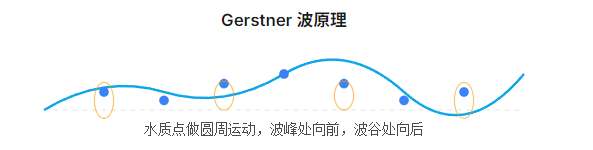
cs
// Gerstner 波叠加
float3 GerstnerWave(float2 pos, float2 direction, float steepness,
                    float wavelength, float speed, float time)
{
    float k = 2 * PI / wavelength;
    float c = sqrt(9.8 / k);
    float2 d = normalize(direction);
    float f = k * (dot(d, pos) - c * time);
    float a = steepness / k;

    return float3(
        d.x * a * cos(f),
        a * sin(f),
        d.y * a * cos(f)
    );
}
交互式水体
玩家与水体交互时,通过 Compute Shader 在交互位置添加高度扰动,可以产生逼真的波纹扩散效果。这种方法常用于水池、喷泉等场景。
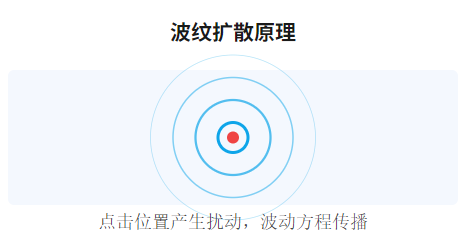
**实现要点:**使用 RenderTexture 作为高度场,每帧执行一次 Jacobi 迭代求解波动方程,配合法线贴图实现光照效果。
雨景与水坑
在雨天场景中,可以使用粒子系统生成雨滴接触水面的位置,然后在对应位置触发波纹。多个波纹的叠加可以产生复杂的水面效果。
性能优化
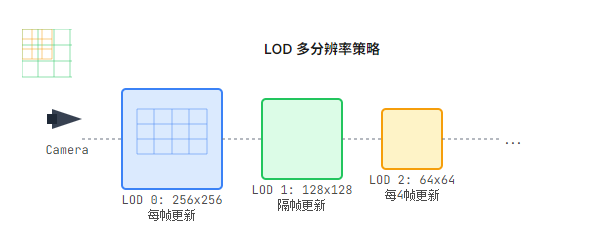
LOD 策略
- •根据距离使用不同精度的模拟网格(近处256x256,远处64x64)
- •远处使用预计算的波纹法线贴图替代实时模拟
- •视锥体外的水体完全跳过模拟
GPU 优化
- •使用 half 精度(fp16)存储高度场,减少带宽占用
- •合并多个计算步骤到单个 Compute Shader
- •使用 GPU Instancing 渲染水面网格
优化后的多分辨率模拟
cs
public class MultiResolutionFluid : MonoBehaviour
{
    [System.Serializable]
    public class LODLevel
    {
        public int resolution;
        public float worldSize;
        public float maxDistance;
        public RenderTexture heightTexture;
    }

    public LODLevel[] lodLevels;

    void Update()
    {
        Vector3 cameraPos = Camera.main.transform.position;

        foreach (var lod in lodLevels)
        {
            // 根据距离决定是否更新该 LOD 层级
            float distance = Vector3.Distance(cameraPos, transform.position);
            if (distance < lod.maxDistance)
            {
                // 以较低频率更新远处的 LOD
                int updateInterval = Mathf.RoundToInt(distance / lod.worldSize);
                if (Time.frameCount % (updateInterval + 1) == 0)
                {
                    SimulateLOD(lod);
                }
            }
        }
    }

    void SimulateLOD(LODLevel lod)
    {
        // 执行该 LOD 层级的模拟
        // ...
    }
}
总结
流体模拟是游戏开发中极具挑战性但也极具表现力的技术领域。通过理解 Navier-Stokes 方程和浅水方程的数学原理,我们可以在 Unity URP 中实现从简单的交互式水坑到广阔海洋的各种水体效果。
关键要点:
- • NS 方程适合需要完整3D流体行为的场景,但计算成本较高
- • 浅水方程是大面积水体模拟的最佳选择,兼顾效率和视觉效果
- • Compute Shader是实现高性能流体模拟的核心技术
- • LOD 和多分辨率策略对于大规模场景至关重要
随着 GPU 计算能力的不断提升,实时流体模拟的效果将越来越接近离线渲染。结合机器学习技术(如神经辐射场、物理信息神经网络),未来的流体模拟将更加高效和逼真。