# -*- coding: utf-8 -*-
"""
@Created on : 2026/4/22 14:50
@creator : er_nao
@File :Day_07.py
@Description :函数封装思路
"""

"""
知识点1:面向对象的核心概念

1. 类(Class)
    大白话:类就是工厂的设计图纸,它规定了这个工厂里有什么配置、有什么加工机器、能做什么事。
    比如:你可以画一张「NLP 文本处理工具工厂」的设计图纸,图纸里规定了:
    工厂里有一个配置:要过滤的标点符号列表
    工厂里有 4 台机器:清洗文本、拆分句子、统计词频、提取 Top 关键词
    这张图纸,就是「类」

2. 对象(Object)
    大白话:对象就是按照设计图纸,建出来的真实工厂,你可以按照同一张图纸,建出无数个一模一样的工厂,每个工厂都有自己的配置、自己的机器,互相不影响。
    比如:你按照「NLP 文本处理工具工厂」的图纸,建了 2 个工厂:
    工厂 1:配置的是「过滤所有标点符号」
    工厂 2:配置的是「保留标点符号」
    这 2 个工厂,就是 2 个「对象」,它们都来自同一张图纸(类),但有自己的独立配置,互相不影响。

3. 2 个核心概念的关系
    类是抽象的设计图纸,对象是具体的、能干活的工厂
    一个类,可以创建出无数个对象,就像一张图纸,可以建出无数个一模一样的工厂
    你用的时候,只需要创建对象,然后让对象去干活,不用再关心图纸里的细节
"""


"""
知识点2:类的定义与对象的创建

1. 基础语法(固定格式,不能改)

定义类(画设计图纸)
class 类名:
    # 类里的内容:属性(配置)、方法(加工机器)
    # 定义属性(配置)
    属性名 = 属性值

    # 定义方法(加工机器)
    def 方法名(self, 参数1, 参数2, ...):
        方法里要执行的代码
        return 处理后的结果

创建对象(按图纸建工厂)
对象名 = 类名()


⚠️ 关键注意点:
1.定义类必须用class开头,后面跟类名、冒号,少一个都不行
2.类名的首字母必须大写,比如NLPTool、ChatBot,这是 Python 的规范,见名知意
3.类里的所有内容,必须缩进 4 个空格,和 if/for/ 函数的缩进规则完全一样
4.类里定义的函数,叫「方法」,方法的第一个参数,必须是self,少一个都不行,self就代表「当前的工厂对象自己」,用来访问自己的属性、调用自己的方法
5.类定义好之后,必须创建对象,才能调用类里的方法,不创建对象的话,类里的方法永远不会跑,就像你画了图纸,不建工厂,永远没法生产东西

"""
# 1.定义类
class NLPTool:
    # 定义属性(工厂的固定配置,要过滤的标点符号)
    punctuations = ["。", ",", "!", "?", ";", ":", "、"]

    # 定义方法(加工机器1:清洗文本)
    def clean_text(self, input_text, keep_punctuations=False):
        clean_text = input_text.strip()
        if not keep_punctuations:
            for pucn in self.punctuations:
                clean_text = clean_text.replace(pucn, '')
        clean_text = clean_text.replace(' ', '')
        return clean_text

    # 定义方法(加工机器2:统计文本长度)
    def get_text_length(self, input_text):
        self.info_text = '我是实例属性请赐教'
        clean_text = input_text.strip()
        return len(clean_text)

# 2.创建对象(按图纸,建一个真实的工具工厂)
tool = NLPTool()

# 3.调用对象的方法(让工厂干活)
# 调用清洗文本
text = "  自然 语言 处理 NLP,是 人工智能 中 非常 重要 的 方向。  "
clean_result = tool.clean_text(text)
print(f'清洗后的文本:{clean_result}')

# 调用统计文本长度
len_result = tool.get_text_length(text)
print(f'文本长度:{len_result}')


"""
知识点3:类的属性与方法(必学,核心)

1. 类的属性(工厂的配置仓库)
    属性就是类里定义的变量,用来存储工厂的固定配置、原材料、加工结果,分 2 种:

(1)类属性(所有工厂通用的配置)
    大白话:所有按同一张图纸建出来的工厂,都通用的固定配置,不管你建多少个工厂,这个配置都是一样的,改了类属性,所有工厂的配置都会变。
    语法:直接在类里定义,不用加self,比如上面的punctuations = ["。", ",", "!", "?", ";", ":", "、"]就是类属性。
    访问方式:类名.属性名,或者对象名.属性名

(2)实例属性(每个工厂自己的独立配置)
    大白话:每个工厂自己独有的配置,不同的工厂,这个配置可以不一样,改了一个工厂的实例属性,不会影响其他工厂。
    语法:在方法里用self.属性名定义,比如self.top_n = 3,就是实例属性。
    访问方式:对象名.属性名

2. 类的方法(工厂里的加工机器)
    方法就是类里定义的函数,用来实现具体的加工逻辑,分 2 种,你现在只需要掌握最常用的 1 种:
(1)实例方法(最常用,NLP 场景 99% 都用这个)
    大白话:每个工厂自己的加工机器,必须通过对象来调用,不能直接通过类调用。
    语法:方法的第一个参数必须是self,用来访问自己的属性、调用自己的方法。
    调用方式:对象名.方法名(参数),比如上面的tool.clean_text(text)就是调用实例方法。
(2)类方法(了解即可,现在用不上)
    大白话:整个工厂通用的加工机器,可以直接通过类调用,不用创建对象。
    语法:用@classmethod装饰,第一个参数是cls,代表类本身。
    现在你不用学,等你写复杂项目的时候再了解就行。
"""
# 获取类属性
print(f'类属性获取方式一:{NLPTool.punctuations}')
print(f'类属性获取方式二:{tool.punctuations}')
# 获取实例属性
print(f'获取实例属性:{tool.info_text}')


"""
知识点4:构造方法__init__(必学,初始化对象)

1. 大白话解释
    构造方法__init__,就是工厂的开工仪式,当你创建一个新的工厂对象的时候,这个方法会自动执行,不用你手动调用,用来给工厂做初始化配置,比如给每个工厂设置自己的独立配置、准备原材料。
2. 基础语法(必背)
class 类名:
    # 构造方法,创建对象的时候自动执行
    def __init__(self, 参数1, 参数2, ...):
        # 初始化代码:给实例属性赋值
        self.属性名1 = 参数1
        self.属性名2 = 参数2

⚠️ 关键注意点:
    构造方法的名字,必须是__init__,前后各 2 个下划线,少一个都不行,名字不能改
    构造方法的第一个参数,必须是self,后面可以跟你需要的初始化参数
    当你创建对象的时候,__init__方法会自动执行,你只需要在创建对象的时候,传入对应的初始化参数就行
    构造方法里,用self.属性名定义的,都是实例属性,每个对象都有自己的独立值,互相不影响
"""

# 定义NLP文本处理工具类
class PROTools:
    default_punctuations = ["。", ",", "!", "?", ";", ":", "、"]

    # 构造方法:创建对象的时候自动执行,初始化配置
    def __init__(self,top_n = 3, keep_punctuations = False):

        # 实例属性:每个工厂自己的独立配置
        self.__top_n = top_n
        self.__keep_punctuations = keep_punctuations
        self.punctuations = self.default_punctuations

    # 清洗文本的方法
    def clean_text(self, input_text):
        clean_text = input_text.strip()
        if not self.__keep_punctuations:
            for punc in self.punctuations:
                clean_text = clean_text.replace(punc,'')
        clean_text = clean_text.replace(' ','')
        return clean_text

    # 统计词频的方法
    def count_words(self, input_text):
        clean_text = self.clean_text(input_text)
        word_count = {}
        for word in clean_text:
            if word not in word_count:
                word_count[word] = 1
            else:
                word_count[word] = word_count[word] + 1
        return word_count

    # 提取Top关键词的方法:
    def get_top_keywords(self, input_text):
        word_count = self.count_words(input_text)
        # 按词频从多到少排序
        sorted_itmes = sorted(word_count.items(),key= lambda x:x[1],reverse=True)
        # 取前TopN个
        top_keywords = sorted_itmes[:self.__top_n]
        return top_keywords

# 1.创建第一个工厂对象:默认配置(top3,不保留标点)
tools1= PROTools()
# 调用方法
pro_text = "自然语言处理NLP,是人工智能中非常重要的方向,NLP的前景非常好。"
print("=== 工具1(默认配置) ===")
print('清洗后的文本:',tools1.clean_text(pro_text))
print('提取top3关键词',tools1.get_top_keywords(pro_text))

# 2.创建第二个工厂对象:自定义配置(Top5,保留标点)
tools2= PROTools(top_n=5,keep_punctuations=True)
# 调用方法
print("=== 工具2(自定义配置) ===")
print('清洗后的文本:',tools2.clean_text(pro_text))
print('提取top3关键词',tools2.get_top_keywords(pro_text))


"""
实操练习:

1.定义一个NLPTool类,用构造方法初始化配置:
    可选参数:top_n(默认 3)、keep_punctuation(默认 False)、custom_punctuations(自定义标点符号列表,默认用通用列表)
2.类里实现以下方法:
    clean_text(input_text):文本标准化清洗,用对象的配置
    split_sentence(input_text):按标点符号拆分文本,返回句子列表
    count_word(input_text):统计文本里每个单字的出现次数,返回词频字典
    get_top_keywords(input_text):提取出现次数最多的前 TopN 个关键词,返回排序后的列表
    get_text_info(input_text):一键获取文本的所有信息(清洗后的文本、句子数量、总长度、Top 关键词),返回字典
3.主程序逻辑:
    创建 2 个不同配置的工具对象
    让用户可以持续输入文本,直到输入「退出」为止
    调用工具对象的方法,完成文本处理,打印结果
"""
class PracticalTool:
    default_punctuations = ["。", ",", "!", "?", ";", ":", "、"]
    def __init__(self,top_n=3,keep_punctuations=False):
        self.__top_n=top_n
        self.__keep_punctuations=keep_punctuations
        self.__custom_punctuations= self.default_punctuations

    # 文本清洗
    def clean_text(self, input_text):
        clean_text = input_text.strip()
        if not self.__keep_punctuations:
            for punc in self.__custom_punctuations:
                clean_text = clean_text.replace(punc,'')
        clean_text = clean_text.replace(' ','')
        return clean_text

    # 拆分文本,返回句子里列表
    def split_sentence(self,input_text):
        # 按句号、感叹号、问号拆分句子
        separators = ["。", "!", "?",","]
        sentence_list = [input_text]
        for sep in separators:
            new_list = []
            for sentence in sentence_list:
                new_list.extend(sentence.split(sep))
            sentence_list = new_list
        # 过滤掉空句子
        sentence_list = [s.strip() for s in sentence_list if s.strip() != ""]
        return sentence_list

    # 统计文本中每个单字出现的次数,返回词频字典
    def count_word(self,input_text):
        split_text = self.clean_text(input_text)
        count_word ={}
        for word in split_text:
            if word not in count_word:
                count_word[word] = 1
            else:
                count_word[word] = count_word[word] + 1
        return count_word

    # 提取出现次数最多的前 TopN 个关键词,返回排序后的列表
    def get_top_keywords(self,input_text):
        top_keyword_text = self.count_word(input_text)
        top_keyword_text = sorted(top_keyword_text.items(),key = lambda x:x[1],reverse=True)
        result_top_text = top_keyword_text[:self.__top_n]
        return result_top_text

    # 一键获取文本的所有信息(清洗后的文本、句子数量、总长度、Top 关键词),返回字典
    def get_text_info(self,input_text):
        text_info = {}
        #清洗后的文本
        clean_text = self.clean_text(input_text)
        split_text = self.split_sentence(input_text)
        count_word = self.count_word(clean_text)
        # top关键词
        get_top_keywords = self.get_top_keywords(input_text)

        text_info['cleaned_text'] = clean_text
        text_info['split_text'] = len(split_text)
        text_info['count_word'] = len(count_word)
        text_info['get_top_keywords'] = get_top_keywords
        return text_info

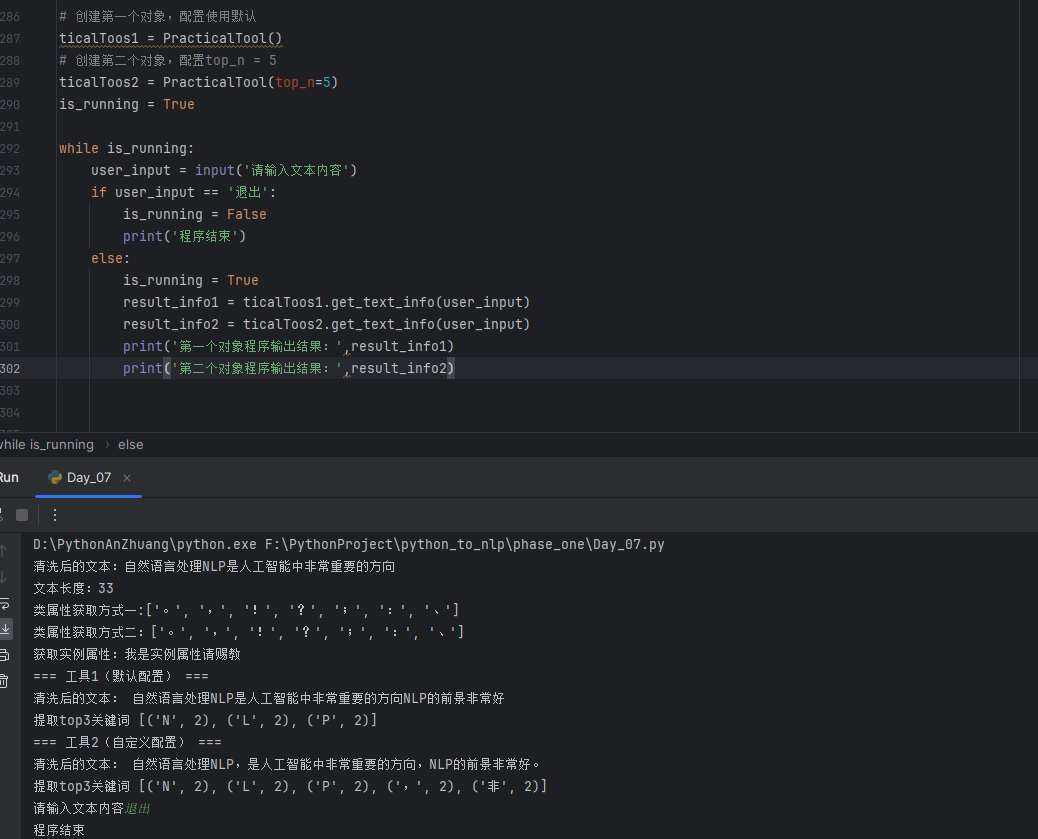
# 创建第一个对象,配置使用默认
ticalToos1 = PracticalTool()
# 创建第二个对象,配置top_n = 5
ticalToos2 = PracticalTool(top_n=5)
is_running = True

while is_running:
    user_input = input('请输入文本内容')
    if user_input == '退出':
        is_running = False
        print('程序结束')
    else:
        is_running = True
        result_info1 = ticalToos1.get_text_info(user_input)
        result_info2 = ticalToos2.get_text_info(user_input)
        print('第一个对象程序输出结果:',result_info1)
        print('第二个对象程序输出结果:',result_info2)