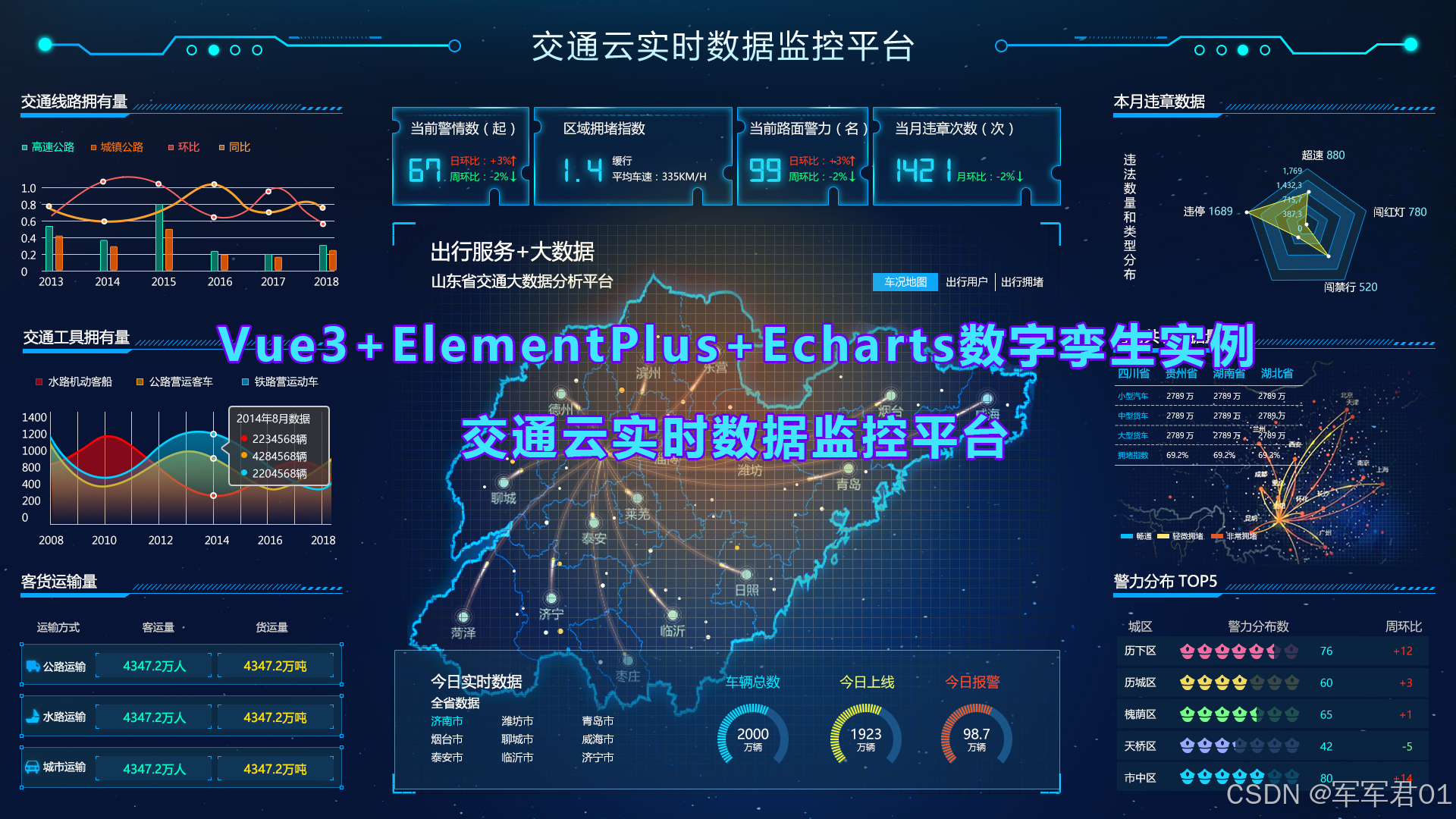
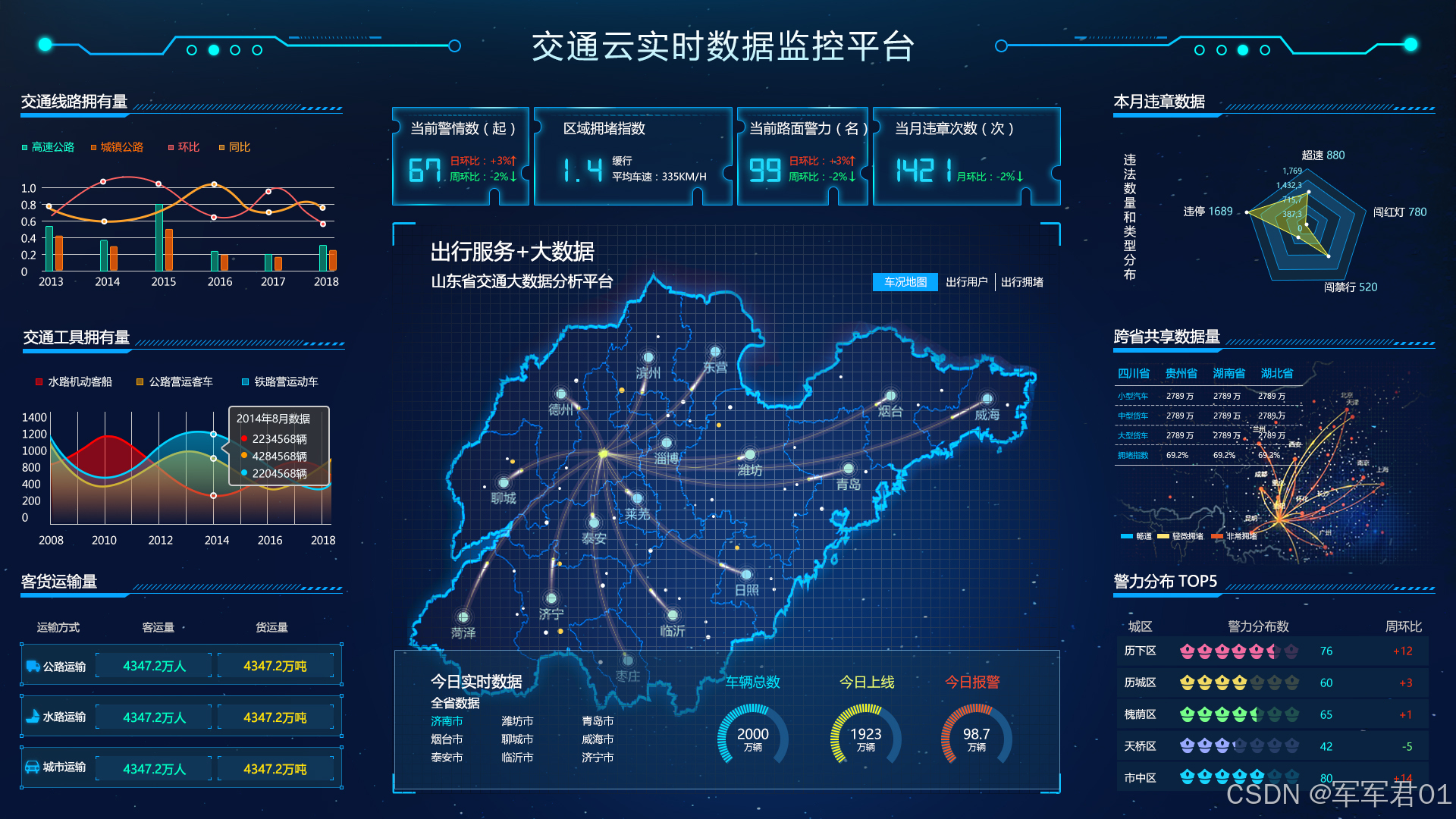
前端数字孪生大屏,使用VUE3+Elementplus+Echarts+TS实现交通云实时数据监控平台,数字孪生,监控大屏展示,可下载作为课堂作业、界面模板、扩展开发,个人作品等。
若想系统学习Echarts开发,我的课程提供了完整的Echarts基础知识讲解并附加大量实战案例,系列课程地址如下:
1. CSDN课程:https://edu.csdn.net/course/detail/40842
2. 51学堂课程:https://edu.51cto.com/course/40414.html
3. B站课程:https://www.bilibili.com/cheese/play/ss456500998
一.效果展示:
二.源码下载:
三.开发视频:
https://www.bilibili.com/video/BV1oPo8BnEir/
四.实现明细:
4.1 开发环境
使用vscode开发,nodejs版本为v24.11.0,其它项目依赖如下:
1. "dayjs": "^1.11.20"
2. "echarts": "^6.0.0"
3. "element-plus": "^2.13.6"
4. "less": "^4.6.4"
5. "pinia": "^3.0.4"
6. "vue": "^3.5.31"
7. "vue-router": "^5.0.4"
4.2 实现明细
- main.ts
javascript
import { createApp } from 'vue'
import { createPinia } from 'pinia'

import App from './App.vue'
import router from './router'
import ElementPlus from 'element-plus'
import 'element-plus/dist/index.css'

const app = createApp(App)

app.use(createPinia())
app.use(router)
app.use(ElementPlus)
app.mount('#app')- App.vue
javascript
<script setup lang="ts"></script>

<template>
  <RouterView></RouterView>
</template>

<style >
  @import url(@/assets/main.css)
</style>- HomeView.vue
javascript
<script setup lang="ts">
import Header from '@/components/Header.vue';
import ChartItem from '@/components/ChartItem.vue';
import LineChartItem from '@/components/LineChartItem.vue';
import CarChartItem from '@/components/CarChartItem.vue';
import PassengerChartItem from '@/components/PassengerChartItem.vue';
import BaseInfoItem from '@/components/BaseInfoItem.vue';
import CenterMapItem from '@/components/CenterMapItem.vue';
import MonthChartItem from '@/components/MonthChartItem.vue';
import Top5ChartItem from '@/components/Top5ChartItem.vue';
import ShareChartItem from '@/components/shareChartItem.vue';
</script>

<template>
  <div class="page">
    <Header></Header>
    <el-row>
      <el-col :span="6">
        <ChartItem title="交通线路拥有量">
          <div class="chart-item">
            <LineChartItem></LineChartItem>
          </div>
        </ChartItem>
        <ChartItem title="交通工具拥有量">
          <div class="chart-item" >
            <CarChartItem></CarChartItem>
          </div>
        </ChartItem>
        <ChartItem title="客货运输量">
          <div class="chart-item" >
            <PassengerChartItem></PassengerChartItem>
          </div>
        </ChartItem>
      </el-col>
      <el-col :span="12">
        <BaseInfoItem></BaseInfoItem>
        <CenterMapItem></CenterMapItem>
      </el-col>
      <el-col :span="6">
        <ChartItem title="本月违章数据">
          <div class="chart-item" >
              <MonthChartItem></MonthChartItem>
          </div>
        </ChartItem>
        <ChartItem title="跨省共享数据量">
          <div class="chart-item" >
            <ShareChartItem></ShareChartItem>
          </div>
        </ChartItem>
        <ChartItem title="警力分布TOP5">
          <div class="chart-item" >
            <Top5ChartItem></Top5ChartItem>
          </div>
        </ChartItem>
      </el-col>
    </el-row>
  </div>
</template>
<style lang="less" scoped>
  .page{
    width:100vw;
    height: 100vh;
    background: url(@/assets/images/bj.jpg);
    background-size: 100% 100%;

    .chart-item{
      height: calc(30vh - 8px);
    }
  }
</style>- router/index.ts
javascript
import HomeView from '@/views/HomeView.vue'
import { createRouter, createWebHistory } from 'vue-router'

const router = createRouter({
  history: createWebHistory(import.meta.env.BASE_URL),
  routes: [{
    path:"",
    component:HomeView
  }],
})

export default router- Top5ChartItem.vue
javascript
<template>
    <div class="chart-item" >
        <div class="tr">
            <div class=" name">城区</div>
            <div class="th">警力分布数</div>
            <div class="percent">周环比</div>
        </div>
        <div class="tr data-tr" v-for="item in values">
            <div class=" name">{{item.name}}</div>
            <div class="td value">
                <el-rate
                    v-model="item.value"
                    :icons="icons"
                    :void-icon="Eleme"
                    :max="10"
                    :colors="['#409eff', '#67c23a', '#FF9900']" disabled show-score text-color="#18fcff"
                />
            </div>
            <div class=" percent " :class="[(item.percent*1.0)<0?'down':'up']">
                {{item.percent}}
            </div>
        </div>
    </div>
</template>
<script setup lang="ts">
import { reactive,ref,onMounted } from 'vue';
import { Eleme} from '@element-plus/icons-vue'
const icons = [Eleme,Eleme,Eleme,Eleme,Eleme]

const values = reactive([{
    name:'历下区',
    value:3,
    percent:'+34'
},{
    name:'历下区',
    value:4,
    percent:'+34'
},{
    name:'历下区',
    value:2,
    percent:'-34'
},{
    name:'历下区',
    value:4,
    percent:'+34'
},{
    name:'历下区',
    value:3,
    percent:'-34'
}])
</script>
<style lang="less" scoped>
.chart-item{
    height: 100%;
    color:#fff;

    .tr{
        display: flex;
        line-height: 35px;
        .th{
            flex: 1;
        }
        .td{
            flex: 1;
        }
        .name{
            width:100px ;
            text-align: center;
        }
        .percent{
            width:100px ;
            text-align: center;
        }
        .up{
            color: #fe3e12;
        }
        .down{
            color: #12fe81;;
        }
    }
    .data-tr{
        background: #0a2340;
        margin-bottom: 8px;
    }
}
</style>- ShareChartItem.vue
javascript
<template>
    <div class="share-chart-item">
        <div class="chart-panel" ref="shareChartRef"></div>
        <div class="detail">
            <div class="tr">
                <div class="th">类型</div>
                <div class="th">四川省</div>
                <div class="th">贵州省</div>
                <div class="th">湖南省</div>
                <div class="th">湖北省</div>
            </div>
            <div class="tr">
                <div class="td name">小型汽车</div>
                <div class="td">5435万</div>
                <div class="td">5466万</div>
                <div class="td">5413万</div>
                <div class="td">2546万</div>
            </div>
            <div class="tr">
                <div class="td name">中型货车</div>
                <div class="td">6547万</div>
                <div class="td">5546万</div>
                <div class="td">7634万</div>
                <div class="td">65433万</div>
            </div>
            <div class="tr">
                <div class="td name">大型货车</div>
                <div class="td">5467万</div>
                <div class="td">9873万</div>
                <div class="td">5476万</div>
                <div class="td">6577万</div>
            </div>
            <div class="tr">
                <div class="td name">拥堵指数</div>
                <div class="td">35.4%</div>
                <div class="td">54.5%</div>
                <div class="td">76.3%</div>
                <div class="td">76.2%</div>
            </div>
        </div>
    </div>
</template>
<script setup lang="ts">
import * as echarts from 'echarts';
import { ref, reactive, onMounted } from 'vue';

const shareChartRef = ref();
const shareChart = ref();
const shareChartOption = reactive({
    legend:{
        left:'3%',
        bottom:'15%',
        textStyle:{
            color:'#fff'
        }
    },
    geo: {
      map: 'ch',
      roam: true,
      // aspectScale: Math.cos((chRoughLatitude * Math.PI) / 180),
      // nameProperty: 'name_en', // If using en name.
      center: [92.291915,35.146784],
      zoom:2,
      label: {
        show: true,
        textBorderWidth: 0,
        textStyle:{
          color:'#8bbdc4aa',
          fontSize:8
        }
      },
      itemStyle:{
        borderColor:'#015fcd',
        borderWidth:1,
        areaColor:'#0e1536'
      },
    },
    tooltip: {},
    series: [
      {
        type:'effectScatter',
        symbol: 'circle' ,
        symbolSize: 15 ,
        coordinateSystem: 'geo',
        data: [
          [117.000923,36.675807]
        ]
      },
      {
        type:'effectScatter',
        symbol: 'circle' ,
        symbolSize: 6 ,
        coordinateSystem: 'geo',
        data: [
          [120.355173,36.082982],
          [88.219897,41.627270],
          [98.786207,36.521140],
          [92.360166,29.289902],
          [104.824098,34.117736],
          [112.371462,37.145185],
          [115.217896,38.241862],
          [119.616931,44.008134],
          [127.250550,46.326399],
          [118.192870,26.626678],
          [100.011387,24.151689],
          [120.124962,33.181742],
          [113.486492,31.116622]
        ]
      },{
        name:'畅通',
        type:'lines',
        coordinateSystem: 'geo',
        effect: {
          show: true,
          period: 4, //箭头指向速度,值越小速度越快
          trailLength: 0.02, //特效尾迹长度[0,1]值越大,尾迹越长重
          symbol: 'arrow', //箭头图标
          symbolSize: 8, //图标大小
        },
        lineStyle: {
          normal: {
            color:'#01c0ff',
            width: 1, //尾迹线条宽度
            opacity: 1, //尾迹线条透明度
            curveness: .3 //尾迹线条曲直度
          }
        },
        data: [
          [[120.355173,36.082982],[117.000923,36.675807]],
          [[88.219897,41.627270],[117.000923,36.675807]],
          [[98.786207,36.521140],[117.000923,36.675807]],
          [[92.360166,29.289902],[117.000923,36.675807]],
        ]
      },{
        name:'拥堵',
        type:'lines',
        coordinateSystem: 'geo',
        effect: {
          show: true,
          period: 4, //箭头指向速度,值越小速度越快
          trailLength: 0.02, //特效尾迹长度[0,1]值越大,尾迹越长重
          symbol: 'arrow', //箭头图标
          symbolSize: 8, //图标大小
        },
        lineStyle: {
          normal: {
            color:'#ffe775',
            width: 1, //尾迹线条宽度
            opacity: 1, //尾迹线条透明度
            curveness: .3 //尾迹线条曲直度
          }
        },
        data: [
          [[104.824098,34.117736],[117.000923,36.675807]],
          [[112.371462,37.145185],[117.000923,36.675807]],
          [[115.217896,38.241862],[117.000923,36.675807]],
          [[119.616931,44.008134],[117.000923,36.675807]]
        ]
      },{
        name:'非常拥堵',
        type:'lines',
        coordinateSystem: 'geo',
        effect: {
          show: true,
          period: 4, //箭头指向速度,值越小速度越快
          trailLength: 0.02, //特效尾迹长度[0,1]值越大,尾迹越长重
          symbol: 'arrow', //箭头图标
          symbolSize: 8, //图标大小
        },
        lineStyle: {
          normal: {
            color:'#e65625',
            width: 1, //尾迹线条宽度
            opacity: 1, //尾迹线条透明度
            curveness: .3 //尾迹线条曲直度
          }
        },
        data: [
          [[118.192870,26.626678],[117.000923,36.675807]],
          [[100.011387,24.151689],[117.000923,36.675807]],
          [[120.124962,33.181742],[117.000923,36.675807]],
          [[113.486492,31.116622],[117.000923,36.675807]]
        ]
      }
    ]
})

onMounted(()=>{
    fetch(new URL('@/assets/geojson/ch.geo.json', import.meta.url).href).then((response)=>{
        if(response.status === 200){
            response.json().then(data=>{
              echarts.registerMap('ch', data);

              shareChart.value = echarts.init(shareChartRef.value);
              shareChart.value.setOption(shareChartOption);
            })
        }
    })
})
</script>
<style lang="less" scoped>
    .share-chart-item{
        color: #fff;
        height: 100%;
        position: relative;

        .chart-panel{
            height: 100%;
        }
        .detail{
            z-index: 1;
            position: absolute;
            left:0;
            top:0;
            width:60%;

            .tr{
                display: flex;
                line-height: 30px;
                border-bottom: 1px dotted #66666655;
                .th{
                    flex:1;
                    color:#01c0ff;
                }
                .td{
                    flex:1;
                    font-size: 0.8rem;
                }
                .name{
                    color:#01c0ff
                }
            }
        }
    }
</style>- PassengerChartItem.vue
javascript
<template>
    <div class="chart-item" >
        <div class="tr">
            <div class="th type">运输方式</div>
            <div class="th user">客运量</div>
            <div class="th goods">货运量</div>
        </div>
        <div class="tr data-tr">
            <div class="left-top"></div>
            <div class="left-bottom"></div>
            <div class="right-top"></div>
            <div class="right-bottom"></div>

            <div class="td type">
                <img src="@/assets/images/icon-002.png">
                <text>公路运输</text>
            </div>
            <div class="td user">
                <div class="value-item">
                    <div class="left-top-1"></div>
                    <div class="left-top-2"></div>
                    <div class="left-bottom-1"></div>
                    <div class="left-bottom-2"></div>
                    <div class="right-top-1"></div>
                    <div class="right-top-2"></div>
                    <div class="right-bottom-1"></div>
                    <div class="right-bottom-2"></div>
                    {{ value1.user }}万人
                </div>
            </div>
            <div class="td goods">
                <div class="value-item">
                    <div class="left-top-1"></div>
                    <div class="left-top-2"></div>
                    <div class="left-bottom-1"></div>
                    <div class="left-bottom-2"></div>
                    <div class="right-top-1"></div>
                    <div class="right-top-2"></div>
                    <div class="right-bottom-1"></div>
                    <div class="right-bottom-2"></div>
                    {{ value1.goods }}万吨
                </div>
            </div>
        </div>

        <div class="tr data-tr">
            <div class="left-top"></div>
            <div class="left-bottom"></div>
            <div class="right-top"></div>
            <div class="right-bottom"></div>

            <div class="td type">
                <img src="@/assets/images/icon-003.png">
                <text>水路运输</text>
            </div>
            <div class="td user">
                <div class="value-item">
                    <div class="left-top-1"></div>
                    <div class="left-top-2"></div>
                    <div class="left-bottom-1"></div>
                    <div class="left-bottom-2"></div>
                    <div class="right-top-1"></div>
                    <div class="right-top-2"></div>
                    <div class="right-bottom-1"></div>
                    <div class="right-bottom-2"></div>
                    {{ value2.user }}万人
                </div>
            </div>
            <div class="td goods">
                <div class="value-item">
                    <div class="left-top-1"></div>
                    <div class="left-top-2"></div>
                    <div class="left-bottom-1"></div>
                    <div class="left-bottom-2"></div>
                    <div class="right-top-1"></div>
                    <div class="right-top-2"></div>
                    <div class="right-bottom-1"></div>
                    <div class="right-bottom-2"></div>
                    {{ value2.goods }}万吨
                </div>
            </div>
        </div>

        <div class="tr data-tr">
            <div class="left-top"></div>
            <div class="left-bottom"></div>
            <div class="right-top"></div>
            <div class="right-bottom"></div>

            <div class="td type">
                <img src="@/assets/images/icon-004.png">
                <text>城市运输</text>
            </div>
            <div class="td user">
                <div class="value-item">
                    <div class="left-top-1"></div>
                    <div class="left-top-2"></div>
                    <div class="left-bottom-1"></div>
                    <div class="left-bottom-2"></div>
                    <div class="right-top-1"></div>
                    <div class="right-top-2"></div>
                    <div class="right-bottom-1"></div>
                    <div class="right-bottom-2"></div>
                    {{ value3.user }}万人
                </div>
            </div>
            <div class="td goods">
                <div class="value-item">
                    <div class="left-top-1"></div>
                    <div class="left-top-2"></div>
                    <div class="left-bottom-1"></div>
                    <div class="left-bottom-2"></div>
                    <div class="right-top-1"></div>
                    <div class="right-top-2"></div>
                    <div class="right-bottom-1"></div>
                    <div class="right-bottom-2"></div>
                    {{ value3.goods }}万吨
                </div>
            </div>
        </div>
    </div>
</template>
<script setup lang="ts">
import { reactive,ref,onMounted } from 'vue';

const value1 = reactive({
    goods:43243,
    user:6546
})
const value2 = reactive({
    goods:75743,
    user:65465
})
const value3 = reactive({
    goods:76873,
    user:43243
})

onMounted(()=>{

})
</script>
<style lang="less" scoped>
.chart-item{
    height: 100%;

    .tr{
        display: flex;
        color:#fff;

        .th{
            flex: 1;
            text-align: center;
            line-height: 60px;
        }

    }
    .data-tr{
        display: flex;
        color:#fff;
        line-height: 40px;
        border: 1px solid #116aa2;
        margin-bottom: 20px;
        position: relative;
        background: #0d2a4455;

        .left-top{
            width:5px;
            height: 5px;
            position: absolute;
            left: -2px;
            top:-2px;
            border: 1px solid #07a6ff;
        }
        .left-bottom{
            width:5px;
            height: 5px;
            position: absolute;
            left: -2px;
            bottom:-2px;
            border: 1px solid #07a6ff;
        }
        .right-top{
            width:5px;
            height: 5px;
            position: absolute;
            right: -2px;
            top:-2px;
            border: 1px solid #07a6ff;
        }
        .right-bottom{
            width:5px;
            height: 5px;
            position: absolute;
            right: -2px;
            bottom:-2px;
            border: 1px solid #07a6ff;
        }


        .td{
            flex: 1;
            text-align: center;

            img{
                position: relative;
                top:6px
            }
            .value-item{
                position: relative;
                height: 80%;
                background: #10365755;
                top:10%;
                margin-right: 10px;
                line-height: 35px;

                .left-top-1{
                    width:5px;
                    height: 1px;
                    left:0;
                    top:0;
                    position: absolute;
                    background: #07a6ff;
                }
                .left-top-2{
                    height:5px;
                    width: 1px;
                    left:0;
                    top:0;
                    position: absolute;
                    background: #07a6ff;
                }

                .left-bottom-1{
                    width:5px;
                    height: 1px;
                    left:0;
                    bottom:0;
                    position: absolute;
                    background: #07a6ff;
                }
                .left-bottom-2{
                    height:5px;
                    width: 1px;
                    left:0;
                    bottom:0;
                    position: absolute;
                    background: #07a6ff;
                }

                .right-top-1{
                    width:5px;
                    height: 1px;
                    right:0;
                    top:0;
                    position: absolute;
                    background: #07a6ff;
                }
                .right-top-2{
                    height:5px;
                    width: 1px;
                    right:0;
                    top:0;
                    position: absolute;
                    background: #07a6ff;
                }

                .right-bottom-1{
                    width:5px;
                    height: 1px;
                    right:0;
                    bottom:0;
                    position: absolute;
                    background: #07a6ff;
                }
                .right-bottom-2{
                    height:5px;
                    width: 1px;
                    right:0;
                    bottom:0;
                    position: absolute;
                    background: #07a6ff;
                }
            }
        }
        .user{
            color:#00ffc6
        }
        .goods{
            color:#ffe400
        }
    }
}
</style>- MonthChartItem.vue
javascript
<template>
    <div class="chart-item" ref="monthChartRef">
    </div>
</template>
<script setup lang="ts">
import { reactive,ref,onMounted } from 'vue';
import * as echarts from "echarts";

const monthChartRef = ref();
const monthChart = ref();
const monthChartOptions = reactive({
    title: {
    text: '违\n法\n数\n量\n和\n类\n型\n统\n计',
    left:'3%',
    top:'center',
    width:30,
    textStyle:{
        color:'#fff',
        fontWeight:'normal',
        fontSize:16,
        lineHeight:20
    }
  },
  radar: {
    indicator: [
      { name: '超速', max: 6500 },
      { name: '闯红灯', max: 16000 },
      { name: '闯禁行', max: 30000 },
      { name: '违停', max: 38000 },
      { name: '逆行', max: 52000 },
    ],
    center: ['50%', '50%'],
    radius: 100,
    axisName: {
        color: '#fff'
    },
    splitArea: {
        areaStyle: {
            color: ['#20dbfd11'],
        }
    },
    axisLine: {
        lineStyle: {
            color: '#0a7ec3'
        }
    },
    splitLine: {
        lineStyle: {
            color: '#0a7ec3'
        }
    }
  },
  series: [
    {
      name: '违法数量和类型统计',
      type: 'radar',
      data: [
        {
          value: [4200, 3000, 20000, 35000, 50000],
          name: '违法数量和类型统计',
          areaStyle: {
            color: '#fffc0055'
          },
          itemStyle:{
            color: '#fffc00'
          }
        }
      ]
    }
  ]
});
onMounted(()=>{
    monthChart.value = echarts.init(monthChartRef.value);
    monthChart.value.setOption(monthChartOptions);
})
</script>
<style lang="less" scoped>
.chart-item{
    height: 100%;
}
</style>- LineChartItem.vue
javascript
<template>
    <div class="chart-item" ref="lineChartRef">
    </div>
</template>
<script setup lang="ts">
import { reactive,ref,onMounted } from 'vue';
import * as echarts from "echarts";

const lineChartRef = ref();
const lineChart = ref();
const lineChartOptions = reactive({
    grid:{
        left:'5%',
        top:'20%',
        right:'5%',
        bottom:'20%',
        containLabel:false
    },
    legend: {
        top:'5%',
        left:'5%',
        textStyle:{
            color:'#Fff'
        }
    },
    xAxis: {
        type: 'category',
        data: ['2012', '2013', '2014', '2015', '2016', '2017', '2018'],
        axisLabel:{
            textStyle:{
                color:'#Fff'
            }
        }
    },
    yAxis: [{
        type: 'value',
        axisLabel:{
            textStyle:{
                color:'#Fff'
            }
        },
        splitLine:{
            lineStyle:{
                color:'#666'
            }
        }
    }],
    series: [
        {
            name:'高速公路',
            data: [120, 200, 150, 80, 70, 110, 130],
            type: 'bar',
            barWidth:20,
            itemStyle:{
                color:'#0b7062'
            }
        },{
            name:'城镇公路',
            data: [30, 250, 250, 110, 30, 150, 120],
            type: 'bar',
            barWidth:20,
            itemStyle:{
                color:'#ce510a'
            }
        },{
            name:'环比',
            smooth:true,
            data: [140, 250, 120, 280, 740, 120, 180],
            type: 'line',
            itemStyle:{
                color:'#fda22c'
            }
        },{
            name:'同比',
            smooth:true,
            data: [220, 300, 450, 170, 120, 120, 235],
            type: 'line',
            itemStyle:{
                color:'#ff6261'
            }
        }
    ]
});
onMounted(()=>{
    lineChart.value = echarts.init(lineChartRef.value);
    lineChart.value.setOption(lineChartOptions);
})
</script>
<style lang="less" scoped>
.chart-item{
    height: 100%;
}
</style>- Header.vue
javascript
<template>
    <div class="header">
        <img src="@/assets/images/icon-001.png">
        <div class="title">交通云监控平台</div>
    </div>
</template>
<script setup lang="ts">
</script>
<style lang="less" scoped>
    .header{
        height: 60px;
        position: relative;
        text-align: center;
        line-height: 60px;
        img{
            position: absolute;
            left: 2%;
            bottom: 0;
            max-width: 100%;
        }
        .title{
            font-size: 2rem;
            color: #01fffd;
            letter-spacing: 5px;
        }
    }
</style>- ChartItem.vue
javascript
<template>
    <div class="chart-item">
        <div class="title">
            <img src="@/assets/images/icon-005.png">
            <text>{{ title }}</text>
        </div>
        <slot></slot>
    </div>
</template>
<script setup lang="ts">
    const props = defineProps({
        title:String
    })
</script>
<style lang="less" scoped>
    .chart-item{
        margin: 5px;
        .title{
            line-height: 40px;
            position: relative;
            img{
                position: absolute;
                bottom: 0;
                width:100%;
            }
            text{
                color:#fff;
            }
        }
    }
</style>- CenterMapItem.vue
javascript
<template>
<div class="center-map">
<div class="left-top-1"></div>
<div class="left-top-2"></div>
<div class="left-bottom-1"></div>
<div class="left-bottom-2"></div>
<div class="right-top-1"></div>
<div class="right-top-2"></div>
<div class="right-bottom-1"></div>
<div class="right-bottom-2"></div>
<div class="map-item" ref="mapChartRef"></div>
<div class="realdata-item" >
<div class="all-data">
<div class="title">全省实时数据</div>
<div class="items">
<div class="item item-select">济南市</div>
<div class="item">潍坊市</div>
<div class="item">青岛市</div>
<div class="item">烟台市</div>
<div class="item">聊城市</div>
<div class="item">威海市</div>
<div class="item">泰安市</div>
<div class="item">临沂市</div>
<div class="item">济宁市</div>
</div>
</div>
<div class="real-chart-item" ref="realChartRef"></div>
</div>
</div>
</template>
<script setup lang="ts">
import { onMounted, reactive,ref } from 'vue';
import * as echarts from "echarts"
const realChartRef = ref();
const realChart = ref();
const realChartOption = reactive({
title:[{
text:'车辆总数',
left:'18%',
top:0,
textStyle:{
color:'#154f90'
}
},{
text:'今日上线',
left:'48%',
top:0,
textStyle:{
color:'#e7e628'
}
},{
text:'今日报警',
left:'78%',
top:0,
textStyle:{
color:'#be563a'
}
}],
series: [
{
type: 'gauge',
startAngle: 180,
endAngle: 0,
min: 0,
max: 24000,
splitNumber: 12,
radius:'100%',
center:['25%','85%'],
itemStyle: {
color: '#147ca8',
shadowColor: '#147ca855',
shadowBlur: 10,
shadowOffsetX: 2,
shadowOffsetY: 2
},
progress: {
show: true,
roundCap: true,
width: 10
},
pointer: {
show:false
},
axisLine: {
roundCap: true,
lineStyle: {
width: 10,
color:[[1, '#1b558855']]
}
},
axisTick: {
show:false
},
splitLine: {
show:false
},
axisLabel: {
show:false
},
title: {
show: false
},
detail: {
width: '60%',
lineHeight: 20,
height: 40,
borderRadius: 8,
offsetCenter: [0, '0%'],
valueAnimation: true,
formatter: function (value) {
return '{value|' + value.toFixed(0) + '}\n{unit|万辆}';
},
rich: {
value: {
fontSize: 20,
color: '#fff'
},
unit: {
fontSize: 14,
color: '#fff',
}
}
},
data: [
{
value: 5433
}
]
},{
type: 'gauge',
startAngle: 180,
endAngle: 0,
min: 0,
max: 24000,
splitNumber: 12,
radius:'100%',
center:['55%','85%'],
itemStyle: {
color: '#e7e628',
shadowColor: '#e7e62855',
shadowBlur: 10,
shadowOffsetX: 2,
shadowOffsetY: 2
},
progress: {
show: true,
roundCap: true,
width: 10
},
pointer: {
show:false
},
axisLine: {
roundCap: true,
lineStyle: {
width: 10,
color:[[1, '#1b558855']]
}
},
axisTick: {
show:false
},
splitLine: {
show:false
},
axisLabel: {
show:false
},
title: {
show: false
},
detail: {
width: '60%',
lineHeight: 20,
height: 40,
borderRadius: 8,
offsetCenter: [0, '0%'],
valueAnimation: true,
formatter: function (value) {
return '{value|' + value.toFixed(0) + '}\n{unit|万辆}';
},
rich: {
value: {
fontSize: 20,
color: '#fff'
},
unit: {
fontSize: 14,
color: '#fff',
}
}
},
data: [
{
value: 20345
}
]
},{
type: 'gauge',
startAngle: 180,
endAngle: 0,
min: 0,
max: 24000,
splitNumber: 12,
radius:'100%',
center:['85%','85%'],
itemStyle: {
color: '#be563a',
shadowColor: '#be563a55',
shadowBlur: 10,
shadowOffsetX: 2,
shadowOffsetY: 2
},
progress: {
show: true,
roundCap: true,
width: 10
},
pointer: {
show:false
},
axisLine: {
roundCap: true,
lineStyle: {
width: 10,
color:[[1, '#1b558855']]
}
},
axisTick: {
show:false
},
splitLine: {
show:false
},
axisLabel: {
show:false
},
title: {
show: false
},
detail: {
width: '60%',
lineHeight: 20,
height: 40,
borderRadius: 8,
offsetCenter: [0, '0%'],
valueAnimation: true,
formatter: function (value) {
return '{value|' + value.toFixed(0) + '}\n{unit|万辆}';
},
rich: {
value: {
fontSize: 20,
color: '#fff'
},
unit: {
fontSize: 14,
color: '#fff',
}
}
},
data: [
{
value: 4324
}
]
}
]
})
const mapChartRef = ref();
const mapChart = ref();
const mapChartOption = reactive({
title: {
text: '出行服务+大数据',
subtext:'山东省交通大数据分析平台',
left:'2%',
textStyle:{
color:'#fff'
},
subtextStyle:{
color:'#fff'
}
},
geo: {
map: 'sd',
roam: true,
// aspectScale: Math.cos((chRoughLatitude * Math.PI) / 180),
// nameProperty: 'name_en', // If using en name.
zoom:1.2,
label: {
show: true,
textBorderWidth: 0,
textStyle:{
color:'#8bbdc4'
}
},
itemStyle:{
borderColor:'#015fcd',
borderWidth:1,
areaColor:'#0e1536'
},
emphasis :{
label: {
textStyle:{
color:'#fff'
}
},
itemStyle:{
borderColor:'#0090f6',
borderWidth:1,
areaColor:'#0090f6'
}
}
},
tooltip: {},
series: [
{
type:'effectScatter',
symbol: 'circle' ,
symbolSize: 15 ,
coordinateSystem: 'geo',
data: [
[117.000923,36.675807]
]
},
{
type:'effectScatter',
symbol: 'circle' ,
symbolSize: 6 ,
coordinateSystem: 'geo',
data: [
[120.355173,
36.082982],
[118.047648,
36.814939],
[117.557964,
34.856424],
[118.66471,
37.434564],
[121.391382,
37.539297],
[119.107078,
36.70925],
[116.587245,
35.415393],
[117.129063,
36.194968],
[122.116394,
37.509691],
[119.461208,
35.428588],
[118.326443,
35.065282],
[116.307428,
37.453968],
[115.980367,
36.456013],
[118.016974,
37.383542],
[115.469381,
35.246531]
]
},{
type:'lines',
coordinateSystem: 'geo',
effect: {
show: true,
period: 4, //箭头指向速度,值越小速度越快
trailLength: 0.02, //特效尾迹长度[0,1]值越大,尾迹越长重
symbol: 'arrow', //箭头图标
symbolSize: 8, //图标大小
},
lineStyle: {
normal: {
color:'#82795155',
width: 1, //尾迹线条宽度
opacity: 1, //尾迹线条透明度
curveness: .3 //尾迹线条曲直度
}
},
data: [
[[120.355173,36.082982],[117.000923,36.675807]],
[[118.047648,
36.814939],[117.000923,36.675807]],
[[117.557964,
34.856424],[117.000923,36.675807]],
[[118.66471,
37.434564],[117.000923,36.675807]],
[[121.391382,
37.539297],[117.000923,36.675807]],
[[119.107078,
36.70925],[117.000923,36.675807]],
[[116.587245,
35.415393],[117.000923,36.675807]],
[[117.129063,
36.194968],[117.000923,36.675807]],
[[122.116394,
37.509691],[117.000923,36.675807]],
[[119.461208,
35.428588],[117.000923,36.675807]],
[[118.326443,
35.065282],[117.000923,36.675807]],
[[116.307428,
37.453968],[117.000923,36.675807]],
[[115.980367,
36.456013],[117.000923,36.675807]],
[[118.016974,
37.383542],[117.000923,36.675807]],
[[115.469381,
35.246531],[117.000923,36.675807]]
]
}
]
})
onMounted(()=>{
realChart.value = echarts.init(realChartRef.value);
realChart.value.setOption(realChartOption);
fetch(new URL('@/assets/geojson/sd.geo.json', import.meta.url).href).then((response)=>{
if(response.status === 200){
response.json().then(data=>{
echarts.registerMap('sd', data);
mapChart.value = echarts.init(mapChartRef.value);
mapChart.value.setOption(mapChartOption);
})
}
})
})
</script>
<style lang="less" scoped>
.center-map{
position: relative;
height: calc(100vh - 80px - 120px);
.left-top-1{
width:15px;
height: 2px;
left:0;
top:0;
position: absolute;
background: #07a6ff;
}
.left-top-2{
height:15px;
width: 3px;
left:0;
top:0;
position: absolute;
background: #07a6ff;
}
.left-bottom-1{
width:15px;
height: 3px;
left:0;
bottom:0;
position: absolute;
background: #07a6ff;
}
.left-bottom-2{
height:15px;
width: 3px;
left:0;
bottom:0;
position: absolute;
background: #07a6ff;
}
.right-top-1{
width:15px;
height: 3px;
right:0;
top:0;
position: absolute;
background: #07a6ff;
}
.right-top-2{
height:15px;
width: 3px;
right:0;
top:0;
position: absolute;
background: #07a6ff;
}
.right-bottom-1{
width:15px;
height: 3px;
right:0;
bottom:0;
position: absolute;
background: #07a6ff;
}
.right-bottom-2{
height:15px;
width: 3px;
right:0;
bottom:0;
position: absolute;
background: #07a6ff;
}
.map-item{
height: 80%;
}
.realdata-item{
display: flex;
height: 20%;
.all-data{
width:40%;
color: #fff;
.title{
line-height: 35px;
font-size: 1.2rem;
padding-left: 10px;
}
.items{
display: flex;
flex-wrap: wrap;
padding: 10px;
line-height: 30px;
.item{
width:100px;
font-size: 0.8rem;
cursor: pointer;
}
:hover{
color:#20dbfd
}
.item-select{
color:#20dbfd
}
}
}
.real-chart-item{
height: 100%;
flex: 1;
}
}
}
</style>- CarChartItem.vue
javascript
<template>
    <div class="chart-item" ref="carChartRef">
    </div>
</template>
<script setup lang="ts">
import { reactive,ref,onMounted } from 'vue';
import * as echarts from "echarts";

const carChartRef = ref();
const carChart = ref();
const carChartOptions = reactive({
    grid:{
        left:'5%',
        top:'20%',
        right:'5%',
        bottom:'20%',
        containLabel:false
    },
    legend: {
        top:'5%',
        left:'5%',
        textStyle:{
            color:'#Fff'
        }
    },
    xAxis: {
        type: 'category',
        data: ['2012', '2013', '2014', '2015', '2016', '2017', '2018'],
        boundaryGap:false,
        axisLabel:{
            textStyle:{
                color:'#Fff'
            }
        }
    },
    yAxis: [{
        type: 'value',
        boundaryGap:false,
        axisLabel:{
            textStyle:{
                color:'#Fff'
            }
        },
        splitLine:{
            lineStyle:{
                color:'#666'
            }
        }
    }],
    series: [
        {
            name:'水路机动客船',
            smooth:true,
            data: [140, 250, 120, 280, 740, 120, 180],
            type: 'line',
            itemStyle:{
                color:'#ceb236'
            },
            areaStyle:{
                color:{
                    type: 'linear',
                    x: 0,
                    y: 0,
                    x2: 0,
                    y2: 1,
                    colorStops: [{
                        offset: 0, color: '#ceb236' // 0% 处的颜色
                    }, {
                        offset: 1, color: '#ceb23621' // 100% 处的颜色
                    }],
                    global: false // 缺省为 false
                }
            }
        },{
            name:'公路营运客车',
            smooth:true,
            data: [220, 300, 450, 170, 120, 120, 235],
            type: 'line',
            itemStyle:{
                color:'#00d2ff'
            },
            areaStyle:{
                color:{
                    type: 'linear',
                    x: 0,
                    y: 0,
                    x2: 0,
                    y2: 1,
                    colorStops: [{
                        offset: 0, color: '#00d2ff' // 0% 处的颜色
                    }, {
                        offset: 1, color: '#00d2ff21' // 100% 处的颜色
                    }],
                    global: false // 缺省为 false
                }
            }
        },{
            name:'铁路营运动车',
            smooth:true,
            data: [543, 675, 657, 232, 361, 432, 232],
            type: 'line',
            itemStyle:{
                color:'#ff0000'
            },
            areaStyle:{
                color:{
                    type: 'linear',
                    x: 0,
                    y: 0,
                    x2: 0,
                    y2: 1,
                    colorStops: [{
                        offset: 0, color: '#ff0000' // 0% 处的颜色
                    }, {
                        offset: 1, color: '#ff000021' // 100% 处的颜色
                    }],
                    global: false // 缺省为 false
                }
            }
        }
    ]
});
onMounted(()=>{
    carChart.value = echarts.init(carChartRef.value);
    carChart.value.setOption(carChartOptions);
})
</script>
<style lang="less" scoped>
.chart-item{
    height: 100%;
}
</style>- BaseInfoItem.vue
javascript
<template>
    <div class="base-info">
        <div class="item item1">
            <div class="title">当前警情数(起)</div>
            <div class="value-items">
                <div class="value">{{ value1.value }}</div>
                <div class="value-text">
                    <div class="text color-red">日环比:{{value1.dayOnDay>0?'+':''}}{{ value1.dayOnDay }}<text class="">{{ value1.dayOnDayTrend }}</text></div>
                    <div class="text color-green">周环比:{{value1.weekOnWeek>0?'+':''}}{{ value1.weekOnWeek }}<text class="">{{ value1.weekOnWeekTrend }}</text></div>
                </div>
            </div>
        </div>
        <div class="item item2">
            <div class="title">区域拥堵指数</div>
            <div class="value-items">
                <div class="value">{{ value2.value }}</div>
                <div class="value-text">
                    <div class="text">缓行</div>
                    <div class="text">平均车速:{{ value2.speed }}KM/H</div>
                </div>
            </div>
        </div>
        <div class="item item3">
            <div class="title">当前路面警力(名)</div>
            <div class="value-items">
                <div class="value">{{ value3.value }}</div>
                <div class="value-text">
                    <div class="text color-red">日环比:{{value3.dayOnDay>0?'+':''}}{{ value3.dayOnDay }}<text class="">{{ value3.dayOnDayTrend }}</text></div>
                    <div class="text color-green">周环比:{{value3.weekOnWeek>0?'+':''}}{{ value3.weekOnWeek }}<text class="">{{ value3.weekOnWeekTrend }}</text></div>
                </div>
            </div>
        </div>
        <div class="item item3">
            <div class="title">当月违章次数(次)</div>
            <div class="value-items">
                <div class="value">{{ value4.value }}</div>
                <div class="value-text ">
                    <div class="text"></div>
                    <div class="text color-green">月环比:{{value4.weekOnWeek>0?'+':''}}{{ value4.weekOnWeek }}<text class="">{{ value4.weekOnWeekTrend }}</text></div>
                </div>
            </div>
        </div>
    </div>
</template>
<script setup lang="ts">
import { reactive } from 'vue';

const value1 = reactive({
    value:432,
    dayOnDay:34,
    dayOnDayTrend:'↑',
    weekOnWeek:-35,
    weekOnWeekTrend:'↓'
})
const value2 = reactive({
    value:34,
    speed:33
})
const value3 = reactive({
    value:43,
    dayOnDay:65,
    dayOnDayTrend:'↑',
    weekOnWeek:-53,
    weekOnWeekTrend:'↓'
})
const value4 = reactive({
    value:43,
    weekOnWeek:-53,
    weekOnWeekTrend:'↓'
})
</script>
<style lang="less" scoped>
    @font-face {
        font-family: 'DS-DIGIT';
        src: url('@/assets/font/DS-DIGIT.TTF') format('woff2');
        font-style: normal;
    }
    .base-info{
        display: flex;
        color: #fff;
        .item{
            flex:1;
            padding: 20px 30px;

            .title{
                line-height: 35px;
            }

            .value-items{
                display: flex;

                .value{
                    width:60px;
                    text-align: center;
                    font-family: DS-DIGIT;
                    font-size: 2rem;
                    color:#20dbfd
                }

                .value-text{
                    flex:1;
                    font-size: 0.8rem;

                    .text{
                        height: 20px;

                        text{
                            padding-left: 5px;
                        }
                    }
                }
            }
        }
        .item1{
            background: url(@/assets/images/icon-006.png);
            background-size: 100% 100%;
        }
        .item2{
            background: url(@/assets/images/icon-007.png);
            background-size: 100% 100%;
        }
        .item3{
            background: url(@/assets/images/icon-008.png);
            background-size: 100% 100%;
        }
        .item4{
            background: url(@/assets/images/icon-009.png);
            background-size: 100% 100%;
        }
        .color-red{
            color: #12fe81;
        }
        .color-green{
            color: #fe3e12;
        }
    }
</style>- main.css
javascript
@import './base.css';

#app {
}

a,
.green {
  text-decoration: none;
  color: hsla(160, 100%, 37%, 1);
  transition: 0.4s;
}

@media (hover: hover) {
  a:hover {
    background-color: hsla(160, 100%, 37%, 0.2);
  }
}

@media (min-width: 1024px) {
  body {
  }

  #app {
  }
}- base.css
javascript
/* color palette from <https://github.com/vuejs/theme> */
:root {
  --vt-c-white: #ffffff;
  --vt-c-white-soft: #f8f8f8;
  --vt-c-white-mute: #f2f2f2;

  --vt-c-black: #181818;
  --vt-c-black-soft: #222222;
  --vt-c-black-mute: #282828;

  --vt-c-indigo: #2c3e50;

  --vt-c-divider-light-1: rgba(60, 60, 60, 0.29);
  --vt-c-divider-light-2: rgba(60, 60, 60, 0.12);
  --vt-c-divider-dark-1: rgba(84, 84, 84, 0.65);
  --vt-c-divider-dark-2: rgba(84, 84, 84, 0.48);

  --vt-c-text-light-1: var(--vt-c-indigo);
  --vt-c-text-light-2: rgba(60, 60, 60, 0.66);
  --vt-c-text-dark-1: var(--vt-c-white);
  --vt-c-text-dark-2: rgba(235, 235, 235, 0.64);
}

/* semantic color variables for this project */
:root {
  --color-background: var(--vt-c-white);
  --color-background-soft: var(--vt-c-white-soft);
  --color-background-mute: var(--vt-c-white-mute);

  --color-border: var(--vt-c-divider-light-2);
  --color-border-hover: var(--vt-c-divider-light-1);

  --color-heading: var(--vt-c-text-light-1);
  --color-text: var(--vt-c-text-light-1);

  --section-gap: 160px;
}

@media (prefers-color-scheme: dark) {
  :root {
    --color-background: var(--vt-c-black);
    --color-background-soft: var(--vt-c-black-soft);
    --color-background-mute: var(--vt-c-black-mute);

    --color-border: var(--vt-c-divider-dark-2);
    --color-border-hover: var(--vt-c-divider-dark-1);

    --color-heading: var(--vt-c-text-dark-1);
    --color-text: var(--vt-c-text-dark-2);
  }
}

*,
*::before,
*::after {
  box-sizing: border-box;
  margin: 0;
  font-weight: normal;
}

body {
  color: var(--color-text);
  background: var(--color-background);
  transition:
    color 0.5s,
    background-color 0.5s;
  line-height: 1.6;
  font-family:
    Inter,
    -apple-system,
    BlinkMacSystemFont,
    'Segoe UI',
    Roboto,
    Oxygen,
    Ubuntu,
    Cantarell,
    'Fira Sans',
    'Droid Sans',
    'Helvetica Neue',
    sans-serif;
  font-size: 15px;
  text-rendering: optimizeLegibility;
  -webkit-font-smoothing: antialiased;
  -moz-osx-font-smoothing: grayscale;
  padding: 0;
  margin: 0;
}