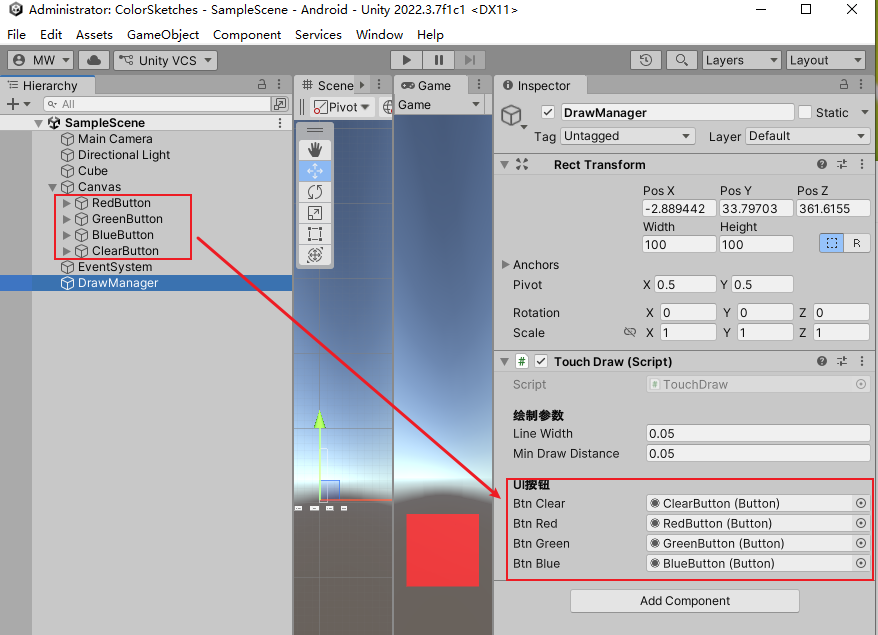
cs
using System.Collections.Generic;
using UnityEngine;
using UnityEngine.UI;
using UnityEngine.EventSystems;

public class TouchDraw : MonoBehaviour
{
    [Header("绘制参数")]
    public float lineWidth = 0.15f;
    public float minDrawDistance = 0.05f;

    [Header("UI按钮")]
    public Button btnClear;
    public Button btnRed;
    public Button btnGreen;
    public Button btnBlue;

    private Color nowColor;
    private LineRenderer curLine;
    private List<Vector3> pointList = new List<Vector3>();
    private List<GameObject> allLineObjects = new List<GameObject>();
    private Material lineMat;

    void Start()
    {
        // 初始化材质,解决颜色异常
        lineMat = new Material(Shader.Find("Sprites/Default"));
        nowColor = Color.red;
        lineMat.color = nowColor;

        // 按钮绑定
        if (btnClear != null) btnClear.onClick.AddListener(ClearAllDraw);
        if (btnRed != null) btnRed.onClick.AddListener(() => SetColor(Color.red));
        if (btnGreen != null) btnGreen.onClick.AddListener(() => SetColor(Color.green));
        if (btnBlue != null) btnBlue.onClick.AddListener(() => SetColor(Color.blue));
    }

    void Update()
    {
        // 手机触摸判断UI
        if (Input.touchCount > 0)
        {
            Touch touch = Input.GetTouch(0);
            if (EventSystem.current.IsPointerOverGameObject(touch.fingerId))
            {
                EndDraw();
                return;
            }

            if (touch.phase == TouchPhase.Began)
                BeginDraw();
            else if (touch.phase == TouchPhase.Moved)
                OnDrawing();
            else if (touch.phase == TouchPhase.Ended || touch.phase == TouchPhase.Canceled)
                EndDraw();
        }
        // 电脑鼠标判断UI
        else
        {
            if (EventSystem.current.IsPointerOverGameObject())
            {
                EndDraw();
                return;
            }

            if (Input.GetMouseButtonDown(0))
                BeginDraw();
            else if (Input.GetMouseButton(0))
                OnDrawing();
            else if (Input.GetMouseButtonUp(0))
                EndDraw();
        }
    }

    void SetColor(Color color)
    {
        nowColor = color;
        lineMat.color = nowColor;
    }

    void BeginDraw()
    {
        pointList.Clear();
        GameObject lineGo = new GameObject("DrawLine");
        curLine = lineGo.AddComponent<LineRenderer>();

        curLine.useWorldSpace = true;
        curLine.startWidth = lineWidth;
        curLine.endWidth = lineWidth;
        curLine.positionCount = 0;
        curLine.material = lineMat;

        allLineObjects.Add(lineGo);
    }

    void OnDrawing()
    {
        if (curLine == null) return;

        Vector3 screenPos = Input.mousePosition;
        screenPos.z = 10f;
        Vector3 worldPos = Camera.main.ScreenToWorldPoint(screenPos);

        if (pointList.Count > 0 && Vector3.Distance(worldPos, pointList[pointList.Count - 1]) < minDrawDistance)
            return;

        pointList.Add(worldPos);
        curLine.positionCount = pointList.Count;
        curLine.SetPosition(pointList.Count - 1, worldPos);
    }

    void EndDraw()
    {
        curLine = null;
    }

    public void ClearAllDraw()
    {
        foreach (var go in allLineObjects)
        {
            if (go != null) Destroy(go);
        }
        allLineObjects.Clear();
        pointList.Clear();
        curLine = null;
    }

    private void OnDestroy()
    {
        if (lineMat != null) Destroy(lineMat);
    }
}