SuperMap iClient3D for Cesium 如何限制相机位置在边界内
功能介绍
Cesium 中,操作相机时,如果操作不当惠导致相机乱飞,找不到预设的场景,而且Cesium 中也没有可以限制相机的接口,本篇文章通过每帧检测相机位置,实现了将相机限制在了矩形边界内。
效果展示
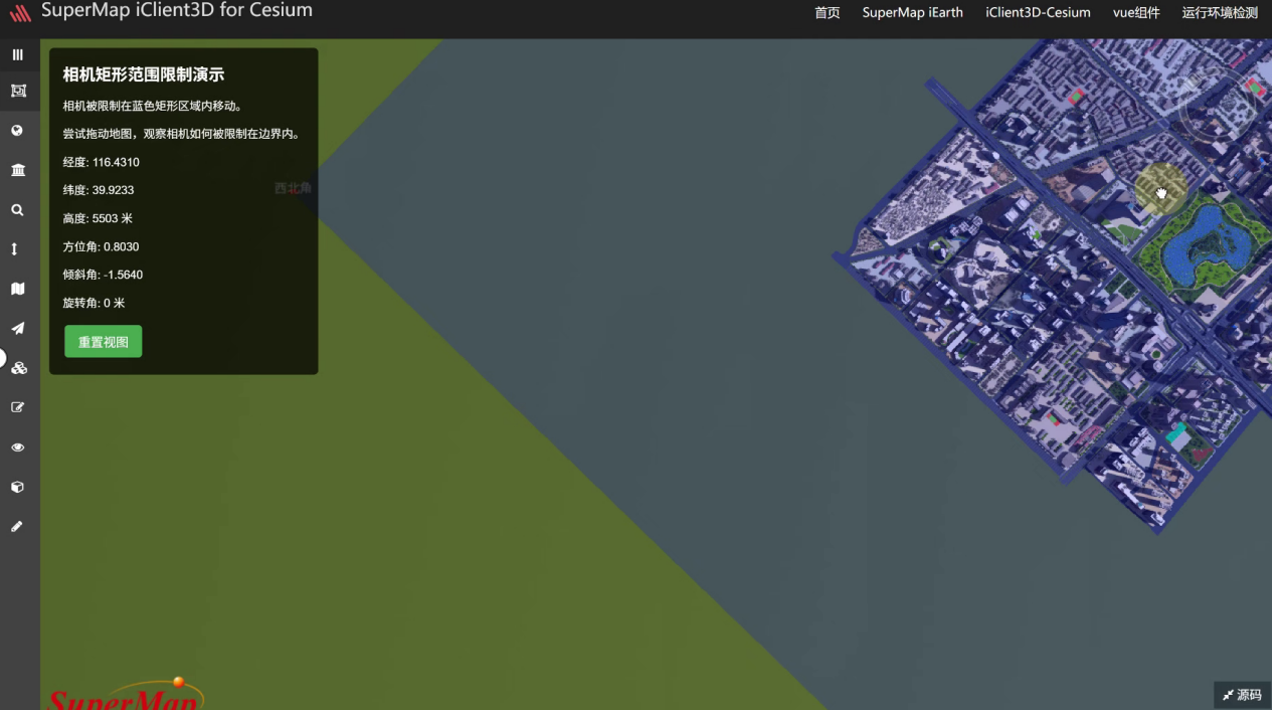
实现思路
主要实现思路是通过viewer.scene.postUpdate方法注册了一个检测相机位置的方法,每当相机超出了设置的位置就会被强制拉回范围内
设置限制位置
首先设置一个变量确定好相机可以移动的边界位置。
javascript
 // 定义矩形区域 (经度, 纬度)
  const boundary = {
       west: -120,   // 西边界经度
       south: 30,    // 南边界纬度
       east: -100,   // 东边界经度
       north: 50     // 北边界纬度
   };
获取相机位置并且限制经度在边界内
首先通过viewer.camera.position获取相机位置,然后和boundary 进行比较,看是否超出了范围,如果超出了范围就通过viewer.camera.setView将相机拉回范围内。
javascript
  // 相机限制函数
 function constrainCameraToBoundary() {
      const position = viewer.camera.position;
      const cartographicPosition = Cesium.Cartographic.fromCartesian(position);

      // 获取当前相机位置的经纬度
      let longitude = Cesium.Math.toDegrees(cartographicPosition.longitude);
      let latitude = Cesium.Math.toDegrees(cartographicPosition.latitude);
      let height = cartographicPosition.height;
      let heading = viewer.camera.heading;
      let pitch = viewer.camera.pitch;
      let roll = viewer.camera.roll;

      // 限制经度在边界内
      if (longitude < boundary.west) {
          longitude = boundary.west;
      } else if (longitude > boundary.east) {
          longitude = boundary.east;
      }

      // 限制纬度在边界内
      if (latitude < boundary.south) {
          latitude = boundary.south;
      } else if (latitude > boundary.north) {
          latitude = boundary.north;
      }
      // 如果相机超出了边界,将其拉回边界内
      if (longitude !== Cesium.Math.toDegrees(cartographicPosition.longitude) ||
          latitude !== Cesium.Math.toDegrees(cartographicPosition.latitude)) {

          // 保持相机高度不变,只调整水平位置
          const newPosition = Cesium.Cartesian3.fromDegrees(longitude, latitude, height);
          viewer.camera.setView({
              destination: newPosition,
              orientation:{
                    heading:0,
                 		 roll :  6.283185307179586,
                     pitch : viewer.camera.pitch,
              }
            }
          )
      }
  }
注册监听事件
将检测相机位置事件注册到场景每帧更新事件中。只要相机超出范围就被拉回之前的位置。
javascript
 // 注册每帧更新事件
viewer.scene.postUpdate.addEventListener(constrainCameraToBoundary);
完整代码
javascript
<!DOCTYPE html>
<html lang="zh-CN">
<head>
 <meta charset="UTF-8">
 <meta name="viewport" content="width=device-width, initial-scale=1.0">
 <title>Cesium 相机矩形范围限制</title>
   <script src="http://support.supermap.com.cn:8090/webgl/Cesium/Build/Cesium/Cesium.js"> </script>
 <link href="http://support.supermap.com.cn:8090/webgl/Cesium/Build/Cesium/Widgets/widgets.css" rel="stylesheet">
 <style>
     body {
         margin: 0;
         padding: 0;
         overflow: hidden;
         font-family: Arial, sans-serif;
     }
     #cesiumContainer {
         position: absolute;
         width: 100%;
         height: 100%;
     }
     #infoPanel {
         position: absolute;
         top: 10px;
         left: 10px;
         background: rgba(0, 0, 0, 0.7);
         color: white;
         padding: 15px;
         border-radius: 5px;
         z-index: 100;
         max-width: 300px;
     }
     h1 {
         font-size: 18px;
         margin-top: 0;
     }
     .boundary-line {
         position: absolute;
         pointer-events: none;
     }
     button {
         background: #4CAF50;
         border: none;
         color: white;
         padding: 8px 15px;
         text-align: center;
         text-decoration: none;
         display: inline-block;
         font-size: 14px;
         margin: 4px 2px;
         cursor: pointer;
         border-radius: 4px;
     }
 </style>
</head>
<body>
 <div id="cesiumContainer"></div>
 <div id="infoPanel">
     <h1>相机矩形范围限制演示</h1>
     <p>相机被限制在蓝色矩形区域内移动。</p>
     <p>尝试拖动地图,观察相机如何被限制在边界内。</p>
     <div id="coordinates">
         <p>经度: <span id="longitude">--</span></p>
         <p>纬度: <span id="latitude">--</span></p>
         <p>高度: <span id="height">--</span> 米</p>
         <p>方位角: <span id="heading">--</span></p>
         <p>倾斜角: <span id="pitch">--</span></p>
         <p>旋转角: <span id="roll">--</span> 米</p>
     </div>
     <button id="resetView">重置视图</button>
 </div>

 <script>
     // 初始化Cesium视图
     const viewer = new Cesium.Viewer('cesiumContainer', {
         terrainProvider: Cesium.createWorldTerrain()
     });

     // 禁用默认的相机控制限制
     viewer.scene.screenSpaceCameraController.enableTranslate = true;
     viewer.scene.screenSpaceCameraController.enableLook = true;
     viewer.scene.screenSpaceCameraController.enableTilt = true;
     viewer.scene.screenSpaceCameraController.enableZoom = true;

     // 定义矩形区域 (经度, 纬度)
     const boundary = {
         west: -120,   // 西边界经度
         south: 30,    // 南边界纬度
         east: -100,   // 东边界经度
         north: 50     // 北边界纬度
     };

     // 计算矩形中心点
     const centerLongitude = (boundary.west + boundary.east) / 2;
     const centerLatitude = (boundary.south + boundary.north) / 2;

     // 设置初始相机位置到矩形中心
     viewer.camera.setView({
         destination: Cesium.Cartesian3.fromDegrees(centerLongitude, centerLatitude, 1500000) // 高度设为1500公里
     });

     // 绘制矩形边界
     const boundaryPolygon = viewer.entities.add({
         polygon: {
             hierarchy: [
                 new Cesium.Cartesian3.fromDegrees(boundary.west, boundary.south),
                 new Cesium.Cartesian3.fromDegrees(boundary.east, boundary.south),
                 new Cesium.Cartesian3.fromDegrees(boundary.east, boundary.north),
                 new Cesium.Cartesian3.fromDegrees(boundary.west, boundary.north)
             ],
             material: Cesium.Color.BLUE.withAlpha(0.2),
             outline: true,
             outlineColor: Cesium.Color.BLUE
         }
     });

     // 相机限制函数
     function constrainCameraToBoundary() {
         const position = viewer.camera.position;
         const cartographicPosition = Cesium.Cartographic.fromCartesian(position);

         // 获取当前相机位置的经纬度
         let longitude = Cesium.Math.toDegrees(cartographicPosition.longitude);
         let latitude = Cesium.Math.toDegrees(cartographicPosition.latitude);
         let height = cartographicPosition.height;
         let heading = viewer.camera.heading;
         let pitch = viewer.camera.pitch;
         let roll = viewer.camera.roll;

         // 更新UI显示
         document.getElementById('longitude').textContent = longitude.toFixed(4);
         document.getElementById('latitude').textContent = latitude.toFixed(4);
         document.getElementById('height').textContent = Math.round(height);
          document.getElementById('heading').textContent = heading.toFixed(4);
         document.getElementById('pitch').textContent = pitch.toFixed(4);
         document.getElementById('roll').textContent = Math.round(roll);
         // 限制经度在边界内
         if (longitude < boundary.west) {
             longitude = boundary.west;
         } else if (longitude > boundary.east) {
             longitude = boundary.east;
         }

         // 限制纬度在边界内
         if (latitude < boundary.south) {
             latitude = boundary.south;
         } else if (latitude > boundary.north) {
             latitude = boundary.north;
         }
         // 如果相机超出了边界,将其拉回边界内
         if (longitude !== Cesium.Math.toDegrees(cartographicPosition.longitude) ||
             latitude !== Cesium.Math.toDegrees(cartographicPosition.latitude)) {

             // 保持相机高度不变,只调整水平位置
             const newPosition = Cesium.Cartesian3.fromDegrees(longitude, latitude, height);
             // viewer.camera.position = newPosition;
             // console.log(viewer.camera)
             // 保持相机方向不变
             // viewer.camera.direction = viewer.camera.direction.clone();
             // viewer.camera.up = viewer.camera.up.clone();
             // viewer.camera.heading = 0
             // viewer.camera.roll = 0
             viewer.camera.setView({
                 destination: newPosition,
                 orientation:{
                       heading:0,
                     roll :  6.283185307179586,
                        pitch : viewer.camera.pitch,
                 }

             }

             )
         }
     }

     // 注册每帧更新事件
     viewer.scene.postUpdate.addEventListener(constrainCameraToBoundary);

     // 重置视图按钮
     document.getElementById('resetView').addEventListener('click', function() {
         viewer.camera.setView({
             destination: Cesium.Cartesian3.fromDegrees(centerLongitude, centerLatitude, 1500000)
         });
     });

     // 添加一些示例标记以增强可视化
     const markers = [
         {lon: boundary.west, lat: boundary.south, name: "西南角"},
         {lon: boundary.east, lat: boundary.south, name: "东南角"},
         {lon: boundary.east, lat: boundary.north, name: "东北角"},
         {lon: boundary.west, lat: boundary.north, name: "西北角"}
     ];

     markers.forEach(marker => {
         viewer.entities.add({
             position: Cesium.Cartesian3.fromDegrees(marker.lon, marker.lat),
             point: {
                 pixelSize: 10,
                 color: Cesium.Color.RED
             },
             label: {
                 text: marker.name,
                 font: '14px Helvetica',
                 fillColor: Cesium.Color.WHITE,
                 horizontalOrigin: Cesium.HorizontalOrigin.CENTER,
                 verticalOrigin: Cesium.VerticalOrigin.BOTTOM
             }
         });
     });
 </script>
</body>
</html>