一个程序
cpp
#include<stdio.h>
#include<string.h>
int main()
{
        FILE *fd=fopen("hello.txt","w");
        if(fd==NULL)
        {
           return 1;
        }
        const char *msg="hello world\n";
        fwrite(msg,1,strlen(msg)+1,fd);
        fclose(fd);


        return 0;
}
运行程序之后查看一下文件的内容

在上面的程序当中,我们以写的方式打开了一个文件,如果文件没有建立会自动帮你建立,而且以写的方式打开的话你多次运行程序的话会将写的内容覆盖,如果想不被覆盖的话可以采用追加的方式打开文件,这都是C语言的内容,我们简单的复习一下,接下来才是重点
为什么我们在读一个文件的时候需要先打开文件,等到程序结束之后我们又要关闭文件?原因就是我们的文件是在磁盘上面的,当我们要写/读文件的时候,打开文件实际上就是将文件加载到内存,关闭就是将文件又写回磁盘上,这也是我们在window电脑上面写完文文件需要点击保存的原因
下面我们演示一下不关闭文件就无法写入成功的情况
cpp
#include<stdio.h>
#include<string.h>
#include<unistd.h>
int main()
{
        FILE *fd=fopen("hello.txt","w");
        if(fd==NULL)
        {
           return 1;
        }
        const char *msg="hello world";
        fwrite(msg,1,strlen(msg)+1,fd);
        //fclose(fd);
        _exit(0);

        //return 0;     //不能写这个,写这个一样回刷新缓冲区,看不见不关闭文件就写写失败的现象

}
运行结果

这个时候我们发现再查看文件的内容的话就显示为空了,在文件系统当中,在内存当中,存在一个文件缓冲区的地方,当我们一直写文件的时候,内容首先回被写到缓冲区当中,当满足刷新条件的时候,就会将缓冲区里面的内容写到磁盘上面去,这样能够避免频繁的I/O导致效率的降低
将内容打印到显示器
在linux中,有一切皆文件的说法,同样的,我们的标准输入(stdin),标准输出(stdout),标准错误(stderror)也是一个文件对象的指针

其中,标准输入就是我们的键盘,stdout就是显示器,stderr暂时不介绍,下面展示集中将文件打印到显示器的操作
cpp
#include<stdio.h>
#include<string.h>

int main()
{
        printf("hello world\n");
        fprintf(stdout,"hello world\n");
        const char *message="hello world\n";
        fwrite(message,1,strlen(message),stdout);


        return 0;
}
运行结果

文件操作的系统接口
除了C语言标准的文件接口,我们还有系统级别的文件调用接口

参数介绍
pathname:想要创建的文件名字,这里是加上路径一起的
flags:表示想要用什么样的方式去创建文件,通常有下面的几种方式:
O_CREAT: 不存在就创建
O_TRUNC 清空文件的内容
O_APPEND 采用追加的方式
mode:表示创建文件的使用权限
关于文件的使用权,在这里介绍一下

上面的红色的方框里面就是文件的权限
第一个字符:-表示是文件 d表示是目录
第二到四:表示所属者的权限,rwx分别表示读,写,执行
第五到七:表示所属组成员的权限,rwx分别表示读,写,执行
第八到十:表示其他用户的权限,rwx分别表示读,写,执行
现在我们来写一个程序
cpp
#include<stdio.h>
#include <sys/types.h>
#include <sys/stat.h>
#include <fcntl.h>
#include<string.h>
#include<unistd.h>

int main()
{
        int fd=open("log.txt",O_CREAT|O_TRUNC|O_WRONLY,0666);
        const char *buffer="hello world\n";
        write(fd,buffer,strlen(buffer));
        close(fd);

        return 0;
}
查看一下文件的内容

我们解释一下上面打开文件的时候里面的参数
O_CREAT|O_TRUNC|O_WRONLY:这里表示没有就创建,先清空文件的内容,用写的方式
为什么用"|"链接,理解为二进制的方式,每一个二进制比特位代表一种方式,或运算不就是把他们都结合起来吗
后面的0666是设置文件的权限,都是以二进制的方式,111 111 111就是拥有者,所属组,其他人的读,写,执行都设置成为1,同样,666的二进制是110 110 110,分析方法和上面的一样

但是发现文件的权限不是这样的呀,这是因为出与安全的考虑,最后总是比设置的权限要低一些,如果想要设置的话,可以像下面的这样
cpp
#include<stdio.h>
#include <sys/types.h>
#include <sys/stat.h>
#include <fcntl.h>
#include<string.h>
#include<unistd.h>

int main()
{
        //umask(0);                         //设置umask的值为0
        int fd=open("log.txt",O_APPEND|O_TRUNC|O_WRONLY,0666);
        const char *buffer="hello world\n";
        write(fd,buffer,strlen(buffer));
        chmod("log.txt",0666);  //改变一下权限
        close(fd);

        return 0;
}
文件fd
下面看一个程序
cpp
#include<stdio.h>
#include <sys/types.h>
#include <sys/stat.h>
#include <fcntl.h>
#include<string.h>
#include<unistd.h>

int main()
{
        //umask(0);                         //设置umask的值为0
        int fd=open("log.txt",O_APPEND|O_TRUNC|O_WRONLY,0666);
        printf("the fd of log.txt is %d\n",fd);
        close(fd);

        return 0;
}
运行结果

我们发现fd居然是一个数字,其实这个数字是一个下标,这个下标是一个文件指针数组的下标,请看下图
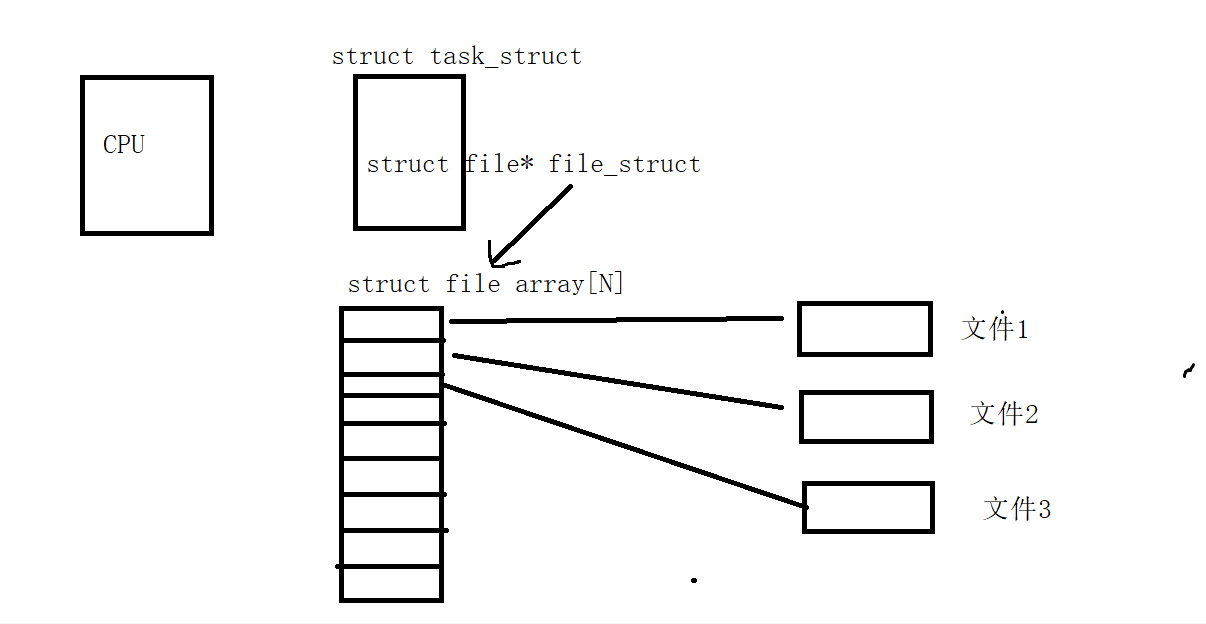
在每一个进程的PCB里面,都有有一个文件指针变量指向一个文件数组,fd是这个文件数组的下标,这样就能访问到对应的文件,下面再看一个文件
cpp
#include<stdio.h>
#include <sys/types.h>
#include <sys/stat.h>
#include <fcntl.h>
#include<string.h>
#include<unistd.h>

int main()
{
        //umask(0);                         //设置umask的值为0
        int fd1=open("log1.txt",O_CREAT|O_TRUNC|O_WRONLY,0666);
        int fd2=open("log2.txt",O_CREAT|O_TRUNC|O_WRONLY,0666);
        int fd3=open("log3.txt",O_CREAT|O_TRUNC|O_WRONLY,0666);
        int fd4=open("log4.txt",O_CREAT|O_TRUNC|O_WRONLY,0666);
        int fd5=open("log5.txt",O_CREAT|O_TRUNC|O_WRONLY,0666);
        printf("the fd of log1.txt is %d\n",fd1);
        printf("the fd of log2.txt is %d\n",fd2);
        printf("the fd of log3.txt is %d\n",fd3);
        printf("the fd of log4.txt is %d\n",fd4);
        printf("the fd of log5.txt is %d\n",fd5);
        close(fd1);
        close(fd2);
        close(fd3);
        close(fd4);
        close(fd5);

        return 0;
}
运行结果
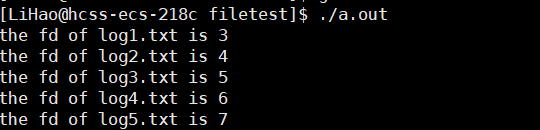
文件fd都是连续晚上可以增长的,看了上面的文件fds数组,可以理解,但是为什么是从3开始,那0,1,2有是什么嘞?其实0,1,2分别对应的就是stdin,stdout,stderr三个,但是,这是默认情况下,系统回给文件分配最小并且没有使用的fd,下面我们关闭一下stderr
cpp
#include<stdio.h>
#include <sys/types.h>
#include <sys/stat.h>
#include <fcntl.h>
#include<string.h>
#include<unistd.h>

int main()
{
        close(2);                //关闭一下stderr
        int fd1=open("log1.txt",O_CREAT|O_TRUNC|O_WRONLY,0666);
        int fd2=open("log2.txt",O_CREAT|O_TRUNC|O_WRONLY,0666);
        int fd3=open("log3.txt",O_CREAT|O_TRUNC|O_WRONLY,0666);
        int fd4=open("log4.txt",O_CREAT|O_TRUNC|O_WRONLY,0666);
        int fd5=open("log5.txt",O_CREAT|O_TRUNC|O_WRONLY,0666);
        printf("the fd of log1.txt is %d\n",fd1);
        printf("the fd of log2.txt is %d\n",fd2);
        printf("the fd of log3.txt is %d\n",fd3);
        printf("the fd of log4.txt is %d\n",fd4);
        printf("the fd of log5.txt is %d\n",fd5);
        close(fd1);
        close(fd2);
        close(fd3);
        close(fd4);
        close(fd5);

        return 0;
}
运行结果:
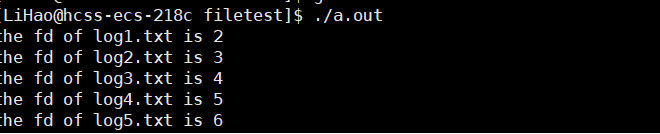
文件fd便开始从2开始了
但是如果我们关闭1的话,就会出现不一样的状况
cpp
#include<stdio.h>
#include <sys/types.h>
#include <sys/stat.h>
#include <fcntl.h>
#include<string.h>
#include<unistd.h>

int main()
{
        close(1);                 //关闭文件stdout对应的文件
        int fd1=open("log1.txt",O_CREAT|O_TRUNC|O_WRONLY,0666);
        int fd2=open("log2.txt",O_CREAT|O_TRUNC|O_WRONLY,0666);
        int fd3=open("log3.txt",O_CREAT|O_TRUNC|O_WRONLY,0666);
        int fd4=open("log4.txt",O_CREAT|O_TRUNC|O_WRONLY,0666);
        int fd5=open("log5.txt",O_CREAT|O_TRUNC|O_WRONLY,0666);
        printf("the fd of log1.txt is %d\n",fd1);
        printf("the fd of log2.txt is %d\n",fd2);
        printf("the fd of log3.txt is %d\n",fd3);
        printf("the fd of log4.txt is %d\n",fd4);
        printf("the fd of log5.txt is %d\n",fd5);
        close(fd1);
        close(fd2);
        close(fd3);
        close(fd4);
        close(fd5);

        return 0;
}
但是运行的时候却是什么结果都没有出现

但是,内容却被打印到log1.txt文件当中去了

其实我们语言层的每一个函数再系统都有一个封装,printf底层可能就是write函数,在写的时候文件默认是stdout对对应的1,当我们改变了fd,就写到别的文件当中去了,这也叫做重定向
重定向
我们结合上卖弄的例子再来理解一下重定向
原本fd=1默认是指向stdout的,但是我们关闭fd=1的文件,在以新建的方式打开文件,fd=1就会分配给新的文件,printf底层默认封装的一个函数参数中就有fd=1,这个时候当我们调用printf的时候,想要打印的内容就打印到了新建的文件当中去
cpp
int dup2(int oldfd, int newfd);这个函数的作用就是让newfd指向oldfd所指向的文件,如果newfd的文件是打开的,就先关闭,但是oldfd不会关闭,也就是说,oldfd和newfd指向同一个文件
cpp
#include<stdio.h>
#include <sys/types.h>
#include <sys/stat.h>
#include <fcntl.h>
#include<string.h>
#include<unistd.h>

int main()
{

        int fd=open("log.txt",O_CREAT|O_TRUNC|O_WRONLY,0666);
        dup2(fd,1);
        printf("hello world\n");
        fflush(stdout);                                  //需要刷新一下缓冲区,当指向文件的时候,需要等缓冲区满了之后才刷新
        close(1);                                        //不管有没有\n,但是指向的是stdout的时候,只要有\n就会刷新
        close(fd);

        return 0;
}
运行查看log.txt文件

用户级缓冲区
在上面我们提到关于文件系统调用,当我们在写文件的时候会有一个系统级别的缓冲区,同样的,我们在使用C语言的文件操作的时候,也存在一个用户级别的缓冲区,当我们调用C语言的文件操作的时候,比如在写文件的时候,先是需要将内容写到用户级别的缓冲区当中,然后等到刷新,刷新到系统级别的缓冲区,再刷新到磁盘上面去
cpp
#include<iostream>
  2 #include<cstdio>
  3 #include<unistd.h>
  4 using namespace std;
  5
  6
  7 int main()
  8 {
  9         FILE *pf=fopen("log.txt","w");
 10         fprintf(pf,"hello world");         //写入用户级别的缓冲区
 11
 12         int fd=fileno(pf);
 13         fsync(fd);                    //刷新一下系统级别的缓冲区
 14
 15
 16         _exit(0);                      //不能用return 0或exit,会刷新用户还有系统级别
 17                                        //的缓冲区
 18 }
运行

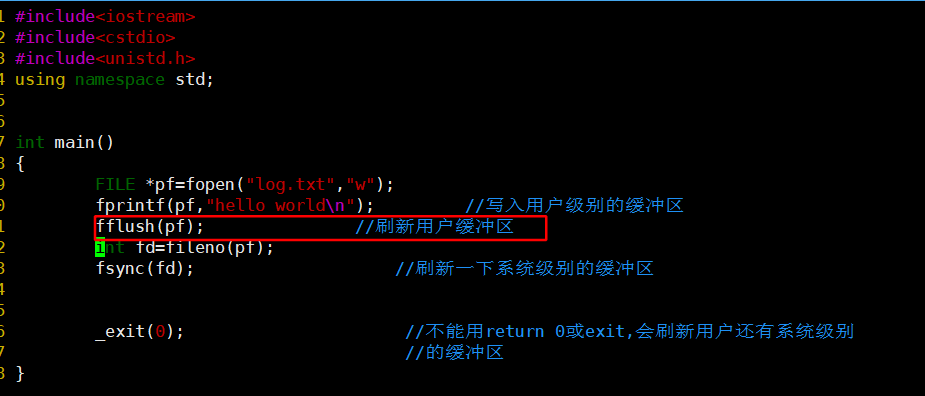
我们查看log.txt文件里面确是发现什么也没有,这是因为当我们调用C语言的文件函数之后,刷新的是系统的缓冲区,但是内容还在用户级别的缓冲区
查看一下文件内容

在上面的程序当中,我们先刷新了用户缓冲区,再刷新文件缓冲区,这个时候内容才能够写到文件当中去
下面我们再看一个程序
cpp
#include<iostream>
  2 #include<cstdio>
  3 #include<unistd.h>
  4 #include<cstring>
  5 using namespace std;
  6
  7
  8 int main()
  9 {
 10         printf("hello printf\n");
 11         fprintf(stdout,"hello fprintf\n");
 12         const char *message="hello fwrite\n";
 13         fwrite(message,1,strlen(message),stdout);
 14
 15         const char *w="hello write\n";
 16         write(1,w,strlen(w));
 17         fork();
 18
 19         return 0;
 20 }
直接运行
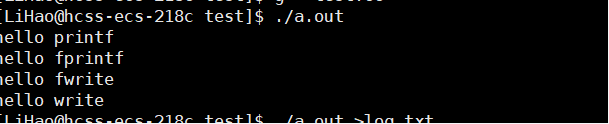
当我们直接运行的时候,由于是输入到显示器上的,遇到换行就刷新,但是当我们重新定向到文件当中去的时候,就会出现不一样的效果
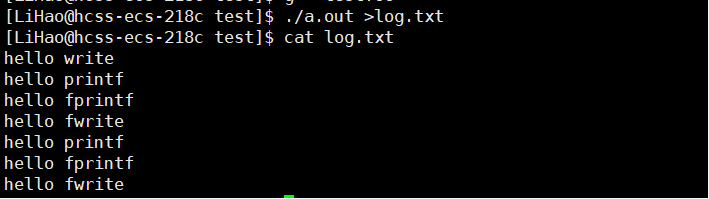
我们发现调用C语言的打印了两次,系统调用的打印了一次,这是因为在fork之前调用C语言的时候内容都在用户缓冲区当中,当fork之后出现父子进程,父子进程分别都有用户缓冲区,内容相同,结束的时候各自刷新,系统调用的是系统自己有的,和父子进程没有关系,于是调用系统的只是调用了一份