【OpenClaw】通过 Nanobot 源码学习架构---(10)Heartbeat
0x00 概要
OpenClaw 应该有40万行代码,阅读理解起来难度过大,因此,本系列通过Nanobot来学习 OpenClaw 的特色。
Nanobot 是由香港大学数据科学实验室(HKUDS)开源的超轻量级个人 AI 助手框架,定位为"Ultra-Lightweight OpenClaw"。非常适合学习Agent架构。
HeartbeatService 组件是 Nanobot 实现 "周期性任务检测与执行" 的核心模块,比如,根据 HEARTBEAT.md 来周期性唤醒Nanobot,执行操作:监控在运行吗?日志里有报错吗?如果出问题了,Agent 会主动给你发消息。
通过_HEARTBEAT_TOOL+LLM 工具调用的轻量化设计,HeartbeatService 组件仅用不到 200 行代码就完成了 OpenClaw 同等核心的 "定时唤醒 Agent 检查任务" 能力。
注:因为最近看的文章太多,所以如果有遗漏参考资料,还请读者指出,谢谢。
0x01 基本功能
1.1 整体作用
HeartbeatService是 Nanobot 的周期性任务检测与执行服务,其放弃传统的 "硬编码规则解析",改用 LLM 驱动的智能决策,适配自然语言描述的任务场景;基于 asyncio 实现轻量化的周期性调度,无需依赖 Celery 等重型定时任务框架。
HeartbeatService的核心职责/特色是:
-
按配置的时间间隔(默认 30 分钟)自动唤醒,读取工作目录下的
HEARTBEAT.md文件,并执行 HEARTBEAT.md 中的周期性任务; -
两阶段执行模式:
HeartbeatService采用 "两阶段执行" 架构,将 "决策" 和 "执行" 解耦,既保证决策的智能化,又实现执行逻辑的解耦: -
LLM 驱动的智能决策:放弃传统的 "关键字匹配 / 正则解析" 方式,通过 LLM + 虚拟工具调用的方式分析
HEARTBEAT.md内容,判断是否有任务需要执行,避免了 "HEARTBEAT_OK" 这类硬编码令牌的不稳定性,适配自然语言描述的任务场景。 -
灵活的回调执行扩展:通过
on_execute和on_notify回调函数解耦 "任务执行" 和 "结果推送" 逻辑,无需修改心跳服务核心代码即可适配不同的执行 / 推送策略。- 若检测到任务,触发预设的执行回调(
on_execute),通过 Agent 完整执行任务; - 执行完成后触发通知回调(
on_notify),将结果推送至指定通道(如 CLI / 第三方平台);
- 若检测到任务,触发预设的执行回调(
-
支持手动触发心跳检测,兼顾 "自动周期性执行" 和 "手动应急触发" 需求。
1.2 应用场景
HeartbeatService 的应用场景如下:
-
持续监控
- 定期检查某些条件是否满足
- 例如:监控文件变化、API 状态、外部事件等
-
代理任务
- 执行长时间运行的监控或检查任务
- 无需用户持续交互即可主动采取行动
-
主动维护
- 定期整理文件、清理临时数据
- 检查系统健康状况
-
状态同步
- 定期同步外部服务的状态
- 保持本地数据与远程服务的同步
1.3 Claw0
1.3.1 架构
Claw0中,一个定时器线程检查"该不该运行", 然后将任务排入与用户消息相同的队列,其架构如下:
rust
    Main Lane (user input):
        User Input --> lane_lock.acquire() -------> LLM --> Print
                       (blocking: always wins)

    Heartbeat Lane (background thread, 1s poll):
        should_run()?
            |no --> sleep 1s
            |yes
        _execute():
            lane_lock.acquire(blocking=False)
                |fail --> yield (user has priority)
                |success
            build prompt from HEARTBEAT.md + SOUL.md + MEMORY.md
                |
            run_agent_single_turn()
                |
            parse: "HEARTBEAT_OK"? --> suppress
                   meaningful text? --> duplicate? --> suppress
                                           |no
                                       output_queue.append()

    Cron Service (background thread, 1s tick):
        CRON.json --> load jobs --> tick() every 1s
            |
        for each job: enabled? --> due? --> _run_job()
            |
        error? --> consecutive_errors++ --> >=5? --> auto-disable
            |ok
        consecutive_errors = 0 --> log to cron-runs.jsonl
其要点如下:
- Lane 互斥 :
threading.Lock在用户和心跳之间共享. 用户总是赢 (阻塞获取); 心跳让步 (非阻塞获取). - should_run() : 每次心跳尝试前的 4 个前置条件检查.
- HEARTBEAT_OK: agent 用来表示"没有需要报告的内容"的约定.
- CronService : 3 种调度类型 (
at,every,cron), 连续错误 5 次后自动禁用. - 输出队列: 后台结果通过线程安全的列表输送到 REPL.
1.3.2 核心架构
Lane 互斥
最重要的设计原则: 用户消息始终优先.
python
lane_lock = threading.Lock()

# Main lane: 阻塞获取. 用户始终能进入.
lane_lock.acquire()
try:
    # 处理用户消息, 调用 LLM
finally:
    lane_lock.release()

# Heartbeat lane: 非阻塞获取. 用户活跃时让步.
def _execute(self) -> None:
    acquired = self.lane_lock.acquire(blocking=False)
    if not acquired:
        return   # 用户持有锁, 跳过本次心跳
    self.running = True
    try:
        instructions, sys_prompt = self._build_heartbeat_prompt()
        response = run_agent_single_turn(instructions, sys_prompt)
        meaningful = self._parse_response(response)
        if meaningful and meaningful.strip() != self._last_output:
            self._last_output = meaningful.strip()
            with self._queue_lock:
                self._output_queue.append(meaningful)
    finally:
        self.running = False
        self.last_run_at = time.time()
        self.lane_lock.release()
前置条件链
四个检查必须全部通过. 锁的检测在 _execute() 中单独进行, 以避免 TOCTOU 竞态条件.
python
def should_run(self) -> tuple[bool, str]:
    if not self.heartbeat_path.exists():
        return False, "HEARTBEAT.md not found"
    if not self.heartbeat_path.read_text(encoding="utf-8").strip():
        return False, "HEARTBEAT.md is empty"

    elapsed = time.time() - self.last_run_at
    if elapsed < self.interval:
        return False, f"interval not elapsed ({self.interval - elapsed:.0f}s remaining)"

    hour = datetime.now().hour
    s, e = self.active_hours
    in_hours = (s <= hour < e) if s <= e else not (e <= hour < s)
    if not in_hours:
        return False, f"outside active hours ({s}:00-{e}:00)"

    if self.running:
        return False, "already running"
    return True, "all checks passed"
1.4 ZeroClaw
我们再看看 ZeroClaw。
下图是来自其官方文档的:"How the daemon keeps components alive"。从中看看 Cron 和 Heartbeat 的思路。
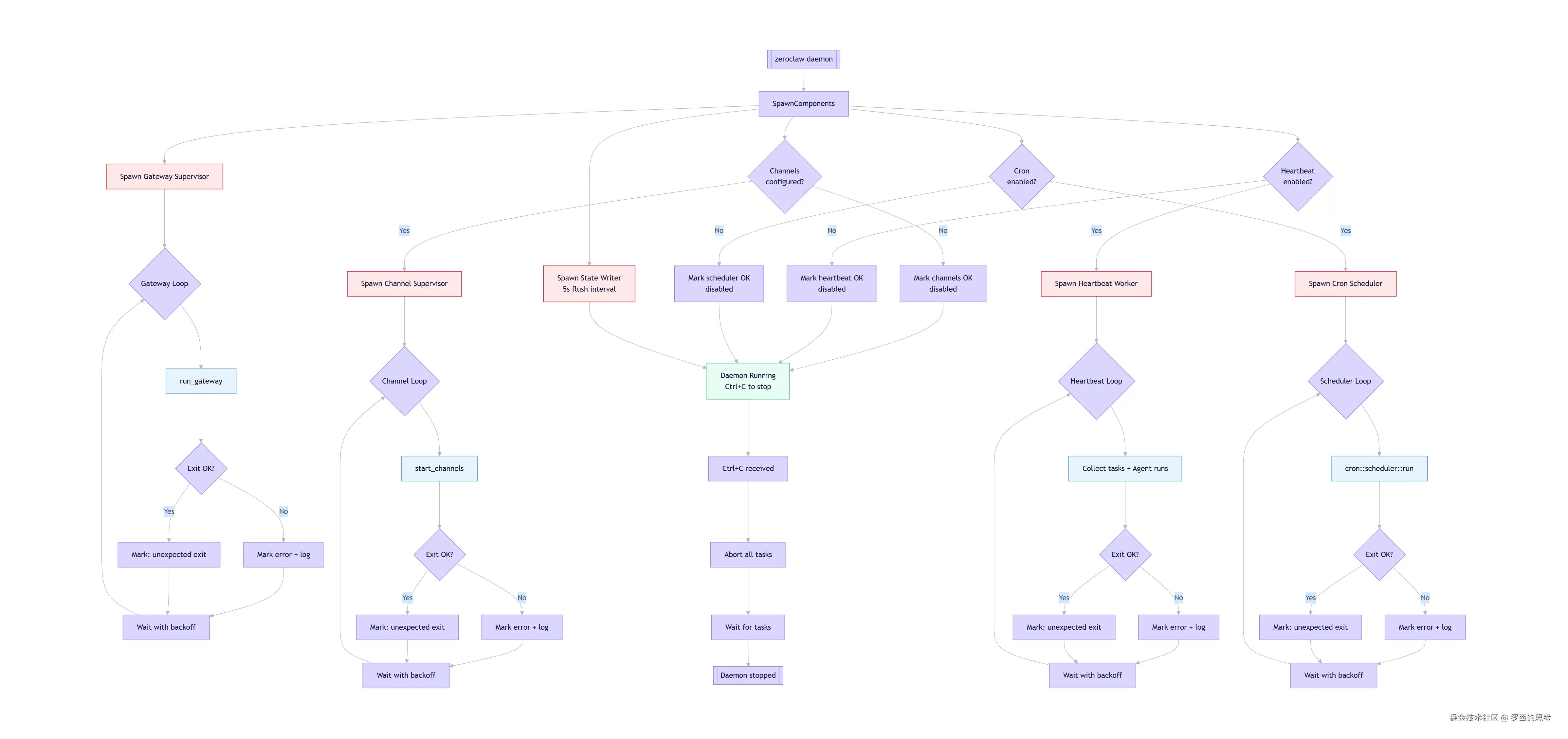
How the daemon keeps components alive
根据 ZeroClaw 的架构设计,这个流程图涵盖了以下核心逻辑:
-
组件并行启动:
- Daemon 启动后会立即并行生成四个核心部分:状态写入器 (每5秒刷新)、网关 、渠道 、心跳 和调度器。
- 条件检查 :渠道、心跳和调度器会根据配置文件(
config.toml)中的设置决定是否启动对应的 Worker。例如,如果未配置 Cron,则直接标记为 OK 并跳过。
-
监督与循环:
- 每个核心组件(Gateway, Channels, Heartbeat, Scheduler)都拥有独立的 Supervisor(监督者) 和 Loop(循环) 。
- 异常处理:如果组件意外退出或报错,系统会记录错误并进行退避等待(Backoff),随后尝试重新进入循环,确保服务的稳定性。
-
核心功能:
- Gateway:负责 HTTP/WebSocket 服务,处理外部连接。
- Channels:连接 Telegram、Discord 等聊天平台。
- Heartbeat :定期执行后台感知任务,赋予 AI "自主意识" 。
- Scheduler :基于 Cron 表达式触发定时任务。
-
优雅退出:
- 当接收到
Ctrl+C信号时,Daemon 会中止所有任务并等待线程结束,确保数据完整保存后停止。
- 当接收到
0x02 详细分析
HeartbeatService 实现了一个周期性的自主唤醒系统,定期检查是否有待处理的任务,无需外部触发。这是一个任务驱动的唤醒机制:
- 通过读取 HEARTBEAT.md 文件了解待办任务
- 使用 LLM 判断是否需要执行这些任务 / 并作相应执行
概要流程如下:
diff
等待 interval_s 秒
↓
HeartbeatService.tick()
↓
HeartbeatService._decide()
↓
输入:HEARTBEAT.md 文件内容
↓
构建 LLM 提示:
- 系统角色:"You are a heartbeat agent."
- 用户输入:HEARTBEAT.md 内容
- 工具:_HEARTBEAT_TOOL
↓
LLM 处理请求
- 分析 HEARTBEAT.md 内容
- 决定是否需要执行任务
- 通过虚拟工具调用返回决策
↓
解析工具调用结果
- act
↓
返回 (action, tasks)
↓
├── Heartbeat: OK
│ (无任务执行)
│
├── 执行任务并通知结果
│ 1. 调用 on_execute
│ 2. 调用 on_notify
│
└── 记录执行失败
2.1 待办任务机制
2.1.1 AGENTS.md
AGENTS.md 文件会用来指导 agent 如何管理 HEARTBEAT.md 文件中的周期性任务。
markdown
## Heartbeat Tasks

`HEARTBEAT.md` is checked every 30 minutes. Use file tools to manage periodic tasks:

- **Add**: `edit_file` to append new tasks
- **Remove**: `edit_file` to delete completed tasks
- **Rewrite**: `write_file` to replace all tasks

When the user asks for a recurring/periodic task, update `HEARTBEAT.md` instead of creating a one-time cron reminder.
2.1.2 HEARTBEAT.md
HEARTBEAT.md是一个标记文件,包含需要定期检查的任务列表,文件位于工作空间根目录,可由agent自主更新。agent 可以使用文件工具(如 edit_file、write_file)更新 HEARTBEAT.md,支持添加、移除或重写周期性任务。
agent 也可以通过技能自动管理心跳任务,例如,当用户请求周期性任务时,agent 会更新 HEARTBEAT.md 而不是创建一次性提醒。
xml
# Heartbeat Tasks

This file is checked every 30 minutes by your nanobot agent.
Add tasks below that you want the agent to work on periodically.

If this file has no tasks (only headers and comments), the agent will skip the heartbeat.

## Active Tasks

<!-- Add your periodic tasks below this line -->


## Completed

<!-- Move completed tasks here or delete them -->
2.1.3 MimiClaw
我们也用MimiClaw 来进行对比验证:
- 心跳服务会定期读取 SPIFFS 上的
HEARTBEAT.md,检查是否有待办事项。如果发现未完成的条目(非空行、非标题、非已勾选的- [x]),就会向 Agent 循环发送提示,让 AI 自主处理。 - 这让 MimiClaw 变成一个主动型助理 --- 把任务写入
HEARTBEAT.md,机器人会在下一次心跳周期自动拾取执行(默认每 30 分钟)。
2.2 两阶段执行模式
HeartbeatService 秉承两阶段执行机制:
- Phase 1 (决策):读取 HEARTBEAT.md,通过 LLM 虚拟工具调用判断是否有活跃任务,返回 "skip" 或 "run" 决策。即:HEARTBEAT.md 内容 → LLM → "skip" 或 "run" 决策
- Phase 2 (执行):只有当 Phase 1 返回 "run" 时才触发任务执行,通过回调函数执行实际的 agent 操作。即,任务摘要 → AgentLoop → 执行结果 → 通知
python
    """
    Periodic heartbeat service that wakes the agent to check for tasks.

    Phase 1 (decision): reads HEARTBEAT.md and asks the LLM --- via a virtual
    tool call --- whether there are active tasks.  This avoids free-text parsing
    and the unreliable HEARTBEAT_OK token.

    Phase 2 (execution): only triggered when Phase 1 returns ``run``.  The
    ``on_execute`` callback runs the task through the full agent loop and
    returns the result to deliver.
    """
        try:
            # Phase 1:调用LLM做决策,获取action和tasks
            action, tasks = await self._decide(content)

            # 若决策为skip(无任务),记录日志并返回
            if action != "run":
                return

            # 若决策为run(有任务),记录日志并执行Phase 2
            # 若配置了执行回调,触发回调执行任务
            if self.on_execute:
                response = await self.on_execute(tasks)
                # 若执行有结果且配置了通知回调,推送结果
                if response and self.on_notify:
                    await self.on_notify(response)
具体流程图如下:
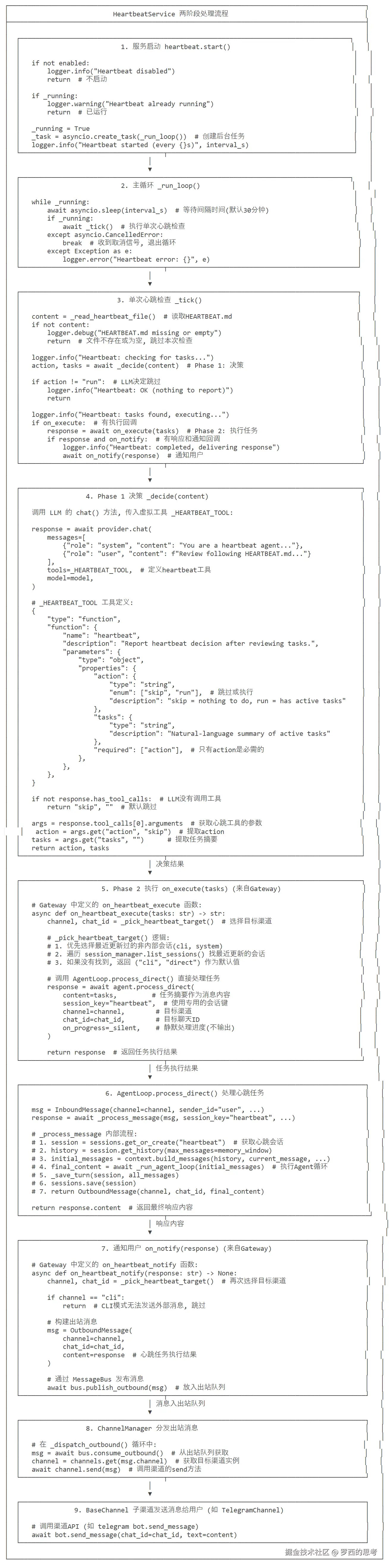
HeartbeatService 完整流程图
2.3 Phase 1
此部分是LLM 调用流程(_decide 方法)。
2.3.1 方法入口
python
async def _decide(self, content: str) -> tuple[str, str]:
    """Phase 1: ask LLM to decide skip/run via virtual tool call."""
2.3.2 步骤 1: 构建请求消息
ini
messages = [
    {
        "role": "system",
        "content": "You are a heartbeat agent. Call heartbeat tool to report your decision."
    },
    {
        "role": "user",
        "content": (
            "Review the following HEARTBEAT.md and decide whether there are active tasks.\n"
            f"{content}"
        )
    },
]- 系统消息:设定角色为 heartbeat agent,明确告知任务
- 用户消息:包含 HEARTBEAT.md 文件内容和用户输入的任务描述
2.3.3 步骤 2: 调用 LLM Provider 的 chat 方法
ini
response = await self.provider.chat(
    messages=messages,
    tools=_HEARTBEAT_TOOL,  # 传入工具定义
    model=self.model,  # 使用配置的模型
)- 调用与主 Agent 相同的 provider 实例
- 传入工具列表,只包含 heartbeat 工具
- 传入模型参数(model、temperature、max_tokens 使用默认值)
- 返回 LLMResponse 对象
2.3.4 步骤 3: 解析工具调用响应
csharp
if not response.has_tool_calls:
    return "skip", ""  # LLM 没有调用工具,返回跳过

args = response.tool_calls[0].arguments  # 获取第一个工具调用的参数
return args.get("action", "skip"), args.get("tasks", "")- 检查是否有工具调用:
response.has_tool_calls - 提取工具调用参数:
response.tool_calls[0].arguments - 解析 action 参数:
args.get("action", "skip") - 解析 tasks 参数:
args.get("tasks", "")
2.3.5 _HEARTBEAT_TOOL
上面步骤2使用了_HEARTBEAT_TOOL,因此我们做特殊分析。
LLM 需要分析 HEARTBEAT.md 中的任务是否需要执行。当时间到,触发回调之后,在 HeartbeatService._decide() 中会显式让LLM调用 _HEARTBEAT_TOOL。
功能
_HEARTBEAT_TOOL 是一个虚拟工具,用于LLM决策跳过或者运行任务,LLM 被要求调用这个工具并返回适当的参数,避免了自由文本解析的不确定性。
_HEARTBEAT_TOOL 定义了action参数(skip或者run)和 task 参数(任务摘要)。根据任务状态决定返回 "skip"(无事可做)或 "run"(有活动任务)。这个定义的核心价值是约束 LLM 的输出格式------ 让原本返回自然语言的 LLM,必须按照固定结构返回 "决策结果",方便代码后续解析,而非人工处理。
内容
_HEARTBEAT_TOOL 的内容如下:
python
"""Heartbeat service - periodic agent wake-up to check for tasks."""

# 定义心跳服务的虚拟工具Schema(OpenAI Function Call格式)
# 核心作用:让LLM通过标准化工具调用的方式返回决策结果,避免自由文本解析的不稳定性
_HEARTBEAT_TOOL = [
    {
        "type": "function",
        "function": {
            "name": "heartbeat",  # 工具名称:固定为heartbeat(LLM调用时必须匹配)
            "description": "Report heartbeat decision after reviewing tasks.",  # 工具描述:告知LLM该工具的用途
            "parameters": {  # 工具参数Schema:定义LLM返回的决策结果格式
                "type": "object",
                "properties": {
                    "action": {  # 核心决策参数:skip(无任务)/run(有任务)
                        "type": "string",
                        "enum": ["skip", "run"],
                        "description": "skip = nothing to do, run = has active tasks",
                    },
                    "tasks": {  # 任务描述参数:仅run时必填,为自然语言的任务摘要
                        "type": "string",
                        "description": "Natural-language summary of active tasks (required for run)",
                    },
                },
                "required": ["action"],  # 强制要求LLM返回action参数
            },
        },
    }
]
如何使用
_HEARTBEAT_TOOL的设计逻辑是:
- 系统提示强制约束 LLM 的行为:告诉它 "你是心跳代理,必须调用 heartbeat 工具",避免 LLM 返回无关的自然语言;
- 用户提示传递决策依据 :把
HEARTBEAT.md的内容作为输入,让 LLM 有分析的素材。
_HEARTBEAT_TOOL的调用逻辑如下:
- 它是 LLM 工具调用的 "契约定义",通过
self.provider.chat的tools参数传入 LLM,LLM 按其规范返回结构化决策结果,代码再解析response.tool_calls获取最终决策;
await self.provider.chat 是_HEARTBEAT_TOOL被 "激活" 的核心:
- LLM 提供商(如 OpenAI)的
chat接口会解析tools参数,理解 "heartbeat 工具" 的调用规范; - LLM 会基于
HEARTBEAT.md内容分析,然后按照_HEARTBEAT_TOOL的参数规范生成工具调用结果(而非普通文本)。
LLM 被赋予的角色是 "heartbeat agent"(心跳代理) ,其唯一职责是:
- 读取
HEARTBEAT.md内容; - 判断是否有活跃任务;
- 按
_HEARTBEAT_TOOL的规范调用heartbeat工具,返回 "skip/run" 决策。
这个角色定位是 Nanobot "超轻量级" 的体现 ------LLM 只做单一决策,不处理复杂任务执行,保证资源消耗最小。
python
    # 核心异步方法:Phase 1 - LLM决策(判断是否有任务需要执行)
    # 参数:content - HEARTBEAT.md的内容
    # 返回值:(action, tasks) - action为skip/run,tasks为任务摘要
    async def _decide(self, content: str) -> tuple[str, str]:
        """Phase 1: ask LLM to decide skip/run via virtual tool call.

        Returns (action, tasks) where action is 'skip' or 'run'.
        """
        # 调用LLM提供商的chat接口,触发虚拟工具调用
        response = await self.provider.chat(
            messages=[
                # 系统提示:告知LLM其角色为心跳代理,必须调用heartbeat工具返回决策
                {"role": "system", "content": "You are a heartbeat agent. Call the heartbeat tool to report your decision."},
                # 用户提示:传入HEARTBEAT.md内容,让LLM分析并决策
                {"role": "user", "content": (
                    "Review the following HEARTBEAT.md and decide whether there are active tasks.\n\n"
                    f"{content}"
                )},
            ],
            tools=_HEARTBEAT_TOOL,  # 指定可用工具为心跳虚拟工具
            model=self.model,  # 指定使用的LLM模型
        )

        # 若LLM未触发工具调用(异常情况),默认返回skip
        if not response.has_tool_calls:
            return "skip", ""

        # 提取LLM工具调用的参数(仅取第一个工具调用结果)
        args = response.tool_calls[0].arguments
        # 返回决策结果:action默认skip,tasks默认空字符串
        return args.get("action", "skip"), args.get("tasks", "")
工具调用流程如下:
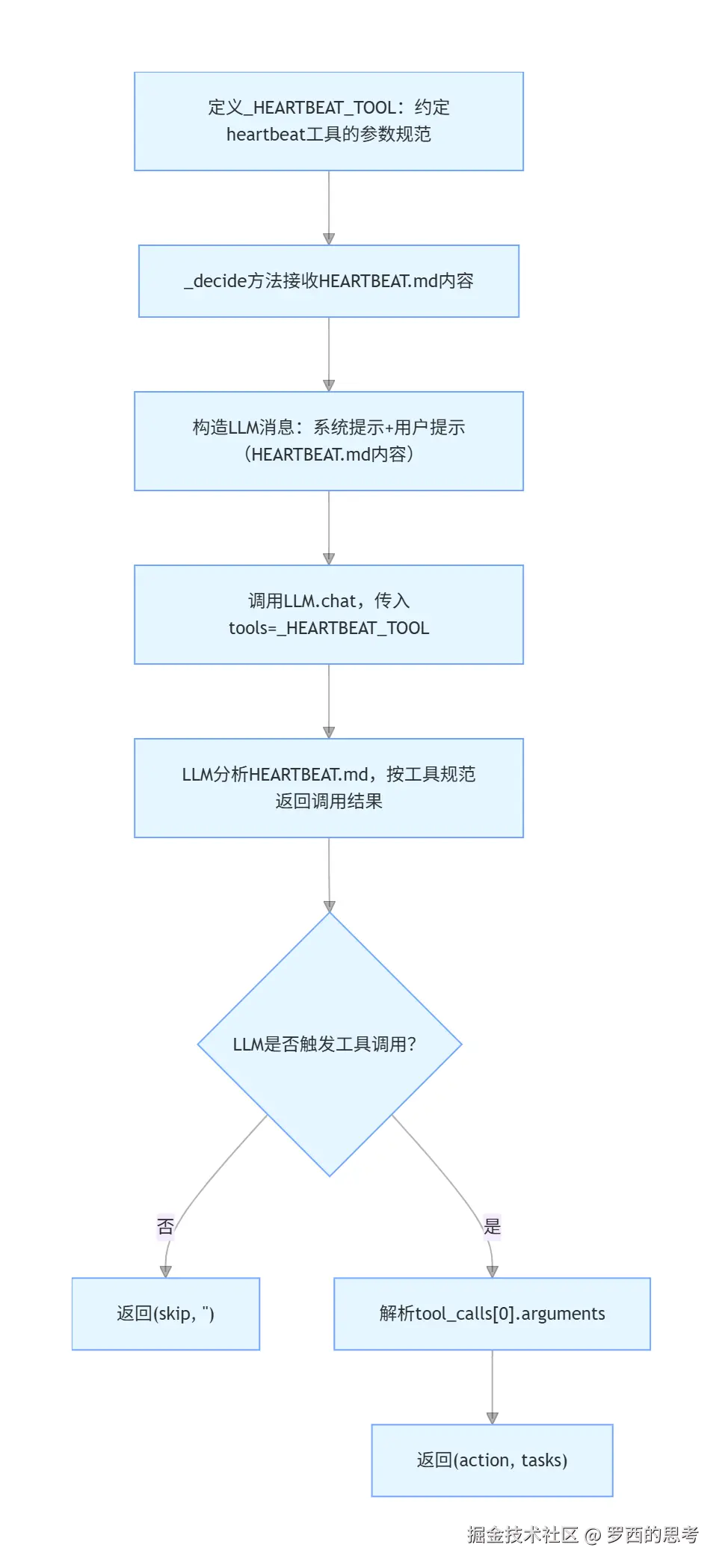
心跳工具调用流程
2.4 Phase 2
python
logger.info("Heartbeat: tasks found, executing...")
if self.on_execute:
    response = await self.on_execute(tasks)  # 调用执行回调
    if response and self.on_notify:
        logger.info("Heartbeat: completed, delivering response")
await self.on_notify(response) # 调用通知回调- 调用
on_execute回调(由 Gateway 设置)执行任务 - 获取任务执行结果(通过
agent.process_direct()) - 如果有结果且配置了
on_notify回调,通知用户
2.5 与其他模块的配合
以下是 HeartbeatService 和其他模块之间的依赖关系。
具体阐释如下:
-
与 AgentLoop 配合(任务执行)
- on_execute 回调函数通常指向 AgentLoop.process_direct()
- 这是主 Agent 的直接方法,绕过消息总线直接处理
-
使用独立的 session_key("heartbeat")避免干扰主对话
- 允许心跳服务通过完整的 agent 循环执行任务,即process_direct()会调用到
_process_message。而_process_message是单条消息处理的核心入口,支持系统消息、斜杠命令、普通对话三种场景,完成「上下文构建→代理循环→结果保存→响应返回」全流程。
- 允许心跳服务通过完整的 agent 循环执行任务,即process_direct()会调用到
-
消息总线交互(结果通知)
- 通过 MessageBus 与其他组件通信
- 执行结果可以通过 on_notify 回调发送给用户,
on_notify(response)调用bus.publish_outbound() - 通过 MessageBus 发布 OutboundMessage
- ChannelManager 会将其分发给目标渠道
-
与 LLM Provider 配合(智能决策)
- 使用 LLM 来判断 HEARTBEAT.md 文件中的任务是否需要执行
- 通过虚拟工具调用获取决策结果,避免自由文本解析的不准确性
-
另外,HeartbeatService 也会与 CronService 配合,两者共同实现全面的后台任务管理
- CronService 处理预定义的定时任务
- HeartbeatService 处理动态发现的任务
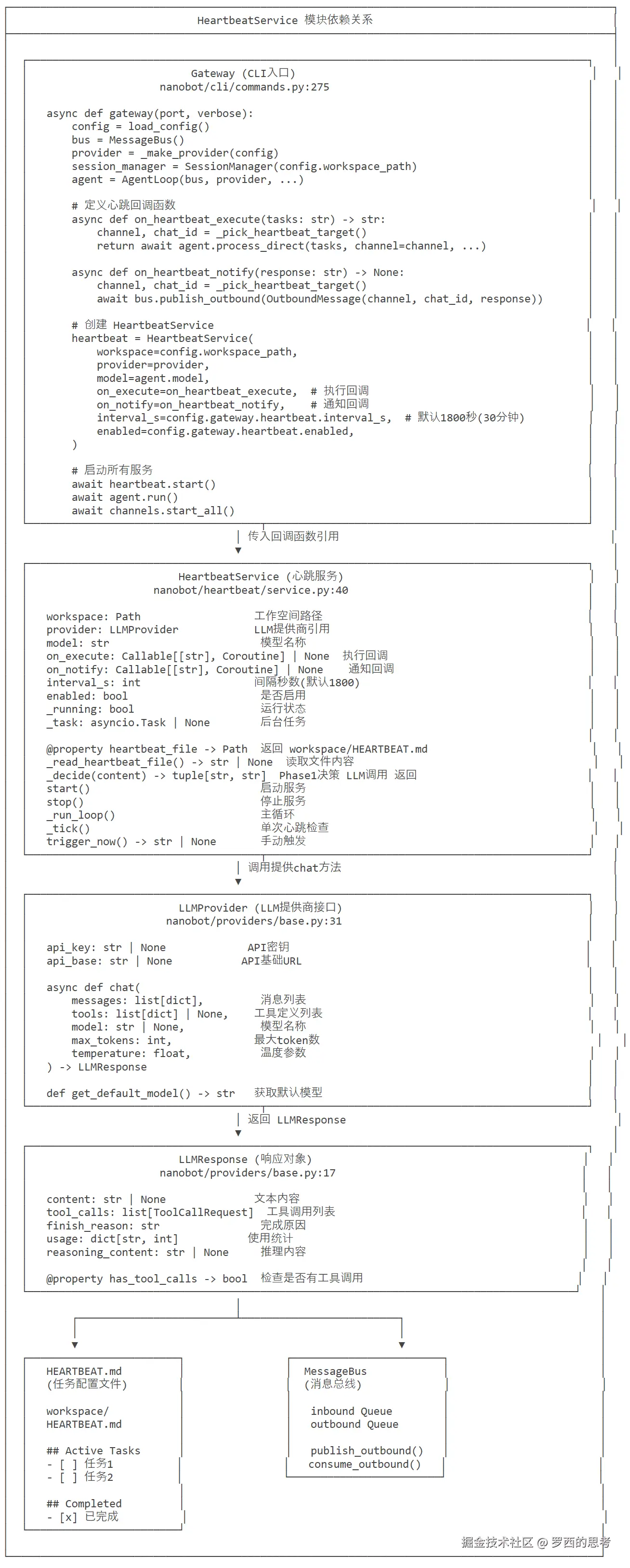
HeartbeatService 模块依赖关系
相关代码如下:
python
    # Create heartbeat service
    async def on_heartbeat_execute(tasks: str) -> str:
        """Phase 2: execute heartbeat tasks through the full agent loop."""
        channel, chat_id = _pick_heartbeat_target()

        async def _silent(*_args, **_kwargs):
            pass

        return await agent.process_direct(
            tasks,
            session_key="heartbeat",
            channel=channel,
            chat_id=chat_id,
            on_progress=_silent,
        )

    async def on_heartbeat_notify(response: str) -> None:
        """Deliver a heartbeat response to the user's channel."""
        from nanobot.bus.events import OutboundMessage
        channel, chat_id = _pick_heartbeat_target()
        if channel == "cli":
            return  # No external channel available to deliver to
        await bus.publish_outbound(OutboundMessage(channel=channel, chat_id=chat_id, content=response))

    hb_cfg = config.gateway.heartbeat
    heartbeat = HeartbeatService(
        workspace=config.workspace_path,
        provider=provider,
        model=agent.model,
        on_execute=on_heartbeat_execute,
        on_notify=on_heartbeat_notify,
        interval_s=hb_cfg.interval_s,
        enabled=hb_cfg.enabled,
    )
0x03 对比
3.1 CronService 与 HeartbeatTool 的关系
从代码可以看到:
- CronService 是独立的定时任务服务 ,使用
croniter计算 cron 表达式的下次执行时间 - HeartbeatTool 是 Agent 的一个内置工具,用于管理 HEARTBEAT.md 中的周期性任务
- 两者的职责完全不同,不存在直接的调用关系
3.2 关键区别
| 特性 | CronService | HeartbeatTool |
|---|---|---|
| 目的 | 粟管用户定义的一次性或循环定时任务 | 让用户通过对话命令来管理 cron 任务 |
| 触发方式 | 通过内部定时器自动运行 | 通过LLM 工具调用 (用户对话) |
| 用户交互 | 不直接交互,需通过命令 | 直接对话交互 |
| 任务来源 | cron.json 文件 | 用户对话请求 |
| 存储位置 | ~/.nanobot/cron/jobs.json | 任务结果通过 AgentLoop 返回 |
| 调度机制 | croniter 精达式调度 | CronService 自维护的定时器 |
0x04 HeartbeatService实现
4.1 生命周期管理
启动流程
scss
gateway() 创建 HeartbeatService
    设置 on_execute 和 on_notify 回调
    await heartbeat.start()
具体构建代码如下:
ini
    hb_cfg = config.gateway.heartbeat
    heartbeat = HeartbeatService(
        workspace=config.workspace_path,
        provider=provider,
        model=agent.model,
        on_execute=on_heartbeat_execute,
        on_notify=on_heartbeat_notify,
        interval_s=hb_cfg.interval_s,
        enabled=hb_cfg.enabled,
    )
on_heartbeat_execute 和 on_heartbeat_notify 如下:
python
    def _pick_heartbeat_target() -> tuple[str, str]:
        """Pick a routable channel/chat target for heartbeat-triggered messages."""
        enabled = set(channels.enabled_channels)
        # Prefer the most recently updated non-internal session on an enabled channel.
        for item in session_manager.list_sessions():
            key = item.get("key") or ""
            if ":" not in key:
                continue
            channel, chat_id = key.split(":", 1)
            if channel in {"cli", "system"}:
                continue
            if channel in enabled and chat_id:
                return channel, chat_id
        # Fallback keeps prior behavior but remains explicit.
        return "cli", "direct"

    # Create heartbeat service
    async def on_heartbeat_execute(tasks: str) -> str:
        """Phase 2: execute heartbeat tasks through the full agent loop."""
        channel, chat_id = _pick_heartbeat_target()

        async def _silent(*_args, **_kwargs):
            pass

        return await agent.process_direct(
            tasks,
            session_key="heartbeat",
            channel=channel,
            chat_id=chat_id,
            on_progress=_silent,
        )

    async def on_heartbeat_notify(response: str) -> None:
        """Deliver a heartbeat response to the user's channel."""
        from nanobot.bus.events import OutboundMessage
        channel, chat_id = _pick_heartbeat_target()
        if channel == "cli":
            return  # No external channel available to deliver to
        await bus.publish_outbound(OutboundMessage(channel=channel, chat_id=chat_id, content=response))
目标渠道选择逻辑如下:
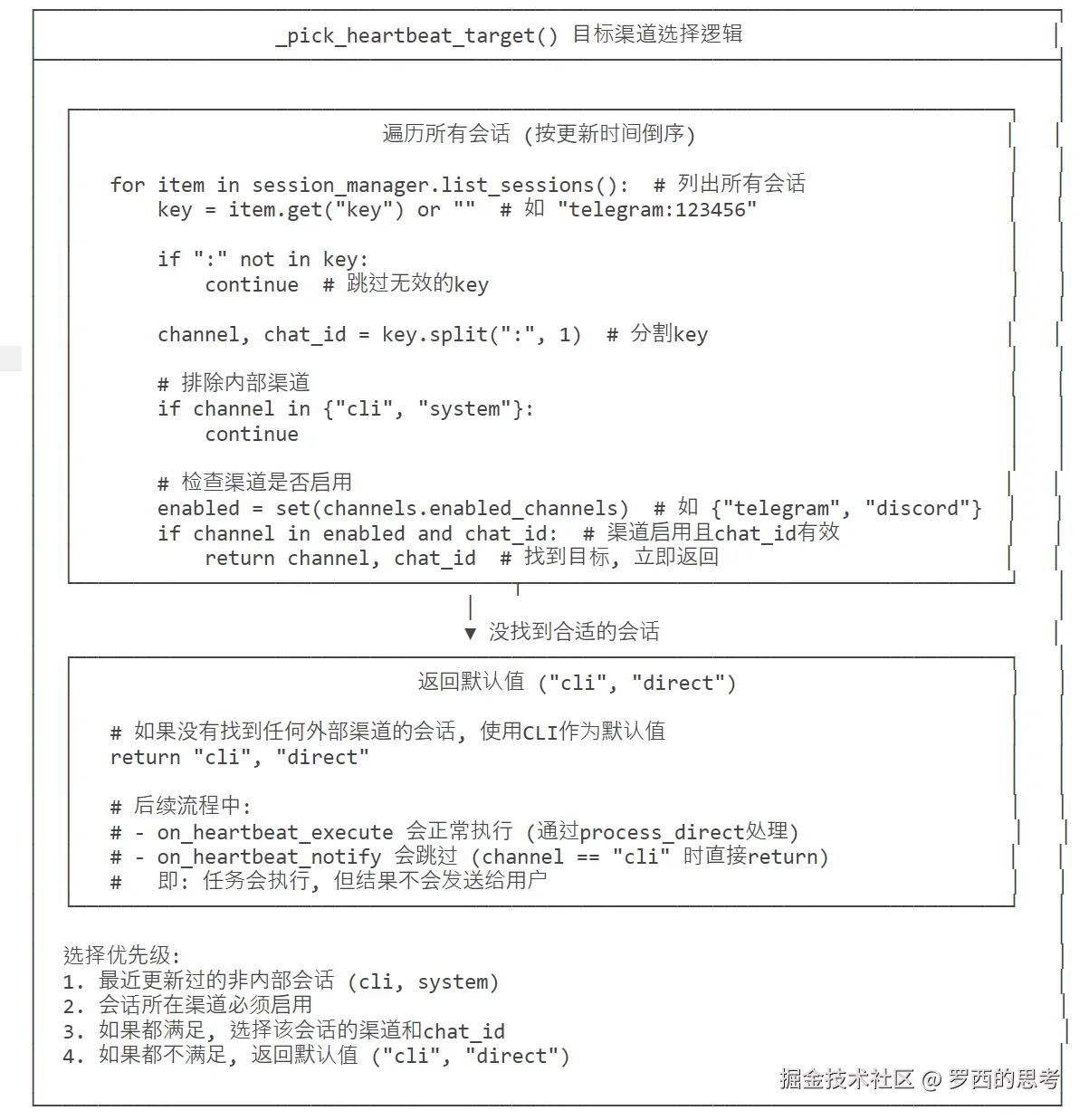
HeartbeatService 目标渠道选择逻辑图
运行流程
scss
_tick() 定时触发(每 30 分钟)
    _decide() 检用 LLM 决策
    on_execute() 执行任务
    on_notify() 通知用户
调用时机(_tick 方法)
python
async def _tick(self) -> None:
    """Execute a single heartbeat tick."""
    content = self._read_heartbeat_file()  # 读取 HEARTBEAT.md
    if not content:
        return  # 文件不存在或为空

action, tasks = await self._decide(content) # 调用 LLM 决策- 每 30 分钟(默认间隔时间)触发一次心跳检查
- 从工作空间读取 HEARTBEAT.md 文件
- 如果文件不存在或为空,直接返回
- 调用
_decide()方法让 LLM 决策是否有活跃任务
决策结果处理
arduino
if action != "run":
    logger.info("Heartbeat: OK (nothing to report)")
return # action 为 skip,记录日志并返回- 如果 LLM 决策为 "skip"(无活跃任务),记录 "OK" 日志
- 如果 action 为 "run"(有活跃任务),进入执行流程
停止流程
scss
heartbeat.stop() 停止定时器
清理 MCP 连接(如果需要)
4.2 手动触发流程
也可以手动触发。
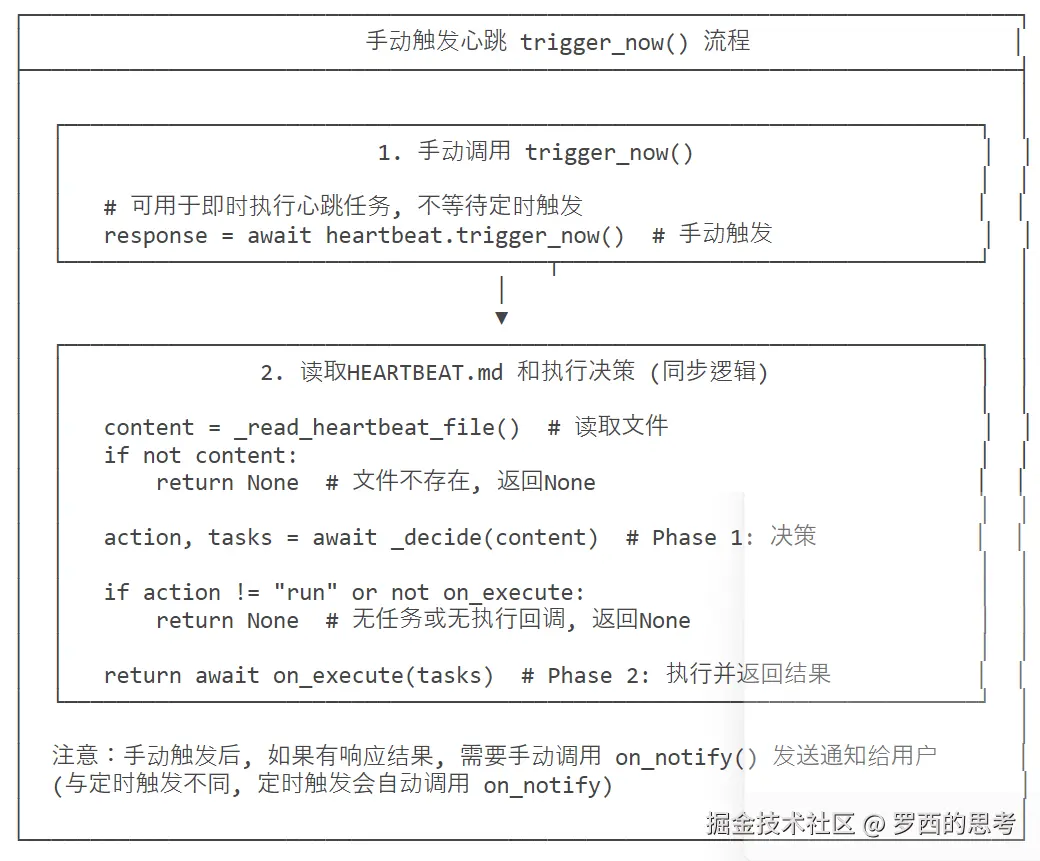
HeartbeatService手动触发流程图
4.3 HeartbeatService 代码
python
class HeartbeatService:
    """
    Periodic heartbeat service that wakes the agent to check for tasks.

    Phase 1 (decision): reads HEARTBEAT.md and asks the LLM --- via a virtual
    tool call --- whether there are active tasks.  This avoids free-text parsing
    and the unreliable HEARTBEAT_OK token.

    Phase 2 (execution): only triggered when Phase 1 returns ``run``.  The
    ``on_execute`` callback runs the task through the full agent loop and
    returns the result to deliver.
    """

    # 心跳服务初始化方法:配置核心依赖与参数
    # 参数说明:
    # - workspace:工作目录(HEARTBEAT.md所在路径)
    # - provider:LLM提供商实例(用于调用大模型做决策)
    # - model:使用的LLM模型名称(如doubao-seed-lite)
    # - on_execute:任务执行回调函数(Phase 2执行时触发)
    # - on_notify:结果通知回调函数(任务执行完成后推送结果)
    # - interval_s:心跳检测间隔(默认30分钟=1800秒)
    # - enabled:是否启用心跳服务
    def __init__(
        self,
        workspace: Path,
        provider: LLMProvider,
        model: str,
        on_execute: Callable[[str], Coroutine[Any, Any, str]] | None = None,
        on_notify: Callable[[str], Coroutine[Any, Any, None]] | None = None,
        interval_s: int = 30 * 60,
        enabled: bool = True,
    ):
        self.workspace = workspace  # 初始化工作目录
        self.provider = provider  # 初始化LLM提供商
        self.model = model  # 初始化LLM模型名称
        self.on_execute = on_execute  # 初始化任务执行回调
        self.on_notify = on_notify  # 初始化结果通知回调
        self.interval_s = interval_s  # 初始化心跳间隔(秒)
        self.enabled = enabled  # 初始化服务启用状态
        self._running = False  # 服务运行状态标记(False=未运行)
        self._task: asyncio.Task | None = None  # 存储心跳循环的异步任务对象

    # 只读属性:返回HEARTBEAT.md文件的完整路径
    @property
    def heartbeat_file(self) -> Path:
        return self.workspace / "HEARTBEAT.md"

    # 内部方法:读取HEARTBEAT.md文件内容
    # 返回值:文件内容字符串(None表示文件不存在/读取失败)
    def _read_heartbeat_file(self) -> str | None:
        if self.heartbeat_file.exists():  # 检查文件是否存在
            try:
                # 读取文件内容(UTF-8编码)
                return self.heartbeat_file.read_text(encoding="utf-8")
            except Exception:  # 捕获所有读取异常(如权限不足、文件损坏)
                return None
        return None  # 文件不存在时返回None

    # 核心异步方法:Phase 1 - LLM决策(判断是否有任务需要执行)
    # 参数:content - HEARTBEAT.md的内容
    # 返回值:(action, tasks) - action为skip/run,tasks为任务摘要
    async def _decide(self, content: str) -> tuple[str, str]:
        """Phase 1: ask LLM to decide skip/run via virtual tool call.

        Returns (action, tasks) where action is 'skip' or 'run'.
        """
        # 调用LLM提供商的chat接口,触发虚拟工具调用
        response = await self.provider.chat(
            messages=[
                # 系统提示:告知LLM其角色为心跳代理,必须调用heartbeat工具返回决策
                {"role": "system", "content": "You are a heartbeat agent. Call the heartbeat tool to report your decision."},
                # 用户提示:传入HEARTBEAT.md内容,让LLM分析并决策
                {"role": "user", "content": (
                    "Review the following HEARTBEAT.md and decide whether there are active tasks.\n\n"
                    f"{content}"
                )},
            ],
            tools=_HEARTBEAT_TOOL,  # 指定可用工具为心跳虚拟工具
            model=self.model,  # 指定使用的LLM模型
        )

        # 若LLM未触发工具调用(异常情况),默认返回skip
        if not response.has_tool_calls:
            return "skip", ""

        # 提取LLM工具调用的参数(仅取第一个工具调用结果)
        args = response.tool_calls[0].arguments
        # 返回决策结果:action默认skip,tasks默认空字符串
        return args.get("action", "skip"), args.get("tasks", "")

    # 公开异步方法:启动心跳服务
    async def start(self) -> None:
        """Start the heartbeat service."""
        # 若服务未启用,记录日志并返回
        if not self.enabled:
            logger.info("Heartbeat disabled")
            return
        # 若服务已运行,记录警告日志并返回(避免重复启动)
        if self._running:
            logger.warning("Heartbeat already running")
            return

        # 标记服务为运行状态
        self._running = True
        # 创建异步任务,启动心跳主循环
        self._task = asyncio.create_task(self._run_loop())
        # 记录启动日志,包含心跳间隔
        logger.info("Heartbeat started (every {}s)", self.interval_s)

    # 公开方法:停止心跳服务
    def stop(self) -> None:
        """Stop the heartbeat service."""
        # 标记服务为非运行状态
        self._running = False
        # 若存在异步任务,取消任务并置空(终止心跳循环)
        if self._task:
            self._task.cancel()
            self._task = None

    # 内部异步方法:心跳服务主循环
    async def _run_loop(self) -> None:
        """Main heartbeat loop."""
        # 循环执行,直到服务被停止
        while self._running:
            try:
                # 等待指定的心跳间隔(秒)
                await asyncio.sleep(self.interval_s)
                # 再次检查运行状态(避免等待期间服务被停止)
                if self._running:
                    # 执行单次心跳检测
                    await self._tick()
            except asyncio.CancelledError:
                # 捕获任务取消异常(stop方法触发),退出循环
                break
            except Exception as e:
                # 捕获其他异常,记录错误日志(不终止服务)
                logger.error("Heartbeat error: {}", e)

    # 内部异步方法:单次心跳检测(核心执行逻辑)
    async def _tick(self) -> None:
        """Execute a single heartbeat tick."""
        # 读取HEARTBEAT.md文件内容
        content = self._read_heartbeat_file()
        # 若文件为空/不存在,记录调试日志并返回
        if not content:
            logger.debug("Heartbeat: HEARTBEAT.md missing or empty")
            return

        # 记录日志:开始检查任务
        logger.info("Heartbeat: checking for tasks...")

        try:
            # Phase 1:调用LLM做决策,获取action和tasks
            action, tasks = await self._decide(content)

            # 若决策为skip(无任务),记录日志并返回
            if action != "run":
                logger.info("Heartbeat: OK (nothing to report)")
                return

            # 若决策为run(有任务),记录日志并执行Phase 2
            logger.info("Heartbeat: tasks found, executing...")
            # 若配置了执行回调,触发回调执行任务
            if self.on_execute:
                response = await self.on_execute(tasks)
                # 若执行有结果且配置了通知回调,推送结果
                if response and self.on_notify:
                    logger.info("Heartbeat: completed, delivering response")
                    await self.on_notify(response)
        except Exception:
            # 捕获执行过程中的所有异常,记录异常日志(不终止服务)
            logger.exception("Heartbeat execution failed")

    # 公开异步方法:手动触发一次心跳检测(应急使用)
    async def trigger_now(self) -> str | None:
        """Manually trigger a heartbeat."""
        # 读取HEARTBEAT.md内容
        content = self._read_heartbeat_file()
        # 无内容则返回None
        if not content:
            return None
        # 调用LLM做决策
        action, tasks = await self._decide(content)
        # 若无任务或无执行回调,返回None
        if action != "run" or not self.on_execute:
            return None
        # 触发执行回调并返回结果
        return await self.on_execute(tasks)
0xFF 参考
3500 行代码打造轻量级AI Agent:Nanobot 架构深度解析
【翻译】Anthropic工程博客:长运行Agent的有效利用框架
从被动唤醒到主动守望:基于AI Agent的智能任务架构实践
万字】带你实现一个Agent(上),从Tools、MCP到Skills
3500 行代码打造轻量级AI Agent:Nanobot 架构深度解析
OpenClaw架构-Agent Runtime 运行时深度拆解
OpenClaw 架构详解 · 第一部分:控制平面、会话管理与事件循环
本文使用 markdown.com.cn 排版