Flutter for OpenHarmony 离线模式实现:让你的应用无网也能萌萌哒~
欢迎加入开源鸿蒙跨平台社区:https://openharmonycrossplatform.csdn.net
嘿,亲爱的开发者宝宝~ 💕
有没有遇到过这样的尴尬时刻:正美滋滋地用着 App,突然网络一断,整个应用就"罢工"了?那种感觉,就像是被男朋友放了鸽子一样心塞呢~
今天要教大家一个超贴心的技能------为你的 Flutter for OpenHarmony 应用添加离线模式!让你的应用即使在没有网络的时候,也能温柔地陪伴用户哦~
一、离线模式是什么呀?🤔
简单来说,离线模式就是让应用在"断网"的情况下依然能够正常使用部分功能。就像一个懂事的小可爱,不会因为一点点小困难就闹脾气~
想象一下这些场景:
- 地铁里信号不好,用户想继续看之前浏览的内容
- 电梯里网络中断,用户正在填写的表单不能丢失
- 偏远地区没有信号,用户还想查看之前收藏的信息
有了离线模式,这些都不是问题啦!你的应用会变成一个贴心的小棉袄,时刻温暖着用户的心~
二、我们要实现哪些功能呢?📝
离线模式的核心功能可以总结为四个小可爱:
第一个小可爱:数据缓存
把从服务器获取的数据保存到本地,就像小松鼠储存松果一样,以备不时之需~
第二个小可爱:网络状态检测
实时感知网络的变化,就像一个机灵的小雷达,时刻关注着网络的"心跳"~
第三个小可爱:离线UI展示
在离线时给用户一个温柔的提示,让用户知道"虽然没网,但我依然陪着你"~
第四个小可爱:数据同步
网络恢复后,把离线期间的操作同步到服务器,就像把积攒的悄悄话一次性告诉对方~
三、数据缓存怎么实现呢?💾
鸿蒙系统给我们提供了两种超好用的存储方式哦~
Preferences:轻量级小可爱
适合存储用户设置、简单配置这些"小物件":
typescript
import preferences from '@ohos.data.preferences';

export class CacheHelper {
  private static instance: CacheHelper;
  private store: preferences.Preferences | null = null;

  public static getInstance(): CacheHelper {
    if (!CacheHelper.instance) {
      CacheHelper.instance = new CacheHelper();
    }
    return CacheHelper.instance;
  }

  public async saveData(key: string, value: string): Promise<void> {
    if (this.store) {
      await this.store.put(key, value);
      await this.store.flush();
    }
  }

  public async getData(key: string): Promise<string> {
    if (this.store) {
      return await this.store.get(key, '') as string;
    }
    return '';
  }
}
RelationalStore:实力派大管家
适合存储新闻列表、商品信息这些"大家伙":
typescript
import relationalStore from '@ohos.data.relationalStore';

export class DatabaseHelper {
  private rdbStore: relationalStore.RdbStore | null = null;

  public async saveNewsList(news: NewsItem[]): Promise<void> {
    for (const item of news) {
      const valueBucket = {
        id: item.id,
        title: item.title,
        content: item.content,
        cacheTime: Date.now()
      };
      await this.rdbStore?.insert('news_cache', valueBucket);
    }
  }
}
四、网络状态怎么检测呀?📡
鸿蒙系统提供了 @ohos.net.connection 模块,让我们可以实时监听网络状态的变化:
typescript
import connection from '@ohos.net.connection';

export class NetworkWatcher {
  private netConnection: connection.NetConnection | null = null;

  public startWatching(callback: (isOnline: boolean) => void): void {
    this.netConnection = connection.createNetConnection();

    this.netConnection.on('netAvailable', () => {
      callback(true);
      console.info('网络回来啦~');
    });

    this.netConnection.on('netUnavailable', () => {
      callback(false);
      console.info('网络跑掉了~');
    });
  }
}
这样,每当网络状态变化时,我们就能第一时间知道啦~
五、离线提示怎么设计呢?🎨
给用户一个温柔的离线提示,让用户感受到你的用心:
typescript
@Component
export struct OfflineTip {
  @Prop isOnline: boolean = true;

  build() {
    if (!this.isOnline) {
      Row() {
        Text('当前处于离线模式,部分功能暂时不可用哦~')
          .fontSize(14)
          .fontColor('#FFFFFF')
      }
      .width('100%')
      .height(44)
      .backgroundColor('#FF9500')
      .justifyContent(FlexAlign.Center)
    }
  }
}
橙色的小横条,既醒目又不会太刺眼,就像一个温柔的小提醒~
六、数据同步怎么做呢?🔄
当网络恢复时,我们要把离线期间的操作同步到服务器。可以用一个"待办队列"来管理:
typescript
export class SyncQueue {
  private pendingTasks: SyncTask[] = [];

  public addTask(task: SyncTask): void {
    this.pendingTasks.push(task);
    this.saveToLocal();
  }

  public async syncAll(): Promise<void> {
    while (this.pendingTasks.length > 0) {
      const task = this.pendingTasks.shift();
      await this.executeTask(task);
    }
  }
}
这样,用户离线时的操作就不会丢失啦,网络恢复后会自动同步~
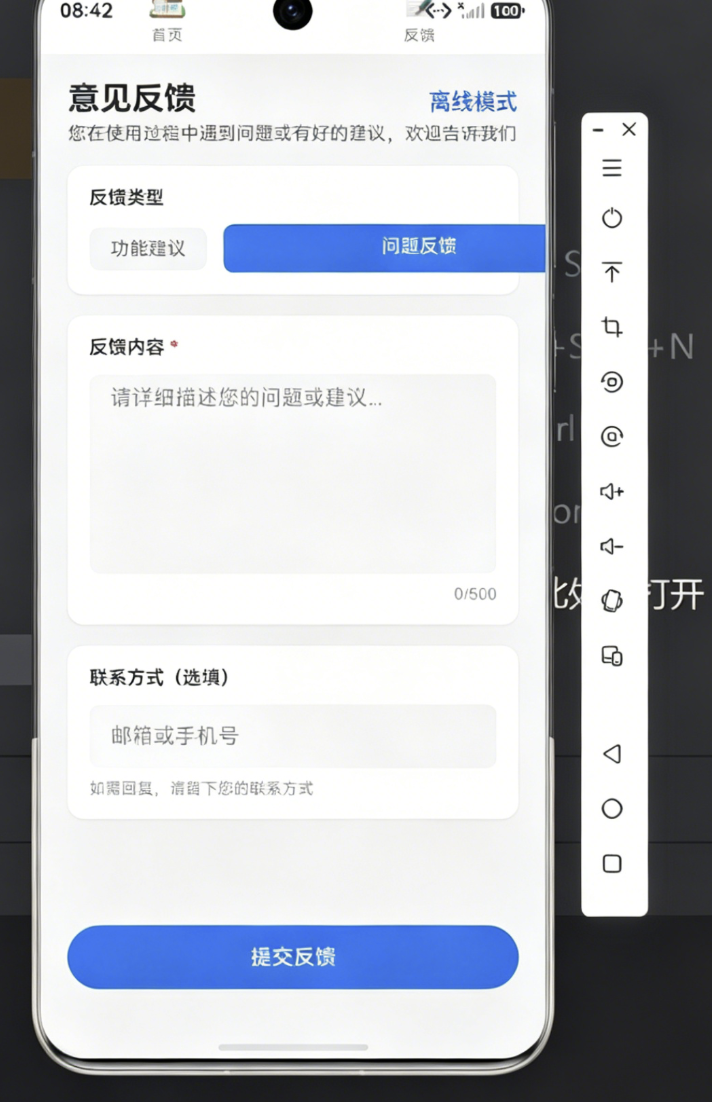
七、在鸿蒙设备上验证一下吧~ 📱
在华为鸿蒙设备上测试时,记得在 module.json5 里添加网络权限:
json
{
  "module": {
    "requestPermissions": [
      {"name": "ohos.permission.INTERNET"}
    ]
  }
}
测试步骤:
- 在有网络时打开应用,加载数据
- 开启飞行模式,关闭应用
- 重新打开应用,查看缓存数据是否正常显示
- 关闭飞行模式,观察数据是否自动同步
八、总结一下~ ✨
今天我们一起学习了:
- 用 Preferences 和 RelationalStore 实现数据缓存
- 用 connection 模块监听网络状态
- 设计温柔的离线提示 UI
- 实现离线操作的同步队列
有了离线模式,你的应用就像一个贴心的小伙伴,无论有网没网,都会陪伴在用户身边~
希望这篇教程对你有帮助!有问题的话,欢迎在评论区留言讨论哦~