note
- OpenClaw 的 SubAgent 就是一个带注册表的"任务外包系统"------父 Agent 把子任务打包成
SpawnSubagentParams,扔给注册中心,注册中心拉起独立会话执行,执行完通过 announce 队列把结果还给父 Agent,整个过程有超时、孤儿恢复、清理等保障机制。 - openclaw架构总结:
- 核心架构:以 Gateway(网关) 为中心的控制平面,统一管理所有通信与调度。
- 大脑引擎:事件驱动的Agentic Loop,处理从接收、推理、调用工具到回复的全流程。
- 生态连接:通过 Channels(频道) 系统,将AI能力无缝集成到Telegram、Slack、WhatsApp等用户现有社交平台。
- 执行能力:分层设计的 工具(Tools)系统,结合精细的策略管道,实现安全可控的自动化操作。
- 后台基石:定时任务系统和智能上下文管理,支撑系统的长期稳定运行与复杂对话。
- Sandbox 是 OpenClaw 的 Docker 隔离层,用于在容器中执行 AI Agent 的工具操作,而非直接在主机上运行。限制工具执行(exec、read、write、edit 等)的安全边界
- 从算法策略角度值得关注的点:
- 上下文选择:lightContext(fork/isolated 上下文模式,
isolated即SubAgent可以选择不继承父 Agent 的完整对话历史) - 工具动态分配:有过滤pipeline(比如全局工具、用户白名单、该agent类型等)筛选出所需对应agent的工具列表
- 上下文选择:lightContext(fork/isolated 上下文模式,
文章目录
一、openclaw整体架构
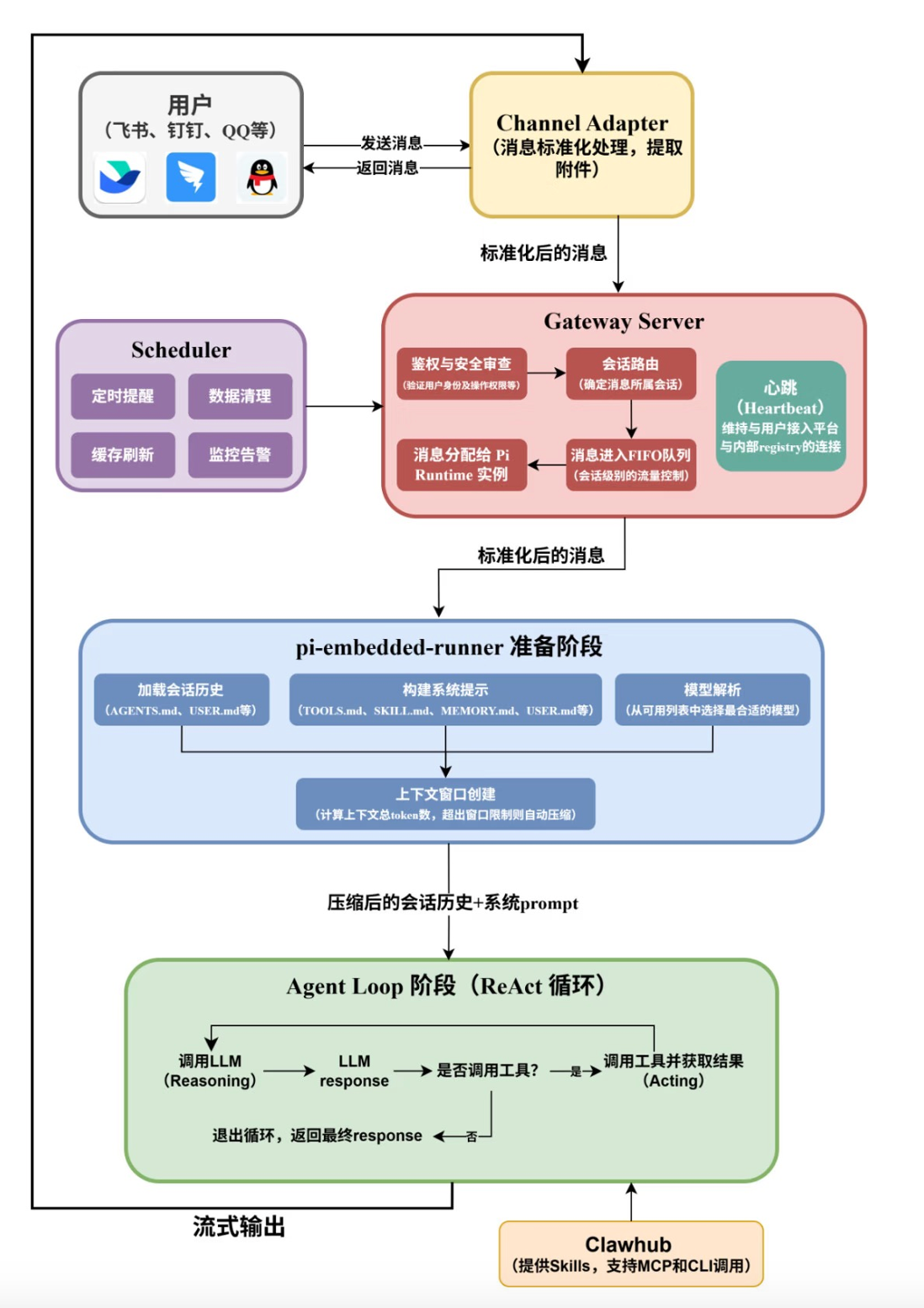
1、OpenClaw会用一组工作区 Markdown 文件定义 Agent 的默认身份与协作现场:
| 文件 | 一句话说明 |
|---|---|
| SOUL.md | 定义"我是谁"------性格、价值观、行为准则 |
| USER.md | 定义"你是谁"------用户画像、偏好 |
| AGENTS.md | 定义"我怎么做事"------决策规则、工作流程 |
| TOOLS.md | 定义"我有什么资源"------环境配置 |
| IDENTITY.md | 名字、头像等基础身份 |
| MEMORY.md | 长期记忆------事实、经验 |
| HEARTBEAT.md | 定时任务清单 |
| BOOTSTRAP.md | 首次运行的初始化引导 |
这些文件并不都是以同样的方式进入一次 run。像 AGENTS.md、SOUL.md、TOOLS.md、IDENTITY.md、USER.md、HEARTBEAT.md 这类 bootstrap 文件,通常会进入 Project Context;BOOTSTRAP.md 只在 brand-new workspace 的首次引导时出现;MEMORY.md 现在也会作为长期记忆文件注入,而 memory/ 里的日记文件更多是靠工具按需召回。
也正因为如此,Agent 才能始终知道自己是谁、在跟谁说话、应该怎么做事,同时又不会把所有资料都无差别塞进同一个 prompt。
更重要的是热更新 机制:你修改任何一个.md文件,保存后的下一秒,Agent的行为就会改变。不需要重启,不需要重新部署。这让调试和优化Agent变得和编辑文档一样简单。
2、简洁的工具列表:
Primitive Layer: read / write / edit / exec(4个原语)
Runtime Layer: process, apply_patch
Official Surface: memory_search, cron, image, tts
四个原语:
plain
read  → 读取(获取信息)
write → 创建(生成新内容)
edit  → 修改(精确修改已有内容)
exec → 执行(运行Shell命令,与外部世界交互)3、gateway这块核心设计是适配器模式:每个平台实现一个ChannelPlugin接口,负责将平台特定的消息格式"翻译"成统一格式。要接入一个新平台?实现一个接口就够了,Agent核心一行代码都不用改。
4、OpenClaw的整个执行链条如下:
plain
用户消息
  → 统一网关(感知,翻译格式)
  → 消息循环(调度,防并发混乱)
  → 提示词系统(装配上下文,注入灵魂)
  → Agent Loop(吸收了 ReAct 的方法,反复迭代)
  → 安全沙箱(每次工具调用必经的安全门)
  → 工具系统(真正动手执行)
  → 结果回到 Agent Loop,直到任务完成
  → 统一网关(输出,翻译格式)
→ 用户收到回复
二、subagent机制
OpenClaw 的 SubAgent 就是一个带注册表的"任务外包系统"------父 Agent 把子任务打包成 SpawnSubagentParams,扔给注册中心,注册中心拉起独立会话执行,执行完通过 announce 队列把结果还给父 Agent,整个过程有超时、孤儿恢复、清理等保障机制。
三大机制:
① 生成(Spawn) subagent-spawn.ts 负责创建子 Agent,支持两种模式:
run --- 一次性任务,跑完即销毁
session --- 持久会话,可多轮交互
上下文策略:
isolated --- 完全隔离,子不知父的记忆
fork --- 分叉自父的上下文,继承上下文再独立执行
② 注册 & 调度(Registry) subagent-registry.ts 是核心调度中枢(1232行),用 Map<runId, SubagentRunRecord> 在内存中追踪所有活跃子 Agent 的状态:
创建 → 启动 → 运行中 → 完成/错误/超时/被杀
父 Agent 调用 waitForSubagentCompletion() 阻塞等待,有孤儿恢复机制(超时后自动重试)。
③ 通知(Announce) subagent-announce.ts 负责结果回传。子 Agent 完成后通过 announce 流程把结果"投递"回父 Agent,支持队列模式(多个结果排队交付),默认 120 秒超时。
可以看下子agent的注册表:
typescript
export type SubagentRunRecord = {
  runId: string;
  childSessionKey: string;
  controllerSessionKey?: string;
  requesterSessionKey: string;
  requesterOrigin?: DeliveryContext;
  requesterDisplayKey: string;
  task: string;
  cleanup: "delete" | "keep";
  label?: string;
  model?: string;
  workspaceDir?: string;
  runTimeoutSeconds?: number;
  spawnMode?: SpawnSubagentMode;
  createdAt: number;
  startedAt?: number;
  sessionStartedAt?: number;
  accumulatedRuntimeMs?: number;
  endedAt?: number;
  outcome?: SubagentRunOutcome;
  archiveAtMs?: number;
  cleanupCompletedAt?: number;
  cleanupHandled?: boolean;
  suppressAnnounceReason?: "steer-restart" | "killed";
  expectsCompletionMessage?: boolean;
  announceRetryCount?: number;
  lastAnnounceRetryAt?: number;
  lastAnnounceDeliveryError?: string;
  endedReason?: SubagentLifecycleEndedReason;
  wakeOnDescendantSettle?: boolean;
  frozenResultText?: string | null;
  frozenResultCapturedAt?: number;
  fallbackFrozenResultText?: string | null;
  fallbackFrozenResultCapturedAt?: number;
  endedHookEmittedAt?: number;
  completionAnnouncedAt?: number;
  attachmentsDir?: string;
  attachmentsRootDir?: string;
  retainAttachmentsOnKeep?: boolean;
};
对于上面可以留意的字段有:
typescript
runId               → 这次任务的唯一 ID(UUID)
childSessionKey     → 子 Agent 的会话 key(agent:coder:subagent:xxx)
requesterSessionKey → 谁发起的(父 Agent 的 session key)
task                → 任务内容文本("帮我写一个排序函数")
spawnMode           → "run"(一次性)或 "session"(持久会话)
cleanup             → "delete"/"keep"(跑完是否销毁会话)
createdAt           → 创建时间戳
startedAt           → 开始执行时间
endedAt             → 结束时间
outcome             → 最终结果(ok/error/timeout/killed)
endedReason         → 为什么结束(complete/error/killed)
frozenResultText    → 子 Agent 返回的结果快照(冻结文本)
announceRetryCount  → 结果回传重试了几次
attachmentsDir      → 附件临时目录
三、工具过滤pipeline
openclaw中会有过滤pipeline(比如全局工具、用户白名单、该agent类型等)筛选出所需对应agent的工具列表
plain
1. tools.profile                         → 全局工具 profile(minimal/coding/full)
2. tools.byProvider.profile              → 按模型提供者的 profile
3. tools.allow                           → 全局工具白名单
4. tools.byProvider.allow                → 按提供者的白名单
5. agents.{agentId}.tools.allow          → 该 Agent 专属白名单
6. agents.{agentId}.tools.byProvider.allow → 该 Agent 按提供者白名单
7. group tools.allow
具体看:
typescript
export function buildDefaultToolPolicyPipelineSteps(params: {
  profilePolicy?: ToolPolicyLike;
  profile?: string;
  profileUnavailableCoreWarningAllowlist?: string[];
  providerProfilePolicy?: ToolPolicyLike;
  providerProfile?: string;
  providerProfileUnavailableCoreWarningAllowlist?: string[];
  globalPolicy?: ToolPolicyLike;
  globalProviderPolicy?: ToolPolicyLike;
  agentPolicy?: ToolPolicyLike;
  agentProviderPolicy?: ToolPolicyLike;
  groupPolicy?: ToolPolicyLike;
  agentId?: string;
}): ToolPolicyPipelineStep[] {
  const agentId = params.agentId?.trim();
  const profile = params.profile?.trim();
  const providerProfile = params.providerProfile?.trim();
  return [
    {
      policy: params.profilePolicy,
      label: profile ? `tools.profile (${profile})` : "tools.profile",
      stripPluginOnlyAllowlist: true,
      suppressUnavailableCoreToolWarningAllowlist: params.profileUnavailableCoreWarningAllowlist,
    },
    {
      policy: params.providerProfilePolicy,
      label: providerProfile
        ? `tools.byProvider.profile (${providerProfile})`
        : "tools.byProvider.profile",
      stripPluginOnlyAllowlist: true,
      suppressUnavailableCoreToolWarningAllowlist:
        params.providerProfileUnavailableCoreWarningAllowlist,
    },
    { policy: params.globalPolicy, label: "tools.allow", stripPluginOnlyAllowlist: true },
    {
      policy: params.globalProviderPolicy,
      label: "tools.byProvider.allow",
      stripPluginOnlyAllowlist: true,
    },
    {
      policy: params.agentPolicy,
      label: agentId ? `agents.${agentId}.tools.allow` : "agent tools.allow",
      stripPluginOnlyAllowlist: true,
    },
    {
      policy: params.agentProviderPolicy,
      label: agentId ? `agents.${agentId}.tools.byProvider.allow` : "agent tools.byProvider.allow",
      stripPluginOnlyAllowlist: true,
    },
    { policy: params.groupPolicy, label: "group tools.allow", stripPluginOnlyAllowlist: true },
  ];
}注意:如果要看36个核心工具,可以参考/openclaw/src/agents/tool-catalog.ts的CORE_TOOL_DEFINITIONS字典列表。