2.1 Openlayers调用ArcGis要素服务之要素查询 (/query)
各个库版本如下:
javascript
    "ol": "^10.8.0",
    "proj4": "^2.20.8",
    "vue3-openlayers": "^12.2.2",
    "ol-esri-style": "^4.1.1",
目录
- [2.1.1 介绍](#2.1.1 介绍 "#211-%E4%BB%8B%E7%BB%8D")
- [2.1.2 核心特点](#2.1.2 核心特点 "#212-%E6%A0%B8%E5%BF%83%E7%89%B9%E7%82%B9")
- [2.1.3 核心接口](#2.1.3 核心接口 "#213-%E6%A0%B8%E5%BF%83%E6%8E%A5%E5%8F%A3")
- [2.1.4 服务信息查看](#2.1.4 服务信息查看 "#214-%E6%9C%8D%E5%8A%A1%E4%BF%A1%E6%81%AF%E6%9F%A5%E7%9C%8B")
- [2.1.5 Openlayers调用](#2.1.5 Openlayers调用 "#215-openlayers%E8%B0%83%E7%94%A8")
- [2.1.6 Vue3-Openlayers用](#2.1.6 Vue3-Openlayers用 "#216-vue3-openlayers%E7%94%A8")
2.1.1 介绍
要素服务是一种通过 Web 提供矢量要素数据访问和编辑功能的接口。它允许客户端(如 Web 应用、桌面软件、移动设备)对地理要素进行查询、编辑(增、删、改)、关联查询和统计分析。下面使用ArcGis官方服务作为示例直接调用(如果使用自己的私有服务,可能先要获取token)
2.1.2 核心特点
| 特性 | 说明 |
|---|---|
| 矢量数据服务 | 以要素(点、线、面)为核心,包含几何和属性信息 |
| 基于 REST API | 通过 HTTP 请求访问,返回 JSON/GeoJSON 格式数据 |
| 支持编辑 | 支持添加、更新、删除要素(需要服务开启编辑能力) |
| 支持查询 | 支持属性查询、空间查询、ID 查询、统计查询 |
| 支持关联 | 可关联查询关联表或附件的相关信息 |
| 事务管理 | 支持版本化和非版本化编辑,支持长事务 |
2.1.3 核心接口
| 操作 | 说明 |
|---|---|
| /query | 查询要素(属性、空间、统计) |
| /addFeatures | 添加新要素 |
| /updateFeatures | 更新现有要素属性或几何 |
| /deleteFeatures | 删除要素 |
| /applyEdits | 批量提交增、删、改操作 |
| /queryRelatedRecords | 查询关联表中的记录 |
| /queryAttachments | 查询要素的附件 |
| /addAttachment | 为要素添加附件 |
2.1.4 服务信息查看
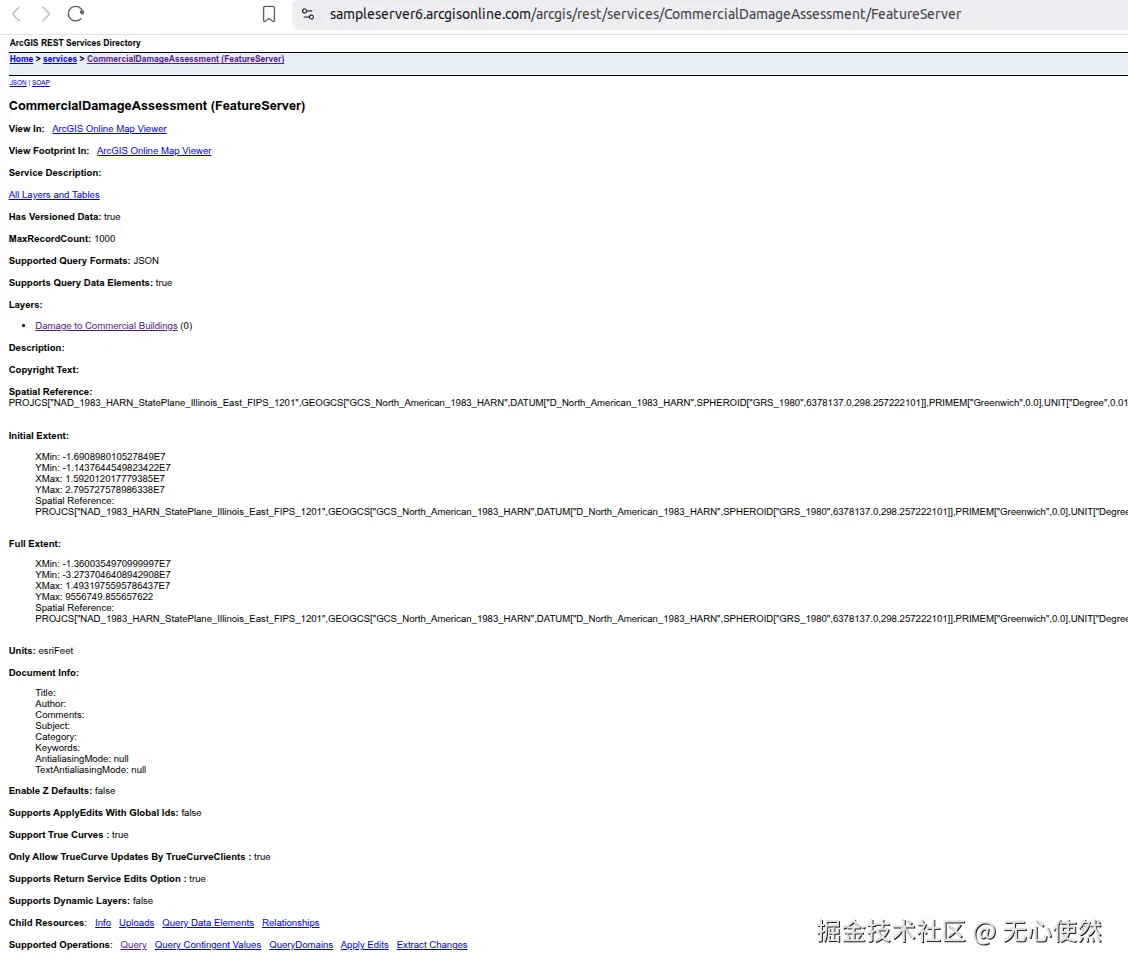
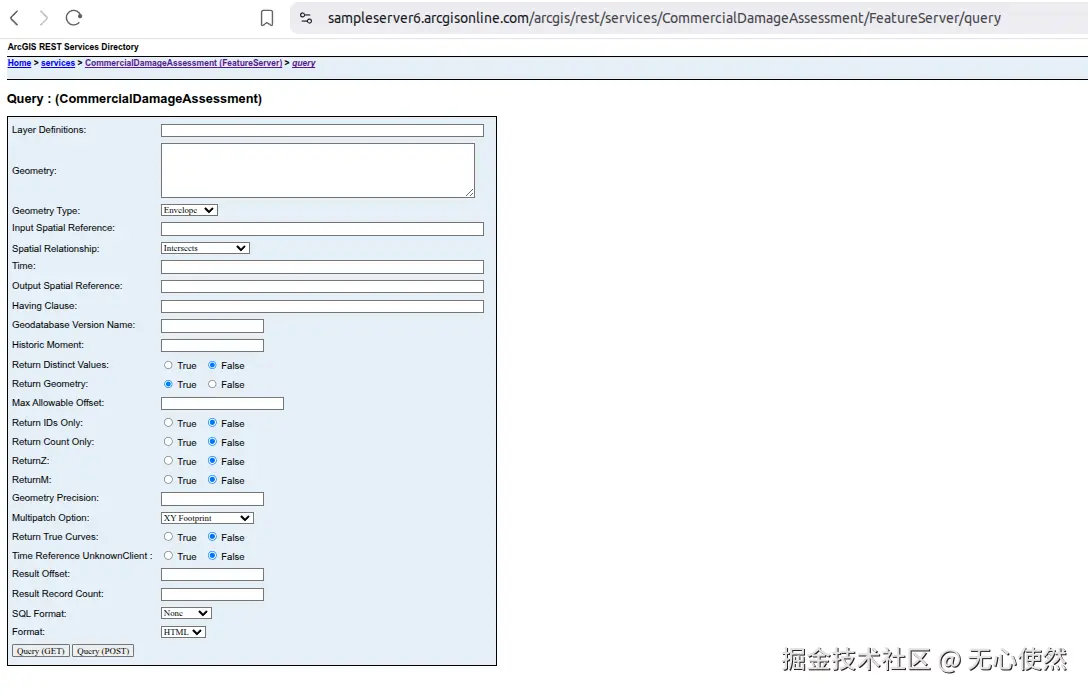
上图中展示的就是要素服务的基本信息,可以看到Supported Operations:中有Query,说明支持查询,但是这个是服务的查询接口,进入后参数比图层的查询接口较少
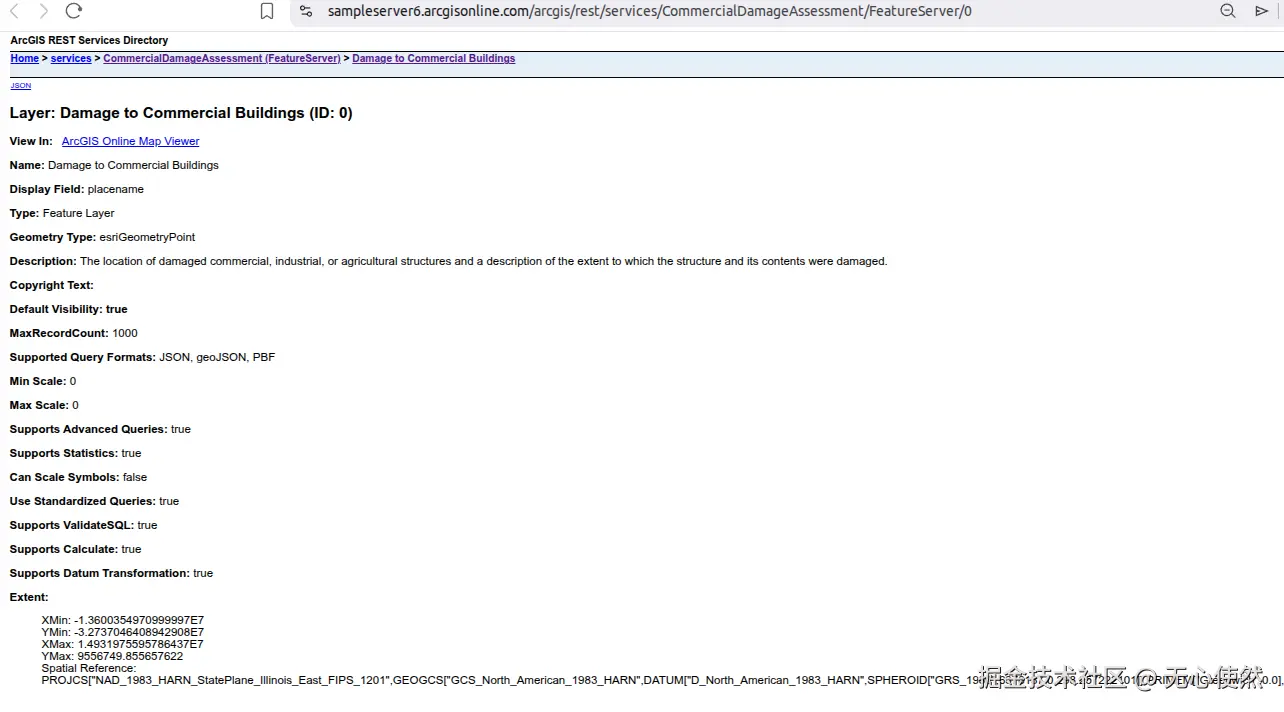
图中可以看到有一个图层,进入图层查看图层信息(信息比较多,只截图了相对重要的部分)
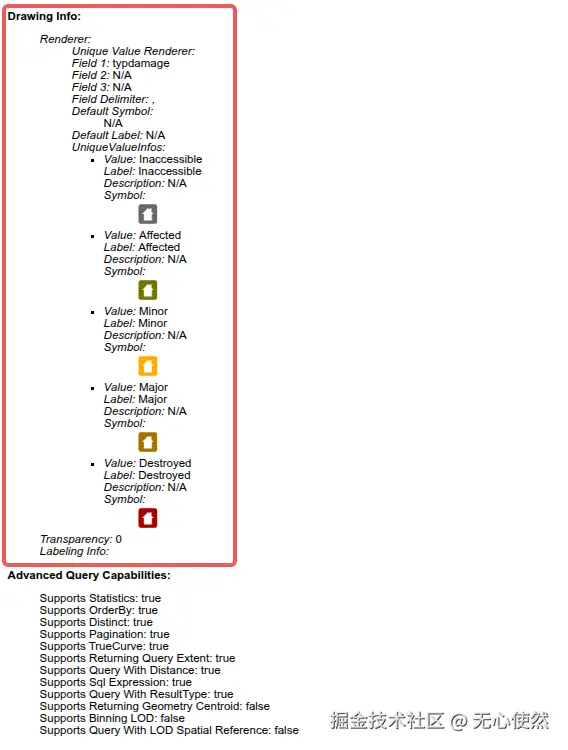
红框内是一个唯一值渲染器,根据typdamage字段来分类,分为Inaccessible, Affected, Minor, Major, Destroyed五种具体类型(可以简单理解为图例)
如果我们使用ArcGis JS SDK加载可以直接使用FeatureLayer即可,但是如果使用Openlayers,一般还是使用图层的/query接口获取到要素的矢量信息,再使用VectorLayer渲染,至于渲染器(图例)我们可以:
- 自定义显示
- 使用
ol-esri-style转换

可以看到Supported Operations:中还有有Add Features等操作,下文以Query为例,其他的操作同理,主要都是构造ArcGis Rest Api请求
2.1.5 Openlayers调用
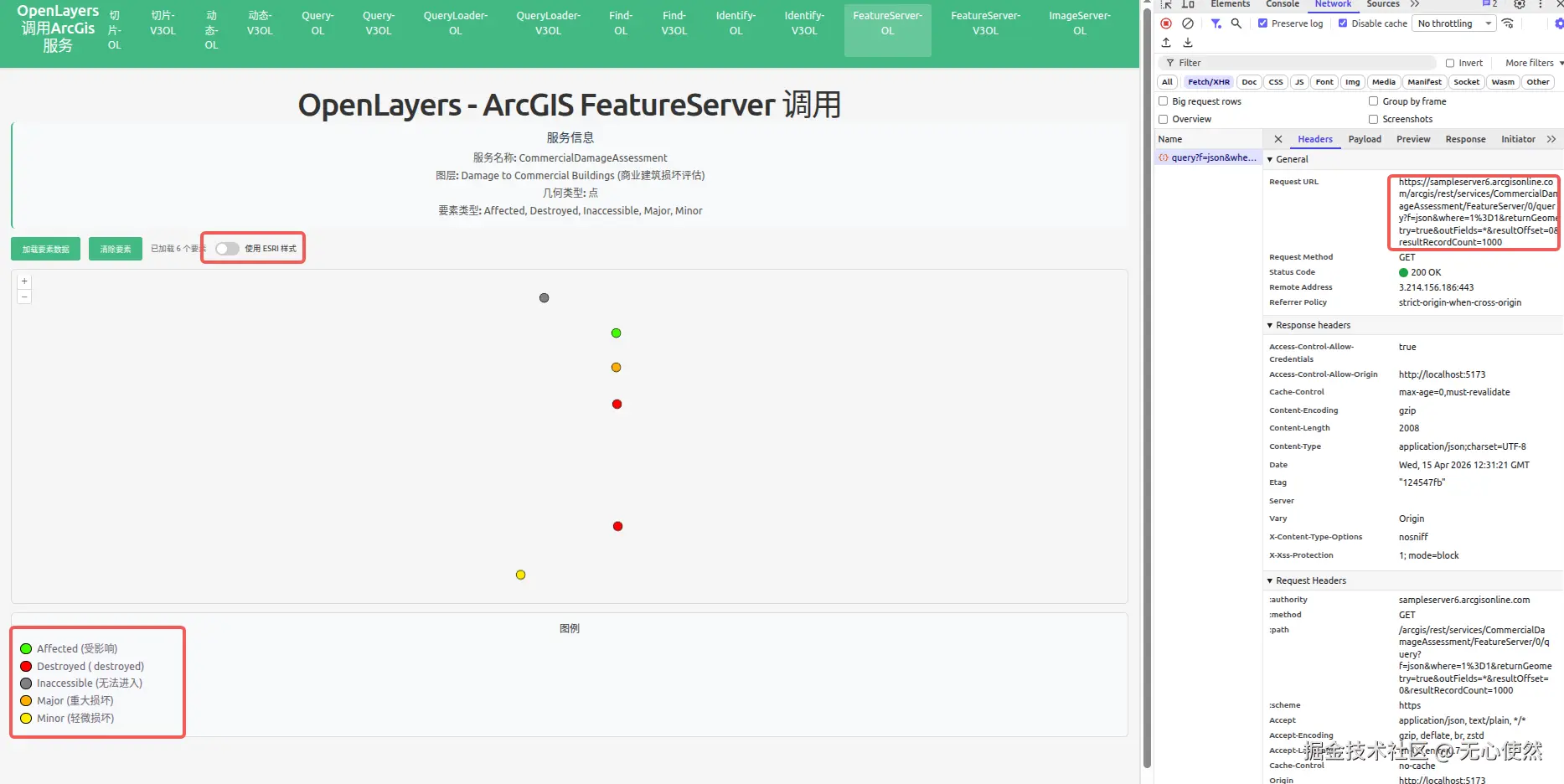
自定义图例:
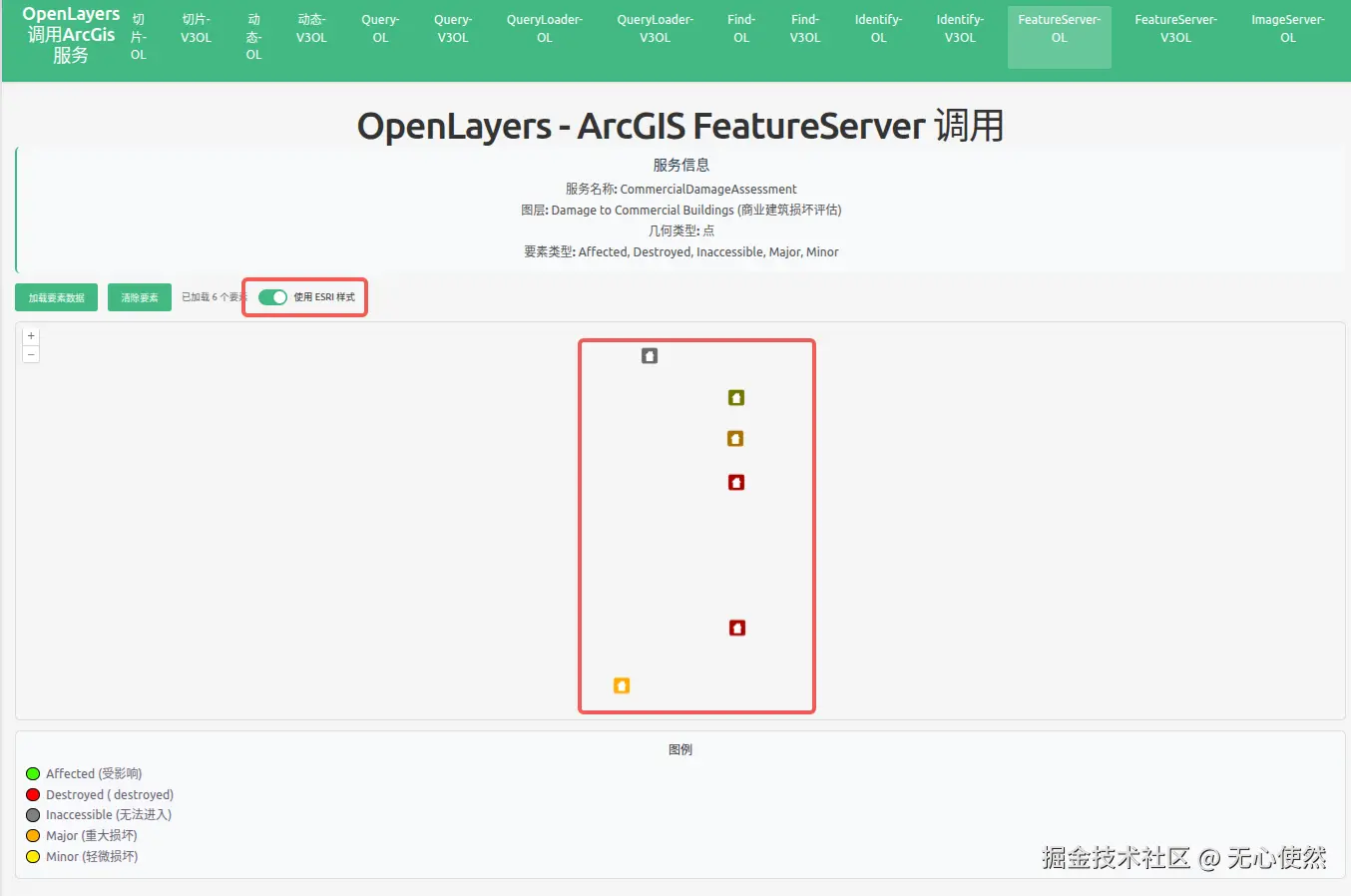
使用渲染器图例:
javascript
<template>
  <div class="map-page">
    <h1>OpenLayers - ArcGIS FeatureServer 调用</h1>
    <div class="info-panel">
      <h3>服务信息</h3>
      <p><strong>服务名称:</strong> CommercialDamageAssessment</p>
      <p>
        <strong>图层:</strong> Damage to Commercial Buildings (商业建筑损坏评估)
      </p>
      <p><strong>几何类型:</strong> 点</p>
      <p>
        <strong>要素类型:</strong> Affected, Destroyed, Inaccessible, Major,
        Minor
      </p>
    </div>
    <div class="controls">
      <button @click="loadFeatures" :disabled="loading">
        {{ loading ? "加载中..." : "加载要素数据" }}
      </button>
      <button @click="clearFeatures" :disabled="loading">清除要素</button>
      <span v-if="featureCount" class="feature-count">
        已加载 {{ featureCount }} 个要素
      </span>
      <label class="toggle-switch">
        <input type="checkbox" v-model="useEsriStyle" @change="updateFeatureStyle" />
        <span class="slider"></span>
        <span class="label-text">使用 ESRI 样式</span>
      </label>
    </div>
    <div
      id="featureserver-ol-map"
      ref="mapContainer"
      class="map-container"
    ></div>
    <div v-if="error" class="error">{{ error }}</div>
    <div class="legend">
      <h4>图例</h4>
      <div class="legend-item">
        <span class="legend-color" style="background-color: #41ff00"></span>
        <span>Affected (受影响)</span>
      </div>
      <div class="legend-item">
        <span class="legend-color" style="background-color: #ff0000"></span>
        <span>Destroyed ( destroyed)</span>
      </div>
      <div class="legend-item">
        <span class="legend-color" style="background-color: #808080"></span>
        <span>Inaccessible (无法进入)</span>
      </div>
      <div class="legend-item">
        <span class="legend-color" style="background-color: #ffae00"></span>
        <span>Major (重大损坏)</span>
      </div>
      <div class="legend-item">
        <span class="legend-color" style="background-color: #ffea00"></span>
        <span>Minor (轻微损坏)</span>
      </div>
    </div>
  </div>
</template>

<script setup lang="ts">
import { onMounted, onUnmounted, ref } from "vue";
import axios from "axios";
import Map from "ol/Map";
import View from "ol/View";
import TileLayer from "ol/layer/Tile";
import VectorLayer from "ol/layer/Vector";
import VectorSource from "ol/source/Vector";
import { EsriJSON } from "ol/format";
import { Style, Circle, Fill, Stroke } from "ol/style";
import { createStyleFunctionFromUrl } from "ol-esri-style";

const mapContainer = ref<HTMLDivElement>();
const loading = ref(false);
const featureCount = ref(0);
const error = ref("");
const useEsriStyle = ref(false);

// 存储 ESRI 样式函数
let esriStyleFunction: ((feature: any) => Style | Style[]) | null = null;
let customStyleFunction: ((feature: any) => Style | Style[]);

// 基于损坏类型的自定义样式函数
customStyleFunction = (feature) => {
  const damageType = feature.get("typdamage");
  let color = "#41ff00"; // 默认 - 受影响

  switch (damageType) {
    case "Destroyed":
      color = "#ff0000";
      break;
    case "Inaccessible":
      color = "#808080";
      break;
    case "Major":
      color = "#ffae00";
      break;
    case "Minor":
      color = "#ffea00";
      break;
    default:
      color = "#41ff00"; // 受影响
  }

  return new Style({
    image: new Circle({
      radius: 8,
      fill: new Fill({ color: color }),
      stroke: new Stroke({ color: "#000", width: 1 }),
    }),
  });
};

let map: Map | null = null;
const featureLayer = new VectorLayer({
  source: new VectorSource(),
  style: customStyleFunction,
});

// 从 ArcGIS FeatureServer 加载要素
const loadFeatures = async () => {
  loading.value = true;
  error.value = "";

  try {
    const response = await axios.get(
      "https://sampleserver6.arcgisonline.com/arcgis/rest/services/CommercialDamageAssessment/FeatureServer/0/query",
      {
        params: {
          f: "json",
          where: "1=1",
          returnGeometry: "true",
          outFields: "*",
          resultOffset: 0,
          resultRecordCount: 1000,
        },
      },
    );

    if (response.data.error) {
      throw new Error(response.data.error.message || "未知错误");
    }

    const format = new EsriJSON();
    const features = format.readFeatures(response.data, {
      featureProjection: "EPSG:3857",
    });

    const source = featureLayer.getSource();
    source?.clear();
    source?.addFeatures(features);

    featureCount.value = features.length;

    // 缩放到要素范围
    if (features.length > 0 && source) {
      const extent = source.getExtent();
      const view = map?.getView();
      if (view && extent) {
        view.fit(extent, { padding: [50, 50, 50, 50], duration: 1000 });
      }
    }
  } catch (err: any) {
    error.value = "加载失败: " + (err.message || "未知错误");
    console.error("Load features error:", err);
  } finally {
    loading.value = false;
  }
};

// 清除所有要素
const clearFeatures = () => {
  const source = featureLayer.getSource();
  source?.clear();
  featureCount.value = 0;
};

// 根据开关更新要素样式
const updateFeatureStyle = async () => {
  if (useEsriStyle.value) {
    // 从 FeatureServer 加载 ESRI 样式
    loading.value = true;
    try {
      esriStyleFunction = await createStyleFunctionFromUrl(
        "https://sampleserver6.arcgisonline.com/arcgis/rest/services/CommercialDamageAssessment/FeatureServer/0",
        "EPSG:3857"
      );
      featureLayer.setStyle(esriStyleFunction);
    } catch (err: any) {
      error.value = "加载 ESRI 样式失败: " + (err.message || "未知错误");
      console.error("Load ESRI style error:", err);
      // 回退到自定义样式
      featureLayer.setStyle(customStyleFunction);
    } finally {
      loading.value = false;
    }
  } else {
    // 使用自定义样式
    featureLayer.setStyle(customStyleFunction);
  }
};

onMounted(() => {
  const baseLayer = new TileLayer({});

  // 创建以伊利诺伊州为中心的地图(数据所在位置)
  map = new Map({
    target: mapContainer.value!,
    layers: [baseLayer, featureLayer],
    view: new View({
      center: [-10747000, 5162000], // Web Mercator 投影下伊利诺伊州的近似中心
      zoom: 7,
    }),
  });

  // 挂载时自动加载要素
  loadFeatures();
});

onUnmounted(() => {
  if (map) {
    map.setTarget(undefined);
    map = null;
  }
});
</script>

<style scoped>
.map-page {
  padding: 20px;
}

h1 {
  margin-bottom: 20px;
  color: #333;
}

.info-panel {
  background-color: #f8f9fa;
  padding: 15px;
  border-radius: 8px;
  margin-bottom: 15px;
  border-left: 4px solid #42b983;
}

.info-panel h3 {
  margin-top: 0;
  margin-bottom: 10px;
  color: #2c3e50;
}

.info-panel p {
  margin: 5px 0;
  color: #555;
}

.controls {
  margin-bottom: 15px;
  display: flex;
  align-items: center;
  gap: 15px;
}

.controls button {
  padding: 10px 20px;
  background-color: #42b983;
  color: white;
  border: none;
  border-radius: 4px;
  cursor: pointer;
  font-size: 14px;
  transition: background-color 0.3s;
}

.controls button:hover:not(:disabled) {
  background-color: #3aa876;
}

.controls button:disabled {
  opacity: 0.6;
  cursor: not-allowed;
}

.feature-count {
  color: #666;
  font-size: 14px;
}

.toggle-switch {
  display: flex;
  align-items: center;
  gap: 10px;
  cursor: pointer;
  position: relative;
}

.toggle-switch input[type="checkbox"] {
  position: absolute;
  opacity: 0;
  width: 0;
  height: 0;
}

.toggle-switch .slider {
  position: relative;
  display: inline-block;
  width: 44px;
  height: 24px;
  background-color: #ccc;
  border-radius: 24px;
  transition: background-color 0.3s;
}

.toggle-switch .slider:before {
  content: "";
  position: absolute;
  height: 18px;
  width: 18px;
  left: 3px;
  bottom: 3px;
  background-color: white;
  border-radius: 50%;
  transition: transform 0.3s;
}

.toggle-switch input:checked + .slider {
  background-color: #42b983;
}

.toggle-switch input:checked + .slider:before {
  transform: translateX(20px);
}

.toggle-switch .label-text {
  font-size: 14px;
  color: #333;
  user-select: none;
}

.map-container {
  width: 100%;
  height: 600px;
  border: 2px solid #ddd;
  border-radius: 8px;
}

.error {
  margin-top: 10px;
  padding: 10px;
  background-color: #fee;
  color: #c33;
  border-radius: 4px;
}

.legend {
  margin-top: 15px;
  padding: 15px;
  background-color: #f8f9fa;
  border-radius: 8px;
  border: 1px solid #ddd;
}

.legend h4 {
  margin-top: 0;
  margin-bottom: 10px;
  color: #333;
}

.legend-item {
  display: flex;
  align-items: center;
  margin: 5px 0;
}

.legend-color {
  width: 20px;
  height: 20px;
  border-radius: 50%;
  margin-right: 10px;
  border: 1px solid #000;
  display: inline-block;
}
</style>
2.1.6 Vue3-Openlayers用
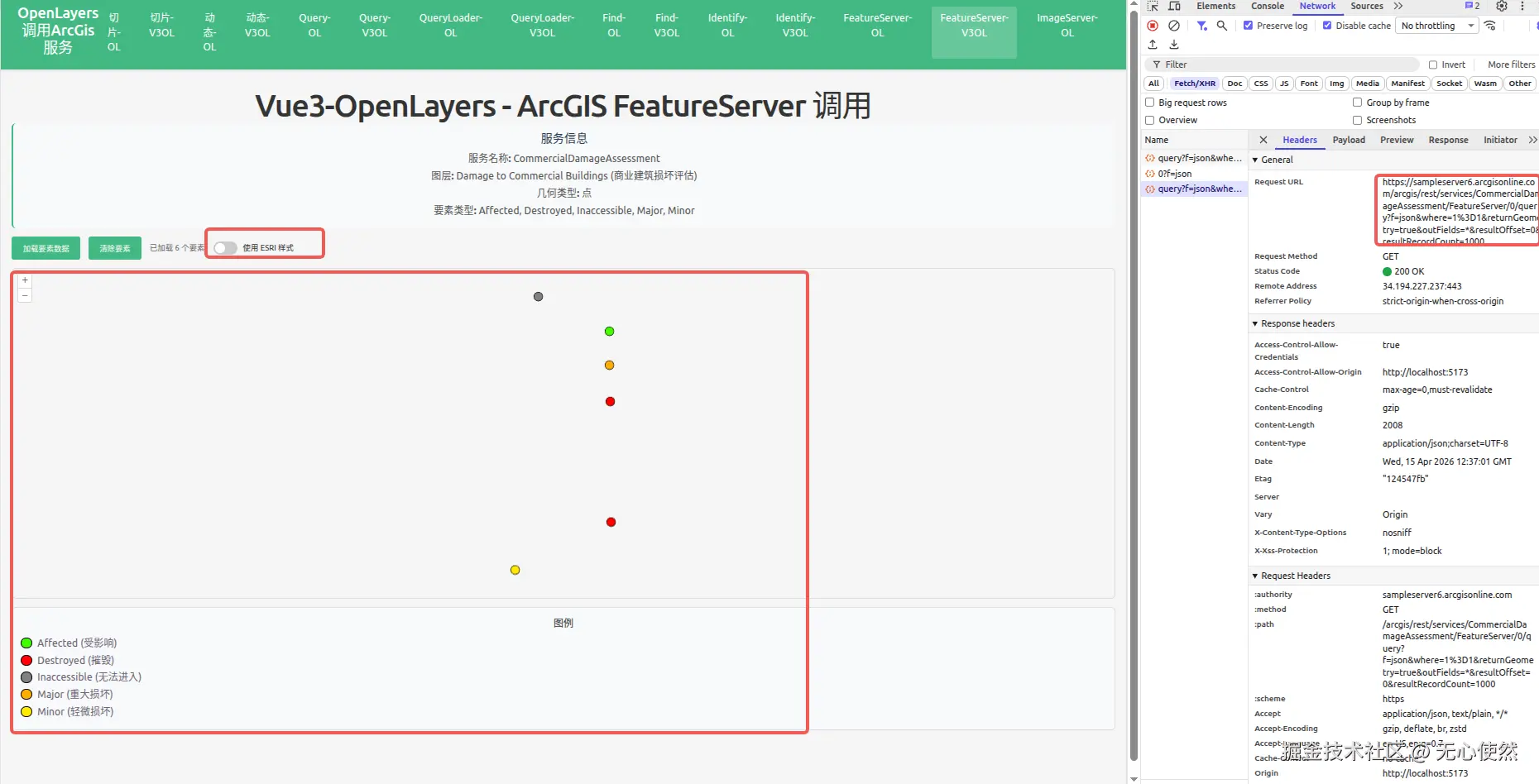
自定义图例:
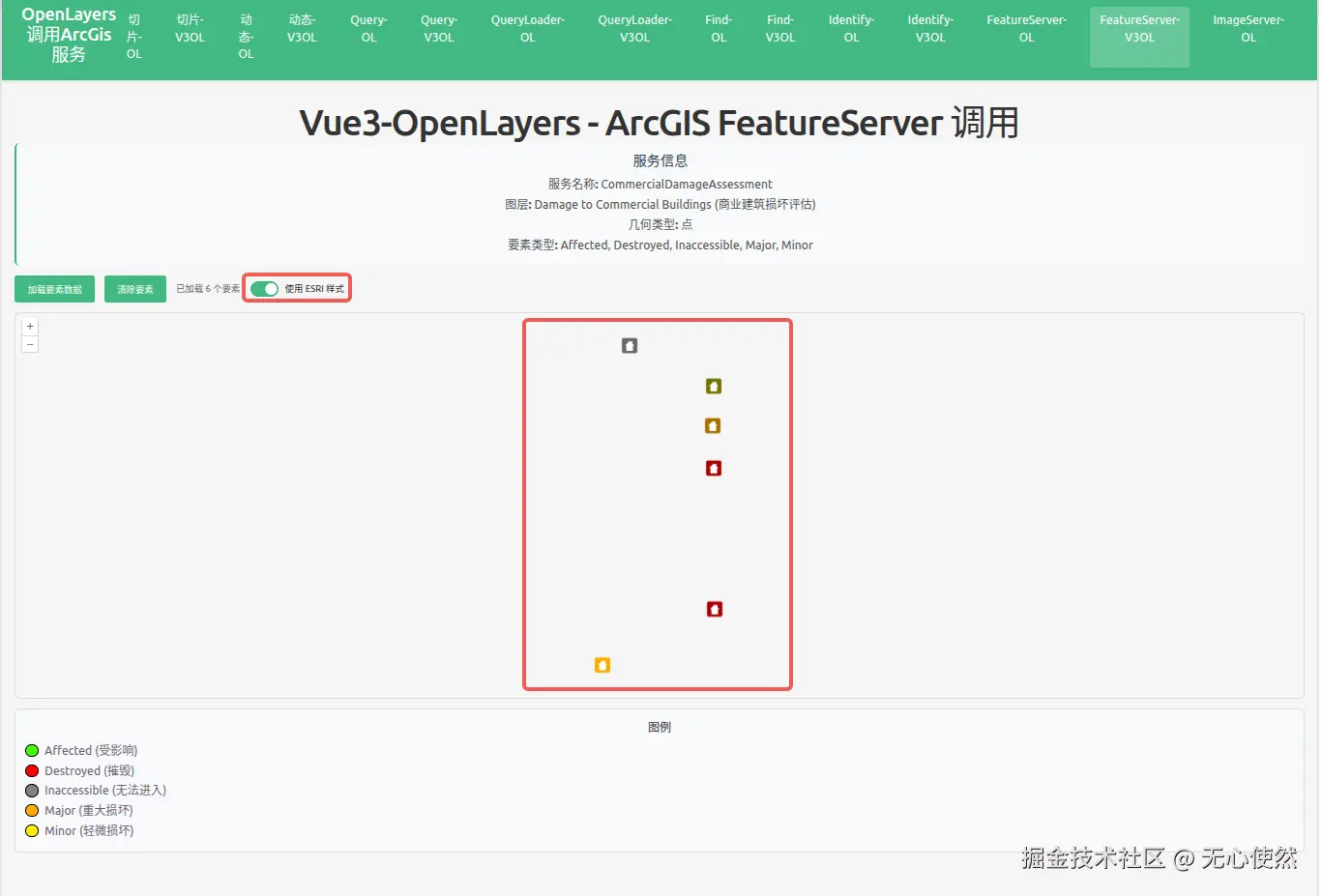
使用渲染器图例:
javascript
<template>
  <div class="map-page">
    <h1>Vue3-OpenLayers - ArcGIS FeatureServer 调用</h1>
    <div class="info-panel">
      <h3>服务信息</h3>
      <p><strong>服务名称:</strong> CommercialDamageAssessment</p>
      <p>
        <strong>图层:</strong> Damage to Commercial Buildings (商业建筑损坏评估)
      </p>
      <p><strong>几何类型:</strong> 点</p>
      <p>
        <strong>要素类型:</strong> Affected, Destroyed, Inaccessible, Major,
        Minor
      </p>
    </div>
    <div class="controls">
      <button @click="loadFeatures" :disabled="loading">
        {{ loading ? "加载中..." : "加载要素数据" }}
      </button>
      <button @click="clearFeatures" :disabled="loading">清除要素</button>
      <span v-if="featureCount" class="feature-count">
        已加载 {{ featureCount }} 个要素
      </span>
      <label class="toggle-switch">
        <input
          type="checkbox"
          v-model="useEsriStyle"
          @change="updateFeatureStyle"
        />
        <span class="slider"></span>
        <span class="label-text">使用 ESRI 样式</span>
      </label>
    </div>

    <ol-map
      ref="mapRef"
      :loadTilesWhileAnimating="true"
      :loadTilesWhileInteracting="true"
      style="
        height: 600px;
        width: 100%;
        border: 2px solid #ddd;
        border-radius: 8px;
      "
    >
      <ol-view
        ref="viewRef"
        :center="center"
        :zoom="7"
        :projection="projection"
      />

      <ol-vector-layer>
        <ol-source-vector ref="vectorSourceRef" />
      </ol-vector-layer>
    </ol-map>

    <div v-if="error" class="error">{{ error }}</div>

    <div class="legend">
      <h4>图例</h4>
      <div class="legend-item">
        <span class="legend-color" style="background-color: #41ff00"></span>
        <span>Affected (受影响)</span>
      </div>
      <div class="legend-item">
        <span class="legend-color" style="background-color: #ff0000"></span>
        <span>Destroyed (摧毁)</span>
      </div>
      <div class="legend-item">
        <span class="legend-color" style="background-color: #808080"></span>
        <span>Inaccessible (无法进入)</span>
      </div>
      <div class="legend-item">
        <span class="legend-color" style="background-color: #ffae00"></span>
        <span>Major (重大损坏)</span>
      </div>
      <div class="legend-item">
        <span class="legend-color" style="background-color: #ffea00"></span>
        <span>Minor (轻微损坏)</span>
      </div>
    </div>
  </div>
</template>

<script setup lang="ts">
import { ref } from "vue";
import axios from "axios";
import { EsriJSON } from "ol/format";
import { Style, Circle, Fill, Stroke } from "ol/style";
import { createStyleFunctionFromUrl } from "ol-esri-style";
import VectorLayer from "ol/layer/Vector";

const projection = "EPSG:3857";
const center = ref([-10747000, 5162000]); // Web Mercator 投影下伊利诺伊州的近似中心
const loading = ref(false);
const featureCount = ref(0);
const error = ref("");
const vectorSourceRef = ref();
const viewRef = ref();
const mapRef = ref();
const useEsriStyle = ref(false);

// 获取矢量图层
const getVectorLayer = () => {
  const map = mapRef.value?.map;
  if (!map) return null;
  const layers = map.getLayers().getArray();
  // 找到第一个 VectorLayer
  return layers.find((layer: any) => layer instanceof VectorLayer) as VectorLayer<any> | null;
};

// 存储 ESRI 样式函数
let esriStyleFunction: ((feature: any) => Style | Style[]) | null = null;
let customStyleFunction: (feature: any) => Style | Style[];

// 定义不同损坏类型的颜色映射
const damageColors: Record<string, string> = {
  Affected: "#41ff00",
  Destroyed: "#ff0000",
  Inaccessible: "#808080",
  Major: "#ffae00",
  Minor: "#ffea00",
};

// 基于损坏类型的自定义样式函数
customStyleFunction = (feature) => {
  const damageType = feature.get("typdamage");
  const color = damageColors[damageType] || "#41ff00";

  return new Style({
    image: new Circle({
      radius: 8,
      fill: new Fill({ color: color }),
      stroke: new Stroke({ color: "#000", width: 1 }),
    }),
  });
};

// 从 ArcGIS FeatureServer 加载要素
const loadFeatures = async () => {
  loading.value = true;
  error.value = "";

  try {
    const response = await axios.get(
      "https://sampleserver6.arcgisonline.com/arcgis/rest/services/CommercialDamageAssessment/FeatureServer/0/query",
      {
        params: {
          f: "json",
          where: "1=1",
          returnGeometry: "true",
          outFields: "*",
          resultOffset: 0,
          resultRecordCount: 1000,
        },
      },
    );

    if (response.data.error) {
      throw new Error(response.data.error.message || "未知错误");
    }

    const format = new EsriJSON();
    const features = format.readFeatures(response.data, {
      featureProjection: "EPSG:3857",
    });

    // 基于损坏类型应用自定义样式(用于非 ESRI 样式模式)
    features.forEach((feature) => {
      const damageType = feature.get("typdamage");
      const color = damageColors[damageType] || "#41ff00";
      feature.set("color", color);
    });

    const source = vectorSourceRef.value?.source;
    const layer = getVectorLayer();
    if (source) {
      source.clear();
      source.addFeatures(features);
    }

    // 根据当前开关状态应用样式
    if (layer) {
      if (useEsriStyle.value && esriStyleFunction) {
        layer.setStyle(esriStyleFunction);
      } else {
        layer.setStyle(customStyleFunction);
      }
    }

    featureCount.value = features.length;

    // 缩放到要素范围
    if (features.length > 0 && source) {
      const extent = source.getExtent();
      const view = viewRef.value?.view;
      if (view && extent) {
        view.fit(extent, { padding: [50, 50, 50, 50], duration: 1000 });
      }
    }
  } catch (err: any) {
    error.value = "加载失败: " + (err.message || "未知错误");
    console.error("Load features error:", err);
  } finally {
    loading.value = false;
  }
};

// 清除所有要素
const clearFeatures = () => {
  const source = vectorSourceRef.value?.source;
  if (source) {
    source.clear();
  }
  featureCount.value = 0;
};

// 根据开关更新要素样式
const updateFeatureStyle = async () => {
  const layer = getVectorLayer();
  if (!layer) {
    console.error("无法获取矢量图层");
    return;
  }

  if (useEsriStyle.value) {
    // 从 FeatureServer 加载 ESRI 样式
    loading.value = true;
    try {
      console.log("开始加载 ESRI 样式...");
      esriStyleFunction = await createStyleFunctionFromUrl(
        "https://sampleserver6.arcgisonline.com/arcgis/rest/services/CommercialDamageAssessment/FeatureServer/0",
        "EPSG:3857",
      );
      console.log("ESRI 样式加载成功,应用到图层");
      layer.setStyle(esriStyleFunction);
    } catch (err: any) {
      error.value = "加载 ESRI 样式失败: " + (err.message || "未知错误");
      console.error("Load ESRI style error:", err);
      // 回退到自定义样式
      layer.setStyle(customStyleFunction);
    } finally {
      loading.value = false;
    }
  } else {
    // 使用自定义样式
    layer.setStyle(customStyleFunction);
  }
};

// 挂载时自动加载要素
import { onMounted } from "vue";
onMounted(() => {
  loadFeatures();
});
</script>

<style scoped>
.map-page {
  padding: 20px;
}

h1 {
  margin-bottom: 20px;
  color: #333;
}

.info-panel {
  background-color: #f8f9fa;
  padding: 15px;
  border-radius: 8px;
  margin-bottom: 15px;
  border-left: 4px solid #42b983;
}

.info-panel h3 {
  margin-top: 0;
  margin-bottom: 10px;
  color: #2c3e50;
}

.info-panel p {
  margin: 5px 0;
  color: #555;
}

.controls {
  margin-bottom: 15px;
  display: flex;
  align-items: center;
  gap: 15px;
}

.controls button {
  padding: 10px 20px;
  background-color: #42b983;
  color: white;
  border: none;
  border-radius: 4px;
  cursor: pointer;
  font-size: 14px;
  transition: background-color 0.3s;
}

.controls button:hover:not(:disabled) {
  background-color: #3aa876;
}

.controls button:disabled {
  opacity: 0.6;
  cursor: not-allowed;
}

.feature-count {
  color: #666;
  font-size: 14px;
}

.toggle-switch {
  display: flex;
  align-items: center;
  gap: 10px;
  cursor: pointer;
  position: relative;
}

.toggle-switch input[type="checkbox"] {
  position: absolute;
  opacity: 0;
  width: 0;
  height: 0;
}

.toggle-switch .slider {
  position: relative;
  display: inline-block;
  width: 44px;
  height: 24px;
  background-color: #ccc;
  border-radius: 24px;
  transition: background-color 0.3s;
}

.toggle-switch .slider:before {
  content: "";
  position: absolute;
  height: 18px;
  width: 18px;
  left: 3px;
  bottom: 3px;
  background-color: white;
  border-radius: 50%;
  transition: transform 0.3s;
}

.toggle-switch input:checked + .slider {
  background-color: #42b983;
}

.toggle-switch input:checked + .slider:before {
  transform: translateX(20px);
}

.toggle-switch .label-text {
  font-size: 14px;
  color: #333;
  user-select: none;
}

.error {
  margin-top: 10px;
  padding: 10px;
  background-color: #fee;
  color: #c33;
  border-radius: 4px;
}

.legend {
  margin-top: 15px;
  padding: 15px;
  background-color: #f8f9fa;
  border-radius: 8px;
  border: 1px solid #ddd;
}

.legend h4 {
  margin-top: 0;
  margin-bottom: 10px;
  color: #333;
}

.legend-item {
  display: flex;
  align-items: center;
  margin: 5px 0;
}

.legend-color {
  width: 20px;
  height: 20px;
  border-radius: 50%;
  margin-right: 10px;
  border: 1px solid #000;
  display: inline-block;
}
</style>