硬件配置
我使用的是大华的GPU专用服务器,型号为DH-GS2288S-G03,2颗Hygon C86 7360,128G内存,3块4T SAS硬盘,2个RTX 3060 12G显卡。打算1块硬盘安装PVE,2块硬盘做RAID0直通给虚拟机,GPU直通给虚拟机。
PVE安装
PVE 9.1.1 安装过程略。
参考:
https://pve.proxmox.com/wiki/PCI_Passthrough#Verifying_IOMMU_parameters
https://wiki.archlinux.org/title/PCI_passthrough_via_OVMF
https://pve.proxmox.com/pve-docs/pve-admin-guide.html
shell
# 删除企业源/ceph源所有内容
sed -i 's/^/#/' /etc/apt/sources.list.d/pve-enterprise.sources
sed -i 's/^/#/' /etc/apt/sources.list.d/ceph.sources

# 添加 PVE9 无订阅源(.sources 格式)
cat > /etc/apt/sources.list.d/pve-no-subscription.sources <<'EOF'
Types: deb
URIs: https://mirrors.tuna.tsinghua.edu.cn/proxmox/debian/pve
Suites: trixie
Components: pve-no-subscription
Signed-By: /etc/apt/trusted.gpg.d/proxmox-release-trixie.gpg
EOF
# 安装密钥
wget https://mirrors.tuna.tsinghua.edu.cn/proxmox/debian/proxmox-release-bookworm.gpg -O /etc/apt/trusted.gpg.d/proxmox-release-bookworm.gpg

# 替换LXC容器镜像源
sed -i 's|http://download.proxmox.com|https://mirrors.tuna.tsinghua.edu.cn/proxmox|g' /usr/share/perl5/PVE/APLInfo.pm

# 备份原有 debian.sources
cp /etc/apt/sources.list.d/debian.sources /etc/apt/sources.list.d/debian.sources.bak
# 替换为清华源(.sources 格式,PVE9 专用)
cat > /etc/apt/sources.list.d/debian.sources << EOF
Types: deb
URIs: https://mirrors.tuna.tsinghua.edu.cn/debian
Suites: trixie trixie-updates
Components: main contrib non-free non-free-firmware
Signed-By: /usr/share/keyrings/debian-archive-keyring.gpg

Types: deb
URIs: https://mirrors.tuna.tsinghua.edu.cn/debian-security
Suites: trixie-security
Components: main contrib non-free non-free-firmware
Signed-By: /usr/share/keyrings/debian-archive-keyring.gpg
EOF

apt clean && apt update && apt upgrade

# 开启IOMMU(必须),需要同时开启BIOS和PVE系统中的配置,BIOS配置(略)
# 如果不开,GPU卡也可以直通使用。这种情况下,QEMU 是通过传统的kvm直接映射 PCIe 设备给虚拟机,而不是通过 VFIO 做安全隔离。
# 修改/etc/default/grub,增加amd_iommu=on iommuu=pt
GRUB_CMDLINE_LINUX_DEFAULT="quiet amd_iommu=on iommu=pt"
update-grub
reboot
# 验证IOMMU是否生效
dmesg | grep -e DMAR -e IOMMU
ls /sys/kernel/iommu_groups/

# 配置VFIO驱动模块
tee /etc/modules-load.d/vfio.conf >/dev/null <<EOF
vfio
vfio_iommu_type1
vfio_pci
vfio_virqfd
EOF
# 获取显卡的硬件ID
lspci -nn | grep NVIDIA
tee /etc/modprobe.d/vfio.conf >/dev/null <<EOF
options vfio-pci ids=10de:2504,10de:228e disable_vga=1
EOF
# 屏蔽NVIDIA显卡驱动
tee /etc/modprobe.d/blacklist.conf >/dev/null <<EOF
blacklist nouveau
blacklist nvidia
EOF
update-initramfs -u -k all
reboot
# 验证VFIO。看到类似 vfio-pci 0000:41:00.0: ... 和 vfio-pci 0000:a1:00.0: ... 的输出信息,就说明两张显卡都已经成功被 VFIO 驱动接管了
dmesg | grep -i vfio
虚拟机
创建虚拟机
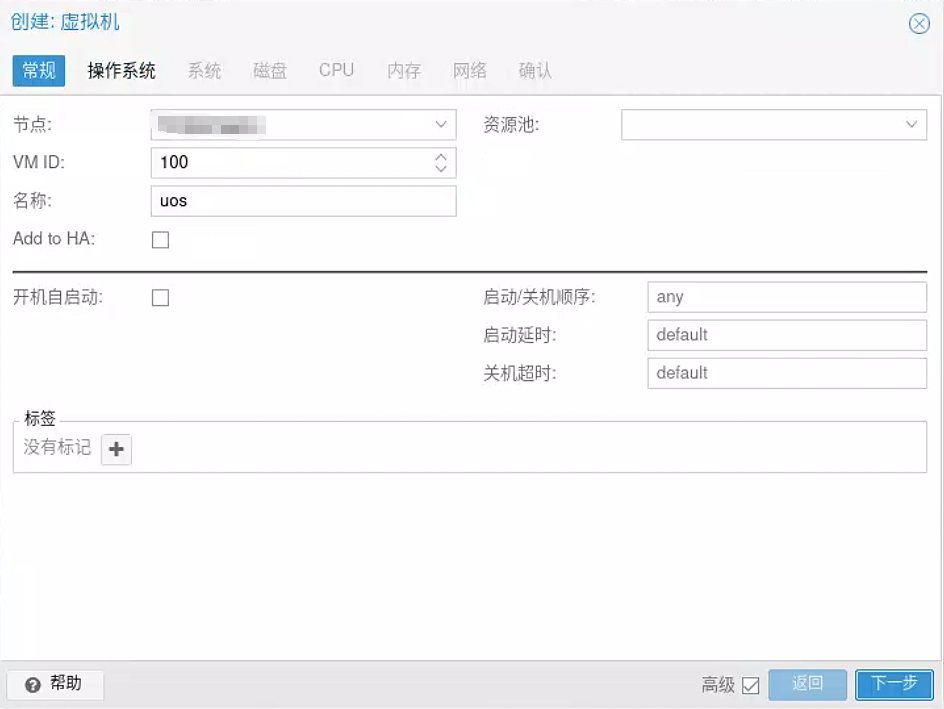
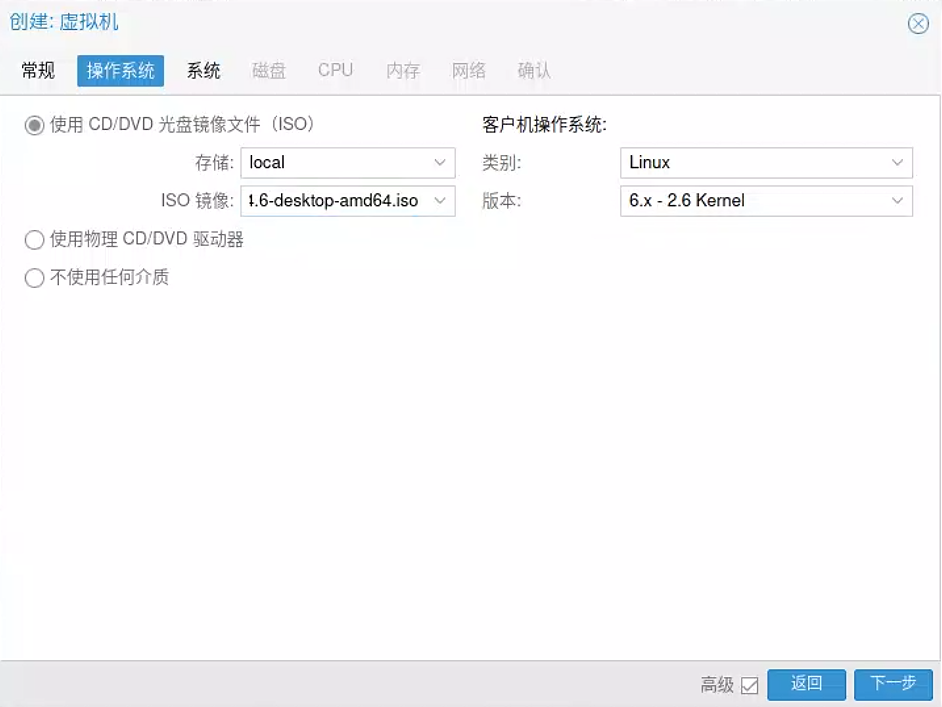
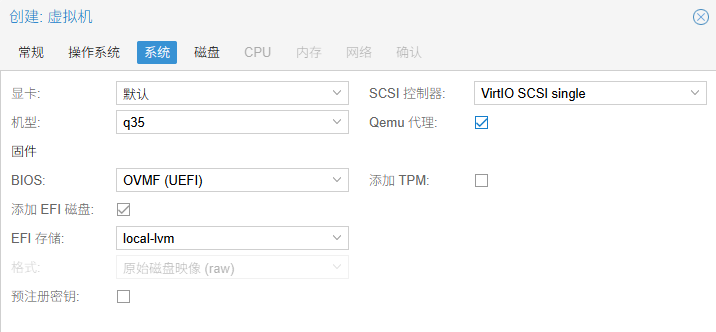
机型:q35 机型模拟了现代的 PCIe 总线架构,这是进行高性能 GPU 直通的必要条件。老式的 i440fx 无法很好地支持 RTX 30 系列显卡的直通需求。PCIe passthrough is only available on q35 machines
BIOS:OVMF (UEFI):RTX 3060 这种新卡,其 UEFI GOP 固件只支持在 UEFI 环境下初始化。如果用 SeaBIOS,有概率会报错。
取消"预注册密钥":如果保持勾选,Windows 或某些 Linux 发行版可能会因为 Secure Boot 验证签名失败而拒绝加载直通进来的显卡驱动。
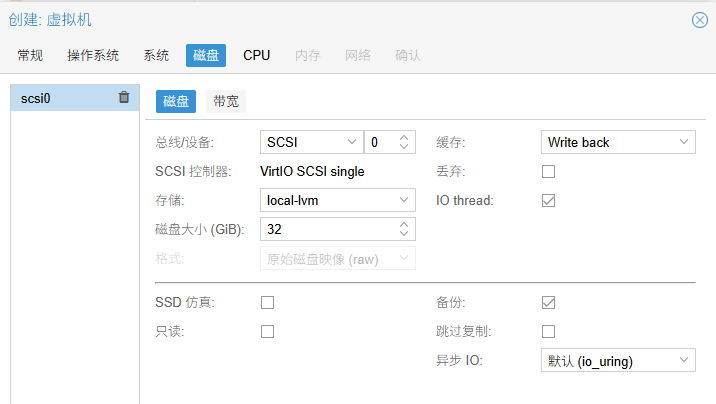
缓存:选"Write back":我打算把一块物理硬盘直通给虚拟机使用。机械硬盘本身的写入速度(大约 150MB/s - 250MB/s)远低于内存和 CPU 的处理速度。如果 PVE 开启缓存(如 Writeback),数据会先存在宿主机的内存里,PVE 会告诉虚拟机"写完了",但实际上数据还在内存里排队等写入慢吞吞的机械盘。
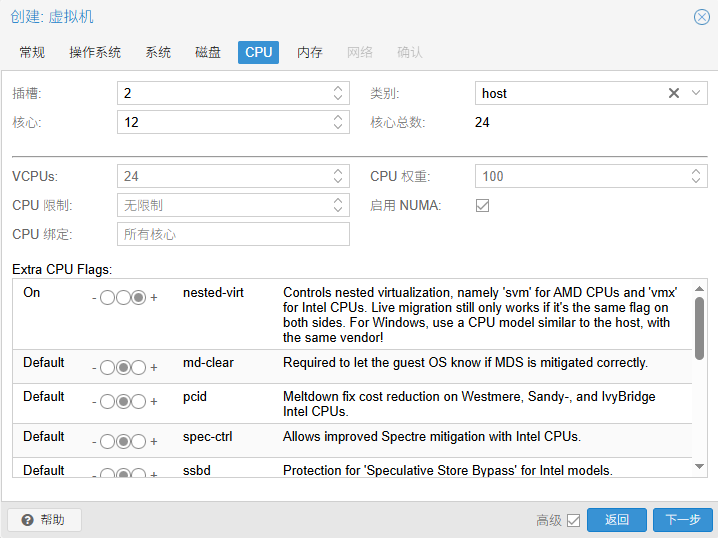
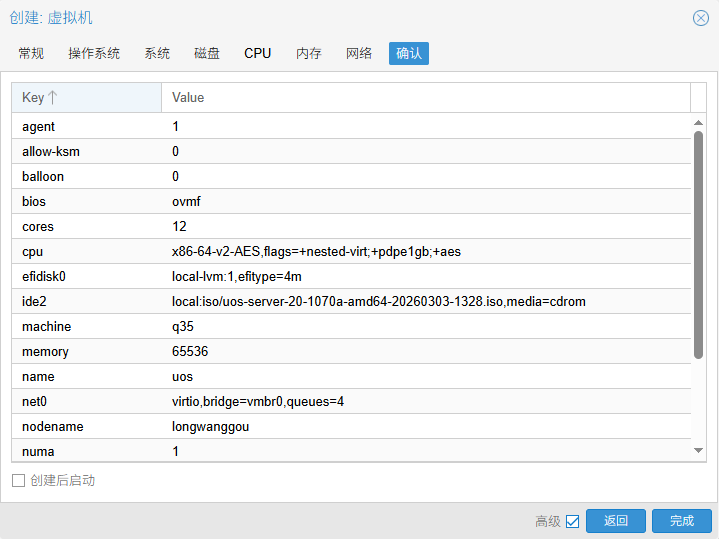
类别改为host。host 模式会将物理 CPU 的所有特性直接透传给虚拟机,减少指令集翻译的开销,对计算密集型任务更有利。
插槽数量和核心数量,根据CPU参数以及自己的需求进行修改,注意给宿主机预留8个核心,防止卡顿、IO 卡死、直通异常。
勾选"启用 NUMA",NUMA是一种多处理器体系结构。启用后,可以加快虚拟机对内存的访问速率,从而提高整体性能。勾选该选项会将宿主机的 NUMA 拓扑结构透传给虚拟机。这对于需要精细分配硬件资源的高性能场景非常关键。如果你的宿主机有多块物理 CPU,建议勾选此选项。
开启"nested-virt",取决于你的具体使用场景。简单来说,如果你需要在虚拟机里再运行虚拟机,那就必须开启;如果只是普通使用,开启它并无坏处,但也没太大必要。
开启"pdpe1gb",深度学习模型(如 LLM 大语言模型)加载时会占用巨大的内存。开启这个选项允许虚拟机使用 1GB 大小的内存页,而不是默认的 4KB。这能极大地减少 CPU 的页表查找压力(TLB Miss),显著提升大模型加载和运行的效率。
开启"aes",这是硬件级别的加密加速指令。虽然深度学习计算本身不怎么用它,但系统运行时的磁盘加密、网络加密(SSL/TLS)会用到。开启它能降低 CPU 占用率,提升系统整体响应速度。
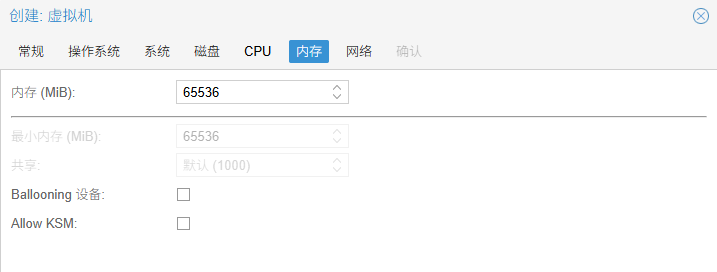
内存大小根据自己的任务需要修改,但是不能大于物理内存。
取消Ballooning:Ballooning 是一种内存回收技术,允许宿主机在虚拟机空闲时"偷"回一些内存给其他虚拟机用。深度学习训练时,内存通常会被占得满满当当,如果开启 Ballooning,虚拟机的驱动程序会不断与宿主机通信,试图调整内存大小。这个过程会消耗 CPU 资源,并可能导致内存碎片化,轻微影响性能。
取消"allow ksm":KSM 是一种内存去重技术。它会扫描内存,如果发现两个虚拟机有相同的数据页(比如都运行了 Windows),它就只存一份,以此节省内存。深度学习的数据通常是独一无二的(不同的训练数据、不同的模型权重),几乎没有重复的内存页可供合并。KSM 后台扫描进程(ksmtuned)会持续消耗 CPU 资源来比对内存。对于深度学习这种需要榨干 CPU 和内存带宽的任务来说,这是纯粹的浪费。
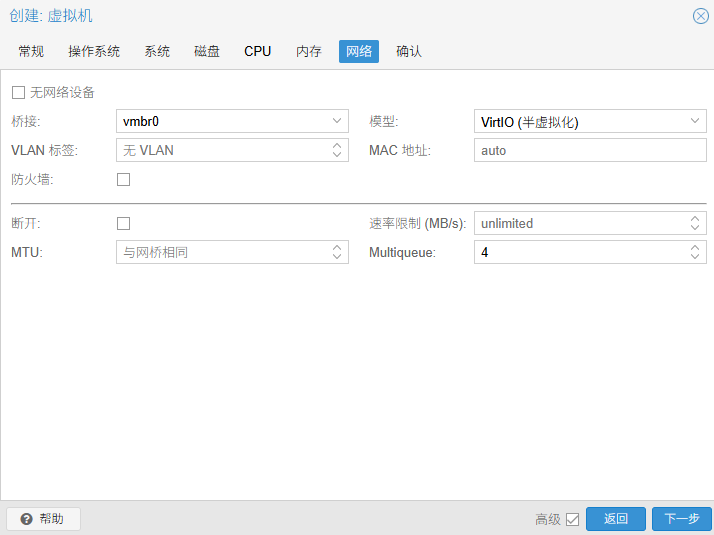
取消"防火墙":PVE 的防火墙是基于 iptables/nftables 实现的。虽然现代 CPU 处理网络包很快,但对于深度学习场景,可能需要传输大量数据。开启宿主机层面的防火墙会增加不必要的 CPU 中断和延迟。通常会在虚拟机内部配置防火墙(如 ufw)。如果在 PVE 层和虚拟机层都开防火墙,排查网络问题时会很头疼。
设置"Multiqueue":默认情况下,虚拟网卡只有一个队列来处理网络数据。这意味着无论你的虚拟机有多少个 CPU 核心,网络中断处理都只由一个核心负责。深度学习服务器通常有大量的多核 CPU。开启 Multiqueue 可以让网卡的中断请求分散到多个 CPU 核心上处理。虽然深度学习训练主要靠 GPU,但在数据加载阶段(从网络存储读取数据)或模型传输阶段,多队列能显著降低网络延迟,提高吞吐量。设置值取决于你分配给虚拟机的 CPU 核心数,一般设置为 CPU 核心数的 1/4 或 1/2。
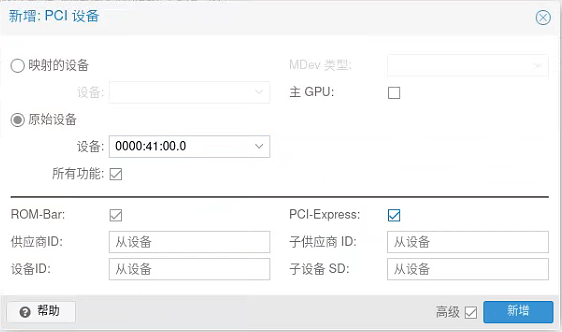
GPU卡直通
硬盘直通
我的两个硬盘已经做了RAID0,在PVE系统中对应sda
shell
# 获取硬盘的ID
ls -l /dev/disk/by-id/
# 语法:qm set <虚拟机ID> --scsi<接口号> <设备路径>
qm set 100 -scsi0 /dev/sda,backup=0
统信系统
安装操作系统,参考统信服务器操作系统V20(1070)安装过程
shell
sudo yum install qemu-guest-agent
sudo systemctl enable --now qemu-guest-agent
性能对比测试
注意:生产环境不需要以下的操作
硬盘性能测试
PVE系统
shell
apt install -y fio

# 顺序写入测试
fio --name=seq-write --ioengine=libaio --rw=write --bs=1M --size=4G --numjobs=1 --runtime=60 --time_based --group_reporting --filename=./test_seq_write --direct=1

# 顺序读取测试
fio --name=seq-read --ioengine=libaio --rw=read --bs=1M --size=4G --numjobs=1 --runtime=60 --time_based --group_reporting --filename=./test_seq_read --direct=1

# 4K 随机读取 (IOPS 测试)
fio --name=rand-read --ioengine=libaio --rw=randread --bs=4k --size=1G --numjobs=4 --runtime=60 --time_based --group_reporting --filename=./test_rand_read --direct=1 --iodepth=32
统信系统
shell
# 安装软件fio
yum install -y fio

# 测试命令与宿主机一致
GPU性能测试
统信系统
在统信系统中安装显卡驱动,我使用的是595.58.03,参考统信服务器操作系统V20(1070)安装过程
安装软件clpeak
shell
# 安装编译依赖
yum install -y cmake gcc gcc-c++ git opencl-headers ocl-icd-devel

# 下载源码
git clone https://github.com/krrishnarraj/clpeak.git
cd clpeak
mkdir build && cd build

# 编译安装
cmake ..
make -j4
make install

# 运行程序
clpeak
PVE系统
安装NVIDIA驱动,我使用的是595.58.03
shell
apt install -y pve-headers-$(uname -r)
apt install -y build-essential pkg-config libglvnd-dev

# 删除VFIO配置文件
rm /etc/modules-load.d/vfio.conf
rm /etc/modprobe.d/vfio.conf
rm /etc/modprobe.d/blacklist.conf

# 修改文件 /etc/default/grub,去除amd_iommu=on iommu=pt
GRUB_CMDLINE_LINUX_DEFAULT="quiet"

update-grub
update-initramfs -u -k all
reboot

# 安装显卡驱动
./NVIDIA-Linux-x86_64-580.126.09.run --no-opengl-files --no-x-check

# 安装测试工具
apt install -y clpeak

# 运行测试工具
clpeak
结论
GPU性能对比
GPU 直通性能几乎无损,达到了原生水平。
- 算力对比 (Compute Performance):
- 单精度浮点 (FP32): 宿主机平均约 13100 GFLOPS,虚拟机平均约 13050 GFLOPS。
- 双精度浮点 (FP64): 宿主机约 212 GFLOPS,虚拟机约 213 GFLOPS。
- 整数运算 (INT): 两者差异极小,均在 6700-6800 GIOPS 波动。
- 显存带宽 (Bandwidth):全局内存带宽(Global Memory Bandwidth)在宿主机和虚拟机中均稳定在 315~330 GB/s。
硬盘性能对比
硬盘测试中,宿主机和虚拟机安装的fio版本不一样。同时宿主机使用的是一个单独的4T硬盘,而虚拟机使用两块4T硬盘在主板HBA卡上做了RAID0。所以结果不具有可比性,只是给出一个感觉就好。
A. 顺序读写 (Sequential Read/Write)
| 测试项目 | 宿主机 PVE (MB/s) | 虚拟机 (MB/s) | 差异 |
|---|---|---|---|
| 顺序读取 (Seq Read) | 264 | 219 | -17% |
| 顺序写入 (Seq Write) | 263 | 235 | -10.6% |
B. 随机读写 (Random Read - 4K)
- 吞吐量对比:
- IOPS (每秒读写次数): 宿主机为 693 IOPS,虚拟机为 1247 IOPS。
- 带宽 (Bandwidth): 宿主机为 2773 KiB/s,虚拟机为 4991 KiB/s。
- 延迟 (Latency) :
- 平均延迟 (avg): 宿主机约 184ms,虚拟机约 102ms。虚拟机平均延迟更低。
- 尾部延迟 (Tail Latency - 99th/99.99th Percentile):宿主机 99.99th 延迟936ms,虚拟机 99.99th 延迟592ms
附录:测试数据
clpeak测试结果-宿主机PVE系统
log
Platform: NVIDIA CUDA
  Device: NVIDIA GeForce RTX 3060
    Driver version  : 595.58.03 (Linux x64)
    Compute units   : 28
    Clock frequency : 1777 MHz

    Global memory bandwidth (GBPS)
      float   : 316.51
      float2  : 326.15
      float4  : 331.56
      float8  : 287.44
      float16 : 326.32

    Single-precision compute (GFLOPS)
      float   : 13131.21
      float2  : 13112.69
      float4  : 13069.46
      float8  : 12981.99
      float16 : 12890.70

    No half precision support! Skipped

    Double-precision compute (GFLOPS)
      double   : 212.39
      double2  : 212.14
      double4  : 211.63
      double8  : 210.64
      double16 : 208.60

    Integer compute (GIOPS)
      int   : 6738.06
      int2  : 6792.92
      int4  : 6794.96
      int8  : 6822.51
      int16 : 6804.65

    Integer compute Fast 24bit (GIOPS)
      int   : 6813.85
      int2  : 6810.97
      int4  : 6809.69
      int8  : 6781.43
      int16 : 6709.74

    Integer char (8bit) compute (GIOPS)
      char   : 6109.36
      char2  : 6149.31
      char4  : 5936.14
      char8  : 5089.74
      char16 : 4698.72

    Integer short (16bit) compute (GIOPS)
      short   : 5983.83
      short2  : 6075.25
      short4  : 5958.45
      short8  : 5110.91
      short16 : 4683.06

    Transfer bandwidth (GBPS)
      enqueueWriteBuffer              : 6.80
      enqueueReadBuffer               : 5.67
      enqueueWriteBuffer non-blocking : 6.54
      enqueueReadBuffer non-blocking  : 5.36
      enqueueMapBuffer(for read)      : 7.95
        memcpy from mapped ptr        : 8.68
      enqueueUnmap(after write)       : 18.08
        memcpy to mapped ptr          : 8.78

    Kernel launch latency : 5.02 us

  Device: NVIDIA GeForce RTX 3060
    Driver version  : 595.58.03 (Linux x64)
    Compute units   : 28
    Clock frequency : 1777 MHz

    Global memory bandwidth (GBPS)
      float   : 316.53
      float2  : 326.23
      float4  : 331.63
      float8  : 287.68
      float16 : 326.23

    Single-precision compute (GFLOPS)
      float   : 13138.47
      float2  : 13122.80
      float4  : 13076.09
      float8  : 12990.50
      float16 : 12899.18

    No half precision support! Skipped

    Double-precision compute (GFLOPS)
      double   : 213.04
      double2  : 212.80
      double4  : 212.32
      double8  : 211.35
      double16 : 209.27

    Integer compute (GIOPS)
      int   : 6739.07
      int2  : 6750.21
      int4  : 6734.08
      int8  : 6762.51
      int16 : 6744.56

    Integer compute Fast 24bit (GIOPS)
      int   : 6832.44
      int2  : 6829.59
      int4  : 6828.04
      int8  : 6800.09
      int16 : 6727.40

    Integer char (8bit) compute (GIOPS)
      char   : 6122.17
      char2  : 6185.49
      char4  : 5977.65
      char8  : 5128.44
      char16 : 4719.13

    Integer short (16bit) compute (GIOPS)
      short   : 5983.12
      short2  : 6123.21
      short4  : 5995.49
      short8  : 5132.73
      short16 : 4708.88

    Transfer bandwidth (GBPS)
      enqueueWriteBuffer              : 6.78
      enqueueReadBuffer               : 5.63
      enqueueWriteBuffer non-blocking : 6.69
      enqueueReadBuffer non-blocking  : 5.48
      enqueueMapBuffer(for read)      : 8.01
        memcpy from mapped ptr        : 9.13
      enqueueUnmap(after write)       : 18.10
        memcpy to mapped ptr          : 8.98

    Kernel launch latency : 4.74 us
clpeak测试结果-虚拟机统信系统
log
Platform: NVIDIA CUDA
  Device: NVIDIA GeForce RTX 3060
    Driver version  : 595.58.03 (Linux x64)
    Compute units   : 28
    Clock frequency : 1777 MHz

    Global memory bandwidth (GBPS)
      float   : 315.83
      float2  : 325.40
      float4  : 330.85
      float8  : 290.06
      float16 : 334.03

    Local memory bandwidth (GBPS)
      float   : 2844.20
      float2  : 4809.75
      float4  : 5668.83
      float8  : 3186.48

    Image memory bandwidth (GBPS)
      float4  : 170.11

    Single-precision compute (GFLOPS)
      float   : 13073.44
      float2  : 13053.29
      float4  : 13009.98
      float8  : 13020.41
      float16 : 12983.58

    No half precision support! Skipped

    Mixed-precision compute fp16xfp16+fp32 (GFLOPS)
      No half precision support! Skipped

    Double-precision compute (GFLOPS)
      double  : 214.49
      double2 : 214.29
      double4 : 213.62
      double8 : 212.77
      double16: 210.72

    Integer compute (GOPS)
      int     : 6782.75
      int2    : 6792.15
      int4    : 6778.57
      int8    : 6808.81
      int16   : 6790.51

    Integer compute Fast 24bit (GOPS)
      int     : 6747.33
      int2    : 6796.96
      int4    : 6794.71
      int8    : 6767.18
      int16   : 6693.95

    Integer char (8bit) compute (GOPS)
      char    : 6073.61
      char2   : 6133.37
      char4   : 5916.44
      char8   : 5080.14
      char16  : 4682.14

    Integer short (16bit) compute (GOPS)
      short   : 5959.20
      short2  : 6070.18
      short4  : 5944.28
      short8  : 5100.33
      short16 : 4642.18

    Packed INT4 compute (emulated) (GOPS)
      int4_packed: 2466.97
      int4_packed2: 2485.22
      int4_packed4: 2505.50
      int4_packed8: 2509.94
      int4_packed16: 2470.82

    INT8 dot-product compute (GOPS)
      cl_khr_integer_dot_product not supported! Skipped

    Atomic throughput (GOPS)
      global  : 130.08
      local   : 847.21

    Transfer bandwidth (GBPS)
      enqueueWriteBuffer              : 5.43
      enqueueReadBuffer               : 5.14
      enqueueWriteBuffer non-blocking : 6.07
      enqueueReadBuffer non-blocking  : 5.20
      enqueueMapBuffer(for read)      : 15.57
        memcpy from mapped ptr        : 9.42
      enqueueUnmap(after write)       : 22.42
        memcpy to mapped ptr          : 9.11

    Kernel launch latency : 4.33 us

  Device: NVIDIA GeForce RTX 3060
    Driver version  : 595.58.03 (Linux x64)
    Compute units   : 28
    Clock frequency : 1777 MHz

    Global memory bandwidth (GBPS)
      float   : 315.91
      float2  : 325.55
      float4  : 330.96
      float8  : 289.96
      float16 : 335.86

    Local memory bandwidth (GBPS)
      float   : 2856.59
      float2  : 5133.77
      float4  : 5692.83
      float8  : 3200.85

    Image memory bandwidth (GBPS)
      float4  : 170.23

    Single-precision compute (GFLOPS)
      float   : 13115.93
      float2  : 13097.46
      float4  : 13051.78
      float8  : 12965.94
      float16 : 12874.60

    No half precision support! Skipped

    Mixed-precision compute fp16xfp16+fp32 (GFLOPS)
      No half precision support! Skipped

    Double-precision compute (GFLOPS)
      double  : 213.15
      double2 : 212.88
      double4 : 212.37
      double8 : 211.38
      double16: 209.34

    Integer compute (GOPS)
      int     : 6724.35
      int2    : 6738.01
      int4    : 6721.74
      int8    : 6749.96
      int16   : 6731.47

    Integer compute Fast 24bit (GOPS)
      int     : 6766.01
      int2    : 6793.99
      int4    : 6793.22
      int8    : 6765.45
      int16   : 6693.26

    Integer char (8bit) compute (GOPS)
      char    : 6080.08
      char2   : 6145.03
      char4   : 5943.30
      char8   : 5116.83
      char16  : 4707.82

    Integer short (16bit) compute (GOPS)
      short   : 5973.77
      short2  : 6095.12
      short4  : 5973.29
      short8  : 5120.63
      short16 : 4671.10

    Packed INT4 compute (emulated) (GOPS)
      int4_packed: 2484.00
      int4_packed2: 2502.66
      int4_packed4: 2523.04
      int4_packed8: 2527.91
      int4_packed16: 2488.72

    INT8 dot-product compute (GOPS)
      cl_khr_integer_dot_product not supported! Skipped

    Atomic throughput (GOPS)
      global  : 131.63
      local   : 854.72

    Transfer bandwidth (GBPS)
      enqueueWriteBuffer              : 6.79
      enqueueReadBuffer               : 5.55
      enqueueWriteBuffer non-blocking : 5.37
      enqueueReadBuffer non-blocking  : 4.55
      enqueueMapBuffer(for read)      : 10.62
        memcpy from mapped ptr        : 6.77
      enqueueUnmap(after write)       : 17.76
        memcpy to mapped ptr          : 6.17

    Kernel launch latency : 5.16 us
fio顺序读取测试-宿主机PVE系统
log
root@CR8809:~# fio --name=seq-read --ioengine=libaio --rw=read --bs=1M --size=4G --numjobs=1 --runtime=60 --time_based --group_reporting --filename=./test_seq_read --direct=1
seq-read: (g=0): rw=read, bs=(R) 1024KiB-1024KiB, (W) 1024KiB-1024KiB, (T) 1024KiB-1024KiB, ioengine=libaio, iodepth=1
fio-3.39
Starting 1 process
seq-read: Laying out IO file (1 file / 4096MiB)
Jobs: 1 (f=1): [R(1)][100.0%][r=265MiB/s][r=265 IOPS][eta 00m:00s]
seq-read: (groupid=0, jobs=1): err= 0: pid=5460: Wed Apr 29 16:45:58 2026
  read: IOPS=252, BW=252MiB/s (264MB/s)(14.8GiB/60002msec)
    slat (usec): min=147, max=1307, avg=153.34, stdev=13.68
    clat (usec): min=1993, max=58875, avg=3810.68, stdev=996.51
     lat (usec): min=2150, max=59029, avg=3964.02, stdev=997.95
    clat percentiles (usec):
     |  1.00th=[ 3294],  5.00th=[ 3294], 10.00th=[ 3294], 20.00th=[ 3392],
     | 30.00th=[ 3556], 40.00th=[ 3589], 50.00th=[ 3818], 60.00th=[ 3818],
     | 70.00th=[ 3949], 80.00th=[ 4080], 90.00th=[ 4359], 95.00th=[ 4359],
     | 99.00th=[ 5145], 99.50th=[ 5538], 99.90th=[16319], 99.95th=[23462],
     | 99.99th=[55837]
   bw (  KiB/s): min=215040, max=274432, per=100.00%, avg=258252.80, stdev=13384.68, samples=120
   iops        : min=  210, max=  268, avg=252.20, stdev=13.07, samples=120
  lat (msec)   : 2=0.01%, 4=74.85%, 10=24.97%, 20=0.09%, 50=0.08%
  lat (msec)   : 100=0.01%
  cpu          : usr=0.06%, sys=4.50%, ctx=15137, majf=0, minf=267
  IO depths    : 1=100.0%, 2=0.0%, 4=0.0%, 8=0.0%, 16=0.0%, 32=0.0%, >=64=0.0%
     submit    : 0=0.0%, 4=100.0%, 8=0.0%, 16=0.0%, 32=0.0%, 64=0.0%, >=64=0.0%
     complete  : 0=0.0%, 4=100.0%, 8=0.0%, 16=0.0%, 32=0.0%, 64=0.0%, >=64=0.0%
     issued rwts: total=15132,0,0,0 short=0,0,0,0 dropped=0,0,0,0
     latency   : target=0, window=0, percentile=100.00%, depth=1

Run status group 0 (all jobs):
   READ: bw=252MiB/s (264MB/s), 252MiB/s-252MiB/s (264MB/s-264MB/s), io=14.8GiB (15.9GB), run=60002-60002msec

Disk stats (read/write):
    dm-1: ios=15121/97, sectors=30967808/1480, merge=0/0, ticks=58362/5363, in_queue=63725, util=97.33%, aggrios=30300/49, aggsectors=30999552/1480, aggrmerge=0/48, aggrticks=93057/5234, aggrin_queue=98517, aggrutil=97.35%
  sdb: ios=30300/49, sectors=30999552/1480, merge=0/48, ticks=93057/5234, in_queue=98517, util=97.35%
root@CR8809:~#
fio顺序读取测试-虚拟机统信系统
log
[root@MiWiFi-CR8809-srv ~]# fio --name=seq-read --ioengine=libaio --rw=read --bs=1M --size=4G --numjobs=1 --runtime=60 --time_based --group_reporting --filename=./test_seq_read --direct=1
seq-read: (g=0): rw=read, bs=(R) 1024KiB-1024KiB, (W) 1024KiB-1024KiB, (T) 1024KiB-1024KiB, ioengine=libaio, iodepth=1
fio-3.22
Starting 1 process
seq-read: Laying out IO file (1 file / 4096MiB)
Jobs: 1 (f=1): [R(1)][100.0%][r=218MiB/s][r=218 IOPS][eta 00m:00s]
seq-read: (groupid=0, jobs=1): err= 0: pid=4994: Wed Apr 29 15:56:00 2026
  read: IOPS=209, BW=209MiB/s (219MB/s)(12.3GiB/60005msec)
    slat (usec): min=39, max=516, avg=46.80, stdev= 6.73
    clat (usec): min=1570, max=137405, avg=4731.54, stdev=4923.51
     lat (usec): min=1617, max=137451, avg=4778.88, stdev=4923.69
    clat percentiles (msec):
     |  1.00th=[    4],  5.00th=[    4], 10.00th=[    4], 20.00th=[    4],
     | 30.00th=[    5], 40.00th=[    5], 50.00th=[    5], 60.00th=[    5],
     | 70.00th=[    5], 80.00th=[    5], 90.00th=[    6], 95.00th=[    6],
     | 99.00th=[    7], 99.50th=[   28], 99.90th=[   93], 99.95th=[  109],
     | 99.99th=[  129]
   bw (  KiB/s): min=43008, max=256000, per=100.00%, avg=214485.63, stdev=45840.79, samples=119
   iops        : min=   42, max=  250, avg=209.45, stdev=44.77, samples=119
  lat (msec)   : 2=0.15%, 4=28.60%, 10=70.29%, 20=0.30%, 50=0.36%
  lat (msec)   : 100=0.22%, 250=0.08%
  cpu          : usr=0.10%, sys=1.27%, ctx=12550, majf=0, minf=269
  IO depths    : 1=100.0%, 2=0.0%, 4=0.0%, 8=0.0%, 16=0.0%, 32=0.0%, >=64=0.0%
     submit    : 0=0.0%, 4=100.0%, 8=0.0%, 16=0.0%, 32=0.0%, 64=0.0%, >=64=0.0%
     complete  : 0=0.0%, 4=100.0%, 8=0.0%, 16=0.0%, 32=0.0%, 64=0.0%, >=64=0.0%
     issued rwts: total=12549,0,0,0 short=0,0,0,0 dropped=0,0,0,0
     latency   : target=0, window=0, percentile=100.00%, depth=1

Run status group 0 (all jobs):
   READ: bw=209MiB/s (219MB/s), 209MiB/s-209MiB/s (219MB/s-219MB/s), io=12.3GiB (13.2GB), run=60005-60005msec

Disk stats (read/write):
    dm-0: ios=12510/19, merge=0/0, ticks=59168/596, in_queue=59764, util=98.89%, aggrios=12549/15, aggrmerge=0/4, aggrticks=59539/465, aggrin_queue=40548, aggrutil=98.72%
  sda: ios=12549/15, merge=0/4, ticks=59539/465, in_queue=40548, util=98.72%
[root@MiWiFi-CR8809-srv ~]#
fio顺序写入测试-宿主机PVE系统
log
root@CR8809:~# fio --name=seq-write --ioengine=libaio --rw=write --bs=1M --size=4G --numjobs=1 --runtime=60 --time_based --group_reporting --filename=./test_seq_write --direct=1
seq-write: (g=0): rw=write, bs=(R) 1024KiB-1024KiB, (W) 1024KiB-1024KiB, (T) 1024KiB-1024KiB, ioengine=libaio, iodepth=1
fio-3.39
Starting 1 process
seq-write: Laying out IO file (1 file / 4096MiB)
Jobs: 1 (f=1): [W(1)][100.0%][w=240MiB/s][w=240 IOPS][eta 00m:00s]
seq-write: (groupid=0, jobs=1): err= 0: pid=5068: Wed Apr 29 16:44:08 2026
  write: IOPS=251, BW=251MiB/s (263MB/s)(14.7GiB/60016msec); 0 zone resets
    slat (usec): min=137, max=12530, avg=157.47, stdev=217.49
    clat (usec): min=1966, max=100137, avg=3824.01, stdev=1795.08
     lat (msec): min=2, max=100, avg= 3.98, stdev= 1.84
    clat percentiles (usec):
     |  1.00th=[ 2343],  5.00th=[ 3294], 10.00th=[ 3294], 20.00th=[ 3392],
     | 30.00th=[ 3425], 40.00th=[ 3589], 50.00th=[ 3818], 60.00th=[ 3818],
     | 70.00th=[ 3916], 80.00th=[ 4080], 90.00th=[ 4359], 95.00th=[ 4359],
     | 99.00th=[ 5342], 99.50th=[ 9110], 99.90th=[24511], 99.95th=[50594],
     | 99.99th=[66847]
   bw (  KiB/s): min=210944, max=276480, per=100.00%, avg=257160.53, stdev=13995.71, samples=120
   iops        : min=  206, max=  270, avg=251.13, stdev=13.67, samples=120
  lat (msec)   : 2=0.04%, 4=77.70%, 10=21.77%, 20=0.29%, 50=0.14%
  lat (msec)   : 100=0.05%, 250=0.01%
  cpu          : usr=0.31%, sys=3.72%, ctx=15735, majf=0, minf=19
  IO depths    : 1=100.0%, 2=0.0%, 4=0.0%, 8=0.0%, 16=0.0%, 32=0.0%, >=64=0.0%
     submit    : 0=0.0%, 4=100.0%, 8=0.0%, 16=0.0%, 32=0.0%, 64=0.0%, >=64=0.0%
     complete  : 0=0.0%, 4=100.0%, 8=0.0%, 16=0.0%, 32=0.0%, 64=0.0%, >=64=0.0%
     issued rwts: total=0,15068,0,0 short=0,0,0,0 dropped=0,0,0,0
     latency   : target=0, window=0, percentile=100.00%, depth=1

Run status group 0 (all jobs):
  WRITE: bw=251MiB/s (263MB/s), 251MiB/s-251MiB/s (263MB/s-263MB/s), io=14.7GiB (15.8GB), run=60016-60016msec

Disk stats (read/write):
    dm-1: ios=2/15261, sectors=16/30802152, merge=0/0, ticks=1436/85884, in_queue=87320, util=97.53%, aggrios=38/30248, aggsectors=9232/30861680, aggrmerge=0/115, aggrticks=7508/116711, aggrin_queue=124557, aggrutil=97.11%
  sdb: ios=38/30248, sectors=9232/30861680, merge=0/115, ticks=7508/116711, in_queue=124557, util=97.11%
root@CR8809:~#
fio顺序写入测试-虚拟机统信系统
log
[root@MiWiFi-CR8809-srv ~]# fio --name=seq-write --ioengine=libaio --rw=write --bs=1M --size=4G --numjobs=1 --runtime=60 --time_based --group_reporting --filename=./test_seq_write --direct=1
seq-write: (g=0): rw=write, bs=(R) 1024KiB-1024KiB, (W) 1024KiB-1024KiB, (T) 1024KiB-1024KiB, ioengine=libaio, iodepth=1
fio-3.22
Starting 1 process
seq-write: Laying out IO file (1 file / 4096MiB)
Jobs: 1 (f=1): [W(1)][100.0%][w=227MiB/s][w=227 IOPS][eta 00m:00s]
seq-write: (groupid=0, jobs=1): err= 0: pid=4834: Wed Apr 29 15:51:37 2026
  write: IOPS=224, BW=224MiB/s (235MB/s)(13.2GiB/60001msec); 0 zone resets
    slat (usec): min=44, max=419, avg=86.71, stdev=30.78
    clat (usec): min=1583, max=59187, avg=4364.02, stdev=1225.03
     lat (usec): min=1633, max=59250, avg=4451.44, stdev=1224.53
    clat percentiles (usec):
     |  1.00th=[ 3589],  5.00th=[ 3621], 10.00th=[ 3687], 20.00th=[ 3851],
     | 30.00th=[ 4047], 40.00th=[ 4146], 50.00th=[ 4228], 60.00th=[ 4490],
     | 70.00th=[ 4621], 80.00th=[ 4686], 90.00th=[ 5145], 95.00th=[ 5211],
     | 99.00th=[ 5800], 99.50th=[ 6194], 99.90th=[20579], 99.95th=[36439],
     | 99.99th=[46924]
   bw (  KiB/s): min=184320, max=256000, per=100.00%, avg=230253.71, stdev=15408.11, samples=119
   iops        : min=  180, max=  250, avg=224.86, stdev=15.05, samples=119
  lat (msec)   : 2=0.45%, 4=26.67%, 10=72.73%, 20=0.04%, 50=0.10%
  lat (msec)   : 100=0.01%
  cpu          : usr=0.98%, sys=1.72%, ctx=13468, majf=0, minf=11
  IO depths    : 1=100.0%, 2=0.0%, 4=0.0%, 8=0.0%, 16=0.0%, 32=0.0%, >=64=0.0%
     submit    : 0=0.0%, 4=100.0%, 8=0.0%, 16=0.0%, 32=0.0%, 64=0.0%, >=64=0.0%
     complete  : 0=0.0%, 4=100.0%, 8=0.0%, 16=0.0%, 32=0.0%, 64=0.0%, >=64=0.0%
     issued rwts: total=0,13467,0,0 short=0,0,0,0 dropped=0,0,0,0
     latency   : target=0, window=0, percentile=100.00%, depth=1

Run status group 0 (all jobs):
  WRITE: bw=224MiB/s (235MB/s), 224MiB/s-224MiB/s (235MB/s-235MB/s), io=13.2GiB (14.1GB), run=60001-60001msec

Disk stats (read/write):
    dm-0: ios=0/13459, merge=0/0, ticks=0/58936, in_queue=58936, util=97.29%, aggrios=0/13480, aggrmerge=0/2, aggrticks=0/59083, aggrin_queue=40100, aggrutil=97.16%
  sda: ios=0/13480, merge=0/2, ticks=0/59083, in_queue=40100, util=97.16%
[root@MiWiFi-CR8809-srv ~]#
fio随机读取测试-宿主机PVE系统
log
root@CR8809:~# fio --name=rand-read --ioengine=libaio --rw=randread --bs=4k --size=1G --numjobs=4 --runtime=60 --time_based --group_reporting --filename=./test_rand_read --direct=1 --iodepth=32
rand-read: (g=0): rw=randread, bs=(R) 4096B-4096B, (W) 4096B-4096B, (T) 4096B-4096B, ioengine=libaio, iodepth=32
...
fio-3.39
Starting 4 processes
rand-read: Laying out IO file (1 file / 1024MiB)
Jobs: 4 (f=4): [r(4)][100.0%][r=2814KiB/s][r=703 IOPS][eta 00m:00s]
rand-read: (groupid=0, jobs=4): err= 0: pid=5819: Wed Apr 29 16:47:38 2026
  read: IOPS=693, BW=2773KiB/s (2840kB/s)(163MiB/60227msec)
    slat (usec): min=7, max=113, avg=12.73, stdev= 4.87
    clat (usec): min=293, max=991583, avg=184515.82, stdev=118040.81
     lat (usec): min=304, max=991632, avg=184528.55, stdev=118040.80
    clat percentiles (msec):
     |  1.00th=[   12],  5.00th=[   31], 10.00th=[   48], 20.00th=[   80],
     | 30.00th=[  110], 40.00th=[  140], 50.00th=[  169], 60.00th=[  201],
     | 70.00th=[  232], 80.00th=[  271], 90.00th=[  334], 95.00th=[  405],
     | 99.00th=[  550], 99.50th=[  600], 99.90th=[  768], 99.95th=[  827],
     | 99.99th=[  936]
   bw (  KiB/s): min= 2000, max= 3440, per=100.00%, avg=2775.53, stdev=63.57, samples=480
   iops        : min=  500, max=  860, avg=693.88, stdev=15.89, samples=480
  lat (usec)   : 500=0.01%
  lat (msec)   : 2=0.01%, 4=0.10%, 10=0.60%, 20=1.81%, 50=8.13%
  lat (msec)   : 100=16.18%, 250=48.25%, 500=22.95%, 750=1.85%, 1000=0.12%
  cpu          : usr=0.04%, sys=0.33%, ctx=41645, majf=0, minf=192
  IO depths    : 1=0.1%, 2=0.1%, 4=0.1%, 8=0.1%, 16=0.2%, 32=99.7%, >=64=0.0%
     submit    : 0=0.0%, 4=100.0%, 8=0.0%, 16=0.0%, 32=0.0%, 64=0.0%, >=64=0.0%
     complete  : 0=0.0%, 4=100.0%, 8=0.0%, 16=0.0%, 32=0.1%, 64=0.0%, >=64=0.0%
     issued rwts: total=41757,0,0,0 short=0,0,0,0 dropped=0,0,0,0
     latency   : target=0, window=0, percentile=100.00%, depth=32

Run status group 0 (all jobs):
   READ: bw=2773KiB/s (2840kB/s), 2773KiB/s-2773KiB/s (2840kB/s-2840kB/s), io=163MiB (171MB), run=60227-60227msec

Disk stats (read/write):
    dm-1: ios=41743/123, sectors=333944/1768, merge=0/0, ticks=7686863/8487, in_queue=7695350, util=99.88%, aggrios=41767/91, aggsectors=343272/1768, aggrmerge=26/32, aggrticks=7717368/5692, aggrin_queue=7723971, aggrutil=97.79%
  sdb: ios=41767/91, sectors=343272/1768, merge=26/32, ticks=7717368/5692, in_queue=7723971, util=97.79%
root@CR8809:~#
fio随机读取测试-虚拟机统信系统
log
[root@MiWiFi-CR8809-srv ~]# fio --name=rand-read --ioengine=libaio --rw=randread --bs=4k --size=1G --numjobs=4 --runtime=60 --time_based --group_reporting --filename=./test_rand_read --direct=1 --iodepth=32
rand-read: (g=0): rw=randread, bs=(R) 4096B-4096B, (W) 4096B-4096B, (T) 4096B-4096B, ioengine=libaio, iodepth=32
...
fio-3.22
Starting 4 processes
rand-read: Laying out IO file (1 file / 1024MiB)
Jobs: 4 (f=4): [r(4)][100.0%][r=4940KiB/s][r=1235 IOPS][eta 00m:00s]
rand-read: (groupid=0, jobs=4): err= 0: pid=4998: Wed Apr 29 16:00:37 2026
  read: IOPS=1247, BW=4991KiB/s (5111kB/s)(293MiB/60125msec)
    slat (usec): min=4, max=223, avg=17.33, stdev= 4.05
    clat (usec): min=281, max=698195, avg=102541.84, stdev=65337.22
     lat (usec): min=296, max=698212, avg=102559.71, stdev=65337.22
    clat percentiles (msec):
     |  1.00th=[    6],  5.00th=[   18], 10.00th=[   29], 20.00th=[   47],
     | 30.00th=[   64], 40.00th=[   81], 50.00th=[   96], 60.00th=[  112],
     | 70.00th=[  128], 80.00th=[  146], 90.00th=[  180], 95.00th=[  211],
     | 99.00th=[  326], 99.50th=[  388], 99.90th=[  514], 99.95th=[  535],
     | 99.99th=[  592]
   bw (  KiB/s): min= 3560, max= 6096, per=100.00%, avg=4992.87, stdev=108.10, samples=480
   iops        : min=  890, max= 1524, avg=1248.22, stdev=27.02, samples=480
  lat (usec)   : 500=0.01%, 750=0.01%, 1000=0.01%
  lat (msec)   : 2=0.15%, 4=0.43%, 10=1.66%, 20=3.85%, 50=15.60%
  lat (msec)   : 100=31.01%, 250=44.75%, 500=2.35%, 750=0.16%
  cpu          : usr=0.18%, sys=0.86%, ctx=73450, majf=0, minf=239
  IO depths    : 1=0.1%, 2=0.1%, 4=0.1%, 8=0.1%, 16=0.1%, 32=99.8%, >=64=0.0%
     submit    : 0=0.0%, 4=100.0%, 8=0.0%, 16=0.0%, 32=0.0%, 64=0.0%, >=64=0.0%
     complete  : 0=0.0%, 4=100.0%, 8=0.0%, 16=0.0%, 32=0.1%, 64=0.0%, >=64=0.0%
     issued rwts: total=75017,0,0,0 short=0,0,0,0 dropped=0,0,0,0
     latency   : target=0, window=0, percentile=100.00%, depth=32

Run status group 0 (all jobs):
   READ: bw=4991KiB/s (5111kB/s), 4991KiB/s-4991KiB/s (5111kB/s-5111kB/s), io=293MiB (307MB), run=60125-60125msec

Disk stats (read/write):
    dm-0: ios=74994/2, merge=0/0, ticks=7662992/156, in_queue=7663148, util=100.00%, aggrios=75017/2, aggrmerge=0/0, aggrticks=7684808/158, aggrin_queue=7535044, aggrutil=99.90%
  sda: ios=75017/2, merge=0/0, ticks=7684808/158, in_queue=7535044, util=99.90%
[root@MiWiFi-CR8809-srv ~]#