IP扫描,局域网内扫描IP地址,找出有用,未使用的。正在使用的信息
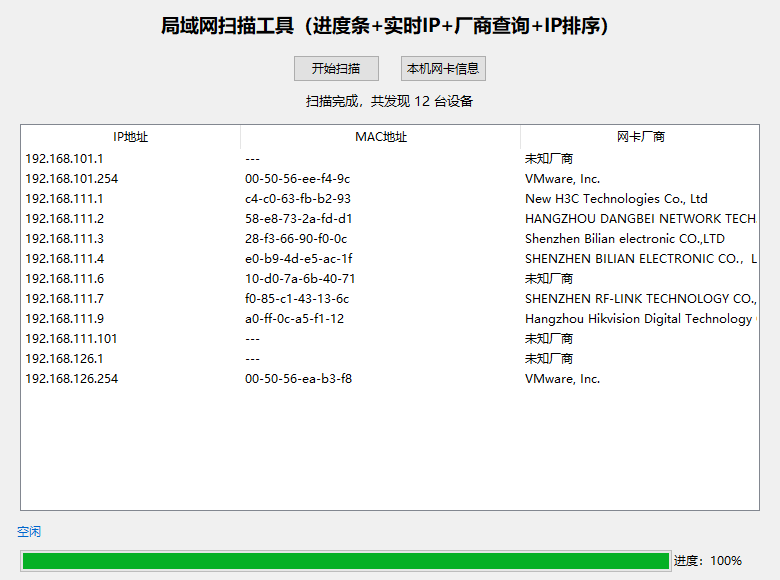
- 扫描放在独立线程 → 界面永远能动
- 控制并发 ping 数量 → 不爆 CPU
- 分段执行 + 自动等待 → Windows 轻松处理
- 超时时间缩短 → 扫描更快
不用驱动、不用管理员、不用 npcap、不卡死!
扫描局域网 IP
显示 MAC 地址
显示网卡厂商
显示本机网卡信息
图形界面窗口
不用安装任何驱动(npcap/winpcap)
不用管理员权限
import subprocess
import re
import requests
import tkinter as tk
from tkinter import ttk, scrolledtext, messagebox
import threading
import time

MAC_API = "https://api.macvendors.com/"

def get_subnet():
    try:
        ipconfig = subprocess.check_output(
            "ipconfig", shell=True, text=True, encoding="gbk", errors="ignore"
        )
        for line in ipconfig.split("\n"):
            if "IPv4" in line and ("192.168" in line or "10." in line):
                ip = line.split(":")[1].strip()
                return ".".join(ip.split(".")[:3]) + "."
    except:
        pass
    return "192.168.1."

# 修复:正确查询MAC厂商
def get_vendor(mac):
    try:
        url = MAC_API + mac.replace("-", ":")
        r = requests.get(url, timeout=1.5)
        if r.status_code == 200 and r.text.strip():
            return r.text.strip()
        return "未知厂商"
    except:
        return "查询失败"

def ip_to_int(ip):
    parts = list(map(int, ip.split(".")))
    return parts[0] << 24 | parts[1] << 16 | parts[2] << 8 | parts[3]

# 修复进度条更新(不用lambda赋值)
def update_progress(val):
    progress_bar["value"] = val
    progress_label.config(text=f"进度:{val}%")

def scan_thread():
    subnet = get_subnet()
    # 清空列表
    root.after(0, lambda: tree.delete(*tree.get_children()))
    root.after(0, lambda: status_main.config(text="开始扫描..."))
    root.after(0, update_progress, 0)

    total = 254
    for idx in range(1, total + 1):
        current_ip = subnet + str(idx)
        # 刷新当前扫描IP
        root.after(0, lambda ip=current_ip: status_ip.config(text=f"正在扫描:{ip}"))

        subprocess.Popen(
            f"ping -n 1 -w 100 {current_ip}",
            shell=True,
            stdout=subprocess.PIPE,
            stderr=subprocess.PIPE
        )

        per = int(idx / total * 100)
        root.after(0, update_progress, per)
        time.sleep(0.015)

    root.after(0, lambda: status_ip.config(text="正在整理并排序设备..."))
    time.sleep(1.2)

    # 读取系统ARP表
    try:
        arp_out = subprocess.check_output(
            "arp -a", shell=True, text=True, encoding="gbk", errors="ignore"
        )
    except:
        arp_out = ""

    pattern = r"(\d+\.\d+\.\d+\.\d+)\s+([\da-fA-F:-]+)"
    matches = re.findall(pattern, arp_out)

    device_list = []
    for ip, mac in matches:
        if "ff-ff-ff" in mac or "00-00-00" in mac:
            continue
        if not (ip.startswith("192.168") or ip.startswith("10.")):
            continue
        vendor = get_vendor(mac)
        device_list.append((ip, mac, vendor))

    # IP升序排序
    device_list.sort(key=lambda x: ip_to_int(x[0]))

    # 插入表格
    count = 0
    for ip, mac, vendor in device_list:
        root.after(0, lambda i=ip, m=mac, v=vendor: tree.insert("", "end", values=(i, m, v)))
        count += 1

    root.after(0, update_progress, 100)
    root.after(0, lambda: status_main.config(text=f"扫描完成,共发现 {count} 台设备"))
    root.after(0, lambda: status_ip.config(text="空闲"))
    root.after(0, lambda: scan_btn.config(state=tk.NORMAL))

def start_scan():
    scan_btn.config(state=tk.DISABLED)
    threading.Thread(target=scan_thread, daemon=True).start()

def show_nic_info():
    try:
        nic = subprocess.check_output(
            "wmic nic get Name,Manufacturer",
            shell=True, text=True, encoding="gbk", errors="ignore"
        )
        win = tk.Toplevel(root)
        win.title("本机网卡信息")
        win.geometry("650x450")
        txt = scrolledtext.ScrolledText(win, width=80, height=22)
        txt.pack(padx=10, pady=10, fill=tk.BOTH, expand=True)
        txt.insert(tk.END, nic)
    except:
        messagebox.showerror("错误", "无法获取网卡信息")

# ==================== GUI界面 ====================
root = tk.Tk()
root.title("局域网 IP/MAC/厂商 扫描器 最终修复版")
root.geometry("780x580")

title_label = ttk.Label(root, text="局域网扫描工具(进度条+实时IP+厂商查询+IP排序)", font=("微软雅黑", 14, "bold"))
title_label.pack(pady=10)

btn_frame = ttk.Frame(root)
btn_frame.pack(pady=5)

scan_btn = ttk.Button(btn_frame, text="开始扫描", command=start_scan)
scan_btn.grid(row=0, column=0, padx=10)

nic_btn = ttk.Button(btn_frame, text="本机网卡信息", command=show_nic_info)
nic_btn.grid(row=0, column=1, padx=10)

status_main = ttk.Label(root, text="就绪", font=("微软雅黑", 10))
status_main.pack(pady=2)

columns = ("ip", "mac", "vendor")
tree = ttk.Treeview(root, columns=columns, show="headings")
tree.heading("ip", text="IP地址")
tree.heading("mac", text="MAC地址")
tree.heading("vendor", text="网卡厂商")
tree.column("ip", width=220)
tree.column("mac", width=280)
tree.column("vendor", width=240)
tree.pack(padx=20, pady=10, fill=tk.BOTH, expand=True)

# 底部实时IP状态栏
status_ip = ttk.Label(root, text="空闲", font=("微软雅黑", 9), foreground="#0066cc")
status_ip.pack(fill=tk.X, padx=15)

# 进度条区域
progress_frame = ttk.Frame(root)
progress_frame.pack(fill=tk.X, padx=20, pady=8)

progress_bar = ttk.Progressbar(progress_frame, orient=tk.HORIZONTAL, mode='determinate')
progress_bar.pack(side=tk.LEFT, fill=tk.X, expand=True)

progress_label = ttk.Label(progress_frame, text="进度:0%", width=12)
progress_label.pack(side=tk.RIGHT)

root.mainloop()