一、项目概述
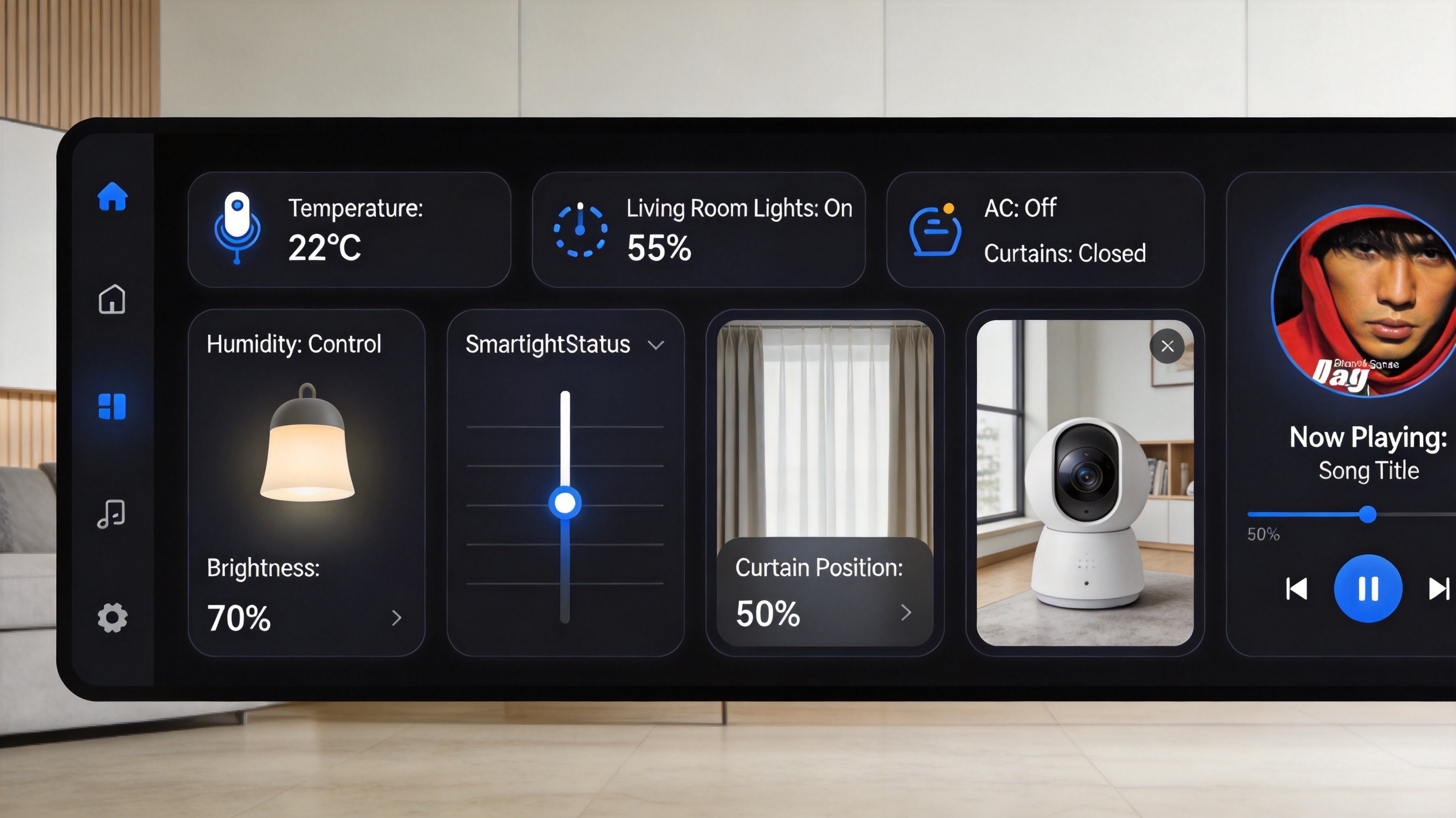
随着物联网技术的飞速发展,智能家居已成为现代生活的重要组成部分。HarmonyOS NEXT(鸿蒙6.0)凭借其强大的分布式能力和统一的开发框架,为智能家居应用的开发提供了全新的解决方案。本文将详细介绍如何使用鸿蒙6.0开发Wi-Fi IoT智能家居套件,涵盖设备扫描连接、状态管理、场景联动等核心功能,帮助开发者快速入门智能家居应用开发。
本方案采用ArkTS语言和ArkUI声明式UI框架进行开发,通过@State和@Link装饰器实现状态管理,使用@ohos.net.http模块进行网络通信,最终实现一个功能完整的智能家居控制应用。
二、技术架构
2.1 系统架构图
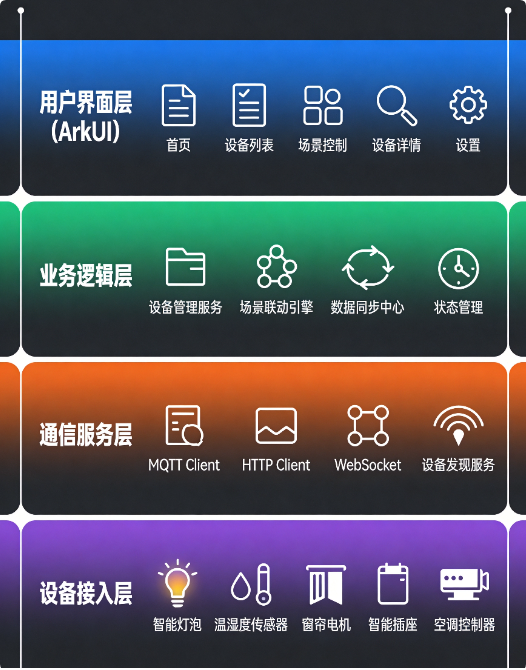
本应用采用分层架构设计,自底向上分为四层:
- 设备层:支持Wi-Fi连接的IoT设备,包括智能灯泡、温湿度传感器、智能窗帘电机、智能插座等
- 通信层:基于MQTT协议实现设备与控制端的双向通信,支持HTTP RESTful API进行设备配置
- 业务层:包含设备管理服务、场景联动引擎、数据同步中心三大核心模块
- 表现层 :使用ArkUI声明式框架构建的现代化UI界面
2.2 技术选型
| 技术模块 | 选型方案 | 说明 |
|---|---|---|
| 开发语言 | ArkTS | 鸿蒙官方推荐的TypeScript扩展 |
| UI框架 | ArkUI | 声明式UI框架,支持跨设备部署 |
| 状态管理 | @State/@Link/@Observed | 组件级状态管理 |
| 网络通信 | @ohos.net.http | HTTP请求库 |
| 设备协议 | MQTT + HTTP | 设备通信与配置 |
| 本地存储 | UserInfoStore | 设备列表缓存 |
| 分布式能力 | SuperDevice | 跨设备协同 |
三、核心功能实现
3.1 Wi-Fi设备管理
Wi-Fi设备管理是智能家居应用的基础功能,包括设备扫描发现、连接配置、状态监控三个核心模块。
arkts
// DeviceManager.ets - 设备管理器
import http from '@ohos.net.http';

// 设备信息接口定义
export interface IoTDevice {
  id: string;           // 设备唯一标识
  name: string;         // 设备名称
  type: DeviceType;     // 设备类型
  status: DeviceStatus;  // 在线/离线状态
  ipAddress: string;    // 设备IP地址
  port: number;         // 通信端口
  properties: Record<string, number | string | boolean>; // 设备属性
}

// 设备类型枚举
export enum DeviceType {
  LIGHT = 'light',           // 智能灯泡
  SENSOR_TEMP_HUM = 'sensor_temp_hum',  // 温湿度传感器
  CURTAIN = 'curtain',       // 窗帘电机
  SWITCH = 'switch',         // 智能开关
  SOCKET = 'socket',         // 智能插座
  AC = 'air_conditioner'     // 空调控制器
}

// 设备状态枚举
export enum DeviceStatus {
  ONLINE = 'online',         // 在线
  OFFLINE = 'offline',       // 离线
  CONNECTING = 'connecting', // 连接中
  ERROR = 'error'            // 异常
}

// 设备管理器类
export class DeviceManager {
  private deviceList: IoTDevice[] = [];
  private mqttClient: any = null;
  private httpServerContext: http.HttpRequest = http.createHttp();

  // 扫描局域网内的IoT设备
  async scanDevices(): Promise<IoTDevice[]> {
    const discoveredDevices: IoTDevice[] = [];

    // 模拟设备发现过程(实际应用中通过UDP广播或mDNS发现)
    const scanResults = await this.performNetworkScan();

    for (const device of scanResults) {
      const deviceInfo = await this.queryDeviceInfo(device.ipAddress);
      if (deviceInfo) {
        discoveredDevices.push({
          id: deviceInfo.deviceId,
          name: deviceInfo.deviceName,
          type: this.mapDeviceType(deviceInfo.deviceType),
          status: DeviceStatus.ONLINE,
          ipAddress: device.ipAddress,
          port: device.port || 1883,
          properties: deviceInfo.properties || {}
        });
      }
    }

    this.deviceList = discoveredDevices;
    return discoveredDevices;
  }

  // 查询设备详细信息
  private async queryDeviceInfo(ip: string): Promise<any> {
    try {
      const response = await this.httpServerContext.request(
        `http://${ip}:8080/api/device/info`,
        {
          method: http.RequestMethod.GET,
          connectTimeout: 3000,
          readTimeout: 3000
        }
      );

      if (response.responseCode === 200) {
        return JSON.parse(response.result as string);
      }
    } catch (error) {
      console.error(`Query device ${ip} failed: ${error}`);
    }
    return null;
  }

  // 映射设备类型
  private mapDeviceType(typeCode: number): DeviceType {
    const typeMap: Record<number, DeviceType> = {
      0x01: DeviceType.LIGHT,
      0x02: DeviceType.SENSOR_TEMP_HUM,
      0x03: DeviceType.CURTAIN,
      0x04: DeviceType.SWITCH,
      0x05: DeviceType.SOCKET,
      0x06: DeviceType.AC
    };
    return typeMap[typeCode] || DeviceType.SWITCH;
  }

  // 获取设备列表
  getDevices(): IoTDevice[] {
    return this.deviceList;
  }

  // 根据类型筛选设备
  getDevicesByType(type: DeviceType): IoTDevice[] {
    return this.deviceList.filter(device => device.type === type);
  }

  // 监听设备状态变化
  onStatusChange(callback: (device: IoTDevice, status: DeviceStatus) => void): void {
    // 实现设备状态监听逻辑
  }
}
3.2 IoT设备控制组件
每个IoT设备都封装为独立的自定义组件,通过@Observed装饰器实现属性的响应式更新。以下是几种常用设备的控制组件实现:
arkts
// DeviceCard.ets - 设备卡片组件
@Observed
export class DeviceCardViewModel {
  device: IoTDevice;
  isControllable: boolean = true;

  constructor(device: IoTDevice) {
    this.device = device;
  }

  // 控制设备开关
  async togglePower(): Promise<boolean> {
    const currentPower = this.device.properties['power'] as boolean;
    return await this.setProperty('power', !currentPower);
  }

  // 设置设备属性
  async setProperty(key: string, value: number | string | boolean): Promise<boolean> {
    try {
      const response = await this.sendCommand({
        deviceId: this.device.id,
        command: 'setProperty',
        key: key,
        value: value
      });

      if (response.code === 0) {
        this.device.properties[key] = value;
        return true;
      }
    } catch (error) {
      console.error(`Set property failed: ${error}`);
    }
    return false;
  }

  // 发送控制命令
  private async sendCommand(command: DeviceCommand): Promise<Response> {
    const httpClient = http.createHttp();
    return await httpClient.request(
      `http://${this.device.ipAddress}:${this.device.port}/api/control`,
      {
        method: http.RequestMethod.POST,
        header: { 'Content-Type': 'application/json' },
        extraData: JSON.stringify(command)
      }
    ) as Response;
  }
}

// 智能灯泡卡片组件
@Component
export struct LightCard {
  @ObjectLink viewModel: DeviceCardViewModel;
  @State brightness: number = 100;
  @State colorTemp: number = 4000;

  build() {
    Column() {
      // 设备状态指示
      Row() {
        Image($r('sys.media.ohos_ic_public_device_lamp'))
          .width(32)
          .height(32)
          .fillColor(this.viewModel.device.status === DeviceStatus.ONLINE ? '#00C853' : '#9E9E9E')

        Text(this.viewModel.device.name)
          .fontSize(16)
          .fontWeight(FontWeight.Medium)
          .margin({ left: 12 })

        Blank()

        Toggle({ type: ToggleType.Switch, isOn: this.viewModel.device.properties['power'] as boolean })
          .selectedColor('#00C853')
          .onChange((isOn: boolean) => {
            this.viewModel.setProperty('power', isOn);
          })
      }
      .width('100%')
      .padding(16)
      .backgroundColor('#F5F5F5')
      .borderRadius(12)

      // 亮度调节
      Column() {
        Text('亮度')
          .fontSize(14)
          .fontColor('#666666')

        Slider({
          value: this.brightness,
          min: 0,
          max: 100,
          style: SliderStyle.OutSet
        })
          .blockColor('#FFC107')
          .trackColor('#E0E0E0')
          .selectedColor('#FFC107')
          .showTips(true)
          .onChange((value: number, mode: SliderChangeMode) => {
            if (mode === SliderChangeMode.End) {
              this.brightness = value;
              this.viewModel.setProperty('brightness', value);
            }
          })

        Text(`${this.brightness}%`)
          .fontSize(12)
          .fontColor('#999999')
      }
      .width('100%')
      .padding(16)
      .visibility(this.viewModel.device.properties['power'] ? Visibility.Visible : Visibility.Collapsed)
    }
  }
}

// 温湿度传感器卡片组件
@Component
export struct SensorCard {
  @ObjectLink viewModel: DeviceCardViewModel;
  @State temperature: number = 0;
  @State humidity: number = 0;

  aboutToAppear() {
    this.temperature = this.viewModel.device.properties['temperature'] as number || 0;
    this.humidity = this.viewModel.device.properties['humidity'] as number || 0;
  }

  build() {
    Column() {
      Row() {
        Image($r('sys.media.ohos_ic_public_device_thermometer'))
          .width(28)
          .height(28)
          .fillColor('#2196F3')

        Text(this.viewModel.device.name)
          .fontSize(16)
          .fontWeight(FontWeight.Medium)
          .margin({ left: 12 })

        Blank()

        if (this.viewModel.device.status === DeviceStatus.ONLINE) {
          Text('在线')
            .fontSize(12)
            .fontColor('#00C853')
            .backgroundColor('#E8F5E9')
            .padding({ left: 8, right: 8, top: 4, bottom: 4 })
            .borderRadius(4)
        }
      }
      .width('100%')

      Divider().margin({ top: 12, bottom: 12 })

      Row() {
        Column() {
          Text('温度')
            .fontSize(12)
            .fontColor('#999999')

          Row() {
            Text(this.temperature.toFixed(1))
              .fontSize(28)
              .fontWeight(FontWeight.Bold)
              .fontColor('#FF5722')

            Text('°C')
              .fontSize(14)
              .fontColor('#FF5722')
              .margin({ top: 8 })
          }
        }
        .alignItems(HorizontalAlign.Start)

        Blank()

        Column() {
          Text('湿度')
            .fontSize(12)
            .fontColor('#999999')

          Row() {
            Text(this.humidity.toFixed(0))
              .fontSize(28)
              .fontWeight(FontWeight.Bold)
              .fontColor('#00BCD4')

            Text('%')
              .fontSize(14)
              .fontColor('#00BCD4')
              .margin({ top: 8 })
          }
        }
        .alignItems(HorizontalAlign.End)
      }
      .width('100%')
    }
    .width('100%')
    .padding(16)
    .backgroundColor('#FFFFFF')
    .borderRadius(16)
    .shadow({
      radius: 8,
      color: '#1A000000',
      offsetX: 0,
      offsetY: 2
    })
  }
}

// 窗帘控制卡片组件
@Component
export struct CurtainCard {
  @ObjectLink viewModel: DeviceCardViewModel;
  @State position: number = 0; // 0-100,0为关闭,100为完全打开

  build() {
    Column() {
      Row() {
        Image($r('sys.media.ohos_ic_public_device_curtain'))
          .width(28)
          .height(28)
          .fillColor('#9C27B0')

        Text(this.viewModel.device.name)
          .fontSize(16)
          .fontWeight(FontWeight.Medium)
          .margin({ left: 12 })

        Blank()

        Text(this.position === 0 ? '已关闭' : (this.position === 100 ? '已打开' : `${this.position}%`))
          .fontSize(12)
          .fontColor('#666666')
      }
      .width('100%')

      Slider({
        value: this.position,
        min: 0,
        max: 100,
        step: 5,
        style: SliderStyle.InSet
      })
        .blockColor('#9C27B0')
        .trackColor('#E1BEE7')
        .selectedColor('#9C27B0')
        .showTips(true)
        .margin({ top: 16 })
        .onChange((value: number, mode: SliderChangeMode) => {
          if (mode === SliderChangeMode.End) {
            this.position = value;
            this.viewModel.setProperty('position', value);
          }
        })

      Row() {
        Button('全关')
          .fontSize(12)
          .height(32)
          .width(80)
          .backgroundColor('#F5F5F5')
          .fontColor('#666666')
          .onClick(() => {
            this.position = 0;
            this.viewModel.setProperty('position', 0);
          })

        Blank()

        Button('全开')
          .fontSize(12)
          .height(32)
          .width(80)
          .backgroundColor('#9C27B0')
          .fontColor('#FFFFFF')
          .onClick(() => {
            this.position = 100;
            this.viewModel.setProperty('position', 100);
          })
      }
      .width('100%')
      .margin({ top: 12 })
    }
    .width('100%')
    .padding(16)
    .backgroundColor('#FFFFFF')
    .borderRadius(16)
    .shadow({
      radius: 8,
      color: '#1A000000',
      offsetX: 0,
      offsetY: 2
    })
  }
}
3.3 场景联动功能
场景联动是智能家居的核心魅力所在,通过预设场景实现一键控制多个设备。"回家模式"示例展示了如何实现多设备协同控制:
arkts
// SceneManager.ets - 场景管理器
import deviceInfo from '@ohos.deviceInfo';

// 场景定义接口
export interface SmartScene {
  id: string;
  name: string;           // 场景名称
  icon: Resource;         // 场景图标
  actions: SceneAction[]; // 执行动作列表
  enabled: boolean;       // 是否启用
  triggerType: TriggerType; // 触发方式
}

// 场景动作接口
export interface SceneAction {
  deviceId: string;
  command: string;
  value: number | string | boolean;
  delay?: number;         // 延迟执行时间(毫秒)
}

// 触发类型枚举
export enum TriggerType {
  MANUAL = 'manual',      // 手动触发
  TIME = 'time',          // 定时触发
  LOCATION = 'location', // 位置触发
  EVENT = 'event'         // 事件触发
}

// 预定义场景库
export const PREDEFINED_SCENES: SmartScene[] = [
  {
    id: 'scene_home',
    name: '回家模式',
    icon: $r('sys.media.ohos_ic_public_device_home'),
    actions: [
      { deviceId: 'light_living', command: 'setProperty', value: true, delay: 0 },
      { deviceId: 'light_living', command: 'setProperty', value: 80, delay: 100 },
      { deviceId: 'curtain_main', command: 'setProperty', value: 100, delay: 200 },
      { deviceId: 'ac_living', command: 'setProperty', value: 'cool', delay: 300 },
      { deviceId: 'ac_living', command: 'setProperty', value: 24, delay: 400 },
      { deviceId: 'socket_tv', command: 'setProperty', value: true, delay: 500 }
    ],
    enabled: true,
    triggerType: TriggerType.MANUAL
  },
  {
    id: 'scene_leave',
    name: '离家模式',
    icon: $r('sys.media.ohos_ic_public_device_door'),
    actions: [
      { deviceId: 'light_all', command: 'setProperty', value: false, delay: 0 },
      { deviceId: 'curtain_all', command: 'setProperty', value: 0, delay: 100 },
      { deviceId: 'ac_all', command: 'setProperty', value: false, delay: 200 },
      { deviceId: 'socket_all', command: 'setProperty', value: false, delay: 300 }
    ],
    enabled: true,
    triggerType: TriggerType.MANUAL
  },
  {
    id: 'scene_morning',
    name: '早安模式',
    icon: $r('sys.media.ohos_ic_public_device_sun'),
    actions: [
      { deviceId: 'curtain_bedroom', command: 'setProperty', value: 100, delay: 0 },
      { deviceId: 'light_bedroom', command: 'setProperty', value: true, delay: 500 },
      { deviceId: 'light_bedroom', command: 'setProperty', value: 30, delay: 600 },
      { deviceId: 'socket_coffee', command: 'setProperty', value: true, delay: 1000 }
    ],
    enabled: true,
    triggerType: TriggerType.TIME
  },
  {
    id: 'scene_movie',
    name: '影院模式',
    icon: $r('sys.media.ohos_ic_public_device_tv'),
    actions: [
      { deviceId: 'light_all', command: 'setProperty', value: false, delay: 0 },
      { deviceId: 'light_tv', command: 'setProperty', value: true, delay: 100 },
      { deviceId: 'light_tv', command: 'setProperty', value: 10, delay: 200 },
      { deviceId: 'curtain_main', command: 'setProperty', value: 0, delay: 300 },
      { deviceId: 'ac_living', command: 'setProperty', value: 'cool', delay: 400 },
      { deviceId: 'ac_living', command: 'setProperty', value: 26, delay: 500 }
    ],
    enabled: true,
    triggerType: TriggerType.MANUAL
  },
  {
    id: 'scene_sleep',
    name: '睡眠模式',
    icon: $r('sys.media.ohos_ic_public_device_moon'),
    actions: [
      { deviceId: 'light_all', command: 'setProperty', value: false, delay: 0 },
      { deviceId: 'curtain_all', command: 'setProperty', value: 0, delay: 100 },
      { deviceId: 'ac_bedroom', command: 'setProperty', value: true, delay: 200 },
      { deviceId: 'ac_bedroom', command: 'setProperty', value: 26, delay: 300 }
    ],
    enabled: true,
    triggerType: TriggerType.MANUAL
  }
];

// 场景管理器类
export class SceneManager {
  private scenes: SmartScene[] = PREDEFINED_SCENES;
  private deviceManager: DeviceManager;

  constructor(deviceManager: DeviceManager) {
    this.deviceManager = deviceManager;
  }

  // 执行场景
  async executeScene(sceneId: string): Promise<SceneResult> {
    const scene = this.scenes.find(s => s.id === sceneId);
    if (!scene) {
      return { success: false, message: '场景不存在' };
    }

    const results: ActionResult[] = [];

    // 按延迟时间排序并执行动作
    const sortedActions = [...scene.actions].sort((a, b) => (a.delay || 0) - (b.delay || 0));

    for (const action of sortedActions) {
      await this.delay(action.delay || 0);

      const result = await this.executeAction(action);
      results.push(result);
    }

    const successCount = results.filter(r => r.success).length;
    return {
      success: successCount === results.length,
      message: `执行完成 (${successCount}/${results.length})`,
      results: results
    };
  }

  // 执行单个动作
  private async executeAction(action: SceneAction): Promise<ActionResult> {
    try {
      // 处理通配符设备ID(如 light_all 表示所有灯)
      const targetDevices = this.resolveDeviceIds(action.deviceId);

      const results = await Promise.all(
        targetDevices.map(device => {
          return this.deviceManager.setDeviceProperty(device.id, action.command, action.value);
        })
      );

      return {
        success: results.every(r => r),
        deviceId: action.deviceId,
        command: action.command,
        value: action.value
      };
    } catch (error) {
      return {
        success: false,
        deviceId: action.deviceId,
        command: action.command,
        value: action.value,
        error: error as string
      };
    }
  }

  // 解析设备ID(支持通配符)
  private resolveDeviceIds(deviceIdPattern: string): IoTDevice[] {
    const allDevices = this.deviceManager.getDevices();

    if (deviceIdPattern.endsWith('_all')) {
      const typePrefix = deviceIdPattern.replace('_all', '');
      return allDevices.filter(d => d.type.toString().includes(typePrefix));
    }

    return allDevices.filter(d => d.id === deviceIdPattern);
  }

  // 延迟函数
  private delay(ms: number): Promise<void> {
    return new Promise(resolve => setTimeout(resolve, ms));
  }

  // 获取所有场景
  getScenes(): SmartScene[] {
    return this.scenes;
  }

  // 添加自定义场景
  addScene(scene: SmartScene): void {
    this.scenes.push(scene);
  }

  // 删除场景
  removeScene(sceneId: string): void {
    this.scenes = this.scenes.filter(s => s.id !== sceneId);
  }

  // 更新场景
  updateScene(sceneId: string, updates: Partial<SmartScene>): void {
    const index = this.scenes.findIndex(s => s.id === sceneId);
    if (index !== -1) {
      this.scenes[index] = { ...this.scenes[index], ...updates };
    }
  }
}

// 结果类型定义
interface SceneResult {
  success: boolean;
  message: string;
  results?: ActionResult[];
}

interface ActionResult {
  success: boolean;
  deviceId: string;
  command: string;
  value: number | string | boolean;
  error?: string;
}
四、完整应用页面
以下是一个完整的智能家居主页实现,整合了设备列表、场景控制、状态管理等功能:
arkts
// SmartHomeMainPage.ets - 智能家居主页
import deviceInfo from '@ohos.deviceInfo';
@Entry
@Component
struct SmartHomeMainPage {
@State deviceManager: DeviceManager = new DeviceManager();
@State sceneManager: SceneManager = new SceneManager(this.deviceManager);
@State deviceList: IoTDevice[] = [];
@State scenes: SmartScene[] = [];
@State selectedTab: number = 0;
@State isLoading: boolean = false;
@State searchKeyword: string = '';
private tabs: TabItem[] = [
{ title: '首页', icon: $r('sys.media.ohos_ic_public_device_home') },
{ title: '设备', icon: $r('sys.media.ohos_ic_public_device_electrical') },
{ title: '场景', icon: $r('sys.media.ohos_ic_public_device_light') },
{ title: '我的', icon: $r('sys.media.ohos_ic_public_person') }
];
aboutToAppear() {
this.loadData();
}
async loadData() {
this.isLoading = true;
try {
// 扫描设备
const devices = await this.deviceManager.scanDevices();
this.deviceList = devices;
// 加载场景
this.scenes = this.sceneManager.getScenes();
} catch (error) {
console.error(`Load data failed: ${error}`);
} finally {
this.isLoading = false;
}
}
build() {
Column() {
// 顶部导航栏
this.buildHeader()
// 内容区域
if (this.isLoading) {
this.buildLoadingState()
} else {
Tabs({ barPosition: BarPosition.End, index: this.selectedTab }) {
TabContent() {
this.buildHomeTab()
}
TabContent() {
this.buildDeviceTab()
}
TabContent() {
this.buildSceneTab()
}
TabContent() {
this.buildProfileTab()
}
}
.barHeight(60)
.onChange((index: number) => {
this.selectedTab = index;
})
}
}
.width('100%')
.height('100%')
.backgroundColor('#F5F5F5')
}
// 顶部导航栏
@Builder
buildHeader() {
Row() {
Column() {
Text('智能家居')
.fontSize(20)
.fontWeight(FontWeight.Bold)
.fontColor('#333333')
Text(new Date().toLocaleDateString('zh-CN', {
year: 'numeric',
month: 'long',
day: 'numeric',
weekday: 'long'
}))
.fontSize(12)
.fontColor('#999999')
.margin({ top: 4 })
}
.alignItems(HorizontalAlign.Start)
Blank()
Image($r('sys.media.ohos_ic_public_device_phone'))
.width(24)
.height(24)
.fillColor('#333333')
Image($r('sys.media.ohos_ic_public_settings'))
.width(24)
.height(24)
.fillColor('#333333')
.margin({ left: 20 })
}
.width('100%')
.height(60)
.padding({ left: 20, right: 20 })
.backgroundColor('#FFFFFF')
}
// 加载状态
@Builder
buildLoadingState() {
Column() {
LoadingProgress()
.width(40)
.height(40)
.color('#00C853')
Text('正在扫描设备...')
.fontSize(14)
.fontColor('#666666')
.margin({ top: 16 })
}
.width('100%')
.height('100%')
.justifyContent(FlexAlign.Center)
}
// 首页Tab
@Builder
buildHomeTab() {
Scroll() {
Column() {
// 环境信息卡片
this.buildEnvironmentCard()
// 快捷场景入口
this.buildQuickSceneSection()
// 常用设备列表
this.buildCommonDevicesSection()
}
.padding(16)
}
.scrollable(ScrollDirection.Vertical)
.edgeEffect(EdgeEffect.Spring)
}
// 环境信息卡片
@Builder
buildEnvironmentCard() {
Column() {
Row() {
Text('家庭环境')
.fontSize(16)
.fontWeight(FontWeight.Medium)
.fontColor('#333333')
Blank()
Text('实时监测')
.fontSize(12)
.fontColor('#00C853')
}
.width('100%')
.margin({ bottom: 16 })
Row() {
// 温度
Column() {
Image($r('sys.media.ohos_ic_public_device_thermometer'))
.width(24)
.height(24)
.fillColor('#FF5722')
Text('25°C')
.fontSize(18)
.fontWeight(FontWeight.Bold)
.fontColor('#333333')
.margin({ top: 8 })
Text('温度')
.fontSize(12)
.fontColor('#999999')
}
.layoutWeight(1)
Divider()
.vertical(true)
.height(40)
.color('#E0E0E0')
// 湿度
Column() {
Image($r('sys.media.ohos_ic_public_device_humidity'))
.width(24)
.height(24)
.fillColor('#00BCD4')
Text('58%')
.fontSize(18)
.fontWeight(FontWeight.Bold)
.fontColor('#333333')
.margin({ top: 8 })
Text('湿度')
.fontSize(12)
.fontColor('#999999')
}
.layoutWeight(1)
Divider()
.vertical(true)
.height(40)
.color('#E0E0E0')
// 设备数量
Column() {
Image($r('sys.media.ohos_ic_public_device_electrical'))
.width(24)
.height(24)
.fillColor('#9C27B0')
Text(`${this.deviceList.length}`)
.fontSize(18)
.fontWeight(FontWeight.Bold)
.fontColor('#333333')
.margin({ top: 8 })
Text('设备')
.fontSize(12)
.fontColor('#999999')
}
.layoutWeight(1)
Divider()
.vertical(true)
.height(40)
.color('#E0E0E0')
// 在线设备
Column() {
Image($r('sys.media.ohos_ic_public_connections'))
.width(24)
.height(24)
.fillColor('#00C853')
Text(`${this.deviceList.filter(d => d.status === DeviceStatus.ONLINE).length}`)
.fontSize(18)
.fontWeight(FontWeight.Bold)
.fontColor('#333333')
.margin({ top: 8 })
Text('在线')
.fontSize(12)
.fontColor('#999999')
}
.layoutWeight(1)
}
.width('100%')
}
.width('100%')
.padding(16)
.backgroundColor('#FFFFFF')
.borderRadius(16)
.shadow({
radius: 8,
color: '#1A000000',
offsetX: 0,
offsetY: 2
})
}
// 快捷场景入口
@Builder
buildQuickSceneSection() {
Column() {
Row() {
Text('快捷场景')
.fontSize(16)
.fontWeight(FontWeight.Medium)
.fontColor('#333333')
Blank()
Text('更多')
.fontSize(12)
.fontColor('#00C853')
}
.width('100%')
.margin({ bottom: 12 })
Row() {
ForEach(this.scenes.slice(0, 4), (scene: SmartScene) => {
Column() {
Image(scene.icon)
.width(32)
.height(32)
.fillColor('#00C853')
Text(scene.name)
.fontSize(12)
.fontColor('#333333')
.margin({ top: 8 })
}
.width(70)
.height(70)
.backgroundColor('#FFFFFF')
.borderRadius(12)
.justifyContent(FlexAlign.Center)
.onClick(() => {
this.executeScene(scene.id);
})
})
}
.width('100%')
.justifyContent(FlexAlign.SpaceBetween)
}
.width('100%')
.margin({ top: 16 })
}
// 常用设备列表
@Builder
buildCommonDevicesSection() {
Column() {
Row() {
Text('常用设备')
.fontSize(16)
.fontWeight(FontWeight.Medium)
.fontColor('#333333')
Blank()
Text('管理')
.fontSize(12)
.fontColor('#00C853')
}
.width('100%')
.margin({ bottom: 12 })
ForEach(this.deviceList.slice(0, 3), (device: IoTDevice) => {
Row() {
Image($r('sys.media.ohos_ic_public_device_electrical'))
.width(40)
.height(40)
.fillColor(device.status === DeviceStatus.ONLINE ? '#00C853' : '#9E9E9E')
.backgroundColor('#F5F5F5')
.borderRadius(10)
.padding(8)
Column() {
Text(device.name)
.fontSize(14)
.fontWeight(FontWeight.Medium)
.fontColor('#333333')
Text(device.status === DeviceStatus.ONLINE ? '在线' : '离线')
.fontSize(12)
.fontColor('#999999')
}
.alignItems(HorizontalAlign.Start)
.margin({ left: 12 })
Blank()
Toggle({ type: ToggleType.Switch, isOn: device.properties['power'] as boolean })
.selectedColor('#00C853')
}
.width('100%')
.padding(12)
.backgroundColor('#FFFFFF')
.borderRadius(12)
.margin({ bottom: 8 })
})
}
.width('100%')
.margin({ top: 16 })
}
// 设备Tab
@Builder
buildDeviceTab() {
Column() {
// 搜索框
Search({ placeholder: '搜索设备' })
.width('100%')
.height(40)
.backgroundColor('#FFFFFF')
.borderRadius(20)
.margin({ left: 16, right: 16, top: 16, bottom: 16 })
// 设备分类
Scroll() {
Row() {
ForEach(this.getDeviceCategories(), (category: DeviceCategory) => {
Column() {
Image(category.icon)
.width(24)
.height(24)
.fillColor(category.selected ? '#00C853' : '#666666')
Text(category.name)
.fontSize(12)
.fontColor(category.selected ? '#00C853' : '#666666')
.margin({ top: 4 })
}
.width(60)
.padding(8)
.backgroundColor(category.selected ? '#E8F5E9' : '#FFFFFF')
.borderRadius(12)
.onClick(() => {
this.selectCategory(category.type);
})
})
}
.padding({ left: 16, right: 16 })
}
.scrollable(ScrollDirection.Horizontal)
.edgeEffect(EdgeEffect.Spring)
// 设备网格
Grid() {
ForEach(this.filterDevices(), (device: IoTDevice) => {
GridItem() {
this.buildDeviceCard(device)
}
})
}
.columnsTemplate('1fr 1fr')
.columnsGap(12)
.rowsGap(12)
.padding(16)
.layoutWeight(1)
}
}
// 设备卡片
@Builder
buildDeviceCard(device: IoTDevice) {
Column() {
Row() {
Image($r('sys.media.ohos_ic_public_device_electrical'))
.width(32)
.height(32)
.fillColor('#00C853')
Blank()
if (device.status === DeviceStatus.ONLINE) {
Circle()
.width(8)
.height(8)
.fillColor('#00C853')
} else {
Circle()
.width(8)
.height(8)
.fillColor('#9E9E9E')
}
}
.width('100%')
Text(device.name)
.fontSize(14)
.fontWeight(FontWeight.Medium)
.fontColor('#333333')
.margin({ top: 12 })
.maxLines(1)
Text(device.status === DeviceStatus.ONLINE ? '在线' : '离线')
.fontSize(12)
.fontColor('#999999')
.margin({ top: 4 })
Toggle({ type: ToggleType.Switch, isOn: device.properties['power'] as boolean })
.selectedColor('#00C853')
.scale({ x: 0.8, y: 0.8 })
.margin({ top: 8 })
.enabled(device.status === DeviceStatus.ONLINE)
}
.width('100%')
.padding(16)
.backgroundColor('#FFFFFF')
.borderRadius(16)
.shadow({
radius: 4,
color: '#1A000000',
offsetX: 0,
offsetY: 1
})
}
// 场景Tab
@Builder
buildSceneTab() {
Column() {
Row() {
Text('智能场景')
.fontSize(20)
.fontWeight(FontWeight.Bold)
.fontColor('#333333')
Blank()
Button('+ 添加')
.fontSize(14)
.height(32)
.backgroundColor('#00C853')
.borderRadius(16)
}
.width('100%')
.padding(16)
Scroll() {
Column() {
ForEach(this.scenes, (scene: SmartScene) => {
Row() {
Image(scene.icon)
.width(40)
.height(40)
.fillColor('#00C853')
.backgroundColor('#E8F5E9')
.borderRadius(10)
.padding(8)
Column() {
Text(scene.name)
.fontSize(16)
.fontWeight(FontWeight.Medium)
.fontColor('#333333')
Text(`${scene.actions.length} 个设备联动`)
.fontSize(12)
.fontColor('#999999')
.margin({ top: 4 })
}
.alignItems(HorizontalAlign.Start)
.margin({ left: 12 })
.layoutWeight(1)
Button('执行')
.fontSize(12)
.height(32)
.backgroundColor('#00C853')
.borderRadius(16)
.onClick(() => {
this.executeScene(scene.id);
})
}
.width('100%')
.padding(16)
.backgroundColor('#FFFFFF')
.borderRadius(16)
.margin({ bottom: 12 })
})
}
.padding(16)
}
.scrollable(ScrollDirection.Vertical)
.edgeEffect(EdgeEffect.Spring)
.layoutWeight(1)
}
}
// 我的Tab
@Builder
buildProfileTab() {
Column() {
// 用户信息卡片
Column() {
Row() {
Image($r('sys.media.ohos_ic_public_photo'))
.width(60)
.height(60)
.fillColor('#FFFFFF')
.borderRadius(30)
.border({ width: 2, color: '#00C853' })
Column() {
Text('智能家庭')
.fontSize(18)
.fontWeight(FontWeight.Bold)
.fontColor('#FFFFFF')
Text('已连接设备: ${this.deviceList.length}台')
.fontSize(12)
.fontColor('rgba(255,255,255,0.8)')
.margin({ top: 4 })
}
.alignItems(HorizontalAlign.Start)
.margin({ left: 16 })
}
.width('100%')
}
.width('100%')
.height(120)
.backgroundColor('#00C853')
.padding(20)
// 设置菜单列表
List() {
ListItem() {
Row() {
Image($r('sys.media.ohos_ic_public_settings'))
.width(24)
.height(24)
.fillColor('#333333')
Text('设置')
.fontSize(14)
.fontColor('#333333')
.margin({ left: 12 })
Blank()
Image($r('sys.media.ohos_ic_public_arrow_right'))
.width(20)
.height(20)
.fillColor('#CCCCCC')
}
.width('100%')
.padding(16)
}
ListItem() {
Row() {
Image($r('sys.media.ohos_ic_public_help'))
.width(24)
.height(24)
.fillColor('#333333')
Text('帮助与反馈')
.fontSize(14)
.fontColor('#333333')
.margin({ left: 12 })
Blank()
Image($r('sys.media.ohos_ic_public_arrow_right'))
.width(20)
.height(20)
.fillColor('#CCCCCC')
}
.width('100%')
.padding(16)
}
ListItem() {
Row() {
Image($r('sys.media.ohos_ic_public_info'))
.width(24)
.height(24)
.fillColor('#333333')
Text('关于')
.fontSize(14)
.fontColor('#333333')
.margin({ left: 12 })
Blank()
Text('v1.0.0')
.fontSize(12)
.fontColor('#999999')
}
.width('100%')
.padding(16)
}
}
.width('100%')
.backgroundColor('#FFFFFF')
.borderRadius(16)
.margin(16)
}
}
// 辅助方法
private getDeviceCategories(): DeviceCategory[] {
return [
{ name: '全部', type: 'all', icon: $r('sys.media.ohos_ic_public_device_electrical'), selected: true },
{ name: '灯光', type: 'light', icon: $r('sys.media.ohos_ic_public_device_lamp'), selected: false },
{ name: '窗帘', type: 'curtain', icon: $r('sys.media.ohos_ic_public_device_curtain'), selected: false },
{ name: '空调', type: 'air_conditioner', icon: $r('sys.media.ohos_ic_public_device_ac'), selected: false },
{ name: '传感器', type: 'sensor', icon: $r('sys.media.ohos_ic_public_device_thermometer'), selected: false }
];
}
private filterDevices(): IoTDevice[] {
return this.deviceList;
}
private selectCategory(type: string): void {
// 实现分类筛选逻辑
}
private async executeScene(sceneId: string): Promise<void> {
const result = await this.sceneManager.executeScene(sceneId);
if (result.success) {
// 显示成功提示
promptAction.showToast({
message: result.message,
duration: 2000
});
}
}
}
// 设备分类类型
interface DeviceCategory {
name: string;
type: string;
icon: Resource;
selected: boolean;
}
// Tab项类型
interface TabItem {
title: string;
icon: Resource;
}五、运行效果说明
5.1 功能演示
应用运行后,主要实现以下功能:
- 设备自动发现:应用启动后自动扫描局域网内的Wi-Fi IoT设备,实时显示设备在线状态
- 设备分组管理:按设备类型(灯光、窗帘、空调、传感器)分类展示,支持快速筛选
- 设备控制 :
- 灯光:开关控制、亮度调节、色温调节
- 窗帘:开合度精确控制(0-100%)
- 温湿度传感器:实时数据展示
- 空调:模式切换、温度调节
- 场景联动:一键执行预定义场景,实现多设备协同控制
- 状态同步:设备状态变更实时同步到UI界面
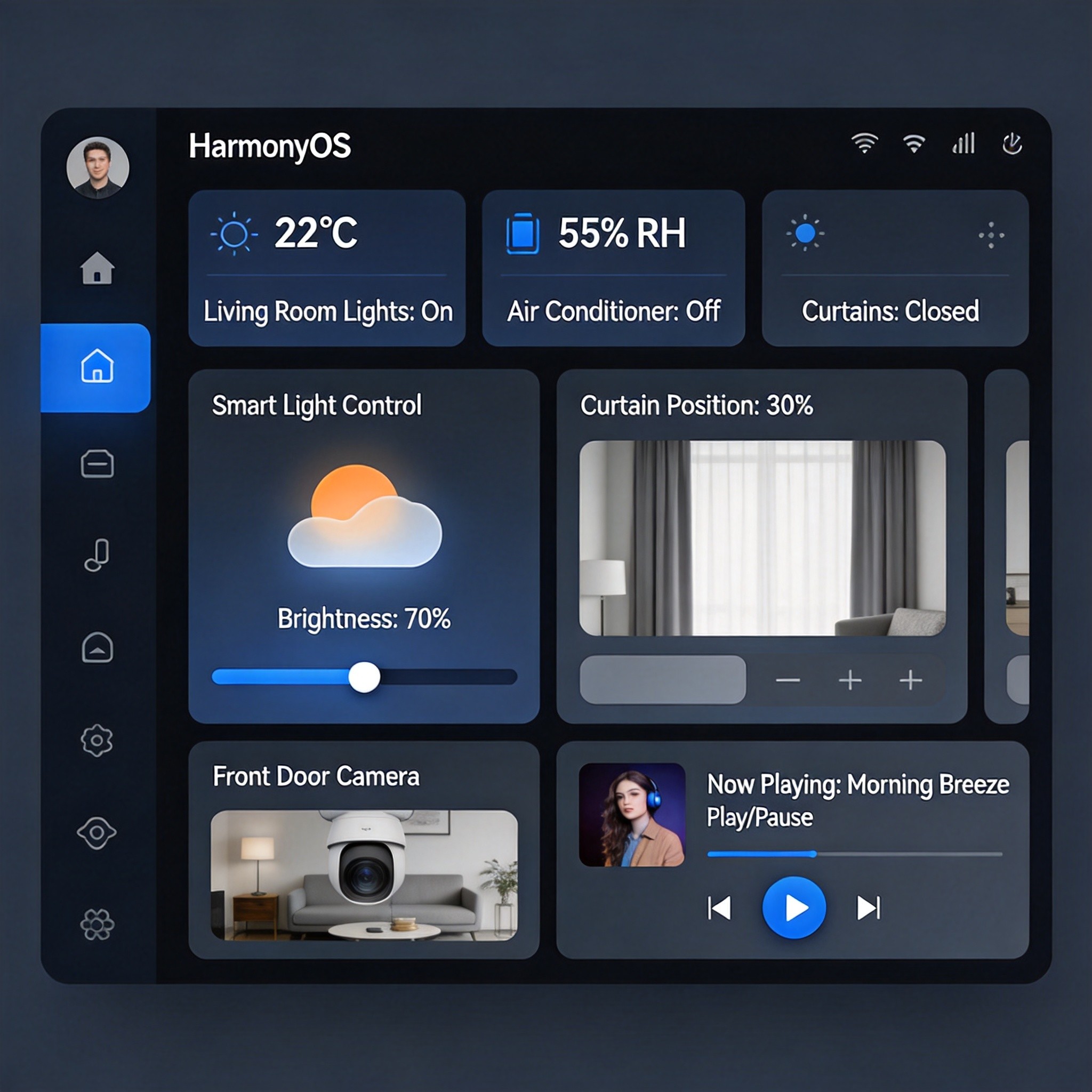
5.2 界面效果预览
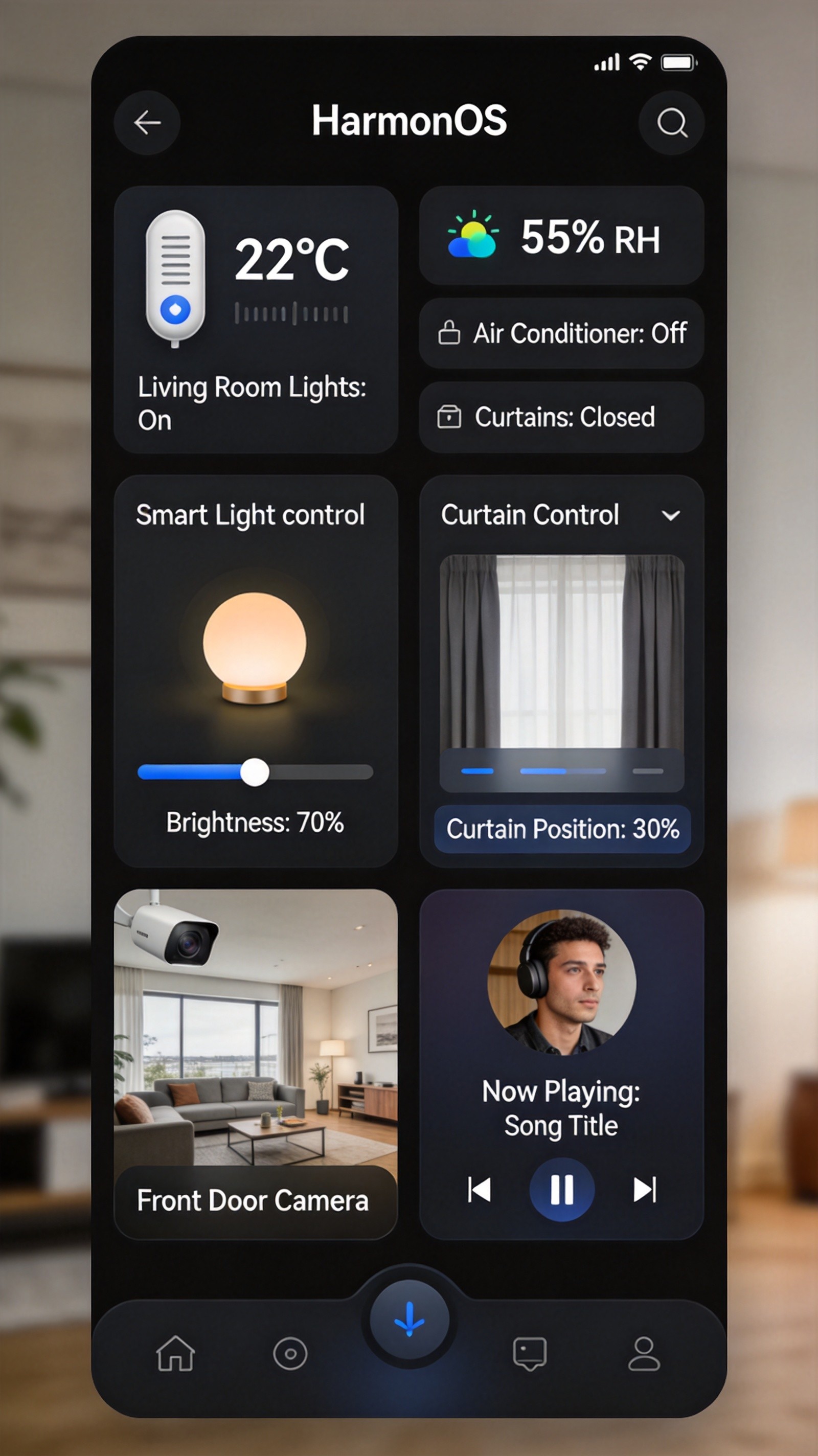
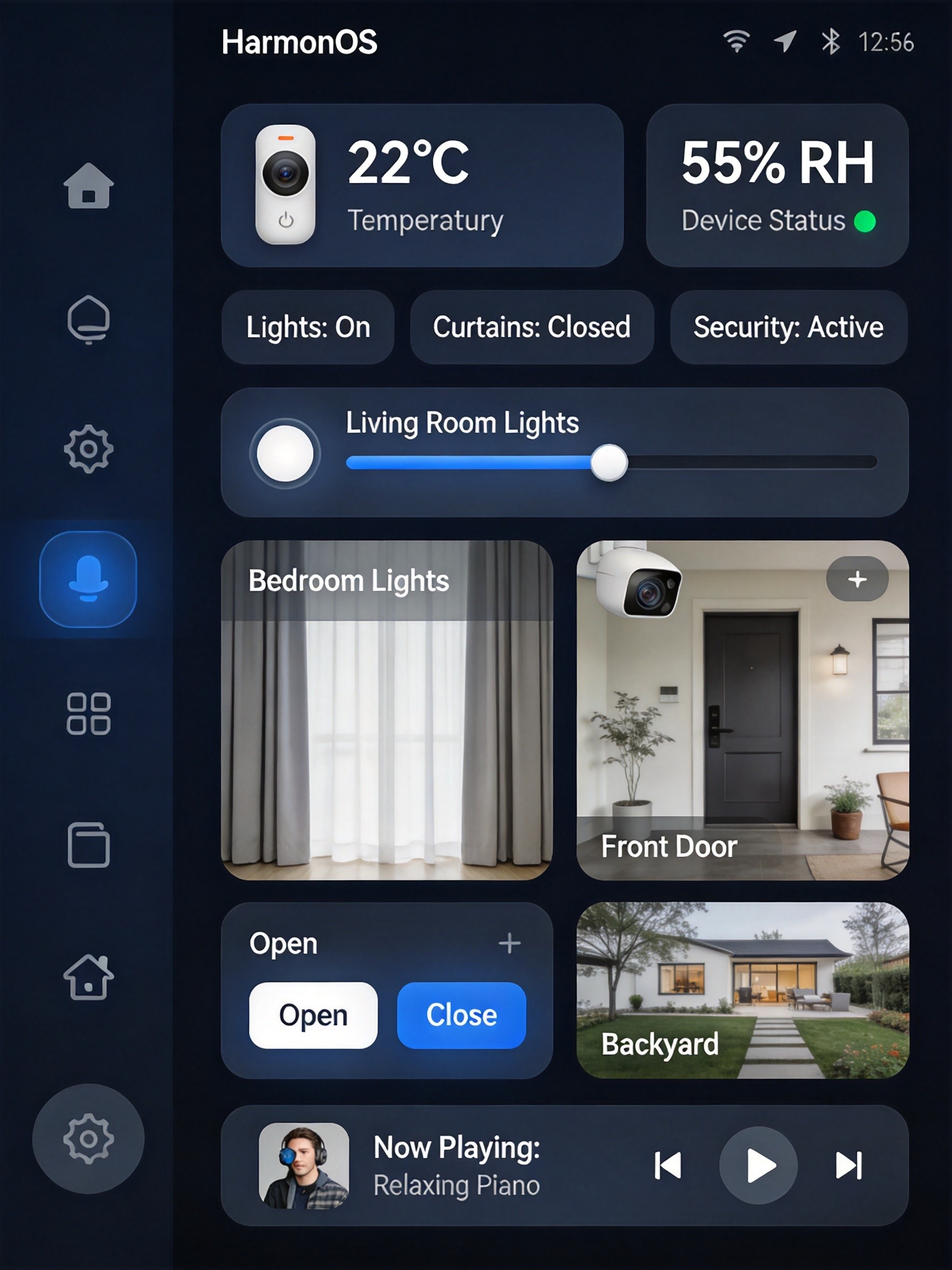
应用主界面采用卡片式设计,包含以下核心区域:
- 环境监测卡片:实时显示室内温度、湿度、在线设备数量
- 快捷场景入口:支持回家、离家、早安、影院、睡眠等常用场景一键触发
- 设备列表:网格化展示所有已连接的IoT设备,支持开关控制
- 底部导航栏:首页、设备、场景、我的四个主要功能入口
六、项目结构说明
SmartHomeApp/
├── entry/src/main/ets/
│   ├── entryability/
│   │   └── EntryAbility.ets          # 应用入口Ability
│   │
│   ├── pages/
│   │   └── Index.ets                  # 主页面入口
│   │
│   ├── components/
│   │   ├── DeviceCard.ets             # 设备卡片组件
│   │   │   ├── LightCard              # 灯光控制卡片
│   │   │   ├── SensorCard             # 传感器卡片
│   │   │   └── CurtainCard            # 窗帘控制卡片
│   │   ├── SceneCard.ets              # 场景卡片组件
│   │   └── EnvironmentCard.ets        # 环境信息卡片
│   │
│   ├── viewmodel/
│   │   ├── DeviceViewModel.ets        # 设备视图模型
│   │   └── SceneViewModel.ets         # 场景视图模型
│   │
│   ├── model/
│   │   ├── Device.ets                 # 设备数据模型
│   │   ├── Scene.ets                  # 场景数据模型
│   │   └── DeviceStatus.ets            # 设备状态枚举
│   │
│   ├── service/
│   │   ├── DeviceManager.ets          # 设备管理服务
│   │   ├── SceneManager.ets           # 场景管理服务
│   │   └── NetworkService.ets          # 网络通信服务
│   │
│   └── utils/
│       ├── Logger.ets                 # 日志工具
│       └── Constants.ets              # 常量定义
│
├── resources/base/profile/
│   └── main_pages.json                # 页面路由配置
│
└── module.json5                       # 模块配置文件
七、总结与展望
本文详细介绍了使用鸿蒙6.0开发Wi-Fi IoT智能家居套件的完整方案,涵盖了从设备发现、状态管理到场景联动的全流程实现。通过ArkUI声明式框架和ArkTS语言,开发者可以快速构建现代化、高性能的智能家居应用。
技术亮点:
- 采用分层架构,职责分离,代码复用性强
- 基于@State/@Link/@Observed的状态管理机制,UI响应式更新
- MQTT/HTTP双协议支持,兼容多种IoT设备
- 场景联动引擎支持延迟执行和多设备协同
- 组件化设计,每个设备类型独立封装