设备管理器
✅ 已实现的功能
-
设备注册 (
POST /register)- ✅ Pydantic 模型校验
- ✅ 防止重复 device_id(409 错误)
- ✅ 返回设备信息
-
设备查询 (
GET /devices)- ✅ 返回所有设备列表
- ✅ 包含在线状态
is_online - ✅ 包含最后心跳时间
last_heartbeat
-
WebSocket 连接 (
ws://{device_id})- ✅ API Key 验证(查询参数)
- ✅ 设备注册验证
- ✅ 连接去重(自动关闭旧连接)
- ✅ 自动记录连接时间
-
心跳机制
- ✅ 客户端发送
ping,服务端回复pong - ✅ 更新
last_heartbeat时间 - ✅ 后台任务定期检查(每 30 秒)
- ✅ 超时(60 秒)自动断开连接并清理
- ✅ 客户端发送
-
远程命令执行 (
POST /devices/{device_id}/command)- ✅ 检查设备是否在线
- ✅ 生成唯一 command_id(UUID)
- ✅ 发送命令到设备
- ✅ 等待结果(可配置超时)
- ✅ 返回执行结果
- ✅ 超时处理
- ✅ 资源清理(finally 块)
-
设备消息处理
- ✅
ping消息 → 更新心跳 + 回复pong - ✅
command_result消息 → 将结果放入队列 - ✅
command_error消息 → 将错误放入队列
- ✅
main.py
dart
from fastapi import FastAPI, HTTPException, WebSocket, WebSocketDisconnect, Query
from pydantic import BaseModel, Field
from typing import Dict, List, Optional, Any
from datetime import datetime
import asyncio
import uuid


# ==================== 配置 ====================

API_KEY = "test-api-key"
HEARTBEAT_TIMEOUT = 60  # 心跳超时判定离线时间(秒)


# ==================== 数据模型 ====================

app = FastAPI(
    title="设备管理器",
    description="设备注册、远程命令和心跳检测",
    version="1.0.0"
)


class DeviceRegister(BaseModel):
    """设备注册请求模型"""
    device_id: str = Field(..., min_length=1, description="设备唯一标识")
    hostname: str = Field(..., min_length=1, description="设备主机名")


class DeviceResponse(BaseModel):
    """设备响应模型"""
    device_id: str
    hostname: str
    is_online: bool = False
    last_heartbeat: Optional[datetime] = None


class CommandRequest(BaseModel):
    """远程命令请求"""
    command: str = Field(..., description="要执行的命令")
    timeout: int = Field(default=30, ge=1, le=300, description="超时时间(秒)")


class CommandResponse(BaseModel):
    """命令执行结果"""
    device_id: str
    command_id: str
    command: str
    status: str  # pending, success, timeout, error
    output: Optional[str] = None
    error: Optional[str] = None
    executed_at: Optional[datetime] = None


class WebSocketMessage(BaseModel):
    """WebSocket 消息模型"""
    type: str
    command_id: Optional[str] = None
    payload: Optional[Any] = None


# ==================== 全局存储 ====================

devices: Dict[str, dict] = {}
active_connections: Dict[str, dict] = {}  # {device_id: {"websocket": WebSocket, "last_heartbeat": datetime, "connected_at": datetime}}
command_results: Dict[str, asyncio.Queue] = {}  # {command_id: Queue}


# ==================== 后台任务 ====================

async def check_device_online():
    """后台任务:定期检查设备是否离线"""
    while True:
        await asyncio.sleep(HEARTBEAT_TIMEOUT // 2)  # 每30秒检查一次

        now = datetime.now()
        to_remove = []

        for device_id, conn in active_connections.items():
            time_since_heartbeat = (now - conn["last_heartbeat"]).total_seconds()
            if time_since_heartbeat > HEARTBEAT_TIMEOUT:
                to_remove.append(device_id)
                print(f"Device {device_id} heartbeat timeout ({time_since_heartbeat:.1f}s), marking offline")

        for device_id in to_remove:
            if device_id in active_connections:
                conn = active_connections[device_id]
                try:
                    await conn["websocket"].close(code=1000, reason="Heartbeat timeout")
                except:
                    pass
                del active_connections[device_id]


@app.on_event("startup")
async def startup_event():
    """启动时创建心跳检查任务"""
    asyncio.create_task(check_device_online())


# ==================== HTTP API ====================

@app.post("/register", response_model=DeviceResponse, status_code=201)
async def register_device(device: DeviceRegister):
    """
    注册新设备

    - 不允许重复 device_id
    """
    if device.device_id in devices:
        raise HTTPException(
            status_code=409,
            detail=f"设备 ID '{device.device_id}' 已存在"
        )

    device_data = device.model_dump()
    device_data["is_online"] = False
    device_data["last_heartbeat"] = None
    devices[device.device_id] = device_data

    return device_data


@app.get("/devices", response_model=List[DeviceResponse])
async def get_devices():
    """
    获取所有已注册设备列表(包含在线状态)
    """
    result = []
    for device_id, device in devices.items():
        device_info = device.copy()
        device_info["is_online"] = device_id in active_connections
        if device_id in active_connections:
            device_info["last_heartbeat"] = active_connections[device_id]["last_heartbeat"]
        result.append(device_info)
    return result


@app.post("/devices/{device_id}/command", response_model=CommandResponse)
async def execute_command(device_id: str, command: CommandRequest):
    """
    向指定设备发送远程命令

    - 检查设备是否在线
    - 生成唯一 command_id
    - 等待设备返回执行结果(超时时间由 timeout 参数控制)
    """
    if device_id not in active_connections:
        raise HTTPException(
            status_code=404,
            detail=f"设备 '{device_id}' 不在线或未连接"
        )

    command_id = str(uuid.uuid4())

    # 创建结果队列
    result_queue = asyncio.Queue(maxsize=1)
    command_results[command_id] = result_queue

    try:
        # 发送命令到设备
        websocket = active_connections[device_id]["websocket"]
        await websocket.send_json({
            "type": "command",
            "command_id": command_id,
            "payload": {
                "command": command.command
            }
        })

        # 等待结果(带超时)
        try:
            result = await asyncio.wait_for(result_queue.get(), timeout=command.timeout)
            return CommandResponse(
                device_id=device_id,
                command_id=command_id,
                command=command.command,
                status=result.get("status", "success"),
                output=result.get("output"),
                error=result.get("error"),
                executed_at=datetime.now()
            )
        except asyncio.TimeoutError:
            return CommandResponse(
                device_id=device_id,
                command_id=command_id,
                command=command.command,
                status="timeout",
                error=f"Command execution timeout ({command.timeout}s)"
            )

    finally:
        # 清理队列
        if command_id in command_results:
            del command_results[command_id]


# ==================== WebSocket ====================

@app.websocket("/ws/{device_id}")
async def websocket_endpoint(
    websocket: WebSocket,
    device_id: str,
    api_key: str = Query(...)
):
    """WebSocket 连接端点 - 设备连接到服务器"""

    # 验证设备是否存在
    if device_id not in devices:
        await websocket.close(code=4001, reason="Device not registered")
        return

    # 验证 API Key
    if api_key != API_KEY:
        await websocket.close(code=4000, reason="Invalid API key")
        return

    await websocket.accept()

    # 检查是否已有连接
    if device_id in active_connections:
        # 关闭旧连接
        old_conn = active_connections[device_id]
        try:
            await old_conn["websocket"].close(code=1000, reason="Replaced by new connection")
        except:
            pass

    # 记录新连接
    active_connections[device_id] = {
        "websocket": websocket,
        "last_heartbeat": datetime.now(),
        "connected_at": datetime.now()
    }

    print(f"Device {device_id} connected")

    try:
        while True:
            data = await websocket.receive_json()
            message = WebSocketMessage(**data)

            msg_type = message.type

            if msg_type == "ping":
                # 更新心跳时间
                active_connections[device_id]["last_heartbeat"] = datetime.now()

                # 回复 pong
                await websocket.send_json({"type": "pong"})

            elif msg_type == "command_result":
                # 处理命令执行结果
                command_id = message.command_id
                if command_id and command_id in command_results:
                    await command_results[command_id].put({
                        "status": "success",
                        "output": message.payload
                    })

            elif msg_type == "command_error":
                # 处理命令执行错误
                command_id = message.command_id
                if command_id and command_id in command_results:
                    await command_results[command_id].put({
                        "status": "error",
                        "error": message.payload
                    })

    except WebSocketDisconnect:
        print(f"Device {device_id} disconnected")
    except Exception as e:
        print(f"WebSocket error for device {device_id}: {e}")
    finally:
        # 清理连接
        if device_id in active_connections:
            del active_connections[device_id]
requirements.txt
dart
fastapi==0.115.0
pydantic==2.8.2
uvicorn[standard]==0.30.0
客户端脚本
dart
#!/usr/bin/env python3
"""
设备 WebSocket 连接模拟脚本
模拟设备连接到设备管理器服务器
"""

import asyncio
import websockets
import json
import sys
from datetime import datetime


# 配置
DEVICE_ID = "test-device"
API_KEY = "test-api-key"
WS_URL = f"ws://localhost:8000/ws/{DEVICE_ID}?api_key={API_KEY}"


async def send_heartbeat(websocket):
    """定期发送心跳(每30秒)"""
    print("💓 心跳任务已启动(每30秒)")

    while True:
        await asyncio.sleep(30)
        try:
            await websocket.send(json.dumps({"type": "ping"}))
            print(f"💓 [{datetime.now().strftime('%H:%M:%S')}] 已发送心跳")
        except Exception as e:
            print(f"❌ 心跳发送失败: {e}")
            break


async def handle_command(websocket, command_data):
    """处理远程命令"""
    command_id = command_data.get("command_id")
    command = command_data.get("payload", {}).get("command", "")

    print(f"⚙️  收到命令 [{command_id}]: {command}")

    try:
        # 简单回显(实际项目中替换为真实命令执行)
        output = f"Command received: {command}\nExit code: 0\nStatus: Success"

        # 发送执行结果
        response = {
            "type": "command_result",
            "command_id": command_id,
            "payload": output
        }
        await websocket.send(json.dumps(response))
        print(f"✅ 命令执行完成 [{command_id}]")

    except Exception as e:
        # 发送错误信息
        error_response = {
            "type": "command_error",
            "command_id": command_id,
            "payload": str(e)
        }
        await websocket.send(json.dumps(error_response))
        print(f"❌ 命令执行失败 [{command_id}]: {e}")


async def main():
    print("=" * 50)
    print("🧪 设备 WebSocket 连接模拟器")
    print("=" * 50)
    print(f"📱 设备 ID: {DEVICE_ID}")
    print(f"🔑 API Key: {API_KEY}")
    print(f"🌐 WebSocket: {WS_URL}")
    print("=" * 50)
    print()
    print("💡 使用前请先注册设备:")
    print(f"   curl -X POST http://localhost:8000/register \\")
    print(f'     -H "Content-Type: application/json" \\')
    print(f'     -d \'{{"device_id":"{DEVICE_ID}","hostname":"test-pc"}}\'')
    print()
    print("💡 按 Ctrl+C 停止模拟器")
    print()

    try:
        # 连接到 WebSocket 服务器
        print(f"🔌 正在连接到 {WS_URL}...")
        async with websockets.connect(WS_URL) as websocket:
            print(f"✅ 连接成功")
            print()

            # 启动心跳任务
            heartbeat_task = asyncio.create_task(send_heartbeat(websocket))

            # 接收消息
            print("📨 消息接收已启动")
            print()

            try:
                async for message in websocket:
                    try:
                        data = json.loads(message)
                        msg_type = data.get("type")

                        if msg_type == "pong":
                            print(f"✅ 收到心跳响应")

                        elif msg_type == "command":
                            await handle_command(websocket, data)

                        else:
                            print(f"📝 收到未知消息类型: {data}")

                    except json.JSONDecodeError:
                        print(f"❌ 无效的 JSON 消息: {message}")

            except KeyboardInterrupt:
                print("\n⚠️  收到中断信号")

            finally:
                heartbeat_task.cancel()
                print("👋 模拟器已停止")

    except Exception as e:
        print(f"❌ 连接失败: {e}")
        print()
        print("💡 请确认:")
        print("   1. 服务已启动: uvicorn main:app --reload")
        print("   2. 设备已注册(见上方说明)")
        print("   3. API Key 正确")


if __name__ == "__main__":
    try:
        asyncio.run(main())
    except KeyboardInterrupt:
        print("\n👋 已退出")
实践流程
启动服务
dart
uvicorn main:app --reload
设备注册
dart
curl -X POST "http://localhost:8000/register" -H "Content-Type: application/json" -d "{\"device_id\":\"test-device\",\"hostname\":\"test-pc\"}"查看设备注册情况
dart
curl http://localhost:8000/devices启动WebSocket 连接
dart
python websocket_device_simulator.py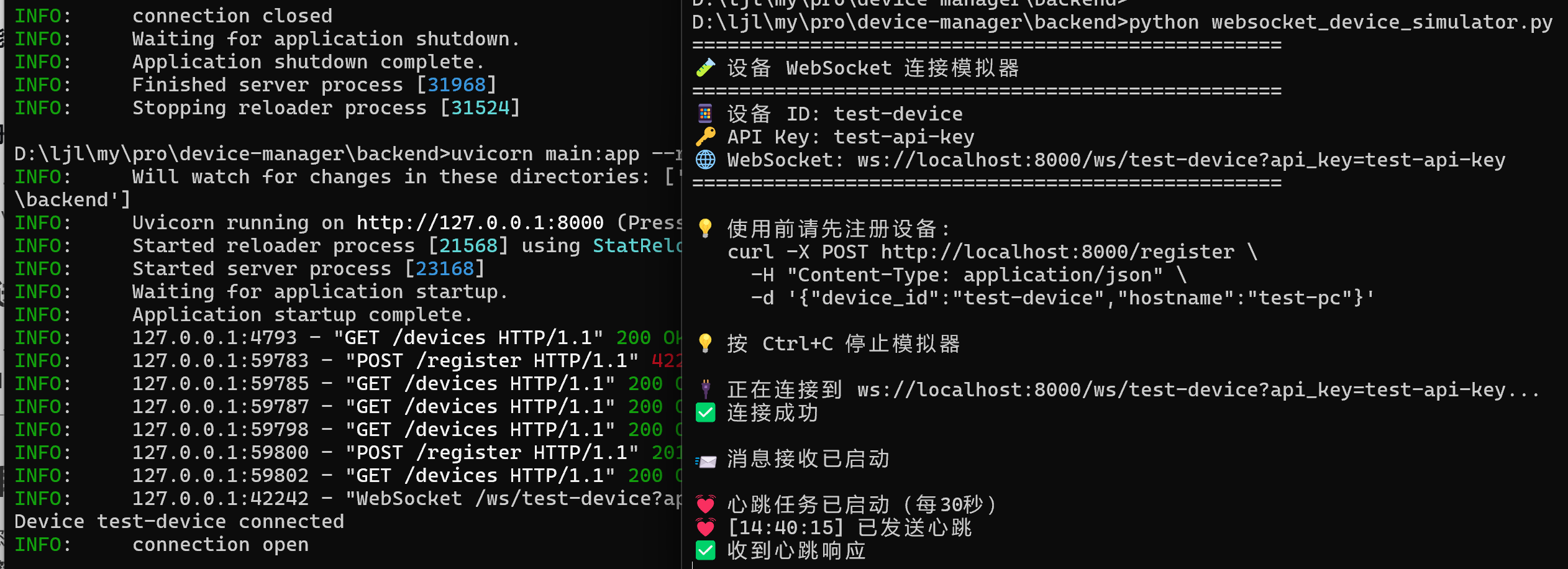
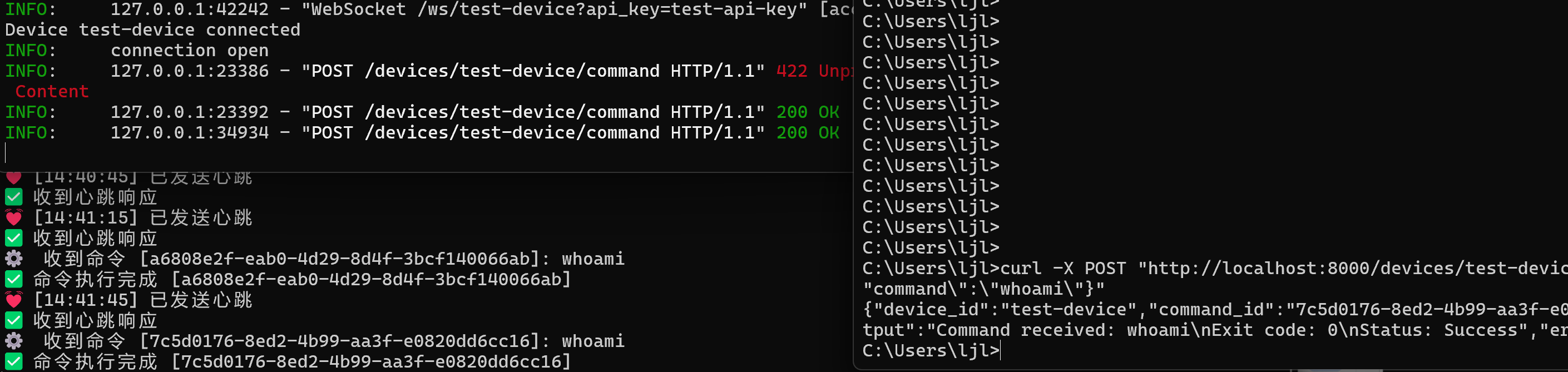
发送远程命令
dart
curl -X POST "http://localhost:8000/devices/test-device/command" -H "Content-Type: application/json" -d "{\"command\":\"whoami\"}"