1.创建库
sql
Create database DBtest

On --数据文件

(

  Name='DBtest',--逻辑名称

   Filename='D:\DATA\DBTEST.mdf', --物理路径和名称

   Size=5MB,  --文件的初始大小

  Filegrowth=2MB,  --文件增长方式

)

   Log on  --日志文件

    (

    Name='DBtest',

   Filename='D:\DATA\DBTEST.mdf',

   Size=5MB,

     Filegrowth=2MB,)
如果不加的话数据库的Create database DBtest都是默认的
2.建表
sql
create table Department( --部门表

DepartmentId int primary key identity(1,1),

-- primary key 主键约束非空且唯一

-- identity(1,1)自动增长,初始值为1,增长步长为1

DepartmentName varchar(30) not null,

DepartRemark text

--text长文本

)
sql
create table People(

PeopleId int primary key identity(1,1),

DepartmentId int references Department(DepartmentId),

--references Department(表名)(DepartmentId(主键字段))

会自动检验插入的数据在Department是否存在,存在才能添加,不存在则添加失败。

RankId int references [Rank](RankId),

PeopleName varchar(30) not null,

PeopleSex nvarchar(1) check(PeopleSex='男'or PeopleSex='女') defaylt('男'),

-- check(PeopleSex='男'or PeopleSex='女')check范围约束

--defaylt('男')没有插入时的默认值

PeopleBirth smalldatetime not null,--生日

PeoPleSalary decimal(12,2) check(PeoPleSalary>=1000 and

PeoPleSalary<=1000000) not null,--月新

PeoplePhone varchar(20) unique not null, --电话

-- unique重复的元素无法添加

PeopleAddress varchar(300),--地址

PeopleAddTime smalldatetime default(getdate())--添加时间

-- getdate()获取当前时间

)
3. 添加列:alter table 表名 add 新表名 数据类型。
4. 删除列:alter table 表名 drop column 列名。
5. 修改列:alter table 表名 alter column 列名 数据类型
6. 删除约束: alter table 表名 drop constraint 约束名
7. 添加check约束:alter table 表名 add constraint 约束名 check(表达式)
(1). 添加约束(主键):alter table 表名 add constraint 约束名 primary key(列名)
(2). 添加约束(唯-):alter table 表名 add constraint 约束名 unique(列名)
(3).添加约束(默认值):alter table 表名 add constraint 约束名 default 默认值 for 列名
(4).添加约束(外键):alter table 表名 add constraint 约束名 foreign key(列名) references 关联表名(列名(主键)
8. 插入数据:
INSERT INTO course (con, cname, lecture, semester, credit, type)
VALUES
('C01', '高等数学', 64, 1, 4, '公共课'),
(1).修改数据:
update 表名 set 字段1=值1,字段2=值2 where 条件
如:将软件部(部门编号1)人员工资低于10000的调整成10000
update People set PeopleSalary= 10000
修改刘备的工资是以前的两倍,并且把刘备的地址修改成北京update People set PeopleSalary= PeopleSalary*2,PeopleAddress ='北京where PeopleName='刘备
(2).删除表:delete from people
删除市场部(部门编号3)中工资大于1万的人
delete from People where Departmentld = 3 and PeopleSalary > 10000
9. 查询:=:等于,比较是否相等及赋值
!=: 比较不等于
>: 比较大于
<:比较小于
>=:比较大于等于
<=:比较小于等于
IS NULL:比较为空
IS NOT NULL:比较不为空
in:比较是否在其中
1ike:模糊查询
asc:升序(默认值,可以不写) desc:降序
sql
select PeopleName from People order by len(PeopleName) descBETWEEN...AND...:比较是否在两者之间and:逻辑与(两个条件同时成立表达式成立)or:逻辑或(两个条件有一个成立表达式成立)not:逻辑非(条件成立,表达式则不成立;条件不成立,表达式则成立)
sql
select PeopleId '编号', PeopleName from People where Peopleid>5

select PeopleId ,PeopleName,PeopleSex from People where PeopleName like '李%'
查询出工资最高的5个人的信息:
sql
select top 5* from People order by PeopleSalary desc--查询出工资最高的10%的员工信息:

select top 10 percent*from People order by PeopleSalary desc
查询出地址已经填写的员工信息!
sql
select*from People where PeopleAddress is not null10.模糊查询:
%:代表匹配0个字符、1个字符或多个字符。
_:代表匹配有且只有1个字符。
\[\]:代表匹配范围内
\^:代表匹配不在范围内
-查询名字最后一个字为香,名字一共是三个字的员工信息:
sql
select* from People where PeopleName like'香

select*from People where SUBSTRING(PeopleName 3,1)='香and len(PeopleName)=3
查询出电话号码开头为138的,第四位好像是7或者8,最后一个号码是5:
sql
select * from People where PeoplePhone like '138[7,8]%5'--查询出电话号码开头为138的,第四位好像是2-5之间,最后一个号码不是2和3
sql
select*from People where PeoplePhone like '138[2,3,4,5]%[^2,3]'

select * from People where PeoplePhone like '138[2-5]%[^2-3]'
11.聚合函数:
常用的聚合函数:count:求数量
max:求最大值
min:求最小值
sum:求和
avg:求平均值
统计出所在地在"武汉或上海"的所有女员工数量以及最大年龄,最小年龄和平均年龄
select'武汉或上海的女员工' 描述,COUNT(*)数量,
sql
max(year(getdate())-year(PeopleBirth))最高年龄min(year(getdate0)-year(PeopleBirth))最低年龄sum(year(getdate0)-year(PeopleBirth))年龄总和avg(year(getdate0)-year(PeopleBirth))平均年龄from People

where PeopleSex='女'and PeopleAddress in('武汉','上海')- 分组查询:group by
根据员工所在地区分组统计员工人数,员工工资总和,平均工资,最高工资和最低工资--要求筛选出员工人数至少在2人及以上的记录,并且1985年及以后出身的员工不参与统计。
sql
select PeopleAddress 地区,count(*)员工人数,sum(PeopleSalary) 工资总和,avg(PeopleSalary)

max(PeopleSalary)最高工资,min(PeopleSalary) 最低工资from People

where PeopleBirth<'1985-1-1'

group by PeopleAddress

having count(*)>=2
在where中使用聚合函数要用having关键字
12. 多表查询:
笛卡尔乘积:select * from People,Department
查询结果将Department所有记录和People表所有记录依次排列组合形成新的结果
--查询员工信息,显示部门编号
sql
select * from People,Department where People.PeopleId=Department.DepartmentId- --内连接查询
不符合主外键关系的数据都不显示
sql
select * from People inner join Department

on People.PeopleId=Department.DepartmentId
(1).外连接(左外联,右外联,全外联)
(2).左外联:
以左表为主表进行数据显示,主外键关系找不到的数据nul取代。
sql
select * from People

left join [Rank] on  People.PeopleId=[Rank].RankId
(3).右连:
A left join B= B right join A
--下面两个查询含义相同
sql
select*from People

left join Department on People.Departmentld = Department.Departmentld
sql
select* from Department

right join People on People.Departmentld = Department.Departmentld
(4).--全外联:
两张表的数据,无论是否符合关系,都要显示
sql
select* from People

full join Department on People.PeopleId=Department.DepartmentId- --查询出武汉地区所有的员工信息,要求显示部门名称,职级名称以及员工的详细资料(显示中文别名
sql
select

PeopleId 员工编号,People.DepartmentId 部门编号,

DepartmentName 部门名称,RankName 职级名称,PeopleName 员工姓名,

PeopleSex 员工性别,PeopleBirth 生日,PeopleSalary 月薪,PeoplePhone 电话,

PeopleAddress 地址

from People

left join Department on People.DepartmentId = Department.DepartmentId

left join [Rank] on People.RankId = [Rank].RankId

where PeopleAddress ='武汉'
(5).自连接:
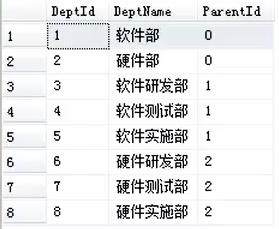
sql
select A.Deptld 部门编号,A.DeptName 部门名称,B.DeptName 上级部门
from Dept Ainnerjoin Dept B on A.Parentld = B.Deptld13.DISTINCT 是用于去除查询结果中重复行的关键字
sql
select distinct sno from sc14. 变量:
(1)全局变量,(2)局部变量
(1)局部变量:
以@开头,先声明,在赋值
sql
declare @str varchar(20)

set @str = 'i like sql'

--select @str = 'i like sql'

print @str
--set和select进行赋值的时候的区别
--set:赋值变量指定的值。
--select:一般用于表中查询出的数据赋值给变量,如果查询结果有多条,取最后一条赋值
--exp:select @a= 字段名 from 表名
-当前表最后一行的某个字段值给@a
(2)全局变量:
以@@开头,由系统进行定义和维护
--@@ERROR:返回执行的上一个语句的错误号
--@@IDENTITYI: 返回最后插入的标识值
--@@MAX CONNECTIONS:返回允许同时进行的最大用户连接数
--@@ROWCOUNT:返回受上一语句影响的行数
--@@SERVERNAME:返回运行 SOL Server 的本地服务器的名称
--@@SERVICENAME:返回 SQL Server 正在其下运行的注册表项的名称
--@@TRANCOUNT:返回当前连接的活动事务数
--@@LOCK TIMEOUT:返回当前会话的当前锁定超时设置(毫秒)
sql
declare @Accountld int

set @AccountId = @@IDENTITY

insert into BankCard(CardNo,AccountId,CardPwd,CardMoney,CardStatevalues
(6225125478544588',@AccountId,'123456'0,1)
--查询sname='王盼盼'的选课成绩
sql
declare @sno varchar(5)

set @sno=(select sno from student where sname='王盼盼')

select sc.grade from sc where sno=@sno
15.Go语句
等待go语句之前代码执行完成之后才能执行后面的代码
sql
create database DBTEST1

use DBTEST1

执行这两条会报错,原因是库还没建好就进入库。

create database DBtest1

go

use DBtext
16. 运算符:
算数运算符:加(+)、减(-)、乘(*)、除(/)、(%)
逻辑运算符:AND、OR、LIKE、BETWEEN and、IN、EXISTS、NOT、ALL、ANY
-- EXISTS()查看是否存在
Begin --大括号
End --大括号
赋值运算符:=
字符串运算符:+
比较运算符:=、>、<、>=、<=、<>
位运算符:1、&、^
复合运算符:+=、-=、/=、%=、*=
17.流程控制:
--(1)某用户银行卡号为"6225547854125656"-该用户执行取钱操作,取钱5000元,
--余额充足则进行取钱操作-并提示"取钱成功",否则提示"余额不足"
sql
declare @balance money

select @balance =(select CardMoney from BankCard where CardNo='6225547854125656')

if @balance >= 5000 --可以取钱

begin

     update BankCard set CardMoney = CardMoney-5000

     where CardNo='6225547854125656'

     insert into CardExchange(CardNo,MoneyInBank,MoneyOutBank,ExchangeTime)

     values('6225547854125656',0,5000,getdate())

end

else

begin

     print '余额不足'

end- 子查询
--查询选修了95010号课程的学生信息
--IN 是一个筛选条件关键字,核心作用是:
--判断某个字段的值,是否存在于指定的「值集合」中,匹配成功则保留记录,失败则排除。
sql
select * from student where sno in (select sno from sc where sno='95010')--查询课程成绩在90分以上的学生信息
sql
select * ,sc.grade from student s,sc where s.sno=sc.sno  and grade>90

select * from student where sno in (select sno from sc where grade>90)

select *,sc.grade 学生成绩 from student s

inner join sc on s.sno=sc.sno

where sc.grade >90
17. 分页查询:
select top 页码大小*from Studentwhere Stuld not in(select top 页码大小*(当前页-1) Stuld from Student)
--一页为5条
--第一页
sql
select top 5 * from student where sno not in (select top 0 sno from student)--第二页
sql
select top 5 * from student where sno not in (select top 5 sno from student)