本教程基于llama.cpp实现大模型本地轻量化部署,适配RTX 5060 8GB显卡,选用轻量级的千问 2.5-1.5B 对话模型,通过 GPU 加速保证运行流畅,同时提供原生 Python 调用和LangChain 自定义封装调用两种方案,代码完全保留,仅优化部署说明与使用指引。
1.打开 ModelScope 社区千问 2.5-1.5B-GGUF 模型地址:https://www.modelscope.cn/models/Qwen/Qwen2.5-1.5B-Instruct-GGUF/files
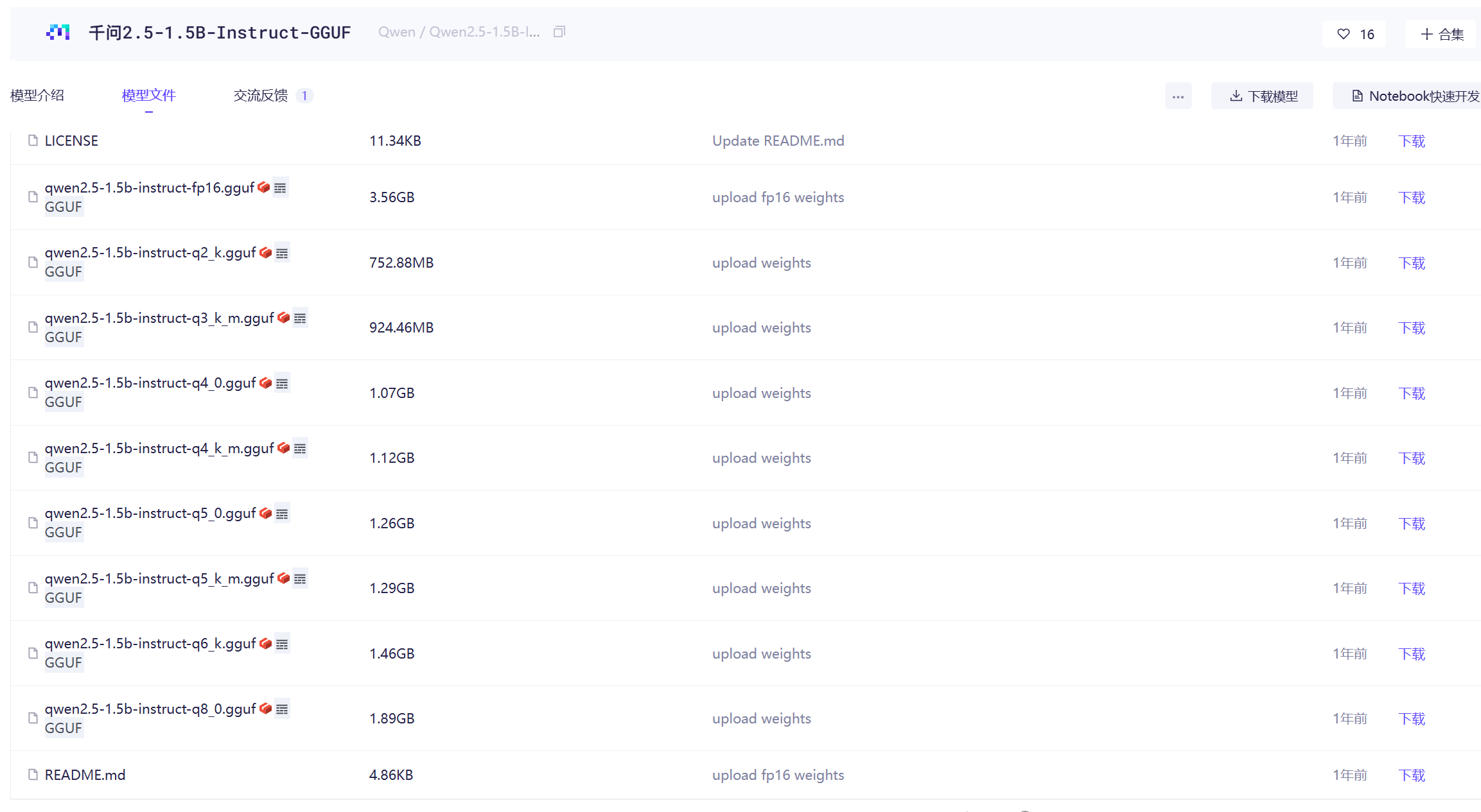
下载 GGUF 格式模型文件(推荐量化版本,适配 8G 显存),下载完成后重命名为qwen25.gguf,方便后续命令调用。
模型说明:1.5B 参数属于轻量级大模型,完美适配 8GB 显存显卡,结合 llama.cpp 的 GPU 加速,推理速度快、显存占用合理。
2.将下载好的qwen25.gguf模型文件,放在llama-server.exe同级目录下,打开命令行工具,执行以下启动命令:
命令参数说明
- -m qwen25.gguf:指定加载的本地模型文件
- --host 127.0.0.1:绑定本地回环地址,仅本机可访问
- --port 11433:设置服务端口为 11433
- -c 1024:上下文窗口大小
- --n-gpu-layers 32:核心参数,将 32 层模型加载到 GPU 运算
命令执行成功后,llama.cpp 服务会在本地持续运行,等待接口调用。
bash
llama-server.exe -m qwen25.gguf --host 127.0.0.1 --port 11433 -c 1024 --n-gpu-layers 32测试连通性
代码直接调用 llama.cpp 的/completion接口,无需依赖第三方框架,快速验证模型服务是否正常运行。
python
import json
from urllib import request, error

url = "http://127.0.0.1:11433/completion"
headers = {"Content-Type": "application/json"}

prompt = """<|im_start|>user
你好,简单介绍一下自己<|im_end|>
<|im_start|>assistant
"""

data = {
    "model": "qwen25.gguf",
    "prompt": prompt,
    "temperature": 0.7,
    "max_tokens": 512,
    "ctx_size": 4096,
    "stop": ["<|im_end|>"],
    "stream": False
}

try:
    data_json = json.dumps(data).encode("utf-8")
    req = request.Request(url, data=data_json, headers=headers, method="POST")
    with request.urlopen(req, timeout=60) as response:
        result = json.loads(response.read().decode("utf-8"))

    print("生成结果:")
    print(result["content"].strip())

except error.HTTPError as e:
    print(f"调用失败(HTTP错误):{e.code} - {e.reason}")
except error.URLError as e:
    print(f"调用失败(连接/网络错误):{e.reason}")
except Exception as e:
    print(f"调用失败(其他异常):{e}")
LangChain 自定义封装 llama.cpp/completion 接口
代码基于LangChain 框架自定义 LLM 类,完整封装 llama.cpp 的补全接口,继承 LangChain 标准接口规范,支持无缝接入 LangChain 生态,方便后续快速搭建 RAG、智能对话、智能体等复杂 AI 应用。
python
import json
from typing import Optional
from urllib import request, error
from langchain_core.language_models import LLM
from langchain_core.callbacks import CallbackManagerForLLMRun

class LlamaCppCompletionLLM(LLM):
    base_url: str = "http://127.0.0.1:11433"
    model: str = "qwen25.gguf"
    temperature: float = 0.7
    max_tokens: int = 512
    ctx_size: int = 4096
    stop: list = []

    @property
    def _llm_type(self) -> str:
        return "llama_cpp_completion"

    def _call(
            self,
            prompt: str,
            stop: Optional[list[str]] = None,
            run_manager: Optional[CallbackManagerForLLMRun] = None,
            **kwargs,
    ) -> str:
        url = f"{self.base_url}/completion"
        headers = {"Content-Type": "application/json"}

        data = {
            "model": self.model,
            "prompt": prompt,
            "temperature": self.temperature,
            "max_tokens": self.max_tokens,
            "ctx_size": self.ctx_size,
            "stop": stop or self.stop,
            "stream": False
        }

        try:
            data_json = json.dumps(data).encode("utf-8")
            req = request.Request(url, data=data_json, headers=headers, method="POST")
            with request.urlopen(req, timeout=60) as response:
                result = json.loads(response.read().decode("utf-8"))
            return result["content"].strip()
        except Exception as e:
            raise RuntimeError(f"llama.cpp 调用失败: {e}")

if __name__ == "__main__":
    llm = LlamaCppCompletionLLM(
        base_url="http://127.0.0.1:11433",
        model="qwen25.gguf",
        temperature=0.7,
        max_tokens=512,
        ctx_size=4096,
        stop=["<|im_end|>"],
    )

    prompt = """<|im_start|>user
                你好,简单介绍一下自己<|im_end|>
                <|im_start|>assistant
            """

    output = llm.invoke(prompt)
    print("生成结果:")
    print(output)
运行效果如图:

LangChain 自定义封装 llama.cpp/stream_chat 接口
python
import json
import urllib.request
import urllib.error

BASE_URL = "http://127.0.0.1:11433"
MODEL = "qwen25.gguf"
STOP_WORDS = ["<|im_end|>"]

# ==========================
# 对话记忆(最简单可靠)
# ==========================
chat_history = []

def add_history(role, content):
    chat_history.append({"role": role, "content": content})

def build_prompt():
    prompt = ""
    for msg in chat_history:
        prompt += f"<|im_start|>{msg['role']}\n{msg['content']}<|im_end|>\n"
    prompt += "<|im_start|>assistant\n"
    return prompt

# ==========================
# 原生流式调用(无 LangChain 兼容错误)
# ==========================
def stream_chat(user_input):
    add_history("user", user_input)
    prompt = build_prompt()

    url = f"{BASE_URL}/completion"
    headers = {"Content-Type": "application/json"}
    data = {
        "model": MODEL,
        "prompt": prompt,
        "temperature": 0.7,
        "max_tokens": 1024,
        "ctx_size": 4096,
        "stop": STOP_WORDS,
        "stream": True
    }

    req = urllib.request.Request(
        url,
        data=json.dumps(data).encode("utf-8"),
        headers=headers,
        method="POST"
    )

    print("\n你:", user_input)
    print("AI:", end="", flush=True)

    full_answer = ""
    try:
        with urllib.request.urlopen(req, timeout=60) as resp:
            for line in resp:
                line = line.decode("utf-8").strip()
                if not line:
                    continue
                if line.startswith("data: "):
                    line = line[6:]
                try:
                    obj = json.loads(line)
                    token = obj.get("content", "")
                    if token:
                        print(token, end="", flush=True)
                        full_answer += token
                except:
                    continue
    except Exception as e:
        print(f"\n[错误] {e}")

    add_history("assistant", full_answer)
    print("\n")

if __name__ == "__main__":
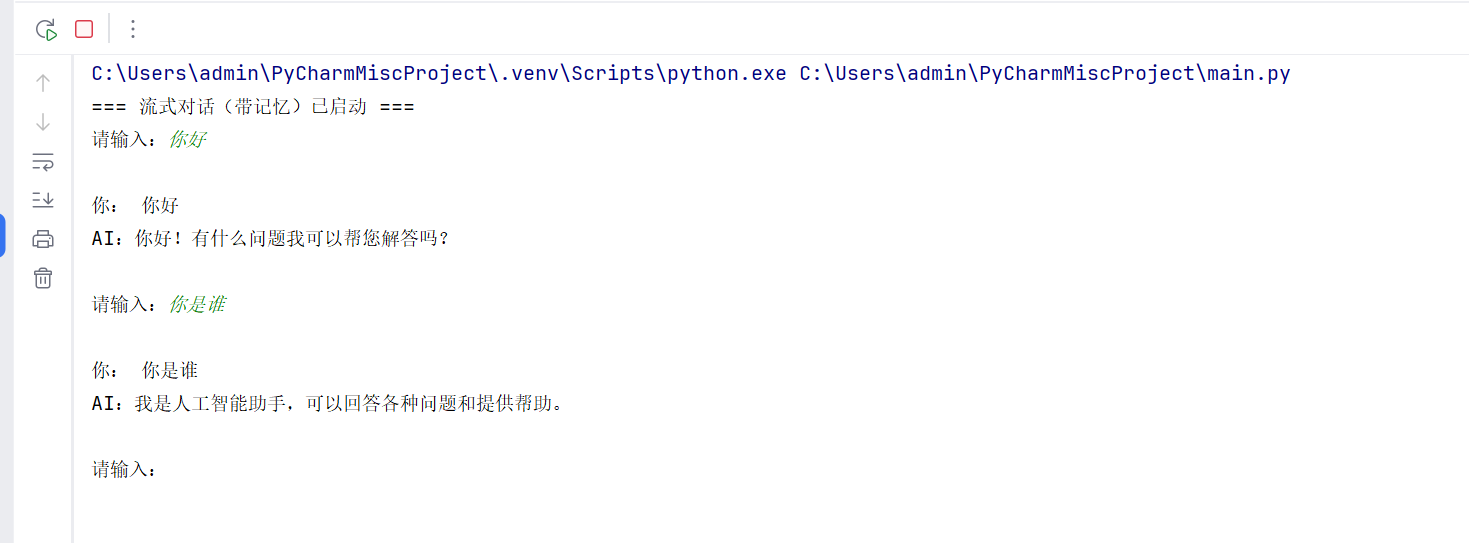
    print("=== 流式对话(带记忆)已启动 ===")
    while True:
        msg = input("请输入:")
        if msg.lower() in ["exit", "quit", "q"]:
            print("对话结束")
            break
        stream_chat(msg)
输出如下:
python
import json
import urllib.request
import urllib.error

# 配置
BASE_URL = "http://127.0.0.1:11433"
MODEL = "qwen25.gguf"
STOP_WORDS = ["<|im_end|>"]
TEMP = 0.7
MAX_TOKENS = 1024
CTX_SIZE = 4096

# 固定系统提示 + 对话历史
SYSTEM_PROMPT = "你是一个乐于助人的AI助手,用中文简洁回答用户问题。"
chat_history = []

# 拼接完整 Qwen 格式 prompt(带系统+历史+当前问题)
def build_full_prompt(new_user_msg):
    parts = []
    # 系统开头
    parts.append(f"<|im_start|>system\n{SYSTEM_PROMPT}<|im_end|>")
    # 拼接历史对话
    for item in chat_history:
        parts.append(f"<|im_start|>{item['role']}\n{item['content']}<|im_end|>")
    # 本次用户提问
    parts.append(f"<|im_start|>user\n{new_user_msg}<|im_end|>")
    # 助手开头
    parts.append("<|im_start|>assistant\n")
    return "\n".join(parts)

# 流式请求 + 保存记忆
def chat_round(user_input):
    # 构造完整上下文 prompt
    prompt = build_full_prompt(user_input)

    url = f"{BASE_URL}/completion"
    headers = {"Content-Type": "application/json"}
    data = {
        "model": MODEL,
        "prompt": prompt,
        "temperature": TEMP,
        "max_tokens": MAX_TOKENS,
        "ctx_size": CTX_SIZE,
        "stop": STOP_WORDS,
        "stream": True
    }

    req = urllib.request.Request(
        url,
        data=json.dumps(data).encode("utf-8"),
        headers=headers,
        method="POST"
    )

    print("\n你:", user_input)
    print("AI:", end="", flush=True)

    full_answer = ""
    try:
        with urllib.request.urlopen(req, timeout=60) as resp:
            for line in resp:
                line = line.decode("utf-8").strip()
                if not line:
                    continue
                if line.startswith("data: "):
                    line = line[6:]
                try:
                    obj = json.loads(line)
                    token = obj.get("content", "")
                    if token:
                        print(token, end="", flush=True)
                        full_answer += token
                except:
                    continue
    except Exception as e:
        print(f"\n[接口错误] {e}")

    # 关键:存入历史,实现记忆
    chat_history.append({"role": "user", "content": user_input})
    chat_history.append({"role": "assistant", "content": full_answer.strip()})
    print("\n")

if __name__ == "__main__":
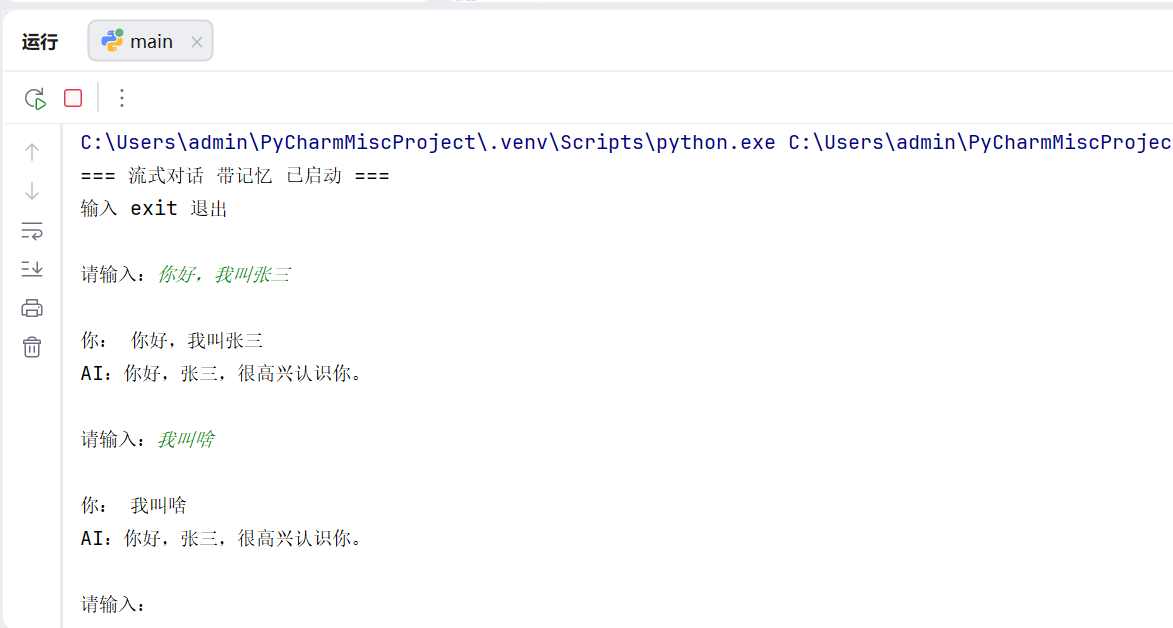
    print("=== 流式对话 带记忆 已启动 ===")
    print("输入 exit 退出\n")
    while True:
        msg = input("请输入:")
        if msg.lower() in ["exit", "quit", "q"]:
            print("对话结束")
            break
        chat_round(msg)
输出效果: