一、网络爬虫到底在干什么?
一句话总结:
爬虫 = 模拟浏览器 + 拿数据 + 解析数据
浏览器访问一个网站,本质流程是:
- 发送 HTTP 请求
- 服务器返回 HTML / JSON
- 浏览器解析并展示
而爬虫做的事情就是------替代浏览器。
网络爬虫与浏览器的区别: 浏览器是展示数据的, 而网络爬虫是采集数据的
二、requests使用
1. 基本请求
requests 是一个优雅而简单的 Python HTTP请求库 requests 的作用是 发送请求获取响应数据
requests安装
在终端(命令行工具) 运行这个简单命令即可
pip install requests
如果系统中既安装了Python2 又安装了 Python3, 需要安装Python3环境中:
pip3 install requests
常见属性
response.text : 响应体 str类型
response.ecoding : 二进制转换字符使用的编码
respones.content: 响应体 bytes类型
python
import requests

responses=requests.get('https://www.baidu.com')
# print(responses.status_code)
# print(responses.text)
# print(responses.content)
# print(responses.encoding)

print(responses.content.decode())
2. 为什么很多人"抓不到数据"?
常见原因:
❌ 没加请求头
python
headers = {
    "User-Agent": "Mozilla/5.0"
}
requests.get(url, headers=headers)
❌ 没带参数
python
params = {
    "page": 1
}
requests.get(url, params=params)
❌ 没带 Cookie
有些网站需要登录态,否则返回空数据
三、BeautifulSoup:HTML 解析利器
requests 只能"拿数据",但不会"看结构"。这时候就需要 BeautifulSoup。
Beautiful Soup 是一个可以从HTML或XML文件中提取数据的Python库
1. Beautiful Soup 安装
安装 Beautiful Soup 4
pip install bs4
安装 lxml
pip install lxml
2. 基础用法
python
from bs4 import BeautifulSoup
import requests

responses=requests.get('https://www.baidu.com')
# print(responses.content.decode())
soup=BeautifulSoup (responses.content.decode(),'lxml')
print(soup.prettify())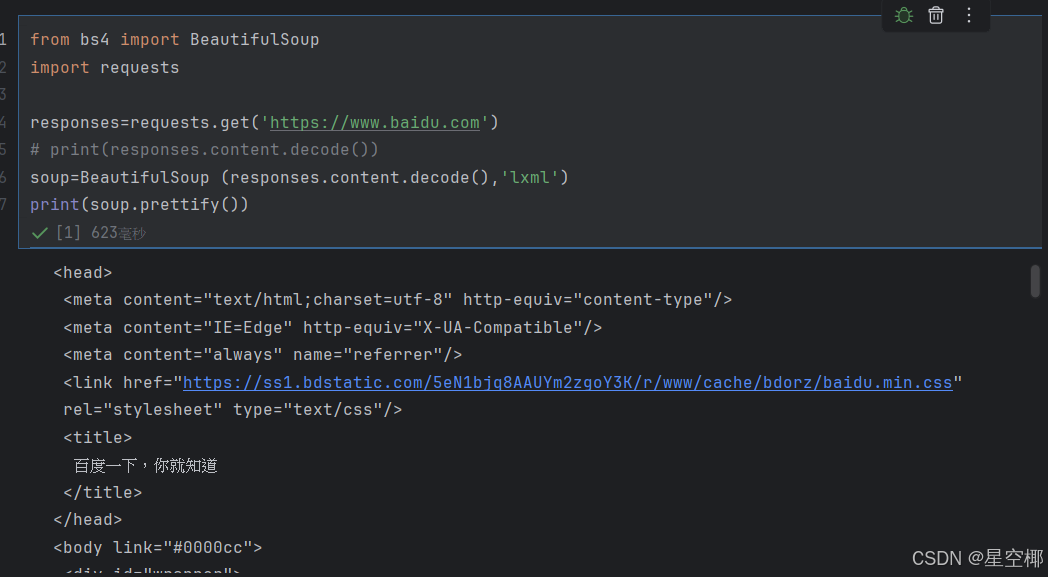
3. BeautifulSoup对象的find方法
find方法的作用: 搜索文档树
find(self, name=None, attrs={}, recursive=True, text=None, **kwargs)
参数
name: 标签名
attrs: 属性字典
recursive: 是否递归循环查找
text: 根据文本内容查找
返回
查找到的第一个元素对象
扩展:#查找所有的a标签
a_s=soup.find_all('a')
print(a_s)
Tag 对象介绍
Tag对象对应于原始文档中的XML或HTML标签 Tag有很多方法和属性, 可用 遍历文档树 和 搜索文档树 以及获取标签内容
Tag 对象常见属性
name: 获取标签名称
attrs: 获取标签所有属性的键和值
text: 获取标签的文本字符串
4. 常见查找方式
按标签找
soup.find("div")
soup.find_all("a")
按 class 找
soup.find("div", class_="title")CSS 选择器(推荐)
soup.select(".title")
soup.select("#main")
soup.select("div > a")
四、正则表达式:提取符合某种条件的字符串
BeautifulSoup 很强,但不是万能。
当你遇到:
- 字符串混乱
- 标签不规范
- 数据嵌在 JS 里
👉 就需要正则。
正则表达式是一种字符串匹配的模式(pattern)
作用: 从某个字符串中提取符合某种条件的子串.
1. 基础示例
python
import re

rs=re.findall(r'^[a-zA-Z0-9_]+$', 'abc123')
print(rs)
语法
. 匹配除换行符(\n)以外的所有字符
\d 匹配 0-9 的数字
\w 匹配字母数字_和中文;
* 前面的一个匹配模式出现0次或多次
- 前面的一个匹配模式出现1次或多次
? 前面的一个匹配模型出现0或1次
2. re.findall() 方法
re.findall(pattern, string, flags=0)(重点)
作用: 扫描整个string字符串,返回所有与pattern匹配的列表
参数:
pattern: 正则表达式
string: 从那个字符串中查找
flags: 匹配模式
特点:
如果正则表达式中没有()则返回与整个正则匹配的列表
如果正则表达式中有(),则返回()中匹配的内容列表, 小括号两边东西都是负责确定提取数据所在位置.
3. r原串的使用
正则中使用r原始字符串, 能够忽略转义符号带来的影响
python
rs = re.findall("a\\\\nb","a\\nb")
print(rs)
python
# 消除不符合PERP8的规范
rs=re.findall(r'\d', 'a123')
print(rs)
4. 匹配 JSON 片段(实战常用)
script = 'var data = {"name":"test","age":18};'

json_str = re.findall(r'\{.*\}', script)[0]
五、json 模块:处理接口数据
json模块是Python自带的模块, 用于json与python数据之间的相互转换.
1. JSON 转 Python
python
import json
data = response.json()
print(data["list"])
2. 字符串转 JSON
python
json_str = '{"name": "test"}'
data = json.loads(json_str)
print(data["name"])
3. JSON 转字符串
python
data = {"name": "test"}

json_str = json.dumps(data, ensure_ascii=False)
print(json_str)
六、实战思路
python
# 示例数据
import requests
from bs4 import BeautifulSoup
url = "https://www.baidu.com/"
headers = { "User-Agent": "Mozilla/5.0" }
# 1. 请求
response = requests.get(url, headers=headers)
# 2. 解析
soup = BeautifulSoup(response.text, "html.parser")
# 3. 提取
for item in soup.select(".item"):
title = item.text.strip()
print(title)七、总结
这一套技术组合,本质是:
| 技术 | 作用 |
|---|---|
| requests | 发请求 |
| BeautifulSoup | 解析 HTML |
| 正则 | 精细提取 |
| json | 处理接口数据 |