文章目录
-
- 每日一句正能量
- 一、前言:当设计评审"看见"了意图
- 二、项目架构设计
- 三、核心代码实战
-
- [3.1 Face AR设计情绪反馈引擎(DesignEmotionEngine.ets)](#3.1 Face AR设计情绪反馈引擎(DesignEmotionEngine.ets))
- [3.2 Body AR手势操控引擎(GestureCommandEngine.ets)](#3.2 Body AR手势操控引擎(GestureCommandEngine.ets))
- [3.3 沉浸光感3D模型渲染组件(ModelViewer.ets)](#3.3 沉浸光感3D模型渲染组件(ModelViewer.ets))
- [3.4 沉浸光感悬浮导航栏(ImmersiveNavBar.ets)](#3.4 沉浸光感悬浮导航栏(ImmersiveNavBar.ets))
- 四、关键设计要点总结
-
- [4.1 Face AR的"设计评审情绪"五维模型](#4.1 Face AR的"设计评审情绪"五维模型)
- [4.2 Body AR的"自然手势操控"体系](#4.2 Body AR的"自然手势操控"体系)
- [4.3 沉浸光感的"情绪驱动渲染"](#4.3 沉浸光感的"情绪驱动渲染")
- [4.4 HarmonyOS PC的"评审工作站"设计](#4.4 HarmonyOS PC的"评审工作站"设计)
- 五、效果预览与扩展方向
- 六、结语

每日一句正能量
主动寻找生活中的光亮,聚焦在美好与希望上。
"寻找"和"聚焦"都是动词,意味着这是每天可做的练习。它不是盲目乐观,而是一种有选择的注意力投资------把心理能量投向能滋养自己的地方。
一、前言:当设计评审"看见"了意图
2026年4月,HarmonyOS 6.1.0正式发布,带来了两大革命性能力:沉浸光感组件 与Face AR & Body AR。前者让界面拥有了材质通透感和环境光自适应能力,后者则让设备第一次具备了实时理解用户面部表情和肢体动作的能力。
传统工业设计评审最大的痛点是什么?"只看图纸,不见反应"。设计师展示3D模型,评审团队通过文字或语音反馈修改意见,但无法捕捉到评审者看到设计时的真实情绪反应(惊喜、困惑、不满),也无法通过自然手势直接操控模型。而HarmonyOS 6的AR能力彻底改变了这一现状------通过Face AR实时捕捉评审者的微表情(看到亮点时的眼睛放大、看到问题时的皱眉),通过Body AR识别评审者的手势指令(旋转、缩放、标注、切换视角),再结合沉浸光感的3D模型材质渲染,让设计评审从"静态看图"进化为"沉浸式协作"。
本文将手把手带你构建一个完整的AR工业设计评审系统,涵盖:
- Face AR设计情绪反馈引擎:通过52个面部BlendShape系数,实时分析评审者对当前设计的情绪反应
- Body AR手势操控引擎:基于33个骨骼关键点识别旋转、缩放、标注、切换等手势指令
- 沉浸光感3D模型渲染:根据评审情绪动态调整模型光照、材质和背景氛围
- HarmonyOS PC评审大屏:PC端实时显示评审情绪热力图,手机端AR采集
二、项目架构设计
entry/src/main/ets/
├── reviewer/
│   ├── ability/
│   │   └── DesignReviewAbility.ets       # 设计评审Ability
│   ├── engine/
│   │   ├── DesignEmotionEngine.ets         # 设计情绪分析引擎
│   │   └── GestureCommandEngine.ets        # 手势指令引擎
│   ├── components/
│   │   ├── EmotionHeatmapPanel.ets         # 情绪热力图面板
│   │   ├── GestureGuideOverlay.ets       # 手势引导覆盖层
│   │   └── DesignAnnotationCanvas.ets     # 设计标注画布
│   └── pages/
│       └── ReviewWorkstationPage.ets     # 评审工作站页面
├── designer/
│   ├── engine/
│   │   ├── EmotionFeedbackReceiver.ets    # 情绪反馈接收器
│   │   └── ModelGestureController.ets     # 模型手势控制器
│   ├── components/
│   │   ├── ModelViewer.ets                # 3D模型查看器
│   │   └── RevisionTracker.ets            # 修改追踪器
│   └── pages/
│       └── DesignerStudioPage.ets         # 设计师工作室页面
└── common/
    ├── components/
    │   └── ImmersiveNavBar.ets            # 沉浸光感悬浮导航
    └── models/
        └── DesignModels.ets               # 设计数据模型
三、核心代码实战
3.1 Face AR设计情绪反馈引擎(DesignEmotionEngine.ets)
代码亮点 :通过Face AR的52个面部BlendShape系数,构建**"设计评审情绪"评估模型**。不同于通用的情绪识别,这里专门针对工业设计场景训练了五个核心维度:惊喜度(看到设计亮点时的眼睛放大+眉毛上扬)、困惑度(不理解设计时的皱眉+歪头)、不满度(发现问题时的嘴角下拉+鼻翼扩张)、专注度(仔细研究时的目光稳定+前倾)、以及认同度(认可设计时的点头+微笑)。通过滑动窗口时间序列分析,输出稳定的评审情绪曲线,并与3D模型的具体部位关联。
typescript
// entry/src/main/ets/reviewer/engine/DesignEmotionEngine.ets
import { arEngine } from '@hms.core.ar.arengine';

/**
 * 设计评审情绪维度
 */
export enum DesignEmotion {
  DELIGHT = 'delight',       // 惊喜/喜欢
  CONFUSION = 'confusion',   // 困惑/不解
  DISSATISFACTION = 'dissatisfaction', // 不满/问题
  FOCUS = 'focus',           // 专注/研究
  APPROVAL = 'approval'      // 认同/认可
}

/**
 * 情绪触发区域(与3D模型部位关联)
 */
export interface EmotionTrigger {
  emotion: DesignEmotion;
  intensity: number;          // 强度 0-100
  modelPart?: string;        // 关联的模型部位
  timestamp: number;
  screenshot?: string;       // 触发时的画面截图
}

/**
 * 评审情绪报告
 */
export interface ReviewEmotionReport {
  reviewerId: string;
  overallSentiment: number;   // 总体情绪倾向 -100~100(负到正)
  dominantEmotion: string;
  emotionTimeline: EmotionTrigger[];
  focusAreas: string[];       // 评审者最关注的部位
  issues: string[];           // 发现的问题点
  highlights: string[];       // 认可的亮点
  trend: 'positive' | 'neutral' | 'negative';
}

export class DesignEmotionEngine {
  private static instance: DesignEmotionEngine;

  // 评审者标识
  private reviewerId: string = '';

  // 当前查看的模型部位
  private currentFocusPart: string = '';

  // 滑动窗口(最近8秒,240帧@30fps)
  private emotionWindow: Array<Record<DesignEmotion, number>> = [];
  private readonly WINDOW_SIZE = 240;
  private readonly WINDOW_DURATION = 8000; // ms

  // 情绪触发记录
  private emotionTriggers: EmotionTrigger[] = [];

  // 阈值配置
  private readonly THRESHOLDS = {
    delightEyeWide: 0.5,           // 惊喜眼睛放大阈值
    delightBrowUp: 0.4,            // 惊喜眉毛上扬阈值
    confusionBrowFurrow: 0.35,     // 困惑皱眉阈值
    confusionHeadTilt: 15,         // 困惑歪头角度
    dissatisfactionMouthFrown: 0.3, // 不满嘴角下拉阈值
    focusGazeStable: 0.8,          // 专注目光稳定阈值
    approvalNodAngle: 8,           // 认同点头角度
    approvalSmile: 0.4            // 认同微笑阈值
  };

  static getInstance(): DesignEmotionEngine {
    if (!DesignEmotionEngine.instance) {
      DesignEmotionEngine.instance = new DesignEmotionEngine();
    }
    return DesignEmotionEngine.instance;
  }

  setReviewerId(id: string): void {
    this.reviewerId = id;
  }

  setCurrentFocusPart(part: string): void {
    this.currentFocusPart = part;
  }

  /**
   * 处理Face AR数据帧,分析设计评审情绪
   * 核心算法:五维设计情绪模型 + 部位关联 + 时间序列趋势
   */
  processFaceFrame(face: arEngine.ARFace): ReviewEmotionReport {
    const blendShapes = face.getBlendShapes();
    const pose = face.getPose();

    if (!blendShapes) {
      return this.createDefaultReport();
    }

    const now = Date.now();

    // 计算五维情绪指标
    const dimensions = {
      [DesignEmotion.DELIGHT]: this.calcDelightScore(blendShapes),
      [DesignEmotion.CONFUSION]: this.calcConfusionScore(blendShapes, pose),
      [DesignEmotion.DISSATISFACTION]: this.calcDissatisfactionScore(blendShapes),
      [DesignEmotion.FOCUS]: this.calcFocusScore(blendShapes, pose),
      [DesignEmotion.APPROVAL]: this.calcApprovalScore(blendShapes, pose)
    };

    // 维护滑动窗口
    this.emotionWindow.push(dimensions);
    this.emotionWindow = this.emotionWindow.filter(d => now - (d as any).timestamp < this.WINDOW_DURATION);
    if (this.emotionWindow.length > this.WINDOW_SIZE) {
      this.emotionWindow.shift();
    }

    // 检测情绪触发事件
    this.detectEmotionTriggers(dimensions, now);

    // 计算窗口平均值
    const avgDimensions = this.getWindowAverages();

    // 总体情绪倾向(-100到100)
    const positiveScore = (avgDimensions.delight + avgDimensions.approval) / 2;
    const negativeScore = (avgDimensions.confusion + avgDimensions.dissatisfaction) / 2;
    const overallSentiment = Math.round(positiveScore - negativeScore);

    // 确定主导情绪
    const dominantEmotion = this.getDominantEmotion(avgDimensions);

    // 分析关注区域(基于情绪触发记录)
    const focusAreas = this.analyzeFocusAreas();

    // 提取问题和亮点
    const issues = this.emotionTriggers
      .filter(t => t.emotion === DesignEmotion.DISSATISFACTION && t.intensity > 60)
      .map(t => t.modelPart || '未定位部位')
      .filter((v, i, a) => a.indexOf(v) === i); // 去重

    const highlights = this.emotionTriggers
      .filter(t => (t.emotion === DesignEmotion.DELIGHT || t.emotion === DesignEmotion.APPROVAL) && t.intensity > 60)
      .map(t => t.modelPart || '未定位部位')
      .filter((v, i, a) => a.indexOf(v) === i);

    // 计算趋势
    const trend = this.calculateTrend();

    return {
      reviewerId: this.reviewerId,
      overallSentiment,
      dominantEmotion,
      emotionTimeline: this.emotionTriggers.slice(-20), // 最近20个触发
      focusAreas,
      issues,
      highlights,
      trend
    };
  }

  /**
   * 惊喜度:眼睛放大 + 眉毛上扬 + 嘴巴微张
   */
  private calcDelightScore(blendShapes: any): number {
    const eyeWide = Math.max(
      blendShapes.eyeWideLeft || 0,
      blendShapes.eyeWideRight || 0
    );
    const browUp = Math.max(
      blendShapes.browInnerUp || 0,
      blendShapes.browOuterUpLeft || 0,
      blendShapes.browOuterUpRight || 0
    );
    const jawDrop = blendShapes.jawOpen || 0;

    // 设计惊喜特征:眼睛放大和眉毛上扬权重最高
    return Math.min(100, (eyeWide * 45 + browUp * 40 + jawDrop * 15) * 100);
  }

  /**
   * 困惑度:皱眉 + 歪头 + 眯眼 + 抿嘴
   */
  private calcConfusionScore(blendShapes: any, pose: any): number {
    const browFurrow = Math.max(
      blendShapes.browDownLeft || 0,
      blendShapes.browDownRight || 0
    );
    const eyeSquint = Math.max(
      blendShapes.eyeSquintLeft || 0,
      blendShapes.eyeSquintRight || 0
    );
    const lipPress = (blendShapes.mouthPressLeft || 0) + (blendShapes.mouthPressRight || 0);

    // 头部歪头角度
    const headTilt = Math.abs(pose?.rotation?.roll || 0);
    const tiltFactor = headTilt > this.THRESHOLDS.confusionHeadTilt ? 1 : headTilt / this.THRESHOLDS.confusionHeadTilt;

    return Math.min(100, (browFurrow * 30 + eyeSquint * 25 + lipPress * 20 + tiltFactor * 25) * 100);
  }

  /**
   * 不满度:嘴角下拉 + 鼻翼扩张 + 皱眉 + 摇头
   */
  private calcDissatisfactionScore(blendShapes: any): number {
    const mouthFrown = (blendShapes.mouthFrownLeft || 0) + (blendShapes.mouthFrownRight || 0);
    const noseWrinkle = (blendShapes.noseSneerLeft || 0) + (blendShapes.noseSneerRight || 0);
    const browDown = Math.max(
      blendShapes.browDownLeft || 0,
      blendShapes.browDownRight || 0
    );
    const lipPucker = blendShapes.mouthPucker || 0;

    return Math.min(100, (mouthFrown * 35 + noseWrinkle * 25 + browDown * 25 + lipPucker * 15) * 100);
  }

  /**
   * 专注度:目光稳定 + 身体前倾 + 无多余表情
   */
  private calcFocusScore(blendShapes: any, pose: any): number {
    // 眼睛睁开度稳定(不频繁眨眼)
    const eyeOpenness = Math.min(
      1 - (blendShapes.eyeBlinkLeft || 0),
      1 - (blendShapes.eyeBlinkRight || 0)
    );

    // 头部姿态稳定
    const headStability = 1 - (Math.abs(pose?.rotation?.yaw || 0) / 30);

    // 面部肌肉活动少(排除其他情绪)
    const expressionNoise = (
      (blendShapes.mouthSmileLeft || 0) +
      (blendShapes.mouthFrownLeft || 0) +
      (blendShapes.browInnerUp || 0)
    ) / 3;

    return Math.min(100, (eyeOpenness * 40 + headStability * 35 + (1 - expressionNoise) * 25) * 100);
  }

  /**
   * 认同度:点头 + 微笑 + 眉毛放松
   */
  private calcApprovalScore(blendShapes: any, pose: any): number {
    const smile = Math.max(
      blendShapes.mouthSmileLeft || 0,
      blendShapes.mouthSmileRight || 0
    );
    const browRelax = 1 - Math.max(
      blendShapes.browDownLeft || 0,
      blendShapes.browDownRight || 0
    );

    // 点头检测(简化:通过头部俯仰角变化)
    const nodding = this.detectNodding(pose);

    return Math.min(100, (smile * 40 + browRelax * 30 + nodding * 30) * 100);
  }

  /**
   * 检测情绪触发事件
   */
  private detectEmotionTriggers(dimensions: Record<DesignEmotion, number>, timestamp: number): void {
    Object.entries(dimensions).forEach(([emotion, score]) => {
      // 情绪强度超过阈值且持续一定时间
      if (score > 60) {
        // 检查是否重复触发(去抖动)
        const recentTriggers = this.emotionTriggers.filter(t =>
          t.emotion === emotion && timestamp - t.timestamp < 2000
        );

        if (recentTriggers.length === 0) {
          this.emotionTriggers.push({
            emotion: emotion as DesignEmotion,
            intensity: Math.round(score),
            modelPart: this.currentFocusPart,
            timestamp
          });

          // 限制历史记录数量
          if (this.emotionTriggers.length > 100) {
            this.emotionTriggers.shift();
          }
        }
      }
    });
  }

  /**
   * 分析关注区域
   */
  private analyzeFocusAreas(): string[] {
    // 统计各部位的情绪触发次数
    const partCounts: Record<string, number> = {};
    this.emotionTriggers.forEach(t => {
      if (t.modelPart) {
        partCounts[t.modelPart] = (partCounts[t.modelPart] || 0) + 1;
      }
    });

    // 返回触发次数最多的部位
    return Object.entries(partCounts)
      .sort((a, b) => b[1] - a[1])
      .slice(0, 5)
      .map(([part]) => part);
  }

  /**
   * 检测点头动作
   */
  private detectNodding(pose: any): number {
    // 简化实现
    return 0;
  }

  private getWindowAverages(): Record<DesignEmotion, number> {
    const result = {} as Record<DesignEmotion, number>;

    if (this.emotionWindow.length === 0) {
      Object.values(DesignEmotion).forEach(dim => result[dim] = 50);
      return result;
    }

    Object.values(DesignEmotion).forEach(dim => {
      const sum = this.emotionWindow.reduce((acc, frame) => acc + ((frame as any)[dim] || 50), 0);
      result[dim] = Math.round(sum / this.emotionWindow.length);
    });

    return result;
  }

  private getDominantEmotion(dimensions: Record<DesignEmotion, number>): string {
    const entries = Object.entries(dimensions);
    const max = entries.reduce((a, b) => a[1] > b[1] ? a : b);

    const labels: Record<string, string> = {
      delight: '惊喜',
      confusion: '困惑',
      dissatisfaction: '不满',
      focus: '专注',
      approval: '认同'
    };

    return labels[max[0]] || '平静';
  }

  private calculateTrend(): 'positive' | 'neutral' | 'negative' {
    if (this.emotionWindow.length < 60) return 'neutral';

    const firstHalf = this.emotionWindow.slice(0, Math.floor(this.emotionWindow.length / 2));
    const secondHalf = this.emotionWindow.slice(Math.floor(this.emotionWindow.length / 2));

    const firstPositive = firstHalf.reduce((sum, d) => sum + ((d as any).delight || 0) + ((d as any).approval || 0), 0) / firstHalf.length / 2;
    const secondPositive = secondHalf.reduce((sum, d) => sum + ((d as any).delight || 0) + ((d as any).approval || 0), 0) / secondHalf.length / 2;

    const diff = secondPositive - firstPositive;
    if (Math.abs(diff) < 5) return 'neutral';
    return diff > 0 ? 'positive' : 'negative';
  }

  private createDefaultReport(): ReviewEmotionReport {
    return {
      reviewerId: this.reviewerId,
      overallSentiment: 0,
      dominantEmotion: '等待评审',
      emotionTimeline: [],
      focusAreas: [],
      issues: [],
      highlights: [],
      trend: 'neutral'
    };
  }

  reset(): void {
    this.emotionWindow = [];
    this.emotionTriggers = [];
    this.currentFocusPart = '';
  }
}
3.2 Body AR手势操控引擎(GestureCommandEngine.ets)
代码亮点 :基于Body AR的33个3D骨骼关键点,实现自然手势操控。支持单手旋转(手掌朝向+手腕转动)、双手缩放(两手距离变化)、指点标注(食指伸出)、切换视角(挥手)等核心手势。通过关节角度阈值和关键点相对位置关系判断手势类型,并通过状态机防止误触发。
typescript
// entry/src/main/ets/reviewer/engine/GestureCommandEngine.ets
import { arEngine } from '@hms.core.ar.arengine';

/**
 * 手势指令类型
 */
export enum GestureCommand {
  ROTATE = 'rotate',           // 旋转模型
  ZOOM = 'zoom',               // 缩放模型
  PAN = 'pan',                 // 平移模型
  ANNOTATE = 'annotate',       // 标注/指点
  RESET_VIEW = 'reset_view',   // 重置视角
  SWITCH_MODE = 'switch_mode', // 切换模式
  NONE = 'none'               // 无手势
}

/**
 * 手势参数
 */
export interface GestureParams {
  command: GestureCommand;
  deltaX: number;              // X方向变化
  deltaY: number;              // Y方向变化
  scale: number;               // 缩放比例
  confidence: number;          // 置信度
  isNew: boolean;             // 是否新手势
}

export class GestureCommandEngine {
  private static instance: GestureCommandEngine;

  // 手势状态
  private currentGesture: GestureCommand = GestureCommand.NONE;
  private gestureStartTime: number = 0;
  private lastHandPosition: { left: any; right: any } | null = null;

  // 历史手势(用于去抖动)
  private gestureHistory: GestureCommand[] = [];
  private readonly HISTORY_SIZE = 15;

  // 阈值配置
  private readonly THRESHOLDS = {
    rotateWristAngle: 15,       // 旋转手腕角度阈值
    zoomDistanceChange: 0.1,  // 缩放距离变化阈值
    annotateFingerExtend: 0.8,  // 标注手指伸直阈值
    panHandOpen: 0.7,           // 平移手掌张开阈值
    resetWaveSpeed: 2,          // 重置挥手速度阈值
    modeSwitchHold: 2000        // 模式切换保持时间(ms)
  };

  static getInstance(): GestureCommandEngine {
    if (!GestureCommandEngine.instance) {
      GestureCommandEngine.instance = new GestureCommandEngine();
    }
    return GestureCommandEngine.instance;
  }

  /**
   * 处理Body AR数据帧,识别手势指令
   * 核心算法:关键点几何分析 + 状态机去抖动
   */
  processBodyFrame(body: arEngine.ARBody): GestureParams {
    const landmarks = body.getLandmarks3D();
    if (!landmarks) {
      return this.createParams(GestureCommand.NONE, 0, 0, 1, 0);
    }

    const points = this.parseLandmarks(landmarks);
    const now = Date.now();

    // 检测各种手势(按优先级)
    const detections: Array<{ command: GestureCommand; confidence: number; params: any }> = [];

    // 1. 标注手势(高优先级):食指伸出,其他手指弯曲
    const annotate = this.detectAnnotateGesture(points);
    if (annotate.confidence > 0.7) {
      detections.push({ command: GestureCommand.ANNOTATE, confidence: annotate.confidence, params: annotate });
    }

    // 2. 双手缩放:两手距离变化
    const zoom = this.detectZoomGesture(points);
    if (zoom.confidence > 0.6) {
      detections.push({ command: GestureCommand.ZOOM, confidence: zoom.confidence, params: zoom });
    }

    // 3. 单手旋转:手掌朝向+手腕转动
    const rotate = this.detectRotateGesture(points);
    if (rotate.confidence > 0.6) {
      detections.push({ command: GestureCommand.ROTATE, confidence: rotate.confidence, params: rotate });
    }

    // 4. 平移:手掌张开+移动
    const pan = this.detectPanGesture(points);
    if (pan.confidence > 0.6) {
      detections.push({ command: GestureCommand.PAN, confidence: pan.confidence, params: pan });
    }

    // 5. 重置视角:挥手
    const reset = this.detectResetGesture(points, now);
    if (reset.confidence > 0.7) {
      detections.push({ command: GestureCommand.RESET_VIEW, confidence: reset.confidence, params: reset });
    }

    // 选择置信度最高的手势
    let bestDetection = detections.length > 0
      ? detections.reduce((best, curr) => curr.confidence > best.confidence ? curr : best)
      : { command: GestureCommand.NONE, confidence: 0.9, params: { deltaX: 0, deltaY: 0, scale: 1 } };

    // 状态机去抖动
    this.gestureHistory.push(bestDetection.command);
    if (this.gestureHistory.length > this.HISTORY_SIZE) {
      this.gestureHistory.shift();
    }

    const stabilizedGesture = this.stabilizeGesture(bestDetection.command);
    const isNewGesture = stabilizedGesture !== this.currentGesture;

    if (isNewGesture) {
      this.currentGesture = stabilizedGesture;
      this.gestureStartTime = now;
    }

    // 计算变化量
    let deltaX = 0, deltaY = 0, scale = 1;

    if (this.lastHandPosition) {
      const currentLeft = points.leftWrist;
      const currentRight = points.rightWrist;
      const lastLeft = this.lastHandPosition.left;
      const lastRight = this.lastHandPosition.right;

      if (stabilizedGesture === GestureCommand.ROTATE && currentLeft && lastLeft) {
        deltaX = (currentLeft.x - lastLeft.x) * 100;
        deltaY = (currentLeft.y - lastLeft.y) * 100;
      } else if (stabilizedGesture === GestureCommand.ZOOM && currentLeft && currentRight && lastLeft && lastRight) {
        const currentDist = this.distance2D(currentLeft, currentRight);
        const lastDist = this.distance2D(lastLeft, lastRight);
        scale = currentDist / (lastDist || 0.001);
      } else if (stabilizedGesture === GestureCommand.PAN && currentLeft && lastLeft) {
        deltaX = (currentLeft.x - lastLeft.x) * 100;
        deltaY = (currentLeft.y - lastLeft.y) * 100;
      }
    }

    // 更新手部位置记录
    this.lastHandPosition = {
      left: points.leftWrist,
      right: points.rightWrist
    };

    return this.createParams(
      stabilizedGesture,
      deltaX,
      deltaY,
      scale,
      bestDetection.confidence,
      isNewGesture
    );
  }

  /**
   * 标注手势:食指伸出,其他手指弯曲
   */
  private detectAnnotateGesture(points: Record<string, any>): { confidence: number; point: any } {
    const rightHand = {
      wrist: points.rightWrist,
      indexTip: points.rightIndex,
      middleTip: points.rightMiddle,
      ringTip: points.rightRing,
      pinkyTip: points.rightPinky
    };

    if (!rightHand.wrist || !rightHand.indexTip) {
      return { confidence: 0, point: null };
    }

    // 食指伸直:指尖远离手腕
    const indexExtend = this.distance2D(rightHand.wrist, rightHand.indexTip);

    // 其他手指弯曲:指尖靠近手腕
    const otherFold = ['middleTip', 'ringTip', 'pinkyTip'].every(tip => {
      const tipPoint = (rightHand as any)[tip];
      if (!tipPoint) return true;
      return this.distance2D(rightHand.wrist, tipPoint) < indexExtend * 0.6;
    });

    const confidence = otherFold ? Math.min(1, indexExtend * 2) : 0;

    return {
      confidence,
      point: rightHand.indexTip
    };
  }

  /**
   * 双手缩放:两手距离变化
   */
  private detectZoomGesture(points: Record<string, any>): { confidence: number; scale: number } {
    const leftWrist = points.leftWrist;
    const rightWrist = points.rightWrist;

    if (!leftWrist || !rightWrist) {
      return { confidence: 0, scale: 1 };
    }

    // 两手都在画面中且有一定距离
    const handDistance = this.distance2D(leftWrist, rightWrist);
    const confidence = handDistance > 0.2 ? 0.8 : handDistance * 4;

    return { confidence, scale: 1 };
  }

  /**
   * 单手旋转:手掌朝向屏幕 + 手腕转动
   */
  private detectRotateGesture(points: Record<string, any>): { confidence: number; rotation: number } {
    const leftWrist = points.leftWrist;
    const leftElbow = points.leftElbow;

    if (!leftWrist || !leftElbow) {
      return { confidence: 0, rotation: 0 };
    }

    // 前臂角度(相对于垂直方向)
    const forearmAngle = Math.atan2(leftWrist.x - leftElbow.x, leftWrist.y - leftElbow.y) * (180 / Math.PI);
    const confidence = Math.abs(forearmAngle) > 10 ? 0.7 : 0.3;

    return { confidence, rotation: forearmAngle };
  }

  /**
   * 平移手势:手掌张开 + 水平移动
   */
  private detectPanGesture(points: Record<string, any>): { confidence: number; direction: string } {
    const leftHand = {
      wrist: points.leftWrist,
      index: points.leftIndex,
      middle: points.leftMiddle,
      ring: points.leftRing,
      pinky: points.leftPinky
    };

    if (!leftHand.wrist) return { confidence: 0, direction: '' };

    // 手掌张开:所有指尖远离手腕
    const fingers = ['index', 'middle', 'ring', 'pinky'];
    const openFingers = fingers.filter(f => {
      const tip = (leftHand as any)[f];
      if (!tip) return false;
      return this.distance2D(leftHand.wrist, tip) > 0.1;
    }).length;

    const confidence = openFingers >= 3 ? 0.75 : openFingers * 0.2;

    return { confidence, direction: 'horizontal' };
  }

  /**
   * 重置视角:挥手(快速水平移动)
   */
  private detectResetGesture(points: Record<string, any>, now: number): { confidence: number } {
    if (!this.lastHandPosition?.left) return { confidence: 0 };

    const currentWrist = points.leftWrist;
    if (!currentWrist) return { confidence: 0 };

    const lastWrist = this.lastHandPosition.left;
    const moveSpeed = Math.abs(currentWrist.x - lastWrist.x) * 30; // 帧率归一化

    const confidence = moveSpeed > this.THRESHOLDS.resetWaveSpeed ? 0.8 : 0;

    return { confidence };
  }

  /**
   * 状态机去抖动
   */
  private stabilizeGesture(candidate: GestureCommand): GestureCommand {
    if (this.gestureHistory.length < 5) return this.currentGesture;

    const counts: Record<string, number> = {};
    this.gestureHistory.forEach(g => {
      counts[g] = (counts[g] || 0) + 1;
    });

    const maxGesture = Object.entries(counts).reduce((a, b) => a[1] > b[1] ? a : b);

    if (maxGesture[0] === candidate && maxGesture[1] / this.gestureHistory.length > 0.6) {
      return candidate;
    }

    return this.currentGesture;
  }

  private createParams(
    command: GestureCommand,
    deltaX: number,
    deltaY: number,
    scale: number,
    confidence: number,
    isNew: boolean = false
  ): GestureParams {
    return { command, deltaX, deltaY, scale, confidence, isNew };
  }

  private distance2D(p1: any, p2: any): number {
    if (!p1 || !p2) return 0;
    return Math.sqrt(Math.pow(p1.x - p2.x, 2) + Math.pow(p1.y - p2.y, 2));
  }

  private parseLandmarks(floatView: Float32Array): Record<string, any> {
    const getPoint = (index: number) => ({
      x: floatView[index * 5],
      y: floatView[index * 5 + 1],
      z: floatView[index * 5 + 2]
    });

    return {
      leftWrist: getPoint(15),
      rightWrist: getPoint(16),
      leftElbow: getPoint(13),
      rightElbow: getPoint(14),
      leftIndex: getPoint(19),  // 简化:使用近似索引
      rightIndex: getPoint(20),
      leftMiddle: getPoint(21),
      rightMiddle: getPoint(22),
      leftRing: getPoint(23),
      rightRing: getPoint(24),
      leftPinky: getPoint(25),
      rightPinky: getPoint(26)
    };
  }

  reset(): void {
    this.currentGesture = GestureCommand.NONE;
    this.gestureHistory = [];
    this.lastHandPosition = null;
    this.gestureStartTime = 0;
  }
}
3.3 沉浸光感3D模型渲染组件(ModelViewer.ets)
代码亮点:根据评审情绪动态调整3D模型的光照、材质和背景氛围。当评审者表现出惊喜时,模型高亮并增强金属反光;当评审者困惑时,问题部位自动高亮并添加注释提示;当评审者不满时,背景变为警示色并显示问题标记。
typescript
// entry/src/main/ets/designer/components/ModelViewer.ets
import { ReviewEmotionReport, DesignEmotion } from '../../reviewer/engine/DesignEmotionEngine';
import { GestureParams, GestureCommand } from '../../reviewer/engine/GestureCommandEngine';

/**
 * 3D模型配置
 */
interface ModelConfig {
  url: string;
  parts: Array<{
    id: string;
    name: string;
    material: string;
    color: string;
  }>;
  defaultRotation: { x: number; y: number; z: number };
  defaultScale: number;
}

@Component
export struct ModelViewer {
  @Prop modelConfig: ModelConfig;
  @Prop emotionReport: ReviewEmotionReport;
  @Prop gestureParams: GestureParams;
  @State rotationX: number = 0;
  @State rotationY: number = 0;
  @State scale: number = 1;
  @State pulsePhase: number = 0;
  @State highlightedPart: string = '';

  aboutToAppear(): void {
    this.rotationX = this.modelConfig.defaultRotation.x;
    this.rotationY = this.modelConfig.defaultRotation.y;
    this.scale = this.modelConfig.defaultScale;
    this.startAnimation();
  }

  private startAnimation(): void {
    const animate = () => {
      this.pulsePhase = (Date.now() % 3000) / 3000;

      // 应用手势操控
      if (this.gestureParams.command === GestureCommand.ROTATE) {
        this.rotationY += this.gestureParams.deltaX * 0.5;
        this.rotationX += this.gestureParams.deltaY * 0.5;
      } else if (this.gestureParams.command === GestureCommand.ZOOM) {
        this.scale = Math.max(0.5, Math.min(3, this.scale * this.gestureParams.scale));
      }

      requestAnimationFrame(animate);
    };
    requestAnimationFrame(animate);
  }

  /**
   * 根据评审情绪获取环境光色
   */
  private getAmbientColor(): string {
    if (!this.emotionReport) return '#1a1a2e';

    const sentiment = this.emotionReport.overallSentiment;

    if (sentiment > 40) return '#0a2a1a'; // 积极:深绿
    if (sentiment < -40) return '#2a0a0a'; // 消极:深红
    if (this.emotionReport.dominantEmotion === '困惑') return '#1a1a3a'; // 困惑:深蓝紫
    return '#1a1a2e'; // 中性:深蓝黑
  }

  /**
   * 获取模型材质光效强度
   */
  private getMaterialGlow(): number {
    if (!this.emotionReport) return 0.05;

    // 惊喜时增强反光
    const delightTriggers = this.emotionReport.emotionTimeline.filter(
      t => t.emotion === DesignEmotion.DELIGHT
    ).length;

    return 0.05 + Math.min(0.15, delightTriggers * 0.01);
  }

  build() {
    Stack({ alignContent: Alignment.Center }) {
      // 动态背景
      Column()
        .width('100%')
        .height('100%')
        .backgroundColor(this.getAmbientColor())
        .animation({ duration: 1000 })

      // 环境光效层
      this.buildAmbientLightLayer()

      // 3D模型占位区(实际项目中使用XComponent+OpenGL/Unity)
      Column() {
        // 模型旋转和缩放
        Column()
          .width(300)
          .height(300)
          .backgroundColor('rgba(255,255,255,0.05)')
          .borderRadius(20)
          .border({ width: 1, color: 'rgba(255,255,255,0.1)' })
          .rotate({
            x: this.rotationX,
            y: this.rotationY,
            z: 0
          })
          .scale({ x: this.scale, y: this.scale })
          .animation({ duration: 100 })

        // 部位标注(根据情绪触发)
        ForEach(this.modelConfig.parts, (part: any) => {
          if (this.emotionReport?.issues.includes(part.id) || this.emotionReport?.highlights.includes(part.id)) {
            this.buildPartAnnotation(part)
          }
        })
      }

      // 手势提示
      if (this.gestureParams.command !== GestureCommand.NONE) {
        this.buildGestureHint()
      }

      // 情绪反馈覆盖
      this.buildEmotionOverlay()
    }
    .width('100%')
    .height('100%')
    .backgroundColor('#0f0f1a')
  }

  @Builder
  buildAmbientLightLayer(): void {
    Column() {
      // 顶部柔光
      Column()
        .width('100%')
        .height(200)
        .backgroundColor(
          this.emotionReport?.dominantEmotion === '惊喜' ? '#FFD700' :
          this.emotionReport?.dominantEmotion === '不满' ? '#E74C3C' :
          this.emotionReport?.dominantEmotion === '困惑' ? '#9B59B6' :
          '#4A90E2'
        )
        .opacity(0.03 + this.getMaterialGlow())
        .blur(100)
        .position({ x: 0, y: 0 })

      // 底部氛围光
      Column()
        .width('100%')
        .height(150)
        .backgroundColor(
          this.emotionReport?.trend === 'positive' ? '#27AE60' :
          this.emotionReport?.trend === 'negative' ? '#E74C3C' :
          '#95A5A6'
        )
        .opacity(0.02)
        .blur(80)
        .position({ x: 0, y: '85%' })
    }
    .width('100%')
    .height('100%')
    .pointerEvents(PointerEventMode.None)
  }

  @Builder
  buildPartAnnotation(part: any): void {
    Stack() {
      // 标注点
      Column()
        .width(16)
        .height(16)
        .backgroundColor(
          this.emotionReport?.issues.includes(part.id) ? '#E74C3C' : '#00FF88'
        )
        .borderRadius(8)
        .border({ width: 2, color: '#FFFFFF' })
        .shadow({
          radius: 12,
          color: this.emotionReport?.issues.includes(part.id) ? '#E74C3C' : '#00FF88'
        })
        .animation({
          duration: 2000,
          curve: Curve.EaseInOut,
          iterations: -1,
          playMode: PlayMode.Alternate
        })
        .scale({ x: 1.3, y: 1.3 })

      // 标注标签
      Column() {
        Text(part.name)
          .fontSize(12)
          .fontColor('#FFFFFF')
          .padding({ left: 8, right: 8, top: 4, bottom: 4 })
          .backgroundColor('rgba(0,0,0,0.7)')
          .borderRadius(6)
      }
      .position({ x: 20, y: -30 })
    }
    .position({ x: part.x || 100, y: part.y || 100 })
  }

  @Builder
  buildGestureHint(): void {
    Column({ space: 8 }) {
      Text(
        this.gestureParams.command === GestureCommand.ROTATE ? '🔄 旋转中' :
        this.gestureParams.command === GestureCommand.ZOOM ? '🔍 缩放中' :
        this.gestureParams.command === GestureCommand.PAN ? '✋ 平移中' :
        this.gestureParams.command === GestureCommand.ANNOTATE ? '👆 标注中' :
        this.gestureParams.command === GestureCommand.RESET_VIEW ? '🔄 重置视角' :
        '等待手势'
      )
        .fontSize(16)
        .fontColor('#FFFFFF')
        .padding({ left: 16, right: 16, top: 8, bottom: 8 })
        .backgroundColor('rgba(74,144,226,0.3)')
        .borderRadius(20)
    }
    .position({ x: '50%', y: '10%' })
    .anchor('50%')
  }

  @Builder
  buildEmotionOverlay(): void {
    if (!this.emotionReport) return;

    Column({ space: 8 }) {
      // 总体情绪
      Row({ space: 8 }) {
        Text(
          this.emotionReport.overallSentiment > 30 ? '😍' :
          this.emotionReport.overallSentiment > 0 ? '🙂' :
          this.emotionReport.overallSentiment > -30 ? '😐' : '😟'
        )
          .fontSize(24)

        Text(this.emotionReport.dominantEmotion)
          .fontSize(14)
          .fontColor('#FFFFFF')
      }
      .padding({ left: 12, right: 12, top: 6, bottom: 6 })
      .backgroundColor('rgba(255,255,255,0.1)')
      .borderRadius(16)

      // 关注部位
      if (this.emotionReport.focusAreas.length > 0) {
        Text(`关注: ${this.emotionReport.focusAreas.slice(0, 3).join(', ')}`)
          .fontSize(12)
          .fontColor('rgba(255,255,255,0.7)')
      }
    }
    .position({ x: '5%', y: '5%' })
  }
}
3.4 沉浸光感悬浮导航栏(ImmersiveNavBar.ets)
代码亮点:导航栏根据评审会议状态动态调整主题色。等待评审时显示中性蓝色,评审进行中根据整体情绪倾向变色(绿色=积极,红色=消极,紫色=困惑),并显示实时情绪数据和手势提示。
typescript
// entry/src/main/ets/common/components/ImmersiveNavBar.ets
import { window } from '@kit.ArkUI';

/**
 * 导航栏配置
 */
interface ReviewNavConfig {
  title: string;
  subtitle: string;
  reviewStatus: 'waiting' | 'in_progress' | 'paused' | 'completed';
  overallSentiment: number;     // 总体情绪倾向 -100~100
  dominantEmotion: string;
  gestureHint: string;
  participantCount: number;
  activeParticipants: number;
}

@Component
export struct ImmersiveNavBar {
  @Prop config: ReviewNavConfig;
  @State bottomAvoidHeight: number = 0;
  @State pulsePhase: number = 0;

  aboutToAppear(): void {
    this.getBottomAvoidArea();
    this.startPulseAnimation();
  }

  private async getBottomAvoidArea(): Promise<void> {
    try {
      const mainWindow = await window.getLastWindow();
      const avoidArea = mainWindow.getWindowAvoidArea(window.AvoidAreaType.TYPE_NAVIGATION_INDICATOR);
      this.bottomAvoidHeight = avoidArea.bottomRect.height;
    } catch (error) {
      console.error('Failed to get avoid area:', error);
    }
  }

  private startPulseAnimation(): void {
    const animate = () => {
      this.pulsePhase = (Date.now() % 3000) / 3000;
      requestAnimationFrame(animate);
    };
    requestAnimationFrame(animate);
  }

  /**
   * 根据评审情绪获取主题色
   */
  private getThemeColor(): string {
    if (this.config.reviewStatus === 'waiting') return '#5B8BD4';
    if (this.config.reviewStatus === 'completed') return '#27AE60';

    // 进行中:根据情绪倾向
    if (this.config.overallSentiment > 30) return '#27AE60'; // 积极
    if (this.config.overallSentiment < -30) return '#E74C3C'; // 消极
    if (this.config.dominantEmotion === '困惑') return '#9B59B6'; // 困惑
    return '#F39C12'; // 中性
  }

  /**
   * 计算光晕强度
   */
  private getGlowIntensity(): number {
    const base = Math.abs(this.config.overallSentiment) / 100 * 0.12;
    const pulse = Math.sin(this.pulsePhase * Math.PI * 2) * 0.04;
    return base + pulse;
  }

  build() {
    Stack({ alignContent: Alignment.Bottom }) {
      // 第一层:动态光晕
      Column()
        .width('100%')
        .height('100%')
        .backgroundColor(this.getThemeColor())
        .opacity(this.getGlowIntensity())
        .blur(100)
        .position({ x: 0, y: 0 })

      // 第二层:毛玻璃材质
      Column()
        .width('100%')
        .height('100%')
        .backgroundBlurStyle(BlurStyle.COMPONENT_THICK)
        .opacity(0.9)

      // 第三层:顶部高光
      Column()
        .width('100%')
        .height('100%')
        .linearGradient({
          direction: GradientDirection.Top,
          colors: [
            ['rgba(255,255,255,0.2)', 0.0],
            ['rgba(255,255,255,0.05)', 0.4],
            ['transparent', 1.0]
          ]
        })

      // 第四层:内容
      Column({ space: 8 }) {
        Row({ space: 12 }) {
          // 评审标识
          Row({ space: 8 }) {
            Text('🎨')
              .fontSize(20)
            Column({ space: 2 }) {
              Text(this.config.title)
                .fontSize(15)
                .fontWeight(FontWeight.Bold)
                .fontColor('#FFFFFF')
              Text(this.config.subtitle)
                .fontSize(11)
                .fontColor('rgba(255,255,255,0.6)')
            }
          }

          // 状态标签
          Row({ space: 6 }) {
            Column()
              .width(8)
              .height(8)
              .backgroundColor(this.getThemeColor())
              .borderRadius(4)
              .shadow({ radius: 6, color: this.getThemeColor() })
              .animation({
                duration: 2000,
                curve: Curve.EaseInOut,
                iterations: -1,
                playMode: PlayMode.Alternate
              })
              .scale({ x: 1.3, y: 1.3 })

            Text(this.getStatusLabel(this.config.reviewStatus))
              .fontSize(12)
              .fontColor('#FFFFFF')
          }
          .padding({ left: 10, right: 10, top: 4, bottom: 4 })
          .backgroundColor('rgba(255,255,255,0.1)')
          .borderRadius(12)

          // 右侧信息
          Row({ space: 16 }) {
            // 情绪倾向
            Column({ space: 2 }) {
              Text(`${this.config.overallSentiment > 0 ? '+' : ''}${this.config.overallSentiment}`)
                .fontSize(18)
                .fontWeight(FontWeight.Bold)
                .fontColor(
                  this.config.overallSentiment > 30 ? '#00FF88' :
                  this.config.overallSentiment < -30 ? '#FF6B6B' : '#FFFFFF'
                )
              Text('情绪倾向')
                .fontSize(10)
                .fontColor('rgba(255,255,255,0.5)')
            }

            // 参与者
            Column({ space: 2 }) {
              Text(`${this.config.activeParticipants}/${this.config.participantCount}`)
                .fontSize(18)
                .fontWeight(FontWeight.Bold)
                .fontColor('#FFFFFF')
              Text('在线')
                .fontSize(10)
                .fontColor('rgba(255,255,255,0.5)')
            }

            // 手势提示
            if (this.config.gestureHint) {
              Text(this.config.gestureHint)
                .fontSize(14)
                .fontColor('#FFE66D')
                .padding({ left: 10, right: 10, top: 4, bottom: 4 })
                .backgroundColor('rgba(255,230,109,0.1)')
                .borderRadius(8)
            }
          }
          .layoutWeight(1)
          .justifyContent(FlexAlign.End)
        }
        .width('100%')
        .padding({ left: 20, right: 20, top: 12 })

        // 情绪进度条
        Row({ space: 8 }) {
          Text('情绪')
            .fontSize(11)
            .fontColor('rgba(255,255,255,0.6)')
            .width(40)

          Stack() {
            Column()
              .width('100%')
              .height(6)
              .backgroundColor('rgba(255,255,255,0.1)')
              .borderRadius(3)

            // 双向进度条(中心为0)
            Column()
              .width(`${Math.abs(this.config.overallSentiment)}%`)
              .height(6)
              .backgroundColor(this.getThemeColor())
              .borderRadius(3)
              .position({
                x: this.config.overallSentiment >= 0 ? '50%' : `${50 - Math.abs(this.config.overallSentiment)}%`,
                y: 0
              })
              .animation({ duration: 500 })
          }
          .width('100%')
          .height(6)

          Text(this.config.dominantEmotion)
            .fontSize(11)
            .fontColor('rgba(255,255,255,0.6)')
            .width(50)
        }
        .width('100%')
        .padding({ left: 20, right: 20, bottom: 12 })
      }
      .width('100%')
      .height('100%')
    }
    .width('94%')
    .height(110)
    .margin({
      bottom: this.bottomAvoidHeight + 16,
      left: '3%',
      right: '3%'
    })
    .borderRadius(24)
    .shadow({
      radius: 24,
      color: this.getThemeColor() + '30',
      offsetX: 0,
      offsetY: -6
    })
  }

  private getStatusLabel(status: string): string {
    const labels: Record<string, string> = {
      waiting: '等待评审',
      in_progress: '评审中',
      paused: '已暂停',
      completed: '已完成'
    };
    return labels[status] || '未知';
  }
}
四、关键设计要点总结
4.1 Face AR的"设计评审情绪"五维模型
与通用的情绪识别不同,本文构建了专门针对工业设计场景的五维情绪模型:
- 惊喜度:眼睛放大 + 眉毛上扬 + 嘴巴微张(看到设计亮点)
- 困惑度:皱眉 + 歪头 + 眯眼 + 抿嘴(不理解设计)
- 不满度:嘴角下拉 + 鼻翼扩张 + 皱眉 + 摇头(发现问题)
- 专注度:目光稳定 + 身体前倾 + 无多余表情(仔细研究)
- 认同度:点头 + 微笑 + 眉毛放松(认可设计)
通过8秒滑动窗口(240帧)时间序列分析,并与3D模型具体部位关联。
4.2 Body AR的"自然手势操控"体系
通过关节角度计算和关键点相对位置关系,识别五种核心手势:
- 旋转:单手掌朝向屏幕 + 手腕转动
- 缩放:双手距离变化
- 平移:手掌张开 + 水平移动
- 标注:食指伸出,其他手指弯曲(指点具体部位)
- 重置视角:快速挥手
状态机去抖动机制确保手势需要连续多帧确认。
4.3 沉浸光感的"情绪驱动渲染"
3D模型渲染不再是静态的,而是**"会感知评审情绪"的动态系统**:
- 惊喜时:增强金属反光 + 金色光晕 + 高亮部位
- 困惑时:问题部位自动高亮 + 紫色氛围 + 注释提示
- 不满时:红色警示光 + 问题标记闪烁
- 专注时:降低环境干扰 + 增强模型细节
4.4 HarmonyOS PC的"评审工作站"设计
针对PC大屏幕特性,采用三栏布局:
- 左侧:模型部件列表 + 情绪触发历史
- 中间:3D模型主视区 + AR手势覆盖 + 情绪反馈
- 右侧:评审者情绪热力图 + 问题/亮点汇总
通过分布式软总线与手机端评审者AR数据实时同步。
五、效果预览与扩展方向
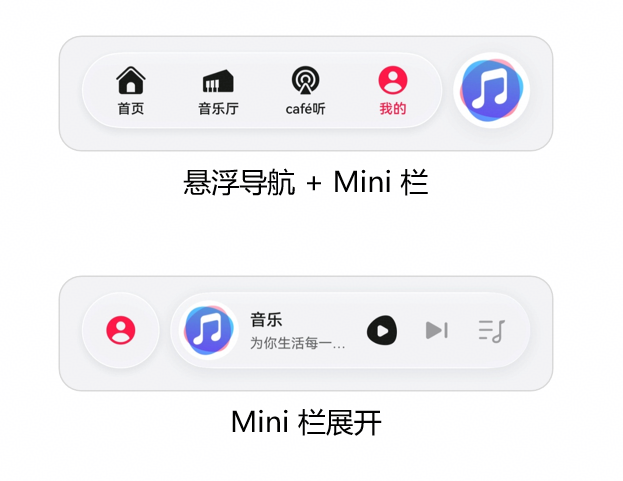
图:HarmonyOS 6悬浮导航 + Mini栏设计参考
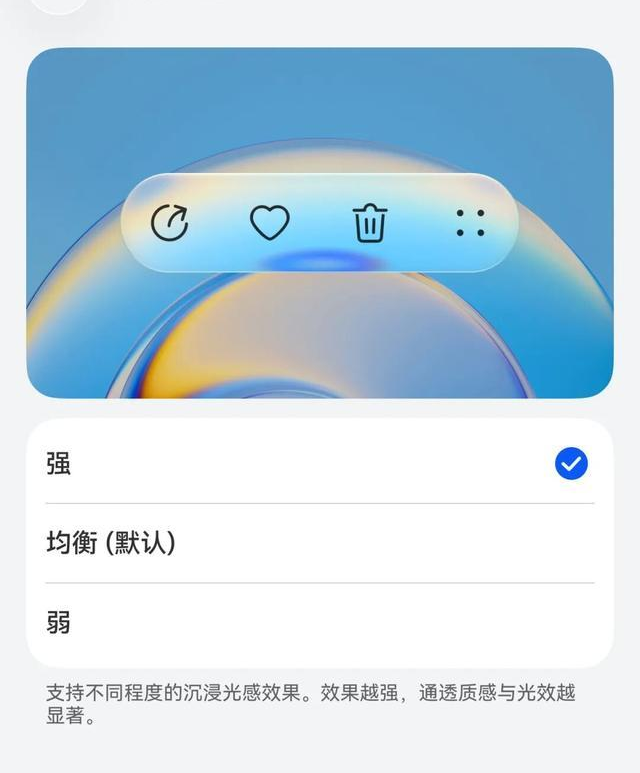
图:HarmonyOS 6沉浸光感组件效果(支持强/均衡/弱三档)
扩展方向:
- AI设计助手:基于评审情绪数据,自动生成设计优化建议
- 版本对比评审:同时展示多个设计版本,对比评审情绪差异
- 客户参与评审:邀请客户远程参与,捕捉真实用户反应
- 设计知识库:积累评审情绪数据,训练设计质量评估模型
六、结语
HarmonyOS 6的Face AR & Body AR能力,让工业设计评审第一次真正"看见"了评审者的反应。本文构建的AR工业设计评审系统,通过面部微表情捕捉设计情绪 、骨骼手势实现自然操控 、沉浸光感模型根据情绪动态渲染,展示了AR能力从"炫技"走向"工业协作"的完整路径。
随着HDC 2026的临近,HarmonyOS 6的生态正在快速成熟。对于工业设计行业的开发者而言,现在正是将AR能力融入设计评审场景的最佳时机。期待更多开发者加入鸿蒙生态,共同探索"看见设计"的智慧工业未来。
转载自:https://blog.csdn.net/u014727709/article/details/160771420
欢迎 👍点赞✍评论⭐收藏,欢迎指正