一、核心原理
1. 核心思想
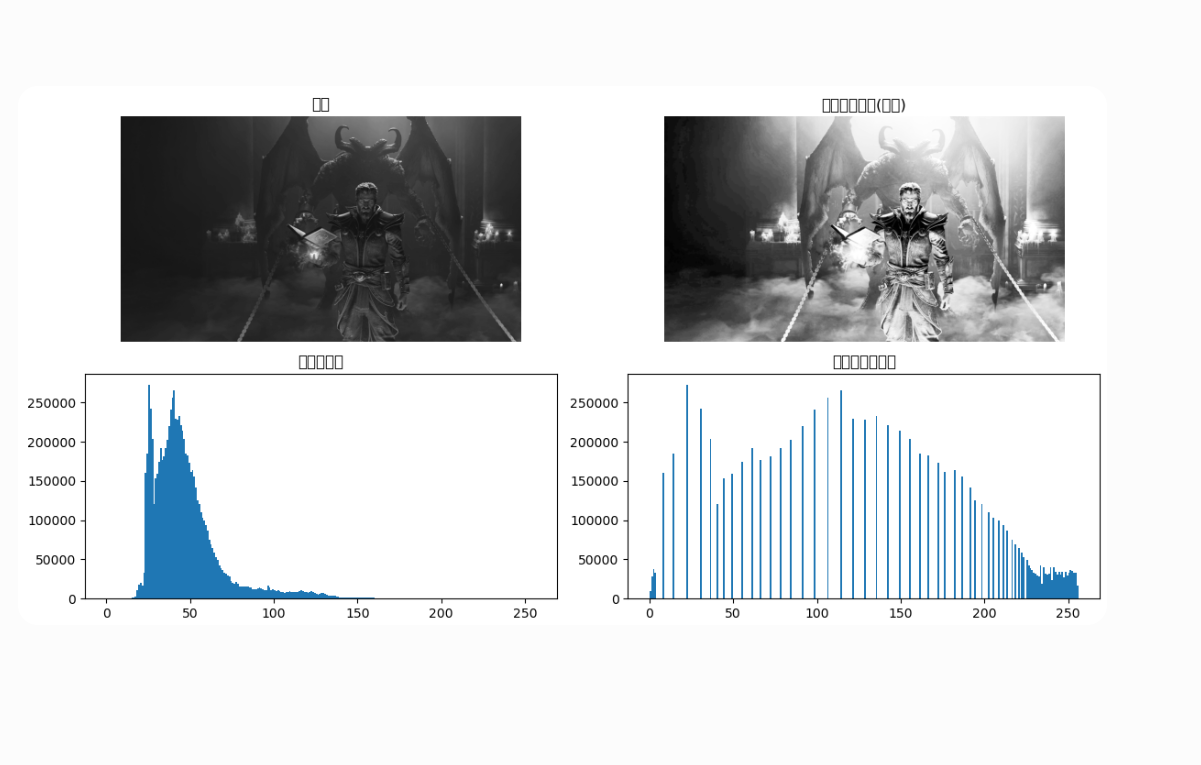
把原始图像集中的灰度直方图 ,通过灰度变换函数 ,映射成近似均匀分布 的直方图,自动增强图像整体对比度。
2. 离散公式
设:
- 灰度级 (0≤rk≤255)(0\le r_k \le 255)(0≤rk≤255)
- (n):总像素数
- (nk)(n_k)(nk):灰度 (nk)(n_k)(nk)的像素个数
归一化直方图概率:
pr(rk)=nkn\]\[ p_r(r_k) = \\frac{n_k}{n} \]\[pr(rk)=nnk
直方图均衡化变换函数 :
sk=255⋅∑j=0kpr(rj)\]\[ s_k = 255\\cdot \\sum_{j=0}\^k p_r(r_j) \] \[sk=255⋅j=0∑kpr(rj)
本质:累积分布 CDF 做灰度映射,再量化为 0~255 整数。
3. 特点
- 全自动,无需手动调参数;
- 拉伸灰度动态范围,暗图变清晰、灰蒙蒙图像增强;
- 缺点:容易过度增强、放大噪声,亮部容易过曝。
代码实现
Kompute实现
C++核心实现
cpp
int main(int argc, char* argv[]) {
    const int channels = 1;

    std::string inputPath;
    if (argc > 1) {
        inputPath = argv[1];
    } else {
        inputPath = "D:/tengyanbo/repo/kompute/examples/grayscale/build/Release/output.png";
    }

    std::cout << "======================================================" << std::endl;
    std::cout << "     Histogram Equalization - GPU + Vulkan Render       " << std::endl;
    std::cout << "======================================================" << std::endl;
    std::cout << std::endl;
    std::cout << "Input: " << inputPath << std::endl;

    int imgWidth, imgHeight, imgChannels;
    unsigned char* imgData = stbi_load(inputPath.c_str(), &imgWidth, &imgHeight, &imgChannels, 0);

    if (!imgData) {
        std::cout << "Failed to load image, creating test pattern..." << std::endl;
        imgWidth = 512;
        imgHeight = 512;
        imgChannels = 1;
        imgData = (unsigned char*)malloc(imgWidth * imgHeight);
        for (int y = 0; y < imgHeight; y++) {
            for (int x = 0; x < imgWidth; x++) {
                imgData[y * imgWidth + x] = (unsigned char)(128 + 127 * sin(x * 0.05) * cos(y * 0.05));
            }
        }
    }

    std::cout << "Image: " << imgWidth << " x " << imgHeight << ", channels=" << imgChannels << std::endl;

    if (imgChannels != 1) {
        std::cout << "[ERROR] Histogram equalization requires grayscale image!" << std::endl;
        stbi_image_free(imgData);
        return 1;
    }

    std::vector<float> inputData(imgWidth * imgHeight);
    for (int i = 0; i < imgWidth * imgHeight; i++) {
        inputData[i] = imgData[i] / 255.0f;
    }
    stbi_image_free(imgData);

    try {
        kp::Manager mgr;
        kp::Memory::MemoryTypes optimalType = detectOptimalMemoryType(mgr);
        std::cout << std::endl;

        auto inputTensor = mgr.tensorT(inputData, optimalType);
        auto outputTensor = mgr.tensorT(std::vector<float>(imgWidth * imgHeight, 0.0f), optimalType);
        std::vector<uint32_t> histData(256, 0);
        auto histTensor = mgr.tensorT(histData, optimalType);
        std::vector<float> mapTableData(256, 0.0f);
        auto mapTableTensor = mgr.tensorT(mapTableData, optimalType);

        std::vector<uint32_t> histShader = std::vector<uint32_t>(
            shader::HISTOGRAM_COMP_SPV.begin(), shader::HISTOGRAM_COMP_SPV.end());
        std::vector<uint32_t> mapShader = std::vector<uint32_t>(
            shader::EQUALIZE_MAP_COMP_SPV.begin(), shader::EQUALIZE_MAP_COMP_SPV.end());

        kp::Workgroup workgroup = { (uint32_t)imgWidth, (uint32_t)imgHeight, 1 };
        std::vector<uint32_t> specConstants = { (uint32_t)imgWidth, (uint32_t)imgHeight };

        auto histAlgo = mgr.algorithm(
            { inputTensor, histTensor }, histShader, workgroup, specConstants, {});
        auto mapAlgo = mgr.algorithm(
            { inputTensor, mapTableTensor, outputTensor }, mapShader, workgroup, specConstants, {});

        std::cout << "\n========== Step 1: GPU Histogram ==========" << std::endl;
        auto start = std::chrono::high_resolution_clock::now();

        mgr.sequence()
            ->record<kp::OpSyncDevice>({ inputTensor, histTensor })
            ->record<kp::OpAlgoDispatch>(histAlgo)
            ->record<kp::OpSyncLocal>({ histTensor })
            ->eval();

        auto histEnd = std::chrono::high_resolution_clock::now();
        std::cout << "Histogram time: "
                  << std::chrono::duration_cast<std::chrono::milliseconds>(histEnd - start).count() << "ms" << std::endl;

        const auto& histVec = histTensor->vector();
        uint64_t totalPixels = 0;
        for (int i = 0; i < 256; i++) totalPixels += (uint64_t)histVec[i];
        std::cout << "Total pixels counted: " << totalPixels << " (expected: " << (imgWidth * imgHeight) << ")" << std::endl;
        std::cout << "Histogram sample: [0]=" << histVec[0] << " [128]=" << histVec[128] << " [255]=" << histVec[255] << std::endl;

        std::cout << "\n========== Step 2: CPU CDF + Mapping Table ==========" << std::endl;
        float n = (float)(imgWidth * imgHeight);
        float cdf = 0.0f;
        std::vector<float> cpuMapTable(256);
        for (int i = 0; i < 256; i++) {
            cdf += (float)histVec[i] / n;
            cpuMapTable[i] = roundf(cdf * 255.0f) / 255.0f;
        }
        mapTableTensor->setData(cpuMapTable);
        std::cout << "MapTable sample: [0]=" << cpuMapTable[0] << " [128]=" << cpuMapTable[128] << " [255]=" << cpuMapTable[255] << std::endl;

        auto cdfEnd = std::chrono::high_resolution_clock::now();
        std::cout << "CDF+Mapping time: "
                  << std::chrono::duration_cast<std::chrono::microseconds>(cdfEnd - histEnd).count() << "us" << std::endl;

        std::cout << "\n========== Step 3: GPU Apply Mapping ==========" << std::endl;

        mgr.sequence()
            ->record<kp::OpSyncDevice>({ inputTensor, mapTableTensor, outputTensor })
            ->record<kp::OpAlgoDispatch>(mapAlgo)
            ->record<kp::OpSyncLocal>({ outputTensor })
            ->eval();

        auto end = std::chrono::high_resolution_clock::now();
        std::cout << "Apply mapping time: "
                  << std::chrono::duration_cast<std::chrono::milliseconds>(end - cdfEnd).count() << "ms" << std::endl;
        std::cout << "\n========== Total GPU time: "
                  << std::chrono::duration_cast<std::chrono::milliseconds>(end - start).count() << "ms ==========" << std::endl;

        const auto& outputVec = outputTensor->vector();
        std::cout << "Input[0]=" << (int)(inputData[0]*255)
                  << " -> Output[0]=" << (int)(outputVec[0]*255) << std::endl;

        unsigned char* outputImg = (unsigned char*)malloc(imgWidth * imgHeight);
        for (int i = 0; i < imgWidth * imgHeight; i++) {
            outputImg[i] = (unsigned char)(outputVec[i] * 255.0f);
        }

        stbi_write_png("output_hist_eq.png", imgWidth, imgHeight, 1, outputImg, imgWidth);
        std::cout << "\nOutput saved to output_hist_eq.png" << std::endl;
    } catch (const std::exception& e) {
        std::cerr << "Error: " << e.what() << std::endl;
        return 1;
    }

    return 0;
}
Shader核心
histogram.comp
shell
#version 450

layout (constant_id = 0) const uint WIDTH = 3840;
layout (constant_id = 1) const uint HEIGHT = 2160;

layout (local_size_x = 16, local_size_y = 16) in;

layout(set = 0, binding = 0, std430) readonly buffer InputBuf { float inputData[]; };
layout(set = 0, binding = 1, std430) buffer HistBuf { uint histData[]; };

shared uint localHist[256];

void main() {
    uint lid = gl_LocalInvocationIndex;
    if (lid < 256u) {
        localHist[lid] = 0u;
    }
    barrier();

    uint x = gl_GlobalInvocationID.x;
    uint y = gl_GlobalInvocationID.y;

    if (x < WIDTH && y < HEIGHT) {
        uint index = y * WIDTH + x;
        float val = inputData[index];
        uint bin = uint(clamp(val * 255.0f, 0.0f, 255.0f));
        atomicAdd(localHist[bin], 1u);
    }

    barrier();

    if (lid < 256u) {
        atomicAdd(histData[lid], localHist[lid]);
    }
}
equalize_map.comp
shell
#version 450

layout (constant_id = 0) const uint WIDTH = 3840;
layout (constant_id = 1) const uint HEIGHT = 2160;

layout (local_size_x = 16, local_size_y = 16) in;

layout(set = 0, binding = 0) buffer InputBuffer { float inputData[]; };
layout(set = 0, binding = 1) buffer MapTable { float mapTable[]; };
layout(set = 0, binding = 2) writeonly buffer OutputBuffer { float outputData[]; };

void main() {
    uint x = gl_GlobalInvocationID.x;
    uint y = gl_GlobalInvocationID.y;

    if (x >= WIDTH || y >= HEIGHT) {
        return;
    }

    uint index = y * WIDTH + x;
    float val = inputData[index];

    uint bin = uint(clamp(val * 255.0, 0.0, 255.0));

    outputData[index] = mapTable[bin];
}
OpenCV实现
python
import cv2
import numpy as np
import matplotlib.pyplot as plt

# 1. 读取灰度图
img = cv2.imread("test.jpg", 0)

# ======================
# 手写 直方图均衡化(教材原理实现)
# ======================
def hist_equalize_manual(img):
    h, w = img.shape
    n = h * w

    # 1. 统计直方图
    hist = np.zeros(256, dtype=np.int32)
    for i in range(h):
        for j in range(w):
            hist[img[i,j]] += 1

    # 2. 计算归一化概率 + 累积分布 CDF
    cdf = np.zeros(256, dtype=np.float32)
    cdf[0] = hist[0] / n
    for k in range(1, 256):
        cdf[k] = cdf[k-1] + hist[k] / n

    # 3. 映射 s_k = 255 * CDF 并取整
    map_table = np.round(255 * cdf).astype(np.uint8)

    # 4. 灰度映射生成新图
    eq_img = np.zeros_like(img)
    for i in range(h):
        for j in range(w):
            eq_img[i,j] = map_table[img[i,j]]
    return eq_img

# 手写实现
img_eq_manual = hist_equalize_manual(img)

# OpenCV 库自带均衡化(对比验证)
img_eq_cv = cv2.equalizeHist(img)

# ======================
# 绘图对比:原图 + 均衡化后
# ======================
plt.figure(figsize=(12,6))

plt.subplot(221)
plt.imshow(img, cmap="gray")
plt.title("原图")
plt.axis("off")

plt.subplot(222)
plt.imshow(img_eq_manual, cmap="gray")
plt.title("直方图均衡化(手写)")
plt.axis("off")

plt.subplot(223)
plt.hist(img.ravel(), 256, [0,256])
plt.title("原图直方图")

plt.subplot(224)
plt.hist(img_eq_manual.ravel(), 256, [0,256])
plt.title("均衡化后直方图")

plt.tight_layout()
plt.show()
最终结果: