目录
为什么存在一个标准错误+printf、perror?cout/cerr
1.重定向补充
[user1@iZ5waahoxw3q2bZ 26-5-12]$ ./a.out 1 > log.txt
[user1@iZ5waahoxw3q2bZ 26-5-12]$ ll
total 20
-rwxrwxr-x 1 user1 user1 9104 May 12 14:37 a.out
-rw-rw-r-- 1 user1 user1   24 May 12 14:38 log.txt
-rw-rw-r-- 1 user1 user1  185 May 12 14:36 stream.cc
[user1@iZ5waahoxw3q2bZ 26-5-12]$ cat log.txt
hello cout
hello printf
重定向完整写法是1重定向到log.txt中,一般会把1进行省略
[user1@iZ5waahoxw3q2bZ 26-5-12]$ cat stream.cc
#include<cstdio>
#include<iostream>

int main()
{
    //向标准输出进行打印,stdout,cin-》 1
    std::cout<<"hello cout"<<std::endl;
    printf("hello printf\n");

    //向标准错误进行打印,stderr,cerr-》2
    std::cerr<<"hello cerr"<<std::endl;
    fprintf(stderr,"hello stderr\n");
    return 0;
}

[user1@iZ5waahoxw3q2bZ 26-5-12]$ g++ stream.cc
[user1@iZ5waahoxw3q2bZ 26-5-12]$ ./a.out
hello cout
hello printf
hello cerr
hello stderr
[user1@iZ5waahoxw3q2bZ 26-5-12]$ ./a.out > log.txt
hello cerr
hello stderr
[user1@iZ5waahoxw3q2bZ 26-5-12]$ cat log.txt
hello cout
hello printf
为什么我们对应的标准输出写到了log.txt里面,而标准错误却依然在显示器文件上进行打印
原因是因为我们在对应输出的时候,虽然我们对应的标准输出和标准错误都指向同一个文件。
但当我们进行重定向时,实际上还是把1重定向到新文件,即把新打开的文件描述符的struct_file的地址拷贝到1里面,把1重定向了。可是我们2依旧指向标准错误往显示器上打印。
[user1@iZ5waahoxw3q2bZ 26-5-12]$ ./a.out 1>log.normal 2>log.error
[user1@iZ5waahoxw3q2bZ 26-5-12]$ ll
total 28
-rwxrwxr-x 1 user1 user1 9248 May 12 14:42 a.out
-rw-rw-r-- 1 user1 user1   24 May 12 14:48 log.error
-rw-rw-r-- 1 user1 user1   24 May 12 14:48 log.normal
-rw-rw-r-- 1 user1 user1   24 May 12 14:43 log.txt
-rw-rw-r-- 1 user1 user1  317 May 12 14:42 stream.cc
[user1@iZ5waahoxw3q2bZ 26-5-12]$ cat log.normal
hello cout
hello printf
[user1@iZ5waahoxw3q2bZ 26-5-12]$ cat log.error
hello cerr
hello stderr
所以我们指向明确就可以正确地进行重定向了!
为什么存在一个标准错误+printf、perror?cout/cerr
可以通过重定向能力,把常规消息和错误消息进行分离
方便我们日志的形成
如果stderr和stdout打印到同一文件?
[user1@iZ5waahoxw3q2bZ 26-5-12]$ rm log*
[user1@iZ5waahoxw3q2bZ 26-5-12]$ ll
total 16
-rwxrwxr-x 1 user1 user1 9248 May 12 14:42 a.out
-rw-rw-r-- 1 user1 user1  317 May 12 14:42 stream.cc
[user1@iZ5waahoxw3q2bZ 26-5-12]$ ./a.out 1>log.normal 2>log.normal
[user1@iZ5waahoxw3q2bZ 26-5-12]$ cat log.normal
hello cerr
hello stderr
为什么这样只显示标准错误?
第一次是标准输出写进去,第二次打开就清空了然后再将标准错误写入。
1.追加重定向
[user1@iZ5waahoxw3q2bZ 26-5-12]$ ./a.out 1>log.normal 2>>log.normal
[user1@iZ5waahoxw3q2bZ 26-5-12]$ cat log.normal
hello cout
hello printf
hello cerr
hello stderr
2.
2>&1----把1中的内容再写到2里面
[user1@iZ5waahoxw3q2bZ 26-5-12]$ rm log*
[user1@iZ5waahoxw3q2bZ 26-5-12]$ ll
total 16
-rwxrwxr-x 1 user1 user1 9248 May 12 14:42 a.out
-rw-rw-r-- 1 user1 user1  317 May 12 14:42 stream.cc
[user1@iZ5waahoxw3q2bZ 26-5-12]$ ./a.out 1>log.normal 2>&1
[user1@iZ5waahoxw3q2bZ 26-5-12]$ cat log.normal
hello cout
hello printf
hello cerr
hello stderr
源代码
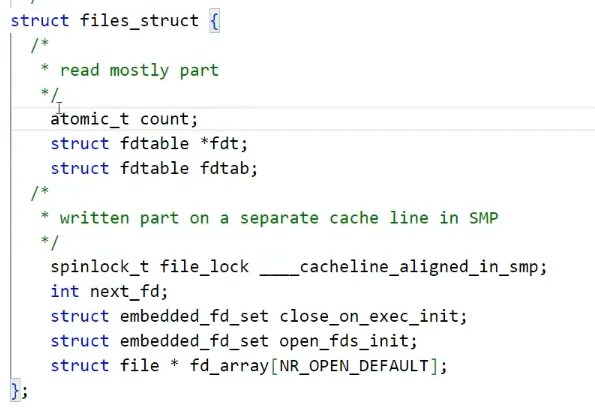
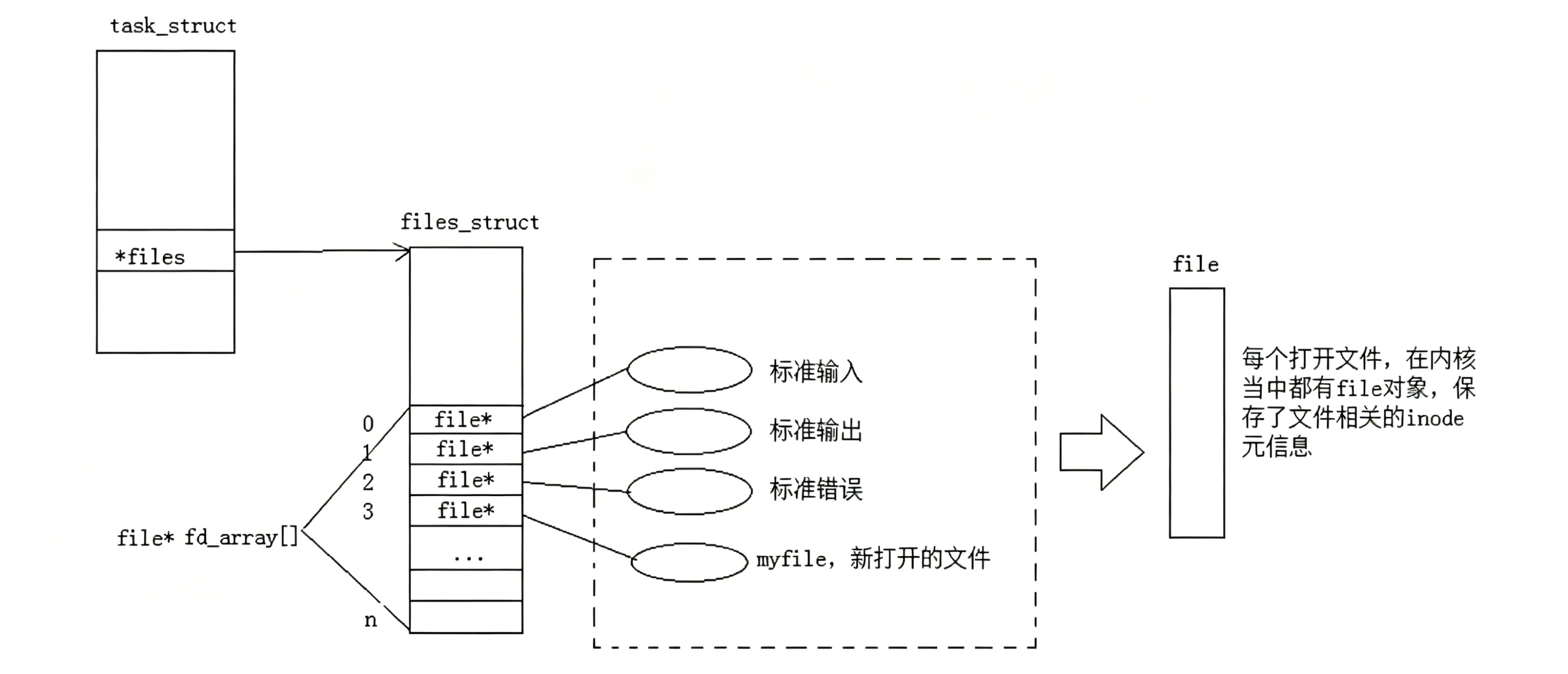
struct file * fd_arrayNR_OPEN_DEFAULT;文件描述符表内对应的数组
保存的是一个进程的struct file *也就是一个文件
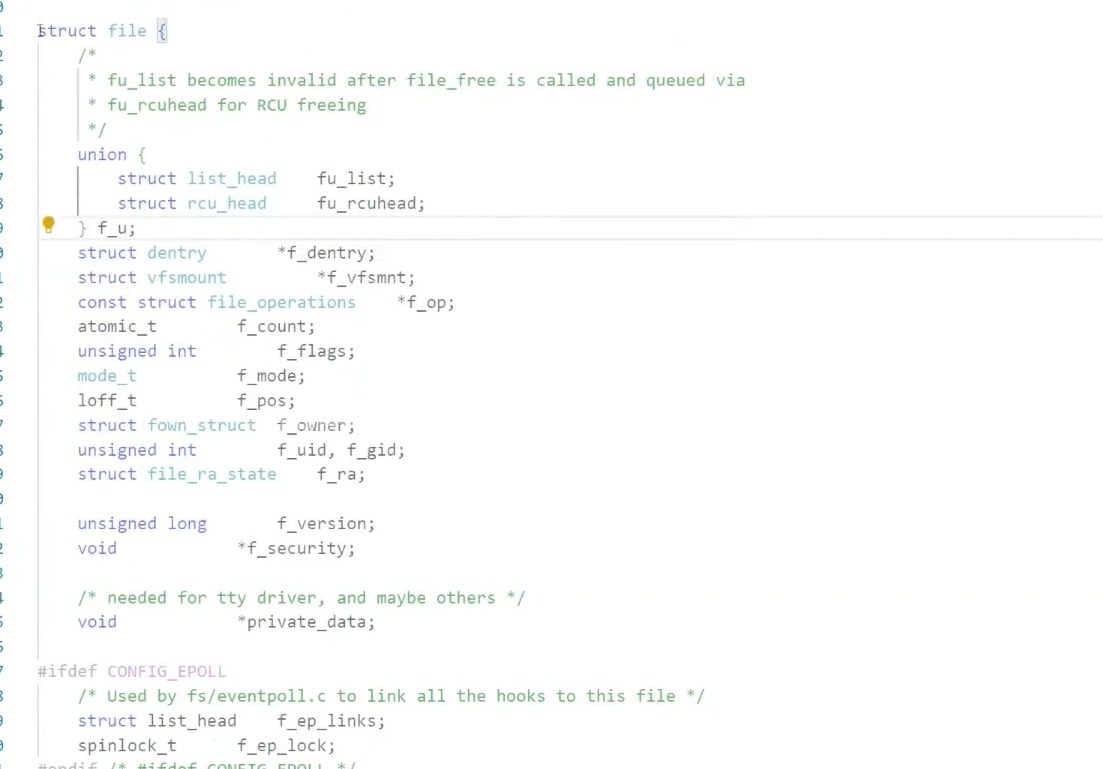
atomic t → f_count;//引用计数
f_flags打开文件时读写权限
f_mode打开的文件对应的权限
f_pos当前读写一个文件对应的读写位置
进程有自己的管理列表,文件有自己的管理列表。进程和文件的管理是解耦的,用文件描述符表产生关联。
操作系统管理内存的时候,也不是把内存整体使用的。把操作系统空间划分为以块为单位的,也就是以4KB的大小划分成块。所以一个4GB的内存,在操作系统中有4GB/4KB个数据页构成的。
所以在操作系统内一定存在很多的内存块。有的内存块被申请被占用被清理等。。。
操作系统要管理这些内存块---先描述再组织
将来为内存也有一个管理内存的数据结构叫做struct_page,只要找到内存对应的struct_page就能找到对应的数据块。
可以通过struct_file找到对应的内核缓冲区
struct_file是操作系统内打开的文件,但是文件的一些相关的硬属性并没有直接在这个file里存,在另外一个inode。可以通过file间接找到文件的属性和文件的缓冲区。
2.理解一切皆文件
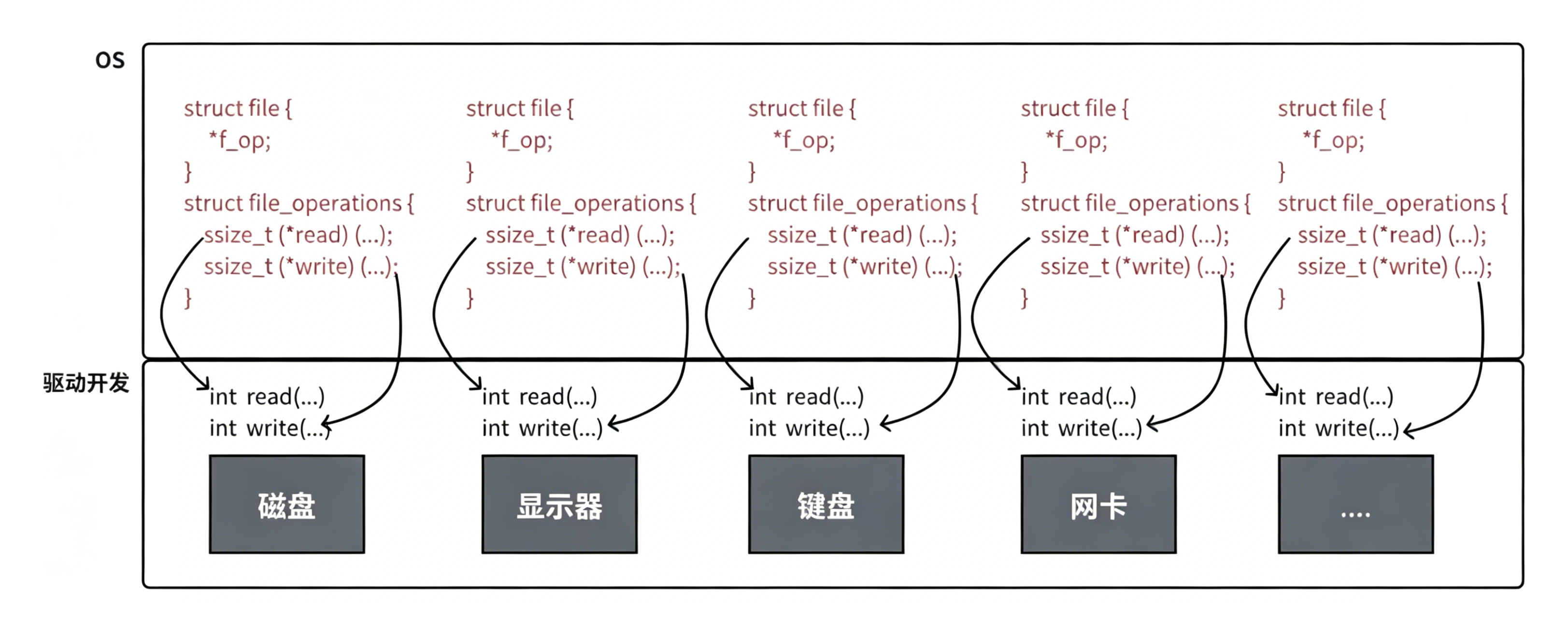
首先,在windows中是文件的东西,它们在linux中也是文件;其次⼀些在windows中不是文件的东西,比如进程、磁盘、显示器、键盘这样硬件设备也被抽象成了文件,你可以使用访问文件的方法访问它们获得信息;甚至管道,也是文件;将来我们要学习网络编程中的socket(套接字)这样的东西,使用的接口跟文件接口也是⼀致的。
这样做最明显的好处是,开发者仅需要使用⼀套API和开发工具,即可调取Linux系统中绝大部分的资源。举个简单的例子,Linux中几乎所有读(读文件,读系统状态,读PIPE)的操作都可以用read函数来进行;几乎所有更改(更改文件,更改系统参数,写PIPE)的操作都可以用write函数来进行。
struct device
{
//type
//status
//其他属性
list_head
}
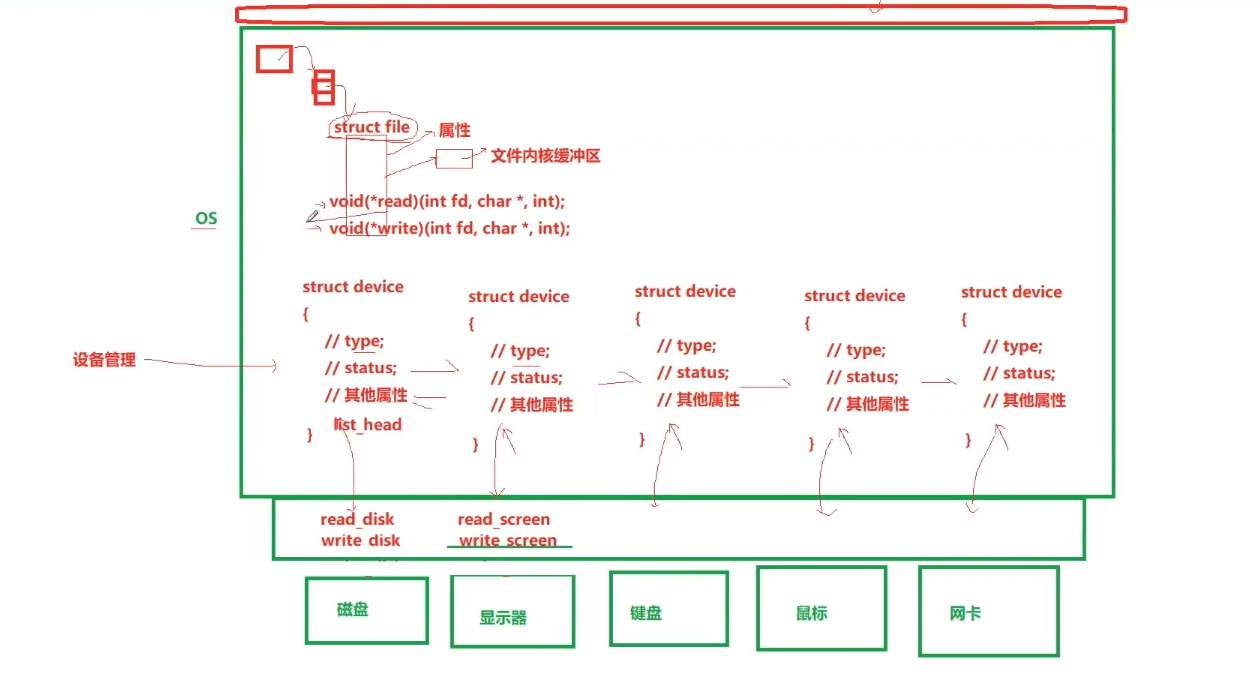
每个外设都有对应struct device
对设备的管理变成了对链表的增删查改
struct_file
属性 文件缓冲区
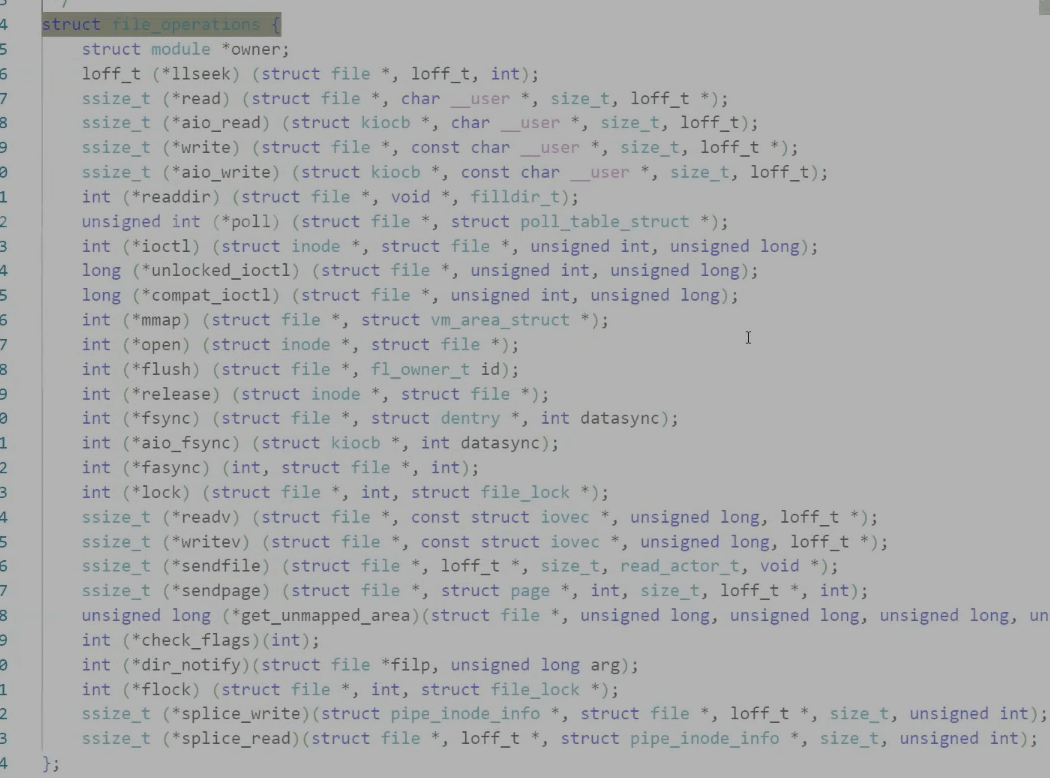
void(*read)(int fd,char*,int);---指向磁盘的读
void(*write)(int fd,char*,int);---- 写
struct_file往上一切皆文件
在系统中访问任何设备,只要提供文件描述符,可以不用关心底层硬件的差异,直接去使用函数内部的指针来访问
VFS virtual file system 虚拟文件系统
struct_file基类
访问设备,都是通过函数指针指向的方法进行访问
的!
函数指针类型命名,参数,都一样!
不就是C版本的多态吗!
感谢你的观看,期待我们下次再见!