-
在一个文件夹中创建
dockerfile文件,文件内容如下powershell# 使用官方的 Ubuntu 镜像 FROM ubuntu:latest # 安装 SSH 服务 RUN apt-get update && apt-get install -y openssh-server # 创建 SSH 目录并设置权限 RUN mkdir -p /var/run/sshd && ssh-keygen -A RUN echo 'root:123456' | chpasswd # 显式开启 root + 密码登录,避免不同基础镜像默认值差异 # PermitRootLogin yes:允许 root 登录 # PasswordAuthentication yes:允许密码认证 # KbdInteractiveAuthentication no:关闭交互式认证(避免和密码认证混杂) # UsePAM no:关闭 PAM(容器场景常用于减少兼容问题) RUN sed -ri 's/^#?PermitRootLogin\s+.*/PermitRootLogin yes/' /etc/ssh/sshd_config \ && sed -ri 's/^#?PasswordAuthentication\s+.*/PasswordAuthentication yes/' /etc/ssh/sshd_config \ && sed -ri 's/^#?KbdInteractiveAuthentication\s+.*/KbdInteractiveAuthentication no/' /etc/ssh/sshd_config \ && sed -ri 's/^#?UsePAM\s+.*/UsePAM no/' /etc/ssh/sshd_config # 暴露 SSH 端口 EXPOSE 22 # 设置容器启动时自动运行 SSH 服务 CMD ["/usr/sbin/sshd", "-D"] -
在
dockerfile文件所在的文件夹中打开终端,输入如下命令构建一个镜像,镜像名字叫ubuntu-with-sshpowershelldocker build -f dockerfile -t ubuntu-with-ssh . -
在终端中输入如下命令,将根据镜像运行一个容器,容器名字叫
ubuntu-sshpowershelldocker run -d -p 2222:22 --name ubuntu-ssh ubuntu-with-ssh -
在终端中使用如下命令,根据提示输入密码,就可以连接ubuntu 了
- 注意:端口用的是主机的
2222端口
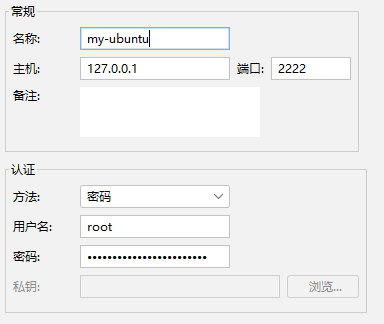
powershellssh root@127.0.0.1 -p 2222- 如果是使用软件连的,可以参考图片
- 注意:端口用的是主机的
在Docker 建立一个SSH连接的 Ubuntu 容器
草木红2026-05-15 8:37
相关推荐
根目录下的猫31 分钟前
ArkTS 代码中如何添加作者信息biaov39 分钟前
Jenkins + Docker 搭建前端 CI:前端一键打包部署梦想出海-Phoebe40 分钟前
GitHub 新手入门:账号注册与 SSH Key 配置教程DevNote_1 小时前
1C1G 服务器从零配置实录(附完整命令)haermosi1 小时前
Ubuntu 下 Flameshot 截图一直闪屏,已找到问题并解决2601_9498477513 小时前
bcrypt.js 跨端三方库仓颉适配全流程说实话起个名字真难啊17 小时前
实战docker部署dify及注意点靳某某。18 小时前
Ubuntu安装php8.4 及redis ngin木泽八19 小时前
《Ubuntu系统GRUB引导修复操作记录》Starry-sky(jing)20 小时前
crane 下载镜像:不连接 Docker,3 步准备并校验 ARM64 离线包