1、docker安装基于WSL
1、1启动虚拟机管理程序
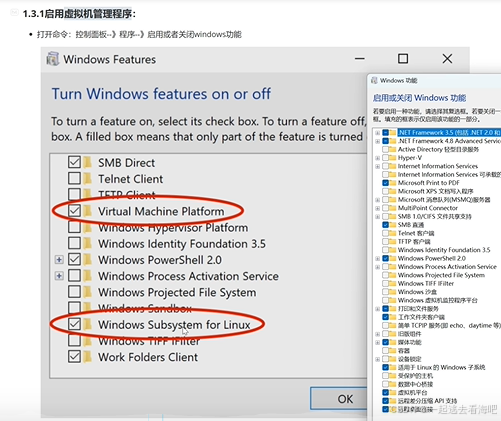
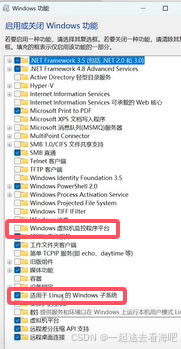 中文的
中文的
1、2 wsl的安装、更新
bash
wsl --install 或者 wsl --update出错1、注册表问题
出错2、wsl安装错误
1、3进入docker 修改镜像
{
  "builder": {
    "gc": {
      "defaultKeepStorage": "20GB",
      "enabled": true
    }
  },
  "experimental": false,
  "features": {
    "buildkit": true
  },
  "registry-mirrors": [
    "https://your-mirror-address.mirror.aliyuncs.com",
    "https://docker.mirrors.ustc.edu.cn",
    "https://hub-mirror.c.163.com",
    "https://reg-mirror.qiniu.com",
    "https://docker.1ms.run",
    "https://dockerproxy.com",
    "https://hub.rat.dev"
  ]
}
1、4测试docker
docker pull hello-world2、部署并运行dify
我的dify位置
E:\dify\dify\docker进入docker文件下
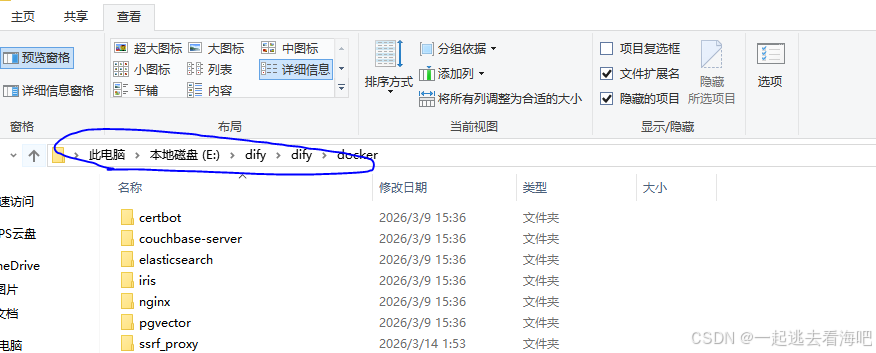
输入cmd
然后输入
docker compose up -d如果终止则一直重复输入即可
然后进入
http://localhost/signin设置好邮箱用户名
由于课件所以直接用配置好的账号密码
C:\Users\123>docker exec -it docker-api-1 flask reset-password
2026-05-14 11:22:46.367 INFO [MainThread] [utils.py:164]  - NumExpr defaulting to 8 threads.
Warning! You didn't set docs_url, redoc_url or openapi_url.
API Documentation will be skipped.
Email: 934942965@qq.com
New password: 1234567gao
Password confirm: 1234567gao
Password reset successfully.