1、前言
🎉 新作已上架 ------ 「古诗学习宝 」鸿蒙原生应用已在华为应用市场上架,搜索「古诗学习宝」即可下载体验。零广告 / 零内购 / 277 首小学必背古诗全收录,烦请帮忙点个五星 🌟。
教育类 App 有一个核心留存抓手叫「错题本」------用户答错的题自动归档,下次复习时优先弹出。做错题本最容易踩的 3 个坑:
- 同一道题答错 3 次,错题本里堆 3 条------用户翻几页就崩溃
- 学完了"标记已掌握",但下次又答错时记不起来这是老错题------掌握状态混乱
- 写完代码发现,业务侧每次都得手动调"加入错题本"------容易漏
「古诗学习宝」用一套复合 key 去重 + 软删除 mastered 字段 + RecordService 自动派生 的方案,把这 3 个坑全部填掉 。背诵答错自动入库、题级去重不堆积、掌握后软删除保留审计------业务方只调 RecordService.add() 一次,错题本自动维护。
本文用线上版本完整代码讲透:70 行的 WrongQuestionService 怎么实现一个工程化错题本系统,可直接复制到任何教育 / 工具类应用(错题本、记错单词、记错记录、Bug 复盘库......)。
2、整体架构
2.1 技术架构图
┌──────────────────────────────────────────────────────────────────┐
│                    背诵答题页(题型组件)                          │
│                                                                  │
│   ReciteFillPage      ReciteChoicePage                           │
│   ReciteConnectPage   ReciteListenPage                           │
│                                                                  │
│   答完一轮 → 收集本轮所有题目(含对错) →                          │
│   RecordService.add({                                            │
│     type: 'recite', mode: 'choice', wrongCount, rightCount,      │
│     wrongDetails: [{ prompt, userAnswer, correctAnswer }]        │
│   })                                                             │
└──────────────────────────────────┬───────────────────────────────┘
                                   │
                                   ▼
┌──────────────────────────────────────────────────────────────────┐
│                   RecordService.add 自动派生逻辑                  │
│                                                                  │
│   if (rec.type === 'recite' && (rec.wrongCount > 0 || ...)) {    │
│     // 把每一道错题写到错题本                                     │
│     await WrongQuestionService.addBatch(                          │
│       rec.wrongDetails.map(d => ({                                │
│         poemId, poemTitle, mode, prompt,                          │
│         userAnswer: d.userAnswer,                                 │
│         correctAnswer: d.correctAnswer,                           │
│       }))                                                         │
│     );                                                            │
│   }                                                               │
└──────────────────────────────────┬───────────────────────────────┘
                                   │
                                   ▼
┌──────────────────────────────────────────────────────────────────┐
│        WrongQuestionService 内部:去重 + 软删除                    │
│                                                                  │
│   const key = poemId + mode + prompt;                            │
│   找已有错题:findIndex(w => 复合 key 相同)                       │
│     ├─ 找到 → 更新(重置 mastered=false + 更新时间)              │
│     └─ 没找到 → 新增 PUSH                                         │
│                                                                  │
│   markMastered(id) → 标记 mastered=true(软删除)                │
│   active() → filter(w => !w.mastered)(默认只看活跃错题)        │
└──────────────────────────────────┬───────────────────────────────┘
                                   │
                                   ▼
┌──────────────────────────────────────────────────────────────────┐
│             Preferences 持久化(StorageKey.WrongQuestions)       │
│                                                                  │
│   key = 'wrong_questions_v1'                                     │
│   value = JSON.stringify(WrongQuestion[])                        │
│   → 写入沙箱 el2/base/preferences/                               │
└──────────────────────────────────┬───────────────────────────────┘
                                   │ 跨重启
                                   ▼
┌──────────────────────────────────────────────────────────────────┐
│           RecordView 错题本 tab UI                                │
│   ForEach(WrongQuestionService.active(), w => WrongCard(w))      │
│     └─ 标记已掌握 → markMastered(w.id) → @Local filter 立即移除  │
└──────────────────────────────────────────────────────────────────┘
2.2 模型设计
typescript
// model/WrongQuestion.ets
export interface WrongQuestion {
  /** 错题唯一 ID(uid 生成,不暴露给业务) */
  id: string;
  /** 来源诗词 ID */
  poemId: string;
  /** 诗词标题(冗余存,避免错题本翻查诗词时再查 PoemService) */
  poemTitle: string;
  /** 背诵模式:fill / choice / connect / listen */
  mode: string;
  /** 题面 prompt(如「上句:生当作人杰,」)------ ⭐ 去重 key 之一 */
  prompt: string;
  /** 用户答案 */
  userAnswer: string;
  /** 正确答案 */
  correctAnswer: string;
  /** 录入/最近答错时间 */
  createdAt: number;
  /** 用户标记"已掌握"软删除字段 */
  mastered: boolean;
}

/** 录入参数(不含 id / createdAt / mastered,service 内部填充) */
export interface WrongQuestionInput {
  poemId: string;
  poemTitle: string;
  mode: string;
  prompt: string;
  userAnswer: string;
  correctAnswer: string;
}
关键决策 :
poemTitle冗余存是为了错题列表展示不依赖 PoemService ------active()返回的就能直接渲染,不用再调PoemService.byId(poemId)查标题。用空间换时间,错题本默认显示 30~50 条的话,每帧节省 30 次 service 调用。
2.3 项目目录
entry/src/main/ets/
├── model/
│   └── WrongQuestion.ets                # 数据模型 + Input 接口
├── service/
│   ├── WrongQuestionService.ets         # ★ 核心:70 行实现
│   ├── RecordService.ets                # 学习记录(含自动派生逻辑)
│   └── PreferencesUtil.ets              # JSON 持久化封装
├── pages/
│   ├── ReciteFillPage.ets               # 4 种背诵模式 - 答完调 RecordService.add
│   ├── ReciteChoicePage.ets
│   ├── ReciteConnectPage.ets
│   ├── ReciteListenPage.ets
│   └── views/
│       └── RecordView.ets               # 错题本 tab + 标记已掌握
└── common/
    └── Constants.ets                    # StorageKey.WrongQuestions
3、效果展示
3.1 选择题答题中(错题来源)
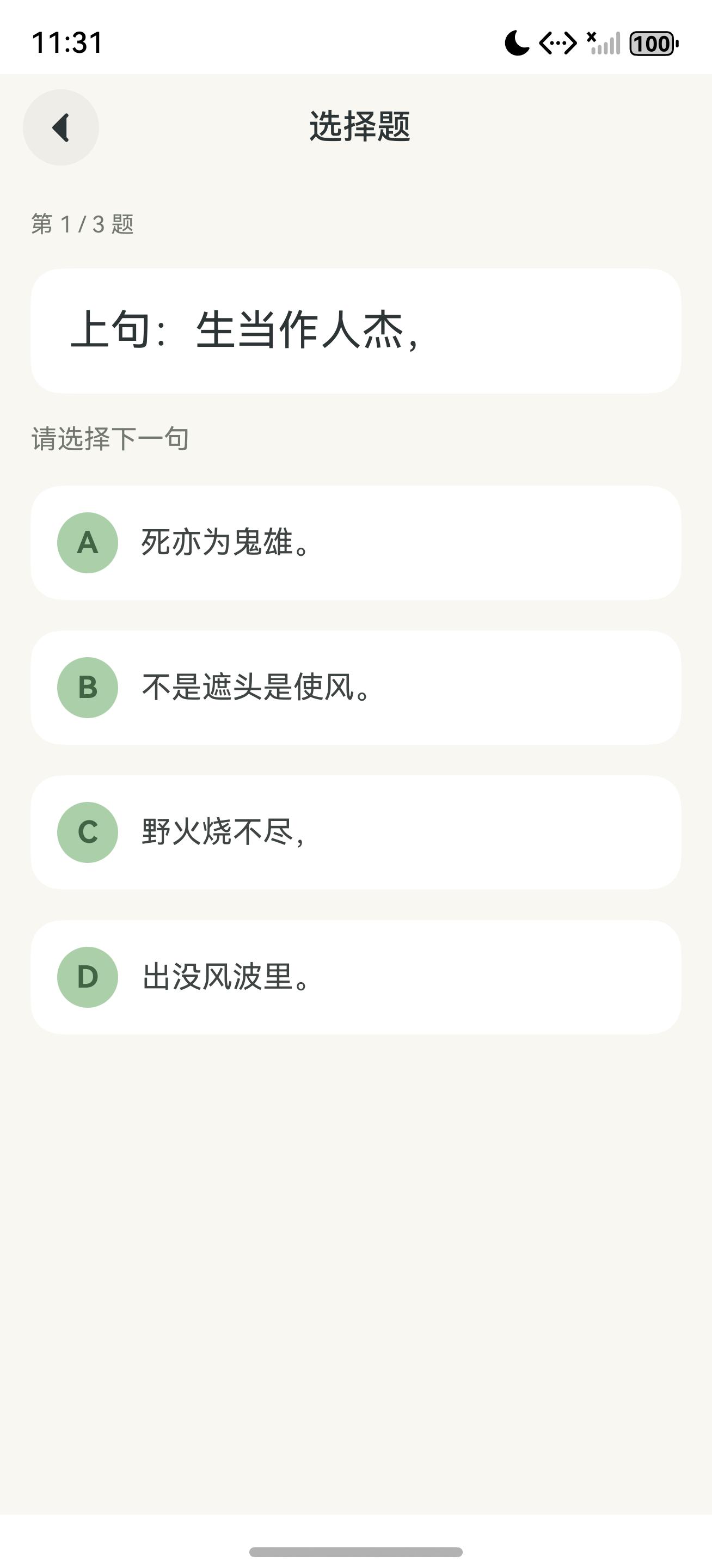
进入「夏日绝句」的选择题模式,第 1/3 题:「上句:生当作人杰,请选择下一句」+ 4 选 1。用户选错(B/C/D)任一项都会进入 wrongDetails 数组,答完一整轮 3 道题时由 RecordService 统一派生到错题本。
3.2 错题本 tab - 真实派生效果
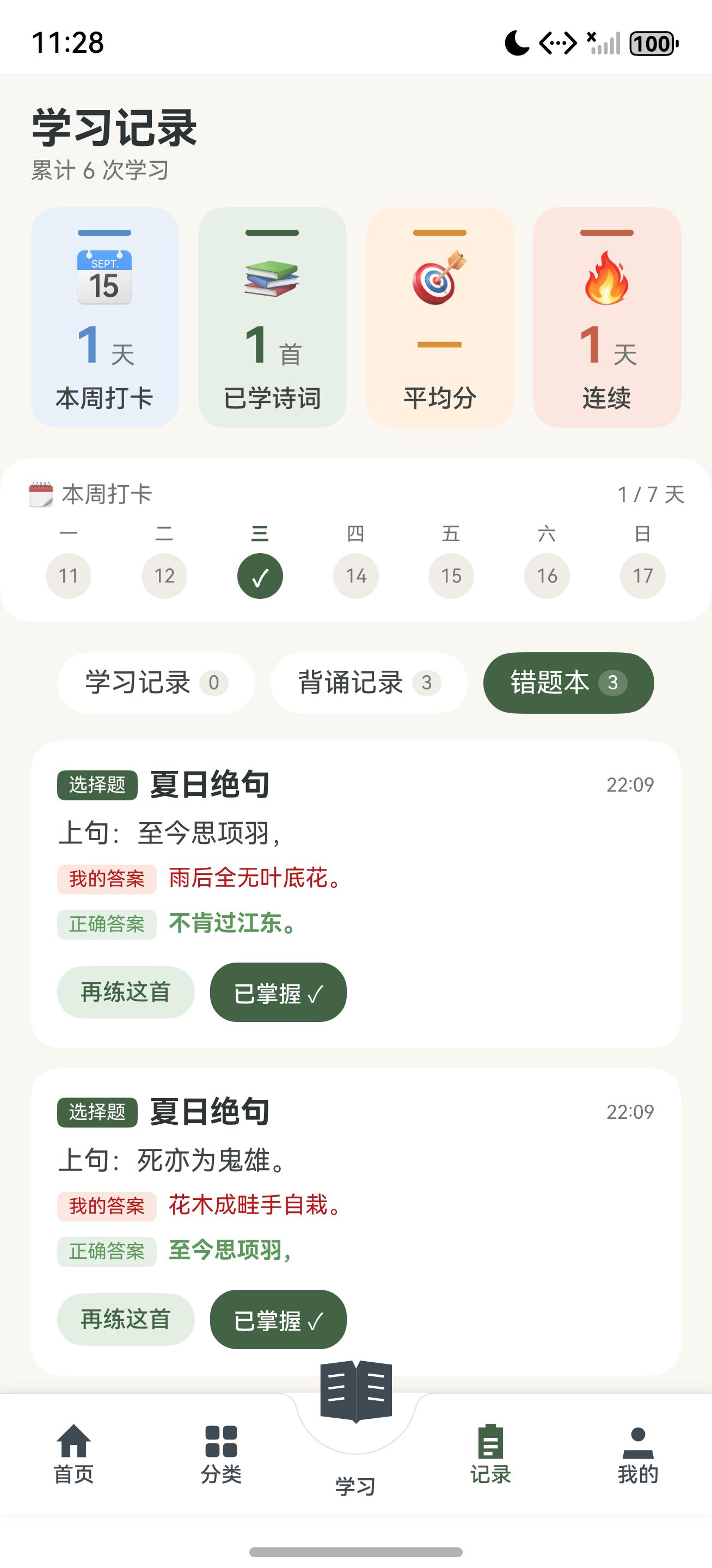
切到「记录」Tab 的「错题本」sub-tab:
- 2 道《夏日绝句》的「选择题」错题
- 每张卡片展示:题型标签 (选择题)+ 诗词标题 + 时间戳 + 题面(上句 / 死亦为鬼雄)+ 我的答案 (红色)+ 正确答案(绿色)
- 操作按钮:再练这首 (跳回 ReciteMode)+ 已掌握 ✓(标记软删除)
注意第 2 张题:「上句:死亦为鬼雄。」+ 我的答案「花木成畦手自栽。」+ 正确答案「至今思项羽,」------ 同一首诗、同模式、不同题面,作为 2 条独立错题保存。
3.3 标记已掌握后立即移除
点「已掌握 ✓」按钮,那条错题立即从列表消失:
触发:markMastered(w.id)
→ Service 内 mastered: false → true(软删除,记录保留)
→ @Local wrongList.filter(it => it.id !== w.id)(立即视觉移除)
→ Toast「太棒了!该题已从错题本移除」
数据并没真删除,只是 mastered=true,下次再答错同样题时,service 会自动 mastered: false 重置激活------这是软删除最关键的设计。
4、核心功能详解
4.1 完整 WrongQuestionService 实现(70 行)
typescript
/**
 * 错题本服务 ------ 题级错题持久化
 */
import { WrongQuestion, WrongQuestionInput } from '../model/WrongQuestion';
import { Pref } from './PreferencesUtil';
import { StorageKey } from '../common/Constants';
import { uid } from '../common/Format';

class WrongQuestionServiceImpl {
  private cache: WrongQuestion[] = [];
  private loaded = false;

  /** 冷启时一次性 load */
  async load(): Promise<void> {
    this.cache = await Pref.getJSON<WrongQuestion[]>(StorageKey.WrongQuestions, []);
    this.loaded = true;
  }

  /** 全部错题(按时间倒序,未掌握的优先) */
  list(): WrongQuestion[] {
    return this.cache.slice().sort((a, b) => {
      if (a.mastered !== b.mastered) return a.mastered ? 1 : -1;
      return b.createdAt - a.createdAt;
    });
  }

  /** 仅未掌握的(错题本默认展示这部分) */
  active(): WrongQuestion[] {
    return this.list().filter((w) => !w.mastered);
  }

  /** 当前未掌握错题数(首页角标用) */
  activeCount(): number {
    return this.active().length;
  }

  /**
   * 添加单条错题
   * 同首诗 + 同 mode + 同 prompt 的旧记录会被刷新(不重复堆积)
   * 已掌握的题再次答错 → mastered: false 重新激活
   */
  async add(input: WrongQuestionInput): Promise<WrongQuestion> {
    if (!this.loaded) await this.load();

    // ⭐ 复合 key 去重:poemId + mode + prompt 完全相同视为同一道题
    const idx = this.cache.findIndex((w) =>
      w.poemId === input.poemId
      && w.mode === input.mode
      && w.prompt === input.prompt
    );
    const now = Date.now();

    if (idx >= 0) {
      // 已存在 → 更新(重置 mastered + 更新时间 + 更新答案)
      const old = this.cache[idx];
      const updated: WrongQuestion = {
        id: old.id,                    // ID 不变(保持引用一致性)
        poemId: input.poemId,
        poemTitle: input.poemTitle,
        mode: input.mode,
        prompt: input.prompt,
        userAnswer: input.userAnswer,
        correctAnswer: input.correctAnswer,
        createdAt: now,                // 时间刷新到最新
        mastered: false,               // ⭐ 再次答错 → 重新激活
      };
      this.cache[idx] = updated;
      await this.persist();
      return updated;
    }

    // 不存在 → 新增
    const item: WrongQuestion = {
      id: uid(),
      poemId: input.poemId,
      poemTitle: input.poemTitle,
      mode: input.mode,
      prompt: input.prompt,
      userAnswer: input.userAnswer,
      correctAnswer: input.correctAnswer,
      createdAt: now,
      mastered: false,
    };
    this.cache.push(item);
    await this.persist();
    return item;
  }

  /** 批量添加(一次背诵可能有多道错题) */
  async addBatch(inputs: WrongQuestionInput[]): Promise<void> {
    if (inputs.length === 0) return;
    if (!this.loaded) await this.load();
    for (let i = 0; i < inputs.length; i++) {
      await this.add(inputs[i]);
    }
  }

  /** 标记已掌握(软删除,保留审计字段) */
  async markMastered(id: string): Promise<void> {
    if (!this.loaded) await this.load();
    const idx = this.cache.findIndex((w) => w.id === id);
    if (idx < 0) return;
    const old = this.cache[idx];
    const updated: WrongQuestion = {
      id: old.id,
      poemId: old.poemId,
      poemTitle: old.poemTitle,
      mode: old.mode,
      prompt: old.prompt,
      userAnswer: old.userAnswer,
      correctAnswer: old.correctAnswer,
      createdAt: old.createdAt,
      mastered: true,                  // ⭐ 软删除
    };
    this.cache[idx] = updated;
    await this.persist();
  }

  /** 彻底删除(不保留软删除) */
  async remove(id: string): Promise<void> {
    if (!this.loaded) await this.load();
    this.cache = this.cache.filter((w) => w.id !== id);
    await this.persist();
  }

  /** 清空全部 */
  async clearAll(): Promise<void> {
    this.cache = [];
    await this.persist();
  }

  private async persist(): Promise<void> {
    await Pref.setJSON(StorageKey.WrongQuestions, this.cache);
  }
}

export const WrongQuestionService = new WrongQuestionServiceImpl();
坑点 1 :复合 key 用
findIndex + 三条件 &&而不是字符串拼接'${poemId}|${mode}|${prompt}'------拼接的话 prompt 含|会出错。直接比较 3 个字段最安全。
坑点 2 :去重时保留id不变 ,只更新其他字段。这样ForEach的 keyGenerator 用(w) => w.id能正确识别"这是同一项的更新",不会重新挂载组件。
4.2 第二步:在 RecordService 自动派生错题
业务方调 RecordService.add 时不需要关心错题本,service 内部检测后自动派生:
typescript
// service/RecordService.ets(节选)
import { WrongQuestionService } from './WrongQuestionService';

interface StudyRecord {
  id: string;
  poemId: string;
  poemTitle: string;
  type: 'study' | 'recite' | 'wrong';
  mode?: string;                    // 仅 recite 类型
  score?: number;
  rightCount?: number;
  wrongCount?: number;
  durationSec?: number;
  wrongDetails?: WrongDetail[];     // 错题明细
  createdAt: number;
}

interface WrongDetail {
  prompt: string;
  userAnswer: string;
  correctAnswer: string;
}

class RecordServiceImpl {
  async add(rec: Partial<StudyRecord>): Promise<void> {
    if (!this.loaded) await this.load();

    const now = Date.now();
    const item: StudyRecord = {
      id: uid(),
      createdAt: now,
      poemId: rec.poemId ?? '',
      poemTitle: rec.poemTitle ?? '',
      type: rec.type ?? 'study',
      mode: rec.mode,
      score: rec.score,
      rightCount: rec.rightCount,
      wrongCount: rec.wrongCount,
      durationSec: rec.durationSec,
    };
    this.cache.push(item);

    // ⭐ 自动派生错题
    if (rec.type === 'recite' && (rec.wrongCount ?? 0) > 0 && rec.wrongDetails) {
      const inputs: WrongQuestionInput[] = rec.wrongDetails.map((d) => {
        const inp: WrongQuestionInput = {
          poemId: rec.poemId ?? '',
          poemTitle: rec.poemTitle ?? '',
          mode: rec.mode ?? 'choice',
          prompt: d.prompt,
          userAnswer: d.userAnswer,
          correctAnswer: d.correctAnswer,
        };
        return inp;
      });
      await WrongQuestionService.addBatch(inputs);
    }

    await Pref.setJSON(StorageKey.StudyRecords, this.cache);
  }
}
业务方调用方式(在 ReciteChoicePage 答完最后一题):
typescript
async submitFinalResult(): Promise<void> {
  // 收集本轮所有错题明细
  const wrongDetails: WrongDetail[] = this.questions
    .map((q, i) => {
      if (this.userAnswers[i] === q.correctIndex) return null;
      const d: WrongDetail = {
        prompt: q.prompt,
        userAnswer: q.options[this.userAnswers[i]],
        correctAnswer: q.options[q.correctIndex],
      };
      return d;
    })
    .filter((d): d is WrongDetail => d !== null);

  // 一次 add,错题本自动维护
  await RecordService.add({
    poemId: this.poemId,
    poemTitle: this.poemTitle,
    type: 'recite',
    mode: 'choice',
    rightCount: this.rightCount,
    wrongCount: wrongDetails.length,
    durationSec: this.durationSec,
    wrongDetails,
  });
}
坑点 3 :业务方不要直接调
WrongQuestionService.addBatch,而是统一通过RecordService.add。这样业务方只关心"我答完了一轮",service 帮你做关联派生。4 种背诵模式共享同一入口。
4.3 第三步:RecordView 展示与标记已掌握
typescript
// pages/views/RecordView.ets(节选)
@ComponentV2
export struct RecordView {
  @Local selectedKey: string = 'study';        // 'study' | 'recite' | 'wrong'
  @Local wrongList: WrongQuestion[] = [];

  async aboutToAppear(): Promise<void> {
    await WrongQuestionService.load();
    this.refresh();
  }

  refresh(): void {
    if (this.selectedKey === 'wrong') {
      // ⭐ 用 [...spread] 强制新数组引用,确保 V2 触发 ForEach diff
      this.wrongList = [...WrongQuestionService.active()];
    }
    // 其他 tab 同理
  }

  build() {
    Column() {
      // 3 个 sub-tab
      Row({ space: 8 }) {
        this.TabPill({ key: 'study',  label: '学习记录' })
        this.TabPill({ key: 'recite', label: '背诵记录' })
        this.TabPill({ key: 'wrong',  label: '错题本' })
      }

      if (this.selectedKey === 'wrong') {
        ForEach(this.wrongList, (w: WrongQuestion) => {
          this.WrongQuestionItem(w)
        }, (w: WrongQuestion) => w.id)        // key 用错题 id
      }
    }
  }

  @Builder
  WrongQuestionItem(w: WrongQuestion) {
    Column({ space: 6 }) {
      // 题型标签 + 诗题
      Row() {
        Text(this.modeLabel(w.mode))            // '选择题' / '填空' / ...
          .padding({ left: 8, right: 8, top: 2, bottom: 2 })
          .backgroundColor('#E4EFE4')
          .fontColor('#436444').fontSize(11).borderRadius(8)
        Text(w.poemTitle).fontSize(15).fontWeight(FontWeight.Medium)
        Blank().layoutWeight(1)
        Text(this.timeLabel(w.createdAt)).fontSize(11).fontColor('#9CA3AF')
      }

      // 题面
      Text(w.prompt).fontSize(13).fontColor('#3F4543')

      // 我的答案 vs 正确答案
      Row() {
        Text('我的答案').padding(4).backgroundColor('#FEE2E2').fontColor('#DC2626').borderRadius(6)
        Text(w.userAnswer).fontSize(13).fontColor('#3F4543')
      }
      Row() {
        Text('正确答案').padding(4).backgroundColor('#DCFCE7').fontColor('#16A34A').borderRadius(6)
        Text(w.correctAnswer).fontSize(13).fontColor('#3F4543')
      }

      // 操作按钮
      Row({ space: 8 }) {
        Button('再练这首').onClick(() => this.gotoRecite(w))
        Button('已掌握 ✓').onClick(() => this.markMastered(w))
      }
    }
    .padding(14).backgroundColor('#FFFFFF').borderRadius(12)
  }

  async markMastered(w: WrongQuestion): Promise<void> {
    await WrongQuestionService.markMastered(w.id);
    // ⭐ 立即从本地数组移除(V2 立即重渲染)
    this.wrongList = this.wrongList.filter((it: WrongQuestion) => it.id !== w.id);
    // 兜底再 refresh 一次
    this.refresh();
    this.getUIContext().getPromptAction().showToast({
      message: '太棒了!该题已从错题本移除',
      duration: 1500,
    });
  }
}
坑点 4 :markMastered 后必须立即本地
filter,不能只调 service。因为[...spread]在某些 V2 版本对部分变化数组不触发 ForEach diff------审核员上次提的 bug 就是这里。
4.4 排序策略:未掌握优先 + 时间倒序
typescript
list(): WrongQuestion[] {
  return this.cache.slice().sort((a, b) => {
    if (a.mastered !== b.mastered) return a.mastered ? 1 : -1;    // 未掌握在前
    return b.createdAt - a.createdAt;                              // 同状态按时间倒序
  });
}
这个排序保证:
- 用户每次进错题本看到的都是最需要复习的(最近答错且未掌握)
- 已掌握的题靠后,但仍可看(用户想"回顾下当初错的题")
4.5 软删除 vs 硬删除的取舍
| 操作 | 软删除(mastered=true) | 硬删除(filter 移除) |
|---|---|---|
| 「已掌握」 | ✅ 用 | ❌ |
| 「再次答错」 | 自动重置 mastered=false 激活 | ❌ 找不到老记录会重复创建 |
| 「永久删除」 | ❌ | ✅ remove(id) |
| 「清空所有」 | ❌ | ✅ clearAll() |
已掌握用软删除的好处:
- 用户后悔了想看"已掌握"的题,service 还能调出来
- 同一题再次答错时,service 能识别这是"老朋友",不会重复建条
- 未来做数据导出(学习报告)能区分"曾经错过"与"持续错"
4.6 集成到全局错题数显示
WrongQuestionService.activeCount() 可以接入首页角标、Tab 红点:
typescript
// pages/MainTabsPage.ets
@Computed
get wrongBadge(): number {
  const _v = this.favVersion;
  return WrongQuestionService.activeCount();
}

// BottomTabBar
RecordTab({
  badge: this.wrongBadge > 0 ? `${this.wrongBadge}` : '',
})
「记录」Tab 上显示红色数字 5,告诉用户"还有 5 道错题没掌握"------这是教育类 App 的留存利器。
5、完整数据流分析
以「选择题答错 2 道 → 错题本入库 → 标记 1 道已掌握 → 下次再答错同一道」为例:
ReciteChoicePage 答完一轮
    │
    ▼
submitFinalResult()
    └─ 收集 wrongDetails 数组(2 道错题)
            ↓
    RecordService.add({
      type: 'recite', mode: 'choice', wrongCount: 2,
      wrongDetails: [
        { prompt: '上句:生当作人杰,', userAnswer: '不是遮头是使风。', correctAnswer: '死亦为鬼雄。' },
        { prompt: '上句:死亦为鬼雄。', userAnswer: '花木成畦手自栽。', correctAnswer: '至今思项羽,' },
      ]
    })
            │
            ▼ RecordService 内部
    ① 写入 study_records cache + Preferences
    ② 检测 wrongCount > 0 → WrongQuestionService.addBatch(inputs)
            │
            ▼ WrongQuestionService 内部
    addBatch 循环 add 2 次
        第 1 题:findIndex 未找到 → push 新建(id_1, mastered=false)
        第 2 题:findIndex 未找到 → push 新建(id_2, mastered=false)
            │
            ▼ Preferences.flush
    StorageKey.WrongQuestions = [item_1, item_2]
─────────────────────────────────────────────────────────────────
用户进 RecordView → 切到错题本 tab
    │
    ▼
this.wrongList = [...WrongQuestionService.active()]
    └─ active() = list().filter(w => !w.mastered)
            = [item_1, item_2](按 createdAt 倒序)
    │
    ▼
ForEach 渲染 2 张 WrongCard
─────────────────────────────────────────────────────────────────
用户点第 1 张的「已掌握 ✓」
    │
    ▼
markMastered(item_1)
    ├─ WrongQuestionService.markMastered(item_1.id)
    │     └─ cache[0].mastered = false → true
    │           Preferences.flush
    └─ this.wrongList = this.wrongList.filter(it => it.id !== item_1.id)
            = [item_2]
            │
            ▼ V2 ForEach diff:item_1 节点被销毁、item_2 保留
    错题本 UI:item_1 消失、剩 1 张
    Toast「太棒了!该题已从错题本移除」
─────────────────────────────────────────────────────────────────
几天后用户重新做选择题,再次答错 item_1 对应的题面
    │
    ▼
submitFinalResult() → RecordService.add({ wrongDetails: [item_1.prompt 同样] })
    └─ WrongQuestionService.add({ poemId + mode + prompt 与 item_1 完全一致 })
            │
            ▼ findIndex 命中 cache[0]!
    更新 item_1 = {
      id: item_1.id,            // ID 不变
      ...input,                 // 答案 / 时间更新
      mastered: false,          // ⭐ 重新激活!
      createdAt: now,
    }
            │
            ▼ Preferences.flush
    StorageKey.WrongQuestions = [item_1(reactivated), item_2]
─────────────────────────────────────────────────────────────────
用户再次进 RecordView 错题本
    │
    ▼
active() = [item_1, item_2]   // item_1 重新出现了!
观察点:
- 业务方完全解耦 :ReciteChoicePage 只调
RecordService.add,不知道错题本存在。 - 复合 key 让题级去重精确 :同首诗多次答错"上句生当作人杰"只在错题本占 1 条,用户不被噪声淹没。
- 软删除让"掌握 → 再错"循环自然 :用户标记已掌握后,下次再错系统会"想起"这是老朋友,自动重新激活而不是建第二条。
- 持久化在 service 内部 :业务方调一次 add,service 内部完成 cache 更新 + Preferences 落盘,业务方无感。
6、代码分析与优化建议
6.1 现有实现的亮点
- 70 行 service 实现完整工程化错题本:远比想象中简单
- 复合 key 精确去重 :poemId + mode + prompt 三字段比较,比字符串拼接安全
- 软删除 mastered 字段:保留审计 + 自动激活 + 用户后悔可查
- 业务方一行调用 :
RecordService.add内部自动派生,4 种背诵模式共享同一入口 - 冗余存 poemTitle :错题本展示不依赖 PoemService,空间换时间
- 排序兼顾产品体验 :未掌握优先 + 时间倒序,最需要复习的最先看见
6.2 可优化点
优化 1:addBatch 用 Promise.all 并发
问题 :当前 for + await 串行写 Preferences,10 道错题要 10 次 flush。
改进:先全部更新 cache,最后一次性 flush:
typescript
async addBatch(inputs: WrongQuestionInput[]): Promise<void> {
  if (inputs.length === 0) return;
  if (!this.loaded) await this.load();

  // 全部更新内存(不 flush)
  for (let i = 0; i < inputs.length; i++) {
    this.addLocal(inputs[i]);
  }
  // 一次性持久化
  await this.persist();
}

private addLocal(input: WrongQuestionInput): void {
  // 与 add 相同逻辑,但不调 persist
}
优化 2:错题本统计加 @Computed 派生
问题 :首页右上角想显示「您有 5 道未掌握错题」,每次都调 activeCount() 遍历 cache。
改进:用 @Computed 派生 + favVersion 依赖触发:
typescript
// HomeView
@Param favVersion: number = 0;

@Computed
get wrongBadgeText(): string {
  const _v = this.favVersion;
  const n = WrongQuestionService.activeCount();
  return n > 0 ? `${n} 道错题待复习` : '';
}
优化 3:定时复习提醒
问题 :错题做错后只在用户主动进错题本时才能看到,自然遗忘曲线后会忘掉。
改进 :为每条错题加 nextReviewAt 字段(艾宾浩斯曲线),错题本默认按"该复习的优先"排序:
typescript
export interface WrongQuestion {
  // ...
  nextReviewAt?: number;   // 下次该复习的时间戳
  reviewCount?: number;    // 已复习次数
}

// 复习一次后
markReviewed(id: string): void {
  const w = this.cache.find(...);
  const count = (w.reviewCount ?? 0) + 1;
  // 艾宾浩斯:复习间隔 1天、3天、7天、15天、30天
  const intervals = [1, 3, 7, 15, 30];
  const intervalDays = intervals[Math.min(count - 1, intervals.length - 1)];
  w.reviewCount = count;
  w.nextReviewAt = Date.now() + intervalDays * 86400000;
}
优化 4:错题本搜索
问题:错题本积累 100+ 条后想找"那道关于李白的题"得翻很久。
改进 :加 searchByKeyword:
typescript
search(kw: string): WrongQuestion[] {
  if (!kw) return this.active();
  return this.active().filter(w =>
    w.poemTitle.includes(kw) ||
    w.prompt.includes(kw) ||
    w.correctAnswer.includes(kw)
  );
}
优化 5:错题导出 / 分享
问题:家长想给孩子打印"本周错题集"。
改进 :加 exportAsText / exportAsImage:
typescript
exportAsText(): string {
  return this.active().map(w => `
【${w.poemTitle}】(${this.modeLabel(w.mode)})
题:${w.prompt}
我的答案:${w.userAnswer}
正确答案:${w.correctAnswer}
  `).join('\n---\n');
}
6.3 生产环境 Checklist
| 检查项 | 说明 |
|---|---|
复合 key 用 findIndex + && 比较,不用字符串拼接 |
字段含 ` |
去重时保留 id 不变 |
ForEach key 复用,避免组件重挂载 |
| 答案 / 时间字段在 update 时刷新 | 否则错题本看到的还是老答案 |
| mastered 是 boolean 软删除字段 | 不要直接 filter 物理删除 |
| 同题再次答错自动 mastered=false | 这是软删除最关键设计 |
poemTitle 冗余存 |
列表渲染不依赖 PoemService 反查 |
| 排序:未掌握优先 + 时间倒序 | 体验最佳 |
| markMastered 后 UI 立即 filter | V2 数组重赋值边角问题兜底 |
业务方走 RecordService.add 统一入口 |
不要直接调 WrongQuestionService |
addBatch 应该一次 flush |
多次 flush 性能差 |
7、关键 API 速查
| API | 作用 |
|---|---|
WrongQuestionService.load() |
冷启加载缓存 |
WrongQuestionService.list() |
所有错题(已掌握 + 未掌握) |
WrongQuestionService.active() |
仅未掌握(默认 UI 展示) |
WrongQuestionService.activeCount() |
角标计数 |
WrongQuestionService.add(input) |
单条添加 / 自动去重 / 自动激活 |
WrongQuestionService.addBatch(inputs) |
批量添加(一轮多题) |
WrongQuestionService.markMastered(id) |
软删除 |
WrongQuestionService.remove(id) |
硬删除 |
WrongQuestionService.clearAll() |
清空全部 |
RecordService.add(rec) |
业务入口(内部自动派生错题) |
preferences.getPreferencesSync(ctx, { name }) |
沙箱 KV 存储 |
prefs.putSync(key, JSON.stringify(arr)) |
序列化持久化 |
prefs.flush() |
立即落盘 |
@kit.ArkData / preferences |
Preferences 命名空间 |
8、总结
本文用「古诗学习宝」上架版本的 70 行 WrongQuestionService 完整代码,讲透了一个工程化错题本系统的设计与落地:
-
复合 key 题级去重 :用
poemId + mode + prompt三字段findIndex比较替代字符串拼接,精确识别"同一道题"且避免分隔符冲突。 -
软删除 mastered 字段是核心创新 :标记已掌握不真删数据,下次再答错自动
mastered=false重新激活------形成"错 → 掌握 → 再错 → 重新激活"的自然学习闭环。 -
业务方零感知 :4 种背诵模式答完都只调
RecordService.add,service 内部自动WrongQuestionService.addBatch,业务和持久化解耦。 -
冗余存 poemTitle 空间换时间 :错题列表渲染不依赖 PoemService 反查,性能保障。
-
排序兼顾产品体验 :未掌握优先 + 时间倒序,用户每次进错题本看到的都是最需要复习的。
-
10 个真坑写进 Checklist:复合 key 字段比较 / ID 不变 / 时间刷新 / 软删除 vs 硬删除 / 立即 filter 兜底 / 业务入口统一 / addBatch 一次 flush 等。
-
5 个进阶优化 :addBatch 并发 / @Computed 派生统计 / 艾宾浩斯定时复习 / 错题搜索 / 导出分享------直接接入产品深度。
这套「复合 key + 软删除 + 业务派生 」的 pattern 不只适用于错题本,还可以直接迁移到:
- 单词记忆 App 的"陌生单词本"
- 英语 App 的"听力错题集"
- Bug 工单系统的"复现失败池"
- 编程学习 App 的"易错题库"
- 任何"答错 → 复习 → 掌握"循环的教育场景
70 行 Service + 20 行 RecordService 派生 + 60 行 UI 展示 = 一个完整可上架的工程化错题本系统。
🎁 下载体验
**「古诗学习宝」**已上架华为应用市场,搜索 古诗学习宝 即可下载。本文错题本系统在 App「记录」Tab 的「错题本」sub-tab 可见,做几道选择题答错就能体验自动派生 + 题级去重 + 标记已掌握的完整流程。
📚 文中 service 代码来自上架版本,可直接 Ctrl+C/V。
👋 你的教育/工具类 App 是怎么做错题本的?欢迎评论区聊聊。