物联网 基于netty构建mqtt协议规范(三种 QoS 等级)
简述
QoS(Quality of Service)是 MQTT 协议的核心特性,定义了消息传递的可靠性等级
源码(netty-sample-03-qos)
https://gitee.com/kcnf-iot/iot-sample/tree/master/netty/netty-sample-03
三种 QoS 等级
| 等级 | 名称 | 消息交付次数 | 确认机制 | 适用场景 |
|---|---|---|---|---|
| 0 | 最多一次 | 最多一次(可能丢失) | 无确认,不重传 | 传感器数据、日志,可容忍少量丢失 |
| 1 | 至少一次 | 至少一次(可能重复) | PUBLISH → PUBACK,超时重传 | 需要可靠送达但可接受重复的控制指令 |
| 2 | 仅一次 | 恰好一次(不重不丢) | 4 步握手(PUBREC / PUBREL / PUBCOMP) | 计费、关键状态同步,不允许重复 |
协议命令演示
🧩 命令交互流程图
1️⃣ 订阅主题
┌────────┐     SUB <topic>      ┌────────┐
│ 客户端 │ ───────────────────► │ Broker │
│  (C)   │                       │  (B)   │
└────────┘                       └────────┘
     ▲                                 │
     └─────────── SUBACK ──────────────┘
2️⃣ 发布消息(按QoS等级)
🔹 QoS 0(最多一次)
┌────────┐     PUB 0 <topic> <msg>      ┌────────┐
│ 客户端 │ ───────────────────────────► │ Broker │
└────────┘                               └────────┘
(无确认,消息发出即忘)
🔸 QoS 1(至少一次)
┌────────┐     PUB 1 <topic> <msg>      ┌────────┐
│ 客户端 │ ───────────────────────────► │ Broker │
└────────┘                               └────────┘
     ▲                                         │
     └────────────── ACK <msgId> ─────────────┘
🔹 QoS 2(仅一次)
┌────────┐     PUB 2 <topic> <msg>      ┌────────┐
│ 客户端 │ ───────────────────────────► │ Broker │
└────────┘                               └────────┘
     ▲                                         │
     │            REC <msgId>                 │
     └────────────────────────────────────────┘

┌────────┐     REL <msgId>            ┌────────┐
│ 客户端 │ ───────────────────────────► │ Broker │
└────────┘                               └────────┘
     ▲                                         │
     │            COMP <msgId>                │
     └────────────────────────────────────────┘
3️⃣ Broker 推送消息给订阅者
┌────────┐
│ Broker │
└────────┘
    │
    │ MSG <topic> <msg> (含msgId)
    ▼
┌────────┐
│ 客户端 │
└────────┘
    │
    │ ACK <msgId> (仅QoS 1/2)
    ▼
┌────────┐
│ Broker │
└────────┘
server代码
package com.jysemel.iot;

import com.jysemel.iot.handler.SimpleBrokerHandler;
import io.netty.bootstrap.ServerBootstrap;
import io.netty.channel.ChannelFuture;
import io.netty.channel.ChannelInitializer;
import io.netty.channel.ChannelPipeline;
import io.netty.channel.EventLoopGroup;
import io.netty.channel.nio.NioEventLoopGroup;
import io.netty.channel.socket.SocketChannel;
import io.netty.channel.socket.nio.NioServerSocketChannel;
import io.netty.handler.codec.string.StringDecoder;
import io.netty.handler.codec.string.StringEncoder;

import java.nio.charset.StandardCharsets;

/**
 * QoS Broker - 简化版消息服务器
 *
 * 学习目标:
 * 1. 理解Pub/Sub(发布/订阅)模式
 * 2. 理解三种QoS级别的区别
 * 3. 掌握基本的消息确认机制
 *
 * 使用方法:
 * 1. 运行此程序启动Broker
 * 2. 运行QosClient连接到此Broker
 * 3. 使用SUB和PUB命令测试
 */
public class QosBroker {

    public static void main(String[] args) throws InterruptedException {
        System.out.println("╔════════════════════════════════════╗");
        System.out.println("║     QoS Broker 启动中...          ║");
        System.out.println("║     端口: 8888                     ║");
        System.out.println("║     支持: QoS 0 / 1 / 2           ║");
        System.out.println("╚════════════════════════════════════╝\n");

        EventLoopGroup bossGroup = new NioEventLoopGroup(1);
        EventLoopGroup workerGroup = new NioEventLoopGroup();

        try {
            ServerBootstrap bootstrap = new ServerBootstrap();
            bootstrap.group(bossGroup, workerGroup)
                    .channel(NioServerSocketChannel.class)
                    .childHandler(new ChannelInitializer<SocketChannel>() {
                        @Override
                        protected void initChannel(SocketChannel ch) {
                            ChannelPipeline p = ch.pipeline();
                            // 字符串解码和编码
                            p.addLast(new StringDecoder(StandardCharsets.UTF_8));
                            p.addLast(new StringEncoder(StandardCharsets.UTF_8));
                            // 业务处理器
                            p.addLast(new SimpleBrokerHandler());
                        }
                    });

            ChannelFuture future = bootstrap.bind(8888).sync();
            System.out.println("✓ Broker已就绪,等待客户端连接...\n");

            future.channel().closeFuture().sync();

        } finally {
            bossGroup.shutdownGracefully();
            workerGroup.shutdownGracefully();
        }
    }
}
client代码
package com.jysemel.iot;

import com.jysemel.iot.handler.SimpleClientHandler;
import io.netty.bootstrap.Bootstrap;
import io.netty.channel.*;
import io.netty.channel.nio.NioEventLoopGroup;
import io.netty.channel.socket.SocketChannel;
import io.netty.channel.socket.nio.NioSocketChannel;
import io.netty.handler.codec.string.StringDecoder;
import io.netty.handler.codec.string.StringEncoder;

import java.nio.charset.StandardCharsets;
import java.util.concurrent.Executors;
import java.util.concurrent.ScheduledExecutorService;
import java.util.concurrent.TimeUnit;

public class QosClient {
    private String host = "127.0.0.1";
    private int port = 8888;
    private Channel channel;
    private ScheduledExecutorService scheduler;
    private boolean autoTestMode = false;

    public static void main(String[] args) throws InterruptedException {
        QosClient client = new QosClient();
        client.autoTestMode = true;
        client.connect();
    }

    public void connect() throws InterruptedException {
        System.out.println("╔════════════════════════════════════╗");
        System.out.println("║     MQTT QoS 客户端               ║");
        System.out.println("║     连接到: " + host + ":" + port);
        if (autoTestMode) {
            System.out.println("║     模式: 自动测试                  ║");
        }
        System.out.println("╚════════════════════════════════════╝\n");
        EventLoopGroup group = new NioEventLoopGroup();
        scheduler = Executors.newScheduledThreadPool(2);
        try {
            Bootstrap bootstrap = new Bootstrap();
            bootstrap.group(group)
                    .channel(NioSocketChannel.class)
                    .handler(new ChannelInitializer<SocketChannel>() {
                        @Override
                        protected void initChannel(SocketChannel ch) {
                            ChannelPipeline p = ch.pipeline();
                            p.addLast(new StringDecoder(StandardCharsets.UTF_8));
                            p.addLast(new StringEncoder(StandardCharsets.UTF_8));
                            p.addLast(new SimpleClientHandler());
                        }
                    });
            ChannelFuture future = bootstrap.connect(host, port).sync();
            channel = future.channel();
            System.out.println("✅ 连接成功!\n");
            startAutoTest();
            channel.closeFuture().sync();
        } finally {
            if (scheduler != null) {
                scheduler.shutdown();
            }
            group.shutdownGracefully();
        }
    }

    private void startAutoTest() {
        System.out.println("🚀 启动自动测试模式...\n");

        scheduler.schedule(() -> {
            System.out.println("📝 [测试1]     主题订阅: news");
            sendCommand("SUB news");
        }, 2, TimeUnit.SECONDS);

//        scheduler.schedule(() -> {
//            System.out.println("📝 [测试2]     向服务端发布 QoS 0 消息");
//            sendCommand("PUB 0 news Hello_QoS0");
//        }, 20, TimeUnit.SECONDS);

        scheduler.schedule(() -> {
            System.out.println("📝 [测试3]     向服务端发布 QoS 1 消息");
            sendCommand("PUB 1 news Important_QoS1");
        }, 30, TimeUnit.SECONDS);
//
//        scheduler.schedule(() -> {
//            System.out.println("📝 [测试4]   向服务端发布 QoS 2 消息");
//            sendCommand("PUB 2 news Critical_QoS2");
//        }, 40, TimeUnit.SECONDS);
//
//        scheduler.schedule(() -> {
//            System.out.println("✅ 自动测试完成!");
//            if (channel != null && channel.isActive()) {
//                channel.close();
//            }
//        }, 50, TimeUnit.SECONDS);
    }

    private void sendCommand(String command) {
        channel.writeAndFlush(command + "\n");
        System.out.println("📤 已发送命令: " + command);
    }
}
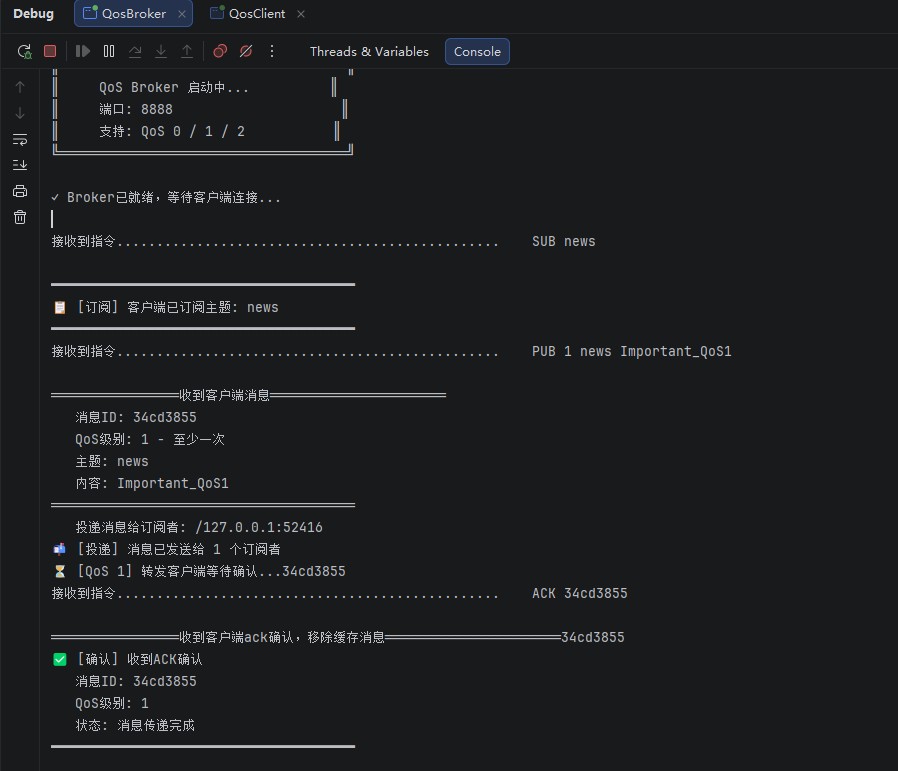
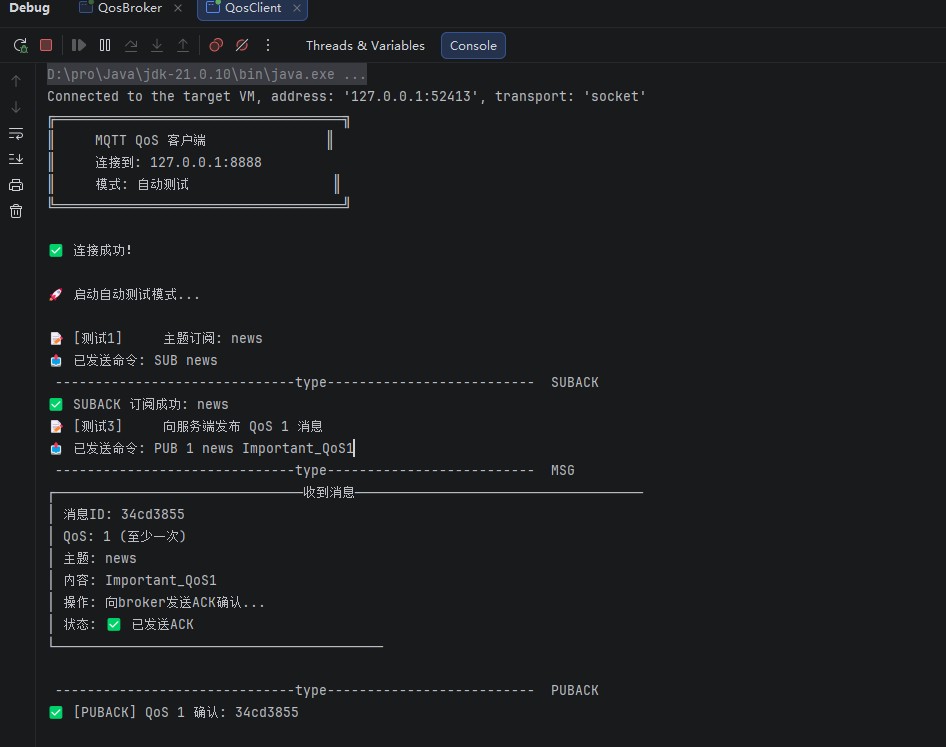
运行结果