溶解shader
CCEffect %{
  techniques:
  - name: opaque
    passes:
    - vert: standard-vs
      frag: standard-fs
      properties: &props
        mainTexture:      { value: grey, target: albedoMap, editor: { displayName: AlbedoMap } }
        mainColor:        { value: [1.0, 1.0, 1.0, 1.0], target: albedo, linear: true, editor: { displayName: Albedo, type: color } }
        # 溶解核心贴图(扇形渐变或噪点)
        dissolveMap:      { value: white, editor: { displayName: "溶解进度图(R通道)" } }
        # 这里的参数分别对应:x:进度, y:噪点强度, z:边缘宽度, w:未定义
        dissolveParams:   { value: [0.0, 0.2, 0.05, 0.0], editor: { displayName: "进度(X),噪点强度(Y),边缘宽(Z)" } }
        burningColor:     { value: [1.0, 0.4, 0.0, 1.0], linear: true, editor: { displayName: "燃烧颜色", type: color } }

        albedoScale:      { value: [1.0, 1.0, 1.0], target: albedoScaleAndCutoff.xyz }
        alphaThreshold:   { value: 0.5, target: albedoScaleAndCutoff.w, editor: { parent: USE_ALPHA_TEST, slide: true, range: [0, 1.0], step: 0.001 } }
        roughness:        { value: 0.8, target: pbrParams.y, editor: { slide: true, range: [0, 1.0], step: 0.001 } }
        metallic:         { value: 0.6, target: pbrParams.z, editor: { slide: true, range: [0, 1.0], step: 0.001 } }
    - &forward-add
      vert: standard-vs
      frag: standard-fs
      phase: forward-add
      propertyIndex: 0
      embeddedMacros: { CC_FORWARD_ADD: true }
      depthStencilState:
        depthFunc: equal
        depthTest: true
        depthWrite: false
      blendState:
        targets:
        - blend: true
          blendSrc: one
          blendDst: one
          blendSrcAlpha: zero
          blendDstAlpha: one
    - &shadow-caster
      vert: shadow-caster-vs
      frag: shadow-caster-fs
      phase: shadow-caster
      propertyIndex: 0
      rasterizerState:
        cullMode: front
      properties:
        mainColor:      { value: [1.0, 1.0, 1.0, 1.0], target: albedo, editor: { displayName: Albedo, type: color } }
        albedoScale:    { value: [1.0, 1.0, 1.0], target: albedoScaleAndCutoff.xyz }
        alphaThreshold: { value: 0.5, target: albedoScaleAndCutoff.w, editor: { parent: USE_ALPHA_TEST } }
        mainTexture:    { value: grey, target: albedoMap, editor: { displayName: AlbedoMap } }
  - name: transparent
    passes:
    - vert: standard-vs
      frag: standard-fs
      embeddedMacros: { CC_FORCE_FORWARD_SHADING: true }
      depthStencilState:
        depthTest: true
        depthWrite: false
      blendState:
        targets:
        - blend: true
          blendSrc: src_alpha
          blendDst: one_minus_src_alpha
          blendDstAlpha: one_minus_src_alpha
      properties: *props
    - *forward-add
    - *shadow-caster
}%

CCProgram shared-ubos %{
  uniform Constants {
    vec4 albedo;
    vec4 albedoScaleAndCutoff;
    vec4 pbrParams;
    vec4 dissolveParams;
    vec4 burningColor;
  };
}%

CCProgram macro-remapping %{
  #pragma define-meta USE_TWOSIDE
  #pragma define-meta USE_VERTEX_COLOR

  #define CC_SURFACES_USE_TWO_SIDED USE_TWOSIDE
  #define CC_SURFACES_USE_VERTEX_COLOR USE_VERTEX_COLOR
}%

CCProgram surface-vertex %{
  #define CC_SURFACES_VERTEX_MODIFY_WORLD_POS
  vec3 SurfacesVertexModifyWorldPos(in SurfacesStandardVertexIntermediate In)
  {
    return In.worldPos;
  }

  #define CC_SURFACES_VERTEX_MODIFY_WORLD_NORMAL
  vec3 SurfacesVertexModifyWorldNormal(in SurfacesStandardVertexIntermediate In)
  {
    return In.worldNormal.xyz;
  }

  #define CC_SURFACES_VERTEX_MODIFY_UV
  void SurfacesVertexModifyUV(inout SurfacesStandardVertexIntermediate In)
  {
  }
}%
CCProgram surface-fragment %{
  #if USE_ALBEDO_MAP
    uniform sampler2D albedoMap;
    #pragma define-meta ALBEDO_UV options([v_uv, v_uv1])
  #endif

  uniform sampler2D dissolveMap;

  #if USE_ALPHA_TEST
    #pragma define-meta ALPHA_TEST_CHANNEL options([a, r])
  #endif

  #define CC_SURFACES_FRAGMENT_MODIFY_BASECOLOR_AND_TRANSPARENCY
  vec4 SurfacesFragmentModifyBaseColorAndTransparency()
  {
    vec4 baseColor = albedo;

    #if USE_ALBEDO_MAP
      vec4 texColor = texture(albedoMap, ALBEDO_UV);
      texColor.rgb = SRGBToLinear(texColor.rgb);
      baseColor *= texColor;
    #endif

    // --- 溶解核心计算 ---
    float threshold = dissolveParams.x;
    float mask = texture(dissolveMap, ALBEDO_UV).r;

    // 抗锯齿宽度计算:fwidth 能够根据屏幕像素密度自动调整羽化范围
    float afwidth = fwidth(mask) * 1.5;

    // 基础溶解裁剪:使用 smoothstep 产生极小范围的 Alpha 渐变
    float alpha = smoothstep(threshold - afwidth, threshold + afwidth, mask);
    baseColor.a *= alpha;

    // 只有在 Alpha 极低时才丢弃像素,防止硬切锯齿
    if (alpha < 0.1) discard;

    baseColor.rgb *= albedoScaleAndCutoff.xyz;
    return baseColor;
  }

  #define CC_SURFACES_FRAGMENT_MODIFY_EMISSIVE
  vec3 SurfacesFragmentModifyEmissive()
  {
    float threshold = dissolveParams.x;
    float edgeWidth = dissolveParams.z;
    float mask = texture(dissolveMap, ALBEDO_UV).r;

    // --- 重点优化:平滑发光边 ---
    // 不要用 if 判断,而是用两个 smoothstep 捏合出一道"平滑的火带"
    // 这会让发光边缘自带朦胧感,掩盖贴图本身的低分辨率颗粒
    float afwidth = fwidth(mask) * 2.0;

    // 计算发光权重 (在 threshold 到 threshold + edgeWidth 之间产生 0-1-0 的过渡)
    float edgeStart = smoothstep(threshold - afwidth, threshold + afwidth, mask);
    float edgeEnd = smoothstep(threshold + edgeWidth - afwidth, threshold + edgeWidth + afwidth, mask);
    float edgeWeight = edgeStart * (1.0 - edgeEnd);

    // 返回平滑后的发光色,强度可以适当调高
    return burningColor.rgb * edgeWeight * 15.0;
  }

  // 其余函数保持不变
  #define CC_SURFACES_FRAGMENT_MODIFY_WORLD_NORMAL
  vec3 SurfacesFragmentModifyWorldNormal() { return normalize(FSInput_worldNormal); }
  #define CC_SURFACES_FRAGMENT_MODIFY_PBRPARAMS
  vec4 SurfacesFragmentModifyPBRParams() { return vec4(1.0, pbrParams.y, pbrParams.z, 0.5); }
}%
CCProgram standard-vs %{
  precision highp float;
  #include <macro-remapping>
  #include <surfaces/effect-macros/common-macros>
  #include <surfaces/includes/common-vs>
  #include <shared-ubos>
  #include <surface-vertex>
  #include <surfaces/includes/standard-vs>
  #include <shading-entries/main-functions/render-to-scene/vs>
}%

CCProgram shadow-caster-vs %{
  precision highp float;
  #include <surfaces/effect-macros/render-to-shadowmap>
  #include <surfaces/includes/common-vs>
  #include <shared-ubos>
  #include <surface-vertex>
  #include <shading-entries/main-functions/render-to-shadowmap/vs>
}%

CCProgram standard-fs %{
  precision highp float;
  #include <macro-remapping>
  #include <surfaces/effect-macros/common-macros>
  #include <surfaces/includes/common-fs>
  #include <shared-ubos>
  #include <surface-fragment>
  #include <lighting-models/includes/standard>
  #include <surfaces/includes/standard-fs>
  #include <shading-entries/main-functions/render-to-scene/fs>
}%

CCProgram shadow-caster-fs %{
  precision highp float;
  #include <surfaces/effect-macros/render-to-shadowmap>
  #include <surfaces/includes/common-fs>
  #include <shared-ubos>
  #include <surface-fragment>
  #include <shading-entries/main-functions/render-to-shadowmap/fs>
}%
1.新建一个shader代码,内容是上述内容
2.新建一个材质球,effect选择刚才新建的shader
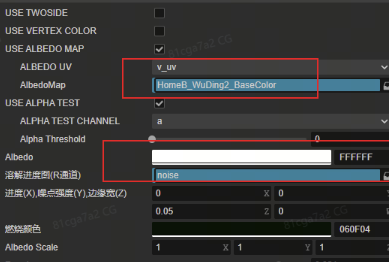
3.选择你要溶解的贴图,还有溶解过程的线性进度噪点图,要勾选ALPHA TEST,因为要设置透明消失
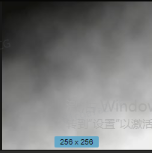
这里选择的进度图是噪点+角落线性渐变图
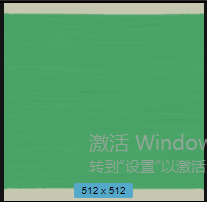
你要溶解的实际物体贴图也要是线性的,如
4.实际控制的溶解进度是这里,其他参数可以根据需求调整

代码中的动画溶解,操作这个参数
  // 2. 获取【实例化】后的材质(使用 getMaterialInstance 确保不污染共享资产)
            const _material = this.horseEatRoomDing.sharedMaterials[0];
            if (_material) {
                const originParams = _material.getProperty('dissolveParams') as Vec4;
                if (originParams) {
                    // 2. 必须克隆一份,防止直接修改引用导致逻辑混乱
                    const currentParams = originParams.clone();

                    // 3. 定义一个临时虚拟对象,用于给 tween 做数值插值
                    // 进度 X 从当前材质的实际进度(currentParams.x)渐变到目标值 1.0
                    let animObj = { progress: currentParams.x };
                    const targetProgress = 1.0; // 溶解目标值 (1.0完全溶解/消失,0.0完全恢复)
                    const duration = 2.0;       // 动画持续时间(秒)

                    tween(animObj)
                        .to(duration, { progress: targetProgress }, {
                            easing: 'linear', // 可以根据需要改成 'sineInOut' 等缓动效果
                            onUpdate: () => {
                                // 4. 每帧将计算出的 progress 赋值给 Vector4 的 x 分量
                                currentParams.x = animObj.progress;

                                // 5. 核心:必须把整个 Vec4 重新 setProperty 回材质,特效才会动
                                _material.setProperty('dissolveParams', currentParams);
                            }
                        })
                        .call(() => {
                        })
                        .start();
                }
            }
最终效果,就是从3d物体的角落开始溶解消失,直到整个物体消失