Spring-Ai-Alibaba 02 chatclient-demo
- 概述
- 开发环境
- 项目结构
- 验证
概述
本文是 Spring AI Alibaba 框架学习系列第二篇,介绍 chatclient 的使用。
代码上传至 Gitee:https://gitee.com/xbjct/spring-ai-alibaba-demo
开发环境
- 基础框架: Spring Boot 3.5.14
- AI 框架: Spring AI 1.1.2 + Spring AI Alibaba 1.1.2.2
- 大模型: 阿里云通义千问 (qwen-plus)
- 构建工具: Maven 3.9.11
- JDK 版本: 21.0.10
项目结构
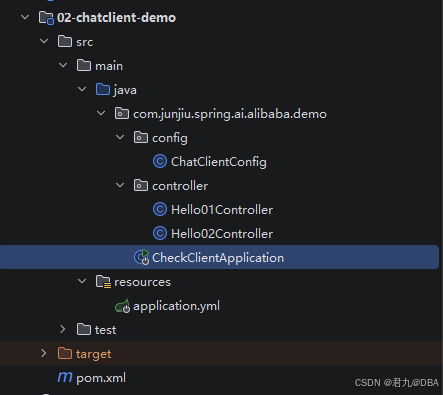
pom.xml
xml
<project xmlns="http://maven.apache.org/POM/4.0.0" xmlns:xsi="http://www.w3.org/2001/XMLSchema-instance"
         xsi:schemaLocation="http://maven.apache.org/POM/4.0.0 http://maven.apache.org/xsd/maven-4.0.0.xsd">
    <modelVersion>4.0.0</modelVersion>
    <parent>
        <groupId>com.junjiu.spring.ai.alibaba.demo</groupId>
        <artifactId>Spring-AI-Alibaba-Demo</artifactId>
        <version>1.0-SNAPSHOT</version>
    </parent>

    <artifactId>02-chatclient-demo</artifactId>
    <packaging>jar</packaging>

    <name>02-chatclient-demo</name>
    <url>http://maven.apache.org</url>

    <properties>
        <project.build.sourceEncoding>UTF-8</project.build.sourceEncoding>
    </properties>

</project>
application.yml 配置文件
yaml
server:
  port: 5826
  servlet:
    # 解决流式中文对话乱码问题.
    encoding:
      charset: utf-8
      enabled: true
      force: true

spring:
  application:
    name: 02-chatclient-demo
  ai:
    dashscope:
      base-url: https://dashscope.aliyuncs.com
      api-key: ${AIALI_API_KEY}
      chat:
        options:
          model: qwen-plus
config 配置类
java
package com.junjiu.spring.ai.alibaba.demo.config;

import org.springframework.ai.chat.client.ChatClient;
import org.springframework.ai.chat.model.ChatModel;
import org.springframework.context.annotation.Bean;
import org.springframework.context.annotation.Configuration;

/**
 * program: Spring-AI-Alibaba-Demo
 * ClassName: ChatClientConfig
 * description:
 *
 * @author: 君九
 * @create: 2026-05-21 08:55
 * @version: 1.0
 **/
@Configuration
public class ChatClientConfig {

    /**
     * 创建 ChatClient 对象,并注入到 Spring 容器中。
     * @param chatModel
     * @return
     */
    @Bean
    public ChatClient chatClient(ChatModel chatModel) {
        // return ChatClient.builder(chatModel).build();
        return ChatClient.create(chatModel);
    }

}
controller 层
Hello01Controller.java
java
package com.junjiu.spring.ai.alibaba.demo.controller;

import org.springframework.ai.chat.client.ChatClient;
import org.springframework.ai.chat.model.ChatModel;
import org.springframework.beans.factory.annotation.Autowired;
import org.springframework.web.bind.annotation.GetMapping;
import org.springframework.web.bind.annotation.RequestMapping;
import org.springframework.web.bind.annotation.RequestParam;
import org.springframework.web.bind.annotation.RestController;
import reactor.core.publisher.Flux;

/**
 * program: Spring-AI-Alibaba-Demo
 * ClassName: HelloController
 * description:
 *
 * @author: 君九
 * @create: 2026-05-18 01:05
 * @version: 1.0
 **/
@RestController
@RequestMapping("/hello01")
public class Hello01Controller {

    @Autowired
    private ChatModel chatModel;

    /**
     * 聊天对话.
     * @param message
     * @return
     */
    @GetMapping("/chat")
    public String chat(@RequestParam(name = "message", defaultValue = "你好") String message) {
        return chatModel.call(message);
    }

    /**
     * 聊天对话.
     * @param message
     * @return
     */
    @GetMapping("/streamChat")
    public Flux<String> streamChat(@RequestParam(name = "message", defaultValue = "你好") String message) {
        return chatModel.stream(message);
    }


    /********************************************************************************************************************/
    // ChatClient 模式
    /********************************************************************************************************************/

    /**
     * ChatClient 第一种使用方式,
     *  在 SpringBoot 项目中,创建 ChatClient.Builder 对象,并注入到 Spring 容器中,然后使用 ChatClient 对象进行聊天对话。
     */

    private ChatClient chatClient;

    public Hello01Controller(ChatClient.Builder builder) {
        this.chatClient = builder.build();
    }

    /**
     * 聊天对话.
     * @param message
     * @return
     */
    @GetMapping("/chat01")
    public String chat01(@RequestParam(name = "message", defaultValue = "你好") String message) {
        return chatClient.prompt()
                .user(message)
                .call()
                .content();
    }

    /**
     * 聊天对话.
     * @param message
     * @return
     */
    @GetMapping("/streamChat01")
    public Flux<String> streamChat01(@RequestParam(name = "message", defaultValue = "你好") String message) {
        return chatClient.prompt()
                .user(message)
                .stream()
                .content();
    }

}
Hello02Controller.java
java
package com.junjiu.spring.ai.alibaba.demo.controller;

import org.springframework.ai.chat.client.ChatClient;
import org.springframework.ai.chat.model.ChatModel;
import org.springframework.beans.factory.annotation.Autowired;
import org.springframework.web.bind.annotation.GetMapping;
import org.springframework.web.bind.annotation.RequestMapping;
import org.springframework.web.bind.annotation.RequestParam;
import org.springframework.web.bind.annotation.RestController;
import reactor.core.publisher.Flux;

/**
 * program: Spring-AI-Alibaba-Demo
 * ClassName: Hello02Controller
 * description:
 *
 * @author: 君九
 * @create: 2026-05-21 08:54
 * @version: 1.0
 **/
@RestController
@RequestMapping("/hello02")
public class Hello02Controller {

    @Autowired
    private ChatModel chatModel;

    /**
     * 聊天对话.
     * @param message
     * @return
     */
    @GetMapping("/chat")
    public String chat(@RequestParam(name = "message", defaultValue = "你好") String message) {
        return chatModel.call(message);
    }

    /**
     * 聊天对话.
     * @param message
     * @return
     */
    @GetMapping("/streamChat")
    public Flux<String> streamChat(@RequestParam(name = "message", defaultValue = "你好") String message) {
        return chatModel.stream(message);
    }


    /********************************************************************************************************************/
    // ChatClient 模式
    /********************************************************************************************************************/

    /**
     * ChatClient 第二种使用方式:
     *      在配置文件 ChatClientconfig中,创建 ChatClient.Builder 对象,并注入到 Spring 容器中,然后使用 ChatClient 对象进行聊天对话。
     */

    @Autowired
    ChatClient chatClient;

    /**
     * 聊天对话.
     * @param message
     * @return
     */
    @GetMapping("/chat02")
    public String chat02(@RequestParam(name = "message", defaultValue = "你好") String message) {
        return chatClient.prompt()
                .user(message)
                .call()
                .content();
    }

    /**
     * 聊天对话.
     * @param message
     * @return
     */
    @GetMapping("/streamChat02")
    public Flux<String> streamChat02(@RequestParam(name = "message", defaultValue = "你好") String message) {
        return chatClient.prompt()
                .user(message)
                .stream()
                .content();
    }

}
启动类
java
package com.junjiu.spring.ai.alibaba.demo;

import org.springframework.boot.SpringApplication;
import org.springframework.boot.autoconfigure.SpringBootApplication;
import org.springframework.boot.context.event.ApplicationReadyEvent;
import org.springframework.context.ApplicationListener;
import org.springframework.core.env.Environment;

/**
 * program: Spring-AI-Alibaba-Demo
 * ClassName: CheckClientApplication
 * description:
 *
 * @author: 君九
 * @create: 2026-05-21 08:23
 * @version: 1.0
 **/
@SpringBootApplication
public class CheckClientApplication {
    public static void main(String[] args) {
        SpringApplication.run(CheckClientApplication.class, args);
    }

    public ApplicationListener<ApplicationReadyEvent> readyEventApplicationListener(Environment env) {
        return event -> {
            System.out.println("\n🎉========================================🎉");
            System.out.println("✅ Application is ready!");
            System.out.println("AIALI_API_KEY=" + System.getenv("AIALI_API_KEY"));
            System.out.println("🎉========================================🎉\n");
        };
    }
}
验证
打开浏览器访问:
ChatClient-方式1:Hello01Contrller
-
基本对话


-
流式对话


ChatClient-方式2:Hello2Controller
-
基本对话


-
流式对话


代码上传至 Gitee:https://gitee.com/xbjct/spring-ai-alibaba-demo
若有转载,请标明出处:https://blog.csdn.net/CharlesYuangc/article/details/161273025