OkHttp 拦截器链与缓存策略:深度解析网络层的核心机制
一句话收益 :彻底理解 OkHttp 责任链模式与多级缓存原理,让你的应用在弱网环境下仍能丝滑响应,同时精准掌控缓存失效与强制刷新。
适用版本 :OkHttp 4.x(基于 Kotlin 实现),Android API 21+
阅读时长:约 18 分钟
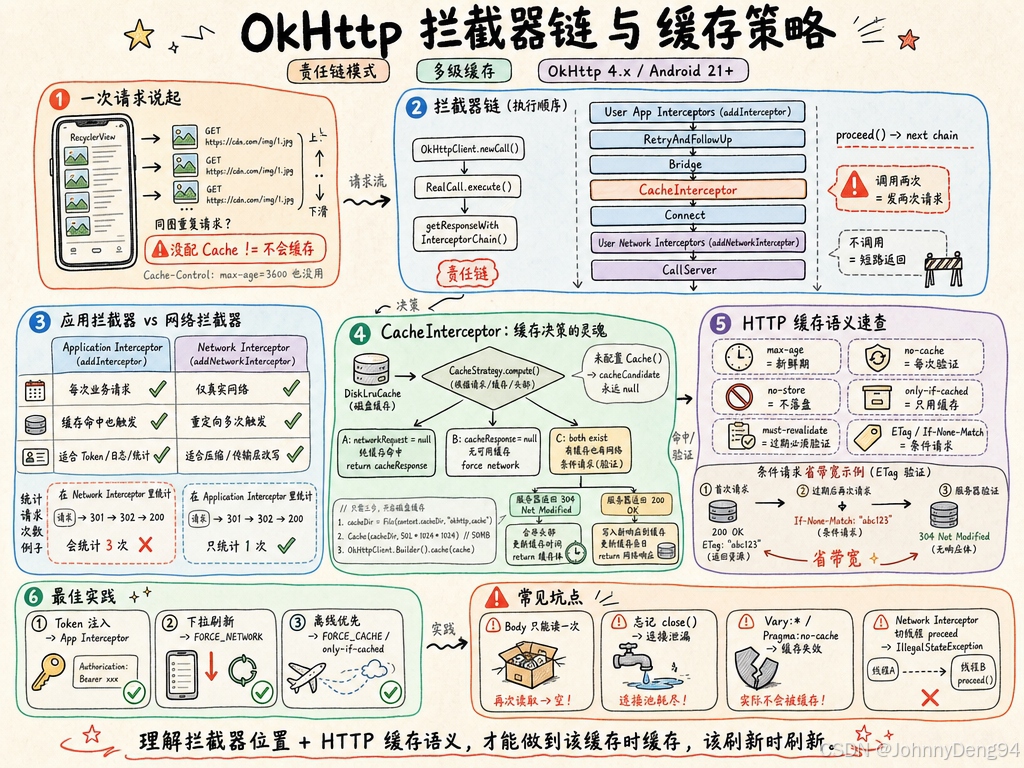
1. 从一次请求说起
你在 RecyclerView 中快速滑动,每次 onBindViewHolder 都触发一次图片 URL 的网络请求。用户向上滑回来,同一张图又请求了一次------即使响应头里明明写着 Cache-Control: max-age=3600。
这不是 OkHttp 的 bug,而是你没有给 OkHttp 配置缓存目录。OkHttp 的缓存不是"默认开启"的,也不是"配了就万事大吉"的------它背后藏着一套精密的拦截器链与 HTTP 缓存语义,理解它才能真正用好它。
2. 拦截器链的本质:责任链模式
2.1 整体架构
OkHttpClient.newCall(request).execute()
          │
          ▼
  RealCall.execute()
          │
          ▼
  getResponseWithInterceptorChain()
          │
          ▼
┌─────────────────────────────────────────┐
│          Interceptor Chain              │
│                                         │
│  用户自定义 Application Interceptors    │  ← addInterceptor()
│          ↓                              │
│  RetryAndFollowUpInterceptor            │  ← 重定向/重试
│          ↓                              │
│  BridgeInterceptor                      │  ← 补全 Header/gzip
│          ↓                              │
│  CacheInterceptor                       │  ← 缓存读写
│          ↓                              │
│  ConnectInterceptor                     │  ← TCP/TLS 连接
│          ↓                              │
│  用户自定义 Network Interceptors        │  ← addNetworkInterceptor()
│          ↓                              │
│  CallServerInterceptor                  │  ← 真正发送请求
└─────────────────────────────────────────┘
每一个 Interceptor 实现 fun intercept(chain: Chain): Response。调用 chain.proceed(request) 就是将请求传递给下一个拦截器。这是经典的责任链模式(Chain of Responsibility)。
2.2 核心类与方法(OkHttp 源码定位)
| 类/方法 | 路径 |
|---|---|
RealInterceptorChain |
okhttp3/internal/http/RealInterceptorChain.kt |
RealInterceptorChain.proceed() |
驱动链式调用的核心 |
CacheInterceptor |
okhttp3/internal/cache/CacheInterceptor.kt |
CacheStrategy |
okhttp3/internal/cache/CacheStrategy.kt |
DiskLruCache |
okhttp3/internal/cache/DiskLruCache.kt |
2.3 proceed() 的递归本质
kotlin
// RealInterceptorChain.kt(简化)
fun proceed(request: Request): Response {
    val next = RealInterceptorChain(
        interceptors, index + 1, request, ...
    )
    val interceptor = interceptors[index]
    return interceptor.intercept(next)  // 每层拦截器持有"下一层 chain"
}
每次调用 chain.proceed() 实际上创建了一个 index+1 的新 Chain 对象,并把它传给下一个拦截器。这意味着:
- 不调用
chain.proceed():请求短路,直接返回(CacheInterceptor 命中缓存时就这样做) - 调用两次
chain.proceed():请求会被发送两次(这是个常见 bug!)
3. Application Interceptor vs Network Interceptor
3.1 位置决定能力
请求 ──→ [App Interceptors] ──→ CacheInterceptor ──→ [Network Interceptors] ──→ 服务器
响应 ←── [App Interceptors] ←── CacheInterceptor ←── [Network Interceptors] ←── 服务器| 特性 | Application Interceptor | Network Interceptor |
|---|---|---|
| 注册方式 | addInterceptor() |
addNetworkInterceptor() |
| 触发时机 | 每次 call.execute(),无论缓存 |
仅真实网络请求时 |
| 重定向/重试 | 只触发一次 | 每次重定向都触发 |
| 可访问缓存响应 | 否 | 否(缓存在其上层) |
| 适合场景 | 全局 Token 注入、日志统计 | 修改压缩、Chunk 传输 |
3.2 典型错误写法 → 正确写法
错误写法:在 NetworkInterceptor 中统计请求次数
kotlin
// 问题:重定向会被计数多次,缓存命中不被计数------数据失真
client.addNetworkInterceptor { chain ->
    requestCount.incrementAndGet()  // 错误:统计的是网络层调用次数
    chain.proceed(chain.request())
}
正确写法:在 ApplicationInterceptor 中统计
kotlin
// 正确:每次业务请求只触发一次,缓存命中也被计数
client.addInterceptor { chain ->
    requestCount.incrementAndGet()  // 准确反映用户发起的请求次数
    chain.proceed(chain.request())
}
4. CacheInterceptor:缓存的灵魂
4.1 工作流程
CacheInterceptor.intercept()
        │
        ├─ 1. 从 DiskLruCache 读取候选缓存 (cacheCandidate)
        │
        ├─ 2. CacheStrategy.compute() 决策
        │        │
        │        ├─ networkRequest = null → 纯缓存响应(不发网络请求)
        │        ├─ cacheResponse = null  → 忽略缓存(强制网络)
        │        └─ 两者都有              → 条件请求(If-None-Match / If-Modified-Since)
        │
        ├─ 3a. networkRequest==null && cacheResponse==null
        │        → 返回 504 (only-if-cached 但无缓存)
        │
        ├─ 3b. networkRequest==null
        │        → 直接返回 cacheResponse(缓存命中,不走网络)
        │
        ├─ 3c. 发起网络请求,得到 networkResponse
        │
        ├─ 4. 若 networkResponse.code == 304
        │        → 合并 header,更新缓存,返回更新后的 cacheResponse
        │
        └─ 5. 将 networkResponse 写入缓存,返回
4.2 启用磁盘缓存(必须显式配置)
kotlin
// 错误:没有配置 cache,CacheInterceptor 形同虚设
val client = OkHttpClient.Builder().build()

// 正确:指定缓存目录和最大容量
val cacheDir = File(context.cacheDir, "okhttp_cache")
val cache = Cache(cacheDir, 50L * 1024 * 1024)  // 50MB

val client = OkHttpClient.Builder()
    .cache(cache)
    .build()
不配置 cache 会怎样 :CacheInterceptor 的 cache 字段为 null,cacheCandidate 永远是 null,CacheStrategy 永远输出 networkRequest != null && cacheResponse == null,所有请求都直接打到网络。
4.3 CacheStrategy 的决策逻辑(简化版)
kotlin
// CacheStrategy.kt 核心逻辑(简化)
class Factory(val nowMillis: Long, val request: Request, val cacheResponse: Response?) {
    fun compute(): CacheStrategy {
        // 规则1:POST/PATCH 等非 GET 方法,不使用缓存
        if (!request.method.canCache()) {
            return CacheStrategy(request, null)
        }
        // 规则2:请求头含 no-store,不缓存
        if (request.cacheControl.noStore) {
            return CacheStrategy(request, null)
        }
        // 规则3:无候选缓存,直接走网络
        if (cacheResponse == null) {
            return CacheStrategy(request, null)
        }
        // 规则4:计算缓存是否仍然新鲜(freshness check)
        val ageMillis = cacheResponseAge()
        val freshMillis = computeFreshnessLifetime()
        if (ageMillis < freshMillis) {
            // 缓存仍新鲜,无需网络请求
            return CacheStrategy(null, cacheResponse)
        }
        // 规则5:缓存已过期但有 ETag/Last-Modified,发条件请求
        val conditionRequest = buildConditionalRequest()
        return CacheStrategy(conditionRequest, cacheResponse)
    }
}
5. HTTP 缓存语义详解
5.1 Cache-Control 指令速查
| 指令 | 方向 | 含义 |
|---|---|---|
max-age=N |
响应 | 资源在 N 秒内新鲜 |
no-cache |
请求/响应 | 不是"不缓存",而是每次必须验证 |
no-store |
请求/响应 | 真正的不缓存,不写磁盘 |
only-if-cached |
请求 | 只用缓存,无缓存则返回 504 |
must-revalidate |
响应 | 过期后必须重新验证,不得使用 stale 缓存 |
stale-while-revalidate=N |
响应 | 过期后 N 秒内可继续用旧缓存,同时后台刷新 |
5.2 强制刷新缓存的正确姿势
kotlin
// 场景:用户手动下拉刷新,强制绕过缓存
fun forceRefreshRequest(url: String): Request {
    return Request.Builder()
        .url(url)
        .cacheControl(CacheControl.FORCE_NETWORK)  // 等价于 Cache-Control: no-cache
        .build()
}

// 场景:离线模式,只用缓存
fun offlineRequest(url: String): Request {
    return Request.Builder()
        .url(url)
        .cacheControl(CacheControl.FORCE_CACHE)    // 等价于 Cache-Control: only-if-cached, max-stale=Int.MAX_VALUE
        .build()
}
5.3 条件请求与 304 的完整流程
第一次请求:
  Client → GET /api/data
  Server → 200 OK
           ETag: "abc123"
           Cache-Control: max-age=60

60秒后缓存过期,第二次请求:
  Client → GET /api/data
           If-None-Match: "abc123"       ← OkHttp 自动添加

  [数据未变更] Server → 304 Not Modified ← 无 body,节省带宽
  OkHttp → 用旧 body + 新 header 合并,更新缓存时间戳,返回给调用方

  [数据已变更] Server → 200 OK
                        ETag: "xyz789"
                        新的 body
  OkHttp → 用新响应覆盖缓存
6. 最佳实践
6.1 全局 Token 注入拦截器
kotlin
class AuthInterceptor(private val tokenProvider: () -> String) : Interceptor {
    override fun intercept(chain: Interceptor.Chain): Response {
        val original = chain.request()
        val request = original.newBuilder()
            .header("Authorization", "Bearer ${tokenProvider()}")
            .build()
        return chain.proceed(request)
    }
}

// 做法:使用 addInterceptor(Application 层),而非 addNetworkInterceptor
// 原因:Token 注入应在每次业务请求时发生一次,而非每次网络层调用
// 对比:若用 addNetworkInterceptor,重定向时 Token 会被重复注入(虽无害但浪费)
6.2 弱网降级:优先用缓存
kotlin
class OfflineFallbackInterceptor(private val context: Context) : Interceptor {
    override fun intercept(chain: Interceptor.Chain): Response {
        val request = if (!context.isNetworkAvailable()) {
            chain.request().newBuilder()
                .cacheControl(CacheControl.Builder()
                    .onlyIfCached()
                    .maxStale(7, TimeUnit.DAYS)
                    .build())
                .build()
        } else {
            chain.request()
        }

        val response = chain.proceed(request)

        if (response.code == 504 && !context.isNetworkAvailable()) {
            throw IOException("No cache available in offline mode")
        }
        return response
    }
}

// 做法:在 Application 层拦截,根据网络状态动态修改 Cache-Control
// 原因:用户离线时仍能看到上次数据,提升体验
// 对比:不做此处理,离线时所有请求直接失败,用户看到空白页
6.3 日志拦截器:用 HttpLoggingInterceptor 而非自己写
kotlin
// 做法:使用官方 HttpLoggingInterceptor,置于 Application Interceptor
// 原因:它正确处理了 gzip 解压、二进制 body 截断、大响应体截断
// 对比:自己用 response.body?.string() 读取 body,会消耗掉流,导致业务层读取为空

val logging = HttpLoggingInterceptor().apply {
    level = if (BuildConfig.DEBUG) HttpLoggingInterceptor.Level.BODY
            else HttpLoggingInterceptor.Level.NONE  // 生产环境不打印 Body!
}
client.addInterceptor(logging)  // Application 层,不是 Network 层
7. 常见坑点
坑 1:双重读取 Response Body 导致 IllegalStateException
现象 :java.lang.IllegalStateException: closed,在第二个拦截器里读取 body 时崩溃。
原因 :ResponseBody 是流式的,string() / bytes() 消费流后流就关闭了。
复现:
kotlin
// 日志拦截器(先执行)读取了 body
val bodyStr = response.body?.string()  // 流被消耗
// 业务层再读取 → 崩溃解决:
kotlin
override fun intercept(chain: Interceptor.Chain): Response {
    val response = chain.proceed(chain.request())
    val bodyBytes = response.body?.bytes() ?: return response
    log(String(bodyBytes))
    return response.newBuilder()
        .body(bodyBytes.toResponseBody(response.body?.contentType()))
        .build()
}
坑 2:忘记调用 response.close() 导致连接泄漏
现象:长时间运行后,连接池耗尽,新请求超时等待连接。
原因:OkHttp 连接复用依赖响应体被正确关闭。
复现 :在拦截器中 chain.proceed(request) 但忘记消费或关闭响应体。
解决:
kotlin
override fun intercept(chain: Interceptor.Chain): Response {
    val response = chain.proceed(chain.request())
    return if (shouldRedirect(response)) {
        response.close()  // 关键!不消费 body 时必须 close
        chain.proceed(buildRedirectRequest(response))
    } else {
        response
    }
}
坑 3:HTTPS 下缓存失效
现象 :服务端返回了正确的 Cache-Control header,但每次请求仍打到网络。
原因 :服务端可能返回了 Vary: *(禁止缓存)或 Pragma: no-cache(老旧指令但仍有效)。
复现/排查:
kotlin
override fun intercept(chain: Interceptor.Chain): Response {
    val response = chain.proceed(chain.request())
    // network=true, cache=null  → 未命中缓存
    // network=null, cache=true  → 缓存命中
    // network=true, cache=true  → 304 条件请求场景
    Log.d("Cache", "network=${response.networkResponse != null}, cache=${response.cacheResponse != null}")
    return response
}
解决 :排查服务端响应头,移除 Vary: * 或与服务端协商正确的缓存策略。
坑 4:在 Coroutine 中调用 chain.proceed() 切换线程
现象 :IllegalStateException: network interceptor must not call proceed on a different thread。
原因 :Network Interceptor 内不得在其他线程调用 proceed(OkHttp 内部有线程检查)。
解决 :在 Network Interceptor 中保持同步调用;异步逻辑放在 Application Interceptor,或通过 Dispatcher 配置线程池来管理并发,不在拦截器内启动协程。
8. 总结
- 拦截器链是 OkHttp 最核心的扩展点,基于责任链模式,Application Interceptor 适合业务逻辑(Token、日志),Network Interceptor 适合网络层操作(编码修改)。
- 缓存必须显式启用 ,配置
Cache()后才生效;OkHttp 自动处理 ETag/Last-Modified 条件请求。 CacheControl.FORCE_NETWORK和FORCE_CACHE是强制刷新与离线降级的标准手段。- Response Body 是流,只能消费一次,拦截器中读取后必须重新包装才能传递。
- 不消费 Response Body 时必须 close(),否则连接泄漏,连接池耗尽。
核心结论 :OkHttp 的缓存不是配置项,而是 HTTP 语义的精确实现------理解
Cache-Control、条件请求与拦截器位置,才能做到"该缓存时缓存,该刷新时刷新"。
参考资料
- OkHttp 官方文档 - Interceptors
- OkHttp 官方文档 - Caching
- OkHttp 源码:
okhttp3/internal/cache/CacheInterceptor.kt - OkHttp 源码:
okhttp3/internal/cache/CacheStrategy.kt - OkHttp 源码:
okhttp3/internal/http/RealInterceptorChain.kt - RFC 7234 - HTTP/1.1 Caching
- Android 开发者文档 - 网络请求最佳实践