🐍 1. 安装 Python 解释器
java
官网下载地址:https://www.python.org/downloads/参考下图进行下载安装(如不熟悉可查找高阅读量教程):
java
https://i-blog.csdnimg.cn/direct/2c64bb62f06f47488d451b589acecb21.png
https://i-blog.csdnimg.cn/direct/eb7b92f41a42459dbb9c11b50696724a.png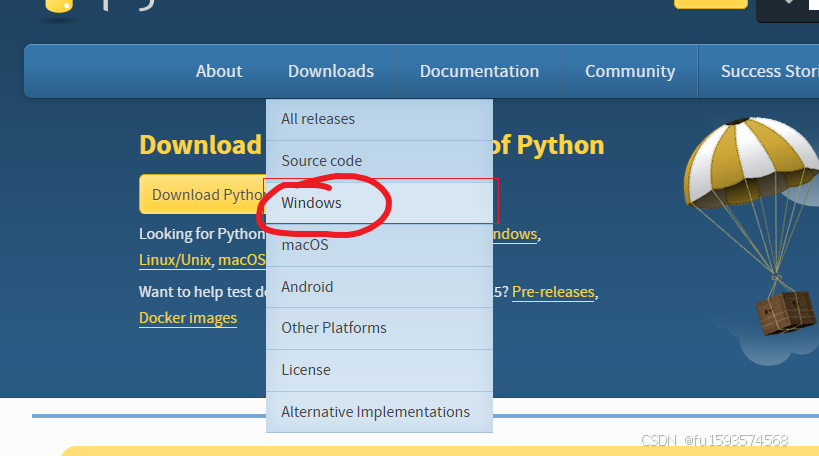
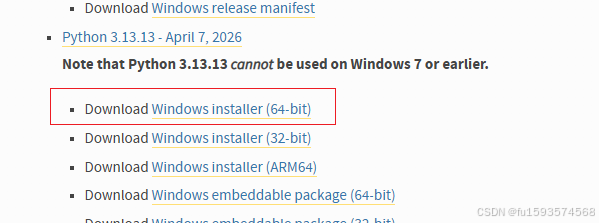
如果不会,你就找阅读量最大的别人教程,很简单的
安装好后win+R 打开黑窗口输入python --version 出现版本好就ok了
如果没有出现也没有报错,那么就需要查看环境变量里面配置的路径是否正确(你应该找得到环境变量在哪里),以及删除系统注册表的老旧的解释器。(win+R 然后输入regedit,具体在哪里找到问AI,基本不会错的)
2.安装manim
java
pip install manim如果下载慢,自己配置镜像源。
java
常用镜像源地址
镜像源	地址	特点
清华大学	https://pypi.tuna.tsinghua.edu.cn/simple	学术友好,更新及时,最常用
阿里云	https://mirrors.aliyun.com/pypi/simple/	云服务商,CDN节点覆盖全
腾讯云	https://mirrors.cloud.tencent.com/pypi/simple	稳定性高,智能路由
华为云	https://repo.huaweicloud.com/repository/pypi/simple	企业级支持
中国科技大学	https://pypi.mirrors.ustc.edu.cn/simple/	支持历史版本查询
豆瓣	http://pypi.douban.com/simple/	老牌镜像源
3.安装ffmpeg
打开这个链接
java
https://www.gyan.dev/ffmpeg/builds/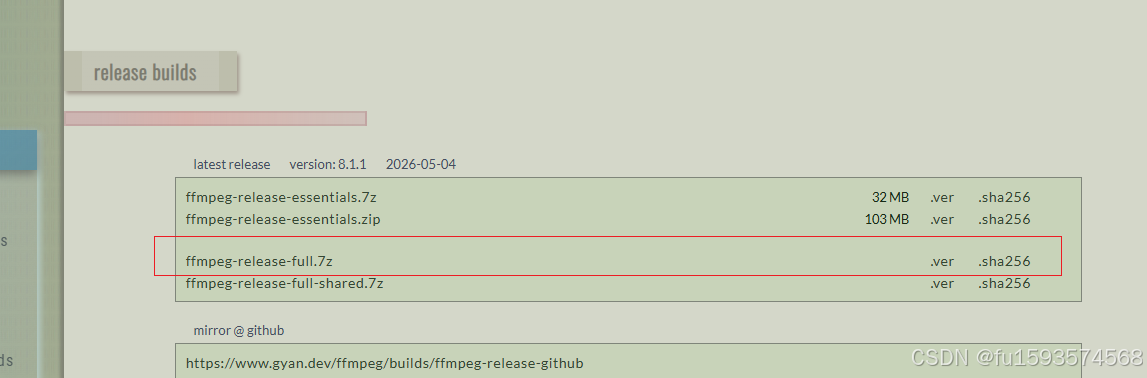
给我下载他,推荐Internet downmanager。获取下载链接丢给这个下载器32倍速下载老爽了。
解压下载的 ZIP 文件到指定目录(例如 C:\ffmpeg)。
添加到系统路径(可选但推荐):
右键点击"此电脑" → "属性" → "高级系统设置" → "环境变量"。
在"系统变量"中找到 Path,点击"编辑"。
新建一条路径,填入 FFmpeg 的 bin 文件夹路径(例如 C:\ffmpeg\bin)。
验证安装:
打开命令行输入:
java
ffmpeg -version若显示版本信息,则安装成功。、
4.安装Latex
打开它
java
https://miktex.org/download点击下载安装就行。
5.运行你的文件:
java
manim -p .\sample.py如果报错丢给AI缺少啥安装啥
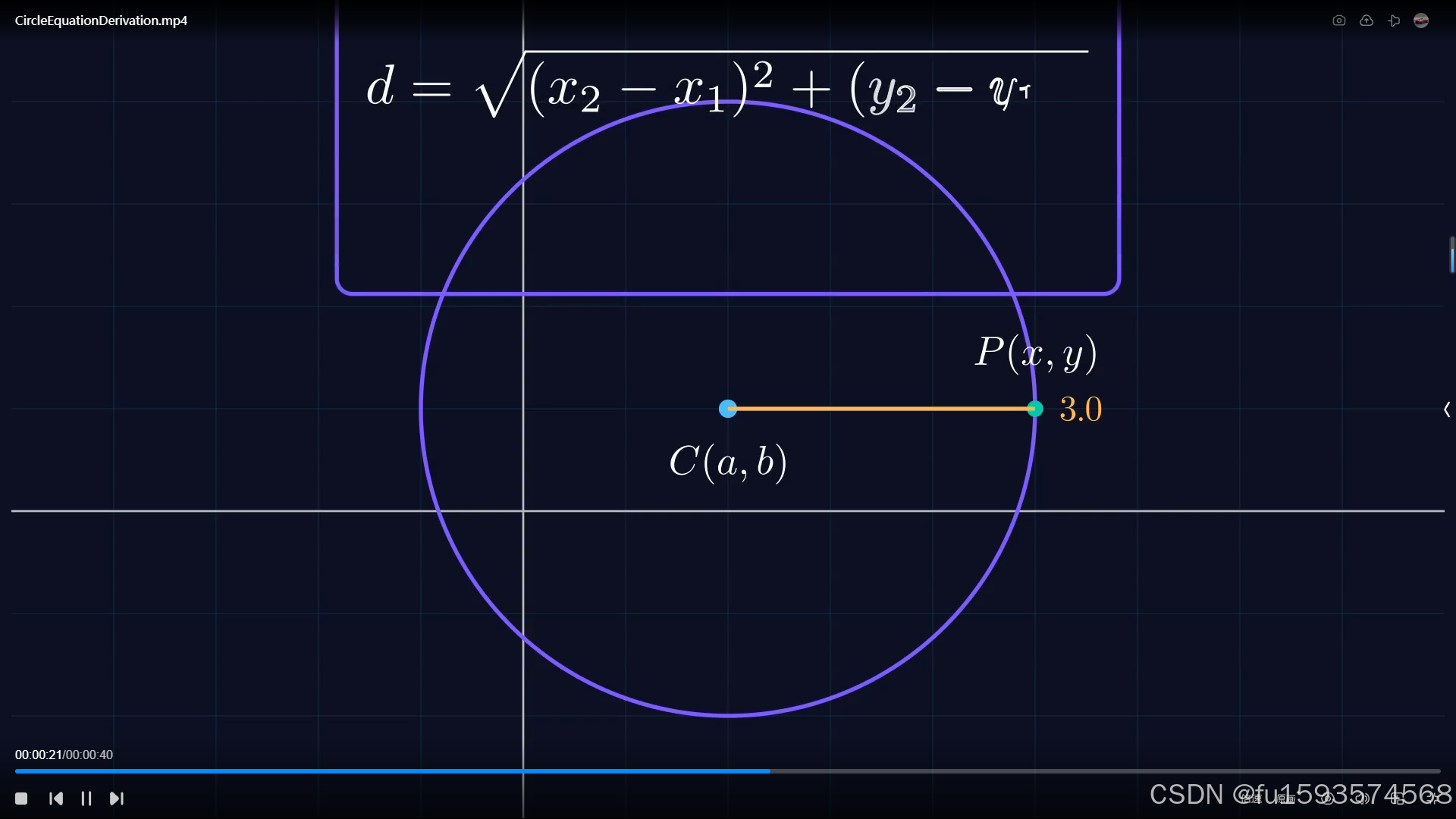
一下是我的参考代码:圆的方程推导演示(做的没那么细哈~)
java
from manim import *
import numpy as np
import os

# =========================
# 全局风格配置
# =========================

config.background_color = "#0B1020"

# 设置 LaTeX 编译器路径到环境变量
os.environ["PATH"] += os.pathsep + r"D:\CodingSoftWare\Miktex\miktex\bin\x64"

# 自定义 TeX 模板类 - 只设置名称,不设置完整路径
class CustomTexTemplate(TexTemplate):
    def __init__(self):
        super().__init__()
        # 使用编译器名称,而不是完整路径
        self.tex_compiler = "latex"  # 或者 "pdflatex"
        # 确保使用正确的参数
        self.compiler_arguments = [
            "-interaction=batchmode",
            "-halt-on-error",
            "-output-directory={}",
            "{}",
        ]


class CircleEquationDerivation(Scene):
    """
    两点距离公式推导圆的标准方程
    Professional Mathematical Visualization
    """

    def construct(self):

        # ------------------------------------------------
        # 1. 场景初始化
        # ------------------------------------------------
        self.camera.background_color = "#0B1020"

        self.setup_color_palette()

        # 标题动画
        self.show_title_sequence()

        # 坐标系建立
        plane = self.create_coordinate_system()

        self.play(
            FadeIn(plane),
            run_time=2,
        )

        self.wait(0.5)

        # ------------------------------------------------
        # 2. 创建圆心与动态点
        # ------------------------------------------------

        center_point = np.array([2, 1, 0])
        radius_value = 3

        radius_tracker = ValueTracker(0)

        # 圆心
        center_dot = Dot(
            plane.c2p(*center_point[:2]),
            color=self.primary_color,
            radius=0.09,
        )

        # 使用自定义模板的 MathTex
        center_label = MathTex("C(a,b)", tex_template=CustomTexTemplate()).scale(0.8)
        center_label.next_to(center_dot, DOWN)

        # 动态角度
        theta_tracker = ValueTracker(0)

        # 动态点P
        moving_point = always_redraw(
            lambda: Dot(
                plane.c2p(
                    center_point[0] + radius_value * np.cos(theta_tracker.get_value()),
                    center_point[1] + radius_value * np.sin(theta_tracker.get_value()),
                ),
                color=self.accent_color,
                radius=0.08,
            )
        )

        moving_label = always_redraw(
            lambda: MathTex("P(x,y)", tex_template=CustomTexTemplate())
            .scale(0.8)
            .next_to(moving_point, UP)
        )

        # 动态圆
        dynamic_circle = always_redraw(
            lambda: Circle(
                radius=plane.x_axis.n2p(radius_value)[0] - plane.x_axis.n2p(0)[0],
                color=self.secondary_color,
                stroke_width=4,
            ).move_to(plane.c2p(*center_point[:2]))
        )

        # 半径线
        radius_line = always_redraw(
            lambda: Line(
                center_dot.get_center(),
                moving_point.get_center(),
                color=self.radius_color,
                stroke_width=4,
            )
        )

        # 半径数值
        radius_text = always_redraw(
            lambda: DecimalNumber(
                radius_value,
                num_decimal_places=1,
                color=self.radius_color,
            )
            .scale(0.7)
            .next_to(radius_line, RIGHT)
        )

        # 动画进入
        self.play(
            LaggedStart(
                GrowFromCenter(center_dot),
                Write(center_label),
                Create(dynamic_circle),
                lag_ratio=0.25,
            ),
            run_time=2,
        )

        self.play(
            FadeIn(moving_point),
            FadeIn(moving_label),
            Create(radius_line),
            FadeIn(radius_text),
            run_time=1.5,
        )

        # ------------------------------------------------
        # 3. 点沿圆运动
        # ------------------------------------------------

        self.play(
            theta_tracker.animate.set_value(TAU),
            rate_func=rate_functions.ease_in_out_sine,
            run_time=8,
        )

        self.wait(0.5)

        # ------------------------------------------------
        # 4. 引出距离公式
        # ------------------------------------------------

        distance_formula = MathTex(
            "d",
            "=",
            "\\sqrt{",
            "(x_2-x_1)^2",
            "+",
            "(y_2-y_1)^2",
            "}",
            tex_template=CustomTexTemplate(),
        ).scale(1.1)

        distance_formula.to_edge(UP)

        formula_bg = SurroundingRectangle(
            distance_formula,
            color=self.secondary_color,
            buff=0.3,
            corner_radius=0.15,
        )

        self.play(
            AnimationGroup(
                FadeIn(formula_bg),
                Write(distance_formula),
                lag_ratio=0.1,
            ),
            run_time=2,
        )

        self.wait(1)

        # ------------------------------------------------
        # 5. 替换坐标
        # ------------------------------------------------

        substitution_formula = MathTex(
            "r",
            "=",
            "\\sqrt{",
            "(x-a)^2",
            "+",
            "(y-b)^2",
            "}",
            tex_template=CustomTexTemplate(),
        ).scale(1.1)

        substitution_formula.move_to(distance_formula)

        self.play(
            TransformMatchingTex(
                distance_formula,
                substitution_formula,
                path_arc=PI / 4,
            ),
            run_time=2.5,
        )

        self.wait(1)

        # ------------------------------------------------
        # 6. 两边平方
        # ------------------------------------------------

        squared_formula = MathTex(
            "r^2",
            "=",
            "(x-a)^2",
            "+",
            "(y-b)^2",
            tex_template=CustomTexTemplate(),
        ).scale(1.2)

        squared_formula.move_to(substitution_formula)

        self.play(
            TransformMatchingTex(
                substitution_formula,
                squared_formula,
            ),
            run_time=2,
        )

        self.wait(1)

        # ------------------------------------------------
        # 7. 标准形式整理
        # ------------------------------------------------

        final_formula = MathTex(
            "(x-a)^2",
            "+",
            "(y-b)^2",
            "=",
            "r^2",
            tex_template=CustomTexTemplate(),
        ).scale(1.4)

        final_formula.set_color_by_gradient(
            self.primary_color,
            self.accent_color,
        )

        final_formula.move_to(squared_formula)

        # 聚焦镜头效果
        focus_rect = SurroundingRectangle(
            final_formula,
            color=self.accent_color,
            buff=0.4,
            stroke_width=3,
        )

        self.play(
            Succession(
                FadeOut(formula_bg),
                TransformMatchingTex(
                    squared_formula,
                    final_formula,
                ),
            ),
            run_time=2.5,
        )

        self.play(
            Create(focus_rect),
            Flash(
                final_formula,
                color=self.accent_color,
                flash_radius=1.2,
            ),
            run_time=1.5,
        )

        self.wait(2)

        # ------------------------------------------------
        # 8. 最终镜头
        # ------------------------------------------------

        explanation = Text(
            "所有到圆心距离为 r 的点的集合",
            font="Microsoft YaHei",
            color=GREY_A,
        ).scale(0.55)

        explanation.next_to(final_formula, DOWN, buff=0.6)

        self.play(
            FadeIn(explanation, shift=UP * 0.2),
            run_time=1.2,
        )

        self.wait(3)

    # ====================================================
    # 工具函数
    # ====================================================

    def setup_color_palette(self):
        """颜色系统"""

        self.primary_color = "#4FC3F7"
        self.secondary_color = "#7C4DFF"
        self.accent_color = "#00E5A8"
        self.radius_color = "#FFB74D"

    def create_coordinate_system(self):
        """创建坐标系"""

        plane = NumberPlane(
            x_range=[-5, 9, 1],
            y_range=[-4, 6, 1],
            background_line_style={
                "stroke_color": BLUE_E,
                "stroke_opacity": 0.25,
                "stroke_width": 1,
            },
            axis_config={
                "stroke_color": GREY_B,
                "stroke_width": 2,
            },
        )

        return plane

    def show_title_sequence(self):
        """标题动画"""

        title = Text(
            "圆的基本方程",
            font="Microsoft YaHei",
            color=WHITE,
            weight=BOLD,
        ).scale(1.3)

        subtitle = Text(
            "Deriving the Equation of a Circle",
            color=GREY_B,
        ).scale(0.45)

        subtitle.next_to(title, DOWN)

        title_group = VGroup(title, subtitle)

        glow = SurroundingRectangle(
            title_group,
            color=self.secondary_color,
            buff=0.4,
            corner_radius=0.2,
        )

        self.play(
            LaggedStart(
                FadeIn(title, shift=UP),
                FadeIn(subtitle),
                lag_ratio=0.2,
            ),
            run_time=2,
        )

        self.play(
            Create(glow),
            run_time=1,
        )

        self.wait(1)

        self.play(
            FadeOut(title_group),
            FadeOut(glow),
            run_time=1.5,
        )