1. 功能概述
Envoy 的 OAuth2 过滤器是一个强大的认证和授权工具,它提供了对 OAuth 2.0 协议的完整支持,允许 Envoy 代理在不修改后端服务代码的情况下,实现安全的用户认证和授权功能。该过滤器可以处理 OAuth 2.0 协议的完整流程,包括用户认证、授权码获取、访问令牌交换和会话管理。
OAuth2 过滤器的主要功能特点:
-
完全支持 OAuth 2.0 协议的授权码流程
-
内置会话管理功能,使用 HMAC 签名的 Cookie 存储认证信息
-
支持自定义 Cookie 名称和路径
-
提供灵活的配置选项,支持各种 OAuth 2.0 提供商
-
与 Envoy 的架构深度集成,提供高效的请求处理
主要优势:
-
完全支持 OAuth 2.0 协议:提供对授权码流程的完整支持
-
内置会话管理:使用 HMAC 签名的 Cookie 存储认证信息,确保会话的安全性
-
灵活的配置:支持各种 OAuth 2.0 提供商,可自定义 Cookie 名称和路径
-
高性能:与 Envoy 的架构深度集成,提供高效的请求处理
-
可扩展性:与其他 Envoy 过滤器配合使用,实现更复杂的安全策略
使用场景:
-
需要实现统一认证架构的微服务系统
-
希望在不修改后端服务代码的情况下添加认证功能
-
需要支持多种 OAuth 2.0 提供商的应用程序
-
需要实现安全的会话管理和访问控制
最佳实践:
-
与 CSRF 过滤器配合使用,防止跨站请求伪造攻击
-
使用 HTTPS 传输,确保认证过程的安全性
-
合理配置 Cookie 的属性,如 HttpOnly 和 Secure
-
定期轮换 HMAC 和 Token 密钥,增强安全性
通过合理配置和使用 OAuth2 过滤器,开发人员可以快速实现安全的用户认证和授权功能,同时提高系统的可维护性和可扩展性。
2. 解决的问题
2.1 统一认证架构
-
提供一种集中式的认证解决方案,避免在每个后端服务中重复实现认证逻辑
-
简化后端服务的开发和维护,让开发人员专注于业务逻辑
-
提供一致的用户体验,无论后端服务是如何实现的
2.2 安全性增强
-
防止未授权的访问,保护后端服务的安全
-
提供强大的会话管理机制,使用 HMAC 签名的 Cookie 存储认证信息
-
支持 HTTPS 传输,确保认证过程的安全性
-
提供签名退出功能,允许用户安全地结束会话
2.3 开发效率提升
-
简化认证相关的开发工作,减少代码重复
-
提供灵活的配置选项,支持各种 OAuth 2.0 提供商
-
与 Envoy 的其他功能(如路由、负载均衡)配合使用,实现复杂的认证策略
2.4 可扩展性
-
支持添加自定义的认证逻辑
-
可以与其他 Envoy 过滤器配合使用,实现更复杂的安全策略
-
提供统计和监控功能,帮助了解认证过程的性能和行为
3. 架构设计
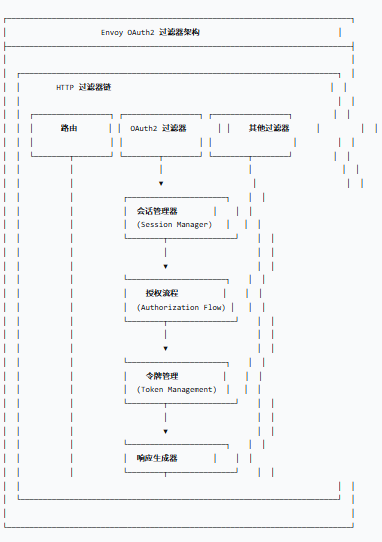
3.1 核心组件架构
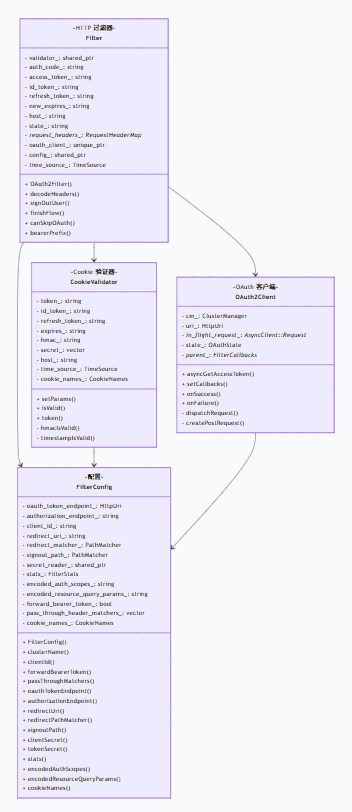
3.2 类图
4. 配置用例
4.1 基础配置
bash
http_filters:- name: envoy.filters.http.oauth2  typed_config:    "@type": type.googleapis.com/envoy.extensions.filters.http.oauth2.v3.OAuth2    config:      token_endpoint:        cluster: oauth        uri: oauth.com/token        timeout: 3s      authorization_endpoint: https://oauth.com/oauth/authorize/      redirect_uri: "%REQ(:x-forwarded-proto)%://%REQ(:authority)%/callback"      redirect_path_matcher:        path:          exact: /callback      signout_path:        path:          exact: /signout      credentials:        client_id: foo        token_secret:          name: token          sds_config:            path: "/etc/envoy/token-secret.yaml"        hmac_secret:          name: hmac          sds_config:            path: "/etc/envoy/hmac.yaml"      auth_scopes:      - user      - openid      - email      resources:      - oauth2-resource      - http://example.com
- name: envoy.filters.http.router
route_config:  name: local_route  virtual_hosts:  - name: backend    domains: ["*"]    routes:    - match: { prefix: "/" }      route: { cluster: backend_cluster }
static_resources:  clusters:  - name: backend_cluster    connect_timeout: 0.25s    type: STRICT_DNS    lb_policy: ROUND_ROBIN    load_assignment:      cluster_name: backend_cluster      endpoints:      - lb_endpoints:        - endpoint:            address:              socket_address:                address: backend.example.com                port_value: 80  - name: oauth    connect_timeout: 0.25s    type: STRICT_DNS    lb_policy: ROUND_ROBIN    load_assignment:      cluster_name: oauth      endpoints:      - lb_endpoints:        - endpoint:            address:              socket_address:                address: oauth.com                port_value: 443
4.2 自定义 Cookie 配置
bash
http_filters:- name: envoy.filters.http.oauth2 typed_config: "@type": type.googleapis.com/envoy.extensions.filters.http.oauth2.v3.OAuth2 config: token_endpoint: cluster: oauth uri: oauth.com/token timeout: 3s authorization_endpoint: https://oauth.com/oauth/authorize/ redirect_uri: "%REQ(:x-forwarded-proto)%://%REQ(:authority)%/callback" redirect_path_matcher: path: exact: /callback signout_path: path: exact: /signout credentials: client_id: foo token_secret: name: token sds_config: path: "/etc/envoy/token-secret.yaml" hmac_secret: name: hmac sds_config: path: "/etc/envoy/hmac.yaml" cookie_names: bearer_token: "MyAccessToken" oauth_hmac: "MyHMAC" oauth_expires: "MyExpires" auth_scopes: - user4.3 与其他过滤器配合使用
bash
http_filters:- name: envoy.filters.http.csrf  typed_config:    "@type": type.googleapis.com/envoy.extensions.filters.http.csrf.v3.CsrfPolicy    allow_origins:    - exact: "https://example.com"    check_request_origin: true
- name: envoy.filters.http.oauth2  typed_config:    "@type": type.googleapis.com/envoy.extensions.filters.http.oauth2.v3.OAuth2    config:      token_endpoint:        cluster: oauth        uri: oauth.com/token        timeout: 3s      authorization_endpoint: https://oauth.com/oauth/authorize/      redirect_uri: "%REQ(:x-forwarded-proto)%://%REQ(:authority)%/callback"      redirect_path_matcher:        path:          exact: /callback      signout_path:        path:          exact: /signout      credentials:        client_id: foo        token_secret:          name: token          sds_config:            path: "/etc/envoy/token-secret.yaml"        hmac_secret:          name: hmac          sds_config:            path: "/etc/envoy/hmac.yaml"      auth_scopes:      - user      - openid
- name: envoy.filters.http.router
4.4 路由级配置
css
route_config: name: local_route virtual_hosts: - name: backend domains: ["*"] routes: - match: { prefix: "/public" } route: { cluster: public_cluster } - match: { prefix: "/api" } route: { cluster: api_cluster } per_filter_config: envoy.filters.http.oauth2: "@type": type.googleapis.com/envoy.extensions.filters.http.oauth2.v3.OAuth2 config: token_endpoint: cluster: oauth uri: oauth.com/token timeout: 3s authorization_endpoint: https://oauth.com/oauth/authorize/ redirect_uri: "%REQ(:x-forwarded-proto)%://%REQ(:authority)%/callback" redirect_path_matcher: path: exact: /callback signout_path: path: exact: /signout credentials: client_id: foo token_secret: name: token sds_config: path: "/etc/envoy/token-secret.yaml" hmac_secret: name: hmac sds_config: path: "/etc/envoy/hmac.yaml" auth_scopes: - user - openid5. 工作流程分析
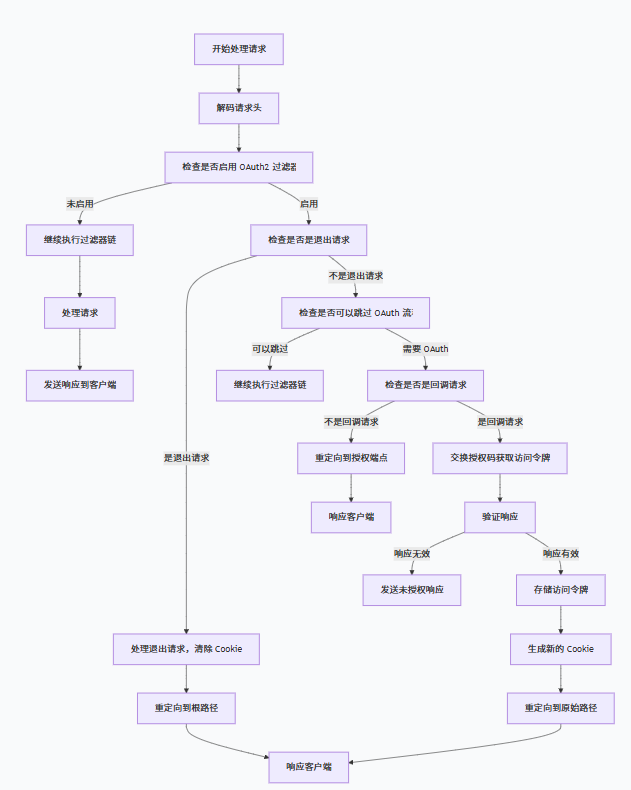
5.1 过滤器执行流程
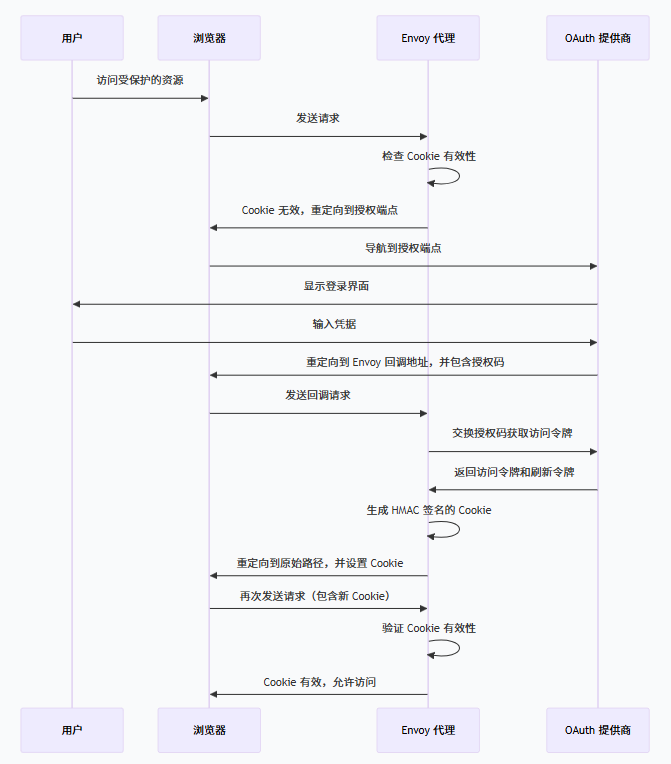
5.2 OAuth 2.0 流程
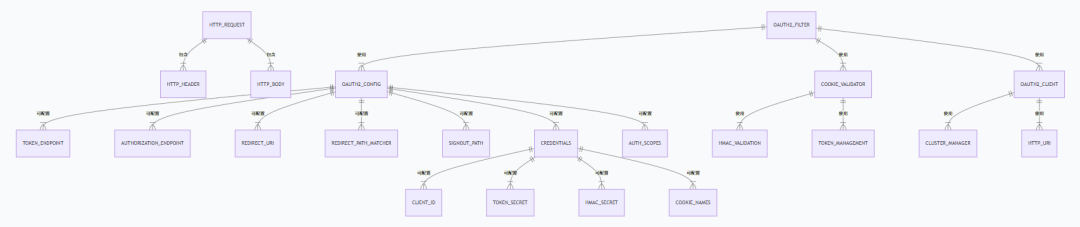
5. 代码实现ER图
6. 最佳实践
6.1 与 CSRF 过滤器配合使用
bash
http_filters:- name: envoy.filters.http.csrf  typed_config:    "@type": type.googleapis.com/envoy.extensions.filters.http.csrf.v3.CsrfPolicy    allow_origins:    - exact: "https://example.com"    - suffix: ".example.com"    check_request_origin: true
- name: envoy.filters.http.oauth2  typed_config:    "@type": type.googleapis.com/envoy.extensions.filters.http.oauth2.v3.OAuth2    config:      # OAuth2 配置
- name: envoy.filters.http.router
6.2 使用 HTTPS 传输
css
static_resources: listeners: - name: listener_0 address: socket_address: protocol: TCP address: 127.0.0.1 port_value: 443 filter_chains: - filters: - name: envoy.filters.network.http_connection_manager typed_config: "@type": type.googleapis.com/envoy.extensions.filters.network.http_connection_manager.v3.HttpConnectionManager http_filters: - name: envoy.filters.http.oauth2 typed_config: "@type": type.googleapis.com/envoy.extensions.filters.http.oauth2.v3.OAuth2 config: # OAuth2 配置 - name: envoy.filters.http.router typed_config: "@type": type.googleapis.com/envoy.extensions.filters.http.router.v3.Router tracing: {} codec_type: "AUTO" stat_prefix: ingress_http route_config: virtual_hosts: - name: backend domains: ["*"] routes: - match: { prefix: "/" } route: { cluster: backend_cluster } transport_socket: name: envoy.transport_sockets.tls typed_config: "@type": type.googleapis.com/envoy.extensions.transport_sockets.tls.v3.DownstreamTlsContext common_tls_context: tls_certificates: - certificate_chain: { filename: "/etc/envoy/cert.pem" } private_key: { filename: "/etc/envoy/key.pem" }6.3 配置自定义 Cookie 名称
bash
http_filters:- name: envoy.filters.http.oauth2 typed_config: "@type": type.googleapis.com/envoy.extensions.filters.http.oauth2.v3.OAuth2 config: token_endpoint: cluster: oauth uri: oauth.com/token timeout: 3s authorization_endpoint: https://oauth.com/oauth/authorize/ redirect_uri: "%REQ(:x-forwarded-proto)%://%REQ(:authority)%/callback" redirect_path_matcher: path: exact: /callback signout_path: path: exact: /signout credentials: client_id: foo token_secret: name: token sds_config: path: "/etc/envoy/token-secret.yaml" hmac_secret: name: hmac sds_config: path: "/etc/envoy/hmac.yaml" cookie_names: bearer_token: "MyAccessToken" oauth_hmac: "MyHMAC" oauth_expires: "MyExpires" auth_scopes: - user6.4 配置密码资源
makefile
static_resources:  secrets:  - name: token    generic_secret:      secret: <Your token secret here>  - name: hmac    generic_secret:      secret: <Your hmac secret here>
http_filters:- name: envoy.filters.http.oauth2  typed_config:    "@type": type.googleapis.com/envoy.extensions.filters.http.oauth2.v3.OAuth2    config:      # OAuth2 配置      credentials:        client_id: foo        token_secret:          name: token          sds_config:            path: "/etc/envoy/token-secret.yaml"        hmac_secret:          name: hmac          sds_config:            path: "/etc/envoy/hmac.yaml"
7. 代码实现细节
7.1 过滤器初始化
css
OAuth2Filter::OAuth2Filter(FilterConfigSharedPtr config, std::unique_ptr<OAuth2Client>&& oauth_client, TimeSource& time_source) : validator_(std::make_shared<OAuth2CookieValidator>(time_source, config->cookieNames())), oauth_client_(std::move(oauth_client)), config_(std::move(config)), time_source_(time_source) { oauth_client_->setCallbacks(*this);}7.2 Cookie 验证
php
bool OAuth2Filter::canSkipOAuth(Http::RequestHeaderMap& headers) const {  validator_->setParams(headers, config_->tokenSecret());  if (validator_->isValid()) {    config_->stats().oauth_success_.inc();    if (config_->forwardBearerToken() && !validator_->token().empty()) {      setBearerToken(headers, validator_->token());    }    return true;  }
  for (const auto& matcher : config_->passThroughMatchers()) {    if (matcher.matchesHeaders(headers)) {      return true;    }  }
  return false;}
7.3 处理回调请求
php
Http::FilterHeadersStatus OAuth2Filter::decodeHeaders(Http::RequestHeaderMap& headers, bool) {  // 检查是否是回调请求  if (config_->redirectPathMatcher().match(headers.Path()->value().getStringView())) {    const auto query_parameters = Http::Utility::parseQueryString(headers.Path()->value().getStringView());
    // 获取授权码和状态    const auto auth_code = query_parameters["code"];    const auto state = Http::Utility::PercentEncoding::decode(query_parameters["state"]);
    // 交换授权码获取访问令牌    oauth_client_->asyncGetAccessToken(auth_code, config_->clientId(), config_->clientSecret(), config_->redirectUri());
    return Http::FilterHeadersStatus::StopAllIterationAndBuffer;  }
  // 其他处理逻辑  return Http::FilterHeadersStatus::Continue;}
7.4 交换授权码获取访问令牌
php
void OAuth2ClientImpl::asyncGetAccessToken(const std::string& auth_code, const std::string& client_id,                                           const std::string& secret, const std::string& cb_url) {  const auto encoded_client_id = Http::Utility::PercentEncoding::encode(client_id, ":/=&?");  const auto encoded_secret = Http::Utility::PercentEncoding::encode(secret, ":/=&?");  const auto encoded_cb_url = Http::Utility::PercentEncoding::encode(cb_url, ":/=&?");
  Http::RequestMessagePtr request = createPostRequest();  const std::string body = fmt::format(GetAccessTokenBodyFormatString, auth_code, encoded_client_id,                                       encoded_secret, encoded_cb_url);  request->body().add(body);  request->headers().setContentLength(body.length());
  dispatchRequest(std::move(request));}
7.5 Cookie 管理
ruby
void OAuth2Filter::onGetAccessTokenSuccess(const std::string& access_code,                                           const std::string& id_token,                                           const std::string& refresh_token,                                           std::chrono::seconds expires_in) {  // 生成新的 Cookie  const auto new_epoch = time_source_.systemTime() + expires_in;  new_expires_ = std::to_string(      std::chrono::duration_cast<std::chrono::seconds>(new_epoch.time_since_epoch()).count());
  finishFlow();}
void OAuth2Filter::finishFlow() {  // 计算 HMAC 签名  std::string token_payload = absl::StrCat(host_, new_expires_, access_token_, id_token_, refresh_token_);  auto& crypto_util = Envoy::Common::Crypto::UtilitySingleton::get();  auto token_secret = config_->tokenSecret();  std::vector<uint8_t> token_secret_vec(token_secret.begin(), token_secret.end());  const std::string pre_encoded_token =      Hex::encode(crypto_util.getSha256Hmac(token_secret_vec, token_payload));  std::string encoded_token;  absl::Base64Escape(pre_encoded_token, &encoded_token);
  // 设置 Cookie  Http::ResponseHeaderMapPtr response_headers{Http::createHeaderMap<Http::ResponseHeaderMapImpl>(      {{Http::Headers::get().Status, std::to_string(enumToInt(Http::Code::Found))}})};
  const CookieNames& cookie_names = config_->cookieNames();  const std::string cookie_tail = fmt::format(CookieTailFormatString, new_expires_);
  response_headers->addReferenceKey(      Http::Headers::get().SetCookie,      absl::StrCat(cookie_names.oauth_hmac_, "=", encoded_token, cookie_tail));  response_headers->addReferenceKey(      Http::Headers::get().SetCookie,      absl::StrCat(cookie_names.oauth_expires_, "=", new_expires_, cookie_tail));
  // 重定向到原始路径  response_headers->setLocation(state_);  decoder_callbacks_->encodeHeaders(std::move(response_headers), true);}