二手图书交易与行为分析系统
项目概述
本项目是一个基于 Python + Django + MySQL 构建的二手图书交易与用户行为分析系统。系统实现了完整的二手图书交易流程,并通过用户行为数据进行深度分析,为平台运营提供数据支持。
技术架构
后端技术栈
| 类型 | 技术 | 版本 |
|---|---|---|
| 框架 | Django | 5.x |
| 语言 | Python | 3.x |
| 数据库 | MySQL | 8.0+ |
| ORM | Django ORM | - |
| 爬虫 | requests + BeautifulSoup4 | - |
前端技术栈
| 类型 | 技术 |
|---|---|
| 模板引擎 | Django Template |
| 图表库 | ECharts |
| 词云 | echarts-wordcloud |
| 样式 | CSS3 + Flexbox |
1. 🔐登录注册模块
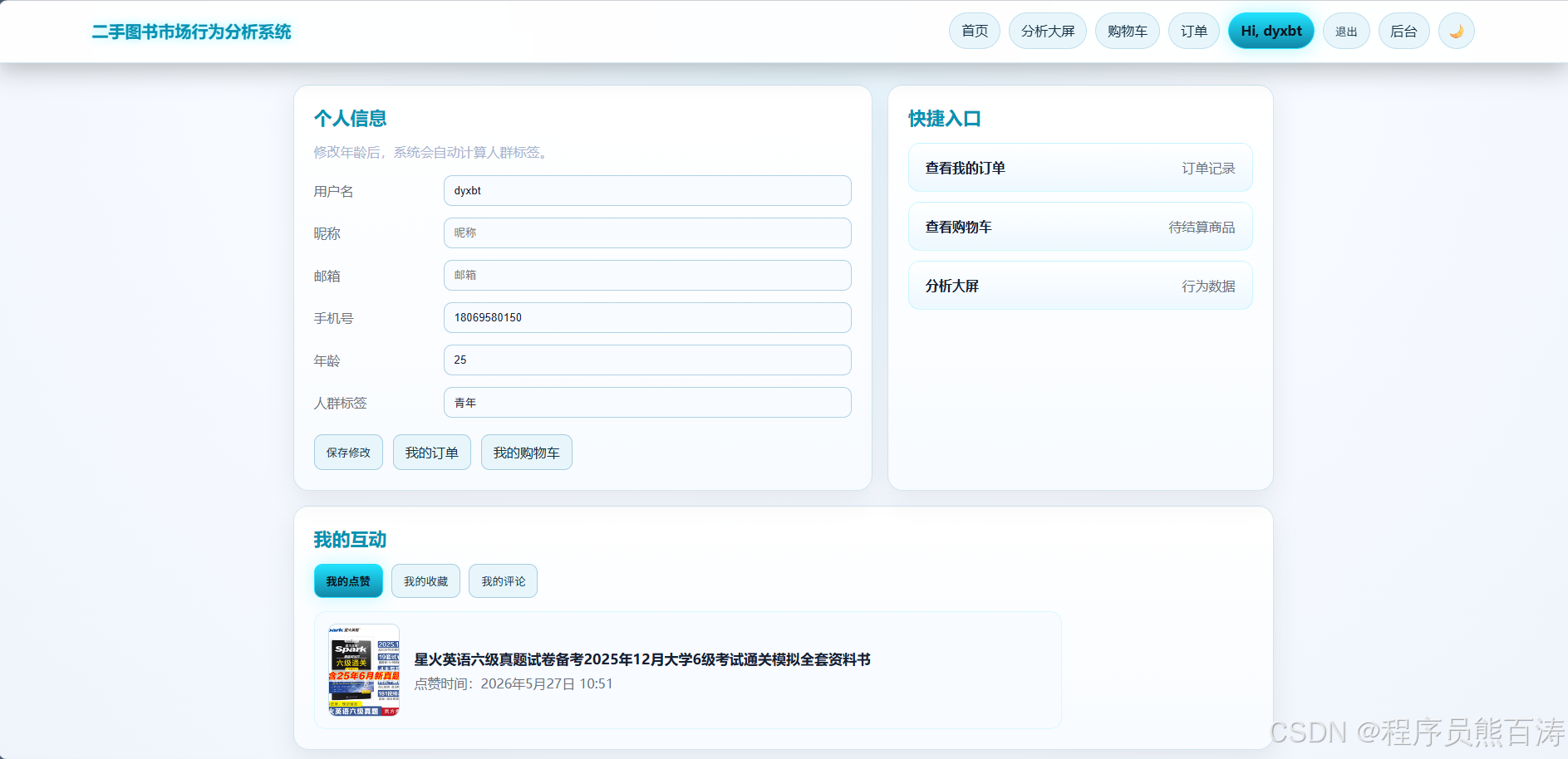
1.1 用户模型设计
系统采用自定义用户模型 CustomUser,支持年龄自动生成人群标签:
python
# books/models.py
class CustomUser(models.Model):
    username = models.CharField(max_length=150, unique=True, verbose_name="用户名")
    first_name = models.CharField(max_length=150, blank=True, verbose_name="昵称")
    email = models.EmailField(blank=True, verbose_name="邮箱")
    age = models.PositiveIntegerField(null=True, blank=True, verbose_name="年龄")
    group_tag = models.CharField(max_length=20, blank=True, verbose_name="人群标签")
    phone = models.CharField(max_length=15, blank=True, verbose_name="手机号")
    is_active = models.BooleanField(default=True, verbose_name="有效状态")
    date_joined = models.DateTimeField(auto_now_add=True, verbose_name="注册时间")
    last_login = models.DateTimeField(null=True, blank=True, verbose_name="最后登录时间")

    def save(self, *args, **kwargs):
        # 年龄自动生成人群标签
        if self.age is None:
            self.group_tag = ""
        elif self.age < 18:
            self.group_tag = "未成年"
        elif self.age <= 40:
            self.group_tag = "青年"
        else:
            self.group_tag = "中老年"
        super().save(*args, **kwargs)
设计亮点 :通过重写 save() 方法实现年龄到人群标签的自动映射,便于后续用户画像分析。
1.2 前台独立登录态
系统实现了前台用户登录态与 Django Admin 登录态的完全分离,避免同浏览器登录冲突:
python
# books/front_auth.py
FRONT_AUTH_COOKIE = "front_auth"
FRONT_AUTH_SALT = "front-auth"
FRONT_AUTH_MAX_AGE = 60 * 60 * 24 * 7  # 7天

def get_front_user(request):
    """获取前台登录用户"""
    cached = getattr(request, "_front_user_cache", None)
    if cached is not None or hasattr(request, "_front_user_cache"):
        return cached

    token = request.COOKIES.get(FRONT_AUTH_COOKIE)
    if not token:
        request._front_user_cache = None
        return None

    try:
        payload = signing.loads(token, salt=FRONT_AUTH_SALT, max_age=FRONT_AUTH_MAX_AGE)
        user_id = payload.get("user_id")
    except Exception:
        request._front_user_cache = None
        return None

    user = CustomUser.objects.filter(id=user_id, is_active=True).first()
    request._front_user_cache = user
    return user
1.3 登录接口实现
python
# books/views.py
@csrf_exempt
@require_POST
def login_api(request):
    payload = _json_body(request)
    username = payload.get("username", "").strip()
    password = payload.get("password", "")

    user = CustomUser.objects.filter(username=username, is_active=True).first()
    if user is None or not user.check_password(password):
        return JsonResponse({"error": "用户名或密码错误"}, status=400)

    user.last_login = timezone.now()
    user.save(update_fields=["last_login"])

    response = JsonResponse({"message": "登录成功", "next": "/"})
    set_front_auth_cookie(response, user)
    return response
1.4 注册接口实现
python
# books/views.py
@csrf_exempt
@require_POST
def register_api(request):
    payload = _json_body(request)
    username = payload.get("username", "").strip()
    password = payload.get("password", "")
    age = payload.get("age")
    phone = payload.get("phone", "").strip()

    if not username or not password:
        return JsonResponse({"error": "用户名和密码不能为空"}, status=400)

    if CustomUser.objects.filter(username=username).exists():
        return JsonResponse({"error": "用户名已存在"}, status=400)

    # 年龄验证
    if age:
        try:
            age = int(age)
            if age < 0 or age > 120:
                return JsonResponse({"error": "年龄范围应为 0-120"}, status=400)
        except (TypeError, ValueError):
            return JsonResponse({"error": "年龄必须是数字"}, status=400)

    user = CustomUser.objects.create_user(username=username, password=password, age=age, phone=phone)
    return JsonResponse({"message": "注册成功", "user_id": user.id})
1.5 登录装饰器
python
# books/front_auth.py
def front_login_required(view_func):
    @wraps(view_func)
    def wrapper(request, *args, **kwargs):
        if get_front_user(request) is None:
            return redirect(f"/login/?next={request.get_full_path()}")
        return view_func(request, *args, **kwargs)
    return wrapper
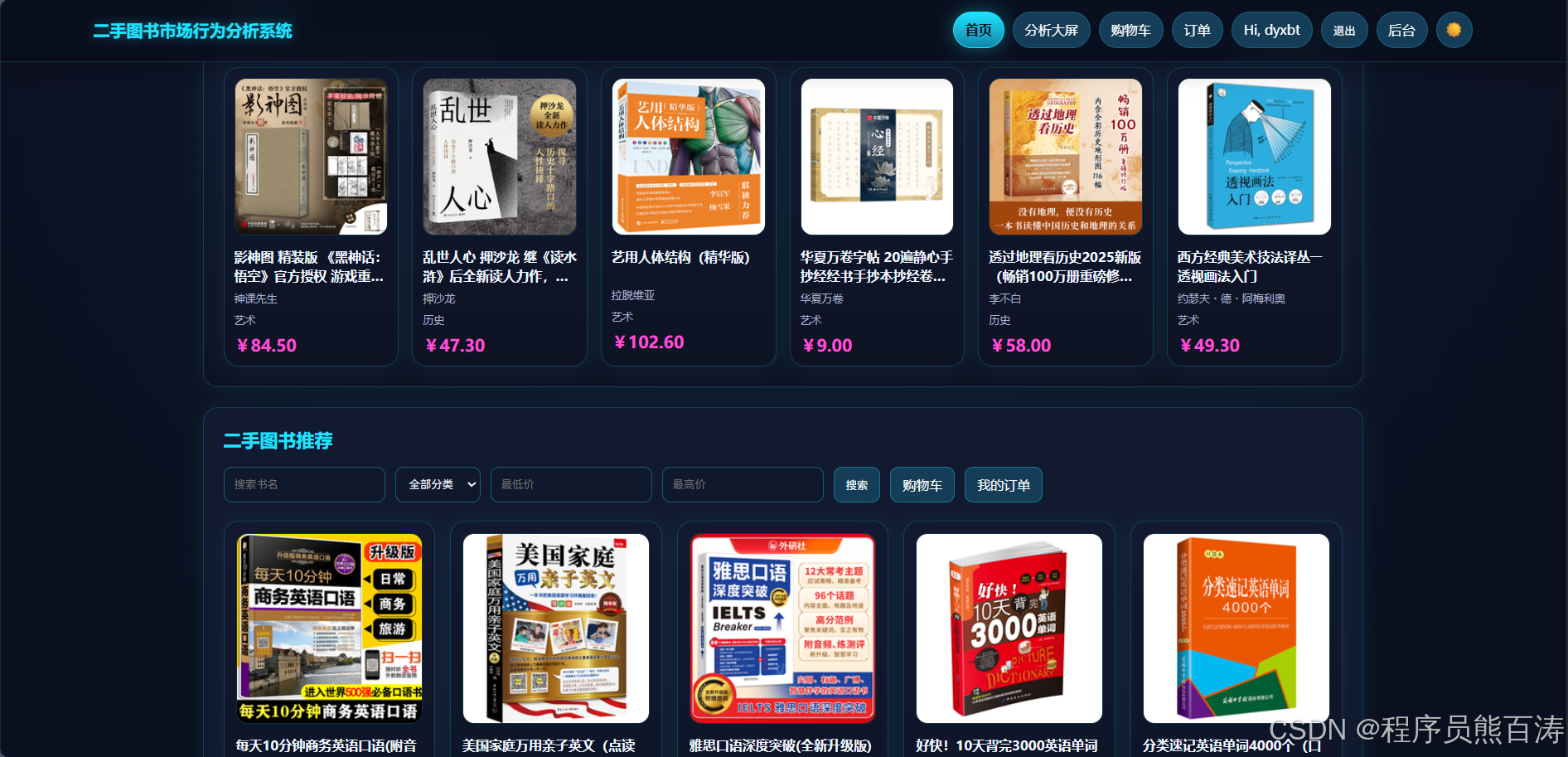
2. 🏠首页模块
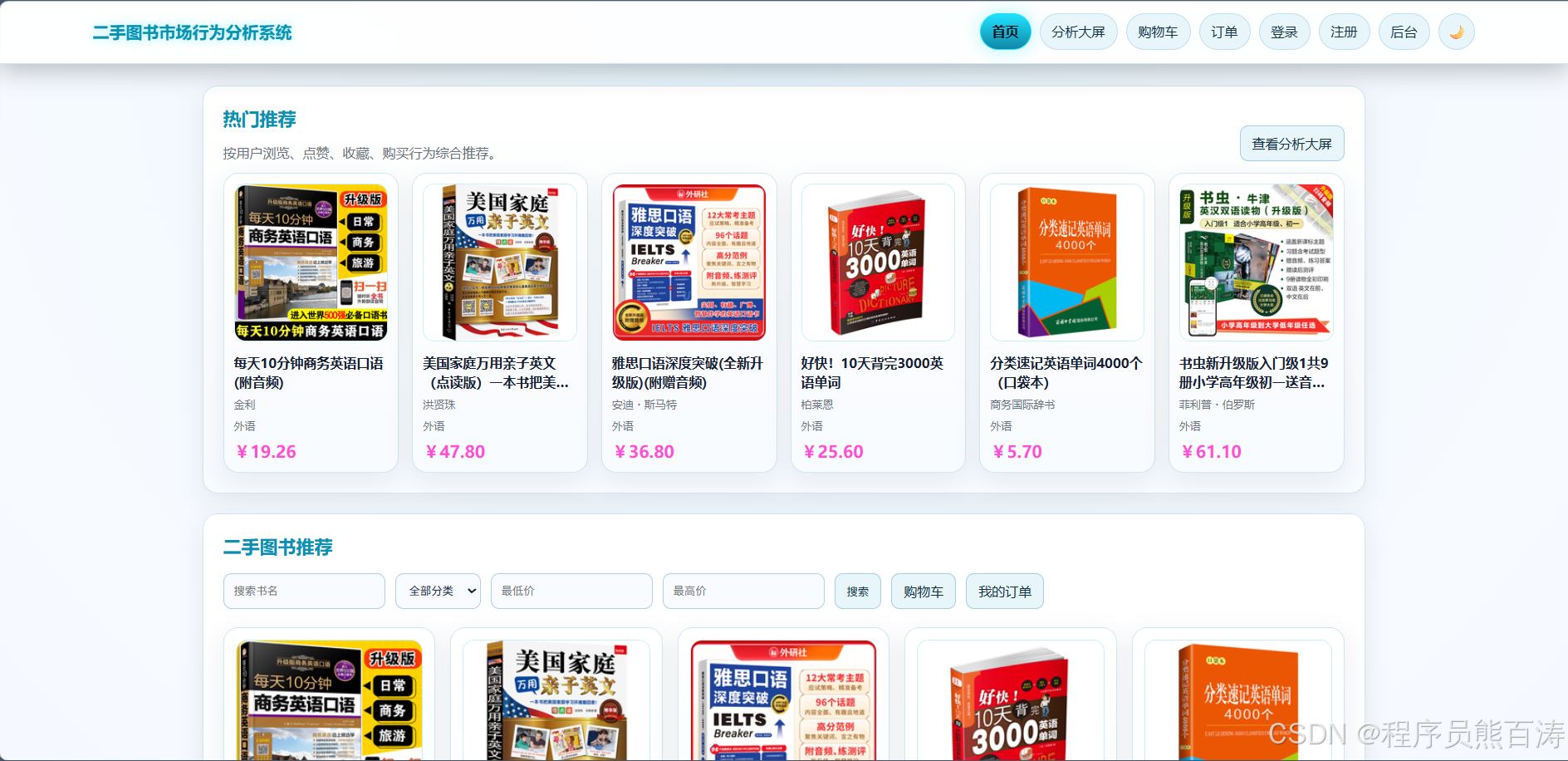
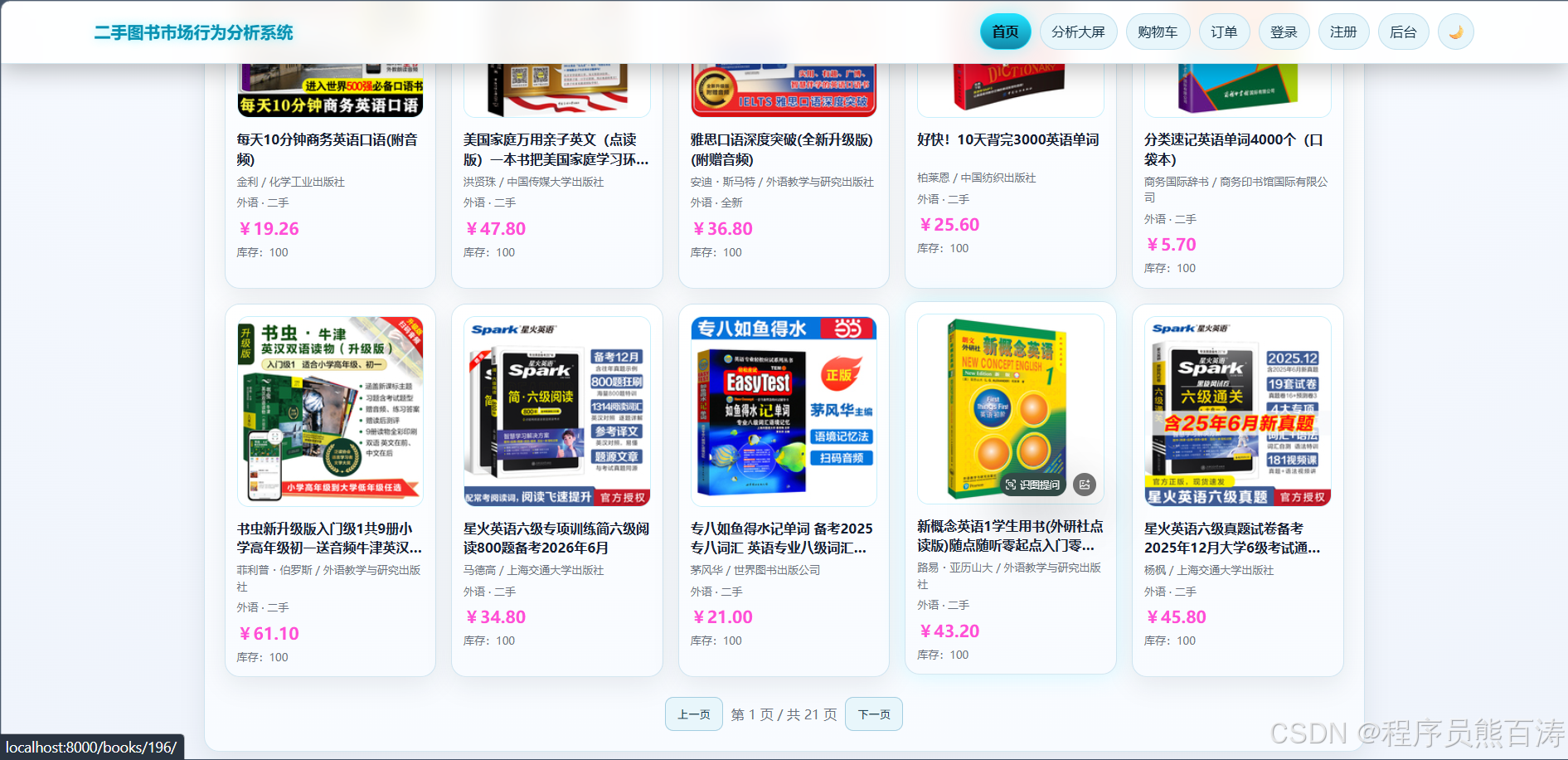
首页是系统的核心入口,实现了丰富的图书展示和交互功能:
2.1 图书搜索筛选
python
# books/views.py
def index(request):
    keyword = request.GET.get("keyword", "").strip()
    category_id = request.GET.get("category", "").strip()
    min_price = request.GET.get("min_price", "").strip()
    max_price = request.GET.get("max_price", "").strip()
    page = int(request.GET.get("page", 1))
    page_size = 10

    # 查询构建
    qs = Book.objects.filter(is_active=True).select_related("category").order_by("-created_at")

    # 关键词搜索
    if keyword:
        qs = qs.filter(title__icontains=keyword)

    # 分类筛选
    if category_id:
        qs = qs.filter(category_id=category_id)

    # 价格范围筛选
    if min_price:
        qs = qs.filter(secondhand_price__gte=min_price)
    if max_price:
        qs = qs.filter(secondhand_price__lte=max_price)

    # 分页处理
    paginator = Paginator(qs, page_size)
    page_obj = paginator.get_page(page)

    return render(request, "books/index.html", {
        "books": page_obj.object_list,
        "page_obj": page_obj,
        "categories": Category.objects.order_by("name"),
        # ... 其他上下文
    })
2.2 热门图书推荐
通过行为日志计算热度评分:
python
# books/views.py
def index(request):
    # ... 搜索逻辑

    # 热门图书:根据行为计算热度分数
    hot_books = (
        Book.objects.filter(is_active=True)
        .annotate(hot_score=Count("behaviorlog"))
        .order_by("-hot_score", "-created_at")[:6]
    )

    return render(request, "books/index.html", {
        "hot_books": hot_books,
        # ...
    })
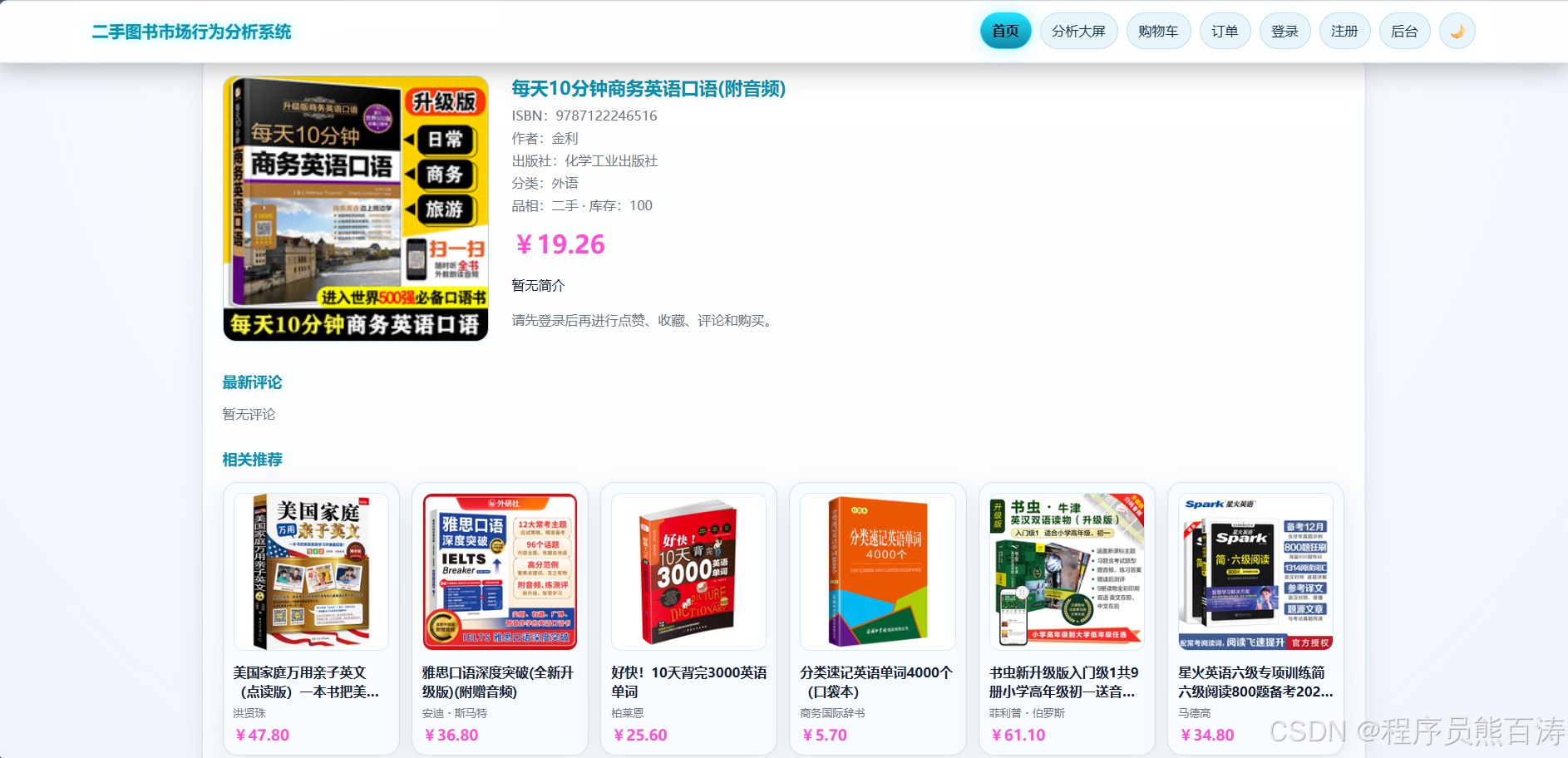
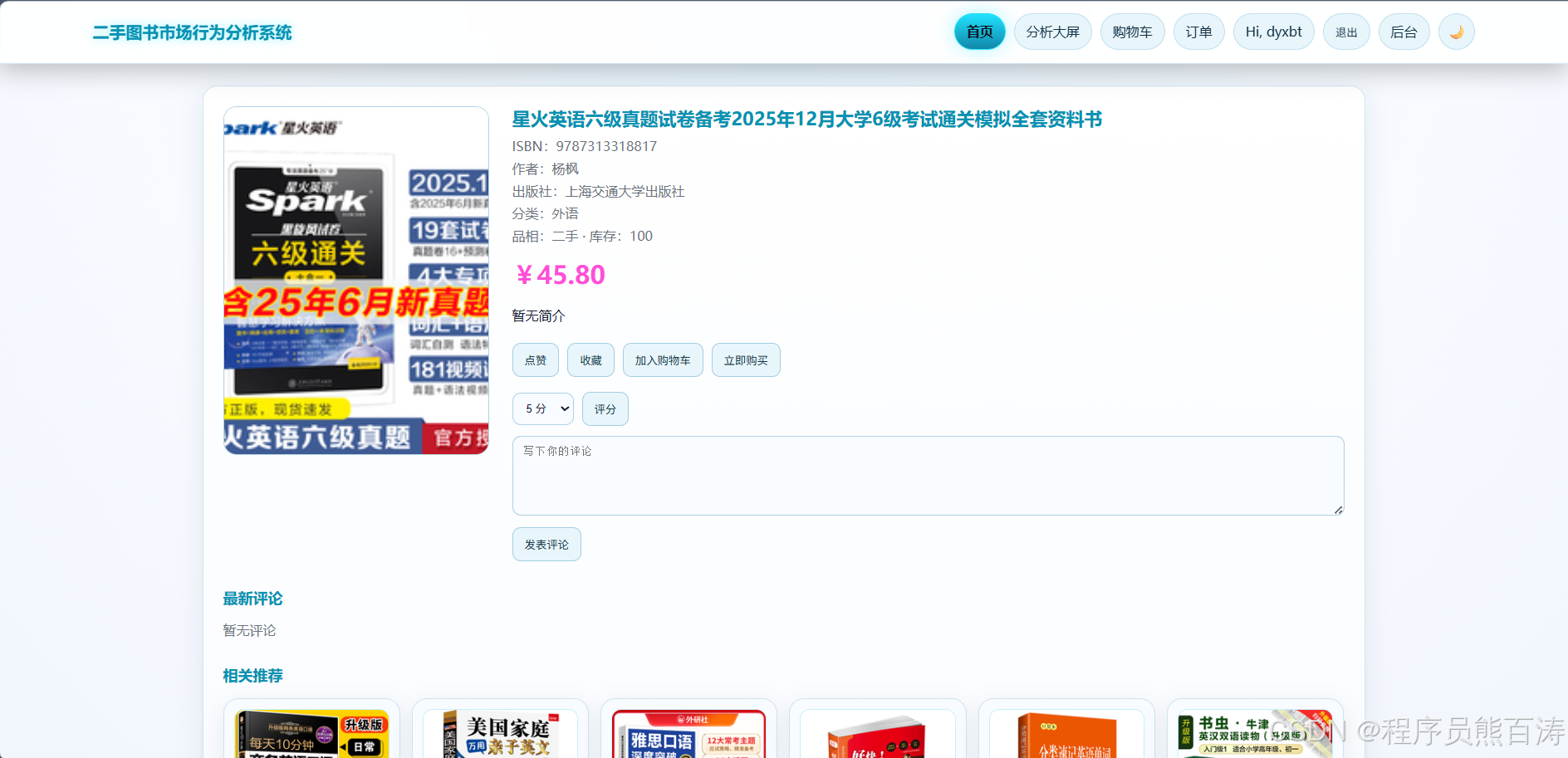
2.3 图书详情页
python
# books/views.py
def book_detail(request, book_id):
    book = get_object_or_404(Book.objects.select_related("category"), id=book_id, is_active=True)
    front_user = get_front_user(request)

    # 记录浏览行为
    if front_user:
        BehaviorService.log(front_user, book, "view")
        liked = BehaviorLog.objects.filter(user=front_user, book=book, action_type="like").exists()
        collected = BehaviorLog.objects.filter(user=front_user, book=book, action_type="collect").exists()

    # 获取评论
    comments = (
        book.behaviorlog_set.filter(action_type="comment")
        .select_related("user")
        .order_by("-created_at")[:20]
    )

    # 相关推荐
    related_books = (
        Book.objects.filter(is_active=True, category=book.category)
        .exclude(id=book.id)
        .order_by("-created_at")[:6]
    )

    return render(request, "books/detail.html", {
        "book": book,
        "comments": comments,
        "related_books": related_books,
        "liked": liked,
        "collected": collected,
    })
2.4 用户行为记录(点赞/收藏)
python
# books/views.py
@csrf_exempt
@require_POST
@front_login_required
def behavior_api(request, book_id):
    book = get_object_or_404(Book, id=book_id, is_active=True)
    user = get_front_user(request)
    payload = _json_body(request)
    action_type = payload.get("action_type")

    allowed = {"view", "like", "collect", "comment", "rate"}
    if action_type not in allowed:
        return JsonResponse({"error": "不支持的行为类型"}, status=400)

    # 点赞/收藏支持取消操作
    if action_type in {"like", "collect"}:
        existing = BehaviorLog.objects.filter(user=user, book=book, action_type=action_type)
        if existing.exists():
            existing.delete()
            return JsonResponse({
                "message": "已取消点赞" if action_type == "like" else "已取消收藏",
                "active": False,
            })

        log = BehaviorService.log(user=user, book=book, action_type=action_type)
        return JsonResponse({
            "message": "已点赞" if action_type == "like" else "已收藏",
            "active": True,
        })

    # 评论/评分
    log = BehaviorService.log(
        user=user,
        book=book,
        action_type=action_type,
        rating_score=payload.get("rating_score"),
        comment_text=payload.get("comment_text"),
    )
    return JsonResponse({"id": log.id, "message": "记录成功"})
2.5 立即购买
python
# books/views.py
@csrf_exempt
@require_POST
@front_login_required
def create_order_api(request, book_id):
    try:
        order = OrderService.create_order(get_front_user(request), book_id)
    except ValueError as exc:
        return JsonResponse({"error": str(exc)}, status=400)

    return JsonResponse({
        "order_number": order.order_number,
        "amount": str(order.amount),
        "status": order.status,
        "message": "下单成功,订单已支付",
    })
3. 📊分析大屏模块
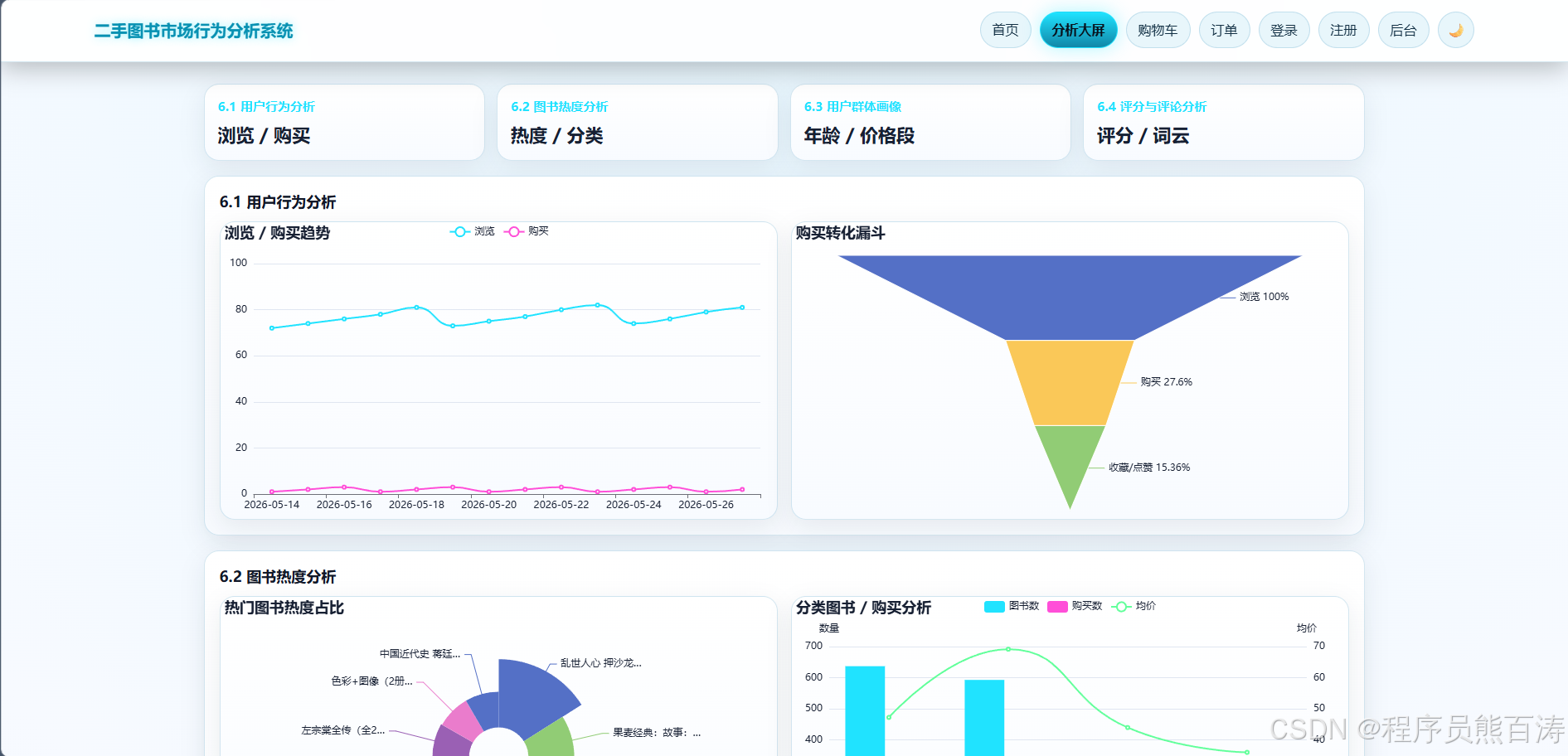
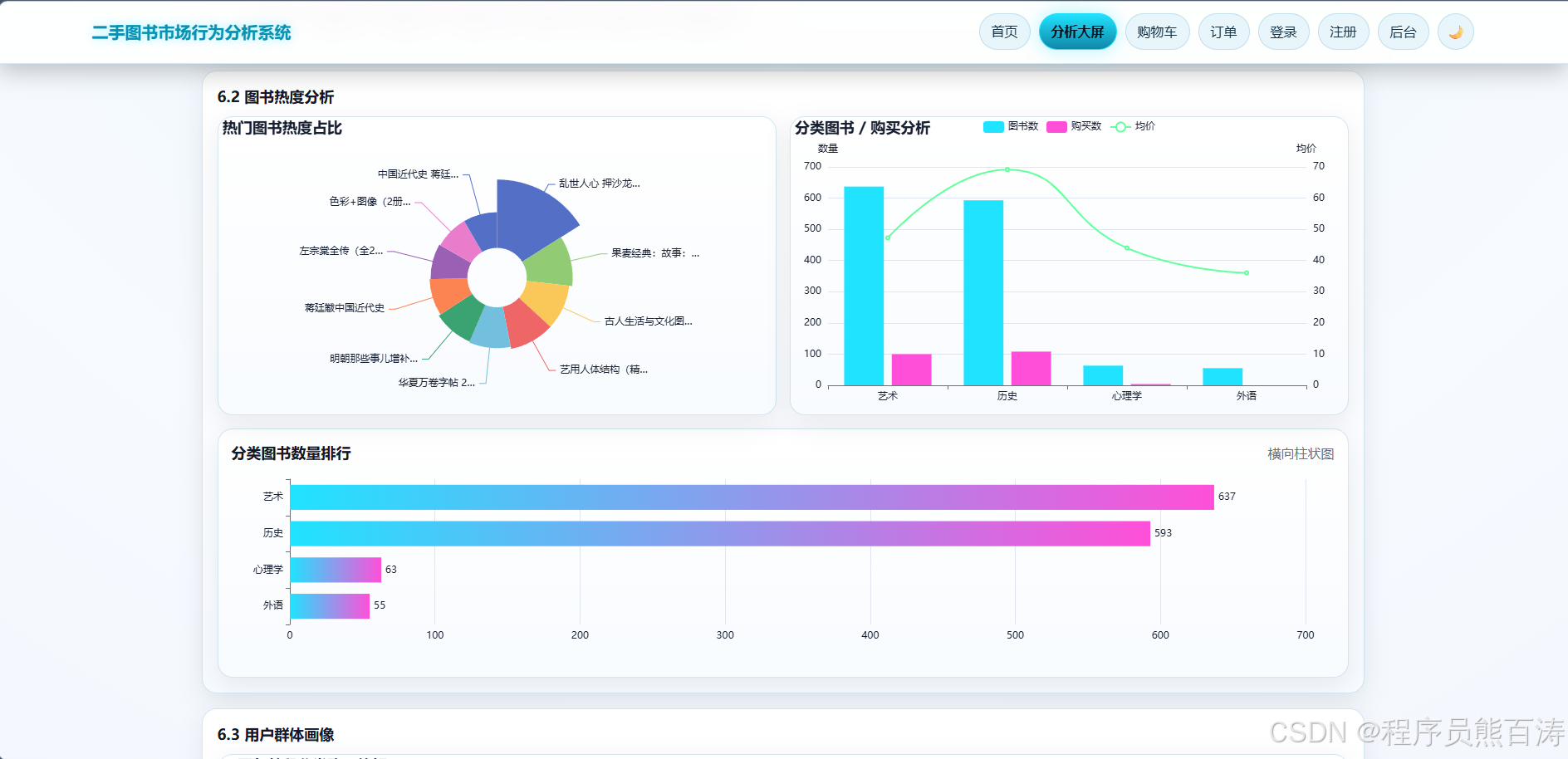
分析大屏是系统的核心数据展示模块,提供多维度的数据可视化分析。
3.1 系统概览
python
# books/services.py
class MarketAnalysisService:
    @staticmethod
    def overview():
        return {
            "book_count": Book.objects.count(),
            "order_count": Order.objects.count(),
            "user_count": BehaviorLog.objects.values("user_id").distinct().count(),
            "behavior_count": BehaviorLog.objects.count(),
        }
3.2 行为趋势分析
python
# books/services.py
@staticmethod
def behavior_trend(days=14):
    days = max(1, int(days or 14))

    rows = (
        BehaviorLog.objects.filter(
            action_type__in=["view", "purchase"],
            created_at__date__gte=start,
            created_at__date__lte=end,
        )
        .annotate(day=TruncDate("created_at"))
        .values("day", "action_type")
        .annotate(value=Count("id"))
        .order_by("day")
    )

    # 构建日期映射,确保每天都有数据
    day_map = {}
    for i in range(days):
        day = start + timedelta(days=i)
        day_map[str(day)] = {"day": str(day), "view": 0, "purchase": 0}

    for row in rows:
        day = str(row["day"])
        if day in day_map and row["action_type"] in {"view", "purchase"}:
            day_map[day][row["action_type"]] = row["value"]

    return list(day_map.values())
3.3 购买转化漏斗
python
# books/services.py
@staticmethod
def funnel():
    view_count = BehaviorLog.objects.filter(action_type="view").count()
    interact_count = BehaviorLog.objects.filter(action_type__in=["collect", "like"]).count()
    purchase_count = BehaviorLog.objects.filter(action_type="purchase").count()

    def rate(value):
        return round(value / view_count * 100, 2) if view_count else 0

    return [
        {"name": "浏览", "value": view_count, "rate": 100 if view_count else 0},
        {"name": "收藏/点赞", "value": interact_count, "rate": rate(interact_count)},
        {"name": "购买", "value": purchase_count, "rate": rate(purchase_count)},
    ]
3.4 热门图书排行
python
# books/services.py
@staticmethod
def hot_books(limit=10):
    return list(
        Book.objects.annotate(
            hot_score=Sum(
                Case(
                    When(behaviorlog__action_type="view", then=Value(1)),
                    When(behaviorlog__action_type="like", then=Value(2)),
                    When(behaviorlog__action_type="collect", then=Value(2)),
                    When(behaviorlog__action_type="purchase", then=Value(5)),
                    default=Value(0),
                    output_field=IntegerField(),
                )
            ),
            view_count=Count("behaviorlog", filter=Q(behaviorlog__action_type="view")),
            like_count=Count("behaviorlog", filter=Q(behaviorlog__action_type="like")),
            collect_count=Count("behaviorlog", filter=Q(behaviorlog__action_type="collect")),
            purchase_count=Count("behaviorlog", filter=Q(behaviorlog__action_type="purchase")),
        )
        .filter(hot_score__gt=0)
        .order_by("-hot_score")[:limit]
        .values("id", "title", "author", "hot_score", "view_count", "like_count", "collect_count", "purchase_count")
    )
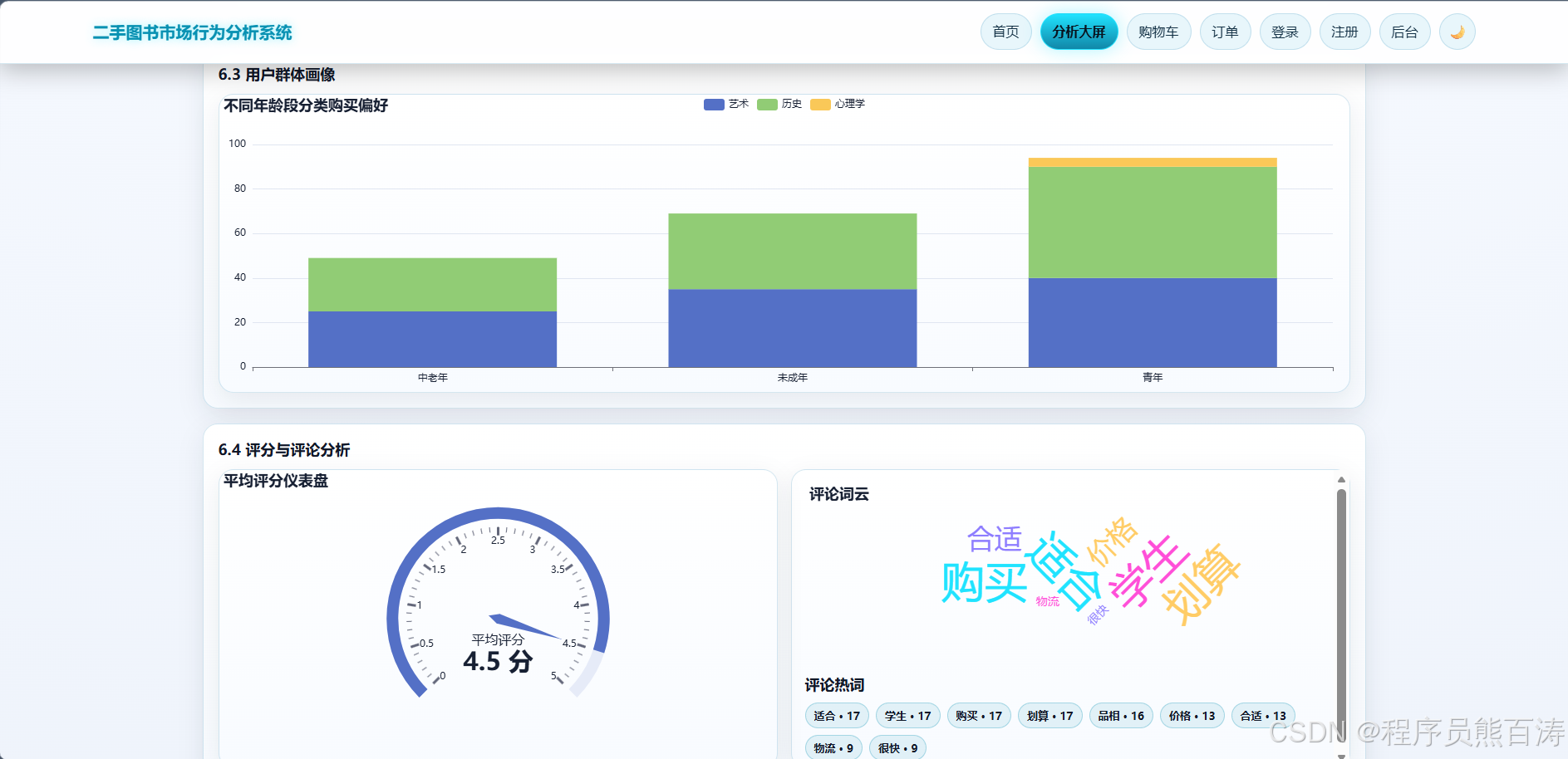
3.5 用户群体画像
python
# books/services.py
@staticmethod
def group_profile():
    rows = (
        BehaviorLog.objects.filter(action_type="purchase", book__category__isnull=False)
        .values("user__group_tag", "book__category__name")
        .annotate(value=Count("id"))
        .order_by("user__group_tag", "-value")
    )
    return [
        {
            "group_tag": (row["user__group_tag"] or "未知").strip() or "未知",
            "segment": row["book__category__name"] or "未分类",
            "value": row["value"],
        }
        for row in rows
    ]
3.6 评分与评论分析
python
# books/services.py
@staticmethod
def rating_analysis():
    rows = (
        Book.objects.values("title")
        .annotate(
            avg_rating=Avg(
                "behaviorlog__rating_score",
                filter=Q(behaviorlog__action_type="rate"),
                output_field=FloatField(),
            ),
            rating_count=Count("behaviorlog", filter=Q(behaviorlog__action_type="rate")),
        )
        .filter(rating_count__gt=0)
        .order_by("-avg_rating", "-rating_count")[:10]
    )
    return [
        {
            "name": row["title"] or "未命名图书",
            "value": round(float(row["avg_rating"] or 0), 2),
            "count": row["rating_count"],
        }
        for row in rows
    ]
3.7 评论词云分析
python
# books/services.py
@staticmethod
def comment_wordcloud():
    stop_words = {"的", "了", "和", "是", "我", "你", "他", "也", "很", "都", "就", "还", ...}

    texts = BehaviorLog.objects.filter(action_type="comment").values_list("comment_text", flat=True)
    counter = {}

    for text in texts:
        clean = re.sub(r"[^\u4e00-\u9fa5A-Za-z0-9]+", " ", text)
        for word in jieba.lcut(clean):
            word = word.strip()
            if len(word) < 2 or word in stop_words or word.isdigit():
                continue
            counter[word] = counter.get(word, 0) + 1

    return [
        {"name": word, "value": count}
        for word, count in sorted(counter.items(), key=lambda x: x[1], reverse=True)[:80]
    ]
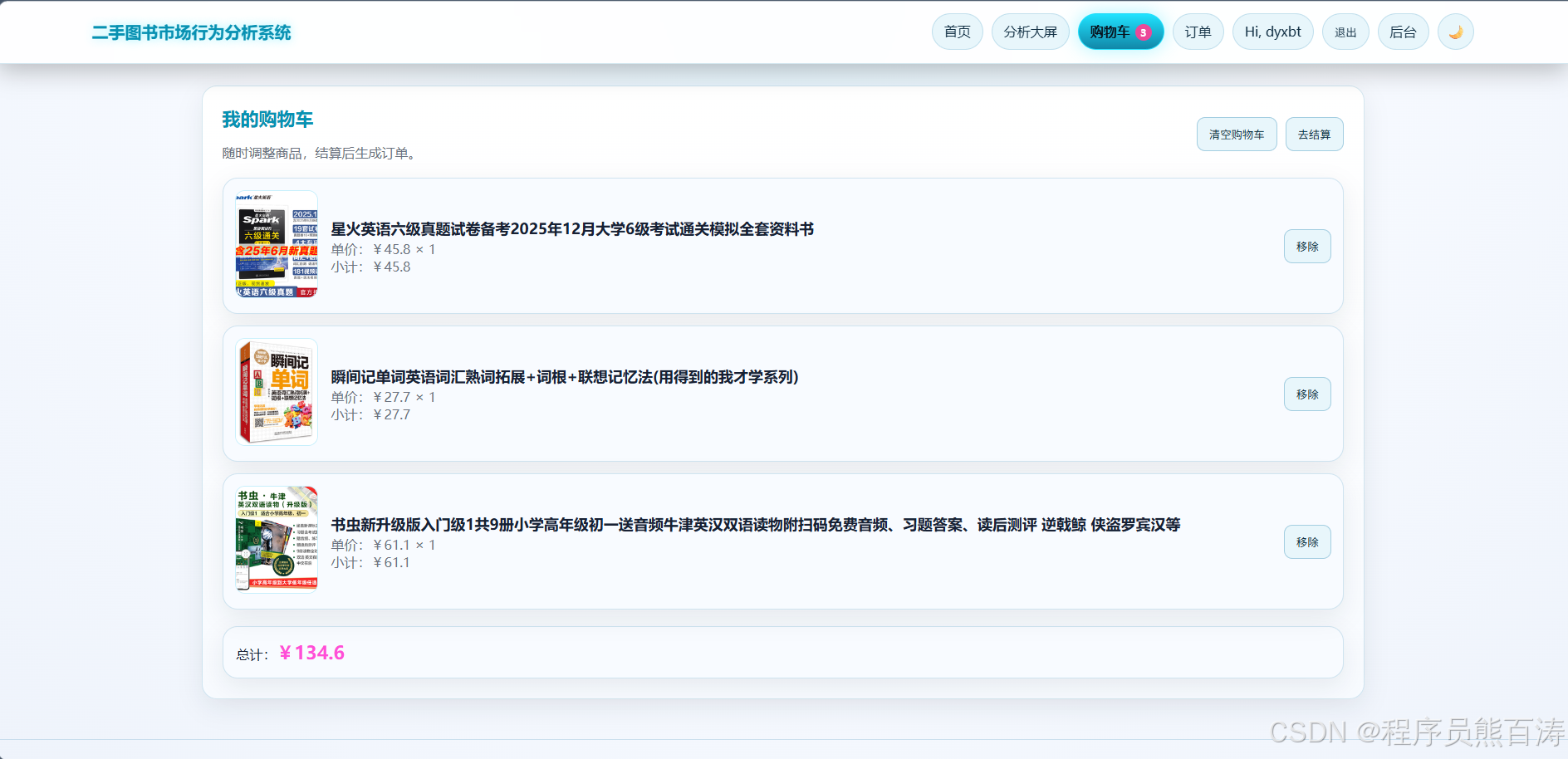
4. 🛒购物车模块
4.1 购物车数据存储
购物车采用 Session 存储,无需数据库表:
python
# books/views.py
def _get_cart(request):
    """获取购物车数据"""
    return request.session.get("cart", {})

def _save_cart(request, cart):
    """保存购物车数据"""
    request.session["cart"] = cart
    request.session.modified = True

def _get_cart_items(request):
    """获取购物车商品详情"""
    cart = _get_cart(request)
    ids = [int(book_id) for book_id in cart.keys()] if cart else []
    books = Book.objects.filter(id__in=ids).select_related("category")
    book_map = {book.id: book for book in books}

    items = []
    for book_id_str, quantity in cart.items():
        book = book_map.get(int(book_id_str))
        if not book:
            continue
        items.append({
            "id": book.id,
            "title": book.title,
            "price": float(book.secondhand_price),
            "quantity": quantity,
            "subtotal": float(book.secondhand_price) * quantity,
            "cover_image": book.cover_image,
        })
    return items
4.2 添加商品到购物车
python
# books/views.py
@csrf_exempt
@require_POST
def cart_add_api(request, book_id):
    book = get_object_or_404(Book, id=book_id, is_active=True)
    cart = _get_cart(request)
    key = str(book.id)
    cart[key] = cart.get(key, 0) + 1
    _save_cart(request, cart)
    return JsonResponse({"message": "已加入购物车", "count": sum(cart.values())})
4.3 购物车结算
python
# books/views.py
def cart_checkout(request):
    cart_items = _get_cart_items(request)
    front_user = get_front_user(request)

    if front_user is None:
        return redirect(f"/login/?next=/cart/checkout/")

    # 批量创建订单
    created_orders = []
    for item in cart_items:
        order = OrderService.create_order(front_user, item["id"])
        created_orders.append(order)

    # 清空购物车
    _save_cart(request, {})
    return redirect("/orders/")
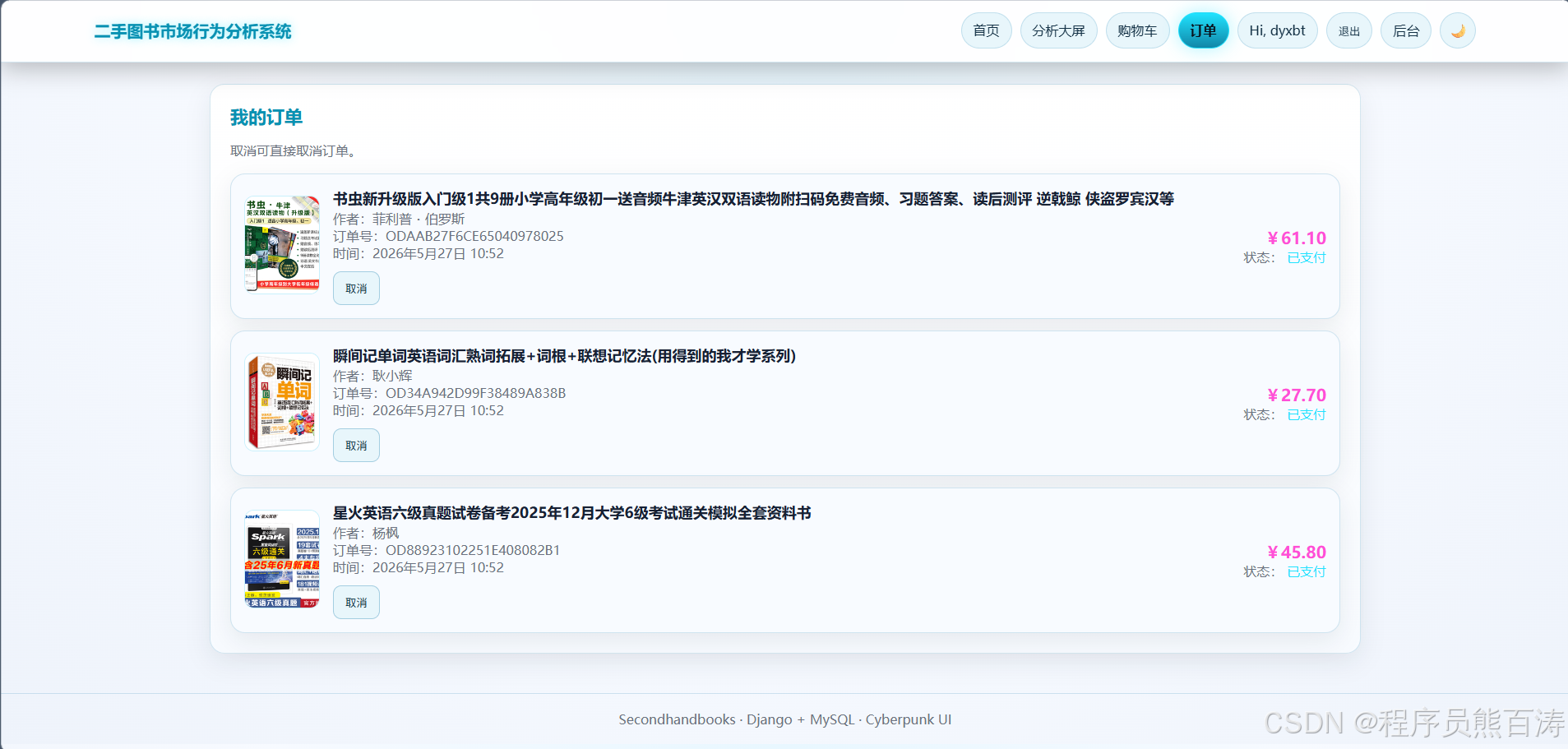
5. 📦订单模块
5.1 订单模型设计
python
# books/models.py
class Order(models.Model):
    STATUS_CHOICES = (
        ("pending", "待支付"),
        ("paid", "已支付"),
        ("completed", "已完成"),
        ("cancelled", "已取消"),
    )

    user = models.ForeignKey(CustomUser, on_delete=models.CASCADE, related_name="orders")
    book = models.ForeignKey(Book, on_delete=models.PROTECT, related_name="orders")
    order_number = models.CharField(max_length=50, unique=True, verbose_name="订单号")
    amount = models.DecimalField(max_digits=10, decimal_places=2, verbose_name="交易金额")
    status = models.CharField(max_length=20, choices=STATUS_CHOICES, default="pending")
    created_at = models.DateTimeField(auto_now_add=True)
5.2 订单服务层
python
# books/services.py
class OrderService:
    @staticmethod
    @transaction.atomic
    def create_order(user, book_id):
        """创建订单,扣减库存"""
        book = Book.objects.select_for_update().get(id=book_id, is_active=True)

        if book.stock <= 0:
            raise ValueError("库存不足")

        # 扣减库存
        book.stock = F("stock") - 1
        book.save(update_fields=["stock"])
        book.refresh_from_db(fields=["stock"])

        # 创建订单
        order = Order.objects.create(
            user=user,
            book=book,
            order_number=OrderService.generate_order_number(),
            amount=book.secondhand_price,
            status="paid",
        )

        # 记录购买行为
        BehaviorService.log(user=user, book=book, action_type="purchase")
        return order

    @staticmethod
    @transaction.atomic
    def cancel_order(user, order_number):
        """取消订单,恢复库存"""
        order = Order.objects.select_for_update().select_related("book").get(
            order_number=order_number, user=user
        )

        if order.status not in {"pending", "paid"}:
            raise ValueError("订单状态不允许取消")

        # 恢复库存
        if order.status in {"pending", "paid"}:
            Book.objects.filter(id=order.book_id).update(stock=F("stock") + 1)

        # 删除购买行为记录
        if order.status == "paid":
            latest_purchase = (
                BehaviorLog.objects.filter(user=user, book=order.book, action_type="purchase")
                .order_by("-created_at", "-id")
                .first()
            )
            if latest_purchase:
                latest_purchase.delete()

        order.status = "cancelled"
        order.save(update_fields=["status"])
        return order

    @staticmethod
    def generate_order_number():
        """生成唯一订单号"""
        return f"OD{uuid.uuid4().hex[:20].upper()}"
5.3 订单列表展示
python
# books/views.py
@require_GET
@front_login_required
def order_list(request):
    status = request.GET.get("status", "").strip()
    user = get_front_user(request)

    orders = user.orders.select_related("book", "book__category").order_by("-created_at")

    # 状态筛选
    if status in {"pending", "paid", "completed", "cancelled"}:
        orders = orders.filter(status=status)

    return render(request, "books/orders.html", {
        "orders": orders,
        "selected_status": status,
        "front_user": user,
    })
5.4 订单状态流转接口
python
# books/views.py
@csrf_exempt
@require_POST
@front_login_required
def pay_order_api(request, order_number):
    try:
        order = OrderService.pay_order(get_front_user(request), order_number)
    except ValueError as exc:
        return JsonResponse({"error": str(exc)}, status=400)
    return JsonResponse({"message": "支付成功", "status": order.status})

@csrf_exempt
@require_POST
@front_login_required
def complete_order_api(request, order_number):
    try:
        order = OrderService.complete_order(get_front_user(request), order_number)
    except ValueError as exc:
        return JsonResponse({"error": str(exc)}, status=400)
    return JsonResponse({"message": "订单已完成", "status": order.status})

@csrf_exempt
@require_POST
@front_login_required
def cancel_order_api(request, order_number):
    try:
        order = OrderService.cancel_order(get_front_user(request), order_number)
    except ValueError as exc:
        return JsonResponse({"error": str(exc)}, status=400)
    return JsonResponse({"message": "订单已取消", "status": order.status})
数据库表结构
核心表关系
CustomUser (用户)
    └── orders (订单)
    └── behaviorlog_set (行为日志)

Category (分类)
    └── books (图书)

Book (图书)
    └── orders (订单)
    └── behaviorlog_set (行为日志)

Order (订单)
    └── user (关联用户)
    └── book (关联图书)

BehaviorLog (行为日志)
    └── user (关联用户)
    └── book (关联图书)
表字段说明
| 表名 | 核心字段 | 说明 |
|---|---|---|
books_customuser |
username, age, group_tag, phone, email | 前台用户信息 |
books_category |
name | 图书分类 |
books_book |
title, isbn, author, publisher, category, secondhand_price, cover_image, condition, stock | 二手图书信息 |
books_order |
user, book, order_number, amount, status | 交易订单 |
books_behaviorlog |
user, book, action_type, rating_score, comment_text | 用户行为日志 |
部署与运行
环境要求
- Python 3.8+
- MySQL 8.0+
- pip 包管理工具
安装步骤
bash
# 1. 安装依赖
pip install -r requirements.txt

# 2. 配置数据库(修改 settings.py)
DATABASES = {
    'default': {
        'ENGINE': 'django.db.backends.mysql',
        'NAME': 'secondhandbooks',
        'USER': 'root',
        'PASSWORD': '123456',
        'HOST': '127.0.0.1',
        'PORT': '3306',
    }
}

# 3. 数据库迁移
python manage.py makemigrations
python manage.py migrate

# 4. 创建管理员账号
python manage.py createsuperuser

# 5. 启动服务
python manage.py runserver
爬虫数据导入
bash
# 爬取当当网二手图书并入库
python manage.py crawl_and_import_books --categories 历史 艺术 --pages 2

# 生成演示行为数据
python manage.py seed_demo_behavior --users 30 --logs 500 --views 300 --purchases 80
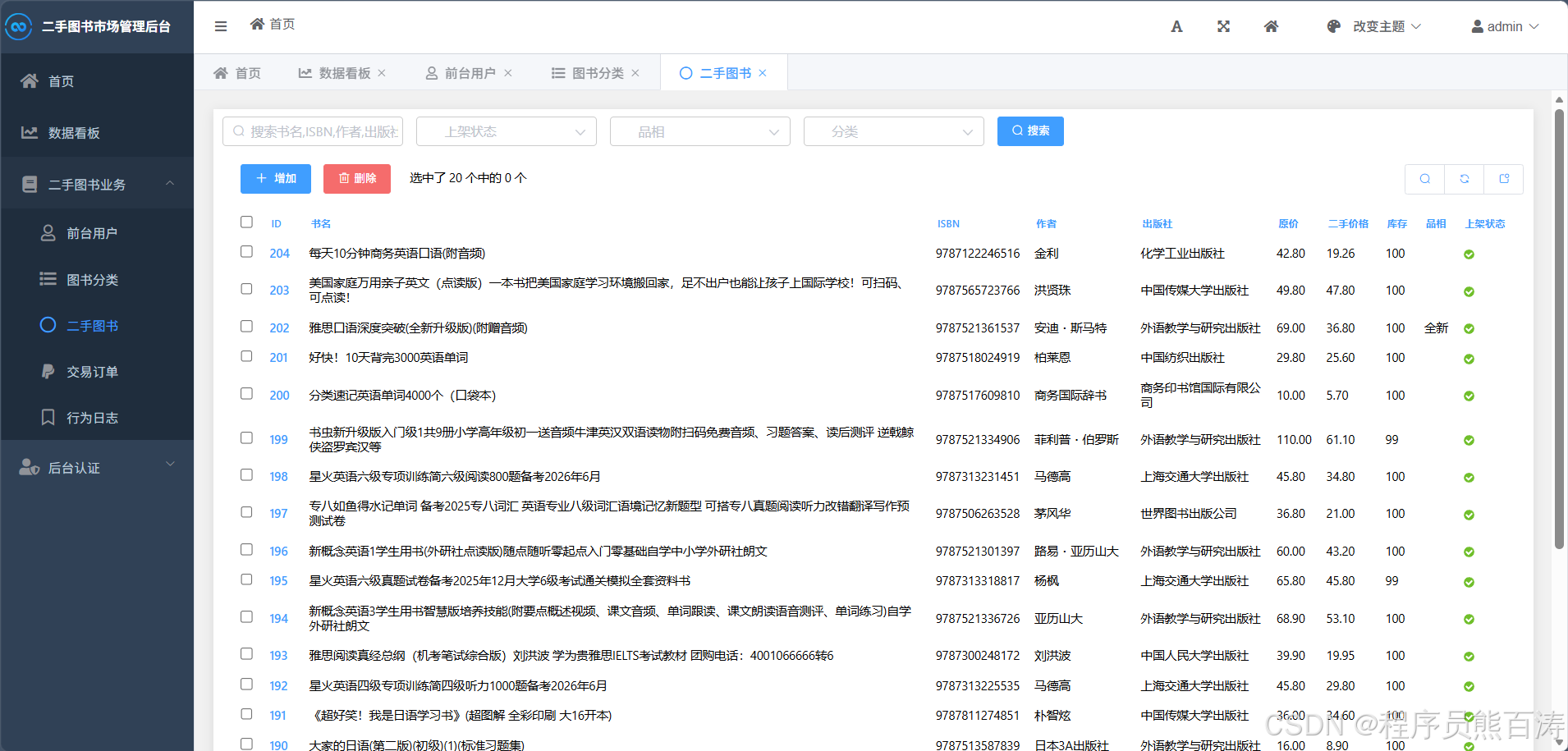
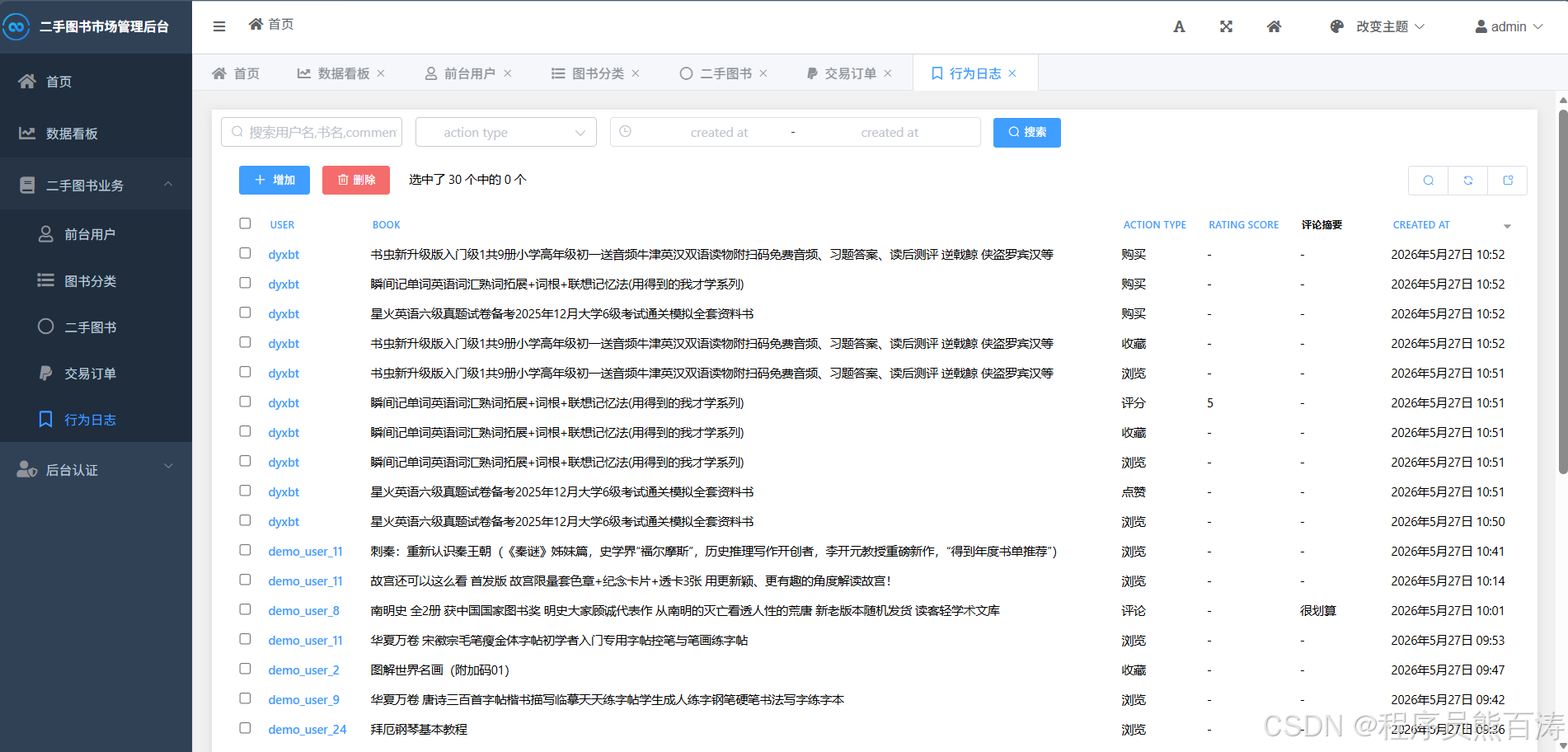
截图附上
总结
本项目实现了一个完整的二手图书交易与行为分析系统,主要特点包括:
-
完整的用户体系:独立的前台登录态、人群标签自动生成、个人资料管理
-
丰富的图书交互:搜索筛选、点赞收藏、评分评论、相关推荐
-
智能数据分析:多维度行为分析、热门图书排行、用户画像、词云分析
-
可靠的订单系统:完整的订单状态流转、库存扣减、事务处理
-
灵活的数据采集:支持爬虫自动采集、演示数据生成
系统架构清晰,代码结构合理,便于后续扩展和维护。