前言:OpenFeign 能做什么?
OpenFeign 是一种声明式、模板化的 HTTP 客户端。在 Spring Cloud 中使用 OpenFeign ,可以做到使用 HTTP 请求访问远程服务,就像调用本地方法一样的,开发者完全感知不到这是在调用远程方法,更感知不到在访问 HTTP 请求。
其用法就是编写一个接口,在接口上添加注解。如此就能轻而易举的调用远程服务。
有如此强大的东西,我们肯定不能放过使用的机会,就像有时你有特殊的要求必须拉别的女孩的手,而此时有个中间人能帮你实现这个愿望,你拉别的女孩子的手就像拉自己女朋友的手一样方便!
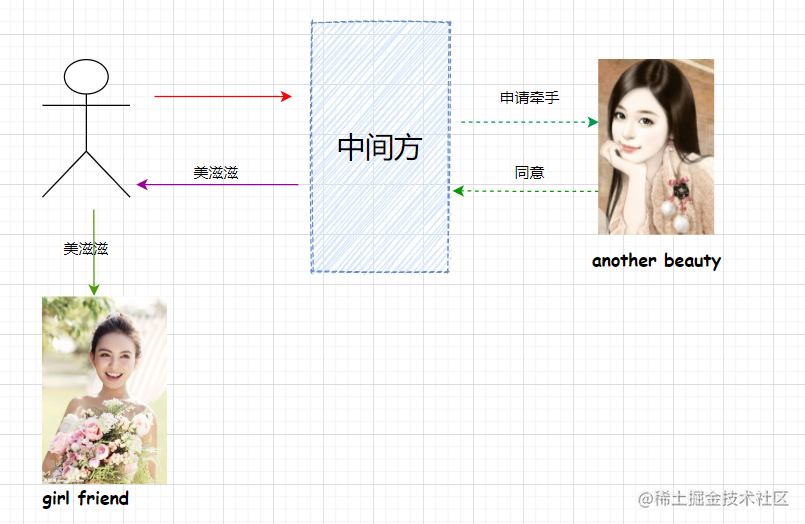
OpenFeign 在微服务中的作用就像中间方一样,当你需要调用另一个微服务的接口时,使用 OpenFeign 就像调用本服务的接口一样丝滑。
操练:欲善其事,先利其器
本章代码仓库:https://github.com/iweidujiang/spring-cloud-alibaba-lab
示例模块:
07-open-feign,包含feign-provider与open-feign-service。
既然是远程调用,那肯定至少得有 2 个微服务。本章在 07-open-feign 下新建 open-feign-service 子模块,调用同目录 feign-provider(注册到 Nacos 的服务名为 nacos-provider)。
open-feign-service 引入 spring-cloud-starter-loadbalancer 和 spring-cloud-starter-openfeign 两个依赖:
xml
<parent>
    <groupId>io.github.iweidujiang</groupId>
    <artifactId>07-open-feign</artifactId>
    <version>1.0.0</version>
</parent>

<artifactId>open-feign-service</artifactId>

<dependencies>
    <dependency>
        <groupId>org.springframework.cloud</groupId>
        <artifactId>spring-cloud-starter-loadbalancer</artifactId>
    </dependency>
    <dependency>
        <groupId>org.springframework.cloud</groupId>
        <artifactId>spring-cloud-starter-openfeign</artifactId>
    </dependency>
</dependencies>
07-open-feign/pom.xml 子模块定义:
xml
<modules>
    <module>feign-provider</module>
    <module>open-feign-service</module>
</modules>
如何在 open-feign-service 服务中调用 nacos-provider 服务的接口呢?前面第 2 章 nacos-consumer 使用了 LoadBalancer 和 RestTemplate 进行调用,现在我们在 open-feign-service 使用 OpenFeign 来进行调用。
创建 FeignClient 接口
要将 Feign 引入到到项目中:
1. 首先需要在启动类上添加 @EnableFeignClients 注解:
java
package io.github.iweidujiang.lab07.consumer;

import org.springframework.boot.SpringApplication;
import org.springframework.boot.autoconfigure.SpringBootApplication;
import org.springframework.cloud.client.discovery.EnableDiscoveryClient;
import org.springframework.cloud.openfeign.EnableFeignClients;

/**
 * OpenFeign 服务消费者启动类。
 *
 * @author 苏渡苇
 */
@SpringBootApplication
@EnableDiscoveryClient
@EnableFeignClients
public class OpenFeignServiceApplication {

    /**
     * 应用入口。
     *
     * @param args 启动参数
     */
    public static void main(String[] args) {
        SpringApplication.run(OpenFeignServiceApplication.class, args);
    }
}
2. 创建一个 Feign 客户端接口,添加 @FeignClient 注解(无需再加 @Service):
java
package io.github.iweidujiang.lab07.consumer.client;

import org.springframework.cloud.openfeign.FeignClient;
import org.springframework.web.bind.annotation.GetMapping;
import org.springframework.web.bind.annotation.PathVariable;

/**
 * 远程调用 nacos-provider 服务的 Feign 客户端。
 *
 * @author 苏渡苇
 */
@FeignClient(name = "nacos-provider")
public interface ProductService {

    /**
     * 调用远程服务 nacos-provider 的 /product/{id} 接口。
     *
     * @param id 商品 ID
     * @return 商品信息
     */
    @GetMapping("/product/{id}")
    String getProductById(@PathVariable("id") Long id);
}
关于 FeignClient 注解,需要知道:
name: 是一个任意的客户端名称,用于创 Spring Cloud LoadBalancer 客户端;url:url一般用于调试,可以手动指定@FeignClient调用的地址;configuration:Feigin 配置类,可自定义 Feign 的 Encode,Decode,LogLevel,Contract;fallback:定义 容错 的类,当远程调用的接口失败或者超时的时候,会调用对应接口的容错逻辑,fallback 执行的类必须实现@FeignClient标记的接口;fallbackFactory:工厂类,用于生成 fallback 类实例,通过此属性可以实现每个接口通用的容错逻辑,以达到减少重复的代码;path:定义当前 FeignClient 的统一前缀。
本案例只是用 name 属性指定调用的服务名称,容错属性后续可与 Sentinel 整合再说。
3. 控制层通过 FeignClient 远程调用
java
package io.github.iweidujiang.lab07.consumer.controller;

import io.github.iweidujiang.lab07.consumer.client.ProductService;
import org.springframework.web.bind.annotation.GetMapping;
import org.springframework.web.bind.annotation.PathVariable;
import org.springframework.web.bind.annotation.RestController;

/**
 * OpenFeign 调用测试接口。
 *
 * @author 苏渡苇
 */
@RestController
public class ProductController {

    private final ProductService productService;

    public ProductController(ProductService productService) {
        this.productService = productService;
    }

    /**
     * 通过 OpenFeign 远程查询商品。
     *
     * @param id 商品 ID
     * @return 远程调用结果
     */
    @GetMapping("/product/{id}")
    public String getProduct(@PathVariable("id") Long id) {
        return productService.getProductById(id);
    }
}
控制层引入被 @FeignClient 标记的接口 ProductService,直接调用 getProductById 方法即可远程调用 nacos-provider 的 /product/{id}。远程服务 feign-provider 的处理逻辑如下:
java
package io.github.iweidujiang.lab07.provider.controller;

import org.springframework.beans.factory.annotation.Value;
import org.springframework.web.bind.annotation.GetMapping;
import org.springframework.web.bind.annotation.PathVariable;
import org.springframework.web.bind.annotation.RequestParam;
import org.springframework.web.bind.annotation.RestController;

import java.util.HashMap;
import java.util.Map;
import java.util.concurrent.TimeUnit;

/**
 * 商品查询接口,供 OpenFeign 远程调用。
 *
 * @author 苏渡苇
 */
@RestController
public class ProductController {

    private static final Map<Long, String> PRODUCT_MAP = new HashMap<>();

    static {
        PRODUCT_MAP.put(1L, "香飘飘奶茶");
        PRODUCT_MAP.put(2L, "雀巢咖啡");
        PRODUCT_MAP.put(3L, "百事可乐");
    }

    @Value("${server.port}")
    private String serverPort;

    /**
     * 根据 ID 查询商品。
     *
     * @param id           商品 ID
     * @param delaySeconds 模拟慢调用延迟秒数
     * @return 商品信息
     */
    @GetMapping("/product/{id}")
    public String getProduct(@PathVariable Long id,
                             @RequestParam(value = "delay", defaultValue = "0") int delaySeconds) {
        if (delaySeconds > 0) {
            try {
                TimeUnit.SECONDS.sleep(delaySeconds);
            } catch (InterruptedException e) {
                Thread.currentThread().interrupt();
            }
        }
        return serverPort + ":" + PRODUCT_MAP.getOrDefault(id, "未知商品");
    }
}
验证
直接访问本服务:http://localhost:6061/product/3 ,可以看到调用了远程服务 nacos-provider 的接口:
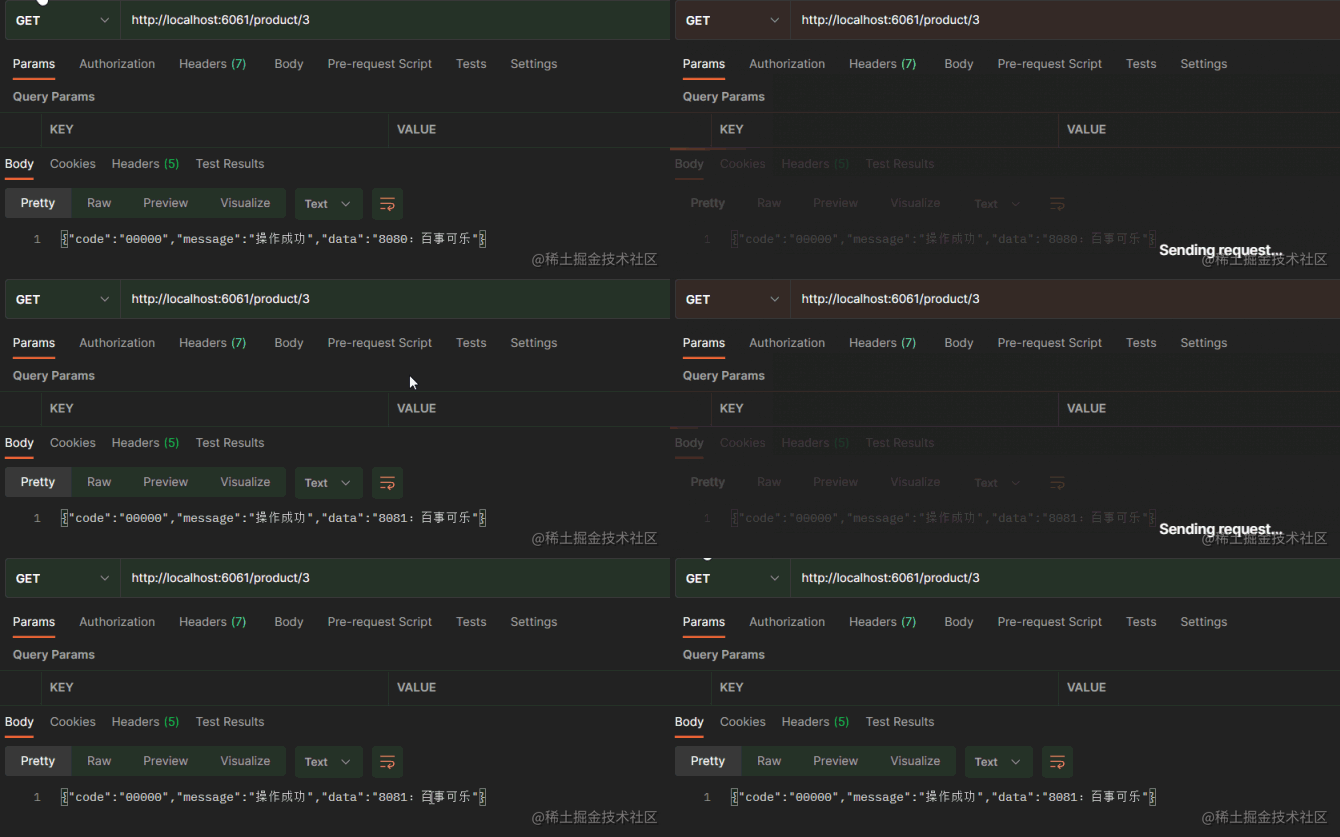
从结果看,还实现了访问服务的负载均衡!
优化:事无巨细,极致体验
日志
OpenFeign 提供了日志打印功能,我们可以通过配置来调整日志级别,从而了解 OpenFeign 中 Http 请求的细节。
通过设置日志,可以对 Feign 接口的调用情况进行监控和输出。
OpenFeign 的日志级别主要有以下几种:
-
NONE:默认的,不显示任何日志; -
BASIC:仅记录请求方法、URL、响应状态码及执行时间; -
HEADERS:除了 BASIC 中定义的信息之外,还有请求和响应的头信息; -
FULL:除了 HEADERS 中定义的信息之外,还有请求和响应的正文及元数据。
使用步骤:
1. 设置 Feign Logger Level(FeignConfig 配置类):
java
package io.github.iweidujiang.lab07.consumer.config;

import feign.Logger;
import org.springframework.context.annotation.Bean;
import org.springframework.context.annotation.Configuration;

/**
 * OpenFeign 全局配置。
 *
 * @author 苏渡苇
 */
@Configuration
public class FeignConfig {

    /**
     * 开启 Feign 详细日志。
     *
     * @return Feign 日志级别
     */
    @Bean
    Logger.Level feignLoggerLevel() {
        return Logger.Level.FULL;
    }
}
2. 在配置文件中给指定的 FeignClient 接口加指定的日志级别
yaml
logging:
  level:
    io.github.iweidujiang.lab07.consumer.client.ProductService: debug
使用效果:

请求的详细情况就以日志的形式打印出来了。
关于超时时间
spring-cloud-starter-openfeign 支持 spring-cloud-starter-loadbalancer 。我们在项目中已经添加了 spring-cloud-starter-loadbalancer依赖:
xml
<dependency>
    <groupId>org.springframework.cloud</groupId>
    <artifactId>spring-cloud-starter-loadbalancer</artifactId>
</dependency>
这样在 @FeignClient 注解中,当设定了 name = "nacos-provider" 客户端名称后,便默认使用了 Spring Cloud LoadBalancer 进行负载均衡访问 nacos-provider ,在老版本中,集成的是 Ribbon ,它默认的响应时间是 1 s,可以通过 ribbon.ReadTimeout 和 ribbon.ConnectTimeout 来设置客户端超时时间。
Spring Cloud Loadbalancer 默认没有超时时间的限制。
但是我们依然可以在默认客户端(default )和命名客户端上(注解 FeignClient 设置的 name,比如本demo中的 nacos-provider)配置超时。
OpenFeign 使用两个超时参数:
connectTimeout防止由于服务器处理时间长而阻塞调用者。readTimeout从连接建立时开始,在返回响应时间过长时触发。
具体设置方式:
yaml
feign:
  client:
    config:
      # 默认的超时时间设置
      default:
        connectTimeout: 5000
        readTimeout: 5000
      # 在指定的 FeignClient 设置超时时间,覆盖默认的设置
      nacos-provider:
        connectTimeout: 1000
        readTimeout: 1000
        loggerLevel: full
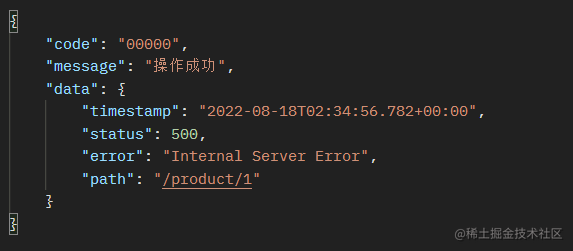
假如设置 nacos-provider 的超时时间为 1s,可通过请求参数 delay=3 模拟慢调用超时:
bash
curl "http://localhost:6061/product/1?delay=3"或在 feign-provider 中直接访问:
bash
curl "http://localhost:8080/product/1?delay=3"调用效果:

本系列文章代码仓库:https://github.com/iweidujiang/spring-cloud-alibaba-lab
以上就是本文的全部内容了,本次导航结束。
先赞后看,养成习惯。
举手之劳,赞有余香。
本文创作于 2022-08-18 。
代码仓库已更新:https://github.com/iweidujiang/spring-cloud-alibaba-lab