作为 Java 后端开发者,分页是我们每天都在使用的功能。MyBatis 本身没有提供物理分页支持,但它强大的插件机制让我们可以轻松实现分页功能。从最原始的RowBounds到流行的PageHelper,再到现在的MyBatis-Plus分页插件,不同的分页方案背后有着不同的实现原理。
面试时,MyBatis 分页和插件机制更是 100% 的必考题,面试官会层层深挖:
- MyBatis 插件的运行原理是什么?它基于什么设计模式?
- MyBatis 可以拦截哪些组件的哪些方法?
RowBounds是如何实现分页的?为什么说它是内存分页?- PageHelper 的核心原理是什么?为什么分页参数要紧跟查询方法?
- MyBatis-Plus 分页插件的实现机制是什么?和 PageHelper 有什么区别?
- 物理分页和内存分页有什么区别?
这篇文章,我们就从插件运行原理→原生 RowBounds 分页→PageHelper 分页→MyBatis-Plus 分页四个维度,彻底搞懂 MyBatis 的分页实现。不仅会讲清楚理论,更会结合源码分析,让你看完既能轻松应对面试,又能解决实际项目中的分页问题。
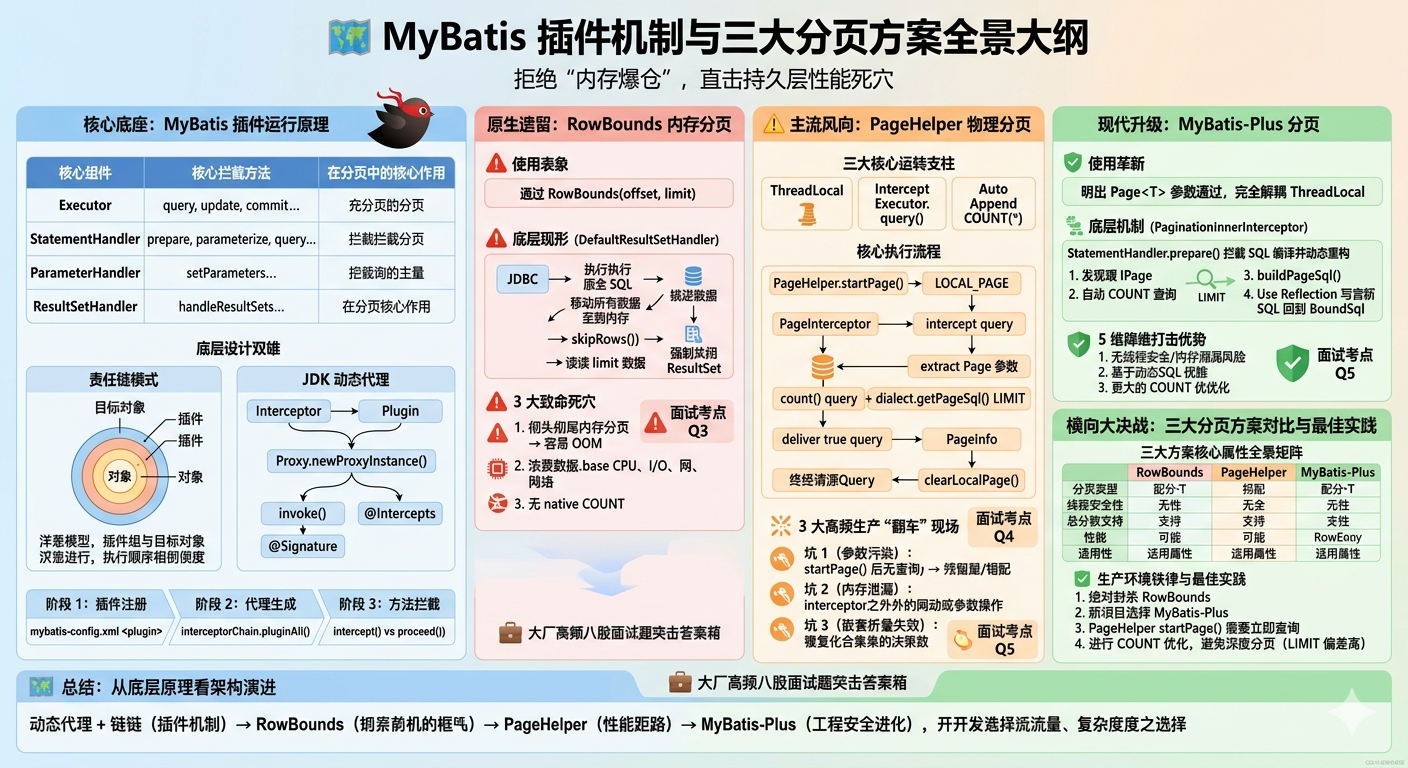
一、先搞懂:MyBatis 插件运行原理
所有的 MyBatis 分页插件都是基于 MyBatis 的插件机制实现的。要理解分页原理,首先必须理解 MyBatis 的插件机制。
1. 什么是 MyBatis 插件?
MyBatis 插件是一种拦截器机制,它允许我们在 SQL 执行的各个阶段进行拦截,插入自定义逻辑。MyBatis 的插件本质上是一个动态代理,它为目标对象生成一个代理对象,在方法执行前后插入自定义逻辑。
MyBatis 允许拦截以下四个核心组件的方法:
| 组件 | 可拦截的方法 | 作用 |
|---|---|---|
| Executor | update、query、commit、rollback、getTransaction、close、isClosed | 负责执行 SQL 语句,管理事务和缓存 |
| StatementHandler | prepare、parameterize、batch、update、query | 负责与 JDBC 的 Statement 交互,设置参数、执行 SQL |
| ParameterHandler | getParameterObject、setParameters | 负责将 Java 对象转换为 JDBC 的 SQL 参数 |
| ResultSetHandler | handleResultSets、handleOutputParameters | 负责处理结果集,将 ResultSet 映射到 Java 对象 |
这四个组件是 MyBatis 执行 SQL 的核心,所有的 SQL 执行都会经过这四个组件。通过拦截这些组件的方法,我们可以在 SQL 执行的任何阶段插入自定义逻辑。
2. 插件的实现原理
MyBatis 插件基于责任链模式 和JDK 动态代理实现。
核心接口:Interceptor
所有的 MyBatis 插件都必须实现Interceptor接口,该接口定义了三个方法:
java
public interface Interceptor {
    // 拦截目标方法,在这里编写自定义逻辑
    Object intercept(Invocation invocation) throws Throwable;

    // 生成代理对象
    default Object plugin(Object target) {
        return Plugin.wrap(target, this);
    }

    // 设置插件属性
    default void setProperties(Properties properties) {
    }
}
核心类:Plugin
Plugin类是 MyBatis 提供的工具类,用于生成代理对象。它实现了InvocationHandler接口,是动态代理的调用处理器:
java
public class Plugin implements InvocationHandler {
    private final Object target;
    private final Interceptor interceptor;
    private final Map<Class<?>, Set<Method>> signatureMap;

    private Plugin(Object target, Interceptor interceptor, Map<Class<?>, Set<Method>> signatureMap) {
        this.target = target;
        this.interceptor = interceptor;
        this.signatureMap = signatureMap;
    }

    // 生成代理对象
    public static Object wrap(Object target, Interceptor interceptor) {
        Map<Class<?>, Set<Method>> signatureMap = getSignatureMap(interceptor);
        Class<?> type = target.getClass();
        Class<?>[] interfaces = getAllInterfaces(type, signatureMap);
        if (interfaces.length > 0) {
            return Proxy.newProxyInstance(
                    type.getClassLoader(),
                    interfaces,
                    new Plugin(target, interceptor, signatureMap));
        }
        return target;
    }

    @Override
    public Object invoke(Object proxy, Method method, Object[] args) throws Throwable {
        try {
            Set<Method> methods = signatureMap.get(method.getDeclaringClass());
            // 如果当前方法需要被拦截,调用interceptor的intercept方法
            if (methods != null && methods.contains(method)) {
                return interceptor.intercept(new Invocation(target, method, args));
            }
            // 否则直接执行原方法
            return method.invoke(target, args);
        } catch (Exception e) {
            throw ExceptionUtil.unwrapThrowable(e);
        }
    }
}
核心注解:@Intercepts 和 @Signature
使用@Intercepts和@Signature注解来指定插件需要拦截的方法:
java
// 拦截Executor的query方法
@Intercepts({
    @Signature(
        type = Executor.class,                // 要拦截的组件类型
        method = "query",                     // 要拦截的方法名
        args = {MappedStatement.class, Object.class, RowBounds.class, ResultHandler.class} // 方法参数类型
    )
})
public class MyInterceptor implements Interceptor {
    @Override
    public Object intercept(Invocation invocation) throws Throwable {
        // 自定义逻辑
        System.out.println("方法执行前");
        // 执行原方法
        Object result = invocation.proceed();
        System.out.println("方法执行后");
        return result;
    }
}
3. 插件的执行流程
MyBatis 插件的执行流程可以分为三个阶段:
阶段 1:插件注册
当 MyBatis 初始化时,会读取配置文件中的插件配置,创建插件实例并添加到拦截器链中:
XML
<!-- mybatis-config.xml中配置插件 -->
<plugins>
    <plugin interceptor="com.example.MyInterceptor">
        <property name="property1" value="value1"/>
    </plugin>
</plugins>
阶段 2:生成代理对象
当 MyBatis 创建四大核心组件时,会遍历所有注册的插件,为每个组件生成代理对象:
java
// Configuration类中创建Executor的方法
public Executor newExecutor(Transaction transaction, ExecutorType executorType) {
    executorType = executorType == null ? defaultExecutorType : executorType;
    executorType = executorType == null ? ExecutorType.SIMPLE : executorType;
    Executor executor;
    if (ExecutorType.BATCH == executorType) {
        executor = new BatchExecutor(this, transaction);
    } else if (ExecutorType.REUSE == executorType) {
        executor = new ReuseExecutor(this, transaction);
    } else {
        executor = new SimpleExecutor(this, transaction);
    }
    if (cacheEnabled) {
        executor = new CachingExecutor(executor);
    }
    // 为Executor生成代理对象
    executor = (Executor) interceptorChain.pluginAll(executor);
    return executor;
}
阶段 3:方法拦截
当调用代理对象的方法时,会触发Plugin.invoke()方法。如果当前方法需要被拦截,就会调用插件的intercept()方法,执行自定义逻辑;否则直接执行原方法。
4. 多插件的执行顺序
MyBatis 支持多个插件同时存在,它们的执行顺序遵循责任链模式:
- 插件的执行顺序与配置顺序相反,先配置的插件后执行
- 可以通过实现
Ordered接口或使用@Order注解指定执行顺序,值越小优先级越高
例如,如果配置了两个插件 A 和 B,配置顺序是 A→B,那么执行顺序是:
B的前置逻辑 → A的前置逻辑 → 原方法 → A的后置逻辑 → B的后置逻辑二、MyBatis 原生分页:RowBounds 原理
MyBatis 本身提供了一个简单的分页方式:RowBounds。但它并不是真正的物理分页,而是内存分页。
1. RowBounds 的使用方式
java
// 创建RowBounds对象,指定偏移量和每页条数
RowBounds rowBounds = new RowBounds(0, 10);
// 执行查询
List<User> users = sqlSession.selectList("com.example.mapper.UserMapper.listUsers", null, rowBounds);
2. RowBounds 的实现原理
RowBounds的实现非常简单,它只是一个包含offset和limit两个字段的对象:
java
public class RowBounds {
    public static final int NO_ROW_OFFSET = 0;
    public static final int NO_ROW_LIMIT = Integer.MAX_VALUE;
    public static final RowBounds DEFAULT = new RowBounds();

    private final int offset;
    private final int limit;

    public RowBounds() {
        this.offset = NO_ROW_OFFSET;
        this.limit = NO_ROW_LIMIT;
    }

    public RowBounds(int offset, int limit) {
        this.offset = offset;
        this.limit = limit;
    }

    // getter方法
}真正的分页逻辑在DefaultResultSetHandler的handleResultSets()方法中:
java
public List<Object> handleResultSets(Statement stmt) throws SQLException {
    final List<Object> multipleResults = new ArrayList<>();
    int resultSetCount = 0;
    ResultSetWrapper rsw = getFirstResultSet(stmt);

    while (rsw != null && resultSetCount < mappedStatement.getResultMaps().size()) {
        ResultMap resultMap = mappedStatement.getResultMaps().get(resultSetCount++);
        handleResultSet(rsw, resultMap, multipleResults, null);
        rsw = getNextResultSet(stmt);
    }

    return collapseSingleResultList(multipleResults);
}

private void handleResultSet(ResultSetWrapper rsw, ResultMap resultMap, List<Object> multipleResults, ResultMapping parentMapping) throws SQLException {
    try {
        if (parentMapping != null) {
            handleRowValues(rsw, resultMap, null, RowBounds.DEFAULT, parentMapping);
        } else {
            if (resultHandler == null) {
                DefaultResultHandler defaultResultHandler = new DefaultResultHandler(objectFactory);
                handleRowValues(rsw, resultMap, defaultResultHandler, rowBounds, null);
                multipleResults.add(defaultResultHandler.getResultList());
            } else {
                handleRowValues(rsw, resultMap, resultHandler, rowBounds, null);
            }
        }
    } finally {
        // 关闭ResultSet
        closeResultSet(rsw.getResultSet());
    }
}

public void handleRowValues(ResultSetWrapper rsw, ResultMap resultMap, ResultHandler<?> resultHandler, RowBounds rowBounds, ResultMapping parentMapping) throws SQLException {
    if (resultMap.hasNestedResultMaps()) {
        handleRowValuesForNestedResultMap(rsw, resultMap, resultHandler, rowBounds, parentMapping);
    } else {
        handleRowValuesForSimpleResultMap(rsw, resultMap, resultHandler, rowBounds, parentMapping);
    }
}

private void handleRowValuesForSimpleResultMap(ResultSetWrapper rsw, ResultMap resultMap, ResultHandler<?> resultHandler, RowBounds rowBounds, ResultMapping parentMapping) throws SQLException {
    ResultSet rs = rsw.getResultSet();
    // 跳过offset条记录
    skipRows(rs, rowBounds);
    // 读取limit条记录
    int rowsProcessed = 0;
    while (shouldProcessMoreRows(rs, rowBounds, rowsProcessed)) {
        Object row = getRowValue(rsw, resultMap);
        resultHandler.handleResult(row);
        rowsProcessed++;
    }
}

private void skipRows(ResultSet rs, RowBounds rowBounds) throws SQLException {
    if (rs.getType() != ResultSet.TYPE_FORWARD_ONLY) {
        if (rowBounds.getOffset() != RowBounds.NO_ROW_OFFSET) {
            rs.absolute(rowBounds.getOffset());
        }
    } else {
        // 对于只能向前滚动的ResultSet,只能逐条跳过
        for (int i = 0; i < rowBounds.getOffset(); i++) {
            rs.next();
        }
    }
}

private boolean shouldProcessMoreRows(ResultSet rs, RowBounds rowBounds, int rowsProcessed) throws SQLException {
    return rs.next() && (rowBounds.getLimit() == RowBounds.NO_ROW_LIMIT || rowsProcessed < rowBounds.getLimit());
}从源码可以看出,RowBounds的分页逻辑是:
- 执行原始的 SQL 查询,获取所有符合条件的记录
- 跳过前
offset条记录 - 只读取前
limit条记录
3. RowBounds 的缺点
RowBounds虽然使用简单,但存在致命的缺点:
- 内存分页:先查询所有数据,再在内存中进行分页。当数据量很大时,会导致内存溢出
- 性能差:需要查询所有数据,然后丢弃大部分数据,浪费数据库和网络资源
- 不支持总条数查询:只能获取当前页的数据,无法获取总记录数和总页数
因此,RowBounds只适用于数据量很小的场景,生产环境不推荐使用。
三、PageHelper 分页原理
PageHelper 是目前最流行的 MyBatis 分页插件,它基于 MyBatis 的插件机制实现,支持多种数据库,使用简单,功能强大。
1. PageHelper 的使用方式
java
// 设置分页参数,紧跟查询方法
PageHelper.startPage(1, 10);
// 执行查询
List<User> users = userMapper.listUsers();
// 获取分页信息
PageInfo<User> pageInfo = new PageInfo<>(users);
System.out.println("总条数:" + pageInfo.getTotal());
System.out.println("总页数:" + pageInfo.getPages());
2. PageHelper 的核心原理
PageHelper 的核心原理可以概括为三句话:
- 基于 ThreadLocal 保存分页参数:使用 ThreadLocal 保存分页参数,避免线程安全问题
- 拦截 Executor 的 query 方法:在 SQL 执行前,动态修改 SQL,添加分页语句
- 自动查询总条数:在执行分页查询前,先执行 count 查询获取总记录数
3. PageHelper 的执行流程
PageHelper 的核心是PageInterceptor拦截器,它拦截了Executor的query方法。整个执行流程如下:
步骤 1:设置分页参数
调用PageHelper.startPage(pageNum, pageSize)方法,将分页参数保存到 ThreadLocal 中:
java
public static <T> Page<T> startPage(int pageNum, int pageSize) {
    return startPage(pageNum, pageSize, true);
}

public static <T> Page<T> startPage(int pageNum, int pageSize, boolean count) {
    return startPage(pageNum, pageSize, count, null, null);
}

public static <T> Page<T> startPage(int pageNum, int pageSize, boolean count, Boolean reasonable, Boolean pageSizeZero) {
    Page<T> page = new Page<>(pageNum, pageSize, count);
    page.setReasonable(reasonable);
    page.setPageSizeZero(pageSizeZero);
    // 将分页参数保存到ThreadLocal中
    LOCAL_PAGE.set(page);
    return page;
}

// ThreadLocal保存分页参数
protected static final ThreadLocal<Page> LOCAL_PAGE = new ThreadLocal<>();
步骤 2:拦截 Executor 的 query 方法
当执行查询方法时,PageInterceptor的intercept方法会被调用:
java
@Override
public Object intercept(Invocation invocation) throws Throwable {
    try {
        Object[] args = invocation.getArgs();
        MappedStatement ms = (MappedStatement) args[0];
        Object parameter = args[1];
        RowBounds rowBounds = (RowBounds) args[2];
        ResultHandler resultHandler = (ResultHandler) args[3];
        Executor executor = (Executor) invocation.getTarget();
        CacheKey cacheKey;
        BoundSql boundSql;

        // 从ThreadLocal中获取分页参数
        Page<?> page = getLocalPage();
        if (page == null) {
            // 没有分页参数,直接执行原方法
            return invocation.proceed();
        }

        // 1. 执行count查询,获取总记录数
        if (page.isCount()) {
            count(ms, parameter, rowBounds, resultHandler, boundSql, page);
        }

        // 2. 生成分页SQL
        String pageSql = dialect.getPageSql(ms, boundSql, parameter, rowBounds, page);
        // 3. 执行分页查询
        List<?> result = executor.query(ms, parameter, RowBounds.DEFAULT, resultHandler, cacheKey, boundSql);
        // 4. 封装分页结果
        page.addAll(result);
        // 5. 清除ThreadLocal中的分页参数
        clearLocalPage();
        return page;
    } finally {
        // 确保清除ThreadLocal中的分页参数
        clearLocalPage();
    }
}
步骤 3:动态生成分页 SQL
PageHelper 会根据不同的数据库方言,生成对应的分页 SQL。例如:
- MySQL:添加
LIMIT offset, limit - Oracle:使用
ROWNUM - SQL Server:使用
TOP和ROW_NUMBER()
以 MySQL 为例,原始 SQL 是:
sql
SELECT * FROM user WHERE age > 18PageHelper 会将其修改为:
sql
-- count查询
SELECT COUNT(*) FROM user WHERE age > 18

-- 分页查询
SELECT * FROM user WHERE age > 18 LIMIT 0, 10
4. PageHelper 的常见坑点
坑 1:分页参数没有紧跟查询方法
问题 :如果在PageHelper.startPage()和查询方法之间有其他逻辑,可能会导致分页参数被其他线程覆盖,或者分页参数失效。
错误示例:
java
PageHelper.startPage(1, 10);
// 其他业务逻辑,可能会导致分页参数被覆盖
Thread.sleep(1000);
List<User> users = userMapper.listUsers();
解决方案 :PageHelper.startPage()必须紧跟查询方法,中间不要有任何其他逻辑。
坑 2:ThreadLocal 内存泄漏
问题:如果查询方法抛出异常,可能会导致 ThreadLocal 中的分页参数没有被清除,造成内存泄漏。
解决方案 :PageHelper 在finally块中会清除 ThreadLocal 中的分页参数,正常情况下不会有问题。但如果在拦截器之外手动设置了分页参数,一定要记得手动清除。
坑 3:不支持嵌套查询
问题:PageHelper 只能拦截最外层的查询,对于嵌套查询(如一对多查询)无法正确分页。
解决方案:避免在分页查询中使用嵌套查询,或者使用 MyBatis-Plus 的分页插件。
四、MyBatis-Plus 分页原理
MyBatis-Plus 是一个 MyBatis 的增强工具,它提供了更强大的分页功能,使用更加简单,性能也更好。
1. MyBatis-Plus 分页的使用方式
java
// 创建分页对象
Page<User> page = new Page<>(1, 10);
// 执行分页查询
IPage<User> userPage = userMapper.selectPage(page, null);
// 获取分页信息
System.out.println("总条数:" + userPage.getTotal());
System.out.println("总页数:" + userPage.getPages());
2. MyBatis-Plus 分页的核心原理
MyBatis-Plus 的分页插件是PaginationInnerInterceptor,它同样基于 MyBatis 的插件机制实现,但与 PageHelper 有很大的不同:
- 不使用 ThreadLocal:分页参数直接通过方法参数传递,避免了 ThreadLocal 的线程安全问题
- 基于动态 SQL 生成:使用 MyBatis 的动态 SQL 机制生成分页语句
- 更强大的方言支持:支持更多的数据库,并且可以自定义方言
3. MyBatis-Plus 分页的执行流程
步骤 1:配置分页插件
首先需要在 Spring 配置中注册PaginationInnerInterceptor:
java
@Configuration
public class MyBatisPlusConfig {

    @Bean
    public MybatisPlusInterceptor mybatisPlusInterceptor() {
        MybatisPlusInterceptor interceptor = new MybatisPlusInterceptor();
        // 添加分页插件,指定数据库方言
        interceptor.addInnerInterceptor(new PaginationInnerInterceptor(DbType.MYSQL));
        return interceptor;
    }
}
步骤 2:拦截 Executor 的 query 方法
PaginationInnerInterceptor拦截了Executor的query方法:
java
@Override
public void beforeQuery(Executor executor, MappedStatement ms, Object parameter, RowBounds rowBounds, ResultHandler resultHandler, BoundSql boundSql) throws SQLException {
    // 检查参数是否是IPage类型
    IPage<?> page = findPage(parameter);
    if (page == null) {
        // 不是分页查询,直接执行
        return;
    }

    // 1. 执行count查询
    if (page.searchCount()) {
        long total = count(executor, ms, parameter, boundSql);
        page.setTotal(total);
        // 如果总条数为0,直接返回空结果
        if (total == 0) {
            return;
        }
    }

    // 2. 生成分页SQL
    String pageSql = buildPageSql(ms, boundSql, page);
    // 3. 修改BoundSql中的SQL为分页SQL
    ReflectionUtils.setFieldValue(boundSql, "sql", pageSql);
}
步骤 3:生成分页 SQL
MyBatis-Plus 会根据数据库方言生成对应的分页 SQL。与 PageHelper 不同的是,MyBatis-Plus 使用了更优雅的方式来修改 SQL,而不是直接替换整个 SQL 字符串。
以 MySQL 为例,原始 SQL 是:
sql
SELECT * FROM user WHERE age > 18MyBatis-Plus 会将其修改为:
sql
-- count查询
SELECT COUNT(*) FROM user WHERE age > 18

-- 分页查询
SELECT * FROM user WHERE age > 18 LIMIT ?, ?
4. MyBatis-Plus 分页的优势
与 PageHelper 相比,MyBatis-Plus 分页有以下优势:
- 无 ThreadLocal 问题:分页参数直接通过方法参数传递,避免了 ThreadLocal 的线程安全问题和内存泄漏问题
- 更优雅的实现:基于 MyBatis 的动态 SQL 机制,而不是直接修改 SQL 字符串
- 更好的兼容性:支持更多的数据库,并且可以自定义方言
- 更强大的功能:支持自定义分页 SQL、多表联查分页、嵌套查询分页等
- 更好的性能:优化了 count 查询,支持自定义 count 方法
五、三大分页方案对比与最佳实践
1. 三大分页方案对比
| 特性 | RowBounds | PageHelper | MyBatis-Plus 分页 |
|---|---|---|---|
| 分页类型 | 内存分页 | 物理分页 | 物理分页 |
| 总条数查询 | 不支持 | 自动支持 | 自动支持 |
| 线程安全 | 安全 | 不安全(依赖 ThreadLocal) | 安全 |
| 数据库支持 | 所有 | 主流数据库 | 主流数据库 + 自定义方言 |
| 性能 | 差(大数据量内存溢出) | 好 | 好 |
| 使用复杂度 | 简单 | 简单 | 简单 |
| 功能丰富度 | 低 | 中 | 高 |
| 适用场景 | 极小数据量 | 中小型项目 | 所有项目 |
2. 最佳实践
- 生产环境禁止使用 RowBounds:内存分页在数据量稍大时就会导致性能问题和内存溢出
- 新项目优先使用 MyBatis-Plus 分页:无 ThreadLocal 问题,功能更强大,性能更好
- PageHelper 使用注意事项 :
PageHelper.startPage()必须紧跟查询方法- 不要在异步方法中使用 PageHelper
- 避免在同一个线程中多次调用
PageHelper.startPage()
- 优化 count 查询 :
- 对于复杂查询,自定义 count 方法,避免使用自动生成的 count 查询
- 对于不需要总条数的场景,关闭 count 查询:
PageHelper.startPage(1, 10, false)
- 避免深分页:深分页(如 offset=100000)会导致数据库性能下降,可以使用游标分页或 ID 分页优化
六、高频面试题解答
-
问:MyBatis 插件的运行原理是什么? 答:MyBatis 插件基于责任链模式和 JDK 动态代理实现。它允许拦截 Executor、StatementHandler、ParameterHandler 和 ResultSetHandler 四个核心组件的方法。当创建这些组件时,MyBatis 会为它们生成代理对象,调用方法时会触发拦截器链,执行自定义逻辑。
-
问:MyBatis 可以拦截哪些组件的哪些方法? 答:MyBatis 可以拦截四个核心组件的方法:
- Executor:update、query、commit、rollback 等
- StatementHandler:prepare、parameterize、update、query 等
- ParameterHandler:getParameterObject、setParameters 等
- ResultSetHandler:handleResultSets、handleOutputParameters 等
-
问:RowBounds 是如何实现分页的?为什么说它是内存分页? 答:RowBounds 的实现原理是先执行原始 SQL 查询所有数据,然后在内存中跳过前 offset 条记录,只返回前 limit 条记录。因为它是在内存中进行分页,而不是在数据库层面进行分页,所以称为内存分页。
-
问:PageHelper 的核心原理是什么? 答:PageHelper 的核心原理是:使用 ThreadLocal 保存分页参数,拦截 Executor 的 query 方法,在 SQL 执行前动态修改 SQL 添加分页语句,并自动执行 count 查询获取总记录数。
-
问:为什么 PageHelper 的分页参数要紧跟查询方法? 答:因为 PageHelper 使用 ThreadLocal 保存分页参数,如果在设置分页参数和查询方法之间有其他逻辑,可能会导致分页参数被其他线程覆盖,或者分页参数失效。
-
问:MyBatis-Plus 分页和 PageHelper 有什么区别? 答:主要区别有:
- MyBatis-Plus 不使用 ThreadLocal,分页参数直接通过方法参数传递,更安全
- MyBatis-Plus 基于动态 SQL 生成,实现更优雅
- MyBatis-Plus 支持更多的数据库和更强大的功能
- MyBatis-Plus 性能更好,优化了 count 查询
-
问:物理分页和内存分页有什么区别? 答:物理分页是在数据库层面进行分页,只查询当前页的数据,性能好,适合大数据量;内存分页是先查询所有数据,再在内存中进行分页,性能差,只适合极小数据量。
七、总结
MyBatis 的分页功能是日常开发中最常用的功能之一,理解它的实现原理不仅能帮助我们写出更高效的代码,还能轻松应对面试中的相关问题。
回顾一下全文的核心内容:
- MyBatis 插件基于责任链模式和 JDK 动态代理实现,可以拦截四大核心组件的方法
- RowBounds 是内存分页,先查询所有数据再在内存中分页,生产环境不推荐使用
- PageHelper 基于 ThreadLocal 和动态修改 SQL 实现,使用简单但有 ThreadLocal 安全问题
- MyBatis-Plus 分页基于方法参数传递和动态 SQL 生成,更安全、更强大、性能更好
- 生产环境优先使用 MyBatis-Plus 分页,避免使用 RowBounds
理解了这些原理,你就能在实际项目中选择合适的分页方案,避免常见的坑点,写出高效、稳定的分页代码。