目录
- 一、问题背景
- 二、效果预览
- 三、环境部署
-
- [3.1 安装 Python](#3.1 安装 Python)
- [3.2 安装 OpenCV 和 NumPy](#3.2 安装 OpenCV 和 NumPy)
- [3.3 准备待处理的书法图片](#3.3 准备待处理的书法图片)
- 四、核心代码解析
-
- [4.1 完整脚本 (batch_split_chars.py)](#4.1 完整脚本 (batch_split_chars.py))
- 五、具体使用步骤
-
- [5.1 保存脚本并准备图片](#5.1 保存脚本并准备图片)
- [5.2 运行脚本](#5.2 运行脚本)
- [5.3 查看结果](#5.3 查看结果)
对一幅书法作品,如何快速、批量地将每一个字拆分成独立的图片呢?
本文就介绍一个基于垂直投影(转为水平投影)和智能间隙过滤的拆字方法。只需一个 Python 脚本,就能把一副书法图或多幅书法图片上的字拆解出来。
接下来,我们环境部署、参数设置与使用几个方面进行详细介绍。
一、问题背景
书法爱好者或研究者经常需要将整幅作品中的每个单字提取出来,用于临摹、分析或建立字库。手工裁剪费时费力,而传统自动化分割方法(简单投影法)在处理竖排书法时,常常会把"忘""只""菩"等上下结构的字从中间劈成两半。
而这个方法,用了基于典型字高和间隙比例过滤的改进算法,仅切割真正的大间距,保留字符内部的小空隙。完美的解决了上面的问题。
二、效果预览
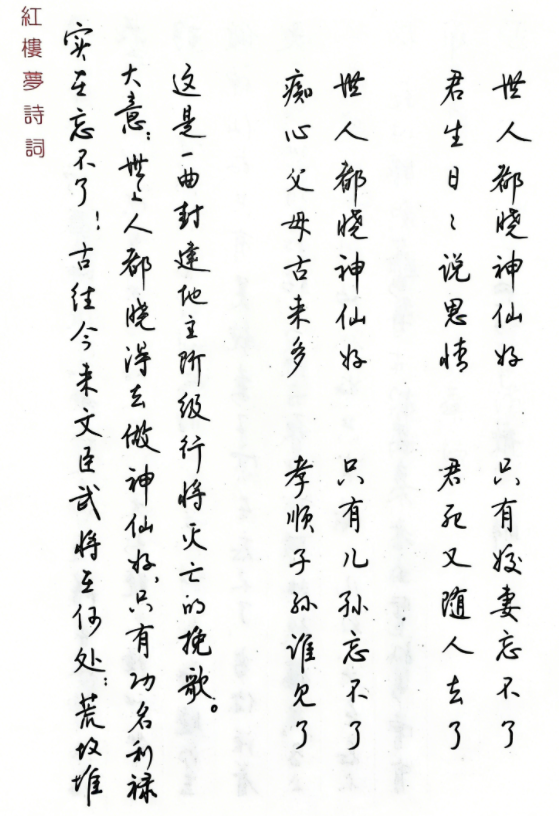
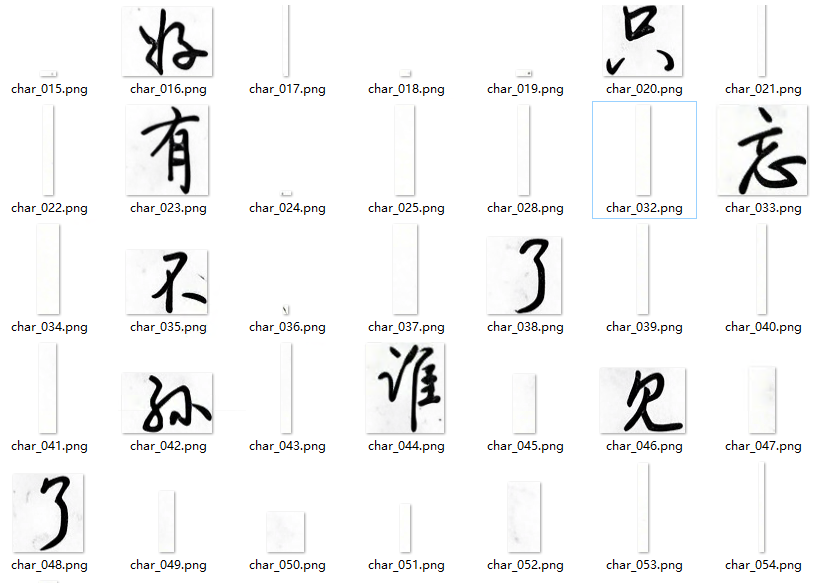
看看上面的这幅图,是钱沛云老师的硬笔书法作品。我们的目的是将这幅图片上的每一个字攫取出来,形成多个单独的图片。如下图所示,是测试的结果,这个结果会受相关参数的影响。
三、环境部署
3.1 安装 Python
推荐 Python 3.8 及以上版本。
官网下载:https://www.python.org/downloads/
安装时务必勾选 "Add Python to PATH"。
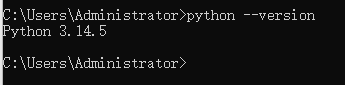
验证安装:打开终端(CMD / PowerShell / Terminal),输入:
python --version
3.2 安装 OpenCV 和 NumPy
OpenCV 负责图像处理,NumPy 用于数组运算。在终端执行:
c
pip install opencv-python numpy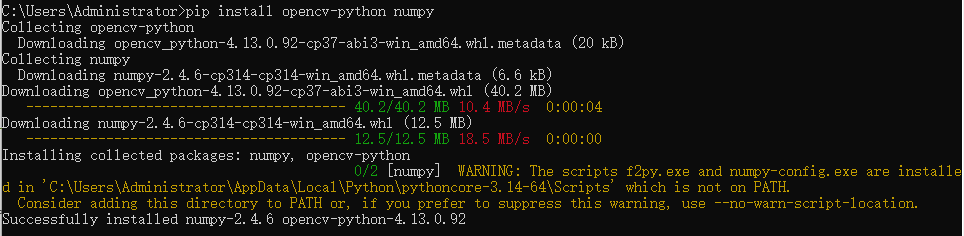
测试是否成功:
c
python -c "import cv2; print(cv2.__version__)"如果输出版本号(如 4.13.0),说明环境就绪。

3.3 准备待处理的书法图片
图片格式:.jpg 或 .png
要求:背景与文字有较明显色差(白底黑字最佳)。
如果图片有印章、底纹或倾斜,建议先用 Photoshop / GIMP 简单校正和去噪。
四、核心代码解析
4.1 完整脚本 (batch_split_chars.py)
c
# -*- coding: gbk -*-
# -*- coding: utf-8 -*-

import cv2
import numpy as np
import os
import glob
import shutil

def split_horizontal(image_path, output_folder, min_width=5, padding=2, prefix="", start_index=1):
    """
    横向书法分割(对单行图片或整张横排图片)
    返回切出的字符数量,并将图片保存到 output_folder
    """
    if not os.path.exists(output_folder):
        os.makedirs(output_folder)

    img = cv2.imread(image_path)
    if img is None:
        print(f"  错误:无法读取图片 {image_path}")
        return 0

    gray = cv2.cvtColor(img, cv2.COLOR_BGR2GRAY)
    _, binary = cv2.threshold(gray, 0, 255, cv2.THRESH_BINARY_INV + cv2.THRESH_OTSU)

    h, w = binary.shape
    vertical_proj = np.sum(binary == 255, axis=0)
    gap_columns = np.where(vertical_proj == 0)[0]
    if len(gap_columns) == 0:
        print(f"  警告:{os.path.basename(image_path)} 未检测到垂直空白,可能字间距过小。")
        return 0

    # 合并连续空白列
    gaps = []
    start = gap_columns[0]
    for i in range(1, len(gap_columns)):
        if gap_columns[i] > gap_columns[i-1] + 1:
            gaps.append((start, gap_columns[i-1]))
            start = gap_columns[i]
    gaps.append((start, gap_columns[-1]))

    # 计算切割位置
    cuts = [0]
    for left, right in gaps:
        mid = (left + right) // 2
        cuts.append(mid)
    cuts.append(w)

    char_count = 0
    for i in range(len(cuts)-1):
        x1, x2 = cuts[i], cuts[i+1]
        width = x2 - x1
        if width < min_width:
            continue
        char_img = img[:, x1:x2]
        # 裁剪上下空白
        gray_char = cv2.cvtColor(char_img, cv2.COLOR_BGR2GRAY)
        _, binary_char = cv2.threshold(gray_char, 0, 255, cv2.THRESH_BINARY_INV + cv2.THRESH_OTSU)
        row_sum = np.sum(binary_char == 255, axis=1)
        rows_with_char = np.where(row_sum > 0)[0]
        if len(rows_with_char) > 0:
            y1 = max(0, rows_with_char[0] - padding)
            y2 = min(char_img.shape[0], rows_with_char[-1] + padding)
            char_img = char_img[y1:y2, :]
        # 保存,使用前缀和序号
        out_path = os.path.join(output_folder, f"{prefix}char_{start_index + char_count:03d}.png")
        cv2.imwrite(out_path, char_img)
        char_count += 1
    return char_count

def split_vertical_complete(image_path, output_folder, gap_ratio=0.3, padding=2):
    """
    竖向书法完整分割:先按行切,再对每行按字切
    最终输出所有单字图片
    """
    if not os.path.exists(output_folder):
        os.makedirs(output_folder)

    img = cv2.imread(image_path)
    if img is None:
        print(f"  错误:无法读取图片 {image_path}")
        return 0

    gray = cv2.cvtColor(img, cv2.COLOR_BGR2GRAY)
    _, binary = cv2.threshold(gray, 0, 255, cv2.THRESH_BINARY_INV + cv2.THRESH_OTSU)

    h, w = binary.shape
    horizontal_proj = np.sum(binary == 255, axis=1)
    gap_rows = np.where(horizontal_proj == 0)[0]
    if len(gap_rows) == 0:
        print("  未检测到空白行,无法分割。")
        return 0

    # 合并连续空白区间
    gaps = []
    start = gap_rows[0]
    for i in range(1, len(gap_rows)):
        if gap_rows[i] > gap_rows[i-1] + 1:
            gaps.append((start, gap_rows[i-1]))
            start = gap_rows[i]
    gaps.append((start, gap_rows[-1]))

    # 计算每个字符块的高度
    char_heights = []
    prev_end = 0
    for top, bottom in gaps:
        char_height = top - prev_end
        if char_height > 5:
            char_heights.append(char_height)
        prev_end = bottom + 1
    last_height = h - prev_end
    if last_height > 5:
        char_heights.append(last_height)

    if len(char_heights) == 0:
        print("  未检测到有效字符")
        return 0

    typical_height = np.median(char_heights)
    min_gap_to_split = typical_height * gap_ratio
    print(f"  典型行高: {typical_height:.1f}px, 最小切割间隙: {min_gap_to_split:.1f}px")

    # 决定切割位置(按行切)
    cuts = [0]
    prev_end = 0
    for top, bottom in gaps:
        gap_height = bottom - top + 1
        if gap_height >= min_gap_to_split:
            mid = (top + bottom) // 2
            cuts.append(mid)
        prev_end = bottom + 1
    cuts.append(h)

    # 临时文件夹存放每一行图片
    temp_dir = os.path.join(output_folder, "_temp_lines")
    if not os.path.exists(temp_dir):
        os.makedirs(temp_dir)

    line_count = 0
    for i in range(len(cuts)-1):
        y1, y2 = cuts[i], cuts[i+1]
        height = y2 - y1
        if height < typical_height * 0.3:
            continue
        line_img = img[y1:y2, :]
        line_path = os.path.join(temp_dir, f"line_{line_count+1:03d}.png")
        cv2.imwrite(line_path, line_img)
        line_count += 1

    print(f"  共切出 {line_count} 行,开始逐行拆分单字...")

    total_chars = 0
    for line_idx in range(1, line_count+1):
        line_path = os.path.join(temp_dir, f"line_{line_idx:03d}.png")
        num = split_horizontal(line_path, output_folder, min_width=5, padding=2,
                               prefix="", start_index=total_chars+1)
        total_chars += num
        print(f"  第 {line_idx} 行拆分出 {num} 个字,累计 {total_chars} 字")

    # 删除临时文件夹
    shutil.rmtree(temp_dir)
    return total_chars

def batch_process(input_dir, output_root, direction, gap_ratio=0.3):
    """
    批量处理文件夹内所有图片
    """
    # 支持的图片扩展名
    exts = ('*.png', '*.jpg', '*.jpeg', '*.bmp', '*.tiff')
    image_files = []
    for ext in exts:
        image_files.extend(glob.glob(os.path.join(input_dir, ext)))
        image_files.extend(glob.glob(os.path.join(input_dir, ext.upper())))
    # 去重并排序
    image_files = sorted(set(image_files))

    if not image_files:
        print(f"错误:在 {input_dir} 中没有找到图片文件")
        return

    print(f"\n找到 {len(image_files)} 张图片,开始批量处理...\n")

    for idx, img_path in enumerate(image_files, 1):
        basename = os.path.splitext(os.path.basename(img_path))[0]
        output_folder = os.path.join(output_root, basename)
        print(f"[{idx}/{len(image_files)}] 处理: {basename}")

        if direction == 'horizontal':
            count = split_horizontal(img_path, output_folder, min_width=5, padding=2)
        else:
            count = split_vertical_complete(img_path, output_folder, gap_ratio=gap_ratio, padding=2)

        if count > 0:
            print(f"  ? 成功拆分出 {count} 个单字,保存在 {output_folder}")
        else:
            print(f"  ? 拆分失败")
        print()

    print("批量处理完成!")

def main():
    print("=== 书法单字批量拆分工具 ===")
    print("请选择处理模式:")
    print("1. 单张图片(交互式)")
    print("2. 批量处理整个文件夹")
    mode = input("请输入 1 或 2:").strip()
    while mode not in ('1', '2'):
        mode = input("输入无效,请重新输入 1 或 2:").strip()

    if mode == '1':
        # 原有的单张处理逻辑
        from pathlib import Path
        def select_file():
            print("\n当前目录下的图片文件:")
            image_exts = ('*.png', '*.jpg', '*.jpeg', '*.bmp', '*.tiff')
            images_set = set()
            for ext in image_exts:
                for f in glob.glob(ext):
                    images_set.add(f)
                for f in glob.glob(ext.upper()):
                    images_set.add(f)
            images = sorted(images_set)
            if images:
                for idx, f in enumerate(images):
                    print(f"{idx+1}. {f}")
                print("0. 手动输入路径")
                choice = input("请选择图片序号 (0-{}):".format(len(images))).strip()
                if choice.isdigit():
                    choice = int(choice)
                    if 1 <= choice <= len(images):
                        return images[choice-1]
                    elif choice == 0:
                        pass
            path = input("请输入图片文件路径:").strip()
            return path

        image_path = select_file()
        if not os.path.exists(image_path):
            print(f"文件不存在:{image_path}")
            return

        print("\n请选择书写方向:")
        print("1. 横排(从左到右)")
        print("2. 竖排(从上到下)")
        direction = input("请输入 1 或 2:").strip()
        while direction not in ('1', '2'):
            direction = input("输入无效,请重新输入 1 或 2:").strip()

        base_name = os.path.splitext(os.path.basename(image_path))[0]
        if direction == '1':
            output_dir = f"./{base_name}_horizontal_chars"
            print("\n开始横向分割...")
            count = split_horizontal(image_path, output_dir, min_width=5, padding=2)
        else:
            output_dir = f"./{base_name}_vertical_chars"
            ratio_input = input("请输入行间隙阈值比例(默认0.3,越小切分越多行,越大越不容易切开上下结构):").strip()
            gap_ratio = 0.3
            if ratio_input:
                try:
                    gap_ratio = float(ratio_input)
                except:
                    pass
            print(f"\n开始竖向分割(gap_ratio={gap_ratio})...")
            count = split_vertical_complete(image_path, output_dir, gap_ratio=gap_ratio, padding=2)

        if count > 0:
            print(f"\n? 成功!共拆分出 {count} 个单字图片,保存在 {output_dir}")
        else:
            print("\n? 拆分失败")
    else:
        # 批量处理模式
        input_dir = input("\n请输入要处理的文件夹路径:").strip()
        if not os.path.isdir(input_dir):
            print(f"错误:文件夹不存在 {input_dir}")
            return

        output_root = input("请输入输出根目录(默认 ./batch_output):").strip()
        if not output_root:
            output_root = "./batch_output"

        print("\n请选择所有图片的书写方向:")
        print("1. 横排(从左到右)")
        print("2. 竖排(从上到下)")
        direction_choice = input("请输入 1 或 2:").strip()
        while direction_choice not in ('1', '2'):
            direction_choice = input("输入无效,请重新输入 1 或 2:").strip()

        direction = 'horizontal' if direction_choice == '1' else 'vertical'
        gap_ratio = 0.3
        if direction == 'vertical':
            ratio_input = input("请输入行间隙阈值比例(默认0.3,越小切分越多行,越大越不容易切开上下结构):").strip()
            if ratio_input:
                try:
                    gap_ratio = float(ratio_input)
                except:
                    pass

        batch_process(input_dir, output_root, direction, gap_ratio)

if __name__ == "__main__":
    main()
五、具体使用步骤
5.1 保存脚本并准备图片
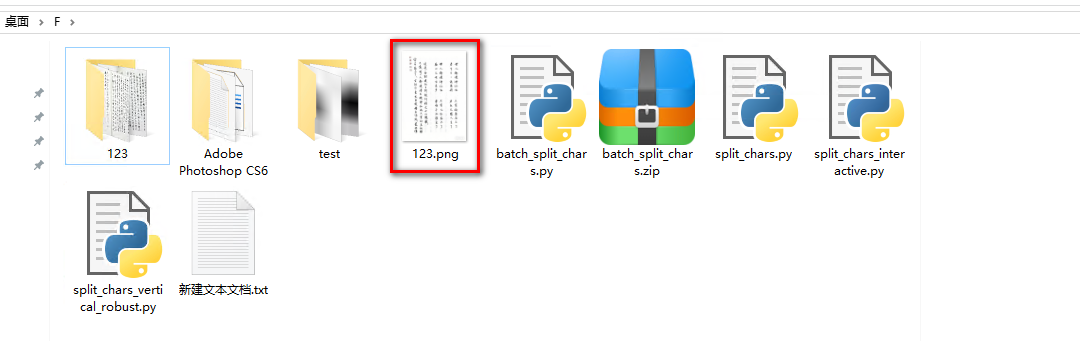
将上述代码复制到文本编辑器(推荐 VS Code、Notepad++、甚至记事本)。
保存为batch_split_chars.py。
把要拆分的书法图片放到与脚本相同的目录下(或记下完整路径)。
5.2 运行脚本
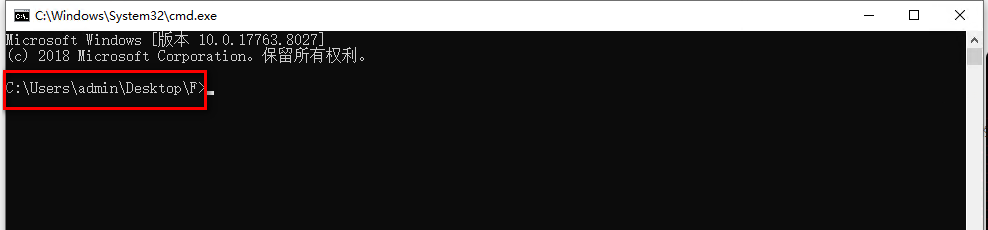
打开终端,切换到脚本所在目录,执行:
c
python batch_split_chars.py下图中,根据实际的格式选择相应的选项:
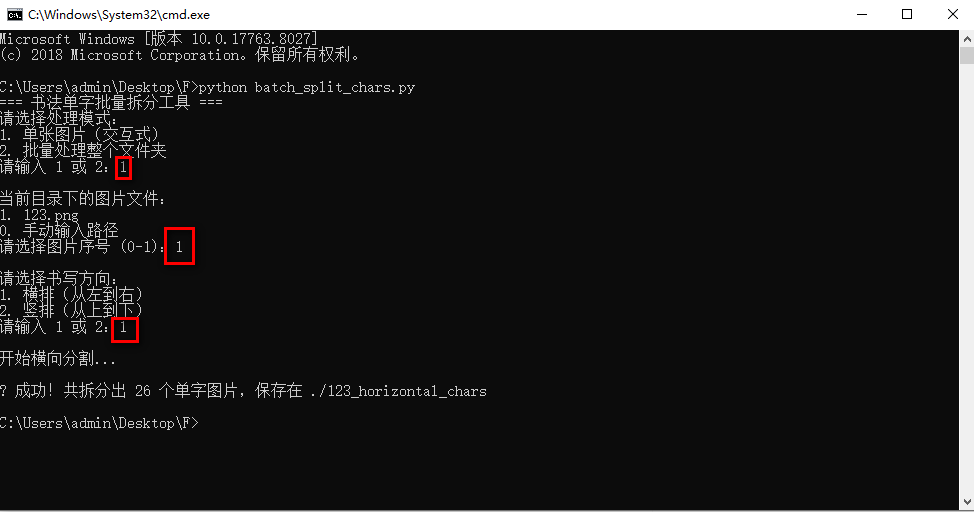
这一步执行结束后,会自动在当前目录中生成一个名为 123_horizontal_chars的文件夹。
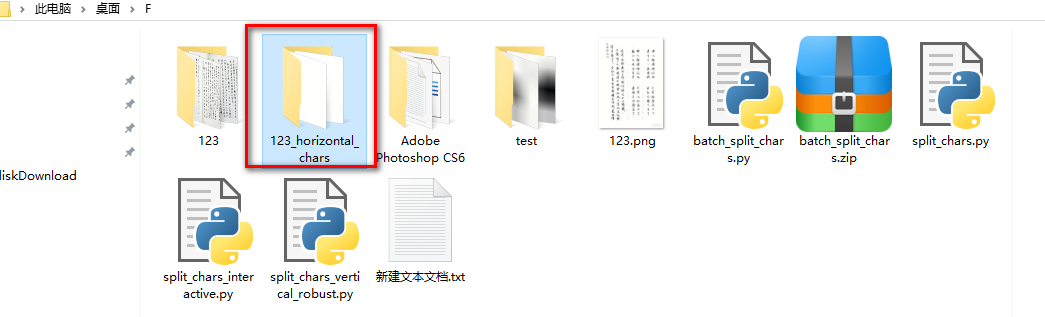
还没有结束,因为文档被纵向截成很多条的图片,每个图片上还有好多字,我们需要批量把这些条幅字截取下来。

继续运行上面的脚本,这里只用一幅图举例:
c
python batch_split_chars.py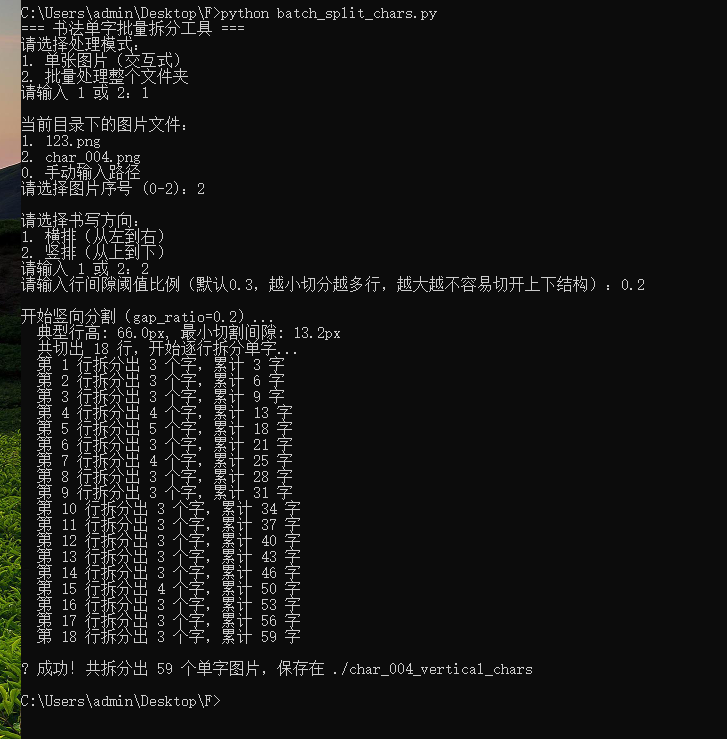
5.3 查看结果
如图,脚本在当前目录下创建了一个名为char_004_vertical_chars文件夹,里面就是拆分好的单字图片(.png 格式)。当然,这个输出需要调整参数才能达到最优结果。
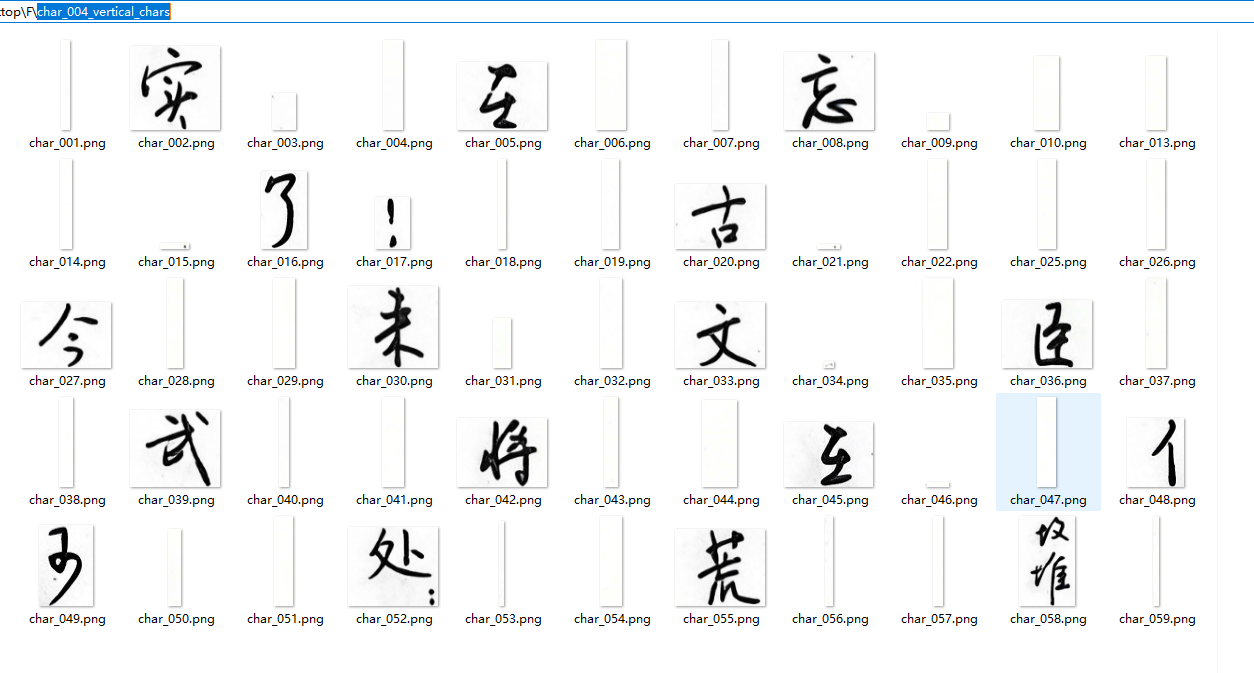
通过本文的脚本,你可以轻松实现竖排书法作品的自动化单字拆分,并且智能避免上下结构字的误切。核心思路即:统计典型字高 → 动态阈值筛选字间空隙 → 按需切割。