
如果您喜欢此文章,请收藏、点赞、评论,谢谢,祝您快乐每一天。
Modbus 是一种专为 PLC 通信而设计的通信协议。Modbus 协议简单易用、速度快且免费。它支持不同类型总线或网络上的设备之间的客户端/服务器通信。
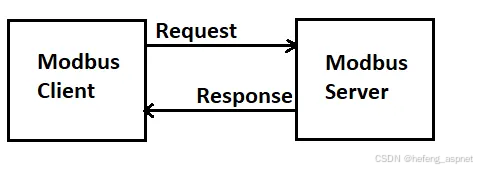
Modbus 是一种请求/响应协议。通过功能码,主站或客户端可以向从站(Modbus 串行)或服务器(Modbus TCP)请求数据或更改,而从站或服务器则会响应该请求。
Modbus 串行(RTU 和 ASCII)通常使用 RS-485 标准。Modbus TCP 在通信时使用 TCP/IP 标准。
首先我们来看一下 Modbus 串行请求命令帧。
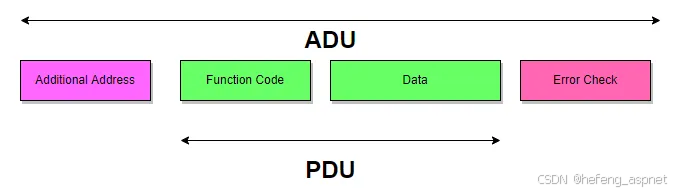
如上图所示,在 Modbus 串行通信中,我们需要发送从站设备的地址(称为"附加地址")、功能码(用于读取/写入输入寄存器、线圈、保持寄存器等)、指示要读取或写入哪些寄存器或线圈等的数据(称为"数据"),以及用于确保通信安全的"错误"检查。所有这些信息都包含在 ADU(应用数据单元)中。PDU(协议数据单元)则独立于底层通信层。
本文将重点介绍 Modbus TCP。
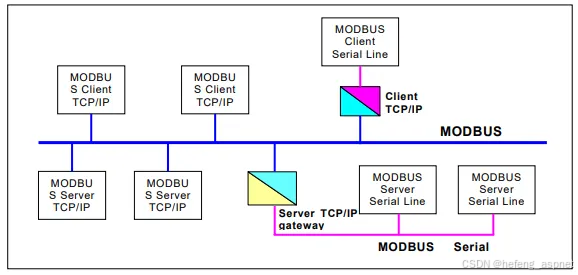
MODBUS 消息传递服务提供通过以太网 TCP/IP 网络连接的设备之间的客户端/服务器通信。
Modbus TCP 可能包含不同类型的设备,例如客户端、服务器和服务器网关。
现在让我们来看一下 Modbus TCP 的响应帧和请求帧的帧结构。
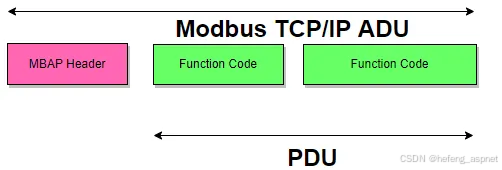
如您所见,Modbus 串行通信和 Modbus TCP/IP ADU 之间存在 MBAP 头部(Modbus 应用协议头部)。让我们来看一下 MBAP 头部字段。
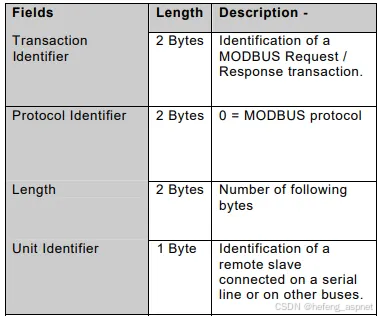
有关 Modbus TCP/IP 的更多详细信息,您可以找到许多文档、介绍视频等。
本文将介绍如何使用 C# 控制台应用程序编写 Modbus TCP/IP 客户端程序。我使用的是 .NET Core 框架。
首先,让我们向 Modbus 客户端程序添加 Socket 和 Text 命名空间。
using System.Net.Sockets;
using System.Text;
第二步是准备 Modbus TCP 客户端请求命令的字节数组,以及"rData"字节数组声明。现在 11 个字节就足够了。在你的 Modbus 程序中,需要根据请求情况更改此值。
Byte\[\] data={
0x00,0x01, // Transaction Identifier (2 Bytes)
0x00,0x00, // Protocol Identifier (0x0000 for modbus 2 bytes)
0x00,0x06, // Length (Following this data there willbe 6 bytes more)
0x11, // Addres of device other side of modbus gateway (17 decimal)
0x03, // modbus Read holding register command (0x03)
0x00,0x00, // Holding register address
0x00,0x01 // Only one register requested
};
Byte\[\] rData=new byte11; // Byte Array for response
第三步是使用 TCP 发送数据,等待响应并显示响应。
TcpClient tcpClient=new TcpClient();
try
{
tcpClient.Connect("127.0.0.1",502);
if(tcpClient!=null){
if(tcpClient.Connected){
NetworkStream networkStream=tcpClient.GetStream();
networkStream.Write(data,0,data.Length);
while(true){
int bytes=networkStream.Read(rData,0,rData.Length);
if(bytes>0){
var sb=new StringBuilder(rData.Length*2);
foreach(var b in rData){
sb.AppendFormat("0x{0:x2}-",b);
}
Console.Write($"Gelen Data :{sb}");
break;
}
}
byte\[\] incommingRowData=new byte2{rData10,rData9};
ushort incommingData=BitConverter.ToUInt16(incommingRowData,0);
Console.WriteLine($"Incomming Data : {incommingData}");
Console.Read();
networkStream.Close();
tcpClient.Close();
}
}
}
catch (System.Exception e)
{
Console.WriteLine("Error :{0}",e.Message);
}
以下是 Modbus TCP 客户端控制台应用程序的完整代码。
using System;
using System.Net.Sockets;
using System.Text;
namespace ModbusTcpClient
{
class Program
{
static void Main(string\[\] args)
{
Byte\[\] data={
0x00,0x01, // Transaction Identifier (2 Bytes)
0x00,0x00, // Protocol Identifier (0x0000 for modbus 2 bytes)
0x00,0x06, // Length (Following this data there willbe 6 bytes more)
0x11, // Addres of device other side of modbus gateway (17 decimal)
0x03, // modbus Read holding register command (0x03)
0x00,0x00, // Holding register address
0x00,0x01 // Only one register requested
};
Byte\[\] rData=new byte11; // Byte Array for response
TcpClient tcpClient=new TcpClient();
try
{
tcpClient.Connect("127.0.0.1",502);
if(tcpClient!=null){
if(tcpClient.Connected){
NetworkStream networkStream=tcpClient.GetStream();
networkStream.Write(data,0,data.Length);
while(true){
int bytes=networkStream.Read(rData,0,rData.Length);
if(bytes>0){
var sb=new StringBuilder(rData.Length*2);
foreach(var b in rData){
sb.AppendFormat("0x{0:x2}-",b);
}
Console.Write($"Gelen Data :{sb}");
break;
}
}
byte\[\] incommingRowData=new byte2{rData10,rData9};
ushort incommingData=BitConverter.ToUInt16(incommingRowData,0);
Console.WriteLine($"Incomming Data : {incommingData}");
Console.Read();
networkStream.Close();
tcpClient.Close();
}
}
}
catch (System.Exception e)
{
Console.WriteLine("Error :{0}",e.Message);
}
}
}
}
如果您喜欢此文章,请收藏、点赞、评论,谢谢,祝您快乐每一天。