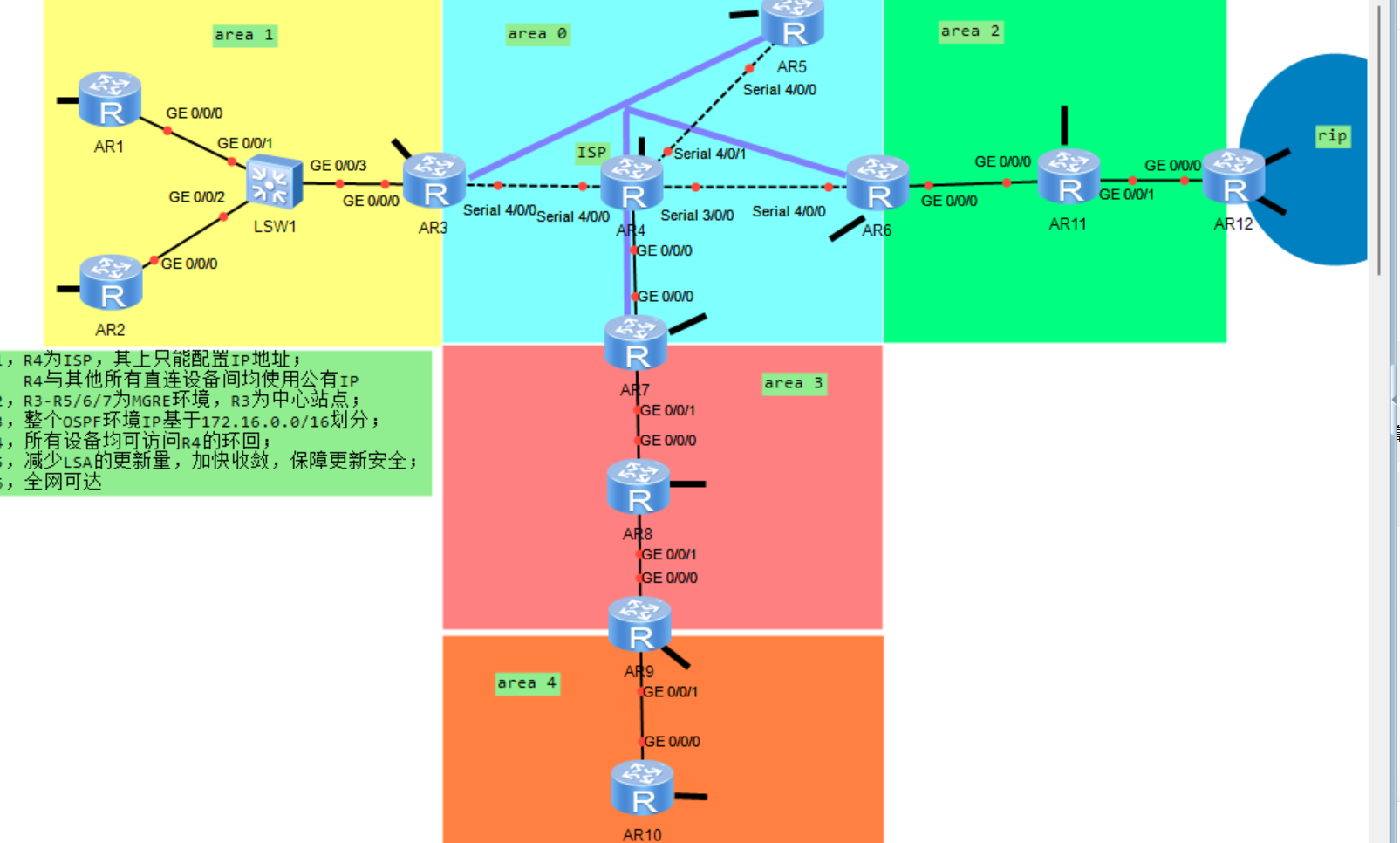
分析:
- OSPF 规划:OSPF 域网段
172.16.0.0/16,划分 Area0/1/2/3/4; - AR4 为 ISP 公网设备,仅配公网 IP,不跑 OSPF;AR4 配置环回口,全网可访问;
- MGRE 环境:AR3 为中心站点,分支 AR5/AR6/AR7;MGRE 隧道跑 OSPF;
- AR12 运行 RIP,需重分发到 OSPF,OSPF 外部路由引入 RIP;
- OSPF 优化:减少 LSA、加速收敛、安全认证;
- 全网互通。
一:area1
AR1 配置
sysname AR1
undo info-center enable
interface LoopBack0
 ip address 1.1.1.1 255.255.255.255
# 连接LSW1
interface GigabitEthernet 0/0/0
 ip address 172.16.1.1 255.255.255.0
# OSPF配置
ospf 1 router-id 1.1.1.1
 area 1
  network 172.16.1.0 0.0.0.255
AR2配置
sysname AR2
undo info-center enable
interface LoopBack0
 ip address 1.1.1.2 255.255.255.255
interface GigabitEthernet 0/0/0
 ip address 172.16.1.2 255.255.255.0
ospf 1 router-id 1.1.1.2
 area 1
  network 172.16.1.0 0.0.0.255
AR3配置(Area1 ABR、MGRE 中心、Area0/Area1 边界)
sysname AR4
undo info-center enable
# ISP公网环回,全网访问
interface LoopBack0
 ip address 209.1.1.1 255.255.255.255
# 四条Serial分别连AR3、AR5、AR6、AR7
interface Serial 4/0/0
 ip address 203.0.1.2 255.255.255.252
interface Serial 4/0/1
 ip address 203.0.1.5 255.255.255.252
interface Serial 3/0/0
 ip address 203.0.1.9 255.255.255.252
interface GigabitEthernet 0/0/0
 ip address 203.0.1.14 255.255.255.252
# 回程静态路由:所有OSPF私网网段下一跳对应各分支
ip route-static 172.16.0.0 255.255.0.0 203.0.1.1
ip route-static 172.16.0.0 255.255.0.0 203.0.1.6
ip route-static 172.16.0.0 255.255.0.0 203.0.1.10
ip route-static 172.16.0.0 255.255.0.0 203.0.1.13
# 负载分担,保证回程可达
二. ISP AR4(仅公网 IP,无 OSPF,全网可达其环回)、
sysname AR4
undo info-center enable
# ISP公网环回,全网访问
interface LoopBack0
 ip address 209.1.1.1 255.255.255.255
# 四条Serial分别连AR3、AR5、AR6、AR7
interface Serial 4/0/0
 ip address 203.0.1.2 255.255.255.252
interface Serial 4/0/1
 ip address 203.0.1.5 255.255.255.252
interface Serial 3/0/0
 ip address 203.0.1.9 255.255.255.252
interface GigabitEthernet 0/0/0
 ip address 203.0.1.14 255.255.255.252
# 回程静态路由:所有OSPF私网网段下一跳对应各分支
ip route-static 172.16.0.0 255.255.0.0 203.0.1.1
ip route-static 172.16.0.0 255.255.0.0 203.0.1.6
ip route-static 172.16.0.0 255.255.0.0 203.0.1.10
ip route-static 172.16.0.0 255.255.0.0 203.0.1.13
# 负载分担,保证回程可达
三. MGRE 分支
AR5配置
sysname AR5
undo info-center enable
interface LoopBack0
 ip address 1.1.1.5 255.255.255.255
# 公网Serial连AR4
interface Serial 4/0/0
 ip address 203.0.1.6 255.255.255.252
# MGRE隧道口
interface Tunnel0/0/0 mode gre multipoint
 ip address 172.16.0.2 255.255.255.0
 source Serial 4/0/0
 # 注册中心站点
 nhrp entry 172.16.0.1 203.0.1.1 register
 nhrp broadcast
# OSPF
ospf 1 router-id 1.1.1.5
 area 0
  network 172.16.0.0 0.0.0.255
# 默认路由访问公网
ip route-static 0.0.0.0 0 Serial 4/0/0
AR6(MGRE 分支 + Area2 ABR)
sysname AR6
undo info-center enable
interface LoopBack0
 ip address 1.1.1.6 255.255.255.255
# 公网Serial连AR4
interface Serial 4/0/0
 ip address 203.0.1.10 255.255.255.252
# MGRE隧道
interface Tunnel0/0/0 mode gre multipoint
 ip address 172.16.0.3 255.255.255.0
 source Serial 4/0/0
 nhrp entry 172.16.0.1 203.0.1.1 register
 nhrp broadcast
# Area2 下行接口
interface GigabitEthernet 0/0/0
 ip address 172.16.2.1 255.255.255.0
# OSPF
ospf 1 router-id 1.1.1.6
 area 0
  network 172.16.0.0 0.0.0.255
 area 2
  network 172.16.2.0 0.0.0.255
# 默认路由
ip route-static 0.0.0.0 0 Serial 4/0/0
AR7(MGRE 分支 + Area3 ABR)
sysname AR7
undo info-center enable
interface LoopBack0
 ip address 1.1.1.7 255.255.255.255
# 公网GE连AR4
interface GigabitEthernet 0/0/0
 ip address 203.0.1.13 255.255.255.252
# MGRE隧道
interface Tunnel0/0/0 mode gre multipoint
 ip address 172.16.0.4 255.255.255.0
 source GigabitEthernet 0/0/0
 nhrp entry 172.16.0.1 203.0.1.1 register
 nhrp broadcast
# Area3下行口
interface GigabitEthernet 0/0/1
 ip address 172.16.3.1 255.255.255.0
# OSPF
ospf 1 router-id 1.1.1.7
 area 0
  network 172.16.0.0 0.0.0.255
 area 3
  network 172.16.3.0 0.0.0.255
# 默认路由
ip route-static 0.0.0.0 0 GigabitEthernet 0/0/0
四. Area2:AR11、AR12(RIP 与 OSPF 重分发)
AR11
sysname AR11
undo info-center enable
interface LoopBack0
 ip address 1.1.1.11 255.255.255.255
# 上联AR6
interface GigabitEthernet 0/0/0
 ip address 172.16.2.2 255.255.255.0
# 下联AR12
interface GigabitEthernet 0/0/1
 ip address 172.16.2.3 255.255.255.0
# OSPF
ospf 1 router-id 1.1.1.11
 area 2
  network 172.16.2.0 0.0.0.255
AR12
sysname AR12
undo info-center enable
interface LoopBack0
 ip address 1.1.1.12 255.255.255.255
# 上联AR11
interface GigabitEthernet 0/0/0
 ip address 172.16.2.4 255.255.255.0
# RIP私有网段
interface GigabitEthernet 0/0/1
 ip address 10.0.0.1 255.255.255.0
# OSPF进程
ospf 1 router-id 1.1.1.12
 area 2
  network 172.16.2.0 0.0.0.255
 # 引入RIP路由
 import-route rip 1 type 2
# RIP进程
rip 1
 version 2
 network 10.0.0.0
 # 引入OSPF路由
 import-route ospf 1
# 关闭RIP自动汇总
undo summary
五. Area3:AR8
AR8
sysname AR8
undo info-center enable
interface LoopBack0
 ip address 1.1.1.8 255.255.255.255
# 上联AR7
interface GigabitEthernet 0/0/1
 ip address 172.16.3.2 255.255.255.0
# 下联AR9
interface GigabitEthernet 0/0/0
 ip address 172.16.3.3 255.255.255.0
ospf 1 router-id 1.1.1.8
 area 3
  network 172.16.3.0 0.0.0.255
六. Area4:AR9、AR10
AR9
sysname AR9
undo info-center enable
interface LoopBack0
 ip address 1.1.1.9 255.255.255.255
# 上联AR8
interface GigabitEthernet 0/0/1
 ip address 172.16.3.4 255.255.255.0
# 下联AR10
interface GigabitEthernet 0/0/0
 ip address 172.16.4.1 255.255.255.0
ospf 1 router-id 1.1.1.9
 area 3
  network 172.16.3.0 0.0.0.255
 area 4
  network 172.16.4.0 0.0.0.255
AR10
sysname AR10
undo info-center enable
interface LoopBack0
 ip address 1.1.1.10 255.255.255.255
interface GigabitEthernet 0/0/0
 ip address 172.16.4.2 255.255.255.0
ospf 1 router-id 1.1.1.10
 area 4
  network 172.16.4.0 0.0.0.255
七、OSPF 优化配置(减少 LSA、加速收敛、安全)
1、AR3:Area1
ospf 1
 area 1
  stub no-summary
Area2 含外部 RIP 路由,配置 NSSA 完全 NSSA
AR6
ospf 1
 area 2
nssa no-summary default-route-advertise-
加速收敛配置(所有 OSPF 路由器)
ospf 1
缩短hello时间,快速发现邻居
timer hello 5
缩短死亡时间
timer dead 20
快速泛洪LSA
timer lsa-update 1
开启SPF智能计时器
spf-schedule-interval 100 1000
接口级快速收敛(所有OSPF接口)
interface GigabitEthernet 0/0/X
ospf timer hello 5
ospf cost 10
ospf fast-reroute auto -
OSPF 安全
Area0(MGRE 隧道接口密文认证)
AR3/AR5/AR6/AR7 隧道口统一配置:
interface Tunnel0/0/0
 ospf authentication-mode md5 1 cipher admin@123
ospf 1
 area 0
  authentication-mode md5
其他区域明文认证(Area1/2/3/4)
ABR 与区域内路由器统一:
ospf 1
 area X
  authentication-mode simple
# 区域接口
interface GigabitEthernet 0/0/X
 ospf authentication-mode simple cipher ospf123
八、全网可达验证思路
- OSPF 邻居检查:
display ospf peer brief - 路由表查看:
display ip routing-table protocol ospf - MGRE 隧道检查:
display nhrp peer、display tunnel-info - RIP 重分发检查:AR12
display ip routing-table rip - 公网连通:所有设备 ping 209.1.1.1(AR4 环回)
- 跨区域连通:AR1 ping AR10、AR1 ping RIP 网段 10.0.0.1