MAF预定义IChatClient中间件-06利用ImageGeneratingChatClient开发专业图片生成Agent
我们目前已经有相当专业的图片生成的模型,它可以利用我们提供的文本提示来生成高质量的图片,但是由于我们对文字的驾驭能力不够,写不出迎合LLM的提示词。ImageGeneratingChatClient中间件结合我们注册的ImageGenerator将两者结合在一起:我们通过与Agent对话的方式说出我们对生成图片的描述,LLM根据我们的描述返回专业的提示词文本。注册的ImageGenerator将提示词提交给专门负责图片生成的模型来生成图片。
1. 开发专业图片生成Agent其实很简单
接下来我们会通过一个示例来演示如何利用ImageGeneratingChatClient中间件来开发一个专业的图片生成Agent。ImageGeneratingChatClient是对一个ImageGenerator对象的封装,后者提供了根据提示生成图片的功能。ImageGeneratingChatClient注册图片生成的工具,工具的输入为提示词,并通过调用ImageGenerator来生成图片。所以图片生成的基本流程是:我们通过于Agent对话说出我们想要生成的图片的描述,LLM根据我们的描述生成专业的提示词文本来调用工具,工具调用ImageGenerator来生成图片并返回结果。所以我们得先来定义一个实现了ImageGenerator接口的图片生成器类型。
1.1 定义图片生成器
如下定义的ImageGenerator最终会通过LLM生成图片,构造函数提供的三个参数分别是图片生成模型的API端点、API密钥和模型名称。GenerateAsync方法会将输入的提示词(来源于作为参数的ImageGenerationRequest对象)和模型名称封装成一个请求来调用API端点,等待响应之后从响应中解析出生成的图片数据并将其转换成DataContent对象返回。在这个过程中,如果发生了任何异常,我们都会捕获到并将异常信息封装成一个ErrorContent对象返回。
csharp
class ImageGenerator : IImageGenerator
{
    private readonly HttpClient _httpClient;
    private readonly string _model;
    private readonly Uri _endpoint;
    public ImageGenerator(string endpoint, string apiKey, string model)
    {
        _httpClient = new HttpClient();
        _httpClient.DefaultRequestHeaders.Add("api-key", apiKey);
        _endpoint = new Uri(endpoint);
        _model = model;
    }

    public void Dispose()=> _httpClient.Dispose();
    public async Task<ImageGenerationResponse> GenerateAsync(
        ImageGenerationRequest request,
        ImageGenerationOptions? options = null,
        CancellationToken cancellationToken = default)
    {
        try
        {
            var payload = new
            {
                prompt = request.Prompt,
                model = _model
            };
            var response = await _httpClient.PostAsync(_endpoint, new StringContent(JsonSerializer.Serialize(payload), System.Text.Encoding.UTF8, "application/json"));
            var json = await response.Content.ReadFromJsonAsync<ResponseData>();
            var dataUri = $"data:image/png;base64,{json!.Data[0].Payload}";
            var imageContent = new DataContent(dataUri);
            var promptContent = new TextContent($"Revised Prompt: {json.Data[0].RevisedPrompt}");
            Console.WriteLine($"Image generated successfully based on revised prompt: {json.Data[0].RevisedPrompt}");
            return new ImageGenerationResponse(contents: [imageContent, promptContent]);
        }
        catch (Exception ex)
        {
            var errorContent = new ErrorContent($"Error during image generation: {ex.Message}");
            return new ImageGenerationResponse(contents: [errorContent]);
        }
    }
    public object? GetService(Type serviceType, object? serviceKey = null) => null;
}我们最终使用的模型为MAI-Image-2e,如下所示的两个类型分别代码承载此模型的API的输入和输出。
csharp
    public class ResponseData
    {
        [JsonPropertyName("created")]
        public int Created { get; set; } = default!;
        [JsonPropertyName("data")]
        public PayloadPromptPair[] Data { get; set; } = [];
        [JsonPropertyName("model")]
        public string Model { get; set; } = default!;
        [JsonPropertyName("size")]
        public string Size { get; set; } = default!;
    }
    public class PayloadPromptPair
    {
        [JsonPropertyName("b64_json")]
        public string Payload { get; set; } = default!;
        [JsonPropertyName("revised_prompt")]
        public string RevisedPrompt { get; set; } = default!;
    }
1.2 为图片生成开启一个对话循环
有了图片生成器之后,我们就可以通过注册ImageGeneratingChatClient中间件来为图片生成开启一个对话循环了。如下面的代码片段所示,在创建了针对OpenAIClient的IChatClient对象之后,我们调用AsBuilder方法来获取ChatClientBuilder对象,并通过调用扩展方法UseImageGeneration注册了ImageGeneratingChatClient中间件,后者使用了我们定义的ImageGenerator。由于整个流程涉及到工具调用,所以我们调用UseFunctionInvocation方法注册了FunctionInvokingChatClient中间件开启ReAct循环。
csharp
using Azure;
using dotenv.net;
using Microsoft.Extensions.AI;
using OpenAI;
using System.Diagnostics;
using System.Net.Http.Json;
using System.Text.Json;
using System.Text.Json.Serialization;

DotEnv.Load();

var apiKey = Environment.GetEnvironmentVariable("API_KEY")!;
var endpoint = Environment.GetEnvironmentVariable("OPENAI_URL")!;
var imageGenerationEndpoint = Environment.GetEnvironmentVariable("IMAGET_GENERATION_URL")!;
var generator = new ImageGenerator(
    imageGenerationEndpoint,
    apiKey,
    "MAI-Image-2e");
var client = new OpenAIClient(
    credential: new AzureKeyCredential(apiKey),
    options: new OpenAIClientOptions { Endpoint = new Uri(endpoint) })
    .GetChatClient(model: "gpt-5.2-chat")
    .AsIChatClient()
    .AsBuilder()
    .UseImageGeneration(generator)
    .UseFunctionInvocation()
    .Build()
    ;

var options = new ChatOptions { Tools = [new HostedImageGenerationTool()] };
Console.WriteLine("请输入图片描述:");
List<ChatMessage> history = [];
while (true)
{
    var propmt = Console.ReadLine();
    var message = new ChatMessage(ChatRole.User, propmt);
    history.Add(message);
    var response = await client.GetResponseAsync(history, options);
    Console.WriteLine(response.Text);
    await ShowGeneratedImageAsync(response);
    history = [.. response.Messages];
}由于需要结合HostedImageGenerationTool这个工具一起使用,所以我们利用ChatOptions注册了此工具。我们在对话循环中不断地读取用户输入的图片描述,并将其添加到对话历史中,然后调用IChatClient来获取响应并输出响应文本。图片包含在生成的消息中,我们通过如下这个ShowGeneratedImageAsync方法来从响应中提取图片内容并展示出来。
csharp
static async Task ShowGeneratedImageAsync(ChatResponse response)
{
    foreach (var msg in response.Messages)
    {
        foreach (var content in msg.Contents)
        {
            if (content is ImageGenerationToolResultContent resultContent)
            {
                foreach (var output in resultContent.Outputs ?? [])
                {
                    if (output is DataContent dataContent)
                    {
                        var fileName = $"{Guid.NewGuid()}.png";
                        var path = await dataContent.SaveToAsync(fileName);
                        Process.Start(new ProcessStartInfo { FileName = path, UseShellExecute = true });
                    }
                }
            }
        }
    }
}
1.3 测试最终的效果
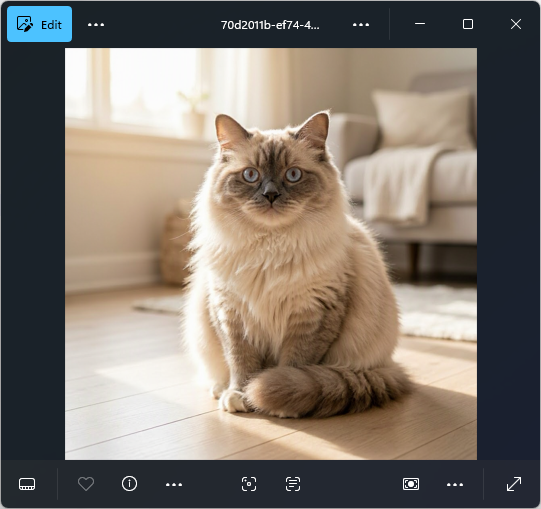
运行程序后,我们输入一个简单的请求绘制一副胖胖的布偶猫的高清图片 ,程序会输出LLM根据我们的描述生成的提示词文本,并且展示出生成的图片。下面的这段文本包含了ImageGenerator调用模型提供的提示词文本,可以看出它非常专业地描述了生成图片的细节要求,包括图片的构图、猫的品种和外观特征、光线和色彩等方面的细节要求。
markdown
请输入图片描述:
绘制一副胖胖的布偶猫的高清图片
Image generated successfully based on revised prompt: A professional pet photography style image centered on a chubby Ragdoll cat sitting comfortably on a pale, matte-finished wooden floor inside a cozy home, captured at eye-level with a tight, subject-focused composition and shallow depth of field that softly blurs the background furnishings. The cat has long, fluffy, voluminous fur with realistic strand definition and a plush texture, showing classic Ragdoll coloring with a warm cream body and darker seal-brown points on the ears, face mask, paws, and tail, plus slightly chubby cheeks, a small pink nose, and large round blue eyes that catch a clean window reflection. The very fluffy tail is wrapped around the cat's body, overlapping the front paws and forming a soft curve along the lower right of the frame. Warm natural sunlight enters from a nearby window off-frame to the left, producing a gentle golden glow across the fur and subtle, soft-edged shadows beneath the cat and along the floorboards, with faint dust motes suggested in the sunbeam. The background suggests a lived-in interior with neutral textiles and light wood tones rendered as creamy bokeh, keeping the cat as the clear focal point. The color palette is dominated by cream, seal brown, honeyed wood, and soft warm whites, punctuated by the saturated blue of the eyes, giving the scene a calm, intimate domestic atmosphere.
我为你生成了一张高清的胖胖布偶猫图片:

一只毛发蓬松、圆滚滚的布偶猫坐在温暖的室内木地板上,奶油色身体,耳朵和脸部是深色重点色,蓝色大眼睛,尾巴蓬松地围在身边,阳光从窗边洒下,整体是专业宠物摄影风格的4K清晰效果。

如果你想换成:
- ✅ 趴着打滚的姿势
- ✅ 戴蝴蝶结或小围巾
- ✅ 卡通风 / 插画风
- ✅ 在花园 / 沙发 / 雪地
- ✅ 更夸张的"超胖圆球"风格

告诉我你想要哪种,我可以再给你生成一张不同风格的 😊🐾
具体的图片生成效果如下所示:
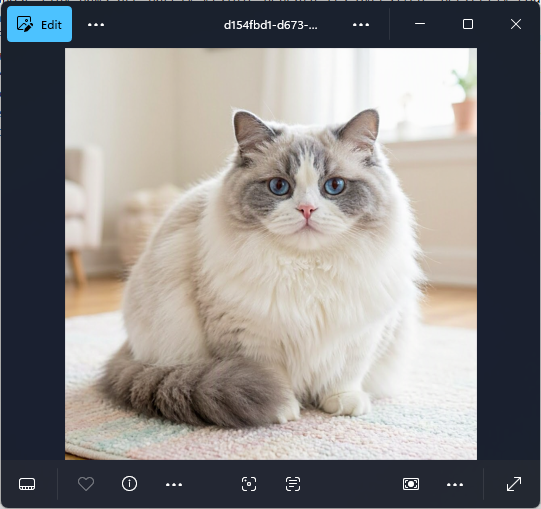
然后我们在对话中继续输入更夸张的'超胖圆球'风格,程序会根据这个新的描述生成一个新的提示词文本,并且生成一张符合这个新描述的图片。如下所示的提示词文本在之前的基础上进一步强调了"超胖圆球"风格的细节要求,比如猫的身体形状像一个毛茸茸的球,爪子几乎被厚毛淹没,脸部被毛发挤压得有点扁平等细节要求。然后我们从输出中看到了不同的提示词。
markdown
更夸张的"超胖圆球"风格,品种为蓝双布偶
Image generated successfully based on revised prompt: A professional pet-photography style image centers on an extremely exaggerated super chubby round ball Ragdoll cat in blue bicolor coloration, posed as a fluffy sphere whose tiny paws are barely visible beneath its oversized, perfectly rounded body. The cat's long, very thick plush fur dominates the frame with ultra-detailed texture, a predominantly clean white coat contrasted by soft blue-gray ears and a matching blue-gray facial mask that frames bright sapphire blue eyes and a small pink nose. The face appears sweet and slightly squished by the surrounding fluff, forming a marshmallow-like muzzle and compact cheeks, while a huge, dense, feathery tail curves forward and wraps around the body so it reads as part of the round silhouette. The cat sits on a soft pastel-colored rug with subtle woven texture, set in a bright, cozy room with pale cream walls, light wood flooring, and softly blurred hints of minimal furnishings in the background. Gentle natural daylight enters from an off-frame window, producing soft highlights along the fur and delicate shadowing under the body that reinforces the spherical volume. The composition is eye-level and tightly framed around the cat, with shallow depth of field and smooth background bokeh that keeps attention on the eyes, mask markings, and fur detail. The color palette is dominated by warm cream whites and pastel pinks and mint tones, punctuated by blue-gray fur accents and vivid blue eyes, creating an adorable, whimsical, cozy atmosphere.
给你生成了一只"超胖圆球"蓝双布偶 🐱💙

特点是:
- ✅ 圆到像一颗毛茸茸的球
- ✅ 爪子几乎被厚毛淹没
- ✅ 标准蓝双配色(蓝灰耳朵+面罩,白色身体)
- ✅ 蓝宝石大眼睛
- ✅ 毛量爆炸、像棉花糖一样蓬

如果你想再升级一点,我可以给你做:
- 🫧 更极端的"看不见脖子"版本
- 🍡 Q版卡通圆球
- 🧸 抱着玩偶的超胖版本
- 💤 躺着变成一滩"猫猫麻薯"
- 👑 戴小皇冠的贵族蓝双球

要不要再胖一点?😆
如下为针对新的提示词生成的图片:
2. IImageGenerator
ImageGeneratingChatClient注册的工具利用一个IImageGenerator对象来生成图片,IImageGenerator接口定义了一个GenerateAsync方法用于根据输入的提示词来生成图片。
csharp
public interface IImageGenerator : IDisposable
{
	Task<ImageGenerationResponse> GenerateAsync(
        ImageGenerationRequest request,
        ImageGenerationOptions? options = null,
        CancellationToken cancellationToken = default);

	object? GetService(Type serviceType, object? serviceKey = null);
}ImageGeneratingChatClient注册的工具不仅包括用来生成一张全新的图片,还包括用来在原有图片基础上进行修改的工具,所以作为请求的ImageGenerationRequest对象不仅包含了提示词这个属性,还包含了一个可选的OriginalImages属性用于提供原始图片以供修改。作为响应的ImageGenerationResponse对象不仅包含了生成的图片内容,还包含了一个可选的RawRepresentation属性用于提供生成结果的原始表示,以及一个可选的Usage属性用于提供生成过程中的使用情况统计信息。
csharp
public class ImageGenerationRequest
{
	public string? Prompt { get; set; }
	public IEnumerable<AIContent>? OriginalImages { get; set; }
	public ImageGenerationRequest(string prompt);
	public ImageGenerationRequest(string prompt, IEnumerable<AIContent>? originalImages);
}

public class ImageGenerationResponse
{
	public object? RawRepresentation { get; set; }
	public IList<AIContent> Contents{ get; set; }
	public UsageDetails? Usage { get; set; }
}GenerateAsync方法除了接受作为图片生成请求的ImageGenerationRequest对象外,还可以接受一个可选的ImageGenerationOptions对象,用于指定生成图片的各种选项。ImageGenerationOptions对象包含了如下这些属性:
csharp
public class ImageGenerationOptions
{
	public int? Count { get; set; }
	public Size? ImageSize { get; set; }
	public string? MediaType { get; set; }
	public string? ModelId { get; set; }
	public Func<IImageGenerator, object?>? RawRepresentationFactory { get; set; }
	public ImageGenerationResponseFormat? ResponseFormat { get; set; }
	public int? StreamingCount { get; set; }
	public AdditionalPropertiesDictionary? AdditionalProperties { get; set; }
}
每个属性说明如下:
- Count:表示希望生成多少张图片;
- ImageSize:表示希望生成的图片的尺寸;
- MediaType:表示希望生成的图片的媒体类型,比如
image/png、image/jpeg等; - ModelId:表示希望使用哪个模型来生成图片;
- RawRepresentationFactory:一个可选的委托,用于根据当前的
ImageGenerator对象来生成RawRepresentation属性的值; - ResponseFormat:表示希望生成的图片的响应格式;
ImageGenerationOptions的ResponseFormat属性是一个ImageGenerationResponseFormat枚举类型,它定义了生成图片的响应格式
csharp
public enum ImageGenerationResponseFormat
{
	Uri,
	Data,
	Hosted
}
具体的格式包括:
- Uri:返回一个图片的URL。图片存储在云端或AI服务商的服务器上。返回的数据量极小(只是一个字符串),并且链接通常有时效性需要及时下载;
- Data:直接返回图片文件的二进制原始数据(通常是Base64编码的字符串或字节数组)。图片数据直接包含在API的响应体中。开发者可以直接在内存中处理、展示或保存为本地文件。缺点是网络传输的数据量较大,会消耗更多带宽;
- Hosted:返回一个持久化的托管资源ID,而非直接的链接或数据。允许开发者在未来随时使用这个ID去再次获取或管理这张图片;
3. 查看生成的工具
我们可以按照如下的方式利用注册的IChatClient中间件来查看ImageGeneratingChatClient注册的工具。在这个命名为ToolChecker的中间件中,我们重写了GetResponseAsync方法来检查传入的ChatOptions对象中的工具列表,并将其中的AIFunction类型的工具的信息输出到控制台上。由于ImageGeneratingChatClient注册的工具是一个AIFunction类型的工具,所以我们可以通过这个ToolChecker中间件来查看它。
csharp
using System.Text.Json;
using System.Text.Json.Serialization;

DotEnv.Load();

var apiKey = Environment.GetEnvironmentVariable("API_KEY")!;
var endpoint = Environment.GetEnvironmentVariable("OPENAI_URL")!;
var imageGenerationEndpoint = Environment.GetEnvironmentVariable("IMAGET_GENERATION_URL")!;

var client = new OpenAIClient(
    credential: new AzureKeyCredential(apiKey),
    options: new OpenAIClientOptions { Endpoint = new Uri(endpoint) })
    .GetChatClient(model: "gpt-5.2-chat")
    .AsIChatClient()
    .AsBuilder()
    .UseImageGeneration(new ImageGenerator(imageGenerationEndpoint, apiKey, "MAI-Image-2e"))
    .Use(inner => new ToolChecker(inner))
    .Build()
    ;

var options = new ChatOptions { Tools = [new HostedImageGenerationTool()] };
await client.GetResponseAsync("N/A", options);

class ToolChecker(IChatClient innerClient) : DelegatingChatClient(innerClient)
{
    public override Task<ChatResponse> GetResponseAsync(IEnumerable<ChatMessage> messages, ChatOptions? options = null, CancellationToken cancellationToken = default)
    {
        var index = 1;
        foreach (var tool in options?.Tools ?? [])
        {
            if (tool is AIFunction  function)
            {
                Console.WriteLine($"""
                {new string('-', 30)}Tool {index++} {new string('-', 30)}
                Name: {function.Name}
                Description: {function.Description}
                JsonSchema: {JsonSerializer.Serialize(function.JsonSchema,new JsonSerializerOptions {  WriteIndented = true })}

                """);
            }
        }
        return Task.FromResult(new ChatResponse());
    }
}
输出:
------------------------------Tool 1 ------------------------------
Name: GenerateImage
Description: Generates images based on a text description.
JsonSchema: {
  "type": "object",
  "properties": {
    "prompt": {
      "description": "A detailed description of the image to generate",
      "type": "string"
    }
  },
  "required": [
    "prompt"
  ]
}

------------------------------Tool 2 ------------------------------
Name: EditImage
Description: Edits an existing image based on a text description.
JsonSchema: {
  "type": "object",
  "properties": {
    "prompt": {
      "description": "A detailed description of the image to generate",
      "type": "string"
    },
    "imageId": {
      "description": "The image to edit from one of the available image identifiers returned by GetImagesForEdit",
      "type": "string"
    }
  },
  "required": [
    "prompt",
    "imageId"
  ]
}

------------------------------Tool 3 ------------------------------
Name: GetImagesForEdit
Description: Lists the identifiers of all images available for edit.
JsonSchema: {
  "type": "object",
  "properties": {}
}
从输出可以看出ImageGeneratingChatClient注册了三个工具,分别是:
- GenerateImage:生成一张全新的图片;
- EditImage: 在提供的图片基础上进行修改;
- GetImagesForEdit: 提供所有可供修改的图片ID;
4. ImageGeneratingChatClient
在了解了ImageGeneratingChatClient大体的工作原理之后,我们来聊聊这个类型的设计细节。在前面的演示程序中,我们特意注册了一个名为HostedImageGenerationTool的工具来配合ImageGeneratingChatClient使用,之所以要注册这个看似没有任何作用的工具,是因为设计ImageGeneratingChatClient的初衷就是为了弥补HostedImageGenerationTool的不足。和其他的Hosted工具一样,HostedImageGenerationTool属于一个服务端/托管端 工具,它希望借助模型托管端的能力来绘制图片。所以仅仅是一个标记工具,它提供给LLM的只有工具的名称和通过Options属性设置的关于图片生成的选项信息。
csharp
public class HostedImageGenerationTool : AITool
{
	public override string Name => "image_generation";
	public override IReadOnlyDictionary<string, object?> AdditionalProperties { get; }
	public ImageGenerationOptions? Options { get; set; }
	public HostedImageGenerationTool(IReadOnlyDictionary<string, object?>? additionalProperties);
}但不是针对所有模型的托管端都具有图片生成的能力,但是作为语言模型,LLM具有为图片绘制生成提示词的能力。如果服务单不提供图片生成的能力,那么就得有工具端工具来提供这个能力,这就是ImageGeneratingChatClient的作用了。说比说一下,注册的HostedImageGenerationTool工具的Options自动应用到ImageGeneratingChatClient上,IImageGenerator的GenerateAsync方法的传入地options参数就是这个对象。
当我们创建一个ImageGeneratingChatClient对象的时候,除了需要提供作为内层IChatClient对象的innerClient和作为图片生成器的IImageGenerator对象之外,还可以选择提供一个DataContentHandling枚举值来指定工具输出的图片数据的处理方式。DataContentHandling的核心作用是控制在后续的对话轮次中,如何向底层的LLM传递图片数据,从而防止LLM的上下文窗口溢出,并节省Token流量费。DataContentHandling提供了三种裁剪 或替代这些图片数据的选项。
csharp
public sealed class ImageGeneratingChatClient : DelegatingChatClient
{
    public enum DataContentHandling
    {
        None,
        AllImages,
        GeneratedImages
    }
    public ImageGeneratingChatClient(
        IChatClient innerClient,
        IImageGenerator imageGenerator,
DataContentHandling dataContentHandling = DataContentHandling.AllImages);DataContentHandling的三种选项说明如下:
- None:不对图片数据进行任何处理,直接将图片数据原封不动地传递给底层的LLM。这种方式适用于生成的图片数量较少或者图片数据较小的情况;
- AllImages:将所有的图片数据都替换成一个占位符文本字符串(比如"Image")来传递给底层的LLM。这种方式适用于生成的图片数量较多或者图片数据较大的情况,可以有效地防止上下文窗口溢出,并节省Token流量费;
- GeneratedImages:仅将生成的图片数据替换成占位符文本字符串来传递给底层的LLM,而对于原始图片数据则不进行处理。这种方式适用于在对话过程中既有生成的图片又有原始图片的情况,可以保留原始图片的数据供LLM参考,同时避免生成的图片数据导致上下文窗口溢出,并节省Token流量费;
ImageGeneratingChatClient会创建一个RequestState对象来维护多轮图片生成的状态,包括生成的图片。RequestState定义的ProcessChatMessages和ReplaceImageGenerationFunctionResults方法会根据DataContentHandling的不同选项以及注册的HostedImageGenerationTool工具的Options来处理请求和响应消息,三个工具通过ProcessChatOptions方法注册到ChatOptions上。上述的三个工具函数就也定义在RequestState类型上,GenerateImageAsync和EditImageAsync方法会利用指定的IImageGenerator对象来生成图片,而GetImagesForEdit方法会返回当前已经生成的图片的ID列表供编辑工具使用。
csharp
public sealed class ImageGeneratingChatClient : DelegatingChatClient
{
    private sealed class RequestState
    {
        public IEnumerable<ChatMessage> ProcessChatMessages(IEnumerable<ChatMessage> messages);
        public ChatOptions? ProcessChatOptions(ChatOptions? options);
        public IList<AIContent> ReplaceImageGenerationFunctionResults(IList<AIContent> contents);

        [Description("Generates images based on a text description.")]
        public async Task<string> GenerateImageAsync(
             [Description("A detailed description of the image to generate")] string prompt,
             CancellationToken cancellationToken = default);

        [Description("Lists the identifiers of all images available for edit.")]
        public IEnumerable<string> GetImagesForEdit();

        [Description("Edits an existing image based on a text description.")]
        public async Task<string> EditImageAsync(
            [Description("A detailed description of the image to generate")] string prompt,
            [Description($"The image to edit from one of the available image identifiers returned by {nameof(GetImagesForEdit)}")] string imageId,
            CancellationToken cancellationToken = default);
    }

    public override async Task<ChatResponse> GetResponseAsync(
        IEnumerable<ChatMessage> messages, ChatOptions? options = null,
        CancellationToken cancellationToken = default);
    public override async IAsyncEnumerable<ChatResponseUpdate> GetStreamingResponseAsync(
        IEnumerable<ChatMessage> messages,
        ChatOptions? options = null,
        CancellationToken cancellationToken = default);
}
5. UseImageGeneration扩展方法
ImageGeneratingChatClient中间件的注册通过如下这个UseImageGeneration扩展方法来完成。这个扩展方法接受一个IImageGenerator对象作为参数,并将其封装成一个ImageGeneratingChatClient对象来注册到IChatClient中间件管道上。但是这个的定义是有问题的,因为无法提供构建ImageGeneratingChatClient对象所需要的dataContentHandling参数。由于ImageGeneratingChatClient也没有提供一个对应的属性,所以利用configure参数也没有办法对这个重要的选项进行设置。
csharp
public static class ImageGeneratingChatClientBuilderExtensions
{
    public static ChatClientBuilder UseImageGeneration(
        this ChatClientBuilder builder,
        IImageGenerator? imageGenerator = null,
        Action<ImageGeneratingChatClient>? configure = null);
    }
}