背景
ArkWeb 官方文档中只给出了组件的基本 API 和简单示例,缺少完整的混合应用开发流程。在实际项目中,需要同时处理 URL 加载、JS 双向通信、本地存储同步以及下拉刷新等场景,如果每个模块单独调试,后期集成时容易出现接口冲突和状态不一致。
下面从零构建一个新闻列表阅读器,包含 Web 页面加载、Native 向 Web 注入数据、Web 回调 Native 打开详情、本地存储缓存摘要、下拉刷新 Web 内容等完整流程。所有代码均基于 HarmonyOS NEXT 的 ArkWeb 组件(API 12)。
1. 项目结构与基础配置
创建工程后,在 entry/src/main/ets 下新建 pages/NewsApp.ets 作为主页面。同时在 rawfile 目录下放入网页资源 news.html(后面会给出完整 HTML)。
typescript
// NewsApp.ets 骨架
import web_webview from '@ohos.web.webview';
import webController from '@ohos.web.webview';
import { BusinessError } from '@ohos.base';
import storage from '@ohos.data.preferences';

@Entry
@Component
struct NewsApp {
  private controller: web_webview.WebviewController = new web_webview.WebviewController();
  @State newsSummary: string = '';
  @State isLoading: boolean = false;

  build() {
    Column() {
      // 下拉刷新区域 + Web 组件
      Refresh({ refreshing: this.isLoading, onRefresh: () => this.onPullRefresh() }) {
        Web({ src: $rawfile('news.html'), controller: this.controller })
          .javaScriptAccess(true)
          .domStorageAccess(true)
          .onPageEnd(() => this.injectNativeData())
          .javascriptProxy({
            object: this,
            name: 'nativeBridge',
            methodList: ['openDetail', 'saveCache', 'getCache']
          })
      }
    }
    .height('100%')
    .width('100%')
  }
}
2. 网页端 HTML(rawfile/news.html)
所有 JS 交互的方法名必须与 .javascriptProxy 中定义的 methodList 一致。
html
<!DOCTYPE html>
<html>
<head>
  <meta charset="utf-8">
  <style>
    body { margin:0; padding:16px; font-family: system-ui; }
    .news-item { border-bottom:1px solid #eee; padding:12px 0; cursor: pointer; }
    .news-title { font-size:16px; font-weight:500; }
    .news-summary { font-size:14px; color:#666; margin-top:4px; }
    #refresh-btn { margin-bottom:8px; padding:8px 16px; }
  </style>
</head>
<body>
  <button id="refresh-btn">手动刷新</button>
  <div id="news-list"></div>
  <script>
    // 接收 Native 注入的新闻数据
    window.renderNews = function(data) {
      const list = JSON.parse(data);
      let html = '';
      list.forEach(item => {
        html += `<div class="news-item" onclick="onItemClick('${item.id}')">
          <div class="news-title">${item.title}</div>
          <div class="news-summary">${item.summary}</div>
        </div>`;
      });
      document.getElementById('news-list').innerHTML = html;
    };

    function onItemClick(id) {
      // 调用 native 端 openDetail 方法
      if (window.nativeBridge && window.nativeBridge.openDetail) {
        window.nativeBridge.openDetail(id);
      }
    }

    // 手动刷新按钮 - 通知Native重新加载数据
    document.getElementById('refresh-btn').addEventListener('click', function() {
      // 也可以通过 Native 回调触发,这里展示双向通信
      if (window.nativeBridge && window.nativeBridge.getCache) {
        window.nativeBridge.getCache('lastRefresh').then(cacheVal => {
          // 仅做演示,实际可交给Native处理
          console.log('last refresh:', cacheVal);
        });
      }
    });
  </script>
</body>
</html>
3. Native 端核心逻辑
3.1 注入本地新闻数据
页面加载完成后(onPageEnd)触发 injectNativeData,通过 runJavaScript 将 JSON 字符串传入 Web 端。
typescript
private injectNativeData() {
  const mockData = [
    { id: '1', title: 'HarmonyOS NEXT 新特性', summary: '原生应用流畅度提升 30%' },
    { id: '2', title: 'ArkUI 组件更新', summary: '新增 Canvas 2D 支持' }
  ];
  const jsonStr = JSON.stringify(mockData);
  // 调用网页端全局函数 renderNews
  this.controller.runJavaScript(`renderNews('${jsonStr}')`, (error, result) => {
    if (error) {
      console.error('数据注入失败:', error.message);
    }
  });
}
3.2 JS 回调 Native 打开详情
在 Web 组件中通过 javascriptProxy 暴露的对象必须实现 openDetail 方法。该方法会被网页端直接调用。
typescript
openDetail(id: string): void {
  console.log('NewsApp 收到打开详情请求, id:', id);
  // 实际场景跳转到详情页面,这里只做日志记录
  // 注意:javascriptProxy 的方法不能是异步函数,否则 Web 端无法获取返回值
  // 如果需要返回数据,使用 promise 或同步返回值
}
3.3 本地存储:缓存上次刷新时间
在 NewsApp 类中定义 saveCache 和 getCache 方法,通过 @ohos.data.preferences 操作持久化数据。
typescript
// 需要注意:javascriptProxy 暴露的方法默认在 UI 线程执行,
// 如果涉及异步操作,需要将结果通过回调返回给 Web 端
async saveCache(key: string, value: string): Promise<void> {
  const dataPreferences = await storage.getPreferences(this, 'newsCache');
  await dataPreferences.put(key, value);
  await dataPreferences.flush();
}

async getCache(key: string): Promise<string> {
  const dataPreferences = await storage.getPreferences(this, 'newsCache');
  const val = await dataPreferences.get(key, '');
  return val as string;
}
注意事项
如果 Web 端期望 getCache 返回字符串,而 Native 方法是 async,则返回的是一个 Promise 对象,Web 端需要 await 或 .then 处理。更稳妥的做法是:在 javascriptProxy 声明 getCache 为同步方法,内部使用 runJavaScript 通过回调把结果传回。但 ArkWeb 当前版本支持返回 Promise 类型,上述写法可直接使用。
4. 下拉刷新实现
Refresh 组件触发后,调用 Native 重新注入最新数据。这里需要先清空网页现有内容。
typescript
private onPullRefresh() {
  this.isLoading = true;
  // 模拟刷新延迟 1 秒
  setTimeout(() => {
    this.controller.runJavaScript('document.getElementById("news-list").innerHTML = ""', () => {
      // 重新注入数据
      this.injectNativeData();
      this.isLoading = false;
    });
  }, 1000);
}
常见误区
下拉刷新时若直接调用 injectNativeData(),由于 Web 端原有数据未被清除,新旧新闻会叠加显示。所以先执行 runJavaScript 清空容器,再注入新数据。此外,Refresh 组件的 onRefresh 回调需要手动设置 isLoading 结束状态,否则刷新动画不会停止。
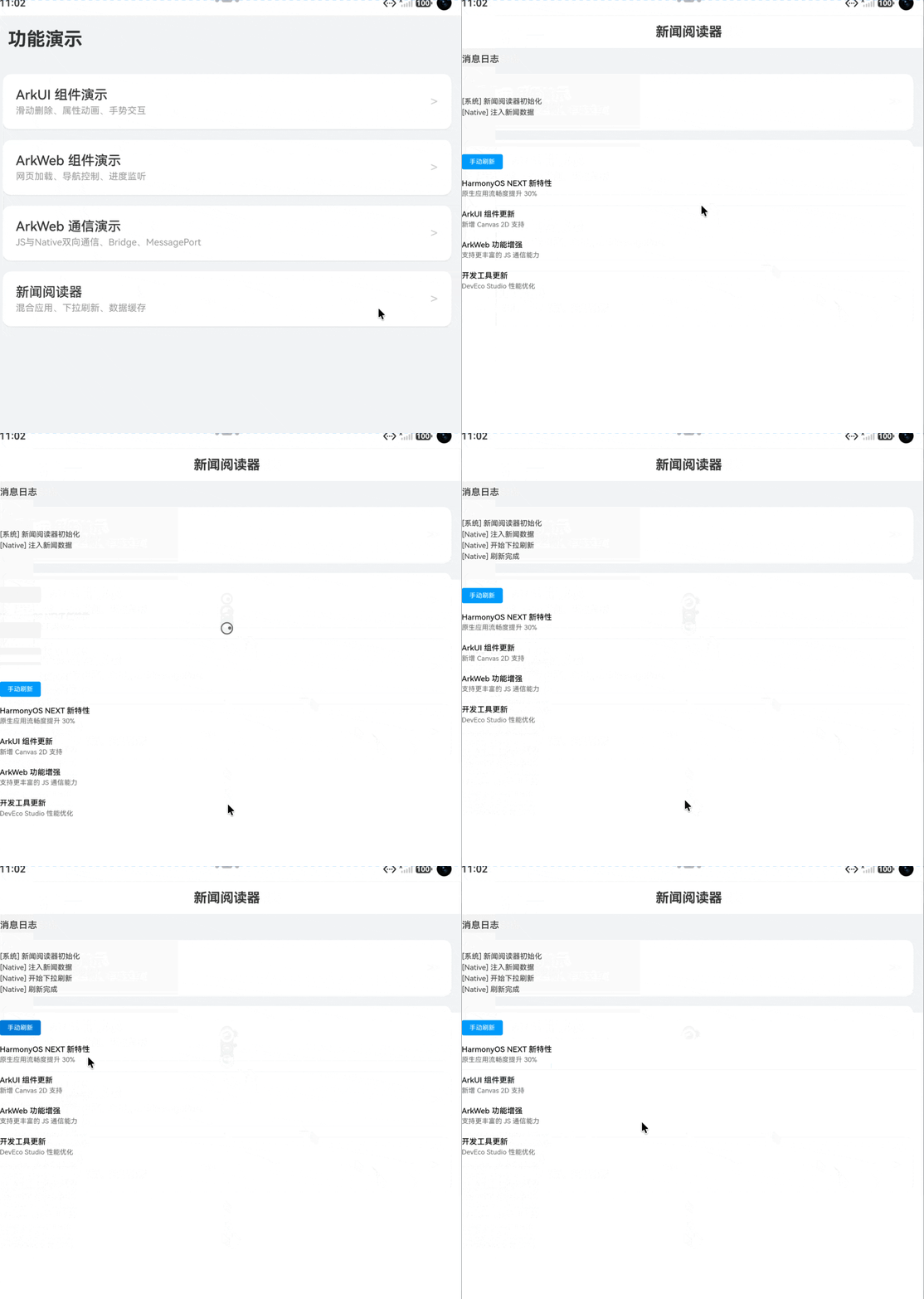
5. 完整运行效果
6. 可能遇到的问题
- JS 交互方法未定义:检查
javascriptProxy的methodList是否包含所有暴露方法,且方法名与 Web 端调用名完全一致(区分大小写)。 - 注入中文数据乱码:确保
runJavaScript的字符串参数使用encodeURIComponent转义,但 ArkWeb 当前版本直接传递 UTF-8 字符串无问题,若遇到特殊字符异常再做编码处理。 - 多个 Web 实例共用同一个
WebviewController:每个 Web 组件必须拥有独立的controller,否则页面错乱。
如果你在实际集成中遇到了其他 ArkWeb 的坑,或者发现 JS 交互在特定机型上报错,欢迎在评论区留言讨论。