📌 学习目标
- 掌握更新GeoJSON多边形的实现方法
- 理解相关API的使用
- 能够独立完成类似功能开发
🎯 核心概念
使用可更新的GeoJSONVT更新GeoJSON多边形。
💻 完 整 代 码
代码示例
js
const map = new maplibregl.Map({
    container: 'map',
    style: 'https://demotiles.maplibre.org/style.json',
    center: [-68.13734351262877, 45.137451890638886],
    zoom: 5
});
map.showTileBoundaries = true;

const rectangles = Array.from({length: 5}, (_, i) => ({
    id: i,
    x: -68.13 + (Math.random() - 0.5) * 5,
    y: 45.13 + (Math.random() - 0.5) * 5,
    vx: (Math.random() - 0.5) * 0.05,
    vy: (Math.random() - 0.5) * 0.05,
    w: 0.5 + Math.random(),
    h: 0.5 + Math.random(),
    rotation: Math.random() * 2 * Math.PI,
    rotationSpeed: (Math.random() - 0.5) * 0.1,
    color: '#008888',
    every: Math.round(Math.random() * 100 + 200)
}));

const getRandomColor = () => '#' + Math.floor(Math.random() * 16777215).toString(16).padStart(6, '0');

function getRectangleGeometry({x, y, w, h, rotation}) {
    const c = Math.cos(rotation), s = Math.sin(rotation);
    const hw = w / 2, hh = h / 2;
    const coords = [[-hw, -hh], [hw, -hh], [hw, hh], [-hw, hh]]
        .map(([dx, dy]) => [x + dx * c - dy * s, y + dx * s + dy * c]);
    coords.push(coords[0]);
    return {type: 'Polygon', coordinates: [coords]};
}

map.on('load', () => {
    const features = rectangles.flatMap(rect => [
        {type: 'Feature', id: rect.id, properties: {color: rect.color}, geometry: getRectangleGeometry(rect)},
        {type: 'Feature', id: `${rect.id}_label`, properties: {label: `Zoom: ${Math.round(map.getZoom())}`}, geometry: {type: 'Point', coordinates: [rect.x, rect.y]}}
    ]);

    map.addSource('rectangles', {type: 'geojson', data: {type: 'FeatureCollection', features}});

    map.addLayer({
        id: 'rectangles', type: 'fill', source: 'rectangles',
        paint: {'fill-color': ['get', 'color'], 'fill-opacity': 0.8},
        filter: ['==', '$type', 'Polygon']
    });

    map.addLayer({
        id: 'rectangles-label', type: 'symbol', source: 'rectangles',
        layout: {'text-field': ['get', 'label'], 'text-size': 14, 'text-allow-overlap': true, 'text-ignore-placement': true},
        paint: {'text-color': '#ffffff'},
        filter: ['==', '$type', 'Point']
    });

    let count = 0;
    function animate() {
        const zoom = map.getZoom().toFixed(1);
        count++;

        const updates = rectangles.flatMap(rect => {
            rect.x += rect.vx; rect.y += rect.vy; rect.rotation += rect.rotationSpeed;
            if (rect.x < -75 || rect.x > -60) rect.vx *= -1;
            if (rect.y < 40 || rect.y > 50) rect.vy *= -1;
            if (count % rect.every === 0) rect.color = getRandomColor();

            return [
                {id: rect.id, newGeometry: getRectangleGeometry(rect), addOrUpdateProperties: [{key: 'color', value: rect.color}]},
                {id: `${rect.id}_label`, newGeometry: {type: 'Point', coordinates: [rect.x, rect.y]}, addOrUpdateProperties: [{key: 'label', value: zoom}]}
            ];
        });

        map.getSource('rectangles')?.updateData({update: updates});
        requestAnimationFrame(animate);
    }
    animate();
});
代码示例
html
<!DOCTYPE html>
<html lang="en">
<head>
    <title>Update GeoJSON polygons</title>
    <meta property="og:description" content="使用可更新的 GeoJSONVT 更新 GeoJSON 多边形" />
    <meta property="og:created" content="2026-03-01" />
    <meta charset='utf-8'>
    <meta name="viewport" content="width=device-width, initial-scale=1">
    <link rel='stylesheet' href='https://unpkg.com/maplibre-gl@5.24.0/dist/maplibre-gl.css' />
    <script src='https://unpkg.com/maplibre-gl@5.24.0/dist/maplibre-gl.js'></script>
    <style>
        body { margin: 0; padding: 0; }
        html, body, #map { height: 100%; }
    </style>
</head>
<body>
<div id="map"></div>
<script>
    const map = new maplibregl.Map({
        container: 'map',
        style: 'https://demotiles.maplibre.org/style.json',
        center: [-68.13734351262877, 45.137451890638886],
        zoom: 5
    });
    map.showTileBoundaries = true;

    const rectangles = Array.from({length: 5}, (_, i) => ({
        id: i,
        x: -68.13 + (Math.random() - 0.5) * 5,
        y: 45.13 + (Math.random() - 0.5) * 5,
        vx: (Math.random() - 0.5) * 0.05,
        vy: (Math.random() - 0.5) * 0.05,
        w: 0.5 + Math.random(),
        h: 0.5 + Math.random(),
        rotation: Math.random() * 2 * Math.PI,
        rotationSpeed: (Math.random() - 0.5) * 0.1,
        color: '#008888',
        every: Math.round(Math.random() * 100 + 200)
    }));

    const getRandomColor = () => '#' + Math.floor(Math.random() * 16777215).toString(16).padStart(6, '0');

    function getRectangleGeometry({x, y, w, h, rotation}) {
        const c = Math.cos(rotation), s = Math.sin(rotation);
        const hw = w / 2, hh = h / 2;
        const coords = [[-hw, -hh], [hw, -hh], [hw, hh], [-hw, hh]]
            .map(([dx, dy]) => [x + dx * c - dy * s, y + dx * s + dy * c]);
        coords.push(coords[0]);
        return {type: 'Polygon', coordinates: [coords]};
    }

    map.on('load', () => {
        const features = rectangles.flatMap(rect => [
            {type: 'Feature', id: rect.id, properties: {color: rect.color}, geometry: getRectangleGeometry(rect)},
            {type: 'Feature', id: `${rect.id}_label`, properties: {label: `Zoom: ${Math.round(map.getZoom())}`}, geometry: {type: 'Point', coordinates: [rect.x, rect.y]}}
        ]);

        map.addSource('rectangles', {type: 'geojson', data: {type: 'FeatureCollection', features}});

        map.addLayer({
            id: 'rectangles', type: 'fill', source: 'rectangles',
            paint: {'fill-color': ['get', 'color'], 'fill-opacity': 0.8},
            filter: ['==', '$type', 'Polygon']
        });

        map.addLayer({
            id: 'rectangles-label', type: 'symbol', source: 'rectangles',
            layout: {'text-field': ['get', 'label'], 'text-size': 14, 'text-allow-overlap': true, 'text-ignore-placement': true},
            paint: {'text-color': '#ffffff'},
            filter: ['==', '$type', 'Point']
        });

        let count = 0;
        function animate() {
            const zoom = map.getZoom().toFixed(1);
            count++;

            const updates = rectangles.flatMap(rect => {
                rect.x += rect.vx; rect.y += rect.vy; rect.rotation += rect.rotationSpeed;
                if (rect.x < -75 || rect.x > -60) rect.vx *= -1;
                if (rect.y < 40 || rect.y > 50) rect.vy *= -1;
                if (count % rect.every === 0) rect.color = getRandomColor();

                return [
                    {id: rect.id, newGeometry: getRectangleGeometry(rect), addOrUpdateProperties: [{key: 'color', value: rect.color}]},
                    {id: `${rect.id}_label`, newGeometry: {type: 'Point', coordinates: [rect.x, rect.y]}, addOrUpdateProperties: [{key: 'label', value: zoom}]}
                ];
            });

            map.getSource('rectangles')?.updateData({update: updates});
            requestAnimationFrame(animate);
        }
        animate();
    });
</script>
</body>
</html>
🔍 代码解析
1. 初始化地图
使用 new maplibregl.Map() 创建地图实例,配置基本参数。启用 showTileBoundaries 显示瓦片边界。
2. 创建矩形数据
生成5个随机矩形,包含位置、速度、尺寸、旋转角度等属性。
3. 几何计算函数
getRectangleGeometry() 函数根据矩形参数计算旋转后的坐标,使用三角函数进行旋转变换。
4. 添加数据源和图层
创建GeoJSON数据源,包含多边形和标签点要素,添加 fill 和 symbol 图层。
5. 动画循环
使用 requestAnimationFrame 实现平滑动画,通过 updateData() 方法高效更新要素。
6. 边界检测
矩形到达边界时反弹(反转速度方向),并随机改变颜色。
⚙️ 参数说明
| 参数 | 类型 | 必填 | 说明 |
|---|---|---|---|
| container | string | 是 | 地图容器ID |
| style | string | 是 | 地图样式URL |
| center | number, number | 否 | 初始中心点,默认0, 0 |
| zoom | number | 否 | 初始缩放级别,默认0 |
updateData 方法参数
| 参数 | 类型 | 说明 |
|---|---|---|
| update | array | 要素更新数组 |
| update\[\].id | string/number | 要素ID |
| update\[\].newGeometry | object | 新的几何对象 |
| update\[\].addOrUpdateProperties | array | 属性更新数组 |
🎨 效果说明
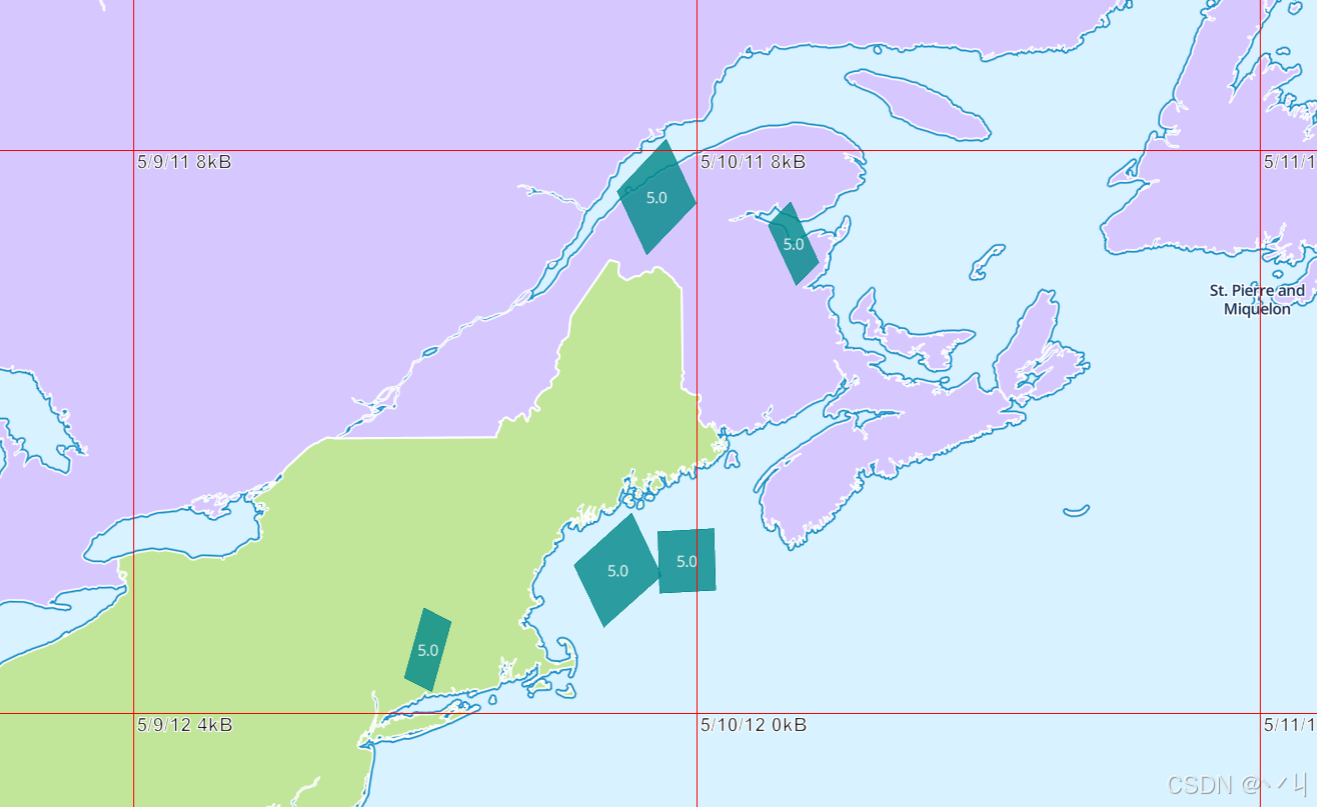
运行代码后:
- 地图显示美国缅因州区域(中心点 -68.14°W, 45.14°N)
- 5个半透明矩形在地图上移动、旋转
- 矩形到达边界时自动反弹
- 矩形颜色随机变化
- 每个矩形中心显示当前缩放级别标签
- 瓦片边界可见(便于调试)
💡 常 见 问 题
Q1: updateData 和 setData 有什么区别?
A: updateData 是增量更新,只更新变化的要素;setData 是全量替换。
Q2: 如何暂停/恢复动画?
A: 可以使用 cancelAnimationFrame() 暂停,重新调用 animate() 恢复。
Q3: 旋转矩形的几何计算原理是什么?
A: 使用旋转变换矩阵:x' = x*cosθ - y*sinθ, y' = x*sinθ + y*cosθ
📝 练习任务
- 基础练习:修改矩形数量和初始颜色
- 进阶挑战:添加暂停/播放按钮控制动画
- 拓展思考:如何实现矩形碰撞检测?
🌟 最佳实践
- 增量更新 : 使用
updateData替代setData,提升性能 - 动画优化 : 使用
requestAnimationFrame确保流畅的60fps动画 - 内存管理: 避免在动画循环中创建新对象
- 边界处理: 合理设置边界条件,避免要素移出可视区域
🔗 延伸阅读
-
下一课预告:将继续学习地图图层的基础知识
本文是MapLibre GL JS实践课程系列的一部分,欢迎关注收藏