👨⚕️ 主页: gis分享者
👨⚕️ 感谢各位大佬 点赞👍 收藏⭐ 留言📝 加关注✅!
文章目录
- 一、🍀前言
-
- [1.1 ☘️THREE.MeshBasicMaterial](#1.1 ☘️THREE.MeshBasicMaterial)
- 二、🍀实现炫酷的3D编程语言地球可视化效果
-
- [1. ☘️实现思路](#1. ☘️实现思路)
- [2. ☘️代码样例](#2. ☘️代码样例)
一、🍀前言
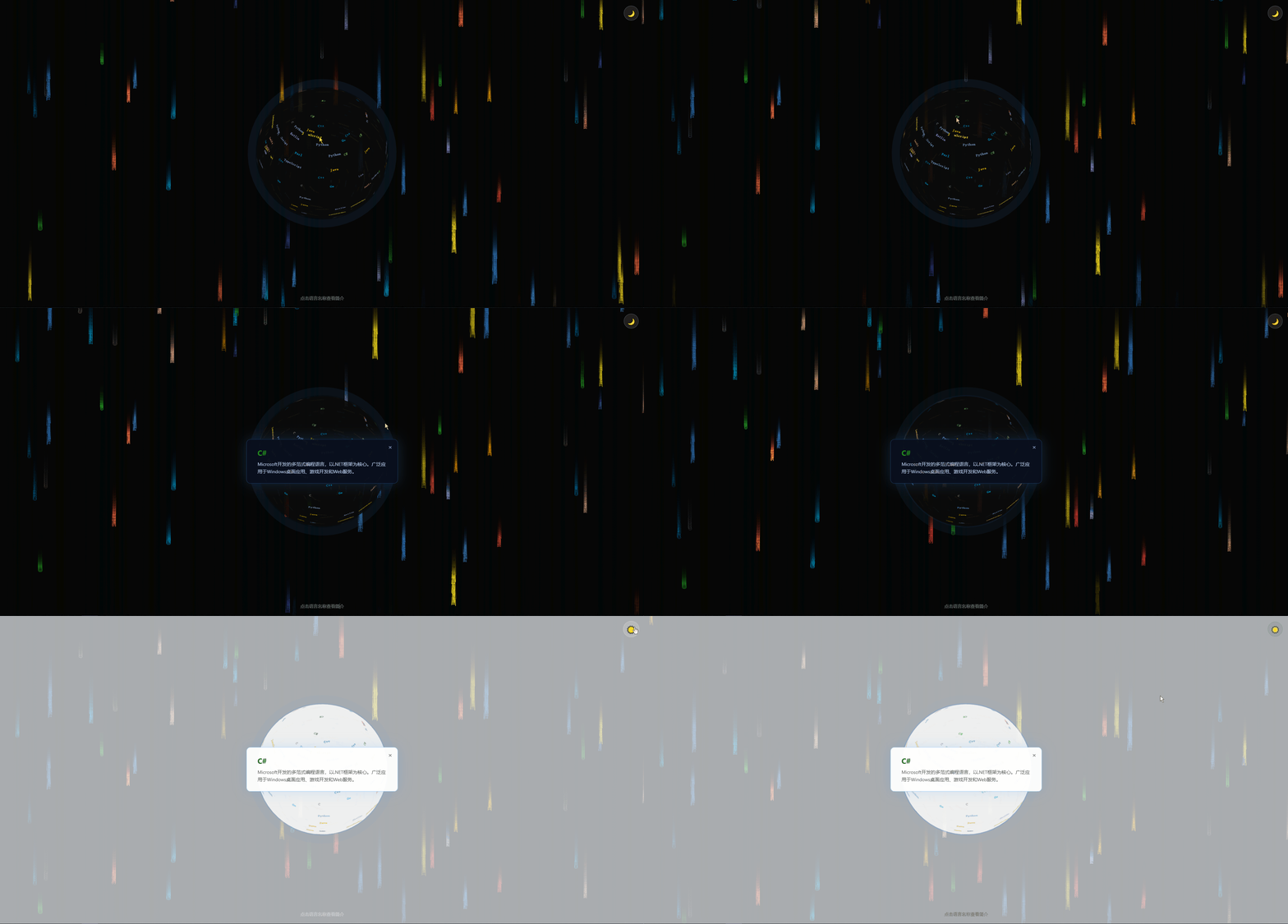
本文详细介绍如何基于threejs在三维场景中实现炫酷的3D编程语言地球可视化效果,亲测可用。希望能帮助到您。一起学习,加油!加油!
1.1 ☘️THREE.MeshBasicMaterial
THREE.MeshBasicMaterial是一种基本的网格材质,它不受光照影响,不产生阴影,并且不具备高级的光照和反射效果。它适用于简单的几何体展示,如平面、立方体等。
构造函数:
MeshBasicMaterial( parameters : Object )
parameters - (可选)用于定义材质外观的对象,具有一个或多个属性。材质的任何属性都可以从此处传入(包括从Material继承的任何属性)。
属性color例外,其可以作为十六进制字符串传递,默认情况下为 0xffffff(白色),内部调用Color.set(color)。
属性:
共有属性请参见其基类Material。
.alphaMap : Texture
alpha贴图是一张灰度纹理,用于控制整个表面的不透明度。(黑色:完全透明;白色:完全不透明)。 默认值为null。
仅使用纹理的颜色,忽略alpha通道(如果存在)。 对于RGB和RGBA纹理,WebGL渲染器在采样此纹理时将使用绿色通道, 因为在DXT压缩和未压缩RGB 565格式中为绿色提供了额外的精度。 Luminance-only以及luminance/alpha纹理也仍然有效。
.aoMap : Texture
该纹理的红色通道用作环境遮挡贴图。默认值为null。aoMap需要第二组UV。
.aoMapIntensity : Float
环境遮挡效果的强度。默认值为1。零是不遮挡效果。
.color : Color
材质的颜色(Color),默认值为白色 (0xffffff)。
.combine : Integer
如何将表面颜色的结果与环境贴图(如果有)结合起来。
选项为THREE.MultiplyOperation(默认值),THREE.MixOperation, THREE.AddOperation。如果选择多个,则使用.reflectivity在两种颜色之间进行混合。
.envMap : Texture
环境贴图。默认值为null。
.fog : Boolean
材质是否受雾影响。默认为true。
.lightMap : Texture
光照贴图。默认值为null。lightMap需要第二组UV。
.lightMapIntensity : Float
烘焙光的强度。默认值为1。
.map : Texture
颜色贴图。可以选择包括一个alpha通道,通常与.transparent 或.alphaTest。默认为null。
.reflectivity : Float
环境贴图对表面的影响程度; 见.combine。默认值为1,有效范围介于0(无反射)和1(完全反射)之间。
.refractionRatio : Float
空气的折射率(IOR)(约为1)除以材质的折射率。它与环境映射模式THREE.CubeRefractionMapping 和THREE.EquirectangularRefractionMapping一起使用。 空气的折射率 (IOR)(大约 1)除以材料的折射率。它与环境映射模式 THREE.CubeRefractionMapping 一起使用。 折射率不应超过1。默认值为0.98。
.specularMap : Texture
材质使用的高光贴图。默认值为null。
.wireframe : Boolean
将几何体渲染为线框。默认值为false(即渲染为平面多边形)。
.wireframeLinecap : String
定义线两端的外观。可选值为 'butt','round' 和 'square'。默认为'round'。
该属性对应2D Canvas lineJoin属性, 并且会被WebGL渲染器忽略。
.wireframeLinejoin : String
定义线连接节点的样式。可选值为 'round', 'bevel' 和 'miter'。默认值为 'round'。
该属性对应2D Canvas lineJoin属性, 并且会被WebGL渲染器忽略。
.wireframeLinewidth : Float
控制线框宽度。默认值为1。
由于OpenGL Core Profile与大多数平台上WebGL渲染器的限制, 无论如何设置该值,线宽始终为1。
方法:
共有方法请参见其基类Material。
二、🍀实现炫酷的3D编程语言地球可视化效果
1. ☘️实现思路
CodePlanet 是一个基于 Three.js 开发的交互式3D编程语言地球可视化项目。它以创新的形式将全球主流编程语言"种"在地球表面,让用户像探索真实星球一样,通过鼠标拖拽、缩放、点击等方式,浏览不同编程语言的分布、特点和应用场景。把枯燥的编程语言排行榜,变成了一个沉浸式、可交互的3D可视化星球,这创意真的很棒!
用短短几百行代码,就创造出了一个视觉和交互都在线的3D编程星球,充分展现了 Web 3D 技术的魅力。它不仅好看、好玩,更重要的是提供了一种把技术知识变得生动有趣的新思路。在AI时代,我们越来越需要这样的创意项目------让复杂的技术概念变得直观、可感知、可探索。
- 3D交互式编程语言地球 使用 Three.js
构建高精度3D地球模型,17种主流编程语言以发光文字形式按流行度比例随机分布在地球表面,视觉效果科技感十足。 - 流畅的多方式交互操作 支持鼠标拖拽旋转地球、滚轮缩放、点击语言名称查看详细介绍,同时完美适配移动端(单指拖动 +
双指缩放),交互体验优秀。 - 动态呼吸辉光效果 地球拥有多层辉光(内辉光 + 外大气层),并实现实时脉冲呼吸动画,极大提升了整体视觉层次感和科幻氛围。
- 赛博朋克风格代码雨背景 独立的 Canvas 实现倾斜下落的编程语言代码雨,配合深色主题营造出强烈的
Matrix(黑客帝国)赛博视觉效果。 - 智能主题切换与响应式适配 一键切换深色/浅色模式(自动保存),支持不同设备屏幕自适应,包含完整的移动端触控优化,兼具美观与实用性。
具体实现参考下面代码样例。
2. ☘️代码样例
html
<!DOCTYPE html>
<html lang="zh-CN">
<head>
    <meta charset="UTF-8">
    <meta name="viewport" content="width=device-width, initial-scale=1.0">
    <title>炫酷的3D编程语言地球可视化</title>
    <style>
        * { margin: 0; padding: 0; box-sizing: border-box; }
        html, body { width: 100%; height: 100%; overflow: hidden; background: #000; }
        canvas { display: block; }
        .stars-bg { position: fixed; top: 0; left: 0; width: 100%; height: 100%; pointer-events: none; z-index: 0; }
        #globeCanvas { position: fixed; top: 0; left: 0; width: 100%; height: 100%; z-index: 1; }
        .lang-info {
            position: fixed;
            top: 50%;
            left: 50%;
            transform: translate(-50%, -50%);
            background: rgba(10, 15, 30, 0.95);
            border: 1px solid rgba(74, 158, 255, 0.3);
            border-radius: 12px;
            padding: 24px 32px;
            color: #fff;
            font-family: 'Segoe UI', sans-serif;
            z-index: 100;
            display: none;
            min-width: 300px;
            max-width: 450px;
            box-shadow: 0 0 40px rgba(74, 158, 255, 0.2);
        }
        .lang-info.show { display: block; }
        .lang-info h2 { margin: 0 0 8px 0; font-size: 22px; }
        .lang-info p { margin: 0; font-size: 14px; line-height: 1.6; color: #b0c4de; }
        .lang-info .close-btn {
            position: absolute;
            top: 12px;
            right: 16px;
            background: none;
            border: none;
            color: #6a8caf;
            font-size: 20px;
            cursor: pointer;
        }
        .lang-info .close-btn:hover { color: #fff; }
        .hint {
            position: fixed;
            bottom: 20px;
            left: 50%;
            transform: translateX(-50%);
            color: rgba(255,255,255,0.4);
            font-size: 13px;
            font-family: sans-serif;
            z-index: 10;
            transition: color 0.3s;
        }
        .theme-toggle {
            position: fixed;
            top: 20px;
            right: 20px;
            z-index: 100;
            background: rgba(255,255,255,0.1);
            border: 1px solid rgba(255,255,255,0.2);
            border-radius: 50%;
            width: 44px;
            height: 44px;
            cursor: pointer;
            display: flex;
            align-items: center;
            justify-content: center;
            font-size: 20px;
            transition: all 0.3s;
        }
        .theme-toggle:hover {
            background: rgba(255,255,255,0.2);
            transform: scale(1.1);
        }
        .theme-toggle .sun { display: none; }
        .theme-toggle .moon { display: block; }
        body.light .theme-toggle { background: rgba(0,0,0,0.05); border-color: rgba(0,0,0,0.1); }
        body.light .theme-toggle:hover { background: rgba(0,0,0,0.1); }
        body.light .theme-toggle .sun { display: block; }
        body.light .theme-toggle .moon { display: none; }
        body.light { background: #f0f4f8; }
        body.light canvas.stars-bg { opacity: 0.3; }
        body.light .hint { color: rgba(0,0,0,0.4); }
        body.light .lang-info {
            background: rgba(255, 255, 255, 0.95);
            border-color: rgba(74, 158, 255, 0.5);
            color: #333;
        }
        body.light .lang-info p { color: #555; }
        body.light .lang-info .close-btn { color: #888; }
        body.light .lang-info .close-btn:hover { color: #333; }
    </style>
</head>
<body>
<canvas class="stars-bg" id="starsCanvas"></canvas>
<canvas id="globeCanvas"></canvas>
<div class="lang-info" id="langInfo">
    <button class="close-btn" onclick="closeLangInfo()">×</button>
    <h2 id="langName"></h2>
    <p id="langDesc"></p>
</div>
<div class="hint">点击语言名称查看简介</div>
<button class="theme-toggle" id="themeToggle" onclick="toggleTheme()">
    <span class="moon">🌙</span>
    <span class="sun">☀️</span>
</button>
<script src="https://cdn.jsdelivr.net/npm/three@0.160.0/build/three.min.js"></script>
<script>
  const languages = [
    { name: 'Python', color: 0x3776AB, ratio: 15 },
    { name: 'C', color: 0x555555, ratio: 12 },
    { name: 'C++', color: 0x00599C, ratio: 11 },
    { name: 'Java', color: 0xED8B00, ratio: 10 },
    { name: 'Go', color: 0x00ADD8, ratio: 8 },
    { name: 'C#', color: 0x239120, ratio: 7 },
    { name: 'JavaScript', color: 0xF7DF1E, ratio: 9 },
    { name: 'TypeScript', color: 0x3178C6, ratio: 6 },
    { name: 'Lua', color: 0x2C2D72, ratio: 4 },
    { name: 'PHP', color: 0x777BB4, ratio: 5 },
    { name: 'Rust', color: 0xDEA584, ratio: 3 },
    { name: 'Kotlin', color: 0x7F52FF, ratio: 3 },
    { name: 'Ruby', color: 0xCC342D, ratio: 4 },
    { name: 'Scala', color: 0xDC322F, ratio: 2 },
    { name: 'Perl', color: 0x0298C3, ratio: 2 },
    { name: 'Swift', color: 0xFA7343, ratio: 3 },
    { name: 'Matlab', color: 0xE16737, ratio: 2 }
  ];

  const langDescriptions = {
    'Python': '一种高级解释型编程语言,以简洁易读的语法著称。广泛应用于Web开发、数据科学、人工智能、科学计算和自动化等领域。',
    'C': '一种底层过程式编程语言,是现代编程语言的基石。适合系统编程、嵌入式开发和性能关键的应用程序。',
    'C++': '在C语言基础上加入面向对象特性的编程语言。支持泛型编程和高性能计算,广泛用于游戏开发、操作系统和金融系统。',
    'Java': '一种跨平台的面向对象编程语言,"一次编写,到处运行"。主要用于企业级应用、Android开发和大型分布式系统。',
    'Go': 'Google开发的编译型编程语言,以高效的并发处理和简洁语法著称。适合云服务、网络编程和微服务架构。',
    'C#': 'Microsoft开发的多范式编程语言,以.NET框架为核心。广泛应用于Windows桌面应用、游戏开发和Web服务。',
    'JavaScript': 'Web开发的核心脚本语言,可实现网页交互效果。随着Node.js的出现,也用于服务器端编程。',
    'TypeScript': 'JavaScript的超集,添加了静态类型检查。适合大型项目开发,提供更好的代码维护性和IDE支持。',
    'Lua': '轻量高效的脚本语言,语法简洁易学。常用于游戏开发(如魔兽世界)、嵌入式系统和配置脚本。',
    'PHP': '服务器端脚本语言,专为Web开发设计。超过80%的网站使用PHP,包括WordPress和Facebook早期版本。',
    'Rust': '注重安全和性能的系统编程语言。通过所有权系统实现内存安全,无需垃圾回收。适合操作系统和嵌入式开发。',
    'Kotlin': '基于JVM的现代编程语言,可与Java互操作。主要用于Android开发和服务器端编程。',
    'Ruby': '简洁优雅的面向对象脚本语言。Ruby on Rails框架开创了Web开发的快速开发模式。',
    'Scala': '运行在JVM上的多范式编程语言,结合了面向对象和函数式编程。适合大数据处理和分布式系统。',
    'Perl': '强大的文本处理脚本语言,拥有强大的正则表达式支持。传统用于系统管理和Web开发。',
    'Swift': 'Apple开发的编程语言,用于iOS和macOS应用开发。语法安全、简洁,取代了早期的Objective-C。',
    'Matlab': '数值计算和算法开发的专业环境。广泛用于工程仿真、信号处理和机器学习研究。'
  };

  const totalRatio = languages.reduce((sum, lang) => sum + lang.ratio, 0);

  function getRandomLanguage() {
    const rand = Math.random() * totalRatio;
    let sum = 0;
    for (const lang of languages) {
      sum += lang.ratio;
      if (rand <= sum) return lang;
    }
    return languages[0];
  }

  function hexToRgb(hex) {
    return {
      r: (hex >> 16) & 255,
      g: (hex >> 8) & 255,
      b: hex & 255
    };
  }

  function createTextTexture(text, color) {
    const canvas = document.createElement('canvas');
    const fontSize = 14;
    const padding = 4;
    canvas.width = text.length * fontSize + padding * 2;
    canvas.height = fontSize + padding * 2;
    const ctx = canvas.getContext('2d');

    ctx.fillStyle = 'rgba(0, 0, 0, 0)';
    ctx.fillRect(0, 0, canvas.width, canvas.height);

    ctx.font = `bold ${fontSize}px monospace`;
    ctx.textAlign = 'center';
    ctx.textBaseline = 'middle';

    const rgb = hexToRgb(color);
    ctx.fillStyle = `rgb(${rgb.r}, ${rgb.g}, ${rgb.b})`;
    ctx.fillText(text, canvas.width / 2, canvas.height / 2);

    const texture = new THREE.CanvasTexture(canvas);
    texture.needsUpdate = true;
    return { texture, width: canvas.width, height: canvas.height };
  }

  const scene = new THREE.Scene();
  const camera = new THREE.PerspectiveCamera(75, window.innerWidth / window.innerHeight, 0.1, 1000);
  const renderer = new THREE.WebGLRenderer({
    canvas: document.getElementById('globeCanvas'),
    antialias: true,
    alpha: true
  });

  renderer.setSize(window.innerWidth, window.innerHeight);
  renderer.setPixelRatio(Math.min(window.devicePixelRatio, 2));

  camera.position.z = 3.5;

  const globeGroup = new THREE.Group();
  scene.add(globeGroup);

  const raycaster = new THREE.Raycaster();
  const mouse = new THREE.Vector2();

  const globeGeometry = new THREE.SphereGeometry(1.2, 64, 64);
  const globeMaterial = new THREE.MeshBasicMaterial({
    color: 0x0a0a0a,
    transparent: true,
    opacity: 0.9
  });
  const globe = new THREE.Mesh(globeGeometry, globeMaterial);
  globeGroup.add(globe);

  const glowGeometry = new THREE.SphereGeometry(1.22, 64, 64);
  const glowMaterial = new THREE.MeshBasicMaterial({
    color: 0x4a9eff,
    transparent: true,
    opacity: 0.15,
    side: THREE.BackSide
  });
  const glow = new THREE.Mesh(glowGeometry, glowMaterial);
  globeGroup.add(glow);

  const outerGlowGeometry = new THREE.SphereGeometry(1.35, 64, 64);
  const outerGlowMaterial = new THREE.MeshBasicMaterial({
    color: 0x4a9eff,
    transparent: true,
    opacity: 0.06,
    side: THREE.BackSide
  });
  const outerGlow = new THREE.Mesh(outerGlowGeometry, outerGlowMaterial);
  globeGroup.add(outerGlow);

  const characters = [];
  const charCount = 200;

  const ripples = [];
  const particles = [];
  const particleCount = 150;

  for (let i = 0; i < charCount; i++) {
    const lang = getRandomLanguage();
    const theta = Math.random() * Math.PI * 2;
    const phi = Math.acos(2 * Math.random() - 1);
    const radius = 1.21;

    const x = radius * Math.sin(phi) * Math.cos(theta);
    const y = radius * Math.sin(phi) * Math.sin(theta);
    const z = radius * Math.cos(phi);

    const { texture, width, height } = createTextTexture(lang.name, lang.color);
    const scale = 0.0035;
    const geometry = new THREE.PlaneGeometry(width * scale, height * scale);
    const material = new THREE.MeshBasicMaterial({
      map: texture,
      transparent: true,
      opacity: 0.9,
      side: THREE.DoubleSide
    });

    const charMesh = new THREE.Mesh(geometry, material);
    charMesh.position.set(x, y, z);

    const lookAtPoint = new THREE.Vector3(x, y, z);
    lookAtPoint.normalize().multiplyScalar(10);
    charMesh.lookAt(lookAtPoint);
    charMesh.userData.langName = lang.name;

    characters.push({ mesh: charMesh, lang: lang });
    globeGroup.add(charMesh);
  }

  const pointLight = new THREE.PointLight(0x4a9eff, 1, 100);
  pointLight.position.set(5, 5, 5);
  scene.add(pointLight);

  const ambientLight = new THREE.AmbientLight(0x111122);
  scene.add(ambientLight);

  let isDragging = false;
  let previousMousePosition = { x: 0, y: 0 };
  let targetRotationX = 0;
  let targetRotationY = 0;
  let currentRotationX = 0;
  let currentRotationY = 0;
  let isPinching = false;
  let previousPinchDistance = 0;

  document.addEventListener('mousedown', (event) => {
    isDragging = true;
    previousMousePosition = { x: event.clientX, y: event.clientY };
  });

  document.addEventListener('mousemove', (event) => {
    if (!isDragging) return;

    const deltaMove = {
      x: event.clientX - previousMousePosition.x,
      y: event.clientY - previousMousePosition.y
    };

    targetRotationY += deltaMove.x * 0.005;
    targetRotationX += deltaMove.y * 0.005;
    targetRotationX = Math.max(-Math.PI / 2, Math.min(Math.PI / 2, targetRotationX));

    previousMousePosition = { x: event.clientX, y: event.clientY };
  });

  document.addEventListener('mouseup', () => {
    isDragging = false;
  });

  document.addEventListener('click', (event) => {
    if (Math.abs(event.clientX - previousMousePosition.x) > 5 ||
      Math.abs(event.clientY - previousMousePosition.y) > 5) return;

    mouse.x = (event.clientX / window.innerWidth) * 2 - 1;
    mouse.y = -(event.clientY / window.innerHeight) * 2 + 1;

    raycaster.setFromCamera(mouse, camera);
    const intersects = raycaster.intersectObjects(characters.map(c => c.mesh));

    if (intersects.length > 0) {
      const langName = intersects[0].object.userData.langName;
      showLangInfo(langName);
    }
  });

  function getDistance(touch1, touch2) {
    const dx = touch2.clientX - touch1.clientX;
    const dy = touch2.clientY - touch1.clientY;
    return Math.sqrt(dx * dx + dy * dy);
  }

  document.addEventListener('touchstart', (event) => {
    if (event.touches.length === 1) {
      isDragging = true;
      isPinching = false;
      previousMousePosition = {
        x: event.touches[0].clientX,
        y: event.touches[0].clientY
      };
    } else if (event.touches.length === 2) {
      isPinching = true;
      isDragging = false;
      previousPinchDistance = getDistance(event.touches[0], event.touches[1]);
    }
  });

  document.addEventListener('touchmove', (event) => {
    if (event.touches.length === 2) {
      isPinching = true;
      isDragging = false;
      const currentDistance = getDistance(event.touches[0], event.touches[1]);
      const delta = currentDistance - previousPinchDistance;
      const zoomSpeed = 0.003;
      camera.position.z -= delta * zoomSpeed * camera.position.z;
      camera.position.z = Math.max(2, Math.min(8, camera.position.z));
      previousPinchDistance = currentDistance;
      event.preventDefault();
    } else if (isDragging && event.touches.length === 1) {
      const deltaMove = {
        x: event.touches[0].clientX - previousMousePosition.x,
        y: event.touches[0].clientY - previousMousePosition.y
      };

      targetRotationY += deltaMove.x * 0.005;
      targetRotationX += deltaMove.y * 0.005;
      targetRotationX = Math.max(-Math.PI / 2, Math.min(Math.PI / 2, targetRotationX));

      previousMousePosition = {
        x: event.touches[0].clientX,
        y: event.touches[0].clientY
      };
    }
  });

  document.addEventListener('touchend', (event) => {
    isDragging = false;
    isPinching = false;
    if (event.changedTouches.length === 1) {
      const touch = event.changedTouches[0];
      const dx = Math.abs(touch.clientX - previousMousePosition.x);
      const dy = Math.abs(touch.clientY - previousMousePosition.y);
      if (dx < 10 && dy < 10) {
        mouse.x = (touch.clientX / window.innerWidth) * 2 - 1;
        mouse.y = -(touch.clientY / window.innerHeight) * 2 + 1;
        raycaster.setFromCamera(mouse, camera);
        const intersects = raycaster.intersectObjects(characters.map(c => c.mesh));
        if (intersects.length > 0) {
          const langName = intersects[0].object.userData.langName;
          showLangInfo(langName);
        }
      }
    }
  });

  document.addEventListener('wheel', (event) => {
    event.preventDefault();
    const zoomSpeed = 0.001;
    camera.position.z += event.deltaY * zoomSpeed * camera.position.z;
    camera.position.z = Math.max(2, Math.min(8, camera.position.z));
  });

  const starsCanvas = document.getElementById('starsCanvas');
  const starsCtx = starsCanvas.getContext('2d');
  starsCanvas.width = window.innerWidth;
  starsCanvas.height = window.innerHeight;

  const fallingChars = [];

  for (let i = 0; i < 60; i++) {
    fallingChars.push(createFallingChar());
  }

  function createFallingChar() {
    const lang = getRandomLanguage();
    return {
      x: Math.random() * starsCanvas.width,
      y: Math.random() * starsCanvas.height - starsCanvas.height,
      text: lang.name,
      speed: 1.5 + Math.random() * 2.5,
      size: 12 + Math.random() * 8,
      opacity: 0.4 + Math.random() * 0.6,
      lang: lang
    };
  }

  function drawFallingChars() {
    starsCtx.fillStyle = 'rgba(0, 0, 0, 0.08)';
    starsCtx.fillRect(0, 0, starsCanvas.width, starsCanvas.height);

    fallingChars.forEach((item) => {
      starsCtx.font = `${item.size}px monospace`;
      const rgb = hexToRgb(item.lang.color);
      starsCtx.fillStyle = `rgba(${rgb.r}, ${rgb.g}, ${rgb.b}, ${item.opacity})`;

      starsCtx.save();
      starsCtx.translate(item.x, item.y);
      starsCtx.rotate(-Math.PI / 2);
      starsCtx.fillText(item.text, 0, 0);
      starsCtx.restore();

      item.y += item.speed;
      item.x += (Math.random() - 0.5) * 0.3;

      if (item.y > starsCanvas.height) {
        Object.assign(item, createFallingChar());
        item.y = -item.size * item.text.length;
      }
    });

    requestAnimationFrame(drawFallingChars);
  }

  drawFallingChars();

  window.addEventListener('resize', () => {
    camera.aspect = window.innerWidth / window.innerHeight;
    camera.updateProjectionMatrix();
    renderer.setSize(window.innerWidth, window.innerHeight);
    starsCanvas.width = window.innerWidth;
    starsCanvas.height = window.innerHeight;
  });

  function showLangInfo(name) {
    document.getElementById('langName').textContent = name;
    document.getElementById('langName').style.color = '#' + languages.find(l => l.name === name).color.toString(16).padStart(6, '0');
    document.getElementById('langDesc').textContent = langDescriptions[name] || '暂无描述';
    document.getElementById('langInfo').classList.add('show');
  }

  function closeLangInfo() {
    document.getElementById('langInfo').classList.remove('show');
  }

  function toggleTheme() {
    document.body.classList.toggle('light');
    const isLight = document.body.classList.contains('light');
    localStorage.setItem('theme', isLight ? 'light' : 'dark');
    if (isLight) {
      globeMaterial.color.setHex(0xf5f5f5);
      glowMaterial.color.setHex(0x4a9eff);
      outerGlowMaterial.color.setHex(0x4a9eff);
    } else {
      globeMaterial.color.setHex(0x0a0a0a);
      glowMaterial.color.setHex(0x4a9eff);
      outerGlowMaterial.color.setHex(0x4a9eff);
    }
  }

  function loadTheme() {
    const savedTheme = localStorage.getItem('theme');
    if (savedTheme === 'light') {
      document.body.classList.add('light');
      globeMaterial.color.setHex(0xf5f5f5);
    }
  }

  document.addEventListener('keydown', (e) => {
    if (e.key === 'Escape') closeLangInfo();
  });

  let pulsePhase = 0;

  loadTheme();

  function animate() {
    requestAnimationFrame(animate);

    if (!isDragging) {
      targetRotationY += 0.002;
    }

    currentRotationX += (targetRotationX - currentRotationX) * 0.08;
    currentRotationY += (targetRotationY - currentRotationY) * 0.08;

    globeGroup.rotation.x = currentRotationX;
    globeGroup.rotation.y = currentRotationY;

    pulsePhase += 0.02;
    const baseOpacity = 0.12;
    const pulseRange = 0.10;
    glowMaterial.opacity = baseOpacity + Math.sin(pulsePhase) * pulseRange;

    const outerBaseOpacity = 0.04;
    const outerPulseRange = 0.04;
    outerGlowMaterial.opacity = outerBaseOpacity + Math.sin(pulsePhase * 0.7 + 1) * outerPulseRange;

    renderer.render(scene, camera);
  }

  animate();
</script>
</body>
</html>
效果如下: