目标 :掌握 OpenHarmony 轻量系统的线程创建与管理,理解 CMSIS-RTOS2 接口设计
前置条件:已完成 Day 2 的 Hello World 工程
一、工程结构
app/
├── BUILD.gn
└── 01_thread/                  # 模块目录
    ├── BUILD.gn
    └── demo.c                  # 线程测试代码
1.1 app/BUILD.gn
gn
import("//build/lite/config/component/lite_component.gni")

lite_component("app") {
  features = [
    "01_thread:thread_demo",    # 引用 01_thread 模块
  ]
}
1.2 01_thread/BUILD.gn
gn
static_library("thread_demo") {
    sources = [
        "demo.c"
    ]

    include_dirs = [
        "//utils/native/lite/include",
        "//kernel/liteos_m/components/cmsis/2.0",  # CMSIS-RTOS2 头文件路径
    ]
}
//kernel/liteos_m/components/cmsis/2.0是 CMSIS-RTOS2 接口的头文件目录,这是 OpenHarmony 轻量系统的关键设计。
二、完整代码详解
2.1 头文件
c
#include <stdio.h>      // 标准输入输出
#include <unistd.h>     // UNIX 标准函数(如 sleep)
#include "ohos_init.h"  // OpenHarmony 系统初始化
#include "cmsis_os2.h"  // CMSIS-RTOS2 接口头文件
关键 :cmsis_os2.h 是 ARM 定义的 CMSIS-RTOS2 标准接口,不是 LiteOS 原生头文件。
2.2 宏定义
c
#define THREAD_NUM      (1000)   // 线程循环计数上限
#define STACK_SIZE      (1024)   // 线程栈大小(字节)
#define DELAY_TICKS_20  (20)     // 20 个 tick 延时
#define DELAY_TICKS_100 (100)   // 100 个 tick 延时
2.3 线程创建辅助函数
c
osThreadId_t newThread(char *name, osThreadFunc_t func, char *arg)
{
    osThreadAttr_t attr = {
        name,              // 线程名称
        0,                 // 属性位(保留)
        NULL,              // 控制块内存(NULL 表示自动分配)
        0,                 // 控制块大小
        NULL,              // 栈内存(NULL 表示自动分配)
        STACK_SIZE * 2,    // 栈大小(2048 字节)
        osPriorityNormal,  // 优先级:普通
        0,                 // 保留
        0                  // 保留
    };

    osThreadId_t tid = osThreadNew(func, (void *)arg, &attr);
    if (tid == NULL) {
        printf("[Thread Test] osThreadNew(%s) failed.\r\n", name);
    } else {
        printf("[Thread Test] osThreadNew(%s) success, thread id: %d.\r\n", name, tid);
    }
    return tid;
}
osThreadAttr_t 结构体字段:
| 字段 | 说明 |
|---|---|
name |
线程名称,用于调试 |
attr_bits |
属性位,保留 |
cb_mem |
控制块内存,NULL 自动分配 |
cb_size |
控制块大小 |
stack_mem |
栈内存,NULL 自动分配 |
stack_size |
栈大小 |
priority |
线程优先级 |
tz_module |
TrustZone 模块 ID |
reserved |
保留 |
2.4 工作线程
c
void threadTest(char *arg)
{
    static int count = 0;
    printf("%s\r\n", arg);           // 打印传入的参数
    osThreadId_t tid = osThreadGetId();  // 获取当前线程 ID
    printf("[Thread Test] threadTest osThreadGetId, thread id:%p\r\n", tid);

    while (count < THREAD_NUM) {
        count++;
        printf("[Thread Test] threadTest, count: %d.\r\n", count);
        osDelay(DELAY_TICKS_20);     // 延时 20 个 tick,主动让出 CPU
    }
}
2.5 主控制线程
c
void rtosv2_thread_main(void)
{
    // 1. 创建新线程
    osThreadId_t tid = newThread("test_thread", threadTest, "This is a test thread.");

    // 2. 获取线程名称
    const char *t_name = osThreadGetName(tid);
    printf("[Thread Test] osThreadGetName, thread name: %s.\r\n", t_name);

    // 3. 获取线程状态
    osThreadState_t state = osThreadGetState(tid);
    printf("[Thread Test] osThreadGetState, state :%d.\r\n", state);
    // 状态值:1=Running, 2=Ready, 3=Blocked, 4=Terminated, 0=Inactive

    // 4. 设置线程优先级
    osStatus_t status = osThreadSetPriority(tid, osPriorityNormal4);
    printf("[Thread Test] osThreadSetPriority, status: %d.\r\n", status);

    // 5. 获取线程优先级
    osPriority_t pri = osThreadGetPriority(tid);
    printf("[Thread Test] osThreadGetPriority, priority: %d.\r\n", pri);

    // 6. 挂起线程(暂停执行)
    status = osThreadSuspend(tid);
    printf("[Thread Test] osThreadSuspend, status: %d.\r\n", status);

    // 7. 恢复线程(继续执行)
    status = osThreadResume(tid);
    printf("[Thread Test] osThreadResume, status: %d.\r\n", status);

    // 8. 获取栈大小
    uint32_t stack_size = osThreadGetStackSize(tid);
    printf("[Thread Test] osThreadGetStackSize, stack size: %d.\r\n", stack_size);

    // 9. 获取栈剩余空间
    uint32_t stack_space = osThreadGetStackSpace(tid);
    printf("[Thread Test] osThreadGetStackSpace, stack space: %d.\r\n", stack_space);

    // 10. 获取系统中线程总数
    uint32_t count = osThreadGetCount();
    printf("[Thread Test] osThreadGetCount, thread count: %d.\r\n", count);

    // 延时 100 tick
    osDelay(DELAY_TICKS_100);

    // 再次挂起线程
    status = osThreadSuspend(tid);
    printf("[Thread Test] osThreadSuspend, status: %d.\r\n", status);
}
2.6 系统入口
c
static void ThreadTestTask(void)
{
    osThreadAttr_t attr;

    attr.name = "rtosv2_thread_main";
    attr.attr_bits = 0;
    attr.cb_mem = NULL;
    attr.cb_size = 0;
    attr.stack_mem = NULL;
    attr.stack_size = STACK_SIZE;
    attr.priority = osPriorityNormal;

    if (osThreadNew((osThreadFunc_t)rtosv2_thread_main, NULL, &attr) == NULL) {
        printf("[Thread Test] Failed to create thread: rtosv2_thread_main.\r\n");
    }
}

APP_FEATURE_INIT(ThreadTestTask);   // 注册为应用初始化入口
APP_FEATURE_INIT与SYS_RUN的区别:
SYS_RUN:系统启动时执行,优先级较高APP_FEATURE_INIT:应用初始化阶段执行,适合创建应用线程
三、CMSIS-RTOS2 API 速查表
| 函数 | 功能 | 对应 LiteOS 原生 |
|---|---|---|
osThreadNew |
创建线程 | LOS_TaskCreate |
osThreadGetId |
获取当前线程 ID | LOS_CurTaskIDGet |
osThreadGetName |
获取线程名称 | LOS_TaskNameGet |
osThreadGetState |
获取线程状态 | LOS_TaskStatusGet |
osThreadSetPriority |
设置优先级 | LOS_TaskPriSet |
osThreadGetPriority |
获取优先级 | LOS_TaskPriGet |
osThreadSuspend |
挂起线程 | LOS_TaskSuspend |
osThreadResume |
恢复线程 | LOS_TaskResume |
osThreadGetStackSize |
获取栈大小 | - |
osThreadGetStackSpace |
获取栈剩余空间 | LOS_TaskStackWaterLineGet |
osThreadGetCount |
获取线程总数 | LOS_TaskTotalNumGet |
osDelay |
延时(tick) | LOS_TaskDelay |
四、核心问题:为什么 OpenHarmony 使用 CMSIS-RTOS2 而不是 LiteOS 原生 Task?
4.1 什么是 CMSIS-RTOS2?
CMSIS (Cortex Microcontroller Software Interface Standard)是 ARM 推出的 Cortex-M 微控制器软件接口标准 。
CMSIS-RTOS2 是其中的 RTOS 接口层规范 ,定义了一套统一的 API,让上层应用代码可以不依赖具体的 RTOS 内核。
4.2 设计架构
┌─────────────────────────────────────────┐
│         应用层(你的代码)                │
│    printf, GPIO, 传感器驱动, 网络协议...   │
├─────────────────────────────────────────┤
│         CMSIS-RTOS2 接口层               │  ← 你调用的 osThreadNew, osDelay...
│    #include "cmsis_os2.h"              │
├─────────────────────────────────────────┤
│         OpenHarmony 适配层               │  ← 将 CMSIS API 映射到具体内核
│    //kernel/liteos_m/components/cmsis/2.0 │
├─────────────────────────────────────────┤
│         内核层(LiteOS-M)                │  ← LOS_TaskCreate, LOS_TaskDelay...
│    //kernel/liteos_m/kernel/...          │
└─────────────────────────────────────────┘
4.3 为什么不用 LiteOS 原生 API?
| 原因 | 说明 |
|---|---|
| 可移植性 | CMSIS-RTOS2 是 ARM 标准,代码可在任何支持 CMSIS 的 RTOS 上运行(FreeRTOS、RT-Thread、LiteOS 等) |
| 生态兼容 | 大量第三方库和中间件基于 CMSIS-RTOS2 编写,直接兼容 |
| 降低学习成本 | 开发者只需学一套 API,不用关心底层是哪个 RTOS |
| 内核可替换 | OpenHarmony 未来可以切换内核(如从 LiteOS 换到 FreeRTOS),上层代码无需修改 |
| 标准化 | ARM 统一维护,文档完善,社区支持广泛 |
4.4 与 FreeRTOS 的关系
注意 :CMSIS-RTOS2 不是 FreeRTOS,它是一个接口标准。
- FreeRTOS 是一个具体的 RTOS 内核(和 LiteOS 同级)
- CMSIS-RTOS2 是一套 API 规范
- OpenHarmony 的 LiteOS-M 实现了 CMSIS-RTOS2 接口
也就是说:
- 你调用
osThreadNew()→ OpenHarmony 的 CMSIS 适配层 → 内部调用LOS_TaskCreate() - 如果你在 FreeRTOS 上调用
osThreadNew()→ FreeRTOS 的 CMSIS 适配层 → 内部调用xTaskCreate()
同样的代码,不同的内核,行为一致。
4.5 为什么不叫 "FreeRTOS(cmsis)"?
这是一个常见的误解。准确的说法是:
OpenHarmony 轻量系统使用 LiteOS-M 内核,通过 CMSIS-RTOS2 接口 暴露给上层。
之所以有人误以为是 FreeRTOS,是因为:
- CMSIS-RTOS2 的 API 命名风格(
osThreadXxx,osDelay)和 FreeRTOS 类似 - 两者都源自 ARM 生态
- 部分文档翻译不够精确
实际上 ,OpenHarmony 轻量系统的内核是 LiteOS-M (华为自研),标准系统的内核是 Linux。
五、编译与验证
5.1 编译
VSCode 点击 Build,编译成功后烧录。
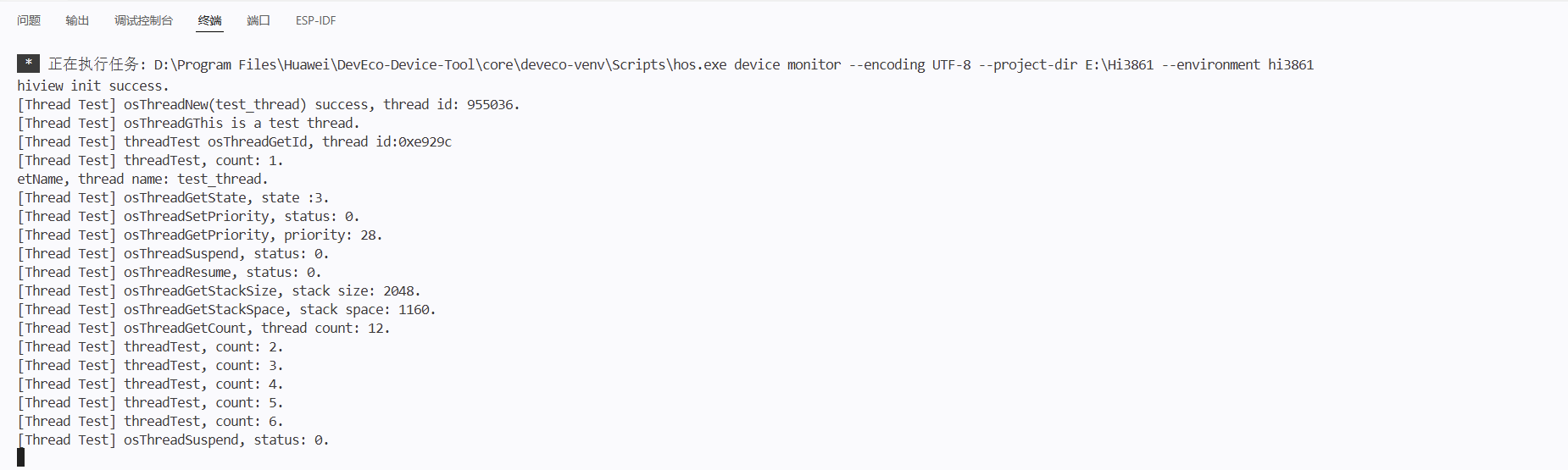
5.2 串口输出
波特率 115200,重启开发板:
[Thread Test] osThreadNew(test_thread) success, thread id: 3.
This is a test thread.
[Thread Test] threadTest osThreadGetId, thread id:0x3
[Thread Test] osThreadGetName, thread name: test_thread.
[Thread Test] osThreadGetState, state :1.        // 1 = Running
[Thread Test] osThreadSetPriority, status: 0.    // 0 = osOK
[Thread Test] osThreadGetPriority, priority: 24.   // osPriorityNormal4
[Thread Test] osThreadSuspend, status: 0.
[Thread Test] osThreadResume, status: 0.
[Thread Test] osThreadGetStackSize, stack size: 2048.
[Thread Test] osThreadGetStackSpace, stack space: 1024.
[Thread Test] osThreadGetCount, thread count: 4.
[Thread Test] threadTest, count: 1.
[Thread Test] threadTest, count: 2.
...
六、总结
| 要点 | 内容 |
|---|---|
| 接口层 | cmsis_os2.h 是标准接口,不是具体 RTOS |
| 内核 | OpenHarmony 轻量系统底层是 LiteOS-M |
| 设计目的 | 解耦应用与内核,提高可移植性 |
| 常用 API | osThreadNew, osDelay, osThreadSuspend, osThreadResume |
| 入口宏 | APP_FEATURE_INIT 用于应用初始化 |
七、下一步
Day 4 预告:互斥锁与信号量 ------ 多线程同步与资源保护。