第二章 tool_use
写在前面
第二章,shareai讲述了给agent扩展工具的流程。完整代码见
https://github.com/shareAI-lab/learn-claude-code/tree/main/s02_tool_use
我们的任务是:
1,扩展四个工具,手把手感受整个过程
2,构建沙箱,了解沙箱为什么重要。
3,感受claude code处理并发的操作
那在写之前,我们需要先把os.getcwd()换成Path.cwd(),用WORKDIR去接收它,这么做的目的是方便后续工具把它作为全局变量使用,并且Path这个包还支持许多路径拼接,方便操作。

现在来思考一个问题,不是都说bash is all your need ,大模型通过bash一个工具就能实现所有操作,何必再写一些工具?其实后者是前者的细粒度,相当于把前者拆分成了一个个小工具,更具体的说是把一些模型能用bash实现的主流功能,专精成一个个不需要模型思考可以直接调用的硬编码。这样做的好处是什么?在这些细粒度的工具函数中,我们能够控制模型安全稳定的工作,并且还可以减少token输出。什么意思?还记得第一章末尾吗?当时只是让模型简单查看一下当前目录下的python文件,模型前后就输出了五次token,试想放到真实场景中,更复杂的任务会产生多少费用。
所以有了这些细粒度的工具,我们不但能安全稳定的控制模型不超过规定的环境工作,还能有效的减少token的消耗。前者就是在防沙箱逃逸。
那么开始吧,在做中去感受。
一、先写一些工具函数
先直接复制shareAI的TOOLS,这里给出了这五个函数的说明,我们来把他们当成本章的任务。
python
TOOLS = [
    {"name": "bash", "description": "Run a shell command.",
    "input_schema": {"type": "object", "properties": {"command": {"type": "string"}}, "required": ["command"]}},
    {"name": "read_file", "description": "Read file contents.",
     "input_schema": {"type": "object", "properties": {"path": {"type": "string"}, "limit": {"type": "integer"}}, "required": ["path"]}},
    {"name": "write_file", "description": "Write content to a file.",
     "input_schema": {"type": "object", "properties": {"path": {"type": "string"}, "content": {"type": "string"}}, "required": ["path", "content"]}},
    {"name": "edit_file", "description": "Replace exact text in a file once.",
     "input_schema": {"type": "object", "properties": {"path": {"type": "string"}, "old_text": {"type": "string"}, "new_text": {"type": "string"}}, "required": ["path", "old_text", "new_text"]}},
    {"name": "glob", "description": "Find files matching a glob pattern.",
     "input_schema": {"type": "object", "properties": {"pattern": {"type": "string"}}, "required": ["pattern"]}},
]
虽然有五个工具函数,但其实只控制了三个功能(读、写和编辑文件),虽然在模型那里这些工具是没什么差别的。试想一下,当你想让模型操作一个文件,是不是需要先找到文件路径,然后拼接路径,再打开bash,最后再操作,所以真正控制的功能只有三个。逻辑如下。
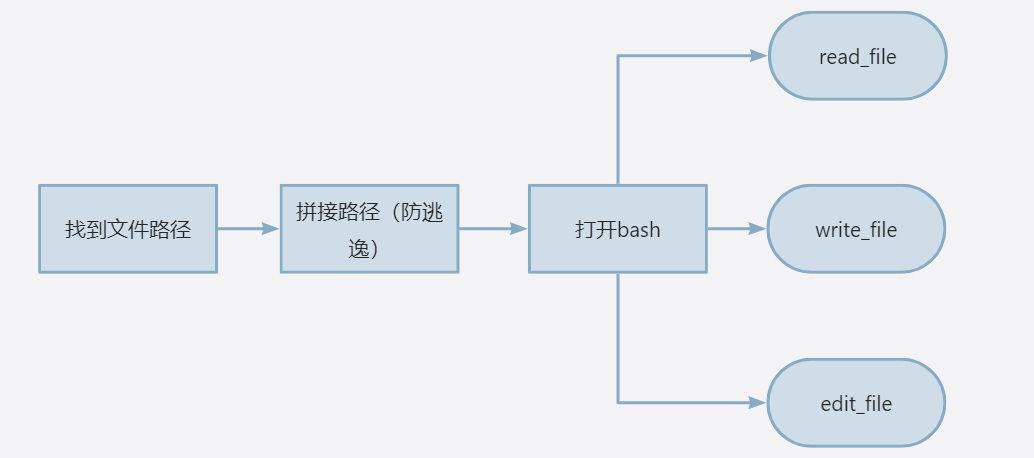
以最复杂的编辑文件的功能edit_file为例(因为可以顺带实现读和写的操作),一起来实现一遍这个流程。
我们先来实现找文件路径的操作,需要通过通配符去寻找环境中匹配的文件。传入一个通配符,返还对应的绝对路径,可能有多个。
python
def run_glob(pattern: str) -> str:
    """
    这个函数就是查找当前工作目录下通配符为pattern的文件
    """
    import glob as g
    try:
        results = []
        for match in g.glob(pattern, root_dir=WORKDIR):
            if (WORKDIR / match).resolve().is_relative_to(WORKDIR):
                results.append(match)
        return "\n".join(results) if results else "(no matches)"
    except Exception as e:
return f"Error: {e}"解释下glob方法,传入一个通配符和根目录,返还匹配到的目录列表。然后依次检查一遍,返回绝对路径。
再来实现拼接路径(防逃逸),保证模型始终在规定的安全环境中工作。创建一个safe_path函数。"(WORKDIR / p).resolve()"先用pathlib的"/"把根目录与传入路径拼接,再通过"resolve()"自动解析抵消".../"跳转符号、换算成操作系统真实绝对路径;通过"is_relative_to"校验,模型工作传入路径,返回经过检查的Path(绝对路径),来实现工作环境的管控。
python
def safe_path(p: str) -> Path:
    # 把传入的p和WORKDIR拼接一下,这就是换了个包的原因,有很方便的功能。
    path = (WORKDIR / p).resolve()
    # 如果path不是WOKRDIR的子路径,则抛出异常,越界访问了。
    if not path.is_relative_to(WORKDIR):
        raise ValueError(f"Path escapes workspace: {p}")

    return path
bash工具我们在第一章实现过了,现在实现编辑文件的功能。在编辑文件之前,我们是不是需要先读到这个文件。创建一个工具用于读文件,传入路径和限制读入行数。这里的lines是一个列表,元素为要读入文件的每行的内容,如果有限制行数,则超过的行内容不进行存储。
python
def run_read(path: str, limit: int | None = None) -> str:
    try:
        lines = safe_path(path).read_text().splitlines()
        if limit and limit < len(lines):
            lines = lines[:limit] + [f"... ({len(lines) - limit} more lines)"]
        return "\n".join(lines)
    except Exception as e:
        return f"Error: {e}"
接着,编辑本质是做替换。将old_text和new_text做替换后写入,那需要有一个工具函数用于写入,来实现它。传入文件路径和内容,拿到过滤后的path,不存在则创建,若已存在则覆盖。
python
def run_write(path: str, content: str) -> str:
    try:
        file_path = safe_path(path)
        # 在父文件夹下创建一个文件,如果没有就创建该路径,如果文件已存在则覆盖
        file_path.parent.mkdir(parents=True, exist_ok=True)
        file_path.write_text(content)
        return f"Wrote {len(content)} bytes to {path}"
    except Exception as e:
        return f"Error: {e}"
最后实现编辑文本,并且需要保证在允许的路径下进行。首先拿到safe_path过滤后的函数,判断要替换的文本肯定在文本中,然后去替换第一个匹配的内容,再写入。
python
def run_edit(path: str, old_text: str, new_text: str) -> str:
    try:
        file_path = safe_path(path)
        text = file_path.read_text()
        if old_text not in text:
            return f"Error: text not found in {path}"
        # 只替换第一个匹配到的内容
        file_path.write_text(text.replace(old_text, new_text, 1))
        return f"Edited {path}"
    except Exception as e:
        return f"Error: {e}"
现在我们已经有了所有工具,试想一下,原先我们只有一个工具,现在变成了多个,是不是需要一个表去分发,这个分发表其实就是一个字典。
python
TOOL_HANDLERS = {
    "bash": run_bash, "read_file": run_read, "write_file": run_write,
    "edit_file": run_edit, "glob": run_glob,
}
二、修改agent_loop
那来修改下agent_loop的内容。我们只需要修改因tool_use而停滞的情况。先观察ToolUseBlock中需要调用的工具名,然后用handler接收分发表对应的值。
python
if block.type == "tool_use":
                print(f"\033[33m$ {block.name}\033[0m")

                handler = TOOL_HANDLERS.get(block.name)
                output = handler(**block.input) if handler else f"Unknow: {block.name}"
                print(str(output)[:200])
                results.append({
                    "type": "tool_result",
                    "tool_use_id": block.id,
                    "content": output,
                })
接下来的三元表达式等同于:
python
if handler:
    # handler 存在、不为空/None,解包入参调用函数
    output = handler(**block.input)
else:
    # handler 不存在,返回提示字符串
    output = f"Unknow: {block.name}"
至此,我们完成了第二章的全部内容,接下来创建一个文本文件测试一下。
bash
s01 >> 将名为test_words的文件内容"我是小明"改为"我是小郭"
观察content的内容:[ThinkingBlock(signature='hirasgznou', thinking='The user wants to change "我是小明" back to "我是小郭" in the test_words file.', type='thinking'), ToolUseBlock(id='019ea094992aa272c8185779cd8c6331', caller=None, input={'command': 'powershell -Command "(Get-Content -Path test_words -Encoding UTF8) -replace \'小明\',\'小郭\' | Set-Content -Path test_words -Encoding UTF8"'}, name='bash', type='tool_use')]
$ bash
(no output)
观察content的内容:[ThinkingBlock(signature='kgzosearyr', thinking='Let me verify the change.', type='thinking'), ToolUseBlock(id='019ea094aa397df9616b5556f1ecd2c0', caller=None, input={'command': 'type test_words'}, name='bash', type='tool_use')]
$ bash
我是小郭,来自三年二班。
已完成!文件 `test_words` 中的"我是小明"已改为"我是小郭",当前内容为:

我是小郭,来自三年二班。

s01 >>
写在最后
可以看到模型输出很少的token就实现了编辑文件的操作。但有一点需要强调,输出很少token不代表agent_loop有很少轮,上述例子只是巧合,但token总归消耗是少的。
试想一下,在run_bash中我们有这样的检查,这只是象征性的拦截,在实际中如何保证permission?
python
    dangerous = ["rm -rf /", "sudo", "shutdown", "reboot", "> /dev/"]
    if any(d in command for d in dangerous):
        return "Error: Dangerous command blocked"
此外,当agent尝试读写编辑一个或多个文件时,如何实现并发?