ROS Action 的本质
1.Action = 异步、可控、可反馈的"任务委托"机制
用通俗比喻:
- Topic:你在广播消息 → 任何人随便听
- Service:你打电话请求 → 等着对方回答完再挂
- Action:你给助理布置一个任务 → 他开始干活 → 过程中不断汇报进度 → 你可以随时喊停 → 完成时告诉你结果
2.核心关键词
- Goal(目标):你交给服务器的任务,"我要乌龟跑到 (8,8)"
- Feedback(反馈):服务器在执行过程中发回的信息,"我现在在 (3,5)"
- Result(结果):任务完成后的最终结果,"我到达目标点啦"
- Preempted(被抢/取消):你改变主意,任务被终止,"停!不要跑了"
3.精髓理解
- 异步:客户端发送 Goal 后不阻塞,可以同时做别的事情
- 可反馈:执行过程不是黑盒,客户端可以实时监控
- 可取消:客户端有权随时喊停,服务器响应
- 面向任务:不像 Topic 只传数据,也不像 Service 只问答,Action 是 "我要你完成一个目标"
4.一句话总结
Action 是 ROS 的"任务委托协议",让客户端能交任务、实时监控、随时取消,并最终拿到结果 。
一、实验名称
ROS Action 通信实验 ------ 实现目标跟踪和计算任务
二、实验目的
- 理解 ROS 中 Action 通信的概念及应用场景。
- 掌握如何定义和使用自定义 Action 消息。
- 熟练实现 Action Server 与 Action Client,完成异步任务处理。
- 对比 Service、Topic 与 Action 的通信方式和适用场景。
三、实验原理
1. ROS 通信机制回顾
- Topic:用于异步、持续的数据流传输(Publisher → Subscriber)。
- Service:用于同步请求-响应式通信(Client ↔ Server)。
- Action :用于异步任务管理,支持预期时间较长的操作,客户端可以在任务执行期间接收反馈并在必要时取消任务。
2. Action 通信概念
- Action Server:提供具体任务的执行逻辑。
- Action Client:发起任务请求,可实时获取执行进度,并可取消任务。
- Action 消息结构 :
- Goal:客户端发送的任务目标。
- Result:服务器返回的任务结果。
- Feedback:服务器在执行过程中返回的中间状态或进度信息。
3.Action 通信流程:
Client --> Goal --> Server
Server --> Feedback --> Client
Server --> Result --> Client
四、实验环境
- 操作系统:Ubuntu 20.04
- ROS 版本:ROS Noetic
- 编程语言:Python 3
- 工具:rviz、rqt_graph、rostopic、rosnode
五、实验内容
- 编写并运行一个 Action Server+client,模拟一个"数数任务",客户端发送目标值,服务器每秒递增数数并反馈进度,完成后返回最终结果。
- 使用 ROS 预定义 Action 消息,实现乌龟"移动到目标点"任务。
六、实验步骤
实验一:自定义 Action 通信
第五天自定义 Action 通信(计数10秒任务一)
1.创建一个 ROS package:
bash
catkin_create_pkg action_tutorials actionlib rospy std_msgs2.在~/catkin_ws/src/action_tutorials目录下创建action文件夹,并在action文件夹下定义 Action 文件: Count.action: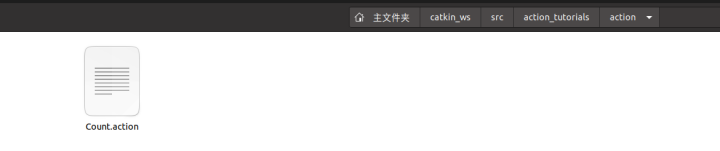
bash
# Goal
int32 target
---
# Result
int32 final_count
---
# Feedback
int32 current_count
3.编写 Action Server (count_server.py)
python
#!/usr/bin/env python3
import rospy
import actionlib
from action_tutorials.msg import CountAction, CountFeedback, CountResult

def execute(goal):
    feedback = CountFeedback()
    result = CountResult()
    for i in range(goal.target + 1):
        if server.is_preempt_requested():
            server.set_preempted()
            return
        feedback.current_count = i
        server.publish_feedback(feedback)
        rospy.sleep(1)
    result.final_count = goal.target
    server.set_succeeded(result)

rospy.init_node('count_server')
server = actionlib.SimpleActionServer('count', CountAction, execute, False)
server.start()
rospy.spin()
4.编写 Action Client (count_client.py)
python
#!/usr/bin/env python3
import rospy
import actionlib
from action_tutorials.msg import CountAction, CountGoal

rospy.init_node('count_client')
client = actionlib.SimpleActionClient('count', CountAction)
client.wait_for_server()
goal = CountGoal(target=10)
client.send_goal(goal)
client.wait_for_result()
print("Result:", client.get_result())
5.编译 package 并运行:
bash
加执行权限:

chmod +x  count_server.py

chmod +x  count_client.py
6.配置cmakelists.txt
在路径:~/catkin_ws/src/action_tutorials/CMakeLists.txt
bash
find_package(catkin REQUIRED COMPONENTS

  actionlib

  actionlib_msgs

  message_generation

  rospy

  std_msgs

)


add_action_files(

  DIRECTORY action

  FILES

  Count.action

)


generate_messages(

  DEPENDENCIES

  actionlib_msgs

  std_msgs

)


catkin_package(

  CATKIN_DEPENDS actionlib actionlib_msgs message_runtime rospy std_msgs

)
7.配置package.xml,
在路径:~/catkin_ws/src/action_tutorials/package.xml
bash
  <build_depend>message_generation</build_depend>

  <build_depend>actionlib_msgs</build_depend>

  <!-- 运行依赖 -->

  <exec_depend>message_runtime</exec_depend>

  <exec_depend>actionlib_msgs</exec_depend>
8.编译
bash
catkin_make
source devel/setup.bash
9.运行
bash
#终端1
roscore
#终端2
rosrun turtlesim turtlesim_node
#终端3
rosrun action_tutorials count_server.py
#终端4
rosrun action_tutorials count_client.py
实验一拓展
新需求是:
1客户端能实时看到 反馈信息并打印到终端。
2 可以根据反馈信息决定是否提前取消动作。
1.编写 Action Server (count_server_2.py):
python
#!/usr/bin/env python3
import rospy
import actionlib
from action_tutorials.msg import CountAction, CountFeedback, CountResult

def execute(goal):
    feedback = CountFeedback()
    result = CountResult()
    rospy.loginfo("Goal received: target=%d" % goal.target)

    for i in range(goal.target + 1):
        if server.is_preempt_requested():
            rospy.loginfo("Goal preempted at count=%d" % i)
            server.set_preempted()
            return

        feedback.current_count = i
        server.publish_feedback(feedback)
        rospy.sleep(1)  # 模拟耗时任务

    result.final_count = goal.target
    server.set_succeeded(result)
    rospy.loginfo("Goal succeeded: final_count=%d" % result.final_count)

rospy.init_node('count_server')
server = actionlib.SimpleActionServer('count', CountAction, execute, False)
server.start()
rospy.loginfo("Count Action Server started")
rospy.spin()
2.编写 Action Client ( count_client_2.py )
python
#!/usr/bin/env python3
import rospy
import actionlib
from action_tutorials.msg import CountAction, CountGoal  # 替换为你包名

def feedback_cb(feedback):
    # 实时打印反馈
    rospy.loginfo("Current count: %d" % feedback.current_count)

    # 根据反馈决定是否提前取消
    if feedback.current_count >= 15:  # 示例条件:计数 >= 15 就取消
        rospy.logwarn("Reached count 5, canceling goal!")
        client.cancel_goal()

rospy.init_node('count_client')
client = actionlib.SimpleActionClient('count', CountAction)
client.wait_for_server()

goal = CountGoal(target=10)
rospy.loginfo("Sending goal: target=%d" % goal.target)
client.send_goal(goal, feedback_cb=feedback_cb)

client.wait_for_result()
if client.get_state() == actionlib.GoalStatus.PREEMPTED:
    rospy.logwarn("Goal was preempted/canceled!")
else:
    rospy.loginfo("Goal succeeded: final count=%d" % client.get_result().final_count)
3.编译 package 并运行
加执行权限:
chmod +x count_server_2.py
chmod +x count_client_2.py
catkin_make
source devel/setup.bash
rosrun action_tutorials count_server_2.py
rosrun action_tutorials count_client_2.py
实验二: ROS 预定义 Action 消息,实现乌龟"移动到目标点"任务
第五天自定义 Action 通信(乌龟指哪打哪任务二)
1.指令解释
move_base_msgs/MoveBase
给乌龟发送座标点,发送动作请求,控制乌龟运动。
这个想法很好,但需要先说明一个关键点:
move_base_msgs/MoveBaseAction 不能直接控制 turtlesim 。
原因是:
MoveBaseAction 是 ROS 导航栈(Navigation Stack)定义的 Action。
它要求有一个名为 /move_base 的 Action Server。
turtlesim_node 本身只提供:
-
- /turtle1/cmd_vel(速度控制)
- /turtle1/pose(位姿反馈)
- 若干 Service
它并没有实现 /move_base Action Server。
因此下面这种代码:
client = actionlib.SimpleActionClient(
'move_base',
MoveBaseAction
)
在 turtlesim 环境中会一直卡在:
client.wait_for_server()
因为根本不存在 move_base 服务端。
2.正确的方案
如果你的目的是:
学习 MoveBaseAction 的通信模式
那么最好的实验方式是:
自己写一个虚拟的 MoveBase Server,底层控制 turtlesim。
架构如下:
MoveBaseAction
+--------------------------------+
| MoveBase Client |
+--------------------------------+
|
|
V
+--------------------------------+
| Fake MoveBase Server |
| |
| 接收目标点(x,y) |
| |
| 订阅 /turtle1/pose |
| 发布 /turtle1/cmd_vel |
+--------------------------------+
|
|
V
+--------------------------------+
| turtlesim_node |
+--------------------------------+
这样学生学习的仍然是:
- Goal
- Feedback
- Result
- Cancel
而且不需要真正导航栈。
3.MoveBaseAction 消息结构
实际上:
rosmsg show move_base_msgs/MoveBaseActionGoal
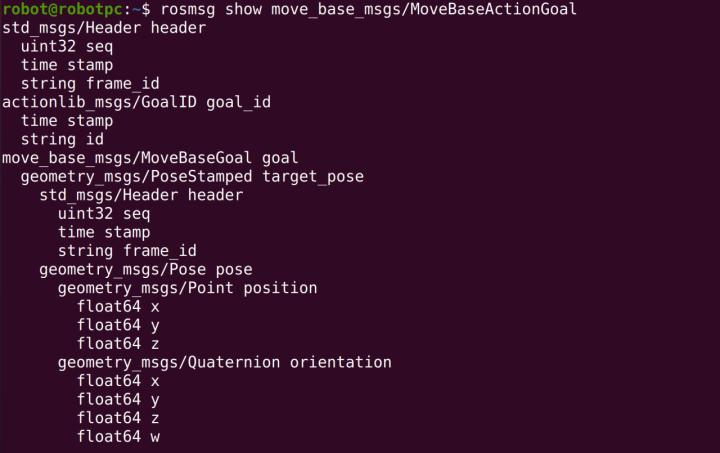
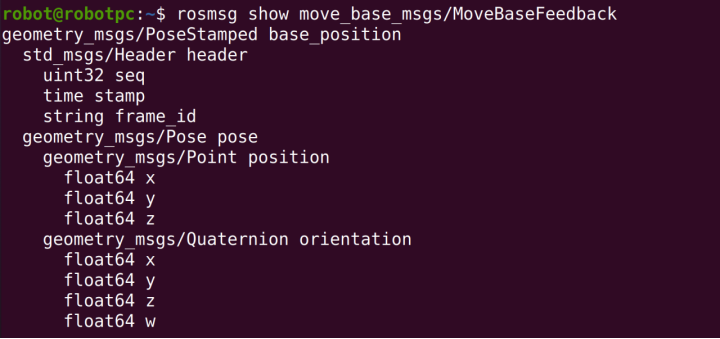
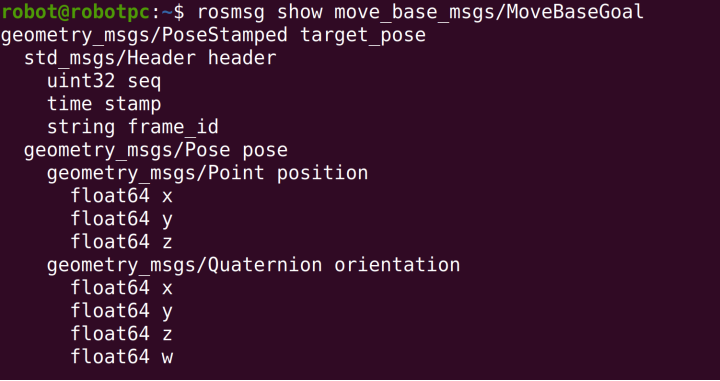
核心Goal是:
bashgeometry_msgs/PoseStamped target_pose即:
目标位置
目标朝向
例如:
bashgoal.target_pose.pose.position.x = 8.0 goal.target_pose.pose.position.y = 5.0表示:
乌龟移动到 (8,5)
4.【实验操作具体】
1.先安装依赖
bash
sudo apt-get install ros-noetic-move-base-msgs2.编写turtle_move_base_server.py
python
#!/usr/bin/env python3
# -*- coding: utf-8 -*-

import math

import rospy
import actionlib

from turtlesim.msg import Pose
from geometry_msgs.msg import Twist

from move_base_msgs.msg import (
    MoveBaseAction,
    MoveBaseFeedback,
    MoveBaseResult
)


class TurtleMoveBaseServer:

    def __init__(self):

        self.pose = None

        rospy.Subscriber(
            "/turtle1/pose",
            Pose,
            self.pose_callback
        )

        self.cmd_pub = rospy.Publisher(
            "/turtle1/cmd_vel",
            Twist,
            queue_size=10
        )

        self.server = actionlib.SimpleActionServer(
            "move_base",
            MoveBaseAction,
            execute_cb=self.execute_cb,
            auto_start=False
        )

        self.server.start()

        rospy.loginfo("Fake MoveBase Server Started")

    def pose_callback(self, msg):
        self.pose = msg

    def stop_robot(self):

        cmd = Twist()

        cmd.linear.x = 0.0
        cmd.angular.z = 0.0

        self.cmd_pub.publish(cmd)

    def normalize_angle(self, angle):

        while angle > math.pi:
            angle -= 2.0 * math.pi

        while angle < -math.pi:
            angle += 2.0 * math.pi

        return angle

    def execute_cb(self, goal):

        rospy.loginfo("Received MoveBase Goal")

        # 等待收到乌龟位姿
        while self.pose is None and not rospy.is_shutdown():
            rospy.sleep(0.1)

        target_x = goal.target_pose.pose.position.x
        target_y = goal.target_pose.pose.position.y

        rospy.loginfo(
            "Target Position: (%.2f, %.2f)",
            target_x,
            target_y
        )

        feedback = MoveBaseFeedback()
        result = MoveBaseResult()

        rate = rospy.Rate(20)

        while not rospy.is_shutdown():

            # 支持取消Goal
            if self.server.is_preempt_requested():

                rospy.logwarn("Goal Preempted")

                self.stop_robot()

                self.server.set_preempted()

                return

            dx = target_x - self.pose.x
            dy = target_y - self.pose.y

            distance = math.sqrt(dx * dx + dy * dy)

            # 发布反馈
            feedback.base_position.header.stamp = rospy.Time.now()

            feedback.base_position.pose.position.x = self.pose.x
            feedback.base_position.pose.position.y = self.pose.y

            self.server.publish_feedback(feedback)

            # 到达目标
            if distance < 0.1:

                self.stop_robot()

                rospy.loginfo("Goal Reached")

                self.server.set_succeeded(result)

                return

            desired_theta = math.atan2(dy, dx)

            angle_error = self.normalize_angle(
                desired_theta - self.pose.theta
            )

            cmd = Twist()

            # 先转向
            if abs(angle_error) > 0.2:

                cmd.linear.x = 0.0
                cmd.angular.z = 4.0 * angle_error

            # 再前进
            else:

                cmd.linear.x = min(2.0, distance)

                cmd.angular.z = 2.0 * angle_error

            self.cmd_pub.publish(cmd)

            rate.sleep()


if __name__ == "__main__":

    rospy.init_node("turtle_move_base_server")

    TurtleMoveBaseServer()

    rospy.spin()
3.编写 turtle_move_base_client.py
python
#!/usr/bin/env python3
# -*- coding: utf-8 -*-

import rospy
import actionlib

from actionlib_msgs.msg import GoalStatus

from move_base_msgs.msg import (
    MoveBaseAction,
    MoveBaseGoal
)


class TurtleMoveBaseClient:

    def __init__(self):

        self.client = actionlib.SimpleActionClient(
            "move_base",
            MoveBaseAction
        )

        rospy.loginfo("Waiting for move_base server...")

        self.client.wait_for_server()

        rospy.loginfo("Connected to move_base server")

    def active_cb(self):
        rospy.loginfo("Goal is now active")

    def feedback_cb(self, feedback):

        x = feedback.base_position.pose.position.x
        y = feedback.base_position.pose.position.y

        rospy.loginfo(
            "Current Position --> x=%.2f  y=%.2f",
            x,
            y
        )

        # ==========================
        # 示例:根据反馈取消任务
        # ==========================

        if x > 8.0:

            rospy.logwarn(
                "x > 8.0, cancel current goal."
            )

            self.client.cancel_goal()

    def done_cb(self, status, result):

        rospy.loginfo("Done callback triggered")

        if status == GoalStatus.SUCCEEDED:

            rospy.loginfo("Goal reached successfully!")

        elif status == GoalStatus.PREEMPTED:

            rospy.logwarn("Goal was canceled (PREEMPTED).")

        elif status == GoalStatus.ABORTED:

            rospy.logerr("Goal aborted.")

        else:

            rospy.logwarn(
                "Goal finished with status: %d",
                status
            )

    def send_goal(self, x, y):

        goal = MoveBaseGoal()

        goal.target_pose.header.frame_id = "map"
        goal.target_pose.header.stamp = rospy.Time.now()

        goal.target_pose.pose.position.x = x
        goal.target_pose.pose.position.y = y

        # turtlesim实际上不用朝向
        goal.target_pose.pose.orientation.w = 1.0

        rospy.loginfo(
            "Send Goal --> x=%.2f  y=%.2f",
            x,
            y
        )

        self.client.send_goal(
            goal,
            done_cb=self.done_cb,
            active_cb=self.active_cb,
            feedback_cb=self.feedback_cb
        )

        self.client.wait_for_result()

        state = self.client.get_state()

        rospy.loginfo(
            "Final State = %d",
            state
        )


if __name__ == "__main__":

    rospy.init_node("turtle_move_base_client")

    client = TurtleMoveBaseClient()

    try:
        target_x = float(input("请输入目标点X坐标(0~11): "))
        target_y = float(input("请输入目标点Y坐标(0~11): "))

        client.send_goal(
            target_x,
            target_y
        )

    except ValueError:
        print("输入错误,请输入数字!")

    rospy.spin()
4.更改权限
bash
chmod +x turtle_move_base_client.py

chmod +x turtle_move_base_server.py
5.运行指令
bash
catkin_make

rosrun action_tutorials turtle_move_base_server.py

rosrun action_tutorials turtle_move_base_client.py