EasyAR版本为:EasyARSenseUnityPlugin_4.6.3+3029.cb846598
OpenCV for Unity3d版本为:OpenCV for Unity 3.0.0
二、测试OpenCV USB相机
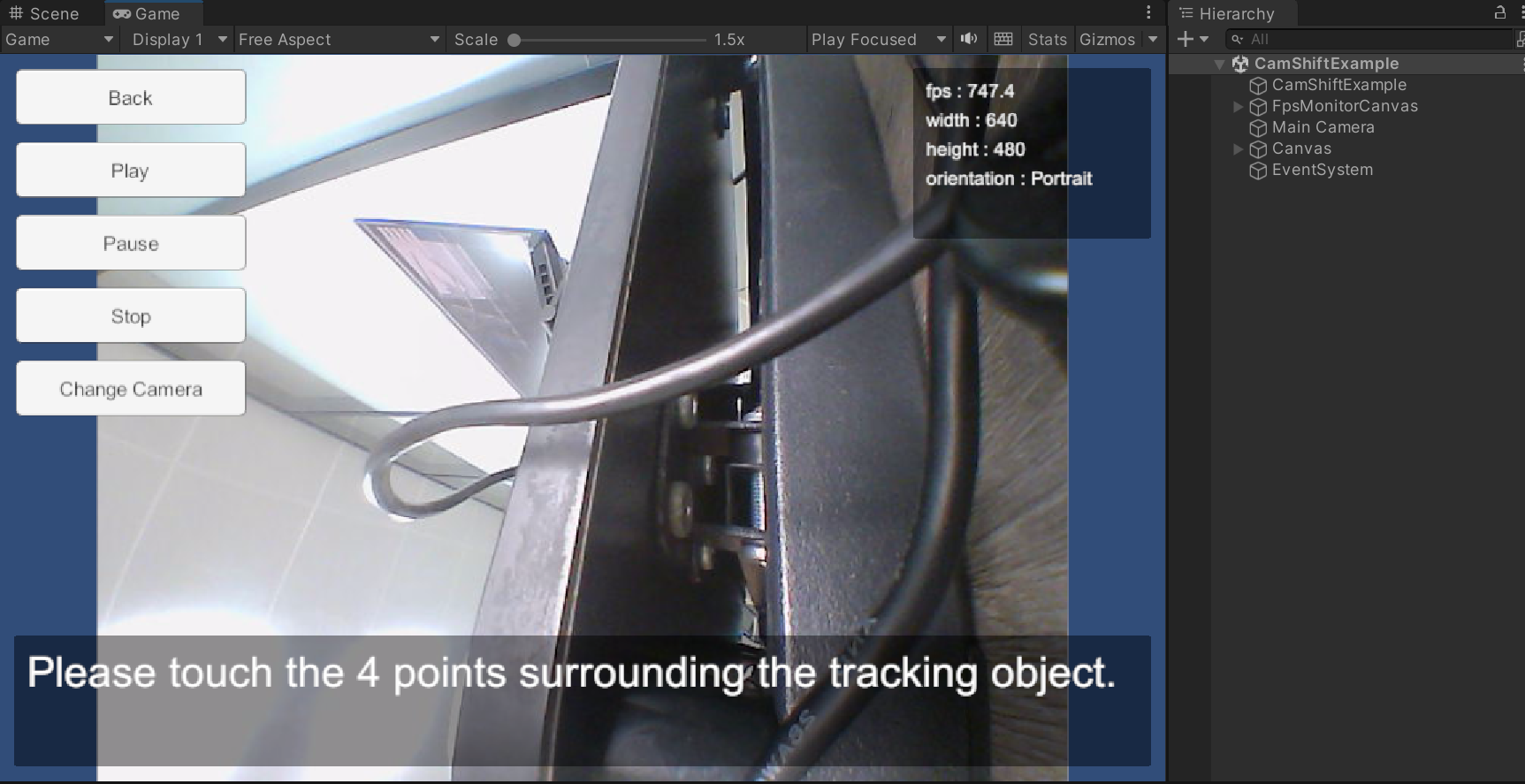
导入OpenCV,打开示例CamShiftExample(路径:Assets\OpenCVForUnity\Examples\MainModules\video\CamShiftExample)
可看到USB摄像头视频。
二、测试EasyAR图片识别
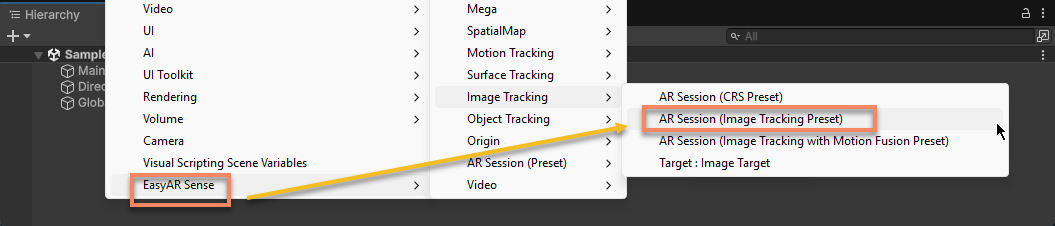
导入EasyAR()
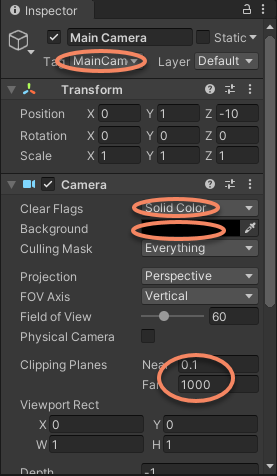
选中 Main Camera, 在 Inspector 设置以下参数。
- 设置
Clear Flags为Solid Color。 - 设置
Background为黑色。 - 设置
Clipping Planes的Near为 0.1(米),Far为 1000(米)。
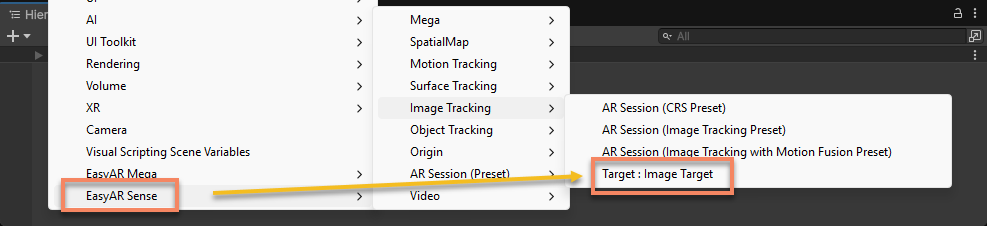
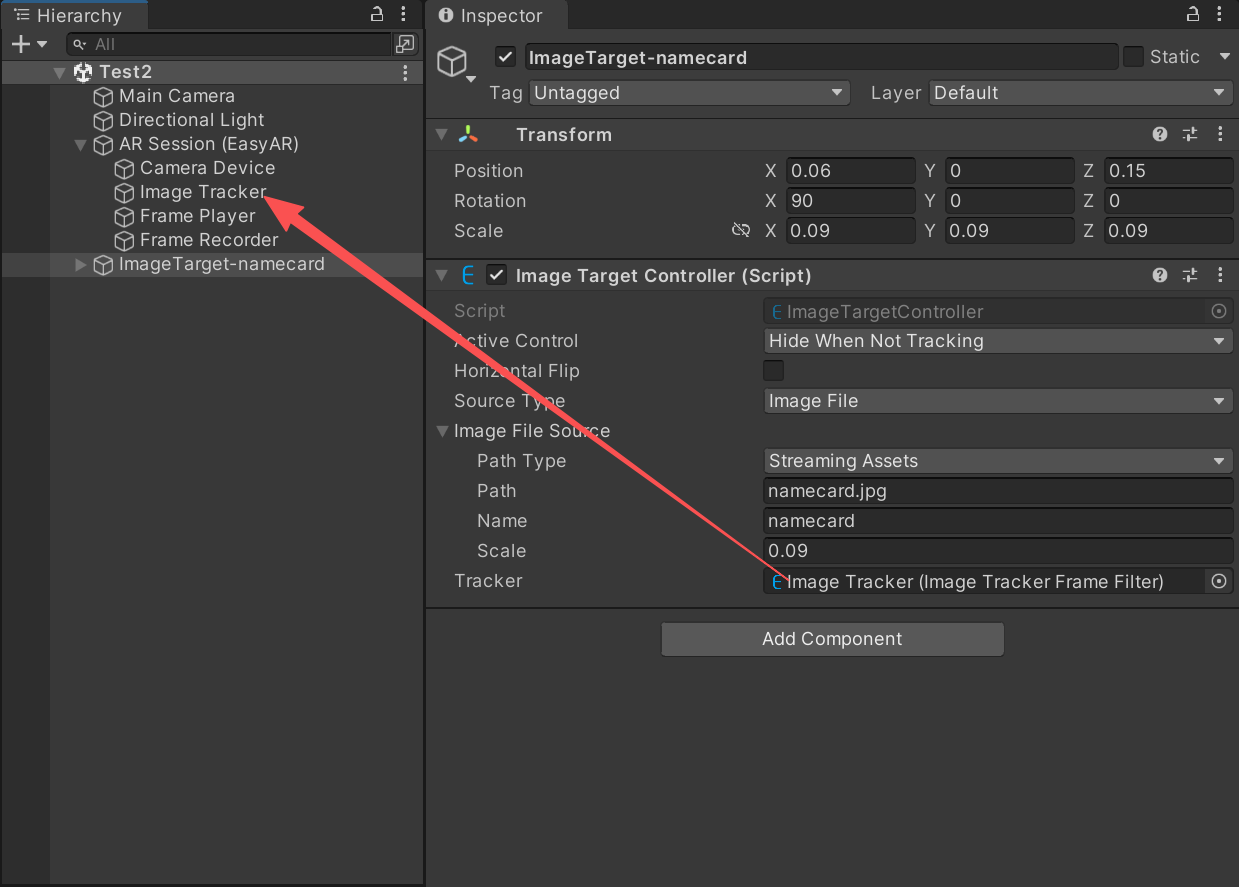
- 设置 Name 为 namecard。
- 设置 Scale 为 0.09(表示 0.09 米)。
- 设置 Tracker 为 ARSession 下的
ImageTrackerFrameFilter。
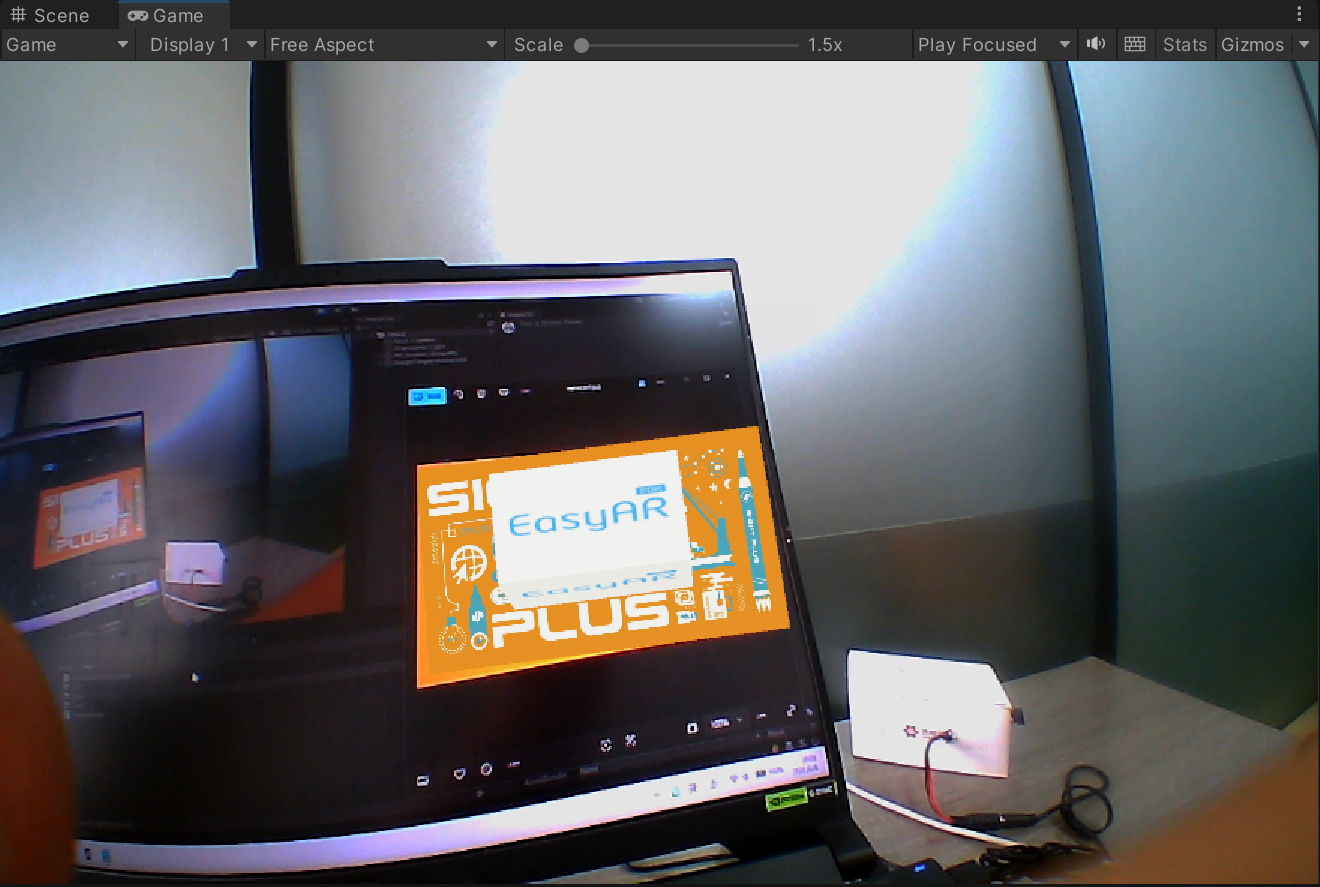
运行程序,测试可以识别图片
三、自定义相机
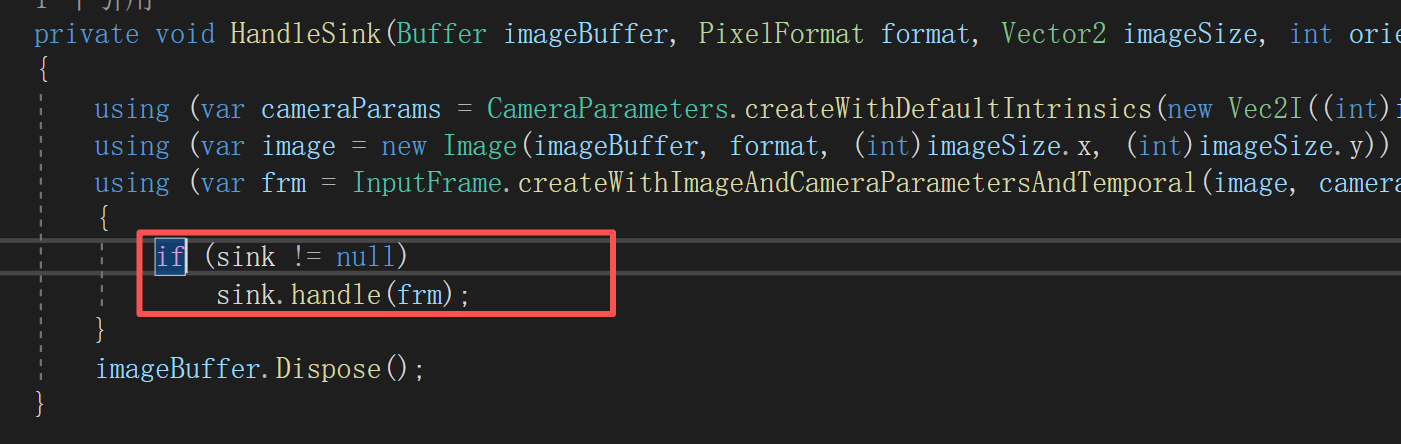
创建脚本CustomCameraSource,派生于FrameSource,将CameraDeviceFrameSource全部复制到CustomCameraSource中。
复制代码的原因是确保sink不为null
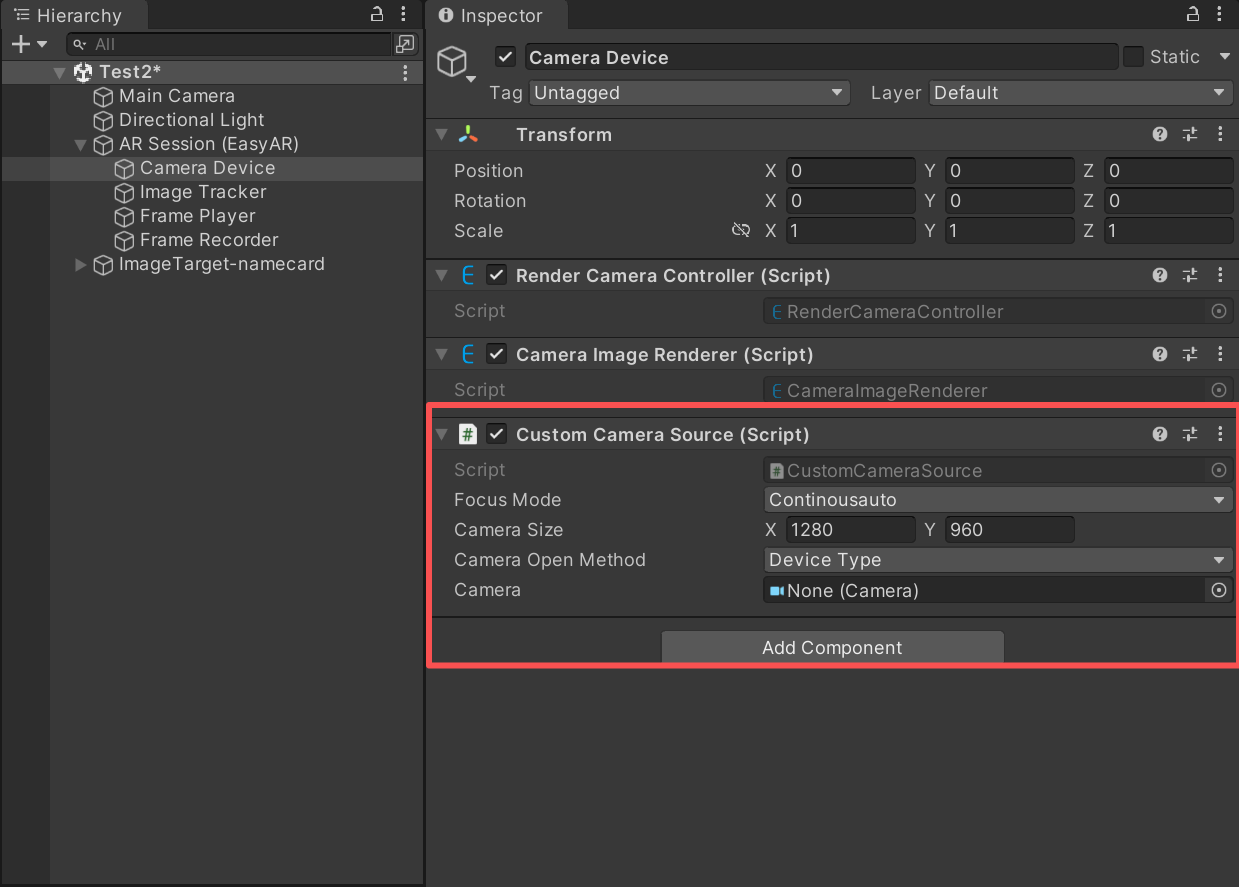
然后,移除Camera Device上的CameraDeviceFrameSource(重要!一定要移除,禁用该脚本无效),在Camera Device添加CustomCameraSource,测试运行识别。
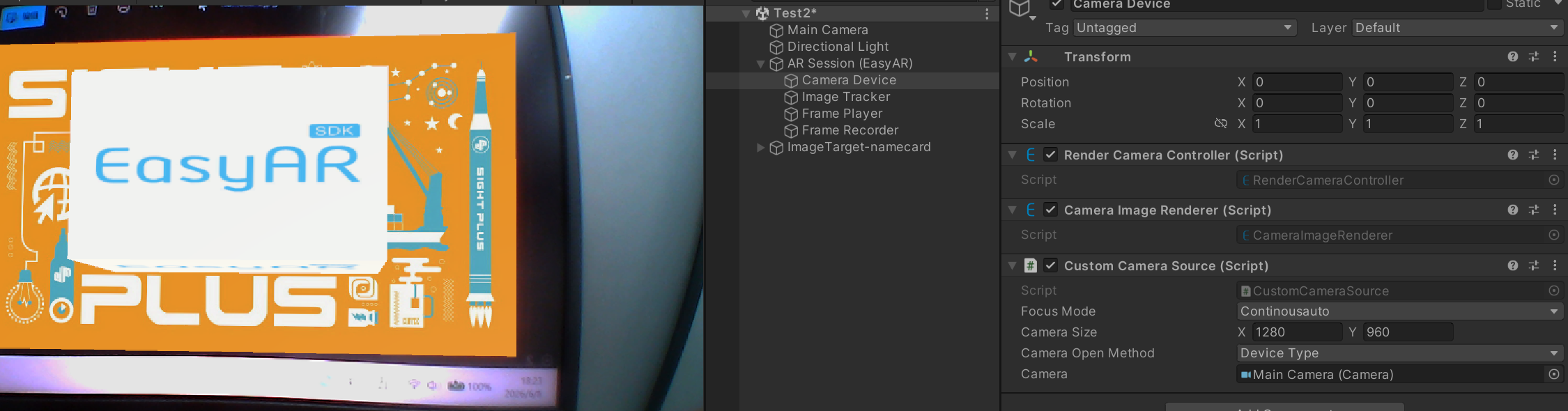
在CustomCameraSource添加如下代码:
cs
private void Start()
    {
        _multiSource2MatHelper = gameObject.GetComponent<MultiSource2MatHelper>();
        _multiSource2MatHelper.OutputColorFormat = Source2MatHelperColorFormat.RGB;
        _multiSource2MatHelper.Initialize();
    }

    byte[] byteArrays;
    easyar.Buffer buffer;
    private void Update()
    {
        if (_multiSource2MatHelper.IsPlaying() && _multiSource2MatHelper.DidUpdateThisFrame())
        {

            Mat mat1 = _multiSource2MatHelper.GetMat();
            if (mat1 == null || mat1.empty())
                return;

            if (byteArrays == null || byteArrays.Length != (mat1.cols() * mat1.rows() * 3))
            {
                byteArrays = new byte[mat1.cols() * mat1.rows() * 3];
            }

            var imageWidth = mat1.cols();
            var imageHeight = mat1.rows();
            var imageSize = new Vector2(imageWidth, imageHeight);

            Marshal.Copy((IntPtr)mat1.dataAddr(), byteArrays, 0, mat1.cols() * mat1.rows() * 3);
            buffer = easyar.Buffer.wrapByteArray(byteArrays);
            var format = PixelFormat.RGB888;

            int orientation = 0;
            int cameraType = 1;
            double timestamp = Time.realtimeSinceStartup;
            HandleSink(buffer, format, imageSize, orientation, cameraType, timestamp);
        }
    }

    private void HandleSink(Buffer imageBuffer, PixelFormat format, Vector2 imageSize, int orientation, int cameraType, double timestamp)
    {
        using (var cameraParams = CameraParameters.createWithDefaultIntrinsics(new Vec2I((int)imageSize.x, (int)imageSize.y), (CameraDeviceType)cameraType, orientation))
        using (var image = new Image(imageBuffer, format, (int)imageSize.x, (int)imageSize.y))
        using (var frm = InputFrame.createWithImageAndCameraParametersAndTemporal(image, cameraParams, timestamp))
        {
            if (sink != null)
                sink.handle(frm);
        }
        imageBuffer.Dispose();
    }
在CameraDevice上添加MultiSource2MatHelper
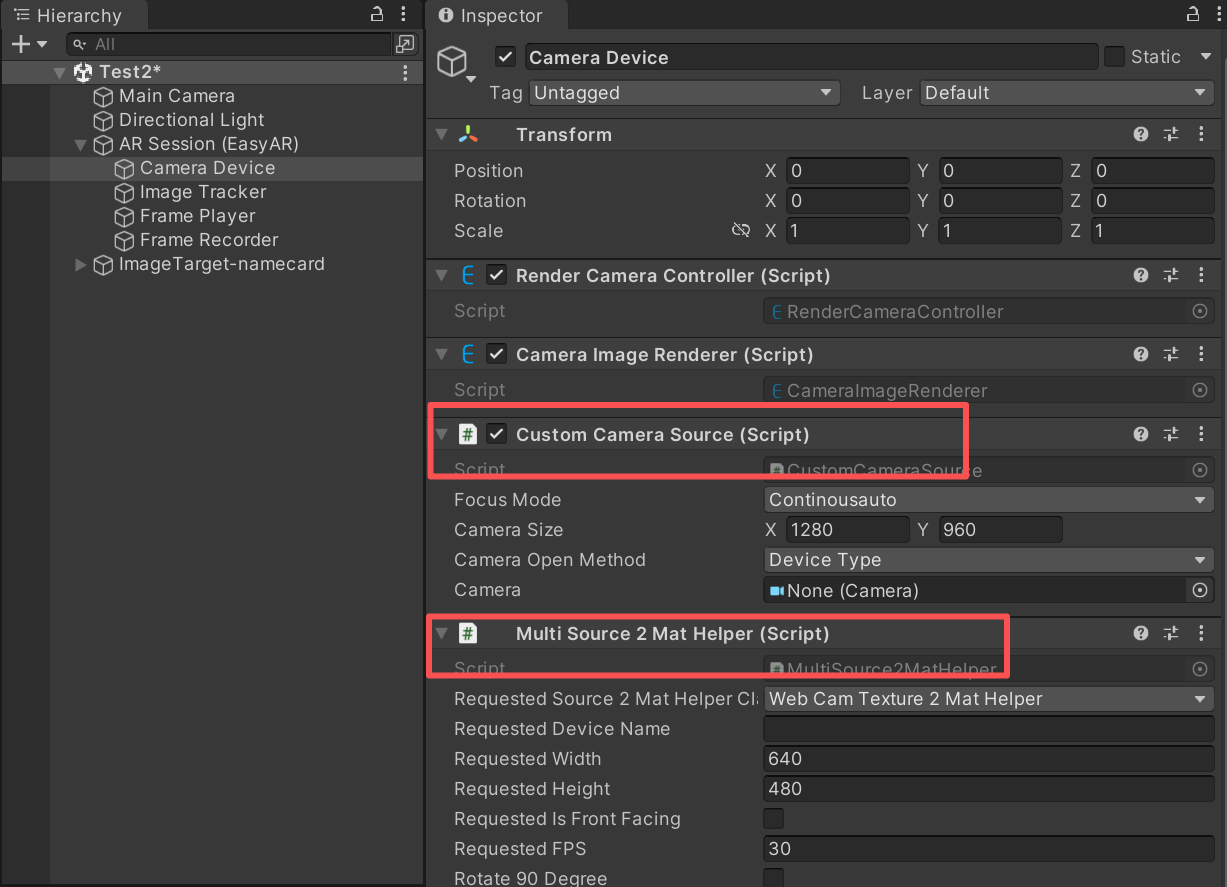
测试运行,发现可以使用自定义相机了
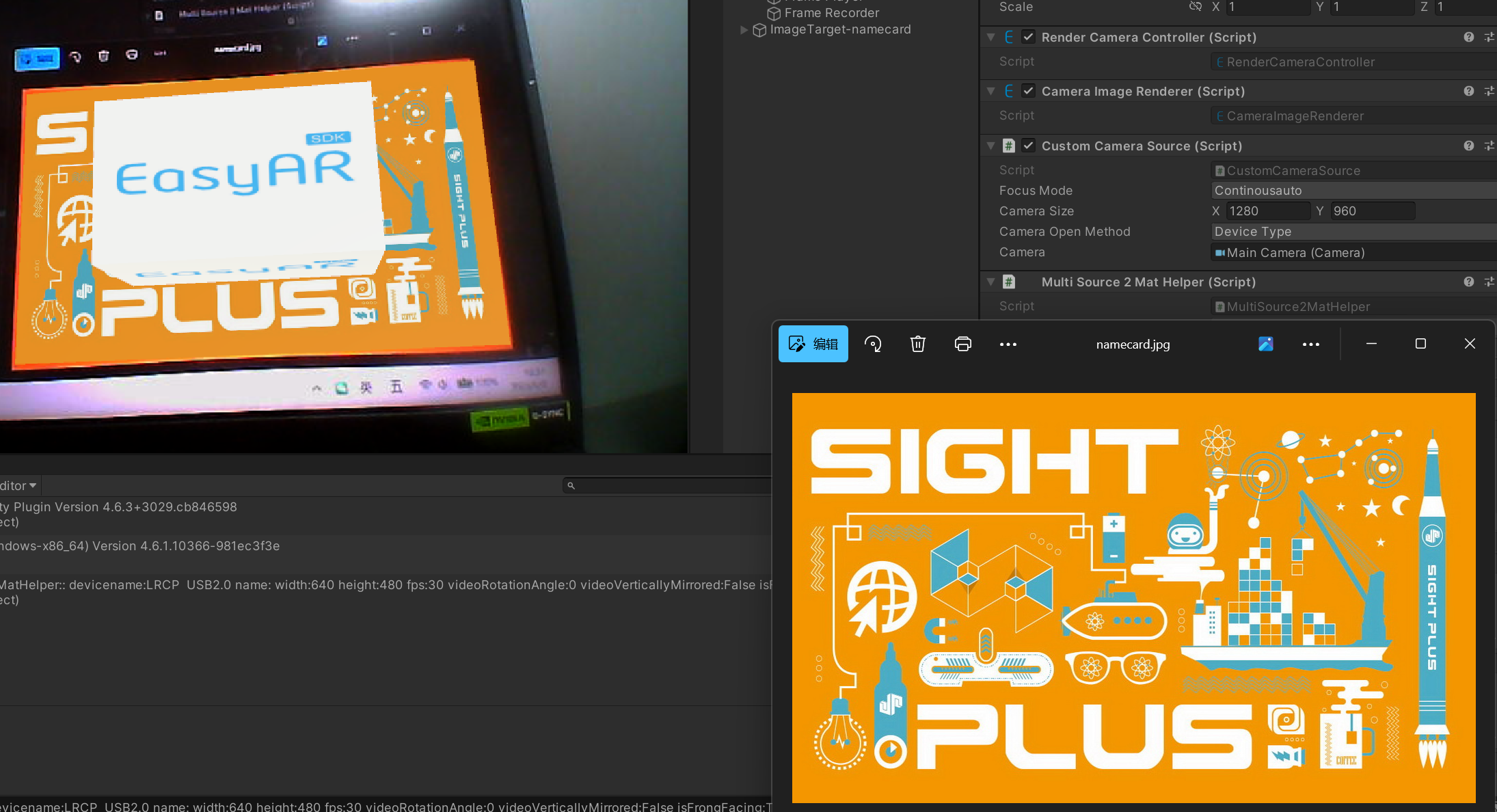
CustomCameraSource全部代码为
cs
//================================================================================================================================
//
//  Copyright (c) 2015-2023 VisionStar Information Technology (Shanghai) Co., Ltd. All Rights Reserved.
//  EasyAR is the registered trademark or trademark of VisionStar Information Technology (Shanghai) Co., Ltd in China
//  and other countries for the augmented reality technology developed by VisionStar Information Technology (Shanghai) Co., Ltd.
//
//================================================================================================================================
using easyar;
using OpenCVForUnity.CoreModule;
using OpenCVForUnity.ImgcodecsModule;
using OpenCVForUnity.ImgprocModule;
using OpenCVForUnity.UnityIntegration.Helper.Source2Mat;
using OpenCVForUnity.UnityUtils;
using System;
using System.Collections;
using System.Collections.Generic;
using System.Runtime.InteropServices;
using UnityEngine;
using Buffer = easyar.Buffer;

public class CustomCameraSource : FrameSource
{
    private MultiSource2MatHelper _multiSource2MatHelper;

    /// <summary>
    /// <para xml:lang="en">EasyAR Sense API. Accessible between <see cref="DeviceCreated"/> and <see cref="DeviceClosed"/> event if available.</para>
    /// <para xml:lang="zh">EasyAR Sense API,如果功能可以使用,可以在<see cref="DeviceCreated"/>和<see cref="DeviceClosed"/>事件之间访问。</para>
    /// </summary>
    /// <senseapi/>
    public CameraDevice Device { get; private set; }

    /// <summary>
    /// <para xml:lang="en">Focus mode used only when create <see cref="Device"/>.</para>
    /// <para xml:lang="zh">创建<see cref="Device"/>时使用的聚焦模式,只在创建时使用。</para>
    /// </summary>
    public CameraDeviceFocusMode FocusMode = CameraDeviceFocusMode.Continousauto;

    /// <summary>
    /// <para xml:lang="en">Camera preview size used only when create <see cref="Device"/>.</para>
    /// <para xml:lang="zh">创建<see cref="Device"/>时使用的图像大小,只在创建时使用。</para>
    /// </summary>
    public Vector2 CameraSize = new Vector2(1280, 960);

    /// <summary>
    /// <para xml:lang="en">Camera open method used only when create <see cref="Device"/>.</para>
    /// <para xml:lang="zh">创建<see cref="Device"/>时使用的方法,只在创建时使用。</para>
    /// </summary>
    public CameraDeviceOpenMethod CameraOpenMethod = CameraDeviceOpenMethod.DeviceType;

    /// <summary>
    /// <para xml:lang="en">Camera type used only when create <see cref="Device"/>, used when <see cref="CameraOpenMethod"/> == <see cref="CameraDeviceOpenMethod.DeviceType"/>.</para>
    /// <para xml:lang="zh">创建<see cref="Device"/>时使用的Camera类型,只在创建时<see cref="CameraOpenMethod"/> == <see cref="CameraDeviceOpenMethod.DeviceType"/>的时候使用。</para>
    /// </summary>
    [HideInInspector, SerializeField]
    public CameraDeviceType CameraType = CameraDeviceType.Back;

    /// <summary>
    /// <para xml:lang="en">Camera index used only when create <see cref="Device"/>, used when <see cref="CameraOpenMethod"/> == <see cref="CameraDeviceOpenMethod.DeviceIndex"/>.</para>
    /// <para xml:lang="zh">创建<see cref="Device"/>时使用的设备索引,只在创建时<see cref="CameraOpenMethod"/> == <see cref="CameraDeviceOpenMethod.DeviceIndex"/>的时候使用。</para>
    /// </summary>
    [HideInInspector, SerializeField]
    public int CameraIndex = 0;

    private static IReadOnlyList<ARSession.ARCenterMode> availableCenterMode = new List<ARSession.ARCenterMode> { ARSession.ARCenterMode.FirstTarget, ARSession.ARCenterMode.Camera, ARSession.ARCenterMode.SpecificTarget };
    [HideInInspector, SerializeField]
    private CameraDevicePreference cameraPreference = CameraDevicePreference.PreferObjectSensing;
    private CameraParameters parameters = null;
    private bool willOpen;
    private bool disableAutoOpen;

    /// <summary>
    /// <para xml:lang="en">Event when <see cref="Device"/> created.</para>
    /// <para xml:lang="zh"><see cref="Device"/> 创建的事件。</para>
    /// </summary>
    public event Action DeviceCreated;
    /// <summary>
    /// <para xml:lang="en">Event when <see cref="Device"/> opened.</para>
    /// <para xml:lang="zh"><see cref="Device"/> 打开的事件。</para>
    /// </summary>
    public event Action DeviceOpened;
    /// <summary>
    /// <para xml:lang="en">Event when <see cref="Device"/> closed.</para>
    /// <para xml:lang="zh"><see cref="Device"/> 关闭的事件。</para>
    /// </summary>
    public event Action DeviceClosed;

    /// <summary>
    /// <para xml:lang="en">Open method of <see cref="CameraDevice"/>.</para>
    /// <para xml:lang="zh"><see cref="CameraDevice"/>开启方式。</para>
    /// </summary>
    public enum CameraDeviceOpenMethod
    {
        /// <summary>
        /// <para xml:lang="en">Open <see cref="CameraDevice"/> type.</para>
        /// <para xml:lang="zh">根据<see cref="CameraDevice"/>的类型打开<see cref="CameraDevice"/>。</para>
        /// </summary>
        DeviceType,
        /// <summary>
        /// <para xml:lang="en">Open <see cref="CameraDevice"/> index.</para>
        /// <para xml:lang="zh">根据<see cref="CameraDevice"/>的索引打开<see cref="CameraDevice"/>。</para>
        /// </summary>
        DeviceIndex,
    }

    public override Optional<InputFrameSourceType> Type { get => Device != null ? Device.inputFrameSourceType() : Optional<InputFrameSourceType>.Empty; }

    public override Optional<bool> IsAvailable { get => CameraDevice.isAvailable(); }

    public override IReadOnlyList<ARSession.ARCenterMode> AvailableCenterMode { get => availableCenterMode; }

    public override int BufferCapacity
    {
        get
        {
            if (Device != null)
            {
                return Device.bufferCapacity();
            }
            return bufferCapacity;
        }
        set
        {
            bufferCapacity = value;
            if (Device != null)
            {
                Device.setBufferCapacity(value);
            }
        }
    }

    /// <summary>
    /// <para xml:lang="en">Camera preference used only when create <see cref="Device"/>. It will switch focus mode to the preferred value, change the focus after this value changed if it not the desired case.</para>
    /// <para xml:lang="zh">创建<see cref="Device"/>时使用的Camera偏好设置,只在创建时使用。它会同时控制对焦模式到推荐使用值,如果需要使用特定对焦模式,需要在修改这个值之后重新设置对焦模式。</para>
    /// </summary>
    public CameraDevicePreference CameraPreference
    {
        get { return cameraPreference; }

        // Switch to preferred FocusMode when switch CameraPreference.
        // You can set other FocusMode after this, but the tracking results may differ.
        set
        {
            cameraPreference = value;
            FocusMode = CameraDeviceSelector.getFocusMode(cameraPreference);
        }
    }

    /// <summary>
    /// <para xml:lang="en">Camera parameters used only when create <see cref="Device"/>. It is for advanced usage and will overwrite other values like <see cref="CameraSize"/>.</para>
    /// <para xml:lang="zh">创建<see cref="Device"/>时使用的相机参数,只在创建时使用。这个参数是高级设置,会覆盖<see cref="CameraSize"/>等其它值。</para>
    /// </summary>
    public CameraParameters Parameters
    {
        get
        {
            if (Device != null)
            {
                return Device.cameraParameters();
            }
            return parameters;
        }
        set
        {
            parameters = value;
        }
    }

    protected override void OnEnable()
    {
        base.OnEnable();
        if (Device != null)
        {
            Device.start();
        }
    }

    protected override void OnDisable()
    {
        base.OnDisable();
        if (Device != null)
        {
            Device.stop();
        }
    }

    protected virtual void OnDestroy()
    {
        Close();
    }

    public override void OnAssemble(ARSession session)
    {
        base.OnAssemble(session);
        StartCoroutine(AutoOpen());
    }

    /// <summary>
    /// <para xml:lang="en">Open device.</para>
    /// <para xml:lang="zh">打开设备。</para>
    /// </summary>
    public void Open()
    {
        disableAutoOpen = true;
        willOpen = true;
        CameraDevice.requestPermissions(EasyARController.Scheduler, (Action<PermissionStatus, string>)((status, msg) =>
        {
            if (!willOpen)
            {
                return;
            }
            if (status != PermissionStatus.Granted)
            {
                throw new UIPopupException("Camera permission not granted");
            }

            Close();
            Device = CameraDeviceSelector.createCameraDevice(CameraPreference);
            if (DeviceCreated != null)
            {
                DeviceCreated();
            }

            bool openResult = false;
            switch (CameraOpenMethod)
            {
                case CameraDeviceOpenMethod.DeviceType:
                    openResult = Device.openWithPreferredType(CameraType);
                    break;
                case CameraDeviceOpenMethod.DeviceIndex:
                    openResult = Device.openWithIndex(CameraIndex);
                    break;
                default:
                    break;
            }
            if (!openResult)
            {
                Debug.LogError("Camera open failed");
                Device.Dispose();
                Device = null;
                return;
            }

            Device.setFocusMode(FocusMode);
            Device.setSize(new Vec2I((int)CameraSize.x, (int)CameraSize.y));
            if (parameters != null)
            {
                Device.setCameraParameters(parameters);
            }
            if (bufferCapacity != 0)
            {
                Device.setBufferCapacity(bufferCapacity);
            }

            if (sink != null)
            {
                Device.inputFrameSource().connect(sink);
            }

            if (DeviceOpened != null)
            {
                DeviceOpened();
            }

            if (enabled)
            {
                OnEnable();
            }
        }));
    }

    /// <summary>
    /// <para xml:lang="en">Close device.</para>
    /// <para xml:lang="zh">关闭设备。</para>
    /// </summary>
    public void Close()
    {
        disableAutoOpen = true;
        willOpen = false;
        if (Device != null)
        {
            OnDisable();
            Device.close();
            Device.Dispose();
            if (DeviceClosed != null)
            {
                DeviceClosed();
            }
            Device = null;
        }
    }

    public override void Connect(InputFrameSink val)
    {
        base.Connect(val);
        if (Device != null)
        {
            Device.inputFrameSource().connect(val);
        }
    }

    private IEnumerator AutoOpen()
    {
        while (!enabled)
        {
            if (disableAutoOpen) { yield break; }
            yield return null;
        }
        if (disableAutoOpen) { yield break; }
        if (IsAvailable.OnNone || !IsAvailable.Value) { throw new UIPopupException(typeof(CameraDevice) + " not available"); }
        Open();
    }
    private void Start()
    {
        _multiSource2MatHelper = gameObject.GetComponent<MultiSource2MatHelper>();
        _multiSource2MatHelper.OutputColorFormat = Source2MatHelperColorFormat.RGB;
        _multiSource2MatHelper.Initialize();
    }

    byte[] byteArrays;
    easyar.Buffer buffer;
    private void Update()
    {
        if (_multiSource2MatHelper.IsPlaying() && _multiSource2MatHelper.DidUpdateThisFrame())
        {

            Mat mat1 = _multiSource2MatHelper.GetMat();
            if (mat1 == null || mat1.empty())
                return;

            if (byteArrays == null || byteArrays.Length != (mat1.cols() * mat1.rows() * 3))
            {
                byteArrays = new byte[mat1.cols() * mat1.rows() * 3];
            }

            var imageWidth = mat1.cols();
            var imageHeight = mat1.rows();
            var imageSize = new Vector2(imageWidth, imageHeight);

            Marshal.Copy((IntPtr)mat1.dataAddr(), byteArrays, 0, mat1.cols() * mat1.rows() * 3);
            buffer = easyar.Buffer.wrapByteArray(byteArrays);
            var format = PixelFormat.RGB888;

            int orientation = 0;
            int cameraType = 1;
            double timestamp = Time.realtimeSinceStartup;
            HandleSink(buffer, format, imageSize, orientation, cameraType, timestamp);
        }
    }

    private void HandleSink(Buffer imageBuffer, PixelFormat format, Vector2 imageSize, int orientation, int cameraType, double timestamp)
    {
        using (var cameraParams = CameraParameters.createWithDefaultIntrinsics(new Vec2I((int)imageSize.x, (int)imageSize.y), (CameraDeviceType)cameraType, orientation))
        using (var image = new Image(imageBuffer, format, (int)imageSize.x, (int)imageSize.y))
        using (var frm = InputFrame.createWithImageAndCameraParametersAndTemporal(image, cameraParams, timestamp))
        {
            if (sink != null)
                sink.handle(frm);
        }
        imageBuffer.Dispose();
    }

}