在真实项目里,Codex 不只需要会写代码,还需要知道这个项目的规矩:用什么命令、跑什么测试、哪些文件不能动、哪些操作要先确认。
这些内容如果每次都手动敲,很麻烦,也容易漏。
AGENTS.md 的作用就是把这些规则写下来,让 Codex 每次进入项目时自动读取。
它解决的是"让 Codex 更懂这个项目"的问题。
我一直用了很久的 Codex,一直还没有认真了解过 AGENTS.md 是什么。
这篇文章就来详细拆解一下。
简单来说,AGENTS.md 就是给 Agent 看的 README。
README.md 是给人看的,让你快速知道这个仓库是干嘛的。
AGENTS.md 是给 Codex 看的,让 Codex 在改代码前知道这个仓库有哪些工程约定。
比如:
- 这个项目怎么启动
- 修改代码后要跑什么测试
- 哪些目录不能动
- 用什么包管理器
- 新增依赖要不要先确认
- 数据库、API、前端分别有什么约定
注意,文件名建议写成:
AGENTS.md不要写成 Agent.md、Agents.md 或者 agents.md。
大小写不一致,有些场景下可能会导致加载不到。
全局 AGENTS.md
全局 AGENTS.md 一般放在:
javascript
~/.codex/AGENTS.md如果没有这个目录,可以先创建:
bash
mkdir -p ~/.codex全局 AGENTS.md 适合放你长期的个人偏好。
比如:
markdown
# ~/.codex/AGENTS.md

## Working agreements

- 默认用中文回复。
- 修改代码前先阅读相关文件。
- 优先使用项目现有风格。
- 不要擅自覆盖用户已有改动。
- 新增生产依赖前先确认。
- 如果无法运行验证命令,说明原因。
这些规则不依赖某个仓库,换任何项目都成立。
所以它适合放全局。
写完之后,可以用下面这个命令验证:
php
codex --ask-for-approval never "Summarize the current instructions."我这里跑了一下:
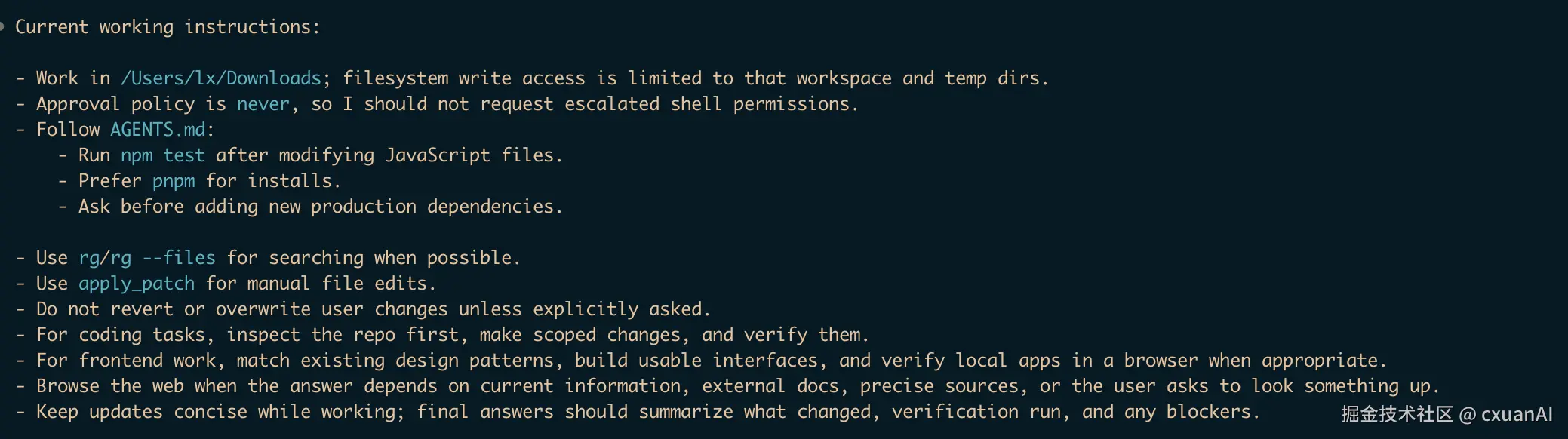
如果输出里出现了你写进去的规则,就说明全局 AGENTS.md 生效了。
输出里如果还有一些英文规则,也正常。
因为这个命令总结的是"当前所有生效指令",不只包含你的 AGENTS.md,还包含 Codex 自带的系统规则、当前工作目录、审批策略、沙箱权限等信息。
全局和项目级怎么分
AGENTS.md 可以放在不同位置。
最常见的是这三个层级:
bash
~/.codex/AGENTS.md        # 全局规则
repo/AGENTS.md            # 项目规则
repo/apps/web/AGENTS.md   # 子模块规则
它们不是互斥关系。
不是说有了全局 AGENTS.md,项目 AGENTS.md 就不生效了。
它们会一起加载。
可以简单理解成:
- 全局规则:我希望 Codex 一直怎么工作
- 项目规则:这个仓库具体怎么工作
- 子目录规则:这个模块有什么特殊要求
判断标准也很简单:
- 换一个项目仍然成立:放全局
- 只在这个仓库成立:放项目
- 只在某个子目录成立:放子目录
比如"新增生产依赖前先确认",适合放全局。
比如"修改 Prisma schema 后运行 pnpm db:generate",适合放项目。
因为不是每个项目都用 Prisma。
这里解释一下。
Prisma 是 Node.js/TypeScript 生态里常见的数据库工具。你可以简单理解成:它把数据库表结构、类型和查询代码连接起来,让你在代码里用类型安全的方式操作数据库。
很多使用 Prisma 的项目里会有:
bash
prisma/schema.prisma这个文件描述数据库里有哪些表、字段和关系。
当你修改了这个 schema 后,项目通常需要重新生成数据库客户端代码。
pnpm db:generate 一般就是项目里封装好的脚本,背后可能执行的是:
prisma generate所以这条规则的意思是:
如果你改了数据库结构定义,不要只改文件就结束,还要重新生成数据库客户端。但不是每个项目都用 Prisma,也不是每个项目都有 db:generate 这个脚本。
所以它是典型的项目级规则,不适合放到全局 ~/.codex/AGENTS.md。
项目级 AGENTS.md
项目级 AGENTS.md 一般放在仓库根目录:
repo/AGENTS.md它应该写这个项目的具体工程约定。
比如:
- 安装命令
- 启动命令
- 测试命令
- 类型检查命令
- lint 命令
- 目录结构
- 生成文件边界
- 数据库变更要求
- API 文档同步要求
如果是生产项目,可以直接使用文末那份模板,再按项目实际情况删改命令和目录。
验证项目级 AGENTS.md
我按照上面的 Project Scope 的 AGENTS.md 创建了一个测试项目。
目录大概是这样:
css
agents-md-test/
  AGENTS.md
  apps/
    web/
  packages/
    ui/
    db/
  services/
    payments/
  docs/
    api/
  src/
    generated/
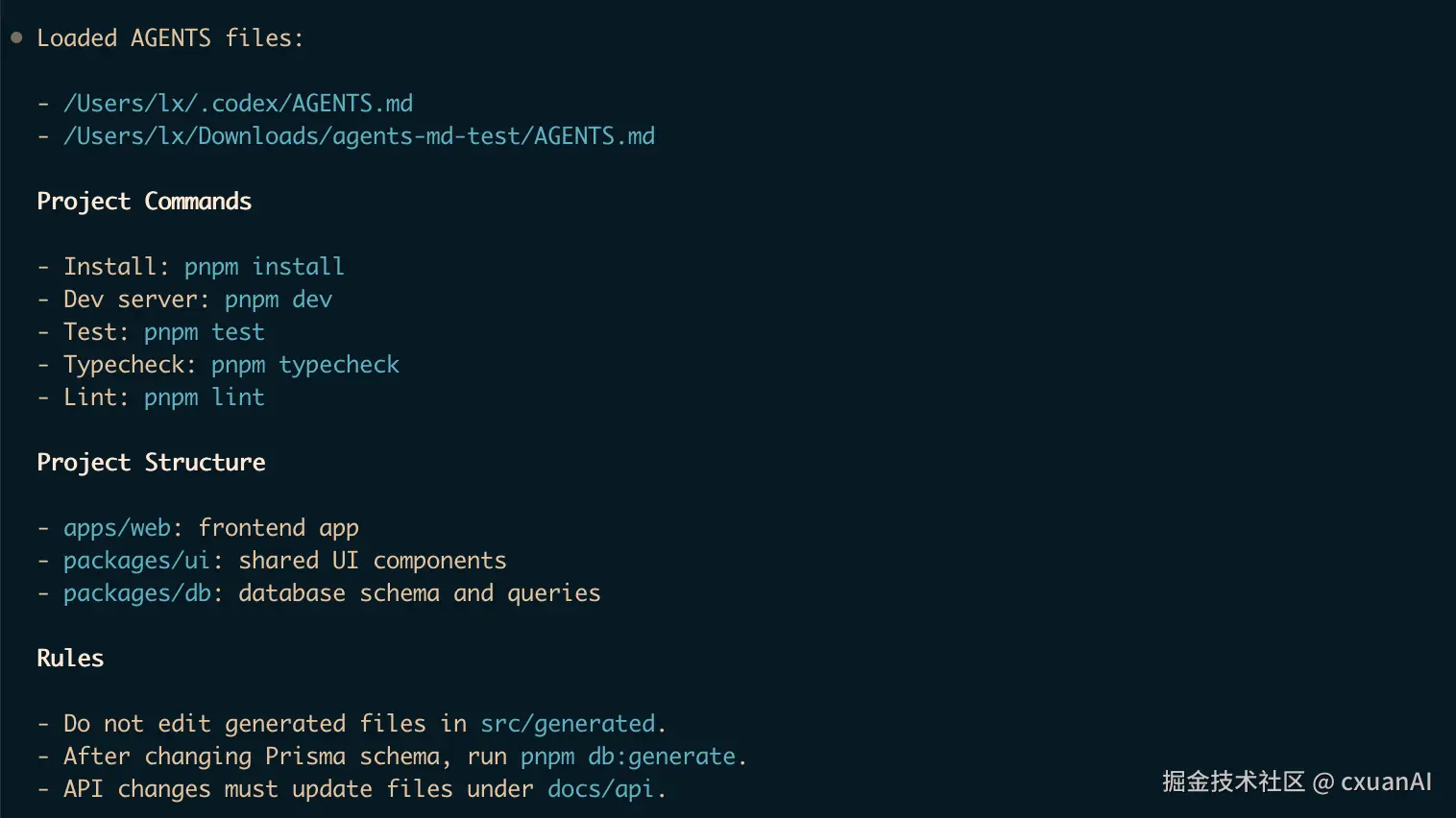
在项目根目录执行:
lua
codex --ask-for-approval never "List the instruction sources you loaded and summarize the Project commands, Project structure, and Rules sections."也可以测试某个子目录:
bash
codex --cd services/payments --ask-for-approval never "List the instruction sources you loaded."输出测试:
一句话:
验证 AGENTS.md 是否生效,不要只看它有没有说"加载了 AGENTS.md"。
最好让它把里面的独有规则总结出来。
比如输出里出现了:
bash
pnpm dev
src/generated
pnpm db:generate
docs/api
这些都是项目级 AGENTS.md 里的独有内容。
能看到这些,就说明项目级规则确实生效了。
子目录 AGENTS.md
除了项目根目录之外,子模块也可以用 AGENTS.md 来做更细的约束。
比如:
markdown
repo/
  AGENTS.md
  services/
    payments/
      AGENTS.md
    search/
      AGENTS.md
repo/AGENTS.md 写整个仓库通用的规则。
services/payments/AGENTS.md 写支付服务自己的规则。
services/search/AGENTS.md 写搜索服务自己的规则。
比如支付服务里可能会写:
markdown
# services/payments/AGENTS.md

## Payments Rules

- Do not change billing behavior without updating payment tests.
- Do not log card numbers, tokens, or customer secrets.
- Run `pnpm test payments` after changing payment logic.
这对 monorepo 很有用。
因为一个仓库里可能同时有前端、后端、支付、搜索、数据任务,每个模块的风险点都不一样。
AGENTS.override.md 是什么
除了 AGENTS.md,还有一个文件名叫:
arduino
AGENTS.override.md它的优先级比同目录下的 AGENTS.md 更高。
比如:
csharp
repo/
  AGENTS.md                         # 仓库根规则
  services/
    payments/
      AGENTS.md                     # 会被忽略
      AGENTS.override.md            # 实际生效
      README.md
    search/
      AGENTS.md
在 services/payments/ 目录下,同时存在:
arduino
AGENTS.md
AGENTS.override.md
这时 Codex 会优先使用:
arduino
services/payments/AGENTS.override.md而忽略同目录下的:
bash
services/payments/AGENTS.mdAGENTS.override.md 适合用在需要强覆盖的场景。
比如:
- 某个子服务有特殊安全规则
- 某个目录禁止修改生成文件
- 某个模块必须用特殊测试命令
- 想临时替换原来的
AGENTS.md行为
普通情况下,用 AGENTS.md 就够了。
只有明确想覆盖同目录 AGENTS.md 时,才用 AGENTS.override.md。
自定义 fallback 文件名
有些团队可能已经有自己的项目说明文件了。
比如:
TEAM_GUIDE.md
.agents.md
如果不想把这些文件改名成 AGENTS.md,可以在 Codex 配置里设置 fallback 文件名。
编辑:
javascript
~/.codex/config.toml加入:
ini
project_doc_fallback_filenames = ["TEAM_GUIDE.md", ".agents.md"]
project_doc_max_bytes = 65536
然后重启 Codex,或者重新运行一条新的 codex 命令。
配置后,Codex 在每个目录里会按这个顺序查找:
arduino
AGENTS.override.md
AGENTS.md
TEAM_GUIDE.md
.agents.md
不在这个列表里的文件名会被忽略。
比如 README.md 不会因为它存在,就自动变成 Codex 的 instructions 文件。
project_doc_max_bytes 控制的是项目说明文件合并后的最大字节数。
如果规则很多,可以适当调大。
使用 CODEX_HOME 切换配置目录
默认情况下,Codex 使用:
bash
~/.codex作为自己的主目录。
所以全局 AGENTS.md 默认是:
javascript
~/.codex/AGENTS.md如果你想临时使用另一套配置,可以设置 CODEX_HOME:
bash
CODEX_HOME=$(pwd)/.codex codex exec "List active instruction sources"这条命令的意思是:
本次执行不要使用默认的 ~/.codex,而是使用当前项目下的:
shell
$(pwd)/.codex适合这些场景:
- 给项目自动化任务准备单独配置
- 区分个人配置和 CI 配置
- 临时测试不同的
AGENTS.md - 避免污染默认
~/.codex
如果规则看起来不对,可以先检查:
bash
echo $CODEX_HOME如果它不是空的,说明 Codex 当前使用的不是默认 ~/.codex。
可以直接抄的生产级 AGENTS.md
最后放一份我觉得更适合生产项目的 AGENTS.md。
这份模板偏工程纪律型,适合多人协作项目、monorepo、涉及数据库、API、CI 的项目。
你可以直接复制到项目根目录,再按项目实际情况删改。
markdown
# AGENTS.md

Working agreement for AI coding agents in this repository.

On conflict, follow: explicit user instructions > this file > existing code conventions > your defaults.

When the choice is risky or materially affects architecture, data, security, or public behavior, stop and ask rather than guess.

## Orientation

Do this first, every session.

Before writing any code, build a working model of the repo from what is actually there:

- Read `README`, `CONTRIBUTING`, and any root-level `*.md` files for setup and norms.
- Detect the package manager from the lockfile:
  - `pnpm-lock.yaml` -> `pnpm`
  - `yarn.lock` -> `yarn`
  - `package-lock.json` -> `npm`
  - `uv.lock` or `poetry.lock` -> the matching Python tool
- Use the detected package manager. Never introduce a second package manager.
- Find the real commands in `package.json` scripts, `Makefile`, `Taskfile`, `justfile`, or CI config.
- Treat CI config (`.github/workflows`, `.gitlab-ci.yml`, etc.) as the source of truth for what passing means.
- Read the files you are about to change and their tests before editing.
- Do not assume a stack. Verify it from the repo.

## Core Principles

- Make the smallest change that solves the task.
- Do not do drive-by refactors, renames, or reformatting of untouched code.
- Keep unrelated changes out of the diff.
- Match the surrounding code: naming, structure, error handling, and test style.
- Consistency beats personal preference.
- Reuse existing helpers, components, and patterns before adding new ones.
- Do not add speculative abstractions, config, or error handling for cases that do not exist yet.
- Comments should explain non-obvious decisions. Do not comment what the code already says.

## Verification

Required before calling a task done:

- Use the project's defined commands. Prefer focused checks first, then broader checks.
- Run the narrow tests for the file, package, or feature you touched.
- Then run the broader gate that the project defines: lint, typecheck or compile, and tests.
- Mirror CI locally when practical.
- Do not invent unrelated verification commands just to have something to run.
- Fix failures caused by your change.
- Add or update tests for behavior changes.
- If you cannot run a command because of missing services, credentials, network, or time, say so explicitly.
- Never imply tests passed if you did not run them.

## Dependencies

- Do not add a production dependency without asking first.
- When requesting a dependency, explain why the existing tools are not enough.
- Dev-only tooling is lower risk, but still match what the repo already uses.
- Never edit generated files, vendored code, or lockfiles by hand.
- Regenerate generated files and lockfiles through the project's documented command.

## Git And PR

- Commit only when asked.
- If asked to commit and currently on the default branch, create a feature branch or ask before committing.
- Add files by name. Do not use `git add .` or `git add -A`.
- Use conventional commit subjects when committing, such as `feat:`, `fix:`, or `chore:`.
- Keep one logical change per commit.
- Never run `push --force`, `reset --hard`, `branch -D`, `clean -f`, or `--no-verify`.
- Do not amend, squash, or rebase already-pushed commits unless asked.
- Do not revert or overwrite changes you did not make.

## Security

- Never commit secrets, tokens, keys, or credentials.
- Treat `.env*` files as sensitive.
- Do not print secret values or write them to logs.
- Validate external input at trust boundaries.
- When changing access to user-visible data, check the authorization path.
- Do not log PII or customer data.

## Data And Migrations

- Treat schema changes and migrations as high risk.
- Do not create or modify production migrations unless the task explicitly asks for it.
- Flag destructive changes in your summary, including dropped columns, deleted rows, and irreversible backfills.
- Wait for confirmation before applying destructive data changes.

## When To Stop And Ask

Pause and ask before:

- Adding a production dependency or new framework.
- Adding a broad new abstraction.
- Touching production data, schema, or migrations.
- Making a breaking change to a public API or shared interface.
- Editing shared config, CI, or the build pipeline.
- Continuing when the task contradicts the code.
- Choosing between several valid approaches when there is no clear winner.

## Reporting Back

End each task with:

- What changed, by file.
- How it was verified, including commands run and results.
- What was not run, and why.
- Risks or follow-ups.
这份模板不绑定具体技术栈,所以比前面那种写死 pnpm、Prisma、docs/api 的模板更通用。
它的重点是让 Codex 先读项目、再判断命令、再做最小修改,最后把验证和风险讲清楚。
如果你的项目已经有明确技术栈,也可以继续往里面加项目规则。
比如:
markdown
- After changing Prisma schema, run `pnpm db:generate`.
- API changes must update files under `docs/api`.
- Frontend changes must pass `pnpm test apps/web`.
也就是说,这份模板适合作为项目级 AGENTS.md 的底座,再叠加你项目自己的命令和边界。
总结
AGENTS.md 本质上就是给 Codex 看的项目说明书。
全局 ~/.codex/AGENTS.md 放长期偏好。
项目 repo/AGENTS.md 放工程规则。
子目录 AGENTS.md 放模块规则。
AGENTS.override.md 用来覆盖同目录普通规则。
如果团队已经有自己的说明文件,也可以通过 project_doc_fallback_filenames 加入 fallback list。
最重要的是,AGENTS.md 不要写空话。
不要写:
请保持代码优雅。
请遵循最佳实践。
要写能影响 Codex 行为、也能被命令验证的规则。
这种才是真正有用的工程化约束。