ros2 从零开始28 监听广播C++
前言
背景
上一篇我们把乌龟的位置给广播出去了,这一篇我们写一个监听广播信息,乌龟的位置的服务。
学习如何使用 tf2 来获取帧变换信息。
TF2坐标原点
在 TF2(坐标变换系统)中,坐标原点 并不是一个固定的物理位置,而是相对于每个坐标系自身定义的。每个坐标系都有自己的原点,通常位于该坐标系的 (0, 0, 0) 位置。
核心概念
1. 每个坐标系都有自己的原点
- 坐标系原点 = 该坐标系的 (0, 0, 0) 点
- 例如:
map坐标系的原点通常是地图的某个固定点(如地图左下角)base_link坐标系的原点通常是机器人的中心点odom坐标系的原点通常是机器人启动时的位置
2. 变换关系描述的是原点之间的相对位置
当你执行:
cpp
t = tf_buffer_->lookupTransform("target_frame", "turtle2", tf2::TimePointZero);返回的 t.transform.translation 表示:
- 从
turtle2坐标系原点到target_frame坐标系原点的向量 - 即:在
turtle2坐标系下,target_frame原点的位置
3. 实际例子
假设你有两个坐标系:
- turtle1:原点在 (1, 2, 0)
- turtle2:原点在 (3, 5, 0)
那么:
lookupTransform("turtle2", "turtle1", ...)会返回:- translation.x = 1 - 3 = -2 (turtle1 在 turtle2 的左侧 2 米)
- translation.y = 2 - 5 = -3 (turtle1 在 turtle2 的后方 3 米)
常见坐标系原点位置
| 坐标系 | 原点位置 | 说明 |
|---|---|---|
| map | 地图的固定参考点 | 通常由 SLAM 或地图文件定义 |
| odom | 机器人启动时的位置 | 里程计坐标系,会随时间漂移 |
| base_link | 机器人底盘中心 | 通常在地面投影点 |
| base_footprint | 机器人在地面的投影 | 与 base_link 同 x,y,z=0 |
| world | 虚拟世界的原点 | 在仿真环境中使用 |
在代码中的体现
cpp
// 获取变换
t = tf_buffer_->lookupTransform("target_frame", "turtle2", tf2::TimePointZero);

// t.transform.translation 表示:
// 在 turtle2 坐标系下,target_frame 原点的位置
double dx = t.transform.translation.x;  // 目标在 turtle2 的 x 方向距离
double dy = t.transform.translation.y;  // 目标在 turtle2 的 y 方向距离

// 所以 atan2(dy, dx) 计算的是:
// 从 turtle2 原点指向 target_frame 原点的方向角
msg.angular.z = atan2(dy, dx);
可视化理解
想象你在房间里:
- 你的位置 =
turtle2的原点 - 房间的东北角 =
target_frame的原点 lookupTransform返回的 translation = 从你到东北角的向量
关键点 :TF2 不关心绝对位置,只关心坐标系之间的相对关系。原点就是每个坐标系自己的 (0,0,0) 点。
实践
1.创建一个包
本次不另外创建包,我们使用《编写静态广播C++》。
2.编写广播C++
在learning_tf2_cpp/src目录下,创建源文件turtle_tf2_listener.cpp , 其内容如下:
c++
#include <chrono>
#include <functional>
#include <memory>
#include <string>

#include "geometry_msgs/msg/transform_stamped.hpp"
#include "geometry_msgs/msg/twist.hpp"
#include "rclcpp/rclcpp.hpp"
#include "tf2/exceptions.h"
#include "tf2_ros/transform_listener.h"
#include "tf2_ros/buffer.h"
#include "turtlesim/srv/spawn.hpp"

using namespace std::chrono_literals;

class FrameListener : public rclcpp::Node
{
public:
  FrameListener()
  : Node("turtle_tf2_frame_listener"),
    turtle_spawning_service_ready_(false),
    turtle_spawned_(false)
  {
    // Declare and acquire `target_frame` parameter
    target_frame_ = this->declare_parameter<std::string>("target_frame", "turtle1");

    tf_buffer_ =
      std::make_unique<tf2_ros::Buffer>(this->get_clock());
    tf_listener_ =
      std::make_shared<tf2_ros::TransformListener>(*tf_buffer_);

    // Create a client to spawn a turtle
    spawner_ =
      this->create_client<turtlesim::srv::Spawn>("spawn");

    // Create turtle2 velocity publisher
    publisher_ =
      this->create_publisher<geometry_msgs::msg::Twist>("turtle2/cmd_vel", 1);

    // Call on_timer function every second
    timer_ = this->create_wall_timer(
      1s, std::bind(&FrameListener::on_timer, this));
  }

private:
  void on_timer()
  {
    // Store frame names in variables that will be used to
    // compute transformations
    std::string fromFrameRel = target_frame_.c_str();
    std::string toFrameRel = "turtle2";

    if (turtle_spawning_service_ready_) {
      if (turtle_spawned_) {
        geometry_msgs::msg::TransformStamped t;

        // Look up for the transformation between target_frame and turtle2 frames
        // and send velocity commands for turtle2 to reach target_frame
        try {
          t = tf_buffer_->lookupTransform(
            toFrameRel, fromFrameRel,
            tf2::TimePointZero);
        } catch (const tf2::TransformException & ex) {
          RCLCPP_INFO(
            this->get_logger(), "Could not transform %s to %s: %s",
            toFrameRel.c_str(), fromFrameRel.c_str(), ex.what());
          return;
        }

        geometry_msgs::msg::Twist msg;

        static const double scaleRotationRate = 1.0;
        msg.angular.z = scaleRotationRate * atan2(
          t.transform.translation.y,
          t.transform.translation.x);

        static const double scaleForwardSpeed = 0.5;
        msg.linear.x = scaleForwardSpeed * sqrt(
          pow(t.transform.translation.x, 2) +
          pow(t.transform.translation.y, 2));

        publisher_->publish(msg);
      } else {
        RCLCPP_INFO(this->get_logger(), "Successfully spawned");
        turtle_spawned_ = true;
      }
    } else {
      // Check if the service is ready
      if (spawner_->service_is_ready()) {
        // Initialize request with turtle name and coordinates
        // Note that x, y and theta are defined as floats in turtlesim/srv/Spawn
        auto request = std::make_shared<turtlesim::srv::Spawn::Request>();
        request->x = 4.0;
        request->y = 2.0;
        request->theta = 0.0;
        request->name = "turtle2";

        // Call request
        using ServiceResponseFuture =
          rclcpp::Client<turtlesim::srv::Spawn>::SharedFuture;
        auto response_received_callback = [this](ServiceResponseFuture future) {
            auto result = future.get();
            if (strcmp(result->name.c_str(), "turtle2") == 0) {
              turtle_spawning_service_ready_ = true;
            } else {
              RCLCPP_ERROR(this->get_logger(), "Service callback result mismatch");
            }
          };
        auto result = spawner_->async_send_request(request, response_received_callback);
      } else {
        RCLCPP_INFO(this->get_logger(), "Service is not ready");
      }
    }
  }

  // Boolean values to store the information
  // if the service for spawning turtle is available
  bool turtle_spawning_service_ready_;
  // if the turtle was successfully spawned
  bool turtle_spawned_;
  rclcpp::Client<turtlesim::srv::Spawn>::SharedPtr spawner_{nullptr};
  rclcpp::TimerBase::SharedPtr timer_{nullptr};
  rclcpp::Publisher<geometry_msgs::msg::Twist>::SharedPtr publisher_{nullptr};
  std::shared_ptr<tf2_ros::TransformListener> tf_listener_{nullptr};
  std::unique_ptr<tf2_ros::Buffer> tf_buffer_;
  std::string target_frame_;
};

int main(int argc, char * argv[])
{
  rclcpp::init(argc, argv);
  rclcpp::spin(std::make_shared<FrameListener>());
  rclcpp::shutdown();
  return 0;
}
2.1 代码解析
现在,让我们看一下访问帧转换信息的tf2 相关的代码。tf2_ros包含TransformListener类,这个类让接收转换信息更容易 。
c++
#include "tf2_ros/transform_listener.h"现在我们创建TransformListener对象,一旦监听创建起来,它就会开始通过通信线路接收 tf2 变换数据,并将这些数据缓存最多 10 秒。
c++
    tf_buffer_ =
      std::make_unique<tf2_ros::Buffer>(this->get_clock());
    tf_listener_ =
std::make_shared<tf2_ros::TransformListener>(*tf_buffer_);最终,我们查询监听器返回的信息,使用lookup_transform 方法,我们明确下面几个参数
- 目标坐标系(本例
turtle2) - 源坐标系(默认参数,本例
turtle1) - 时间点(本例
tf2::TimePointZero)
提供tf::TimePointZero让我们能获取最新的一次变换信息,这里用try-catch块来捕获可能的异常
c++
        try {
          t = tf_buffer_->lookupTransform(
            toFrameRel, fromFrameRel,
            tf2::TimePointZero);
        } catch (const tf2::TransformException & ex) {
          RCLCPP_INFO(
            this->get_logger(), "Could not transform %s to %s: %s",
            toFrameRel.c_str(), fromFrameRel.c_str(), ex.what());
          return;
}得到的变换表示了源坐标系turtle1相对于目标坐标系turtle2 的位置和朝向。
然后,两只乌龟之间的角度被用来计算跟随目标乌龟的速度指令。关于 tf2 的更通用信息,请参见概念章节中的 tf2 页面。
源码还是有点晦涩难懂,这里再给大家解析一下。
先说源码整体目的:
- 访问帧转换信息 (上面的解析部分)
- 生成另一只小乌龟,目标乌龟
- 得到的变换,计算成目标乌龟的移动指令
- 把移动指令发到目标乌龟topic,令其移动。
以下创建spawner_的客户端,用于调用spawn服务(这个服务可能指定参数生成小乌龟),
同时也创建publisher_ 发布者,可发布移动指令(类型是geometry_msgs::msg::Twist)到turtle2/cmd_vel
c++
    // Create a client to spawn a turtle
    spawner_ =
      this->create_client<turtlesim::srv::Spawn>("spawn");

    // Create turtle2 velocity publisher
    publisher_ =
this->create_publisher<geometry_msgs::msg::Twist>("turtle2/cmd_vel", 1);具体的创建小乌龟的操作,放在on_timer函数里面。判断spawner_服务是否准备好。如果是,则创建名字为turtle2的小乌龟。
c++
      // Check if the service is ready
      if (spawner_->service_is_ready()) {
        // Initialize request with turtle name and coordinates
        // Note that x, y and theta are defined as floats in turtlesim/srv/Spawn
        auto request = std::make_shared<turtlesim::srv::Spawn::Request>();
        request->x = 4.0;
        request->y = 2.0;
        request->theta = 0.0;
        request->name = "turtle2";

        // Call request
        using ServiceResponseFuture =
          rclcpp::Client<turtlesim::srv::Spawn>::SharedFuture;
        auto response_received_callback = [this](ServiceResponseFuture future) {
            auto result = future.get();
            if (strcmp(result->name.c_str(), "turtle2") == 0) {
              turtle_spawning_service_ready_ = true;
            } else {
              RCLCPP_ERROR(this->get_logger(), "Service callback result mismatch");
            }
          };
        auto result = spawner_->async_send_request(request, response_received_callback);
      } else {
        RCLCPP_INFO(this->get_logger(), "Service is not ready");
}在得到的变换表示了源坐标系turtle1相对于目标坐标系turtle2 的位置和朝向。
| 向量 | 距离 | 方向 |
|---|---|---|
| (x,y) | \\sqrt{x\^2 + y\^2} | atan2 ( y , x ) \text{atan2}(y, x) atan2(y,x) |
下面是计算位置并转换为移动指令,发布它。
c++
        geometry_msgs::msg::Twist msg;

        static const double scaleRotationRate = 1.0;
        msg.angular.z = scaleRotationRate * atan2(
          t.transform.translation.y,
          t.transform.translation.x);

        static const double scaleForwardSpeed = 0.5;
        msg.linear.x = scaleForwardSpeed * sqrt(
          pow(t.transform.translation.x, 2) +
          pow(t.transform.translation.y, 2));

        publisher_->publish(msg);
2.3 更新CMakeLists.txt
在CMakeLists.txt添加配置可执行程序turtle_tf2_listener, 如下:
cmake
add_executable(turtle_tf2_listener src/turtle_tf2_listener.cpp)
ament_target_dependencies(
    turtle_tf2_listener
    geometry_msgs
    rclcpp
    tf2
    tf2_ros
    turtlesim
)最后,添加安装配置install(TARGETS...)
cmake
install(TARGETS
    turtle_tf2_listener
    DESTINATION lib/${PROJECT_NAME})
3 更新启动文件
使用上一章的启动文件。在src/learning_tf2_cpp/launch 目录。根据上一章选择的启动文件(turtle_tf2_demo_launch 的文件,扩展名为 .py、.xml 或 .yaml,随便选一个),使用文本编辑器修改成以下内容:
3.1.1 XML
xml
<?xml version="1.0" encoding="UTF-8"?>
<launch>
  <node pkg="turtlesim" exec="turtlesim_node" name="sim" />
  <node pkg="learning_tf2_cpp" exec="turtle_tf2_broadcaster" name="broadcaster1">
    <param name="turtlename" value="turtle1" />
  </node>
  <arg name="target_frame" default="turtle1" description="Target frame name." />
  <node pkg="learning_tf2_cpp" exec="turtle_tf2_broadcaster" name="broadcaster2">
    <param name="turtlename" value="turtle2" />
  </node>
  <node pkg="learning_tf2_cpp" exec="turtle_tf2_listener" name="listener">
    <param name="target_frame" value="$(var target_frame)" />
  </node>
</launch>
3.1.2 YAML
yaml
%YAML 1.2
---
launch:
  - node:
      pkg: "turtlesim"
      exec: "turtlesim_node"
      name: "sim"
  - node:
      pkg: "learning_tf2_cpp"
      exec: "turtle_tf2_broadcaster"
      name: "broadcaster1"
      param:
      - name: "turtlename"
        value: "turtle1"
  - arg:
      name: "target_frame"
      default: "turtle1"
      description: "Target frame name."
  - node:
      pkg: "learning_tf2_cpp"
      exec: "turtle_tf2_broadcaster"
      name: "broadcaster2"
      param:
      - name: "turtlename"
        value: "turtle2"
  - node:
      pkg: "learning_tf2_cpp"
      exec: "turtle_tf2_listener"
      name: "listener"
      param:
      - name: "target_frame"
        value: "$(var target_frame)"
3.1.3 PYTHON
python
from launch import LaunchDescription
from launch.actions import DeclareLaunchArgument
from launch.substitutions import LaunchConfiguration

from launch_ros.actions import Node


def generate_launch_description():
    return LaunchDescription([
        Node(
            package='turtlesim',
            executable='turtlesim_node',
            name='sim'
        ),
        Node(
            package='learning_tf2_cpp',
            executable='turtle_tf2_broadcaster',
            name='broadcaster1',
            parameters=[
                {'turtlename': 'turtle1'}
            ]
        ),
        DeclareLaunchArgument(
            'target_frame', default_value='turtle1',
            description='Target frame name.'
        ),
        Node(
            package='learning_tf2_cpp',
            executable='turtle_tf2_broadcaster',
            name='broadcaster2',
            parameters=[
                {'turtlename': 'turtle2'}
            ]
        ),
        Node(
            package='learning_tf2_cpp',
            executable='turtle_tf2_listener',
            name='listener',
            parameters=[
                {'target_frame': LaunchConfiguration('target_frame')}
            ]
        ),
    ])
解析,这将声明一个目标帧(target_frame)启动参数,启动一个针对我们将生成的第二只海龟的广播器,以及一个订阅这些变换的监听器。
launch文件启动4个node
| 节点名 | 包 | 执行文件 | 参数 | 用途 |
|---|---|---|---|---|
| sim | turtlesim | turtlesim_node | 默认小乌龟turtle1 | |
| broadcaster1 | learning_tf2_cpp | turtle_tf2_broadcaster | turtlename=turtle1 | 广播turtle1的位置 |
| broadcaster2 | learning_tf2_cpp | turtle_tf2_broadcaster | turtlename=turtle2 | 广播turtle2的位置 |
| listener | learning_tf2_cpp | turtle_tf2_listener | target_frame=turtle1 | 监听turtle1的位置,创建小乌龟turtle2,发移动指令给turtle2 |
3.2 修改package.xml
回到包learning_tf2_cpp目录,打开package.xml,添加launch依赖
xml
<exec_depend>launch</exec_depend>
<exec_depend>launch_ros</exec_depend>
3.3 修改CMakeLists.txt
CMakeLists.txt增加目录launch/的安装
cmake
install(DIRECTORY launch
  DESTINATION share/${PROJECT_NAME})
4 编译和运行
进入工作区,用colcon build ,等待编译完成。
bash
root@bc2bf85b2e4a:/# cd ~/ros2_ws
root@bc2bf85b2e4a:~/ros2_ws# colcon build --packages-select learning_tf2_cpp
Starting >>> learning_tf2_cpp
Finished <<< learning_tf2_cpp [5.52s]

Summary: 1 package finished [5.87s]
编译完成后,我们需要安装后才能运行,使用
bash
source install/setup.sh打开一个终端,输入如下命令运行(这里取turtle_tf2_demo_launch.xml,如果你用yaml或python,需要自己替换)
bash
root@bc2bf85b2e4a:~/ros2_ws# colcon build --packages-select learning_tf2_cpp
Starting >>> learning_tf2_cpp
Finished <<< learning_tf2_cpp [7.69s]

Summary: 1 package finished [8.08s]
root@bc2bf85b2e4a:~/ros2_ws# . install/setup.bash
root@bc2bf85b2e4a:~/ros2_ws# ros2 launch learning_tf2_cpp turtle_tf2_demo_launch.xml
[INFO] [launch]: All log files can be found below /root/.ros/log/2026-06-12-07-11-40-543599-bc2bf85b2e4a-11841
[INFO] [launch]: Default logging verbosity is set to INFO
[INFO] [turtlesim_node-1]: process started with pid [11849]
[INFO] [turtle_tf2_broadcaster-2]: process started with pid [11851]
[INFO] [turtle_tf2_broadcaster-3]: process started with pid [11853]
[INFO] [turtle_tf2_listener-4]: process started with pid [11855]
[turtlesim_node-1] QStandardPaths: XDG_RUNTIME_DIR not set, defaulting to '/tmp/runtime-root'
[turtlesim_node-1] [INFO] [1781248300.948587258] [sim]: Starting turtlesim with node name /sim
[turtlesim_node-1] [INFO] [1781248300.954795529] [sim]: Spawning turtle [turtle1] at x=[5.544445], y=[5.544445], theta=[0.000000]
[turtlesim_node-1] [INFO] [1781248301.753201963] [sim]: Spawning turtle [turtle2] at x=[4.000000], y=[2.000000], theta=[0.000000]
[turtle_tf2_listener-4] [INFO] [1781248302.740008695] [listener]: Successfully spawned
这将会运行小乌龟节点和广播小乌龟位置的节点。
!外链图片转存失败,源站可能有防盗链机制,建议将图片保存下来直接上传(https://img-home.csdnimg.cn/images/2023072402415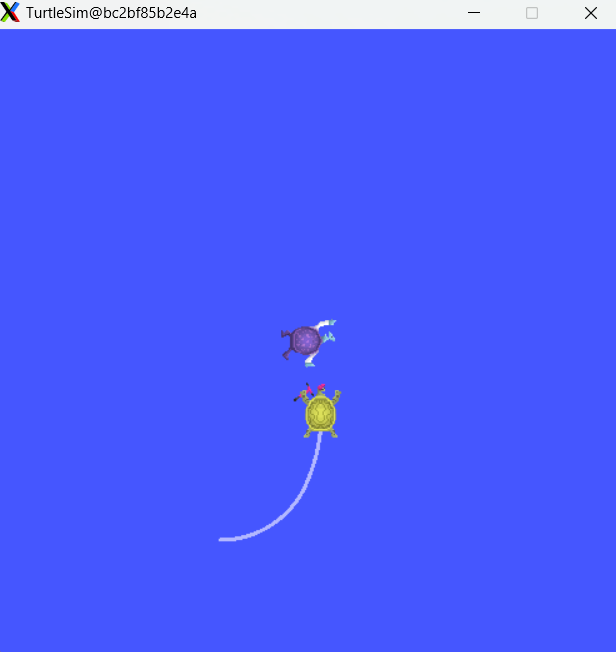
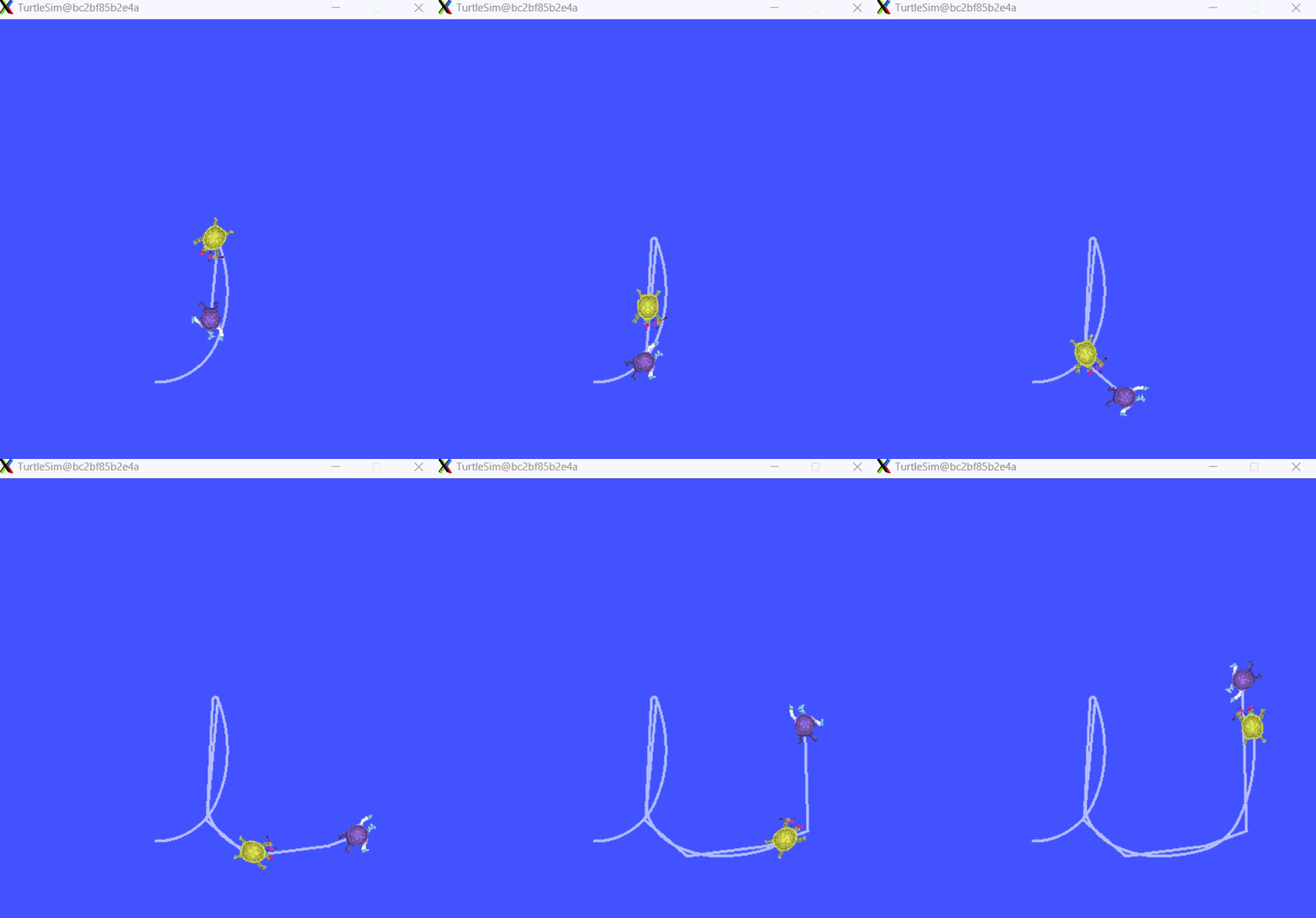
另外打开一个终端,运行小乌龟控制节点,控制小乌龟turtle1的移动。
bash
root@bc2bf85b2e4a:~/ros2_ws# ros2 run turtlesim turtle_teleop_key 可以看到,随着turtle1的移动,turtle2跟随turtle1移动。
总结
在本教程中,您学习了如何使用tf2来获取帧变换。同时,您也完成了在tf2入门教程中首次尝试的turtlesim演示的编写。