SpringBoot 集成 AgentScope Java
- [1 依赖](#1 依赖)
- [2 配置](#2 配置)
- [3 代码](#3 代码)
-
- [1 配置](#1 配置)
- [2 工具](#2 工具)
- [3 请求](#3 请求)
- [4 记忆](#4 记忆)
- [4 测试](#4 测试)
| 框架 |
维护方/背景 |
大致发布时间 |
核心定位 |
LLM 支持 |
向量库 |
编排范式 |
状态管理 |
循环/分支 |
多Agent协作 |
适用场景 |
| Spring AI |
Spring 官方(VMware) |
2024.02 |
Spring 生态 AI 能力基础集成框架 |
20+ 主流模型(OpenAI、Anthropic、通义、文心等) |
15+(Milvus、PGVector、Redis 等) |
链式(Chain)编排 |
弱,需开发者自行维护会话状态 |
弱,原生不支持复杂流程控制 |
弱,需自定义扩展实现 |
Spring Boot 项目快速接入 AI 基础能力 |
| LangChain4j |
开源社区主导 |
2023.01 |
Java 生态通用 LLM/Agent 工具集,对标 Python LangChain |
20+ 主流及国产模型(通义、文心、智谱等原生支持) |
30+,Java 生态覆盖最广 |
链式编排 + 基础 Agent 范式 |
基础 Memory 模块,支持会话记忆 |
有限支持,需通过代码逻辑实现 |
中等,支持简单多角色 Agent 交互 |
非 Spring 栈项目、RAG 应用开发、多模型兼容需求 |
| Spring AI Alibaba |
阿里云官方 |
2024.09 |
基于 Spring AI 的企业级 AI 工作流与 Agent 编排框架 |
继承 Spring AI + 深度集成通义、DeepSeek 等国产模型 |
继承 Spring AI + 阿里云原生向量服务 |
Graph 图式 + Workflow 工作流编排 |
有状态,支持工作流上下文持久化 |
强,原生支持条件分支、循环执行 |
强,支持可视化多 Agent 角色编排 |
企业级 AI 工作流、国产模型落地、阿里云生态项目 |
| AgentScope Java |
阿里通义实验室 |
2025.12 |
生产级自治智能体运行框架,主打 ReAct 范式 |
原生支持通义、OpenAI、Anthropic 等主流模型 |
内置向量能力 + 适配主流向量数据库 |
ReAct 自治范式(LLM 主导决策) |
强,内置会话、记忆、工具调用全链路状态 |
强,由 LLM 自主控制执行循环与分支 |
强,支持动态协作、子 Agent 委派 |
复杂任务自主规划、生产级自治 Agent、多 Agent 协作系统 |
| AgentHarness Java |
开源社区 / 阿里联合 |
2026.04 |
Agent 工程化运行外壳,解决 Agent 从 Demo 到生产的稳定性问题 |
依赖底层 AgentScope / Spring AI,继承其模型能力 |
依赖底层框架,继承其向量库支持 |
Harness 封装式可控自治范式 |
强,支持分布式会话持久化、多租户工作区隔离 |
强,支持可控循环、异常分支与熔断 |
强,支持会话隔离下的子 Agent 委派与协作 |
分布式多用户 Agent 系统、长期运行的企业级 Agent、高可用生产环境 |
| LangGraph4j |
开源社区 |
2025 年初 |
Java 版有状态图式工作流编排框架,对标 Python LangGraph |
不直接对接模型,为编排层,依赖 LangChain4j / Spring AI 等底层框架 |
不直接对接,依赖底层框架的向量库能力 |
StateGraph 状态图式编排 |
内置全局 AgentState,原生支持状态读写、持久化与回溯 |
原生强支持,内置条件边、循环、回退、分支能力 |
强,支持多角色、多节点 Agent 的图式协作编排 |
复杂有状态 AI 工作流、需要循环/回退的多 Agent 系统、RAG + 工作流结合场景 |
1 依赖
<?xml version="1.0" encoding="UTF-8"?>
<project xmlns="http://maven.apache.org/POM/4.0.0" xmlns:xsi="http://www.w3.org/2001/XMLSchema-instance"
         xsi:schemaLocation="http://maven.apache.org/POM/4.0.0 https://maven.apache.org/xsd/maven-4.0.0.xsd">
    <modelVersion>4.0.0</modelVersion>

    <parent>
        <groupId>org.springframework.boot</groupId>
        <artifactId>spring-boot-starter-parent</artifactId>
        <version>4.1.0</version>
        <relativePath/> <!-- lookup parent from repository -->
    </parent>

    <groupId>com.xu</groupId>
    <artifactId>agentscope</artifactId>
    <version>1.0.0</version>

    <properties>
        <java.version>25</java.version>
    </properties>

    <dependencies>

        <!-- webmvc -->
        <dependency>
            <groupId>org.springframework.boot</groupId>
            <artifactId>spring-boot-starter-webmvc</artifactId>
        </dependency>

        <!-- spring-boot-agentscope -->
        <dependency>
            <groupId>io.agentscope</groupId>
            <artifactId>agentscope-spring-boot-starter</artifactId>
            <version>2.0.0-RC2</version>
        </dependency>

        <!-- redis -->
        <dependency>
            <groupId>org.springframework.boot</groupId>
            <artifactId>spring-boot-starter-data-redis</artifactId>
        </dependency>

        <!-- lombok -->
        <dependency>
            <groupId>org.projectlombok</groupId>
            <artifactId>lombok</artifactId>
            <optional>true</optional>
        </dependency>

        <!-- devtools -->
        <dependency>
            <groupId>org.springframework.boot</groupId>
            <artifactId>spring-boot-devtools</artifactId>
            <scope>runtime</scope>
            <optional>true</optional>
        </dependency>

        <!-- webmvc-test -->
        <dependency>
            <groupId>org.springframework.boot</groupId>
            <artifactId>spring-boot-starter-webmvc-test</artifactId>
            <scope>test</scope>
        </dependency>

    </dependencies>

    <build>
        <plugins>
            <plugin>
                <groupId>org.springframework.boot</groupId>
                <artifactId>spring-boot-maven-plugin</artifactId>
                <configuration>
                    <excludes>
                        <exclude>
                            <groupId>org.projectlombok</groupId>
                            <artifactId>lombok</artifactId>
                        </exclude>
                    </excludes>
                </configuration>
            </plugin>
            <plugin>
                <groupId>org.apache.maven.plugins</groupId>
                <artifactId>maven-compiler-plugin</artifactId>
                <executions>
                    <execution>
                        <id>default-compile</id>
                        <phase>compile</phase>
                        <goals>
                            <goal>compile</goal>
                        </goals>
                        <configuration>
                            <annotationProcessorPaths>
                                <path>
                                    <groupId>org.projectlombok</groupId>
                                    <artifactId>lombok</artifactId>
                                </path>
                            </annotationProcessorPaths>
                        </configuration>
                    </execution>
                    <execution>
                        <id>default-testCompile</id>
                        <phase>test-compile</phase>
                        <goals>
                            <goal>testCompile</goal>
                        </goals>
                        <configuration>
                            <annotationProcessorPaths>
                                <path>
                                    <groupId>org.projectlombok</groupId>
                                    <artifactId>lombok</artifactId>
                                </path>
                            </annotationProcessorPaths>
                        </configuration>
                    </execution>
                </executions>
            </plugin>
        </plugins>
    </build>

</project>
2 配置
spring:
  application:
    name: agentscope
  data:
    redis:
      host: ${REDIS_HOST:127.0.0.1}
      port: ${REDIS_PORT:6379}
      password: ${REDIS_PASSWORD:123456}
      timeout: 5s
      lettuce:
        pool:
          max-active: 8
          max-idle: 8
          min-idle: 2
3 代码
1 配置
package com.xu.agentscope.conf;

import io.agentscope.core.ReActAgent;
import io.agentscope.core.model.GenerateOptions;
import io.agentscope.core.model.OpenAIChatModel;
import io.agentscope.core.state.AgentStateStore;
import io.agentscope.core.tool.Toolkit;
import io.agentscope.core.tool.coding.ShellCommandTool;
import com.xu.agentscope.state.RedisAgentStateStore;

import org.springframework.beans.factory.annotation.Value;
import org.springframework.context.annotation.Bean;
import org.springframework.context.annotation.Configuration;
import org.springframework.data.redis.core.RedisTemplate;

/**
 * AgentScope 核心配置 ------ 定义三个 {@link ReActAgent} Bean 及共享组件。
 *
 * <p>每个 Agent 已预配置系统提示词、生成参数(温度、最大 Token)、最大推理步数、
 * 工具集({@link ShellCommandTool})和 Redis 会话持久化,
 * Controller 注入后可直接调用,无需每次请求重新构建。</p>
 */
@Configuration
public class AgentScopeConfig {

    @Value("${DASHSCOPE_API_KEY:你的API_KEY}")
    private String apiKey;

    @Value("${DASHSCOPE_API_BASE_URL:你的BASE_URL}")
    private String baseUrl;

    /**
     * 共享工具集 ------ 注册 {@link ShellCommandTool},允许 Agent 执行 shell 命令。
     */
    @Bean
    public Toolkit toolkit() {
        Toolkit toolkit = new Toolkit();
        toolkit.registerAgentTool(new ShellCommandTool());
        return toolkit;
    }

    /**
     * Redis 持久化存储 ------ 用于保存和恢复会话聊天历史。
     */
    @Bean
    public AgentStateStore agentStateStore(RedisTemplate<String, String> redisTemplate) {
        return new RedisAgentStateStore(redisTemplate);
    }

    /**
     * 对话 Agent ------ 用于普通文本对话、问答等场景。
     */
    @Bean
    public ReActAgent llmAgent(AgentStateStore vector, Toolkit toolkit) {
        return ReActAgent.builder()
                .name("assistant")
                .sysPrompt("You are a helpful AI assistant.")
                .model(OpenAIChatModel.builder()
                        .apiKey(apiKey)
                        .baseUrl(baseUrl)
                        .modelName("deepseek-v4-flash")
                        .stream(true)
                        .build())
                .toolkit(toolkit.copy())
                .stateStore(vector)
                .maxIters(3)
                .generateOptions(GenerateOptions.builder()
                        .temperature(0.7)
                        .maxTokens(4096)
                        .build())
                .build();
    }

    /**
     * 视觉 Agent ------ 用于图像理解、图片描述等视觉任务。
     */
    @Bean
    public ReActAgent visionAgent(AgentStateStore vector, Toolkit toolkit) {
        return ReActAgent.builder()
                .name("vision")
                .sysPrompt("You are a visual analysis assistant. Describe images accurately and help users understand visual content.")
                .model(OpenAIChatModel.builder()
                        .apiKey(apiKey)
                        .baseUrl(baseUrl)
                        .modelName("deepseek-v4-flash")
                        .stream(true)
                        .build())
                .toolkit(toolkit.copy())
                .stateStore(vector)
                .maxIters(3)
                .generateOptions(GenerateOptions.builder()
                        .temperature(0.5)
                        .maxTokens(4096)
                        .build())
                .build();
    }

    /**
     * 全模态 Agent ------ 支持文本、图像、音频等混合输入的综合推理。
     */
    @Bean
    public ReActAgent multimodalAgent(AgentStateStore vector, Toolkit toolkit) {
        return ReActAgent.builder()
                .name("multimodal")
                .sysPrompt("You are a multimodal assistant capable of understanding text, images, audio, and video. Analyze all provided content comprehensively.")
                .model(OpenAIChatModel.builder()
                        .apiKey(apiKey)
                        .baseUrl(baseUrl)
                        .modelName("deepseek-v4-flash")
                        .stream(true)
                        .build())
                .toolkit(toolkit.copy())
                .stateStore(vector)
                .maxIters(3)
                .generateOptions(GenerateOptions.builder()
                        .temperature(0.6)
                        .maxTokens(4096)
                        .build())
                .build();
    }

}
2 工具
package com.xu.agentscope.utils;

import io.agentscope.core.event.AgentEvent;
import io.agentscope.core.event.TextBlockDeltaEvent;
import io.agentscope.core.event.ThinkingBlockDeltaEvent;
import io.agentscope.core.event.ToolCallDeltaEvent;
import io.agentscope.core.event.ToolCallStartEvent;

import org.springframework.web.servlet.mvc.method.annotation.SseEmitter;

import java.io.IOException;
import java.util.concurrent.atomic.AtomicReference;

/**
 * SSE (Server-Sent Events) 事件发射工具类。
 *
 * <p>将 AgentScope 的事件流转换为 SSE 事件,推送给前端。
 * 所有控制器共享此类中的事件处理逻辑。</p>
 */
public final class EmitterHelper {

    private EmitterHelper() {}

    /**
     * 发送空的"完成"信号后关闭发射器。
     *
     * @param emitter SSE 发射器
     */
    public static void completeEmpty(SseEmitter emitter) {
        try {
            emitter.send(SseEmitter.event().name("done").data(""));
            emitter.complete();
        } catch (IOException ex) {
            emitter.completeWithError(ex);
        }
    }

    /**
     * 处理 AgentScope 事件并转发为 SSE 事件。
     *
     * <p>事件类型映射:</p>
     * <ul>
     *   <li>{@link TextBlockDeltaEvent} → {@code text_delta}</li>
     *   <li>{@link ThinkingBlockDeltaEvent} → {@code thinking_delta}</li>
     *   <li>{@link ToolCallStartEvent} → {@code tool_start}</li>
     *   <li>{@link ToolCallDeltaEvent} → {@code tool_delta}</li>
     * </ul>
     *
     * @param emitter SSE 发射器
     * @param event   AgentScope 事件
     * @param buffer  用于累积文本片段的缓冲区(在流结束时输出完整结果)
     */
    public static void handleEvent(SseEmitter emitter, AgentEvent event,
                                   AtomicReference<StringBuilder> buffer) {
        try {
            switch (event) {
                case TextBlockDeltaEvent e -> {
                    buffer.get().append(e.getDelta());
                    emitter.send(SseEmitter.event()
                            .name("text_delta").data(e.getDelta()));
                }
                case ThinkingBlockDeltaEvent e ->
                        emitter.send(SseEmitter.event()
                                .name("thinking_delta").data(e.getDelta()));
                case ToolCallStartEvent e ->
                        emitter.send(SseEmitter.event()
                                .name("tool_start").data(e.getToolCallName()));
                case ToolCallDeltaEvent e ->
                        emitter.send(SseEmitter.event()
                                .name("tool_delta").data(e.getDelta()));
                default -> { }
            }
        } catch (IOException ex) {
            throw new RuntimeException(ex);
        }
    }
}
package com.xu.agentscope.utils;

import io.agentscope.core.agent.RuntimeContext;
import io.agentscope.core.message.Base64Source;
import io.agentscope.core.message.ContentBlock;
import io.agentscope.core.message.DataBlock;
import io.agentscope.core.message.TextBlock;
import io.agentscope.core.message.UserMessage;

import lombok.SneakyThrows;
import org.springframework.web.multipart.MultipartFile;

import java.util.ArrayList;
import java.util.Base64;
import java.util.List;

/**
 * 消息构建工具类 ------ 将请求参数转换为 AgentScope 的 {@link UserMessage} 和 {@link RuntimeContext}。
 */
public final class MessageHelper {

    private MessageHelper() {}

    /**
     * 构建包含文本和可选文件的多模态用户消息。
     *
     * <p>上传文件通过 Base64 编码后以 {@link DataBlock} 形式附加到消息中。</p>
     *
     * @param message 用户输入的文本(必填)
     * @param files   上传的文件列表(可为 null 或空)
     * @return 构建好的 {@link UserMessage}
     */
    public static UserMessage buildUserMessage(String message, List<MultipartFile> files) {
        List<ContentBlock> blocks = new ArrayList<>();
        blocks.add(TextBlock.builder().text(message).build());

        if (files != null) {
            for (MultipartFile file : files) {
                if (file != null && !file.isEmpty()) {
                    blocks.add(toDataBlock(file));
                }
            }
        }
        return new UserMessage(blocks);
    }

    /**
     * 将 {@link MultipartFile} 转为 Base64 编码的 {@link DataBlock}。
     */
    @SneakyThrows
    private static DataBlock toDataBlock(MultipartFile file) {
        String base64 = Base64.getEncoder().encodeToString(file.getBytes());
        return DataBlock.builder()
                .name(file.getOriginalFilename())
                .source(Base64Source.builder()
                        .mediaType(file.getContentType())
                        .data(base64)
                        .build())
                .build();
    }

    /**
     * 构建带 sessionId 的 {@link RuntimeContext},用于多轮对话上下文恢复。
     *
     * @param sessionId 会话标识,为 null 或空时使用 Agent 默认会话
     * @return 配置好的 RuntimeContext
     */
    public static RuntimeContext buildContext(String sessionId) {
        RuntimeContext.Builder builder = RuntimeContext.builder();
        if (sessionId != null && !sessionId.isBlank()) {
            builder.sessionId(sessionId);
        }
        return builder.build();
    }
}
3 请求
package com.xu.agentscope.controller;

import com.xu.agentscope.utils.EmitterHelper;
import com.xu.agentscope.utils.MessageHelper;
import io.agentscope.core.ReActAgent;
import io.agentscope.core.message.UserMessage;

import java.io.IOException;
import java.util.List;
import java.util.concurrent.atomic.AtomicReference;

import org.springframework.beans.factory.annotation.Qualifier;
import org.springframework.http.MediaType;
import org.springframework.web.bind.annotation.PostMapping;
import org.springframework.web.bind.annotation.RequestMapping;
import org.springframework.web.bind.annotation.RequestPart;
import org.springframework.web.bind.annotation.RestController;
import org.springframework.web.multipart.MultipartFile;
import org.springframework.web.servlet.mvc.method.annotation.SseEmitter;

/**
 * 对话 Agent 控制器。
 *
 * <p>提供普通响应和 SSE 流式响应两个端点,支持可选的附件上传和会话 ID。
 * 使用预构建的 {@link ReActAgent}(llmAgent),系统提示词、温度等参数已在配置类中固化。</p>
 *
 * <p>请求示例(multipart/form-data):</p>
 * <pre>{@code
 * curl -X POST http://localhost:8080/api/llm/chat -F "message=你好" -F "sessionId=abc123"
 * curl -X POST http://localhost:8080/api/llm/chat -F "message=分析这张图" -F "files=@photo.jpg"
 * }</pre>
 */
@RestController
@RequestMapping("/api/llm")
public class LlmController {

    private final ReActAgent agent;

    public LlmController(@Qualifier("llmAgent") ReActAgent agent) {
        this.agent = agent;
    }

    /**
     * 普通响应 ------ 非流式调用 Agent,等待完整回复后返回。
     *
     * @param message   用户输入的消息文本(必填)
     * @param files     上传的文件列表(可选)
     * @param sessionId 会话 ID,用于多轮对话上下文保持(可选)
     * @return 包含 {@code response} 字段的 JSON 对象
     */
    @PostMapping(value = "/chat", consumes = MediaType.MULTIPART_FORM_DATA_VALUE)
    public Object chat(@RequestPart String message,
                       @RequestPart(required = false) List<MultipartFile> files,
                       @RequestPart(required = false) String sessionId) {
        UserMessage msg = MessageHelper.buildUserMessage(message, files);
        return agent.call(List.of(msg), MessageHelper.buildContext(sessionId)).block();
    }

    /**
     * 流式响应 ------ 通过 SSE (Server-Sent Events) 实时推送文本增量。
     *
     * <p>事件类型:</p>
     * <ul>
     *   <li>{@code text_delta} ------ 文本片段增量</li>
     *   <li>{@code thinking_delta} ------ 思考过程片段增量</li>
     *   <li>{@code tool_start} ------ 工具调用开始</li>
     *   <li>{@code tool_delta} ------ 工具调用参数增量</li>
     *   <li>{@code result} ------ 最终完整文本</li>
     *   <li>{@code done} ------ 流结束信号</li>
     *   <li>{@code error} ------ 错误信息</li>
     * </ul>
     *
     * @param message   用户输入的消息文本(必填)
     * @param files     上传的文件列表(可选)
     * @param sessionId 会话 ID,用于多轮对话上下文保持(可选)
     * @return SSE 事件流
     */
    @PostMapping(value = "/chat/stream",
            consumes = MediaType.MULTIPART_FORM_DATA_VALUE,
            produces = MediaType.TEXT_EVENT_STREAM_VALUE)
    public SseEmitter chatStream(@RequestPart String message,
                                 @RequestPart(required = false) List<MultipartFile> files,
                                 @RequestPart(required = false) String sessionId) {
        SseEmitter emitter = new SseEmitter(0L);
        UserMessage msg = MessageHelper.buildUserMessage(message, files);
        AtomicReference<StringBuilder> buffer = new AtomicReference<>(new StringBuilder());

        agent.streamEvents(List.of(msg), MessageHelper.buildContext(sessionId))
                .subscribe(
                        event -> EmitterHelper.handleEvent(emitter, event, buffer),
                        error -> {
                            try {
                                emitter.send(SseEmitter.event()
                                        .name("error").data(error.getMessage()));
                            } catch (IOException ignored) {
                            }
                            emitter.complete();
                        },
                        () -> {
                            try {
                                emitter.send(SseEmitter.event()
                                        .name("result").data(buffer.get().toString()));
                                emitter.send(SseEmitter.event().name("done").data(""));
                            } catch (IOException ignored) {
                            }
                            emitter.complete();
                        });

        return emitter;
    }
}
package com.xu.agentscope.controller;

import com.xu.agentscope.utils.EmitterHelper;
import com.xu.agentscope.utils.MessageHelper;
import io.agentscope.core.ReActAgent;
import io.agentscope.core.message.UserMessage;

import java.io.IOException;
import java.util.List;
import java.util.concurrent.atomic.AtomicReference;

import org.springframework.beans.factory.annotation.Qualifier;
import org.springframework.http.MediaType;
import org.springframework.web.bind.annotation.PostMapping;
import org.springframework.web.bind.annotation.RequestMapping;
import org.springframework.web.bind.annotation.RequestPart;
import org.springframework.web.bind.annotation.RestController;
import org.springframework.web.multipart.MultipartFile;
import org.springframework.web.servlet.mvc.method.annotation.SseEmitter;

/**
 * 全模态 Agent 控制器。
 *
 * <p>使用预构建的 {@link ReActAgent}(multimodalAgent),支持文本、图像、音频等混合输入。
 * 请求参数仅需文本和可选文件、会话 ID,其他配置已在 Agent 构建时固化。</p>
 *
 * <p>请求示例(multipart/form-data):</p>
 * <pre>{@code
 * curl -X POST http://localhost:8080/api/multimodal/chat -F "message=分析这个文件" -F "files=@audio.mp3" -F "sessionId=abc123"
 * }</pre>
 */
@RestController
@RequestMapping("/api/multimodal")
public class MultimodalController {

    private final ReActAgent agent;

    public MultimodalController(@Qualifier("multimodalAgent") ReActAgent agent) {
        this.agent = agent;
    }

    /**
     * 普通响应 ------ 非流式调用全模态 Agent。
     *
     * @param message   用户输入的消息文本(必填)
     * @param files     上传的文件列表(可选,支持图片、音频等)
     * @param sessionId 会话 ID,用于多轮对话上下文保持(可选)
     * @return 包含 {@code response} 字段的 JSON 对象
     */
    @PostMapping(value = "/chat", consumes = MediaType.MULTIPART_FORM_DATA_VALUE)
    public Object chat(@RequestPart String message,
                       @RequestPart(required = false) List<MultipartFile> files,
                       @RequestPart(required = false) String sessionId) {
        UserMessage msg = MessageHelper.buildUserMessage(message, files);
        return agent.call(List.of(msg), MessageHelper.buildContext(sessionId)).block();
    }

    /**
     * 流式响应 ------ 通过 SSE 实时推送全模态 Agent 回复。
     *
     * @param message   用户输入的消息文本(必填)
     * @param files     上传的文件列表(可选)
     * @param sessionId 会话 ID,用于多轮对话上下文保持(可选)
     * @return SSE 事件流
     */
    @PostMapping(value = "/chat/stream",
            consumes = MediaType.MULTIPART_FORM_DATA_VALUE,
            produces = MediaType.TEXT_EVENT_STREAM_VALUE)
    public SseEmitter chatStream(@RequestPart String message,
                                 @RequestPart(required = false) List<MultipartFile> files,
                                 @RequestPart(required = false) String sessionId) {
        SseEmitter emitter = new SseEmitter(0L);
        UserMessage msg = MessageHelper.buildUserMessage(message, files);
        AtomicReference<StringBuilder> buffer = new AtomicReference<>(new StringBuilder());

        agent.streamEvents(List.of(msg), MessageHelper.buildContext(sessionId))
                .subscribe(
                        event -> EmitterHelper.handleEvent(emitter, event, buffer),
                        error -> {
                            try {
                                emitter.send(SseEmitter.event()
                                        .name("error").data(error.getMessage()));
                            } catch (IOException ignored) {
                            }
                            emitter.complete();
                        },
                        () -> {
                            try {
                                emitter.send(SseEmitter.event()
                                        .name("result").data(buffer.get().toString()));
                                emitter.send(SseEmitter.event().name("done").data(""));
                            } catch (IOException ignored) {
                            }
                            emitter.complete();
                        });

        return emitter;
    }
}
package com.xu.agentscope.controller;

import com.xu.agentscope.utils.EmitterHelper;
import com.xu.agentscope.utils.MessageHelper;
import io.agentscope.core.ReActAgent;
import io.agentscope.core.message.UserMessage;

import java.io.IOException;
import java.util.List;
import java.util.concurrent.atomic.AtomicReference;

import org.springframework.beans.factory.annotation.Qualifier;
import org.springframework.http.MediaType;
import org.springframework.web.bind.annotation.PostMapping;
import org.springframework.web.bind.annotation.RequestMapping;
import org.springframework.web.bind.annotation.RequestPart;
import org.springframework.web.bind.annotation.RestController;
import org.springframework.web.multipart.MultipartFile;
import org.springframework.web.servlet.mvc.method.annotation.SseEmitter;

/**
 * 视觉 Agent 控制器。
 *
 * <p>使用预构建的 {@link ReActAgent}(visionAgent),用于图像理解、图片描述等视觉任务。
 * 请求参数仅需文本和可选图片文件、会话 ID,其他配置已在 Agent 构建时固化。</p>
 *
 * <p>请求示例(multipart/form-data):</p>
 * <pre>{@code
 * curl -X POST http://localhost:8080/api/vision/chat -F "message=描述这张图片" -F "files=@photo.jpg" -F "sessionId=abc123"
 * }</pre>
 */
@RestController
@RequestMapping("/api/vision")
public class VisionController {

    private final ReActAgent agent;

    public VisionController(@Qualifier("visionAgent") ReActAgent agent) {
        this.agent = agent;
    }

    /**
     * 普通响应 ------ 非流式调用视觉 Agent。
     *
     * @param message   用户输入的消息文本(必填)
     * @param files     上传的图片文件列表(可选)
     * @param sessionId 会话 ID,用于多轮对话上下文保持(可选)
     * @return 包含 {@code response} 字段的 JSON 对象
     */
    @PostMapping(value = "/chat", consumes = MediaType.MULTIPART_FORM_DATA_VALUE)
    public Object chat(@RequestPart String message,
                       @RequestPart(required = false) List<MultipartFile> files,
                       @RequestPart(required = false) String sessionId) {
        UserMessage msg = MessageHelper.buildUserMessage(message, files);
        return agent.call(List.of(msg), MessageHelper.buildContext(sessionId)).block();
    }

    /**
     * 流式响应 ------ 通过 SSE 实时推送视觉 Agent 回复。
     *
     * @param message   用户输入的消息文本(必填)
     * @param files     上传的图片文件列表(可选)
     * @param sessionId 会话 ID,用于多轮对话上下文保持(可选)
     * @return SSE 事件流
     */
    @PostMapping(value = "/chat/stream",
            consumes = MediaType.MULTIPART_FORM_DATA_VALUE,
            produces = MediaType.TEXT_EVENT_STREAM_VALUE)
    public SseEmitter chatStream(@RequestPart String message,
                                 @RequestPart(required = false) List<MultipartFile> files,
                                 @RequestPart(required = false) String sessionId) {
        SseEmitter emitter = new SseEmitter(0L);
        UserMessage msg = MessageHelper.buildUserMessage(message, files);
        AtomicReference<StringBuilder> buffer = new AtomicReference<>(new StringBuilder());

        agent.streamEvents(List.of(msg), MessageHelper.buildContext(sessionId))
                .subscribe(
                        event -> EmitterHelper.handleEvent(emitter, event, buffer),
                        error -> {
                            try {
                                emitter.send(SseEmitter.event()
                                        .name("error").data(error.getMessage()));
                            } catch (IOException ignored) {
                            }
                            emitter.complete();
                        },
                        () -> {
                            try {
                                emitter.send(SseEmitter.event()
                                        .name("result").data(buffer.get().toString()));
                                emitter.send(SseEmitter.event().name("done").data(""));
                            } catch (IOException ignored) {
                            }
                            emitter.complete();
                        });

        return emitter;
    }
}
4 记忆
package com.xu.agentscope.state;

import io.agentscope.core.state.AgentState;
import io.agentscope.core.state.AgentStateStore;
import io.agentscope.core.state.State;

import java.util.*;
import java.util.concurrent.TimeUnit;
import java.util.stream.Collectors;

import org.springframework.data.redis.core.RedisTemplate;

import org.slf4j.Logger;
import org.slf4j.LoggerFactory;

/**
 * 基于 Redis 的 {@link AgentStateStore} 实现。
 *
 * <p>将 Agent 的会话状态(聊天历史、工具上下文等)持久化到 Redis,
 * 支持多轮对话的上下文恢复。所有状态数据以 JSON 格式存储。</p>
 *
 * <p><b>Redis Key 结构:</b></p>
 * <pre>
 * # 单值状态(如 AgentState)
 * agentscope:session:{userId}:{sessionId}:single:{key}
 *
 * # 列表状态(如消息历史)
 * agentscope:session:{userId}:{sessionId}:list:{key}
 *
 * # 会话索引(记录某个用户下的所有 sessionId)
 * agentscope:session:{userId}:index
 * </pre>
 *
 * <p>匿名用户(userId 为空)统一映射为 {@code __anon__}。所有 Key 在 7 天无访问后自动过期。</p>
 */
public class RedisAgentStateStore implements AgentStateStore {

    private static final Logger log = LoggerFactory.getLogger(RedisAgentStateStore.class);
    private static final long TTL_DAYS = 7;
    private static final String ANON = "__anon__";
    private static final String SCOPE_KEY = "agentscope:session";

    private final RedisTemplate<String, String> redisTemplate;

    /**
     * 构造 Redis 状态存储。
     *
     * @param redisTemplate Spring Data Redis 模板(由 {@code spring-boot-starter-data-redis} 自动配置)
     */
    public RedisAgentStateStore(RedisTemplate<String, String> redisTemplate) {
        this.redisTemplate = redisTemplate;
    }

    private static String slot(String userId, String sessionId) {
        String uid = (userId == null || userId.isBlank()) ? ANON : userId;
        return uid + ":" + sessionId;
    }

    private static String singleKey(String userId, String sessionId, String key) {
        return SCOPE_KEY + ":" + slot(userId, sessionId) + ":single:" + key;
    }

    private static String listKey(String userId, String sessionId, String key) {
        return SCOPE_KEY + ":" + slot(userId, sessionId) + ":list:" + key;
    }

    private static String indexKey(String userId) {
        String uid = (userId == null || userId.isBlank()) ? ANON : userId;
        return SCOPE_KEY + ":" + uid + ":index";
    }

    /**
     * 更新 Key 的过期时间(每次读写时续期)。
     */
    private void setTtl(String redisKey) {
        redisTemplate.expire(redisKey, TTL_DAYS, TimeUnit.DAYS);
    }

    /**
     * 保存单个状态对象到 Redis。
     *
     * @param userId    用户标识(可为 null,表示匿名用户)
     * @param sessionId 会话标识
     * @param key       状态键名(如 "agent_state")
     * @param value     状态对象
     */
    @Override
    public void save(String userId, String sessionId, String key, State value) {
        if (value == null) {
            return;
        }
        String redisKey = singleKey(userId, sessionId, key);
        String json = serializeSingle(value);
        redisTemplate.opsForValue().set(redisKey, json);
        setTtl(redisKey);

        redisTemplate.opsForSet().add(indexKey(userId), sessionId);
        setTtl(indexKey(userId));

        log.debug("已保存单值状态: key={}", redisKey);
    }

    /**
     * 保存列表状态到 Redis(使用 Redis List 结构)。
     *
     * <p>每次保存会先清空旧数据,再写入新列表。</p>
     *
     * @param userId    用户标识
     * @param sessionId 会话标识
     * @param key       状态键名(如 "memory_messages")
     * @param values    状态列表
     */
    @Override
    public void save(String userId, String sessionId, String key, List<? extends State> values) {
        if (values == null || values.isEmpty()) {
            return;
        }
        String redisKey = listKey(userId, sessionId, key);
        redisTemplate.delete(redisKey);

        List<String> jsons = values.stream()
                .map(this::serializeSingle)
                .collect(Collectors.toList());
        redisTemplate.opsForList().rightPushAll(redisKey, jsons);
        setTtl(redisKey);

        redisTemplate.opsForSet().add(indexKey(userId), sessionId);
        setTtl(indexKey(userId));

        log.debug("已保存列表状态: key={}, size={}", redisKey, values.size());
    }

    /**
     * 从 Redis 读取单个状态对象。
     *
     * @param userId    用户标识
     * @param sessionId 会话标识
     * @param key       状态键名
     * @param type      状态类型
     * @return 状态对象,不存在时返回 {@link Optional#empty()}
     */
    @Override
    @SuppressWarnings("unchecked")
    public <T extends State> Optional<T> get(String userId, String sessionId, String key, Class<T> type) {
        String redisKey = singleKey(userId, sessionId, key);
        String json = redisTemplate.opsForValue().get(redisKey);
        if (json == null || json.isBlank()) {
            return Optional.empty();
        }
        try {
            T value = deserializeSingle(json, type);
            setTtl(redisKey);
            return Optional.ofNullable(value);
        } catch (Exception e) {
            log.warn("反序列化单值状态失败: key={}", redisKey, e);
            return Optional.empty();
        }
    }

    /**
     * 从 Redis 读取列表状态。
     *
     * @param userId    用户标识
     * @param sessionId 会话标识
     * @param key       状态键名
     * @param itemType  列表元素类型
     * @return 状态列表,不存在时返回空列表
     */
    @Override
    public <T extends State> List<T> getList(String userId, String sessionId, String key, Class<T> itemType) {
        String redisKey = listKey(userId, sessionId, key);
        Long size = redisTemplate.opsForList().size(redisKey);
        if (size == null || size == 0) {
            return Collections.emptyList();
        }
        List<String> jsons = redisTemplate.opsForList().range(redisKey, 0, size - 1);
        if (jsons == null || jsons.isEmpty()) {
            return Collections.emptyList();
        }
        setTtl(redisKey);

        List<T> results = new ArrayList<>();
        for (String json : jsons) {
            try {
                T value = deserializeSingle(json, itemType);
                if (value != null) {
                    results.add(value);
                }
            } catch (Exception e) {
                log.warn("反序列化列表项失败: key={}", redisKey, e);
            }
        }
        return results;
    }

    /**
     * 检查指定会话是否存在。
     *
     * @param userId    用户标识
     * @param sessionId 会话标识
     * @return 存在返回 {@code true}
     */
    @Override
    public boolean exists(String userId, String sessionId) {
        String pattern = SCOPE_KEY + ":" + slot(userId, sessionId) + ":*";
        Set<String> keys = redisTemplate.keys(pattern);
        return keys != null && !keys.isEmpty();
    }

    /**
     * 删除指定会话的全部状态数据。
     *
     * @param userId    用户标识
     * @param sessionId 会话标识
     */
    @Override
    public void delete(String userId, String sessionId) {
        String pattern = SCOPE_KEY + ":" + slot(userId, sessionId) + ":*";
        Set<String> keys = redisTemplate.keys(pattern);
        if (keys != null && !keys.isEmpty()) {
            redisTemplate.delete(keys);
            log.debug("已删除会话: userId={}, sessionId={}, keys={}", userId, sessionId, keys.size());
        }
        redisTemplate.opsForSet().remove(indexKey(userId), sessionId);
    }

    /**
     * 删除指定会话下某个状态键的数据。
     *
     * @param userId    用户标识
     * @param sessionId 会话标识
     * @param key       状态键名
     */
    @Override
    public void delete(String userId, String sessionId, String key) {
        redisTemplate.delete(singleKey(userId, sessionId, key));
        redisTemplate.delete(listKey(userId, sessionId, key));
    }

    /**
     * 列出指定用户的所有会话 ID。
     *
     * @param userId 用户标识
     * @return 会话 ID 集合
     */
    @Override
    public Set<String> listSessionIds(String userId) {
        Set<String> ids = redisTemplate.opsForSet().members(indexKey(userId));
        return ids != null ? ids : Collections.emptySet();
    }

    /**
     * 关闭存储(连接由 Spring 管理,无需手动释放)。
     */
    @Override
    public void close() {
    }

    /**
     * 将状态对象序列化为 JSON 字符串。
     *
     * <p>对 {@link AgentState} 使用其内置的 {@link AgentState#toJson()} 方法,
     * 其他类型使用 AgentScope 的 {@code JsonUtils}。</p>
     */
    private String serializeSingle(State value) {
        if (value instanceof AgentState as) {
            return as.toJson();
        }
        return io.agentscope.core.util.JsonUtils.getJsonCodec().toJson(value);
    }

    /**
     * 将 JSON 字符串反序列化为指定类型的状态对象。
     */
    @SuppressWarnings("unchecked")
    private <T extends State> T deserializeSingle(String json, Class<T> type) {
        if (AgentState.class.isAssignableFrom(type)) {
            return (T) AgentState.fromJsonString(json);
        }
        return io.agentscope.core.util.JsonUtils.getJsonCodec().fromJson(json, type);
    }
}
4 测试
  .   ____          _            __ _ _
 /\\ / ___'_ __ _ _(_)_ __  __ _ \ \ \ \
( ( )\___ | '_ | '_| | '_ \/ _` | \ \ \ \
 \\/  ___)| |_)| | | | | || (_| |  ) ) ) )
  '  |____| .__|_| |_|_| |_\__, | / / / /
 =========|_|==============|___/=/_/_/_/

 :: Spring Boot ::                (v4.1.0)

2026-06-13T18:29:26.950+08:00  INFO 34124 --- [agentscope] [  restartedMain] com.xu.agentscope.App                    : Starting App using Java 25.0.2 with PID 34124 (D:\Code\Learn\agentscope\target\classes started by xuhya in D:\Code\Learn\agentscope)
2026-06-13T18:29:26.953+08:00  INFO 34124 --- [agentscope] [  restartedMain] com.xu.agentscope.App                    : No active profile set, falling back to 1 default profile: "default"
2026-06-13T18:29:26.984+08:00  INFO 34124 --- [agentscope] [  restartedMain] .e.DevToolsPropertyDefaultsPostProcessor : Devtools property defaults active! Set 'spring.devtools.add-properties' to 'false' to disable
2026-06-13T18:29:26.984+08:00  INFO 34124 --- [agentscope] [  restartedMain] .e.DevToolsPropertyDefaultsPostProcessor : For additional web related logging consider setting the 'logging.level.web' property to 'DEBUG'
2026-06-13T18:29:27.338+08:00  INFO 34124 --- [agentscope] [  restartedMain] .s.d.r.c.RepositoryConfigurationDelegate : Multiple Spring Data modules found, entering strict repository configuration mode
2026-06-13T18:29:27.340+08:00  INFO 34124 --- [agentscope] [  restartedMain] .s.d.r.c.RepositoryConfigurationDelegate : Bootstrapping Spring Data Redis repositories in DEFAULT mode.
2026-06-13T18:29:27.357+08:00  INFO 34124 --- [agentscope] [  restartedMain] .s.d.r.c.RepositoryConfigurationDelegate : Finished Spring Data repository scanning in 8 ms. Found 0 Redis repository interfaces.
2026-06-13T18:29:27.634+08:00  INFO 34124 --- [agentscope] [  restartedMain] o.s.boot.tomcat.TomcatWebServer          : Tomcat initialized with port 8080 (http)
2026-06-13T18:29:27.644+08:00  INFO 34124 --- [agentscope] [  restartedMain] o.apache.catalina.core.StandardService   : Starting service [Tomcat]
2026-06-13T18:29:27.644+08:00  INFO 34124 --- [agentscope] [  restartedMain] o.apache.catalina.core.StandardEngine    : Starting Servlet engine: [Apache Tomcat/11.0.22]
2026-06-13T18:29:27.664+08:00  INFO 34124 --- [agentscope] [  restartedMain] b.w.c.s.WebApplicationContextInitializer : Root WebApplicationContext: initialization completed in 680 ms
2026-06-13T18:29:27.934+08:00  INFO 34124 --- [agentscope] [  restartedMain] io.agentscope.core.tool.Toolkit          : Registered tool 'execute_shell_command' in group 'ungrouped'
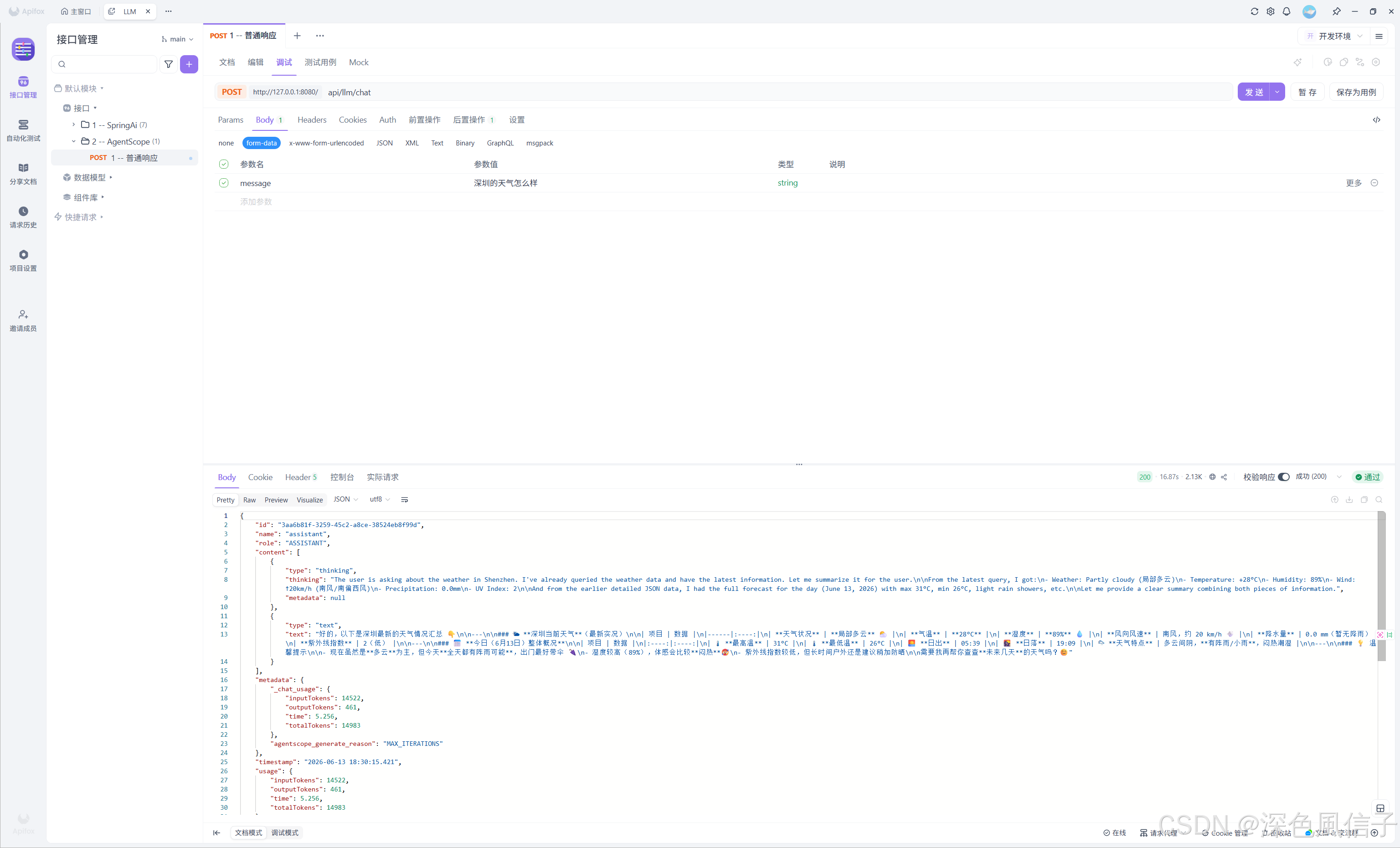
2026-06-13T18:29:28.266+08:00  INFO 34124 --- [agentscope] [  restartedMain] o.s.boot.tomcat.TomcatWebServer          : Tomcat started on port 8080 (http) with context path '/'
2026-06-13T18:29:28.270+08:00  INFO 34124 --- [agentscope] [  restartedMain] com.xu.agentscope.App                    : Started App in 1.602 seconds (process running for 2.011)